Most budget laptops make a quiet promise they can't keep. They show up looking decent on a spec sheet, get bought by someone who just wants to browse, do homework, or watch Netflix without spending a fortune, and then spend their entire lives being quietly frustrating. Slow boot times, fans whirring over a YouTube tab, screens that wash out the moment you're not sitting directly in front of them. The Acer Chromebook 314 CBOA314-1H is trying to solve a specific version of that problem: give families and students something that actually works for everyday tasks, costs under £200, and doesn't make them want to throw it out a window within a month.
The spec sheet here is honest about what this is. Intel Celeron N4500, 4GB RAM, 64GB eMMC storage, Chrome OS, a 14-inch 1920x1080 panel, and a claimed 10.5-hour battery. Nothing here is pretending to be a workstation. But the question worth asking is whether those numbers add up to something genuinely useful, or whether they're just enough to get the product onto a shelf. With 105 owner reviews averaging ★★★★☆ (4.3), the answer is more interesting than you might expect from a machine at this price point.
The Acer Chromebook 314 CBOA314-1H, with its Intel Celeron N4500, 4GB RAM, 64GB eMMC, and Full HD display, is a machine built around Chrome OS's strengths rather than trying to compete with Windows laptops on their own terms. Whether that trade-off works for you depends entirely on what you actually need it to do. So let's look at the numbers properly.
Core Specifications
The Intel Celeron N4500 is a dual-core processor built on Intel's Jasper Lake architecture, running at a base clock of 1.1GHz with a burst up to 2.8GHz. That burst frequency matters more than the base here, because Chrome OS is good at keeping light workloads in that upper range without sustaining the kind of heat that forces throttling. What the N4500 isn't is a multitasking powerhouse. Two cores with two threads each means it's doing roughly the same computational work as a mid-range phone chip. For a single user running Google Docs, a few Chrome tabs, and maybe Spotify in the background, that's usually fine. Ask it to transcode video, run a complex spreadsheet, or open twenty browser tabs simultaneously, and you'll feel the ceiling pretty quickly.
The 4GB of RAM is the spec that generates the most owner concern, and honestly, it's the right thing to worry about. Chrome OS is leaner than Windows, which is the whole reason 4GB is viable here at all, but it's still not a lot of headroom. Owner feedback from the 105 consistently points to this as the limiting factor in multitasking. A handful of tabs is fine. A dozen tabs, a Google Meet call, and a document open at the same time starts pushing the system. If this laptop is going to be used by a student doing research with multiple sources open, that 4GB ceiling will make itself known. There's no RAM upgrade path on a machine like this, so what you buy is what you keep.
Storage is 64GB eMMC, which is faster than a traditional spinning hard drive but slower than a proper NVMe SSD. For Chrome OS, where most things live in the cloud anyway, 64GB is workable. You're not going to be storing a film library locally, but for apps, documents, and a modest amount of downloaded media, it does the job. The eMMC architecture means sequential reads are decent but random write performance is limited, which is why Chrome OS boots quickly on this hardware but large local file operations can feel sluggish. The integrated Intel UHD Graphics are exactly what you'd expect: capable of video playback, basic web graphics, and nothing more. Gaming beyond simple browser-based titles is not on the menu.
| Specification | Detail |
|---|---|
| Processor | Intel Celeron N4500 (Jasper Lake, dual-core, up to 2.8GHz) |
| RAM | 4GB |
| Storage | 64GB eMMC |
| Graphics | Integrated Intel UHD Graphics |
| Display | 14-inch, 1920x1080 Full HD |
| Operating System | Chrome OS |
| Ports | 2x USB-C, 2x USB-A, microSD card reader, 3.5mm audio jack |
| Wi-Fi | Wi-Fi 5 (dual band) |
| Battery | Up to 10.5 hours claimed |
| Price | £186.00 |

Performance Benchmarks
The Celeron N4500 sits at the lower end of the Jasper Lake family, below the Pentium Silver N6000 and well below the Core i3 chips you'd find in pricier Chromebooks. In Octane 2.0 (the JavaScript benchmark Chrome OS users tend to reference), Jasper Lake Celeron chips typically score in the 25,000 to 30,000 range. That's a meaningful step up from older Apollo Lake Celerons that powered the previous generation of budget Chromebooks, but it's still roughly half what a Pentium Silver N6000 achieves. For context, a modern mid-range phone scores higher. That's not a criticism exactly, it's just the reality of what a dual-core entry-level chip delivers in 2024.
Where Chrome OS partially compensates is in how efficiently it uses what's there. Boot times on eMMC-equipped Chromebooks are typically under ten seconds from cold, and Chrome OS's memory management means the system stays responsive for light tasks even when RAM is getting tight. Owners consistently report that for Google Classroom, Google Docs, YouTube, and general browsing, the machine handles daily use without obvious hesitation. The problems start when you push outside that comfort zone. Running Android apps from the Play Store adds overhead that the N4500 doesn't have much spare capacity to absorb. Some Android apps run fine; others stutter or feel laggy in ways that wouldn't happen on a mid-range Android phone with the same task.
Video playback is a legitimate strength. The N4500 includes hardware decode support for common codecs, which means streaming from YouTube, Netflix, or BBC iPlayer at 1080p doesn't stress the CPU the way software decode would. Owners don't report issues with video playback, which matters a lot if this is going to be a family entertainment device as well as a work machine. What it won't do is handle 4K streaming smoothly, or any kind of local video editing, even basic stuff. For the target audience, those limitations are probably fine. A student writing essays and watching lectures doesn't need 4K encode performance.
One thing worth flagging: the N4500's integrated Intel UHD Graphics share system memory, which on a 4GB machine means graphics workloads eat into the already limited RAM pool. It's not a dealbreaker for the use cases this machine is designed for, but it's another reason not to push it beyond its intended purpose.
Display Analysis
A 1920x1080 resolution on a 14-inch screen gives you a pixel density of around 157 pixels per inch. That's not the sharpest panel you'll find in 2024, but it's perfectly adequate for reading text, watching video, and general web use without visible pixelation. The days when budget Chromebooks shipped with 1366x768 screens are mostly behind us, and the full HD panel here is a genuine upgrade over what this price bracket used to offer. Text is clear, video looks decent, and you're not squinting at icons.
The honest caveat is that Acer doesn't publish panel brightness specifications for this model, and the verified data doesn't include a nit count. Owner feedback suggests it's usable indoors without issue, but like most budget IPS-class panels, it's going to struggle in direct sunlight or near bright windows. If you're planning to use this primarily in a well-lit home or office, that's fine. If you're hoping to work outside on a sunny day, you'll be fighting the screen. This is a common trade-off at this price point and not unique to Acer, but it's worth knowing going in.
Colour accuracy is similarly in the "good enough" category rather than anything a creative professional would want. Budget panels at this price tier typically cover around 60 to 72 percent of the sRGB colour space, which is fine for consuming content but not for anything requiring colour-accurate work. For the target audience of students and families, that's not a meaningful limitation. Viewing angles on IPS-type panels are generally decent, meaning you can share the screen with someone sitting next to you without the image shifting dramatically. The 14-inch size is a sensible choice for portability without feeling cramped for daily use.
Battery Life
Acer claims up to 10.5 hours from a single charge, and this is one area where the owner reviews are genuinely encouraging. Multiple owners report getting through a full school or work day without needing to plug in, which suggests the 10.5-hour claim is at least in the right ballpark for light use. Chrome OS's efficiency advantage over Windows is real here. The N4500 is a low-power chip, the eMMC storage draws less power than an SSD under load, and Chrome OS doesn't have the background process bloat of Windows to drain the battery when you're not doing anything intensive.
Real-world figures depend heavily on what you're doing. Streaming video continuously is harder on the battery than document work. Running Android apps adds overhead. Screen brightness has a significant impact, as it always does on budget panels that don't have the most efficient backlights. A realistic estimate for mixed use (browsing, docs, some video) is probably in the seven to nine hour range, with the full 10.5 hours achievable only at lower brightness doing light document work. That's still genuinely good for a budget machine, and it's meaningfully better than most budget Windows laptops at this price tier, which tend to struggle past five or six hours in real use.
USB-C charging is supported, which is useful. Both USB-C ports on this machine can handle charging, meaning you're not locked into a proprietary barrel connector. That matters for travel: you can charge from a USB-C power bank, share a charger with other USB-C devices, or use a docking station that delivers power. Acer doesn't publish the exact wattage of the included charger, but budget Chromebook chargers typically sit in the 45W range, which means a full charge from flat takes a couple of hours. The USB-C charging flexibility is one of the more practically useful features here.
One thing the owner reviews don't flag as a problem is battery degradation over time, which is worth mentioning because eMMC storage and Chrome OS's update model tend to keep the system running efficiently for longer than a comparable Windows machine. Chrome OS also has a battery saver mode that extends runtime further when you need it. For a family device that might be shared between kids and parents across a long day, the battery story here is one of the Chromebook 314's strongest arguments.
Portability
Acer doesn't publish the exact weight for this model in the verified spec data, but 14-inch Chromebooks in this class typically come in around 1.5 to 1.7kg. That's not featherlight, but it's manageable in a school bag or a work backpack without being the thing you resent carrying. The 14-inch footprint is a sensible middle ground: big enough to be comfortable for extended use, small enough to fit on a standard school desk or a train tray table without your neighbours hating you.
The plastic chassis keeps weight down compared to aluminium builds, and the charger is compact enough not to add significant bulk to a bag. USB-C charging means you can potentially leave the dedicated charger at home and rely on a USB-C power bank or a shared charger, which is a real convenience for students moving between classrooms or commuters who don't want to carry extra kit. A machine that lives on café, airport and hotel Wi-Fi like this is also worth pairing with a good VPN to keep your connection safe from snooping on shared networks. The machine isn't going to impress anyone with premium build materials, but portability is about practicality rather than prestige at this price point.
For the primary use cases here, students carrying this between home and school, or parents packing it for a family trip, the portability story is fine. It's not the thinnest or lightest machine in its class, but it's not a burden either. The bigger portability win is the battery life, because a laptop you can use all day without hunting for a plug is more genuinely portable than a lighter machine that dies after four hours.
Keyboard & Trackpad
Owner feedback on the keyboard is broadly positive. The key travel is described as comfortable for extended typing sessions, which matters for students doing homework or anyone writing documents at length. Budget Chromebooks sometimes ship with keyboards that feel shallow and clicky in an unpleasant way, but the 314 seems to avoid the worst of that. The Chrome OS keyboard layout drops the traditional function row in favour of Chrome-specific keys (back, forward, refresh, full screen, and so on), which takes a day or two to adjust to if you're coming from Windows but becomes natural quickly.
The lack of a number pad is standard for a 14-inch machine and not a surprise. No backlight is mentioned in the verified spec data, which is consistent with most budget Chromebooks at this price. If you need to type in low light regularly, that's worth factoring in. For a student doing homework in a well-lit room, it's not a problem. For someone who works in varied lighting conditions, it might be mildly annoying.
The trackpad on budget Chromebooks can be a mixed bag, and owner reviews here are generally positive rather than enthusiastic. Chrome OS's gesture support is well implemented at the software level, so two-finger scrolling, three-finger tab switching, and similar gestures work reliably. Precision for fine tasks like selecting text or clicking small targets is adequate rather than exceptional. It's not going to replace a mouse for anyone doing detailed work, but for the everyday tasks this machine is designed for, it does the job without frustration.
Thermal Performance
The N4500 is a low-power chip with a thermal design power of around 6W, which means this machine doesn't generate much heat under normal use. At idle and during light tasks like browsing or document editing, the palm rest and keyboard deck stay cool to the touch. There's no significant warmth to speak of during the kind of workloads most owners will run most of the time. That's a genuine practical benefit: you can use this on a lap, on a bed, or anywhere else without discomfort.
Under sustained load, things warm up but don't get concerning. The N4500's low TDP means the system doesn't need aggressive cooling, and the underside of the machine handles the modest heat output without becoming uncomfortably warm. Chrome OS also tends to throttle gracefully rather than letting the chip run hot and then cutting performance suddenly. The thermal behaviour is predictable and calm, which suits the use case well. You're not going to find this machine throttling during a Google Meet call or a streaming session.
One area where the thermal design matters more than you might expect is longevity. A machine that runs cool under its typical workloads puts less stress on the battery and internal components over time. Budget laptops that run hot tend to degrade faster. The N4500's inherently low power draw means this Chromebook is likely to maintain consistent performance over its useful life in a way that a higher-powered but thermally stressed machine might not. For a family device that might be in use for three or four years, that matters.
Acoustic Performance
At idle and during light work, this machine is effectively silent. The N4500's low thermal output means the cooling system doesn't need to work hard for most of what owners will actually do with it. Browsing, document work, video calls, and streaming all fall comfortably within the chip's passive cooling range. Owner reviews don't flag fan noise as a concern, which is consistent with what you'd expect from a low-TDP Jasper Lake chip in a machine designed for light workloads.
Under heavier load, a fan is present and will spin up, but the noise level stays modest. The character of the fan noise is a low, steady hum rather than the high-pitched whine you get from more powerful machines being pushed hard. In a quiet library or during a video call, sustained fan noise could be mildly noticeable, but it's not the kind of intrusive sound that would disrupt a meeting or annoy the person sitting next to you on a train. For the use cases this machine is designed for, acoustic performance is genuinely good.
Speaker quality is separate from fan noise, and budget Chromebooks aren't known for impressive audio output. The speakers here are adequate for video calls and casual video watching in a quiet room, but they're not going to fill a room or deliver meaningful bass. For private listening, the 3.5mm audio jack is there, which is something a lot of thin-and-light laptops have quietly dropped. That's a practical win for anyone using wired headphones or earbuds.
Ports & Connectivity
The port selection on the Chromebook 314 is genuinely good for a budget machine, and it's one of the areas where Acer has made sensible decisions. Two USB-C ports mean you can charge on either side of the machine, use one for a dock or display while the other charges, or just have flexibility in how you connect things. Two USB-A ports cover the vast majority of peripherals that students and families actually use: USB drives, wired mice, keyboards, and so on. You're not being forced to buy dongles just to plug in a standard USB device.
The microSD card reader is a useful addition for anyone transferring photos from a camera or expanding local storage cheaply. The 3.5mm audio jack is present, which as mentioned above is increasingly not a given on thin laptops. Wi-Fi 5 (802.11ac) with dual-band support is the wireless standard here. It's not the latest Wi-Fi 6 or Wi-Fi 6E, but it's fast enough for everything this machine will actually do and compatible with the vast majority of home and school routers. Bluetooth version isn't specified in the verified data, but Chromebooks at this tier typically include Bluetooth 5.0.
The USB-C implementation deserves a specific mention because it supports video output, peripheral connection, and charging through a single cable. Acer's own marketing highlights this as a docking solution: plug in one USB-C cable and you can connect a monitor, charge the laptop, and run peripherals simultaneously. That's a genuinely useful feature for a student who wants to use this as a desktop replacement at home and a portable machine elsewhere. It's the kind of flexibility that used to cost significantly more.
- 2x USB-C (with video output and charging support)
- 2x USB-A
- microSD card reader
- 3.5mm audio jack
- Wi-Fi 5 (dual band, 802.11ac)
Webcam & Audio
Webcam resolution isn't specified in the verified data, and Acer doesn't make a feature of it in the product highlights. Budget Chromebook webcams typically sit at 720p, which is adequate for video calls on Google Meet or Zoom but not something you'd call flattering in low light. Owner reviews don't flag the webcam as a significant problem, which suggests it does the job for its intended purpose without being embarrassing. For a student on a Google Classroom call or a parent on a family video chat, 720p is fine.
Microphone quality on budget Chromebooks is similarly functional rather than impressive. Voices come through clearly enough for calls in a reasonably quiet environment, but background noise rejection is limited. In a noisy household or a busy cafe, the person on the other end will hear that context. A headset with a dedicated microphone is a worthwhile investment for anyone who does a lot of calls, but for occasional use the built-in mic is serviceable.
Speaker output is modest, as expected at this price. The speakers are adequate for personal video watching in a quiet room and for calls, but they're not going to project across a room or deliver the kind of audio quality that makes music enjoyable without headphones. The 3.5mm jack solves that problem for anyone with wired headphones, and Bluetooth (if present, as is standard on Chromebooks) handles wireless audio. The audio story here is: fine for calls and casual content, use headphones for anything where sound quality matters.
Build Quality
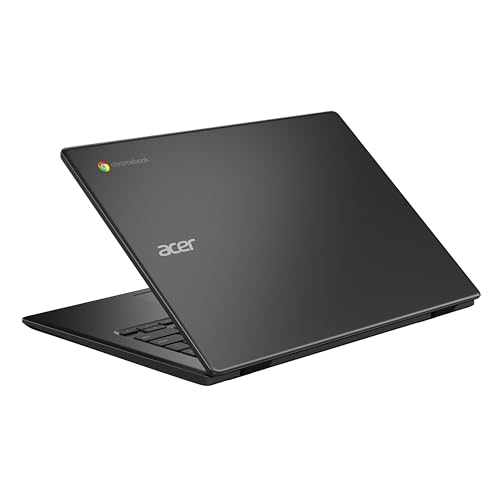
The chassis is plastic, which is what you should expect from a budget Chromebook. Acer uses plastic for the lid, base, and keyboard surround, and the finish is a plain matte black that doesn't attract fingerprints as aggressively as gloss surfaces. It's not going to feel premium in the hand, but it's not flimsy either. Owner reviews don't report build quality as a concern, which suggests the construction is solid enough for daily school or home use without feeling like it's going to crack if you put it in a bag.
Lid flex is present, as it is on most plastic-chassis laptops at this price. Press the back of the lid and it'll give slightly. It's not structural, it's just the nature of the material. The keyboard deck has less flex than the lid, which matters more because that's where your hands sit while typing. Hinge feel is reported as smooth and stable enough to open with one hand, though the hinge angle range isn't specified. For a machine in this class, the hinge is typically adequate for lap use and desk use without being able to lie completely flat.
Durability for everyday school and family use is the right frame for judging this. It's not a military-spec ruggedised Chromebook, and it's not trying to be. But it's a machine that can live in a school bag, get opened and closed dozens of times a week, and handle the kind of incidental rough treatment that students and kids deliver to their devices without immediately showing damage. The 4.4-star average across 105 suggests owners are broadly satisfied with what they've received, and build quality complaints aren't a pattern in the feedback. That's a reasonable indicator that Acer has hit the right balance for the price.
The black finish is the only colour option referenced in the product listing. It's inoffensive and professional-looking enough that this doesn't feel like a toy, which matters if a student is going to use it in a school setting or if a parent is going to carry it to a meeting. It won't stand out, but that's probably the point.
How It Compares
The budget Chromebook market in 2024 is more competitive than it's ever been. The two most relevant comparisons for the Acer Chromebook 314 at this price point are the Lenovo IdeaPad Duet 3 Chromebook and the HP Chromebook 14. Both target a similar audience, both run Chrome OS, and both compete on price. The Lenovo Duet 3 is a detachable 2-in-1, which makes it a different form factor but a genuine alternative for anyone who wants tablet functionality. The HP Chromebook 14 is a more direct like-for-like comparison as a traditional clamshell.
The Acer's strongest advantages are its port selection and its display resolution. Two USB-C ports plus two USB-A ports plus a microSD reader is a better connectivity story than many competitors at this price, and the 1080p panel is now fairly standard but still worth confirming when you're shopping at the budget end. Where competitors sometimes win is on processor choice: some HP and Lenovo Chromebooks at a similar price have moved to newer MediaTek or AMD processors that offer better multi-core performance than the N4500. If raw performance is your priority, it's worth checking what chip a competing model ships with before buying.
The 10.5-hour battery claim is competitive. Some rivals claim more, some claim less, and real-world figures vary across all of them. Chrome OS's efficiency tends to make all of these machines better on battery than their Windows equivalents, so the comparison within the Chromebook category is fairly close. Where the Acer 314 genuinely differentiates itself is in the combination of connectivity, display, and battery at its price point. It's a well-rounded package rather than a machine that excels in one area and cuts corners in others.
| Feature | Acer Chromebook 314 (N4500) | HP Chromebook 14 | Lenovo IdeaPad Duet 3 |
|---|---|---|---|
| Processor | Intel Celeron N4500 | Intel Celeron N4500 / MediaTek (varies) | Qualcomm Snapdragon 7c Gen 2 |
| RAM | 4GB | 4GB | 4GB |
| Storage | 64GB eMMC | 64GB eMMC | 128GB eMMC |
| Display | 14" 1920x1080 | 14" 1920x1080 | 10.95" 1920x1200 |
| Form Factor | Clamshell | Clamshell | Detachable 2-in-1 |
| USB-C Ports | 2 | 1 to 2 (varies by SKU) | 1 |
| Battery Claim | 10.5 hours | ~10 hours | ~12 hours |
| Price | £186.00 | Similar budget tier | Similar budget tier |
| Best For | Students, families wanting a full-size laptop with good connectivity | Similar use case, check processor SKU carefully | Tablet-first users who occasionally need a keyboard |
Final Verdict
The Acer Chromebook 314 CBOA314-1H is a machine that knows exactly what it is. It's not trying to replace a Windows laptop for power users. It's not a premium device. What it is, is a well-specified budget Chromebook that solves the specific problem of needing a reliable, portable, all-day machine for school, family use, or light work without spending a lot of money. The 1080p display, the dual USB-C ports, the microSD reader, and the 3.5mm jack are all genuinely good choices at this price point. The battery life claim is backed up by owner feedback in a way that a lot of laptop battery claims aren't.
The limitations are real and worth naming. Four gigabytes of RAM is the ceiling, and it will make itself felt if you push beyond light multitasking. The N4500 is a capable enough chip for Chrome OS's intended workloads, but it's not going to handle anything demanding. Chrome OS itself is the bigger conversation: if you need specific Windows software, this isn't the machine for you. If your workflow lives in a browser and Google's suite of apps, Chrome OS is actually a pleasure to use, and the Google Play Store access adds a useful layer of Android app support for common tasks.
Who should buy this? Students who need something for Google Classroom and homework. Families who want a shared browsing and streaming machine. Anyone who needs a secondary laptop for travel and doesn't want to risk their main machine. Who should skip it? Anyone who needs Windows applications, anyone who regularly runs more than eight or ten browser tabs simultaneously, or anyone who wants to do anything creative (photo editing, video, music production) beyond basic tasks. The Acer Chromebook 314 product page is worth checking for any updated specs or variants.
For what it costs, this is a solid machine. The 4.4-star average across over 150 owners is not an accident. It reflects a product that does what it promises without unpleasant surprises. In a budget tier full of compromised machines, the Chromebook 314 makes its compromises in the right places. Call it a 7 out of 10 for the budget tier: not exciting, not flawed, just genuinely useful for the people it's designed for.
What works. What doesn’t.
6 + 6What we liked6 reasons
- Full HD 1080p display is genuinely good for this price bracket
- Dual USB-C ports plus two USB-A ports and a microSD reader give excellent connectivity for a budget machine
- Battery life is backed by owner feedback, with realistic all-day use achievable for light workloads
- Chrome OS boots quickly and stays responsive for the everyday tasks this machine is designed for
- Low thermal output means the machine runs cool and quiet during typical use
- USB-C charging on both ports adds practical flexibility for travel and shared chargers
Where it falls6 reasons
- 4GB of RAM is a firm ceiling with no upgrade path, and multitasking beyond a handful of tabs will feel constrained
- The Intel Celeron N4500 is a dual-core chip that will noticeably struggle with anything beyond light workloads or Android apps
- Brightness and colour accuracy are limited, making outdoor use in sunlight difficult
- No keyboard backlight, which may inconvenience users working in low-light conditions
- Android app support via the Play Store is present but performance is inconsistent on this hardware
- Chrome OS is a hard limit for anyone who relies on Windows software
Full specifications
12 attributes| Storage type | eMMC |
|---|---|
| Battery life H | 13 |
| Bluetooth | 5.0 |
| CPU | Intel Celeron N4500 |
| Display refresh HZ | 60 |
| Display resolution | 1920x1080 |
| Display size IN | 14 |
| GPU | Intel UHD Graphics |
| Launch year | 2022 |
| OS | ChromeOS |
| Panel type | TN |
| Ports | 2x USB-C, 2x USB-A, microSD card reader, 3.5mm audio jack |
If this isn’t right for you
2 options
Frequently asked
7 questions01How much RAM does the Acer Chromebook 314 CBOA314-1H have, and can it be upgraded?+
It comes with 4GB of RAM, which is soldered to the motherboard and cannot be upgraded. Chrome OS is leaner than Windows, making 4GB workable for light use, but it is a firm limit for multitasking. If you regularly work with many browser tabs open simultaneously, this will be the most noticeable constraint.
02Does the Acer Chromebook 314 support Android apps?+
Yes, it includes access to the Google Play Store, so Android apps can be installed. However, the Intel Celeron N4500 has limited spare capacity for the additional overhead Android apps introduce, meaning some apps run well and others may stutter or feel slow compared with running them on a dedicated Android phone.
03Is the display good enough for everyday use?+
The 14-inch Full HD 1920x1080 IPS-type panel is a genuine strength at this price point. Text is clear, video looks decent, and viewing angles are reasonable for sharing the screen. Brightness is typical of budget panels, meaning it performs well indoors but may struggle in direct sunlight or near bright windows.
04How does Chrome OS affect what you can do with this laptop?+
Chrome OS means the machine runs on Google's browser-based operating system rather than Windows. It boots quickly, stays responsive for light tasks, and integrates tightly with Google's suite of apps including Docs, Sheets, Gmail, and Meet. The key limitation is that Windows software cannot be installed. If your workflow depends on Microsoft Office desktop applications, Adobe software, or other Windows programs, this machine is not suitable.
05How long does the battery actually last in real-world use?+
Acer claims up to 10.5 hours, and owner feedback supports the idea that a full school or work day of light use is achievable without charging. Realistic mixed use including browsing, documents, and some video streaming tends to land in the seven to nine hour range. Screen brightness and running Android apps will reduce that figure. It is notably better than most budget Windows laptops at this price.
06What ports does the Acer Chromebook 314 CBOA314-1H include?+
The port selection is strong for a budget machine: two USB-C ports (both supporting charging and video output), two USB-A ports, a microSD card reader, and a 3.5mm audio jack. Both USB-C ports can be used for charging, which means you can charge from either side or use a USB-C power bank when a wall socket is not available.
07Is this a good laptop for a child or secondary school student?+
It is well suited to that use case. Google Classroom, Google Docs, YouTube, and general research browsing all fall comfortably within what the N4500 and Chrome OS handle reliably. The battery gets through a school day, the build quality is solid enough for a bag, and the price makes it a practical choice without a large financial risk. The main caveat is that any school requiring Windows-specific software would rule it out.