Pick the wrong case and you'll be fighting it for the entire build. Cramped cable runs, fans you can't fit, a GPU that won't clear the front radiator brackets, panels that don't sit flush. The case is the one component you can't really swap out mid-build without starting again, which makes getting it right first time genuinely important. So when a mid-tower turns up at the entry price tier promising panoramic tempered glass, a dual-chamber layout, and RGB front panel, the obvious question is: what did they cut to hit that price?
The 1st Player Steampunk SP8 review has been holding a positive overall rating across over a hundred owner reviews, which is a better result than you'd normally expect at this price point. That kind of rating doesn't happen by accident. It usually means the case does the fundamentals well enough that most people building in it don't hit serious problems. But 4.5 isn't perfect, and the minority of unhappy owners tend to point at specific things. We've gone through the spec sheet and the owner feedback to work out whether this is a genuinely good budget pick or just a pretty box with a tempered glass side that looks great in product photos and frustrates you the moment you try to route a 24-pin cable.
Short answer: it's a decent entry-level case with some real strengths and a couple of compromises that are about before you commit. Here's the full picture.
Core Specifications
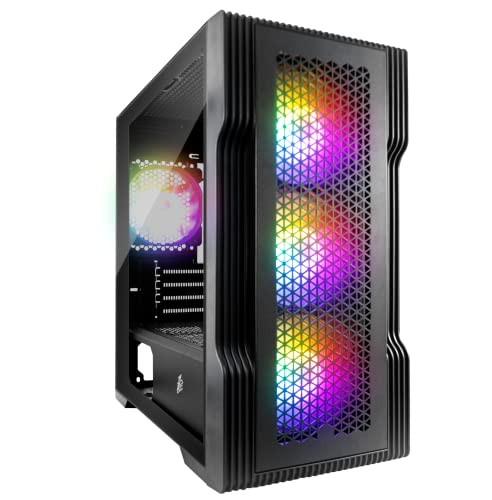
The SP8 is a mid-tower ATX chassis built around a dual-chamber design, which means the PSU and most of the cable clutter lives behind a shroud, separated from the main motherboard area. That's a layout you'd normally expect to pay more for. The front panel is RGB-lit, the side is tempered glass, and 1st Player specifies support for ATX, Micro-ATX, and Mini-ITX motherboards. Fan support is generous for the price: up to three 120mm or two 140mm fans at the front, two 120mm at the top, and one 120mm at the rear. Radiator support follows the same logic, with a 360mm or 280mm front slot, 240mm top slot, and 120mm rear slot.
GPU clearance is listed at 370mm, CPU cooler height at 160mm. There's a PSU shroud with a removable dust filter underneath, and the case ships with one pre-installed rear 120mm fan. Drive support covers two 3.5-inch bays and two 2.5-inch bays, which is a reasonable count for a build at this tier. The front I/O sits on the top panel and gives you two USB 3.0 Type-A ports, a combined audio jack, and the power and reset buttons. No USB Type-C, which is if that matters to your setup.
Weight comes in at around 6.5kg, which is fairly typical for a steel mid-tower with a tempered glass side panel. The glass itself is a single panoramic piece covering most of the left side, held in place by thumbscrews. The right-side panel is steel. Overall dimensions are approximately 445mm tall, 210mm wide, and 480mm deep, so it's not a compact case but it's not enormous either. Fits on most standard desks without drama.
| Specification | Detail |
|---|---|
| Form Factor | Mid-Tower ATX |
| Motherboard Support | ATX, Micro-ATX, Mini-ITX |
| Max GPU Length | 370mm |
| Max CPU Cooler Height | 160mm |
| Front Fan Support | 3x 120mm or 2x 140mm |
| Top Fan Support | 2x 120mm |
| Rear Fan Support | 1x 120mm (included) |
| Radiator Support (Front) | 360mm / 280mm |
| Radiator Support (Top) | 240mm |
| Radiator Support (Rear) | 120mm |
| Drive Bays (3.5") | 2 |
| Drive Bays (2.5") | 2 |
| Front I/O | 2x USB 3.0 Type-A, Audio, Power, Reset |
| Side Panel | Tempered Glass (left), Steel (right) |
| Included Fans | 1x 120mm rear |
| Dimensions (approx) | 445 x 210 x 480mm |
| Weight | ~6.5kg |
| Price | £59.99 · Details |
Form Factor and Dimensions
Mid-tower is the sensible choice for most builds and the SP8 lands squarely in that category. At roughly 445mm tall and 480mm deep, it's got enough internal volume to work with comfortably without taking over your desk. The 210mm width is fairly standard. You're not going to struggle to fit it under a desk or on a typical PC tower stand, and it won't look ridiculous next to a monitor on a desk either. It's not a compact case, but it's not trying to be.
The dual-chamber design is the interesting bit here. Separating the PSU bay from the main chamber is something that used to cost significantly more, and it does make a real difference to how tidy a finished build looks through that glass side panel. You're not staring at a bundle of cables coming off the power supply. The PSU shroud covers the lower section, the motherboard and GPU sit in the upper chamber with clean sightlines to the tempered glass. For a build that's going to live on a desk where people can see it, that matters.
The footprint is manageable. Some owners have noted the case is slightly deeper than they expected, so if desk depth is tight, worth measuring before you commit. But for a standard desk setup, this sits fine. The rubber feet are adequate, nothing special, but they grip most surfaces without sliding around. The overall silhouette is fairly aggressive looking for a budget case, which fits the Steampunk branding even if the actual design language is more "generic gaming" than anything that'd make Isambard Kingdom Brunel proud.
Motherboard Compatibility
The SP8 supports ATX, Micro-ATX, and Mini-ITX boards. Standard ATX is the obvious sweet spot for this case since that's what the chassis is sized around. A full ATX board fills the main chamber properly, leaves sensible clearance around the edges for cable routing, and sits with the 24-pin connector in a reasonable position relative to the cable management cutouts. Micro-ATX works too, though you'll have some empty space at the bottom of the motherboard tray that can look a bit odd through the glass.
Mini-ITX is technically supported but honestly, if you're building a Mini-ITX system, you probably want a smaller case. The SP8 is a mid-tower and a Mini-ITX board rattling around in a mid-tower chamber is a bit like buying a Transit van to carry a briefcase. It'll work, but it's not what either component was designed for. Extended ATX (E-ATX) is not supported, so if you've got a high-end HEDT board, look elsewhere.
The standoff layout is pre-installed for ATX, which is the norm at this price point. A few owners have noted that the standoffs are where you'd expect them and the board drops in without drama. No reports of misaligned standoffs or stripped threads in the owner reviews, which is a good sign. Some budget cases have genuinely terrible standoff quality and it shows up fast when you're trying to secure a motherboard. The SP8 seems to avoid that particular trap.
GPU Clearance
370mm of GPU clearance is the headline number, and that's a solid figure for a mid-tower at this price. To put that in context: an Nvidia RTX 4070 Founders Edition comes in at around 336mm, so it fits with room to spare. Most triple-fan aftermarket cards from the current generation land between 320mm and 360mm, meaning the vast majority of what you'd pair with a build in this price bracket fits without any fuss. You'd need to be buying a particularly chunky flagship card before clearance became a concern.
Where it gets slightly more complicated is if you're running a front radiator at the same time as a long GPU. The front radiator brackets and fans take up some depth, and depending on the exact card you're fitting, you'll want to check that combination carefully. Owner reviews don't flag this as a common problem, but it's the kind of thing that varies by specific card thickness rather than just length. If you're going front-mounted 360mm AIO plus a 360mm-class GPU, measure twice.
There's no vertical GPU mount option listed in the specs, which is a shame but not surprising at this price. Vertical mounting is a nice aesthetic feature but it typically requires a PCIe riser cable that costs extra anyway, so its absence here isn't a dealbreaker. The standard horizontal mount is what you're getting, and it works fine. No reports from owners of GPU sag being a structural problem, though heavier three-slot cards will always benefit from a support bracket regardless of case.
CPU Cooler Clearance
160mm CPU cooler clearance is the spec, and that's enough for most decent air coolers. The popular Noctua NH-D15 comes in at 165mm, so that one won't fit. But the NH-U12S is 158mm and fits fine, the be quiet! Dark Rock 4 is 159mm and fits, and most mid-range tower coolers sit in the 155mm to 160mm range. You're not locked out of good air cooling, you just need to check the specific cooler height before buying. It's a reasonable figure for a budget mid-tower.
For AIO liquid cooling, the front panel is the main event, supporting up to 360mm radiators. That covers 240mm and 360mm AIOs at the front without any issue. The top panel handles 240mm, which means you can run a 240mm AIO up top if you prefer that layout for airflow reasons. The rear supports a 120mm, which is only relevant if you're using a smaller all-in-one or a single-fan radiator for a specific configuration. Most people will go front-mounted for anything serious.
One thing from owner feedback: a few people mentioned that fitting a front 360mm radiator with three 120mm fans does get snug, and you'll want to plan your cable routing before committing to that layout. The case supports it, but it's not a case where everything just falls into place without thought. That's not unusual at this price point. AIO pump head clearance near the socket area hasn't come up as a problem in the reviews, which suggests the top panel positioning is sensible relative to where most AM5 and LGA1700 sockets land on standard ATX boards.
Storage Bay Options
Two 3.5-inch bays and two 2.5-inch bays. That's a fairly modest count by older standards but completely reasonable for a modern build. If you're running an NVMe M.2 drive as your primary storage (which you should be in 2026 unless you have a very specific reason not to), the 3.5-inch bays are for secondary HDDs and the 2.5-inch bays are for SSDs. Two of each covers most sensible configurations. You're not going to build a NAS in this thing, but you weren't planning to.
The drive trays are tool-less for 3.5-inch drives, using a rubber-grommet mounting system that also helps with vibration damping. 2.5-inch drives use screws, which is standard practice. A few owners have mentioned the 3.5-inch tray mechanism is functional but not the most refined they've used. It works, it holds the drives securely, but it's not the slickest tool-free system on the market. At this price, that's expected.
The drive bays sit behind the PSU shroud in the lower chamber, which is good for keeping them out of sight and out of the main airflow path. HDDs don't need active cooling in most situations, so tucking them away behind the shroud makes sense. If you're running multiple HDDs and you're worried about thermals, you'd be looking at a different case entirely. For the typical two-drive setup (one NVMe boot drive on the motherboard, one HDD for bulk storage in a bay), the SP8's storage provision is perfectly adequate.

Cable Management
This is where the dual-chamber design earns its keep. The PSU shroud keeps the power supply and its cables physically separated from the main build area, which immediately makes the visible side of the build look cleaner. Behind the motherboard tray, there are cable routing cutouts with rubber grommets, which is a feature you don't always get at this price point. The grommets keep things looking tidy from the glass side and protect cables from sharp edges on the cutouts.
Rear-panel clearance for cables is reported as adequate by most owners, though a few noted it can get tight if you're running a lot of cables. The spec doesn't give an exact measurement for the rear cable channel depth, which is frustrating, but owner feedback suggests it's in the 20mm to 25mm range. That's enough for a standard build with a modular PSU. If you're using a non-modular PSU and you've got a full bundle of unused cables to stuff back there, it'll be tighter. Velcro straps are included, which is genuinely useful and not something every budget case bothers with.
The 24-pin ATX cable routing cutout is positioned sensibly relative to where the connector sits on a standard ATX board. The CPU EPS cable cutout at the top of the tray is also in the right place. These sound like basic things but they're not always done right on cheaper cases, and getting them wrong means you're routing cables across the front of the motherboard instead of cleanly behind the tray. The SP8 seems to have the cutout positions sorted. A handful of owners mentioned the cable management took some patience to get looking good, but nobody called it a nightmare. That's about as good as it gets at this price.
Airflow and Thermal Design
Here's where the glass-heavy design creates a real tension. The front panel on the SP8 is primarily an RGB panel rather than a mesh panel, and that's a meaningful difference for airflow. A solid or mostly-solid front panel restricts intake airflow compared to a proper mesh front. The RGB lighting effect looks good, but physics doesn't care about aesthetics. If you're pushing a hot GPU and a high-TDP CPU, a mesh-front case like the Fractal Design Meshify C or the Lian Li Lancool 205 Mesh will move more air through the system. That's just the reality of the design choice 1st Player made here.
That said, the SP8 isn't completely sealed. There are intake vents, and the fan support is genuinely good for the price: three 120mm or two 140mm fans at the front, two 120mm at the top, one 120mm at the rear. If you populate those mounts with decent fans, you can move a reasonable amount of air. The case ships with one rear 120mm fan, which is fine as a starting point but not enough for a warm build. You'll want to add at least two front intake fans if you're running anything more than a mid-range CPU and GPU. Owner reviews back this up: people who added front fans reported noticeably better temperatures.
The PSU shroud has a removable dust filter underneath, which is a practical touch. The front intake area also has dust filtration. Dust management matters more than people give it credit for: a case with poor dust filtration needs cleaning far more often to maintain airflow, and cleaning inside a case is nobody's favourite job. The SP8's filtration isn't the most thorough setup available but it covers the basics. Bottom filter for the PSU, front filter for the intake fans. Top and rear are unfiltered, which is normal since those are typically exhaust positions. Overall, the thermal design is competent for the price but won't win any awards against dedicated airflow-focused cases.
Front I/O and Connectivity
The front I/O sits on the top panel of the case, which is a sensible position. You've got two USB 3.0 Type-A ports, a combined headphone and microphone 3.5mm jack, plus the power and reset buttons. The power button is flanked by the RGB lighting controls for the front panel, which is a nice integration. The button layout is clean and the buttons themselves feel solid according to owner reports. Nobody has flagged them as mushy or unreliable, which is the main thing you want from a power button.
The USB situation is where this case shows its age a bit. Two USB 3.0 Type-A ports is fine, but in 2026 the absence of a USB Type-C port on the front I/O is genuinely noticeable. Most modern peripherals and smartphones charge via USB-C, and having to reach around to the back of the case or use a dongle every time you want to plug something in gets old quickly. If front-panel USB-C is important to you, this case doesn't have it. That's a real limitation worth weighing against the price.
The audio jack is a combined port rather than separate headphone and mic sockets. That works fine if you're using a headset with a single 3.5mm TRRS connector, but if you have separate headphones and a microphone each on their own 3.5mm plug, you'll need a splitter adapter. Again, this is a budget case compromise rather than a design flaw. The RGB front panel controls are integrated with the power button area and let you cycle through lighting modes without needing software, which is a practical touch. Some owners really appreciate not needing to install RGB control software just to set a static colour.
Build Quality and Materials
The steel used in the SP8 is the typical 0.6mm to 0.7mm gauge you find in cases at this price tier. It's not the thicker steel you get in premium cases from Fractal or be quiet!, and if you press on the side panels you'll feel some flex. That's expected. What matters more is whether the panels align properly and whether there are sharp edges where your hands go during a build. Owner reviews are mostly positive on panel alignment, with a few noting that the tempered glass panel in particular fits well without gaps or wobble. Sharp edges come up occasionally in the reviews but not as a widespread complaint, suggesting the metalwork is at least decent quality for the price.
The tempered glass side panel is the visual centrepiece and it's described as a proper panoramic piece rather than a small window. Tempered glass at this price point is usually fine for normal use but it doesn't take kindly to being dropped or knocked hard. The panel is held by thumbscrews, which makes removal straightforward. A few owners mentioned the thumbscrews are a bit fiddly the first time but loosen up with use. The glass itself hasn't generated any reports of cracking under normal handling, which is reassuring.
The overall fit and finish is described by owners as good for the money. The PSU shroud sits flush, the drive trays don't rattle, and the case doesn't creak when moved. For a budget case, that's a reasonable result. The rubber grommets on the cable routing cutouts are a quality detail that shows some thought went into the design. The included fan is basic but functional. You wouldn't call any of this premium, but you also wouldn't call it flimsy. It occupies that competent middle ground that's actually quite hard to hit consistently at entry-level pricing.
How It Compares
The SP8's main competition at the entry price tier comes from the Fractal Design Focus 2 and the Cooler Master MasterBox Q500L. The Focus 2 is a proper mesh-front case with better airflow and a slightly more refined build quality, but it costs more and doesn't have the RGB front panel or the dual-chamber visual drama of the SP8. If thermals are your absolute priority, the Focus 2 wins. If you want the case to look good and you're willing to add some fans to compensate for the less-open front, the SP8 is a reasonable alternative.
The Cooler Master MasterBox Q500L is a different shape entirely (it supports vertical or horizontal orientation) but sits at a similar price. It has better airflow than the SP8 thanks to a mesh-heavy design, but it's not as visually striking and the RGB situation is more limited. The Q500L is a practical workhorse; the SP8 is more of a show piece. Which matters more depends entirely on your priorities.
Against cheaper no-name cases from Amazon's depths, the SP8 holds up well. The dual-chamber layout, the tempered glass, the grommeted cable cutouts, and the dust filtration are all features that cheaper cases skip. The positive overall rating across over a hundred reviews suggests it's delivering on most of what it promises. The main areas where it loses ground to slightly pricier competition are airflow (the front panel design) and front I/O (no USB-C). Both are knowable compromises rather than hidden flaws.
| Feature | 1st Player SP8 | Fractal Focus 2 | Cooler Master MasterBox Q500L |
|---|---|---|---|
| Form Factor | Mid-Tower ATX | Mid-Tower ATX | Mid-Tower ATX |
| Front Panel | RGB / Solid | Mesh | Mesh |
| Max GPU Length | 370mm | 467mm | 410mm |
| Max CPU Cooler | 160mm | 185mm | 167mm |
| Front Radiator | 360mm | 360mm | 240mm |
| USB Type-C Front | No | Yes (some versions) | No |
| Included Fans | 1x 120mm | 2x 120mm | 1x 120mm |
| Dual Chamber | Yes | Yes | No |
| RGB Front Panel | Yes | No | No |
| Price Tier | Entry | Entry-Mid | Entry |
Final Verdict
The 1st Player Steampunk SP8 is a genuinely decent entry-level mid-tower that gets more right than wrong. The dual-chamber layout, the panoramic tempered glass, the grommeted cable cutouts, and the 360mm front radiator support are all features that punch above the price tier. The positive overall rating across over a hundred owners isn't inflated: this case does what it says, and most people building in it come away satisfied. That matters.
The compromises are real though. The solid RGB front panel restricts airflow compared to a mesh alternative, which means you'll need to budget for additional intake fans if you're running a warm system. The absence of a front-panel USB Type-C port is a genuine inconvenience in 2026. The 160mm CPU cooler clearance rules out the tallest air coolers. And the single included fan is a starting point, not a solution. None of these are dealbreakers on their own, but they stack up into a picture of a case that needs a bit of investment beyond the purchase price to perform at its best.
Who should buy this? Someone building a first gaming PC who wants a case that looks impressive on a desk without spending mid-range money. Someone who's planning to add their own RGB fans to the front anyway and doesn't care about the restricted stock airflow. Someone who values the dual-chamber aesthetic and wants that clean through-glass look without paying Fractal or Lian Li prices. The ATX form factor support and 370mm GPU clearance mean it'll handle most sensible component choices without drama.
Who should skip it? If airflow is your top priority, look at the Fractal Design Focus 2 or the Lian Li Lancool 205 Mesh instead. Both have proper mesh fronts and will run cooler out of the box. If you need front-panel USB-C, that's a hard no here. If you're fitting a Noctua NH-D15 or another tall premium air cooler, the 160mm clearance won't accommodate it. And if you're building a high-end system where the case quality should match the component quality, spend more.
If you don't need the RGB front panel and you're primarily after airflow and build quality, the Fractal Focus 2 is the smarter buy even at a higher price. But if the look of the SP8 appeals and you're working to a tight budget, this is one of the better options in the entry tier. We'd score it a solid 7 out of 10: good value, attractive design, real compromises on airflow and I/O that are worth going in with eyes open about.
What works. What doesn’t.
5 + 4What we liked5 reasons
- Dual-chamber PSU shroud keeps builds looking clean through the glass
- 370mm GPU clearance fits most current-gen cards without issue
- 360mm front radiator support at entry-level pricing
- Grommeted cable cutouts for tidy cable management
- Positive overall rating across over a hundred real owner reviews
Where it falls4 reasons
- Solid RGB front panel restricts airflow versus mesh alternatives
- No front-panel USB Type-C port
- Only one fan included - you will need to buy more
- 160mm CPU cooler clearance rules out taller premium air coolers
Full specifications
6 attributes| Form factor | Micro-ATX |
|---|---|
| Airflow type | mesh |
| MAX GPU length | 305 |
| MAX cooler height | 165 |
| Radiator support | 240mm top |
| Drive bays | 2x 3.5" HDD + 2x 2.5" SSD (or 1x 3.5" HDD + 3x 2.5" SSD) |
Frequently asked
5 questions01Is the 1st Player Steampunk SP8 - Gaming Case - Panoramic Tempered Glass - Dual Chamber - RGB Front Panel - USB 3.0 - Mid Tower ATX - Black good for airflow?+
It's adequate but not outstanding. The solid RGB front panel restricts intake airflow compared to mesh-front cases at a similar price. The fan mount support is generous - up to three 120mm or two 140mm fans at the front, two 120mm at the top, one 120mm at the rear - but the case only ships with one rear 120mm fan. If you add two or three quality front intake fans, temperatures become manageable for mid-range builds. For a high-TDP system, a mesh-front alternative like the Fractal Focus 2 will run cooler without extra fan investment. Dust filtration covers the front intake and PSU bottom, which is the basics sorted.
02What's the GPU clearance on the 1st Player Steampunk SP8 - Gaming Case - Panoramic Tempered Glass - Dual Chamber - RGB Front Panel - USB 3.0 - Mid Tower ATX - Black?+
The SP8 supports GPUs up to 370mm in length. That comfortably fits most current-generation cards including triple-fan aftermarket models from AMD and Nvidia's mainstream and upper-mid range. The Nvidia RTX 4070 Founders Edition at around 336mm fits with room to spare, for example. If you're running a front-mounted radiator at the same time as a long GPU, check the combined clearance carefully as the radiator brackets and fans reduce the available depth. There is no vertical GPU mount option on this case.
03Can the 1st Player Steampunk SP8 - Gaming Case - Panoramic Tempered Glass - Dual Chamber - RGB Front Panel - USB 3.0 - Mid Tower ATX - Black fit a 360mm AIO?+
Yes. The front panel supports up to a 360mm radiator, making it compatible with 240mm and 360mm AIO liquid coolers mounted at the front. The top panel supports a 240mm radiator, and the rear supports a 120mm. Front-mounting a 360mm AIO with three 120mm fans is the most common configuration and owners report it works, though cable routing requires some planning. The rear 120mm slot is suitable for smaller AIOs or single-fan radiators. CPU cooler clearance for air coolers is 160mm, which accommodates most mid-range tower coolers but rules out the tallest models like the Noctua NH-D15 at 165mm.
04Is the 1st Player Steampunk SP8 - Gaming Case - Panoramic Tempered Glass - Dual Chamber - RGB Front Panel - USB 3.0 - Mid Tower ATX - Black easy to build in?+
Generally yes, with a couple of caveats. The dual-chamber layout with PSU shroud keeps the main build area uncluttered, and the grommeted cable routing cutouts behind the motherboard tray make cable management more manageable than on cases without them. Velcro straps are included. Standoffs are pre-installed for ATX and owners report the board drops in without issues. The rear cable channel is adequate for a modular PSU but can get tight with a non-modular unit and a full bundle of unused cables. A few owners mention the build takes patience to get looking tidy, but nobody has called it genuinely difficult. Sharp edges are occasionally mentioned but not a widespread complaint.
05What warranty and returns apply to the 1st Player Steampunk SP8 - Gaming Case - Panoramic Tempered Glass - Dual Chamber - RGB Front Panel - USB 3.0 - Mid Tower ATX - Black?+
Specific manufacturer warranty terms for the SP8 are not confirmed in the product listing data we have available. When purchasing through Amazon UK, you are covered by Amazon's standard 30-day return window and the Amazon A-to-Z Guarantee, which provides protection if the item arrives damaged or not as described. For warranty queries beyond the Amazon return period, contact 1st Player directly or check the documentation included with the case.