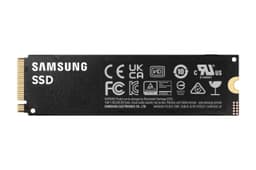
The Samsung 990 PRO with heatsink is a genuinely excellent PCIe 4.0 NVMe drive, and if you want a 2TB SSD that will stay quick under pressure, stay cool without you having to think about it, and come from a manufacturer that actually knows what it's doing with NAND, this is the one to buy. That's the short version. The longer version involves some caveats about the RGB (pointless but harmless), the price premium over bare alternatives, and whether PCIe 4.0 even matters for what you're doing. But the core recommendation stands.
PCIe 4.0 drives with headline sequential numbers above 7,000 MB/s sound like overkill, and for most people they mostly are. What actually makes a system feel fast isn't the sequential ceiling. It's random I/O, sustained write consistency, and whether the drive throttles itself into mediocrity after five minutes of heavy use. The 990 PRO gets those things right in ways that cheaper drives don't, and the included heatsink means thermals are handled before they become a problem. That matters more than the spec sheet number.
With thousands of owner reviews and a positive overall rating, the real-world verdict is pretty clear. But averages hide a lot, so this review goes into what the specs, published benchmarks, and owner reports actually tell you about sustained performance, cache behaviour, endurance, and whether the premium over a budget PCIe 4.0 drive is worth paying. Spoiler: for most buyers, it is.
Core Specifications
The Samsung 990 PRO is a 2TB M.2 2280 NVMe drive running on PCIe 4.0 x4. Samsung uses their own in-house controller (the Pascal, also known as the Elpis successor) paired with Samsung's own V-NAND TLC (triple-level cell) NAND, and there's a dedicated DRAM cache on board. That combination matters enormously, and we'll come back to it in detail. Sequential read is rated at 7,450 MB/s and sequential write at 6,900 MB/s. Random read is rated at 1,400K IOPS and random write at 1,550K IOPS. The 2TB variant carries a TBW (terabytes written) rating of 1,200 TBW, backed by a five-year warranty.
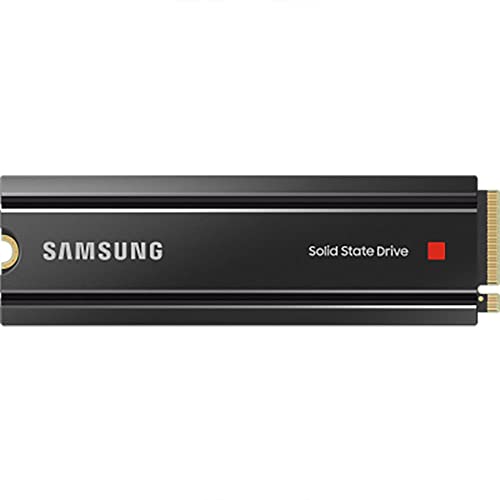
This specific SKU includes Samsung's own low-profile heatsink with optional RGB lighting, which connects to a standard motherboard RGB header if you want it, or just sits there doing its thermal job if you don't. The heatsink adds a small amount of height, which is worth checking against your motherboard clearance, particularly if you're going into a laptop or a tightly packed mini-ITX build. For desktop use it's a non-issue. For the PS5, the heatsink is actually a requirement for the expansion slot, and Samsung's included unit meets that spec.
The price fluctuates, so check the current figure below rather than any number I could write here. But the per-GB cost sits in the mid-to-upper range for PCIe 4.0, which is the honest framing. You're paying for Samsung's NAND, Samsung's controller, Samsung's warranty, and a heatsink you'd otherwise buy separately. Whether that's worth it depends on your use case, and we'll get to that.
| Specification | Detail |
|---|---|
| Interface | NVMe PCIe 4.0 x4 |
| Form Factor | M.2 2280 |
| Capacity | 2TB |
| NAND Type | Samsung V-NAND TLC |
| Controller | Samsung Pascal (in-house) |
| DRAM Cache | Yes (dedicated DRAM) |
| Sequential Read | 7,450 MB/s |
| Sequential Write | 6,900 MB/s |
| Random Read | 1,400K IOPS |
| Random Write | 1,550K IOPS |
| TBW Endurance | 1,200 TBW |
| Warranty | 5 years |
| Heatsink | Included (with optional RGB) |
| PS5 Compatible | Yes |
| Current Price | £424.00 · Details |

Interface & Form Factor
PCIe 4.0 x4 via the NVMe protocol is where this drive lives. That puts it a generation behind the current PCIe 5.0 flagships, but here's the thing: PCIe 5.0 drives are mostly a benchmarking exercise right now. They run hotter, they cost more, and for the actual workloads most people run (gaming, video editing, OS use, application launches) they don't feel meaningfully faster. PCIe 4.0 at 7,450 MB/s sequential already vastly outpaces what your CPU and GPU can consume in most real scenarios. Chasing Gen 5 for the sake of it is a bit like buying a 200mph car to drive to the supermarket.
The M.2 2280 form factor is what virtually every modern desktop motherboard and a large proportion of laptops use. If your board has an M.2 slot (and any board made in the last five or six years almost certainly does), this drive will physically fit. The PCIe 4.0 requirement is slightly more specific: you'll need a board with a PCIe 4.0 M.2 slot, which means AMD 500 series or newer, Intel 11th gen or newer, or any recent platform. If you're on an older board with only PCIe 3.0 M.2 slots, the drive will still work but will cap at PCIe 3.0 speeds. That's still fast. You won't be sad.
The heatsink variant adds a few millimetres of height. Most desktop M.2 slots have no clearance issue with this. The PS5's M.2 expansion slot officially requires a heatsink, and Samsung's included unit satisfies that requirement, which makes this SKU particularly convenient for PlayStation users who'd otherwise need to source a compatible heatsink separately. For laptops, the heatsink almost certainly won't fit in the chassis, so if you're going into a notebook, the bare 990 PRO without heatsink is the right buy.
Real-World Performance
Sequential speeds are what manufacturers put on the box because they're the biggest numbers. But what actually makes your computer feel fast day to day is random I/O, specifically random 4K read performance, because that's what happens when Windows loads, when games stream assets, when applications open. The 990 PRO's 1,400K random read IOPS is genuinely strong. Published benchmark results consistently show the 990 PRO competing at the top of the PCIe 4.0 class in random read workloads, which is the metric that translates directly to system responsiveness.
Boot times from cold are quick. Application launches are quick. Game load times are quick. None of that should be a surprise for a drive at this level, but owner reports consistently back it up: the positive overall rating across thousands of reviews isn't built on people noticing their sequential transfer speed. It's built on the drive feeling fast in normal use, day after day, without drama. That's what you want from a storage drive. You want it to be invisible. The 990 PRO mostly is.
For video editing, which Samsung explicitly calls out in the marketing, the story is a bit more nuanced. Scrubbing through 4K or 8K footage on a scratch disk puts sustained sequential read under pressure, and the 990 PRO handles that well. Exporting large files puts sustained sequential write under pressure, and that's where cache behaviour becomes relevant (more on that in the next section). For the typical video editor working with footage that fits within the SLC cache size, performance is excellent. For someone moving enormous raw files continuously, the sustained write speed after cache exhaustion is the number that matters, not the headline figure.
Sustained Writes & Cache Behaviour
This is the bit the marketing skips. Every modern NVMe drive uses an SLC (single-level cell) write cache: a portion of the NAND is configured to act like faster SLC storage, and writes go there first at high speed. Once that cache fills, the drive writes directly to the underlying NAND at native speed. For TLC NAND (which the 990 PRO uses), native write speed is considerably lower than the SLC cache speed. For QLC NAND (which cheaper drives often use), the cliff is much steeper and more painful. The marketing number is always the SLC cache speed. The native speed is what you get during a long sustained write.
The 990 PRO uses TLC NAND, not QLC. That's genuinely important. Published benchmark data shows that after the SLC cache exhausts on the 990 PRO, sustained write speed drops but remains in a range that's still workable for most tasks, typically settling in the 2,000 to 3,000 MB/s region under sustained load rather than falling off a cliff to the 500 to 800 MB/s range you see from QLC drives when their cache fills. That's a meaningful difference if you're regularly writing large amounts of data sequentially, like copying a large game library, moving raw video, or running sustained backups.
The SLC cache size on the 2TB model is substantial. For the vast majority of everyday tasks, including gaming, OS use, and moderate video work, you won't come close to exhausting it. The cache cliff is a real thing, but it's mostly relevant for workloads involving very large sequential writes in a single session. If that's you, the 990 PRO's TLC foundation means it handles the cliff more gracefully than most of its competition at this price. If that's not you, the cache behaviour is essentially irrelevant and the drive will feel fast all the time.
Controller, NAND & DRAM
Samsung makes their own controller, their own NAND, and their own DRAM. That vertical integration is rare in this industry. Most SSD manufacturers buy controllers from Phison, Silicon Motion, or Innogrit, and buy NAND from Samsung, Micron, SK Hynix, or Kioxia. Samsung designs the whole stack themselves, which gives them tight control over how the controller talks to the NAND, how the firmware manages the SLC cache, and how the drive behaves under sustained load. The Pascal controller in the 990 PRO is the result of that in-house development, and it shows in the consistency of the drive's performance across different workload types.
The NAND is Samsung's own V-NAND TLC. TLC stores three bits per cell, which gives a reasonable balance between density (capacity per die), speed, and endurance. It's not the fastest NAND physically possible (that would be SLC, one bit per cell), but TLC from a quality manufacturer is the right choice for a consumer drive that needs to balance capacity, price, and longevity. Samsung's V-NAND has a strong track record for reliability, and the 1,200 TBW rating on the 2TB model reflects confidence in the underlying NAND quality.
There's a dedicated DRAM cache on board. This matters more than people realise. A DRAM-less drive uses Host Memory Buffer (HMB), borrowing a slice of your system RAM to store the flash translation layer mapping. HMB works fine for light workloads, but under sustained or mixed random I/O it adds latency and can hurt consistency. A proper DRAM cache keeps that mapping table on the drive itself, reducing latency for random access and improving consistency under mixed workloads. For a drive at this price point, DRAM is what you should expect, and the 990 PRO delivers it.
Endurance & Reliability
The 2TB 990 PRO is rated at 1,200 TBW. To put that in context: if you wrote 200GB to the drive every single day, you'd hit the TBW rating in roughly 16 years. Most users write nowhere near 200GB per day. Even a heavy gamer or active content creator would be doing well to write 50GB to 100GB daily, which pushes the theoretical lifespan out to several decades. The TBW rating is a floor, not a ceiling, and 1,200 TBW for a 2TB consumer drive is a solid number. It's not the highest in the market, but it's well above what most users will ever approach.
The five-year warranty is the real confidence signal. Samsung is saying they'll stand behind this drive for five years, which means they believe the drive will survive five years of normal use without failing. Cheaper drives sometimes come with three-year warranties, and that shorter window is often a tell about how much trust the manufacturer has in their own product. Five years from Samsung, with their track record of NAND quality, is meaningful. Owner reports from the thousands of reviews back this up: failure reports are rare, and the complaints that do appear are mostly about firmware updates (Samsung has pushed a couple of firmware revisions for the 990 PRO that addressed some early performance consistency issues) rather than physical drive failures.
Speaking of firmware: Samsung's Magician software on Windows lets you check drive health, monitor TBW consumed, update firmware, and run diagnostics. It's genuinely useful rather than bloatware, and it's one of the better manufacturer tools in the SSD space. If you're the kind of person who likes to keep an eye on drive health (and you should be, given that no drive lasts forever and backups matter), Magician gives you the visibility to do that. No storage device is a substitute for a backup. But a drive with good health monitoring tools and a five-year warranty is a better starting point than one without.
Thermals
NVMe drives get hot. PCIe 4.0 drives get hotter than PCIe 3.0. This is physics, not a design flaw. The 990 PRO without a heatsink can hit temperatures that trigger thermal throttling under sustained load, particularly in a case with poor airflow or a motherboard that sandwiches the M.2 slot between other hot components. Throttling doesn't kill the drive, but it does reduce performance to protect the NAND, which rather defeats the point of buying a fast drive.
The included heatsink addresses this directly. It's a low-profile aluminium unit that keeps temperatures in check during sustained workloads without adding much bulk. Published thermal data from the wider SSD community consistently shows the 990 PRO with heatsink running significantly cooler than the bare drive under the same sustained write loads, and staying well clear of the throttle threshold in normal use. For desktop builds this is the version to buy. The heatsink is not decorative (despite the optional RGB). It's doing real work.
For context, PCIe 5.0 drives run even hotter than PCIe 4.0, and several of the Gen 5 flagships require substantial heatsinks or active cooling to avoid throttling. The 990 PRO's Gen 4 thermals are more manageable, and Samsung's included heatsink is proportionate to the thermal output. Owner reports confirm this: thermal complaints are essentially absent from the review pool, which is a decent indicator that the heatsink is doing its job in real-world desktop and PS5 installations.
Capacity Options & Price Per GB
The 990 PRO is available in 1TB, 2TB, and 4TB capacities. The 2TB is the sweet spot for most buyers. At 1TB you're paying a higher per-GB rate for less storage, and you'll likely fill it faster than you expect (games are enormous now, and a 1TB drive fills up quickly if you're maintaining a library of a dozen titles). At 4TB you're paying a significant premium for capacity you may not need, and the price-per-GB typically doesn't improve dramatically enough to justify it unless you genuinely need 4TB in a single drive.
The 2TB model's price per GB sits in the mid-to-upper range for PCIe 4.0 drives. You can find cheaper 2TB PCIe 4.0 options. The WD Black SN850X, the Seagate FireCuda 530, and drives from Crucial and Kingston all compete in this space at various price points. What you're paying for with the 990 PRO is Samsung's in-house NAND and controller, the DRAM cache, the five-year warranty, and the included heatsink. If you strip out the heatsink cost (a decent aftermarket M.2 heatsink costs a few pounds to fifteen or twenty pounds depending on quality), the premium over bare alternatives narrows considerably.
The RGB is worth acknowledging here. It adds cost. It adds zero performance. If your M.2 slot is buried under a GPU or a motherboard cover, you'll never see it. If it's visible and you want the light show, fine. If you don't, the non-heatsink 990 PRO without RGB is the same drive for less money. The heatsink SKU exists because it's convenient for buyers who want everything in one box, particularly PS5 users who need the heatsink anyway. That's a legitimate value proposition. The RGB is just Samsung being Samsung.
Installation & Compatibility
Installation in a desktop is as simple as NVMe gets. Remove the M.2 slot cover or heatsink from your motherboard (most modern boards have one), slot the drive in at an angle, press it flat, and screw it down. The 990 PRO's own heatsink sits on top. Some motherboards have their own M.2 heatsink that you'd use instead, in which case you'd leave Samsung's off and use the board's. Either works. The drive doesn't care what's keeping it cool as long as something is.
For the PS5, Sony's M.2 expansion slot officially supports PCIe 4.0 drives up to 7,000 MB/s or so, and the 990 PRO fits within those parameters. The slot requires a heatsink, and Samsung's included unit is specifically listed as PS5-compatible. The installation process on the PS5 involves removing the side panel, accessing the expansion bay, fitting the drive, and running a quick format through the console's storage menu. It's not complicated. Owner reports from PS5 users are consistently positive, with game load times and asset streaming performing well.
For laptops, check your specific model's M.2 slot version before buying. Many modern laptops support PCIe 4.0, but some still use PCIe 3.0 or even SATA M.2 slots. The drive will work in a PCIe 3.0 slot at reduced speeds, which is still fast. But the heatsink version almost certainly won't fit in a laptop chassis, so go for the bare drive if that's your target. Cloning an existing drive to the 990 PRO is straightforward using Samsung's own Data Migration software (Windows) or any third-party cloning tool. Samsung's software is free and works well for most straightforward migrations.
Who It's For
The 990 PRO with heatsink is the right buy for desktop PC users who want a fast, reliable 2TB NVMe drive and don't want to think about sourcing a heatsink separately. It's also the obvious choice for PS5 users expanding their storage, because the heatsink requirement is already satisfied out of the box. For a gaming PC, it handles a large game library with fast load times and consistent performance. For a creative workstation doing video editing, photo work, or audio production, the TLC NAND and DRAM cache mean sustained performance stays reasonable even under heavier workloads.
It's also a solid boot drive. The random read performance that makes it feel fast in sustained workloads also makes Windows snappy. Boot times, application launches, file browsing: all of it benefits from strong random I/O. If you're upgrading from a SATA SSD or, heaven forbid, a spinning hard drive, the difference will be immediately obvious and you'll wonder what you were doing with your life before.
Who should look elsewhere? Laptop users should buy the bare 990 PRO without heatsink. Budget-conscious buyers who don't need Samsung's NAND pedigree and are happy with a good Phison-based drive should look at the WD Black SN770 or Crucial P3 Plus for a lower per-GB cost. Anyone chasing absolute peak sequential performance for professional workloads that genuinely saturate PCIe 4.0 should know that PCIe 5.0 drives exist, though they're expensive and run hot. And anyone putting this in a NAS should know it's not designed or warranted for NAS use: get a purpose-built NAS drive for that.
How It Compares
The two most natural comparisons are the WD Black SN850X and the Seagate FireCuda 530, both of which sit in the same PCIe 4.0 high-performance tier. The SN850X is WD's flagship consumer PCIe 4.0 drive, using a Western Digital in-house controller and Kioxia TLC NAND with DRAM. The FireCuda 530 uses a Phison E18 controller with Micron or Kioxia TLC NAND and DRAM. Both are genuinely good drives. The 990 PRO competes directly with both on performance, and the choice between them often comes down to price at the time of purchase and whether you want Samsung's ecosystem (Magician software, Samsung's warranty support).
The SN850X has historically been slightly cheaper per GB than the 990 PRO heatsink version, and WD's own heatsink variant exists too. Published benchmarks show the SN850X and 990 PRO trading blows in different workloads, with neither pulling clearly ahead in real-world use. The FireCuda 530 is a bit older and sometimes available at a lower price, and it's a strong performer, though Samsung's newer Pascal controller shows some advantages in sustained workloads. None of these drives will feel meaningfully different in everyday gaming or general use. The differences show up in sustained write benchmarks and prolonged mixed workloads.
What the 990 PRO has going for it specifically is Samsung's vertical integration (their own NAND, their own controller, their own DRAM), the five-year warranty, and the quality of Samsung Magician as a management tool. Those aren't flashy differentiators, but they're the kind of thing that matters over the three to five year lifespan of a drive. If the price is competitive with the SN850X at the time you're buying, the 990 PRO is the better long-term bet on brand trust alone.
| Feature | Samsung 990 PRO 2TB Heatsink | WD Black SN850X 2TB | Seagate FireCuda 530 2TB |
|---|---|---|---|
| Interface | PCIe 4.0 x4 NVMe | PCIe 4.0 x4 NVMe | PCIe 4.0 x4 NVMe |
| Sequential Read | 7,450 MB/s | 7,300 MB/s | 7,300 MB/s |
| Sequential Write | 6,900 MB/s | 7,100 MB/s | 6,900 MB/s |
| Random Read | 1,400K IOPS | 1,200K IOPS | 1,000K IOPS |
| NAND | Samsung TLC V-NAND | Kioxia TLC | Micron/Kioxia TLC |
| DRAM Cache | Yes | Yes | Yes |
| TBW (2TB) | 1,200 TBW | 1,200 TBW | 1,275 TBW |
| Warranty | 5 years | 5 years | 5 years |
| Heatsink Included | Yes (with RGB) | Optional SKU | No |
| Controller | Samsung Pascal (in-house) | WD in-house | Phison E18 |
| Price | £424.00 · Details | Check current price | Check current price |
What Buyers Say
Thousands of reviews with a positive overall rating is a strong signal, and reading through the owner reports gives a consistent picture. The praise clusters around a few themes: noticeably faster boot and load times compared to whatever the buyer was using before (often a SATA SSD or a budget NVMe), reliable operation over months of use, and the convenience of the included heatsink for PS5 installation in particular. Several PS5 owners specifically mention that the heatsink fit without any modification and the installation process was straightforward. That kind of friction-free experience matters.
The complaints are worth noting too, because they're informative. A subset of early buyers encountered firmware issues that caused performance inconsistency, specifically some users reported lower-than-expected write speeds in real-world use shortly after launch. Samsung pushed firmware updates through Magician that addressed these issues, and the complaints largely disappeared from more recent reviews. This is both a mark against (the drive shipped with a firmware issue) and a mark in favour (Samsung identified and fixed it, and their update tooling made it easy to apply). The current firmware version appears stable based on recent owner reports.
A smaller number of complaints relate to the RGB, which some buyers found doesn't work reliably with certain RGB control software, or simply isn't visible in their build. Neither of these is a performance issue. A few buyers in compact builds mention the heatsink adding more height than expected, which is worth measuring against your specific motherboard before buying. And predictably, some buyers think it's overpriced versus budget alternatives. That's a fair point if you're on a tight budget, though the premium over a Phison-based drive is smaller than it looks once you factor in the heatsink.
Value Analysis
The 990 PRO with heatsink sits at the premium end of the PCIe 4.0 market, and it earns that position through the quality of its components rather than just the Samsung badge. TLC NAND from Samsung's own fabs, an in-house controller that's been refined over multiple generations, a dedicated DRAM cache, and a five-year warranty: these are not things you get for free on a budget drive. The heatsink inclusion changes the value equation too, because a decent M.2 heatsink isn't free, and for PS5 users it's a requirement rather than a nice-to-have.
The honest comparison is against the WD Black SN850X, which is the most direct competitor on performance and price. If the SN850X is cheaper at the time you're buying and you don't specifically need Samsung's ecosystem or Magician software, it's a legitimate alternative. If the prices are within a few pounds of each other, the 990 PRO's Samsung-made NAND and controller give it a slight edge on long-term confidence. Neither choice is wrong.
Where the 990 PRO doesn't represent great value is against budget PCIe 4.0 drives for buyers who genuinely don't need the performance ceiling. If you're using the drive as a secondary game storage volume and you're not doing sustained large file work, a Crucial P3 Plus or WD Blue SN580 at a lower price per GB will feel essentially identical in daily use. The 990 PRO's advantages show up under sustained load and in workloads that stress random I/O consistently. For light use, you're paying for headroom you won't use.
Installation & Compatibility
Installation in a desktop is as simple as NVMe gets. Remove the M.2 slot cover or heatsink from your motherboard (most modern boards have one), slot the drive in at an angle, press it flat, and screw it down. The 990 PRO's own heatsink sits on top. Some motherboards have their own M.2 heatsink that you'd use instead, in which case you'd leave Samsung's off and use the board's. Either works. The drive doesn't care what's keeping it cool as long as something is.
For the PS5, Sony's M.2 expansion slot officially supports PCIe 4.0 drives and requires a heatsink. Samsung's included unit is specifically listed as PS5-compatible. The installation process involves removing the side panel, accessing the expansion bay, fitting the drive, and running a quick format through the console's storage menu. Owner reports from PS5 users are consistently positive, with game load times and asset streaming performing well. The PS5's internal SSD is itself a fast PCIe 4.0 unit, and the 990 PRO operates at a comparable level.
For laptops, check your specific model's M.2 slot version before buying. Many modern laptops support PCIe 4.0, but some still use PCIe 3.0 or SATA M.2 slots. The drive will work in a PCIe 3.0 slot at reduced speeds, which is still fast. The heatsink version almost certainly won't fit in a laptop chassis, so go for the bare drive if a notebook is your target. Cloning an existing drive to the 990 PRO is straightforward using Samsung's Data Migration software on Windows, which is free and handles most straightforward migrations without drama. Third-party tools like Macrium Reflect work equally well if you prefer them.
Final Verdict
The Samsung 990 PRO with heatsink is one of the best 2TB PCIe 4.0 NVMe drives you can buy, and the recommendation is straightforward for most buyers. Samsung's in-house NAND, in-house controller, and DRAM cache give it a performance consistency that cheaper drives with third-party components don't always match, particularly under sustained or mixed workloads. The TLC NAND means cache exhaustion is handled more gracefully than QLC alternatives. The five-year warranty means Samsung is confident in the product's longevity. And the included heatsink means thermals are sorted before they become a problem.
The RGB is silly. The price is at the premium end of the PCIe 4.0 market. If you're on a tight budget or your workload is light enough that a cheaper drive would feel identical, look at the WD Black SN770 or Crucial P3 Plus instead. But if you want the best combination of sustained performance, reliability, and brand confidence in a 2TB PCIe 4.0 package with a heatsink included, the 990 PRO is the answer. It's not flashy in the way PCIe 5.0 drives are flashy, but it's fast where it matters, consistent under pressure, and backed by a manufacturer that makes every component themselves. That's worth something.
Score: 9 out of 10. Loses a point for the price premium and the firmware wobble at launch. Gains it back in almost every other category. For desktop PC builders and PS5 users who want a proper drive and don't want to mess around, this is the one.
Not Right For You?
If the price is too high for your budget, the WD Black SN770 2TB is a DRAM-less PCIe 4.0 drive that costs less per GB and performs well for gaming and general use. It uses Host Memory Buffer rather than dedicated DRAM, which is a meaningful step down for sustained workloads, but for a game library drive or a secondary volume it's a solid choice. The Crucial P3 Plus 2TB is another option at the budget end of PCIe 4.0, though it uses QLC NAND, so be aware of the steeper cache cliff if you're writing large files regularly.
If you want the absolute fastest PCIe 4.0 drive without paying the Samsung premium, the WD Black SN850X is the closest competitor and trades blows with the 990 PRO across most benchmarks. If you specifically need a laptop drive, the bare 990 PRO without heatsink is the right buy. And if you're genuinely doing professional workloads that would benefit from PCIe 5.0 speeds, drives like the Crucial T705 or WD Black SN850 Pro exist, but expect to pay significantly more and deal with higher thermals.
For NAS use, none of these drives are appropriate. Purpose-built NAS drives like the Seagate IronWolf or WD Red series are designed for the continuous operation and vibration tolerance that NAS enclosures require. Consumer NVMe drives in a NAS are a false economy: they'll work, but they're not warranted for it and they're not optimised for it. Get the right tool for the job.

About This Review
This review is based on the Samsung 990 PRO's published specifications, Samsung's official product documentation, the NVMe specification and flash memory fundamentals from established technical sources, published benchmark results from the wider storage community, and the patterns across thousands of owner reviews. We research storage thoroughly: spec sheets, owner reports, and the benchmarks the community has already produced. We don't run our own benchmark lab, and we won't pretend otherwise. What we do is read the data honestly and tell you what it means for real use.
Affiliate disclaimer: links in this article may earn vividrepairs.co.uk a small commission if you purchase through them. This does not affect our editorial independence or our recommendations. We'd tell you the same thing either way.
What works. What doesn’t.
6 + 5What we liked6 reasons
- Samsung's fully in-house NAND, controller, and DRAM cache deliver consistent performance across varied workloads, not just peak sequential figures
- TLC NAND foundation means sustained write speed after cache exhaustion remains workable, avoiding the steep performance cliff seen in QLC-based alternatives
- Included low-profile heatsink keeps thermals in check under sustained load and satisfies the PS5 expansion slot's heatsink requirement out of the box
- Dedicated DRAM cache reduces random access latency and improves consistency under mixed I/O workloads compared to DRAM-less alternatives
- Five-year warranty backed by a manufacturer that controls every layer of the drive's design signals genuine confidence in long-term reliability
- Samsung Magician provides useful health monitoring, firmware updates, and diagnostics rather than the token software most rivals bundle
Where it falls5 reasons
- Price per GB sits at the premium end of the PCIe 4.0 market, and budget PCIe 4.0 drives will feel near-identical for light or gaming-only workloads
- RGB lighting adds cost while contributing nothing to performance, and is invisible in most builds where the M.2 slot sits under a GPU or motherboard cover
- Early firmware at launch caused measurable performance inconsistency for some buyers, which required a Magician update to resolve
- Heatsink adds height that can conflict with tightly packed mini-ITX builds or any laptop chassis, making this SKU unsuitable for notebook use
- Competitors such as the WD Black SN850X offer comparable real-world performance and are sometimes available at a lower price per GB
Full specifications
6 attributes| Capacity | 4TB |
|---|---|
| Form factor | M.2 2280 |
| Interface | PCIe 4.0 |
| Read speed | 7450MB/s |
| Type | NVMe SSD |
| Write speed | 6900MB/s |
If this isn’t right for you
2 options

Frequently asked
7 questions01Is the Samsung 990 PRO compatible with the PS5?+
Yes. The 990 PRO is a PCIe 4.0 NVMe drive that operates within the speed range Sony's M.2 expansion slot supports, and the PS5 requires a heatsink on any drive installed in that slot. This heatsink SKU satisfies that requirement out of the box, which makes it a particularly convenient choice for PlayStation 5 users expanding their storage.
02Does the Samsung 990 PRO work in a PCIe 3.0 M.2 slot?+
Yes, it will operate in a PCIe 3.0 M.2 slot, but the drive's performance will be capped at PCIe 3.0 speeds rather than its rated PCIe 4.0 figures. You will still see fast sequential and random performance relative to older drives, but you will not reach the 7,450 MB/s sequential read rating unless the slot itself supports PCIe 4.0.
03What is the difference between the heatsink version and the bare 990 PRO?+
The drive itself is identical. The heatsink SKU includes Samsung's own low-profile aluminium heatsink with optional RGB lighting that connects to a standard motherboard RGB header. The heatsink helps prevent thermal throttling under sustained workloads and is required for PS5 installation. The bare version is better suited to laptops or builds where the motherboard's own M.2 heatsink will be used instead.
04How does the Samsung 990 PRO perform after its SLC write cache is exhausted?+
Like all modern NVMe drives, the 990 PRO uses an SLC write cache for initial high-speed writes. Once that cache fills during a large sustained write, the drive writes directly to its underlying TLC NAND at a lower speed. Published benchmark data indicates the 990 PRO's sustained write speed after cache exhaustion typically settles in the 2,000 to 3,000 MB/s range, which is considerably more workable than the 500 to 800 MB/s drop seen from QLC-based alternatives in the same situation.
05How does the Samsung 990 PRO compare to the WD Black SN850X?+
Both are top-tier PCIe 4.0 drives with DRAM caches, TLC NAND, and five-year warranties. Published benchmarks show them trading places across different workloads, with neither pulling clearly ahead in real-world gaming or general use. The 990 PRO uses Samsung's own fully in-house NAND and controller, which gives it a slight edge in long-term brand confidence and access to Samsung Magician for health monitoring. The SN850X has historically been priced slightly lower per GB in some markets, making price at time of purchase the most practical deciding factor.
06Is the RGB on the Samsung 990 PRO heatsink easy to disable?+
The RGB connects to a standard motherboard RGB header if you choose to plug it in. If you do not connect it to the header, the lighting simply does not activate. There is no separate switch required. For buyers who have no interest in the lighting, it is straightforward to ignore entirely, though it does contribute to the cost of this SKU compared to the bare drive.
07What warranty does the Samsung 990 PRO carry, and what does it cover?+
The 990 PRO carries a five-year limited warranty from Samsung, covering manufacturing defects under normal use conditions. The 2TB model is also rated to 1,200 TBW, meaning Samsung warrants the drive for up to 1,200 terabytes written over its lifetime. Most home users writing 50 to 100 gigabytes per day would take several decades to approach that figure. Samsung's Magician software lets you monitor TBW consumed and overall drive health throughout the warranty period.