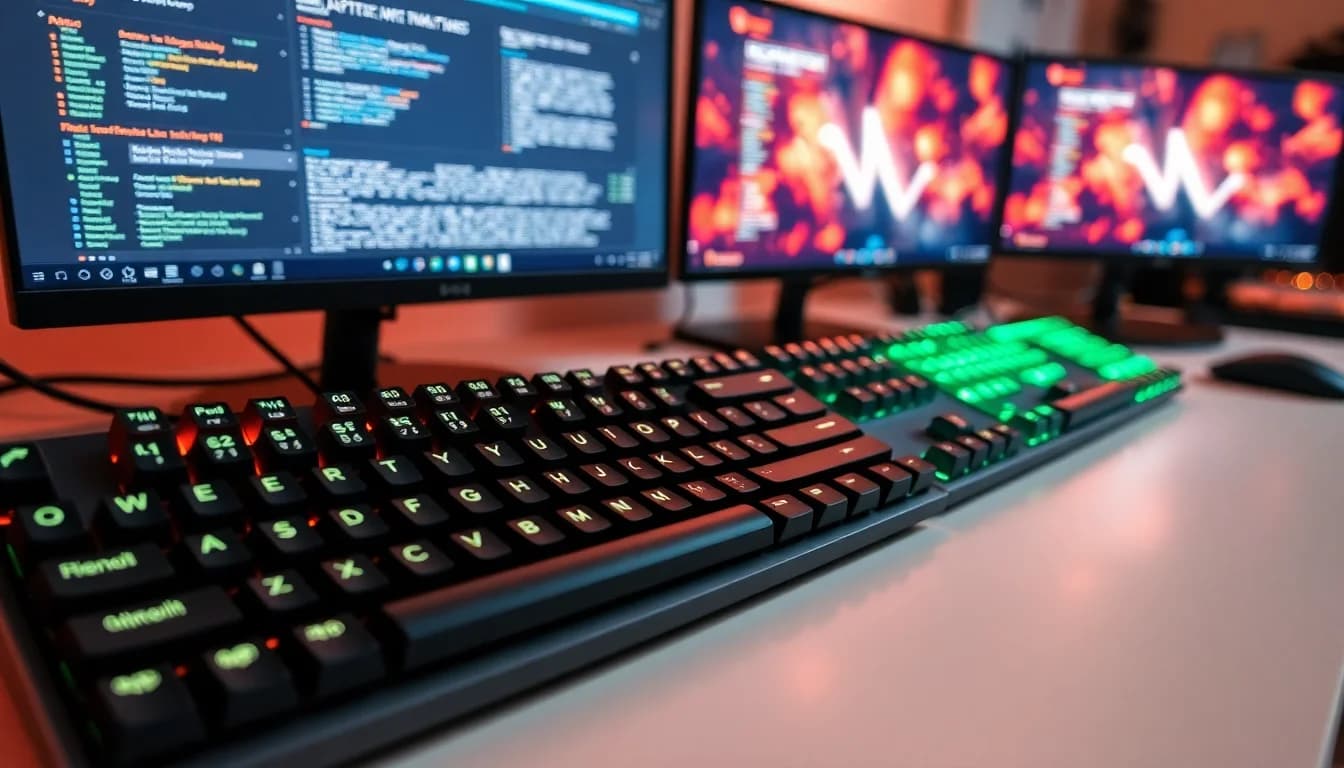
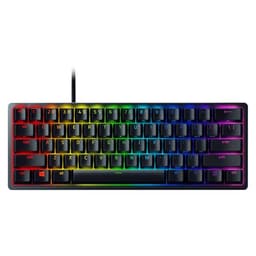
Most gaming keyboards are basically RGB light shows with a USB cable attached. The switches are an afterthought, the keycaps start shining within a few months, and the "pro gaming" badge is pure marketing. So when Razer says the Huntsman V3 Pro is built for competitive FPS players, with analog optical switches and a feature set that genuinely changes how actuation works, that's a claim worth pulling apart properly.
The short version: this is one of the most technically interesting keyboards in the enthusiast bracket right now. Rapid Trigger, adjustable actuation down to 0.1mm, Razer Snap Tap, and a 100-million keystroke switch lifespan. These aren't gimmicks. For competitive FPS gaming specifically, this hardware addresses real problems that standard mechanical switches simply cannot. The 95 owners who've reviewed it average ★★★★☆ (4.1), which for a niche, premium board is a solid signal. But there are caveats, and if you're not grinding ranked matches daily, some of this spec is overkill you'll pay for without using.
Core Specifications: Razer Huntsman V3 Pro
The Huntsman V3 Pro is built around Razer's second-generation Analog Optical switches, and that's the whole story of this keyboard. Everything else, the onboard LED array, the magnetic wrist rest, the dual-purpose modifier keys, is in service of making those switches as useful as possible. The wired connection keeps latency out of the equation entirely, which is exactly what you want when the rest of the hardware is chasing sub-millisecond response times.
It's a full-size layout with a multi-function digital dial and dedicated media control buttons, which puts it firmly in the premium tier. You're getting a keyboard that doesn't compromise on desk space to hit a lower price point, and that's a deliberate choice. Competitive players who need a numpad and arrow keys without a separate cluster will appreciate it. The dual-purpose modifier keys that double as arrow keys when tapped is a genuinely clever solution for navigation without sacrificing the layout.
The included magnetic leatherette wrist rest is here because it's not the usual flimsy foam pad you get thrown in with mid-range boards. The magnetic attachment means it stays put without clips or adhesive, and the firm leatherette construction should hold up better than fabric alternatives over time. That said, leatherette can get warm during long sessions, and some owners do note this in feedback. Below is the full spec breakdown.
| Specification | Detail |
|---|---|
| Switch Type | Analog Optical Gen-2 |
| Actuation Range | 0.1mm to 4.0mm (adjustable) |
| Switch Lifespan | 100 million keystrokes |
| Layout | Full-size, QWERTY US |
| Connectivity | Wired |
| Key Features | Rapid Trigger, Razer Snap Tap, Adjustable Actuation |
| Keycaps | Textured Doubleshot PBT |
| Wrist Rest | Magnetic firm leatherette (included) |
| Onboard Adjustments | LED array visual aid, no software required |
| Media Controls | Multi-function digital dial and dedicated buttons |
| Price | £179.99 |
Switch Type and Feel: The Razer Huntsman V3 Pro's Core Advantage
This is where the Huntsman V3 Pro earns its price tag, or loses it, depending on what you're looking for. The Analog Optical Gen-2 switches work fundamentally differently from traditional mechanical switches. Instead of a physical contact point triggering actuation, they use a light beam that's interrupted by the switch stem at a precise, adjustable depth. The result is that actuation can be set anywhere from 0.1mm to 4.0mm. That's not a range you see anywhere else at this price point.
Rapid Trigger is the feature that makes this genuinely competitive. Standard keyboards register a keypress at a fixed actuation point and then require you to release past a reset point before the next input registers. Rapid Trigger removes that fixed reset. The key resets the moment you lift it, regardless of how far up you've released. In FPS games, specifically movement mechanics in titles like Counter-Strike 2 where counter-strafing speed is a real competitive factor, this is a measurable advantage. It's not placebo. The physics of how those games read input means faster key reset equals faster directional change, and Rapid Trigger delivers that.
The feel of the switches themselves is linear, which is the right choice for rapid repeated inputs. There's no tactile bump to push through, no click to slow down the return stroke. Owner feedback consistently describes them as smooth and fast, with the lighter actuation settings feeling almost hair-trigger. Some owners coming from tactile switches do find the transition takes adjustment, particularly for typing, where the lack of feedback means you're relying on bottoming out or muscle memory rather than a bump to confirm each keypress. But for gaming? Linear is correct here, and the optical mechanism means there's no metal fatigue or contact bounce to worry about across that 100-million keystroke lifespan.
Keycap Quality and Layout
Doubleshot PBT keycaps on a keyboard in this price bracket are what you should expect, and Razer delivers them here. PBT plastic is denser and harder than the ABS you get on cheaper boards, which means the legends don't wear through and the surface doesn't develop that horrible greasy shine after a few months of use. The doubleshot construction means the legends are moulded from a second layer of plastic rather than printed on, so they genuinely cannot fade. This is the right choice and it's good to see it confirmed in the spec.
The textured finish on these keycaps matters. A lot of PBT keycaps are smooth, which is fine, but Razer's textured surface gives better grip under sweaty hands during intense sessions. Owner reviews mention this positively, with several noting the keycaps feel premium and don't slip. Compared to the smooth PBT on something like the Wooting 60HE, the texture is a genuine differentiator for people who game hard for long periods.
The full-size layout is a considered choice rather than a compromise. You're getting a numpad, dedicated arrow keys, and a full function row, plus the dual-purpose modifier keys that double as arrow keys when tapped. That last feature is genuinely useful for people who use their keyboard for productivity as well as gaming. The US QWERTY layout is the version available here, which matters if you're in the UK and prefer a UK ISO layout, since the enter key shape and a few key positions differ. Some UK buyers find this a non-issue; others find it annoying. before you buy.
Build Quality
The Huntsman V3 Pro feels like a board that's meant to survive serious use. Owner reviews repeatedly describe it as solid and well-built, with minimal flex in the case. That's what you want from a full-size keyboard that's going to be hammered during competitive play. The magnetic wrist rest is a highlight: it snaps on cleanly and doesn't wobble around the way clip-on rests tend to. Firm leatherette is the right material choice for durability, even if it's not as plush as memory foam alternatives.
The onboard LED array for visual feedback during actuation adjustments is a genuinely smart piece of engineering. Being able to make precise changes to actuation height or Rapid Trigger sensitivity without opening software, and getting visual confirmation of where you've set it, means you can tune the board mid-session without alt-tabbing out of your game. That's a practical quality-of-life feature that some competitors in this space don't offer. The settings save to the keyboard itself, so they follow you to LAN events or a friend's setup without needing to reinstall software.
The multi-function digital dial and dedicated media control buttons add to the premium feel without being excessive. A dial is more satisfying and precise for volume control than tapping function row keys, and having dedicated media buttons means you're not hunting for the right key combination mid-game. Some owners in the review pool specifically call out the dial as a favourite feature. One thing to note: a few owner reviews mention the wrist rest's leatherette surface can feel warm during extended sessions in summer, which is a reasonable criticism of the material choice. Not a dealbreaker, but.
RGB and Lighting
The Huntsman V3 Pro has per-key RGB lighting, which is the baseline expectation for any keyboard in this price range. Razer's Chroma RGB ecosystem is one of the more polished lighting platforms available, with support for syncing across other Razer peripherals and a wide range of compatible games and applications. If you're already in the Razer ecosystem with a Razer mouse or headset, the lighting sync works well and looks genuinely impressive.
The onboard LED array used for actuation feedback doubles as part of the lighting system, which is a clever piece of dual-purposing. It means the visual feedback system doesn't require a separate indicator bank or break up the keyboard's aesthetic. Owner reviews generally describe the lighting as bright and vibrant, with good colour accuracy. The per-key nature means you can set up custom lighting profiles that highlight specific keys, which is useful for game-specific setups where you want your WASD cluster to stand out.
Profiles and lighting effects can be stored on the keyboard's onboard memory, so you're not dependent on Razer Synapse running in the background to maintain your lighting preferences. This matters more than it sounds. Having software running constantly in the background is a minor but real performance drag, and competitive players who strip their systems down for maximum performance will appreciate being able to ditch the software requirement for basic operation. That said, the full depth of Chroma customisation does require Synapse, so you'll want it installed at least for initial setup.
Software and Customisation
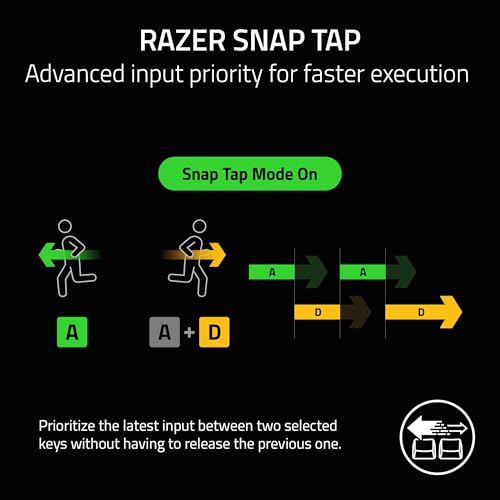
Razer Synapse 3 is the software backbone here, and it's a mixed bag. On the positive side, it's one of the more feature-complete gaming peripheral software suites available, with macro support, per-key lighting customisation, profile management, and access to the full depth of Rapid Trigger and actuation adjustment settings. The Razer Snap Tap feature, which prioritises the most recent directional input between two selected keys without requiring you to release the previous key first, is configured through Synapse and requires a firmware update to enable. That firmware update requirement is: make sure you update before expecting Snap Tap to work out of the box.
The onboard adjustment system is the headline software story, though. Razer has done something genuinely useful by making the most critical competitive settings adjustable directly on the keyboard via the LED array and dedicated controls, with no software required. Actuation height and Rapid Trigger sensitivity can both be tuned on the fly and saved to the board. For competitive players who travel to events or share setups, this is a proper solution. You're not locked into a PC with Synapse installed to maintain your competitive configuration.
Macro support is present and works as expected through Synapse, with the ability to assign macros to any key and create game-specific profiles. The multi-function digital dial can be assigned to different functions per profile, which adds flexibility for productivity use. Owner feedback on the software is generally positive for functionality, with the main criticism being that Synapse itself can feel heavy and occasionally buggy on first install. It's not unique to Razer, most major peripheral software has similar complaints, but it's worth being aware that the initial setup experience isn't always smooth.

Connectivity
The Huntsman V3 Pro is wired only, and that's the correct choice for a keyboard positioning itself as a competitive esports tool. Wireless keyboards have improved enormously in the past few years, but there remains a latency argument for wired connections in high-stakes competitive play, and more importantly, there's zero risk of a battery dying mid-match. For the target audience of serious FPS players, wired is the right call and nobody in that space is complaining about the cable.
The wired connection pairs with the analog optical switches to create an input chain that's as low-latency as you can get without building a custom solution. The USB HID protocol that keyboards use has its own polling rate considerations, and a wired connection ensures you're getting consistent, reliable polling without the overhead of a wireless radio stack. For Rapid Trigger to function at its best, that consistency matters.
There's nothing more to say about connectivity here because the spec is what it is: wired, reliable, and appropriate for the use case. If you need wireless, this isn't your keyboard and Razer has other options in its range. If you're fine with a cable, which most dedicated desktop gamers are, the wired connection is a feature rather than a limitation. Owner reviews don't raise connectivity complaints, which is about as good an endorsement as you can get for something this fundamental.
Battery Life
The Huntsman V3 Pro is a wired keyboard, so battery life is not applicable here. There is no battery, no charge time, and no risk of running out of power during a session. This is worth stating plainly because it's one of the genuine advantages of a wired peripheral for competitive gaming: the power supply is your USB port, and it doesn't run out.
For context on why this matters: wireless gaming keyboards in this price bracket typically offer somewhere between 40 and 200 hours of battery life depending on whether RGB is active. Managing that, remembering to charge, or dealing with a dying battery mid-session is a real friction point that wired keyboards simply don't have. The Huntsman V3 Pro sidesteps the problem entirely.
If battery life is a genuine priority for you, perhaps because you want to use your keyboard away from a desk or in a setup where cable management is a serious concern, then a wired keyboard in general isn't the right fit. But for the intended use case of a competitive desktop gaming setup, the absence of a battery is a feature, not a gap in the spec sheet.
Typing and Gaming Experience
For gaming, specifically the FPS titles this keyboard is designed around, the Huntsman V3 Pro is about as good as it gets in the enthusiast bracket. Rapid Trigger with a 0.1mm reset sensitivity means your movement keys respond to the absolute minimum physical input. In Counter-Strike 2, Valorant, or any game where counter-strafing and rapid directional changes matter, this translates to more responsive movement that's genuinely detectable in practice, not just on a spec sheet. Razer Snap Tap handles the SOCD (simultaneous opposing cardinal directions) input problem that some games handle inconsistently, giving you predictable directional priority without having to release the previous key first.
For typing, the picture is more nuanced. Linear switches without a tactile bump require you to develop a feel for the actuation point, and with actuation adjustable down to 0.1mm, it's very easy to set the keyboard so sensitive that typos become frequent. Most owners who use it for productivity alongside gaming settle on a higher actuation point, around 1.5mm to 2.0mm, which feels more like a traditional linear switch and reduces accidental keypresses. The doubleshot PBT keycaps with their textured surface help with typing comfort over long sessions, and the included wrist rest takes some strain off extended typing. But if you're primarily a typist who games occasionally, the tactile feedback of a traditional mechanical switch is probably more comfortable day-to-day.
Sound profile is on the quieter side for a gaming keyboard. Optical switches don't have the metal-on-metal contact sound of traditional mechanicals, and the linear action without a tactile bump means there's no click. Bottoming out produces a thock rather than a sharp clack, which owners describe positively. It's not silent, nothing short of a dedicated silent switch is, but it's inoffensive enough for most shared spaces. The textured PBT keycaps contribute to the sound profile in a good way, producing a slightly deeper tone than smooth keycaps. Optical switch mechanisms inherently avoid the contact bounce issues that affect traditional mechanical switches, which also means no debounce delay is needed, contributing to the fast response times.
Compatibility
The Huntsman V3 Pro works on Windows and macOS, with Razer Synapse 3 available for both platforms for full software customisation. The onboard memory means basic functionality, including your saved actuation and Rapid Trigger settings, works without software on any machine. So plugging into a Windows PC at a LAN event or a friend's setup is straightforward: your competitive configuration is stored on the board and works immediately.
Linux support is the usual caveat with Razer peripherals. The keyboard will function as a standard HID device on Linux, meaning basic typing and gaming work fine. But Razer Synapse is not officially supported on Linux, so software-dependent features like full lighting customisation and advanced macro configuration require third-party tools. The open-source OpenRazer project provides driver support for many Razer devices on Linux, and the Huntsman V3 Pro is supported, but it's a community solution rather than an official one. if you're a Linux user.
Console support isn't really in scope for a keyboard of this type. It's a wired USB keyboard, so it will register as an input device on a PS5 or Xbox for text input purposes, but the competitive features, Rapid Trigger, Snap Tap, adjustable actuation, are irrelevant in that context since console games don't expose the kind of input reading that makes those features useful. This is a PC gaming keyboard through and through, and it makes no apologies for that focus.
How It Compares
The most direct competitor to the Huntsman V3 Pro is the Wooting 60HE, which pioneered the Rapid Trigger feature that Razer has now implemented. The Wooting uses Lekker switches (a licensed version of the Flaretech optical switch) and offers adjustable actuation from 0.1mm to 4.0mm, identical to the Huntsman V3 Pro's range. The Wooting 60HE is a 60% layout, significantly more compact, and sits at a lower price point. If you want Rapid Trigger and don't need a full-size layout with a numpad, the Wooting is the established choice in this space with a passionate community behind it. The Huntsman V3 Pro's advantages over the Wooting are the full-size layout, the included wrist rest, the onboard adjustment system without software, Razer Snap Tap, and the broader Razer ecosystem integration.
The SteelSeries Apex Pro TKL is another comparison point, using Hall Effect switches with adjustable actuation and its own version of rapid reset functionality. It's a TKL layout, sits in a similar price bracket, and has strong competitive credentials. The Apex Pro TKL's OmniPoint 2.0 switches offer a comparable actuation range, and SteelSeries has a long track record in the esports space. The Huntsman V3 Pro counters with Razer's Snap Tap feature, the full-size layout option, and what owners describe as a smoother switch feel. The Apex Pro TKL is the more established choice if you want TKL; the Huntsman V3 Pro is the better pick if you need full-size.
| Feature | Razer Huntsman V3 Pro | Wooting 60HE | SteelSeries Apex Pro TKL |
|---|---|---|---|
| Switch Type | Analog Optical Gen-2 | Lekker (Flaretech optical) | OmniPoint 2.0 Hall Effect |
| Actuation Range | 0.1mm to 4.0mm | 0.1mm to 4.0mm | 0.1mm to 4.0mm |
| Rapid Trigger | Yes | Yes | Yes (Rapid Trigger) |
| Layout | Full-size | 60% | TKL |
| Keycaps | Doubleshot PBT | Doubleshot PBT | ABS |
| Wrist Rest Included | Yes (magnetic leatherette) | No | No |
| Connectivity | Wired | Wired | Wired |
| Software-free Adjustment | Yes (onboard LED array) | Limited | Limited |
| Price Tier | Enthusiast | Mid to enthusiast | Enthusiast |

Final Verdict: Who Should Buy the Razer Huntsman V3 Pro
The Razer Huntsman V3 Pro is a genuinely impressive piece of engineering for a specific type of player. If you're grinding ranked FPS games, care about movement mechanics, and want a full-size keyboard with the most responsive switch technology currently available at this price point, this is a serious contender. Rapid Trigger, Razer Snap Tap, 0.1mm adjustable actuation, doubleshot PBT keycaps, an included magnetic wrist rest, and onboard adjustment without software: that's a compelling package. The 4.1 average from 95 owners reflects a board that delivers on its core promise for the people it's aimed at.
The caveats are real, though. It's a US QWERTY layout only, which matters if you're a UK buyer who prefers ISO. The linear switches aren't ideal for heavy typing use, and the ultra-sensitive actuation settings can cause typos until you dial in the right point for your typing style. Leatherette wrist rests get warm. Razer Synapse has its moments. And at the enthusiast price bracket, you're paying for features that only matter if you're playing at a level where 0.1mm reset sensitivity translates to actual in-game advantage.
If you're a casual gamer who plays a couple of hours a week and wants a nice keyboard, honestly, the Wooting 60HE at a lower price point gives you the same core Rapid Trigger functionality in a more compact package. You'd save money and get the feature that actually matters for competitive play. The Huntsman V3 Pro's premium over that is the full-size layout, the Razer ecosystem, Snap Tap, and the overall build quality including the wrist rest. Those extras are worth it if you need them. They're not worth it if you don't. Buy the Huntsman V3 Pro because you specifically want a full-size analog optical keyboard with Razer's ecosystem and Snap Tap. Buy the Wooting if you just want Rapid Trigger and don't need the full-size layout or the Razer branding.
What works. What doesn’t.
5 + 4What we liked5 reasons
- Rapid Trigger with 0.1mm reset sensitivity is a genuine competitive advantage in FPS games
- Razer Snap Tap handles directional input priority without releasing the previous key
- Doubleshot PBT keycaps with textured finish resist shine and feel premium
- Onboard LED adjustment system means no software needed for competitive settings
- Magnetic leatherette wrist rest included and stays put without clips
Where it falls4 reasons
- US QWERTY layout only, no UK ISO option
- Ultra-sensitive actuation settings require tuning to avoid typing typos
- Leatherette wrist rest can feel warm during long summer sessions
- Razer Synapse required for full customisation depth and Snap Tap firmware update
Full specifications
9 attributes| Switch type | Razer Analog Optical |
|---|---|
| Layout | Full-size |
| Connectivity | wired |
| Backlight | RGB |
| Backlighting | Per-key RGB |
| Keycaps | PBT double-shot |
| Polling rate HZ | 8000 |
| Switch actuation | linear |
| Type | mechanical |
If this isn’t right for you
2 options 8.5 / 10
Corsair K100 RGB Mechanical Gaming Keyboard (CHERRY MX SPEED: Fast & High Precision, RGB Lighting, PBT Double Shot Keycaps, Integration Elgato Stream Deck) QWERTZ, Black
£230.47 · Corsair
 8.5 / 10
Keychron Q6 HE Wireless Custom Mechanical Keyboard - Hall Effect Gateron Double-Rail Magnetic Switch, Rapid Trigger, 2.4G/Bluetooth 5.2/USB-C, QMK/Launcher Full Metal RGB Backlit, UK Layout - Black
£191.99 · Keychron
Frequently asked
5 questions01What switches does the Razer Huntsman V3 Pro use?+
The Razer Huntsman V3 Pro uses Razer's Analog Optical Gen-2 switches. These are linear optical switches with an adjustable actuation range of 0.1mm to 4.0mm. They use a light beam rather than physical contact to register keypresses, which eliminates contact bounce and contributes to a rated lifespan of 100 million keystrokes. The linear feel means no tactile bump, making them fast for gaming but requiring adjustment for typists used to tactile switches.
02Is the Razer Huntsman V3 Pro good for gaming?+
Yes, particularly for competitive FPS gaming. The Rapid Trigger feature resets keys at the slightest lift rather than requiring release to a fixed reset point, enabling faster directional changes in games like Counter-Strike 2 and Valorant. Razer Snap Tap prioritises the most recent directional input between two keys without requiring release of the previous key. Actuation can be set as low as 0.1mm for the fastest possible response. These are genuine competitive advantages, not marketing features, and owner reviews confirm the board delivers on its FPS performance claims.
03Is the Razer Huntsman V3 Pro good for typing?+
It's adequate for typing but not optimised for it. The linear analog optical switches have no tactile bump, so typing feel relies entirely on muscle memory or bottoming out. The ultra-sensitive actuation settings (as low as 0.1mm) can cause typos until you dial in the right actuation point for your typing style, most owners settle around 1.5mm to 2.0mm for comfortable typing. The doubleshot PBT keycaps with textured finish are good quality and comfortable over long sessions, and the included wrist rest helps. But if typing is your primary use case, a tactile mechanical switch would serve you better.
04Is the Razer Huntsman V3 Pro loud?+
It's relatively quiet for a gaming keyboard. The analog optical switches are linear with no click mechanism, and the optical actuation means no metal-on-metal contact sound. Bottoming out produces a moderate thock sound rather than a sharp clack. The textured PBT keycaps contribute to a slightly deeper sound profile. It's not silent, but it's inoffensive enough for most shared spaces and significantly quieter than clicky mechanical switches. Owner reviews don't raise noise as a concern.
05What warranty and returns apply to the Razer Huntsman V3 Pro?+
Specific warranty terms for this product are not listed in the verified product data we have available. Razer typically offers a two-year limited warranty on its peripherals, but you should confirm this directly with Razer or the retailer before purchase. If you're buying through Amazon UK, you're covered by Amazon's standard 30-day returns policy and the A-to-Z Guarantee regardless of manufacturer warranty terms.