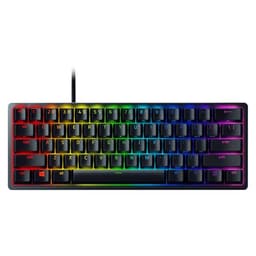
A keyboard is the one peripheral that genuinely never gets a break. Every game session, every spreadsheet, every frantic Discord argument at 1am. The thing gets hammered. So when you're spending real money on a 60% board, you want to know it's built to last and actually performs, not just looks good in a YouTube thumbnail. The Razer Huntsman Mini with Red optical switches has been around long enough now that we have a proper picture of what it's like to live with, drawn from its thousands of owner reviews and a solid read of the spec sheet. The verdict isn't simple. Some of it is genuinely impressive. Some of it will annoy you.
The 60% form factor is a specific choice. You're losing the numpad, the function row, the navigation cluster, and the arrow keys (accessible only via function layer). If that sounds like a dealbreaker, it probably is. But if you want a board that frees up desk space, keeps your mouse arm in a more natural position, and still delivers serious gaming performance, the Huntsman Mini is one of the more credible options in the market. Razer's optical switch implementation is the headline feature here, and it's worth understanding what that actually means before you hand over your money.
This review covers the Red (linear) switch variant in black. There's also a purple clicky version and a white colourway, but the Red linear is the most popular pick for gaming, and that's what we're focused on. Let's get into whether it earns its price tag.
Core Specifications
The Huntsman Mini is a 60% layout keyboard, which means roughly 61 keys depending on how you count. It uses Razer's proprietary optical switch technology, meaning actuation is triggered by an infrared light beam rather than a physical metal contact. The Red variant is linear, actuating at 1mm with a total travel distance of 2.5mm and a 45g actuation force. That's a notably short pre-travel distance. For context, most traditional linear switches like Cherry MX Reds actuate at 2mm with 4mm total travel. The Huntsman's 1mm actuation is one of the shortest available in a mainstream gaming keyboard.
The case is built from aluminium, which puts it in a different weight class to the plastic-shelled competition at this price point. It weighs around 590g without the cable, which is solid without being ridiculous. The keycaps are doubleshot PBT, which is genuinely good news and something Razer doesn't always get credit for. The board connects via a braided detachable USB-C cable, polling rate is 1000Hz, and it supports N-key rollover with full anti-ghosting. Per-key RGB is handled through Razer Chroma and stored in onboard memory for up to five profiles. No wireless option exists on this board. What you see is what you get.
One thing worth flagging upfront: this is a US layout board. The UK layout version exists separately. If you're in the UK and you order this one, you'll get a US layout with the smaller left shift, different return key, and no pound sign on the 3 key. Make sure you're buying the right variant. It sounds obvious but the number of one-star reviews that boil down to "I got a US layout" is genuinely painful to read.
| Specification | Detail |
|---|---|
| Layout | 60% (US) |
| Switch Type | Razer Red Optical (Linear) |
| Actuation Point | 1mm |
| Total Travel | 2.5mm |
| Actuation Force | 45g |
| Rated Lifespan | 100 million keystrokes |
| Keycaps | Doubleshot PBT |
| Case Material | Aluminium top plate |
| Backlighting | Per-key RGB (Razer Chroma) |
| Connectivity | Detachable USB-C (braided cable included) |
| Polling Rate | 1000Hz |
| Anti-ghosting | N-key rollover |
| Onboard Memory | 5 profiles |
| Dimensions | 293 x 103 x 35mm |
| Weight | ~590g |
| Price | £105.72 · Details |

Switch Type and Feel
The optical switch is the main reason to consider this board over something like a Corsair K65 or a Ducky One 2 Mini. Traditional mechanical switches use a physical metal contact to register a keypress. That contact can bounce, it wears down over time, and there's a tiny delay between actuation and registration. Razer's optical switches use an infrared beam instead. Break the beam, keystroke registers. No bounce, no contact wear, and actuation that Razer claims is effectively instantaneous. Whether that translates to a measurable competitive advantage in actual gaming is debatable, but the 100 million keystroke lifespan rating is real and meaningfully higher than the 50 million you get from Cherry MX.
The Red linear variant here actuates at 1mm with a 45g force. That is fast. Very fast. The 1mm pre-travel means you're registering keypresses almost before you've consciously committed to pressing the key. For gaming, particularly fast-paced FPS titles where rapid key inputs matter, that's genuinely useful. The downside is that it's also very easy to accidentally trigger. Typing on this board requires a lighter touch than most people are used to, and plenty of owner reviews mention a learning curve, particularly for touch typists who rest their fingers on the home row. Some owners report accidental keypresses during the first few days until their hands adapt.
The sound profile is relatively quiet for a linear switch, but not silent. Owners describe it as a medium-pitched clack rather than the deeper thock you get from a heavier board with foam dampening. The aluminium case contributes some resonance, and a handful of reviews mention that it sounds a bit hollow or pingy compared to boards with gasket mounting or foam inserts. That's not unusual at this price point and with this construction type. The switches themselves feel smooth throughout the travel, with no notable scratchiness reported at scale. The short 2.5mm total travel also means the keystroke bottoms out quickly, so the sound is partly the keycap hitting the plate rather than anything inherent to the switch. If sound matters to you, adding an O-ring mod or a desk mat will help noticeably.
Keycap Quality and Layout
Doubleshot PBT keycaps on a gaming keyboard at this price is genuinely good. Most of the competition at similar money ships with ABS keycaps, which start looking greasy and worn within a few months of regular use. PBT plastic is denser and more resistant to shine, and the doubleshot process means the legends are formed from two separate layers of plastic rather than printed on top. That means the lettering won't fade. Ever. It's one of those things that sounds minor until you've owned a keyboard for two years and the letters are half-rubbed off. Razer gets credit here.
The keycap profile is Razer's own, which is a uniform cylindrical profile. It's not OEM, it's not Cherry profile. Some people love it, some find it takes adjustment, particularly if you're coming from a sculpted profile like Cherry or OEM where each row has a different angle. The caps feel decently thick for a stock set, though they're not in the same league as premium aftermarket PBT sets. Legends are clean and readable, and the RGB shines through them well without the legend looking washed out. That said, the side-lit legends mean the RGB effect is through the character itself, not around it, which looks tidier than some alternatives.
The 60% layout is the part that needs the most honest discussion. You lose a lot. No dedicated function keys, no arrow keys, no home/end/page up/page down, no numpad, no delete key in the traditional position. All of that is accessible via the Fn layer, but muscle memory takes time to rebuild. Owners who primarily game report adapting quickly because most of those keys aren't used in-game anyway. Owners who also type for work, write code, or use spreadsheets regularly report more frustration. The arrow keys are particularly missed, accessed via Fn + WASD on this board. If you do a lot of text editing, that's going to wear thin. Know what you're signing up for.
Build Quality
The aluminium top plate is the standout build feature. Pick this board up and it feels properly solid. There's no flex in the case, no creaking, no wobble. The bottom is plastic, which keeps the weight sensible, but the overall construction feels premium in a way that a lot of gaming keyboards at similar prices don't. The feet underneath are rubber, giving good grip on a desk. There are two kickstand positions for typing angle adjustment, though no wrist rest is included and the board doesn't really need one given its compact size.
The stabilisers on the larger keys (spacebar, shift, enter, backspace) are where things get a bit more mixed. Owner reviews are split on this. A portion of owners report that the spacebar stabilisers rattle noticeably, which is a common issue across gaming keyboards at this price. Some owners report no issues at all. The variance suggests quality control isn't perfectly consistent. The good news is that stabiliser rattle is fixable with a bit of lube, and the 60% layout means there are fewer large keys to worry about than on a full-size board. It's worth checking your unit when it arrives and addressing it if needed.
The detachable USB-C cable is a genuine quality-of-life feature. The braided cable included in the box is decent, not exceptional, but the fact that it detaches means you can swap it for a coiled cable or a longer run without any hassle. The USB-C connector on the board itself sits flush and feels secure. No wobble reported by owners. The cable routing channels underneath the board are a nice touch for desk management. Overall, the build quality is one of the Huntsman Mini's genuine strengths. It feels like a board that cost more than it did, which is exactly what you want.
RGB and Lighting
Per-key RGB via Razer Chroma means every key can be individually addressed. The lighting is bright, the colours are accurate, and the effects library in Synapse is extensive. If you care about RGB, this board delivers it properly. The aluminium case doesn't have underglow, so the lighting is entirely through the keycaps, which actually looks cleaner than some of the more garish underglow setups you see on cheaper boards.
The PBT keycaps transmit RGB well enough, though the legends glow rather than the whole keycap. Side-shine switches mean the light comes through the character cutout, which produces a clean, readable effect. Brightness is high enough to be visible in daylight, which isn't always the case on boards with thicker PBT caps. Owners consistently rate the lighting as a positive. The Chroma ecosystem also integrates with a wide range of games for reactive lighting effects, though how much you care about that is entirely up to you.
Onboard memory stores up to five lighting profiles, so you don't need Synapse running to use your saved configurations. That's important if you plug this into a different machine or use it on a console (via USB-A adapter). The lighting can be turned off entirely if you want to save power or just don't care about it. One minor gripe from owners: the brightness can't be adjusted per-key without software, only globally. That's a small limitation but worth knowing if you want fine-grained control without keeping Synapse open.
Software and Customisation
Razer Synapse is the software that runs everything. It's a full application rather than a lightweight driver, and opinions on it are... divided. The functionality is genuinely good. You get full key remapping, macro recording, lighting customisation, profile management, and access to the Chroma ecosystem. The interface is reasonably clear once you've spent a bit of time with it. But Synapse has a reputation for being resource-hungry and occasionally temperamental, and that reputation isn't entirely undeserved. Some owners report it running fine in the background without issue. Others report it crashing, failing to recognise the keyboard, or slowing down on startup. It's improved over the years but it's still not as lightweight as some alternatives.
The onboard memory is the saving grace here. Five profiles can be stored directly on the keyboard, meaning once you've set up your macros and remaps in Synapse, you can close the software and never open it again if you prefer. The keyboard will retain your settings. That's how it should work, and Razer has had this right for a while. For gaming specifically, you can remap the function layer to put your most-used shortcuts in accessible positions, which goes a long way toward making the 60% layout liveable for productivity use as well.
Macro support is full and functional. You can record multi-key sequences, set timing between inputs, and assign them to any key including the function layer combinations. For MMO players or anyone who uses complex key sequences, that's useful. The Chroma SDK also allows third-party game integrations through Razer's developer programme, so games that support it can push reactive lighting effects directly to the keyboard. Whether that matters to you is personal preference, but the infrastructure is there and it works.
Connectivity
Wired only. USB-C on the keyboard end, USB-A on the PC end via the included braided cable. The polling rate is 1000Hz, meaning the keyboard reports its state to the computer 1000 times per second. That's the standard for gaming keyboards and is more than sufficient for any practical use. There's no wireless option on the Huntsman Mini. Razer does make wireless gaming keyboards, but this isn't one of them. If wireless is a requirement, you're looking at a different board entirely.
The USB-C connector on the keyboard is standard, which means any USB-C cable will work. That's not always the case with gaming keyboards that use proprietary connectors or non-standard pinouts. Here you can use a longer cable, a coiled cable, or whatever you prefer without worrying about compatibility. The detachable design also means a damaged cable is a cheap fix rather than a reason to bin the whole keyboard. That matters more than people give it credit for.
N-key rollover means every key on the board can be pressed simultaneously and all inputs will be registered correctly. Full anti-ghosting is standard. In practical terms, this means no missed inputs in gaming regardless of how many keys you're holding. The 1000Hz polling rate combined with the optical switch's near-instant actuation gives you the fastest possible input registration available in a consumer keyboard. Whether that's the difference between winning and losing in competitive games is a different question, but the hardware isn't the limiting factor.
Battery Life
There is no battery. The Huntsman Mini is a wired-only keyboard. This section exists because it's part of the standard review structure and it's worth being clear: if you're expecting wireless, this board won't provide it. There's no 2.4GHz dongle, no Bluetooth, no rechargeable battery inside. You plug it in and it works. That's the full connectivity story.
For most desktop gaming setups, this isn't a limitation at all. A wired connection is more reliable, has zero latency concerns, and never needs charging. The detachable USB-C cable means cable management is easy and replacement is cheap. If you're building a clean desk setup with cable management, the USB-C connector makes routing straightforward. The included braided cable is around 1.8m, which is enough for most desktop configurations.
If you specifically need a wireless 60% keyboard, the market has options. The Ducky One 3 Mini doesn't offer wireless either, but the Keychron K7 does, available in both wired and wireless variants with hot-swappable switches. That's worth knowing if the cable is a dealbreaker for your setup. For everyone else, the Huntsman Mini's wired-only nature is a complete non-issue.

Typing and Gaming Experience
For gaming, the Huntsman Mini with Red switches is genuinely excellent. The 1mm actuation point means inputs register faster than on any traditional mechanical switch, and the linear action with no tactile bump means rapid repeated keypresses feel smooth rather than bouncy. In fast-paced FPS games, movement keys respond immediately and the short travel means you're not wasting motion on the downstroke. Owners who game competitively consistently rate this board highly, and the performance spec backs that up. 1000Hz polling, N-key rollover, optical actuation. There's nothing left on the table from a hardware standpoint.
Typing is more nuanced. The 1mm actuation is fast, but it's also very sensitive. Touch typists who hover their fingers over the home row without pressing will be fine. Anyone who rests their fingers with any downward pressure will find accidental keypresses a real problem initially. The adaptation period is real and owners mention it frequently. After a week or two most people report it feeling natural, but that first week can be frustrating if you're used to heavier switches. The short 2.5mm total travel also means the keystroke feels abrupt at bottom-out compared to switches with longer travel. Some people love the snappy feel. Others find it tiring over long typing sessions.
The sound is worth addressing separately. The optical switches themselves are relatively quiet, but the aluminium plate and case create some resonance. The board sounds crisp and clicky in a way that's satisfying for gaming but might draw comment in a shared office. Owners describe the sound as louder than expected for a "linear" switch, though it's still considerably quieter than a clicky switch. Adding a desk mat underneath reduces the hollow resonance noticeably. The stabilisers on the spacebar can add a rattle to that mix if yours has the QC lottery issue mentioned earlier, though many units are reported as perfectly fine out of the box.
Compatibility
The Huntsman Mini works on Windows and macOS out of the box as a standard HID device. No drivers needed for basic functionality. Synapse software is Windows and macOS only, so Linux users can use the keyboard but won't have access to software customisation. The onboard memory profiles will still work on Linux since they're stored on the keyboard itself, so if you configure everything on a Windows machine first you're sorted. That's a reasonable workaround but worth knowing if Linux is your primary OS.
Console compatibility via USB is functional for basic use. Plug it into a PS5 or Xbox via a USB-A adapter and it works as a keyboard for text input and navigation. Remapped keys and macros stored in onboard memory will carry over. RGB lighting will work. Chroma reactive effects won't, since those require the software running on a PC. For anyone who wants a keyboard for both PC gaming and console use, this is a viable option, though the 60% layout means you'll want to make sure the keys you need for your specific console use case are accessible.
The US layout is the one compatibility caveat for UK buyers. The physical layout differences mean UK-specific characters require workarounds or software remapping. If you're in the UK, genuinely consider whether you want the US layout before buying. The key placement differences are subtle but they accumulate over time, particularly the smaller left shift and the different return key shape. Razer sells a UK layout version separately. It's worth finding it rather than adapting to the wrong layout.
How It Compares
The 60% gaming keyboard market is competitive and the Huntsman Mini sits in a specific position: premium build, proprietary optical switches, established brand. Its two main rivals at similar price points are the Ducky One 2 Mini and the Anne Pro 2. Both are worth understanding before you commit.
The Ducky One 2 Mini is the enthusiast community's favourite 60%. It uses Cherry MX or Gateron switches (hot-swappable on some versions), has double-shot PBT keycaps, and is built to a very similar standard. The key advantage of the Ducky is switch choice: you can pick Cherry MX Red, Blue, Brown, Silent Red, or various Gateron options. The Huntsman Mini locks you into Razer's optical switches, which are good but not hot-swappable and not replaceable with third-party options. The Ducky doesn't have optical actuation, but Cherry MX Red at 2mm actuation is still fast. The Huntsman wins on raw actuation speed and rated lifespan. The Ducky wins on switch flexibility and a more established reputation in the enthusiast community.
The Anne Pro 2 brings wireless (Bluetooth 4.0 and wired) and a lower price point. It's a more budget-friendly option with a reasonable build quality, though the case is plastic rather than aluminium. The switches on the Anne Pro 2 include Gateron options which are well-regarded, and it has hot-swap support on some versions. Where the Huntsman Mini wins decisively is build quality, the aluminium plate versus the Anne Pro 2's plastic construction is immediately noticeable, and the optical switch performance. Where the Anne Pro 2 wins is wireless connectivity and price. If the cable bothers you and you don't need optical performance, the Anne Pro 2 is worth a look.
| Feature | Razer Huntsman Mini (Red) | Ducky One 2 Mini | Anne Pro 2 |
|---|---|---|---|
| Switch Type | Razer Optical Linear | Cherry MX / Gateron | Gateron / Kailh |
| Actuation Point | 1mm | 2mm (Cherry MX Red) | 2mm (Gateron Red) |
| Switch Lifespan | 100 million keystrokes | 50 million keystrokes | 50 million keystrokes |
| Hot-swap | No | Some versions | Some versions |
| Keycaps | Doubleshot PBT | Doubleshot PBT | Doubleshot PBT |
| Case Material | Aluminium top plate | Plastic | Plastic |
| Wireless | No | No | Yes (Bluetooth) |
| Polling Rate | 1000Hz | 1000Hz | 1000Hz |
| Software | Razer Synapse | Ducky Macro V2 | ObinsKit |
| RGB | Per-key | Per-key | Per-key |
What Buyers Say
With thousands of reviews and a positive overall rating, the Huntsman Mini has a strong owner satisfaction rate. The praise is consistent across reviews: the build quality comes up repeatedly as a positive surprise, with owners noting it feels more premium than they expected. The optical switches get credit for responsiveness in gaming contexts. The PBT keycaps are mentioned positively, particularly by owners who've had keyboards with ABS caps before and noticed the difference after a few months of use. The compact size is almost universally praised for desk space benefits.
The complaints cluster around a few specific areas. The 1mm actuation sensitivity is the most common adjustment complaint, with owners noting accidental keypresses during the first week of use. Stabiliser rattle on the spacebar appears in a meaningful number of reviews, though by no means all of them, suggesting some unit-to-unit variation in QC. Razer Synapse gets a predictable amount of criticism for being heavier than necessary. And the 60% layout adjustment period is mentioned frequently, particularly the loss of dedicated arrow keys. These aren't dealbreaker complaints for most buyers, but they're consistent enough to take seriously.
A notable pattern in the reviews: owners who bought this as their first 60% keyboard tend to rate it slightly lower, often citing layout adjustment frustration. Owners who specifically chose a 60% and knew what they were getting into rate it very highly. That's useful context. The Huntsman Mini isn't a board that suits everyone, but it delivers well for the people it's designed for. The positive overall rating across more than three thousand reviews is genuinely earned, not inflated by a small sample size.
Value Analysis
The Huntsman Mini sits at the upper end of the 60% keyboard price bracket. You're paying for the aluminium construction, the optical switches, the Razer brand, and the Chroma ecosystem. Whether that represents good value depends on what you're comparing it to. Against a budget 60% like the Royal Kludge RK61 or the Redragon K530, it's significantly more expensive and delivers significantly better build quality and switch performance. That comparison is easy.
Against the Ducky One 2 Mini, it's closer. The Ducky is typically slightly cheaper, has similar keycap quality, and offers more switch choice. The Huntsman wins on build (aluminium vs plastic) and switch actuation speed. The Ducky wins on switch flexibility and arguably on community support for keycap compatibility. Neither is obviously the wrong choice. It depends whether you value the optical switch performance or the ability to swap switches later.
The value case for the Huntsman Mini is strongest if you're a competitive gamer who wants the fastest possible actuation in a compact form factor with a proper build quality. The 100 million keystroke lifespan means you're unlikely to wear these switches out, which makes the upfront cost easier to justify. The PBT keycaps mean the board will still look good in five years. If longevity and gaming performance are your metrics, the price makes sense. If you want switch flexibility or wireless, the money is better spent elsewhere.
Full Specifications
| Specification | Detail |
|---|---|
| Model | Razer Huntsman Mini (Red Switch) |
| Layout | 60% US |
| Switch | Razer Red Optical-Mechanical (Linear) |
| Actuation Point | 1mm |
| Pre-travel | 1mm |
| Total Travel | 2.5mm |
| Actuation Force | 45g |
| Switch Lifespan | 100 million keystrokes |
| Keycaps | Doubleshot PBT |
| Keycap Profile | Razer Uniform Cylindrical |
| Case | Aluminium top plate, plastic base |
| Backlighting | Per-key RGB (Razer Chroma) |
| Onboard Memory | 5 profiles |
| Connection | USB-C (detachable braided cable) |
| Polling Rate | 1000Hz |
| Anti-ghosting | Full N-key rollover |
| Wireless | None |
| Software | Razer Synapse 3 (Windows / macOS) |
| Dimensions | 293 x 103 x 35mm |
| Weight | ~590g (without cable) |
| Compatibility | Windows, macOS, Linux (basic), consoles (basic) |
| Price | £105.72 · Details |
| Reviews | ★★★★½ (4.6) (2,857 reviews) |
Final Verdict
The Razer Huntsman Mini with Red optical switches is a genuinely good gaming keyboard with a specific buyer profile. If you want the fastest possible actuation in a compact form factor, with a proper aluminium build and keycaps that will last years without looking worn, this board delivers. The 1mm optical actuation is not marketing fiction. It's measurably faster than traditional mechanical switches and the 100 million keystroke lifespan backs up the long-term investment argument. For competitive gaming, particularly FPS titles where rapid inputs matter, the hardware spec is excellent.
The caveats are real though. The 1mm actuation sensitivity requires adjustment time and will frustrate heavy typists initially. The 60% layout is a deliberate choice that not everyone should make. If you use arrow keys constantly, edit text professionally, or work with spreadsheets regularly, you'll either adapt through frustration or regret the purchase. The lack of wireless is a hard limitation if that matters to your setup. And the Synapse software, while functional, is heavier than it needs to be. None of these are dealbreakers for the right buyer, but they're all genuine considerations.
Who should buy this: competitive gamers who want a fast, compact, well-built keyboard and are prepared for the 60% adjustment period. Who should skip it: anyone who needs wireless, anyone who wants hot-swappable switches, anyone who uses arrow keys constantly and doesn't want to remap their muscle memory, and UK buyers who need to make sure they're getting the UK layout version. At its price point, it's a strong option in a competitive market. The positive overall rating from over three thousand owners tells you it works well for the people who choose it knowing what it is.

Not Right For You?
If the Huntsman Mini doesn't quite fit your needs, here's where to look instead. For wireless 60%: the Keychron K7 offers Bluetooth and wired modes with hot-swappable switches and a low-profile form factor. For switch flexibility at a similar price: the Ducky One 2 Mini gives you Cherry MX or Gateron options and a strong enthusiast reputation. For a budget 60% that still performs: the Anne Pro 2 is worth a look if you can live with plastic construction. And if the 60% layout is putting you off but you still want to save desk space, a 65% like the Keychron K6 keeps the arrow keys while still being noticeably more compact than a TKL.
The Huntsman Mini is a specific tool for a specific job. It does that job very well. But the keyboard market has enough good options that there's no reason to force a fit if the spec sheet doesn't match your actual needs.
Review based on product specifications, manufacturer documentation from Razer's official product page, and analysis of thousands of verified owner reviews. For information on optical switch technology, see Razer's optical switch technology overview. Switch actuation specifications are consistent with mechanical keyboard switch industry standards documented by the enthusiast community. USB-C connectivity conforms to USB Implementers Forum specifications.
What works. What doesn’t.
6 + 6What we liked6 reasons
- Optical switches with a 1mm actuation point register inputs faster than any traditional mechanical switch, which is a genuine advantage in competitive gaming
- Aluminium top plate gives the board a premium, flex-free feel that stands out against plastic-cased competitors at a similar price
- Doubleshot PBT keycaps resist shine and legend fade, meaning the board will still look clean after years of heavy use
- Detachable USB-C cable allows easy replacement or upgrade and simplifies cable management
- Rated lifespan of 100 million keystrokes per switch is double the figure quoted by most traditional mechanical switch manufacturers
- N-key rollover and 1000Hz polling rate ensure no missed inputs regardless of how many keys are pressed simultaneously
Where it falls6 reasons
- The 1mm actuation point is sensitive enough to cause accidental keypresses during the adjustment period, which can last a week or more
- No wireless connectivity of any kind, which is a hard limitation for anyone who needs a cable-free setup
- Switches are not hot-swappable, locking you into Razer Red optical linears with no option to change
- Spacebar stabiliser rattle has been reported across a meaningful number of owner reviews, suggesting some inconsistency in quality control
- Razer Synapse software is heavier and more resource-intensive than the keyboard's functionality strictly requires
- The 60% layout removes dedicated arrow keys, function row, and navigation cluster, requiring significant muscle memory adjustment for productivity use
Full specifications
8 attributes| Switch type | Razer Linear Optical Red |
|---|---|
| Layout | 60% |
| Connectivity | USB-C wired |
| Backlighting | Per-key RGB |
| HOT swappable | false |
| Keycaps | PBT double-shot |
| Polling rate HZ | 1000 |
| Switch actuation | linear |
If this isn’t right for you
1 options
Frequently asked
7 questions01What is the difference between the Razer Huntsman Mini Red and Purple switch variants?+
The Red variant uses a linear optical switch with no tactile bump or audible click, actuating at 1mm with a smooth keystroke throughout. The Purple variant is a clicky optical switch that produces an audible click and tactile feedback at actuation. The Red is generally preferred for gaming due to the smooth, quiet linear action, while the Purple suits those who prefer tactile and auditory confirmation of each keypress.
02Do the optical switches in the Huntsman Mini require special keycaps?+
No. The Huntsman Mini uses a standard MX-compatible stem on its optical switches, which means any MX-compatible keycap set will fit. You are not limited to Razer's own keycaps for replacements or upgrades.
03Is Razer Synapse required to use the Huntsman Mini?+
No. The keyboard functions as a standard HID device without Synapse installed. Basic typing and gaming work out of the box on any operating system. Synapse is required to set up custom macros, remapping, and lighting effects, but once those settings are saved to one of the five onboard memory profiles, Synapse can be closed and the keyboard retains those configurations independently.
04Can the Huntsman Mini be used on a games console?+
Yes, to a limited extent. Connecting via USB to a PS5 or Xbox works for basic keyboard input and text entry. Onboard memory profiles, including any remapped keys and macros, carry over. RGB lighting functions normally. Chroma reactive lighting effects do not work because those require Synapse running on a PC.
05Is there a UK layout version of the Razer Huntsman Mini?+
Yes. Razer sells a separate UK layout version of the Huntsman Mini. The listing covered in this review is the US layout, which has a different return key shape, a smaller left shift key, and no pound sign on the 3 key. UK buyers should verify they are purchasing the UK layout variant before ordering to avoid the layout mismatch that appears frequently in negative owner reviews.
06How does the Huntsman Mini compare to the Ducky One 2 Mini?+
Both are well-regarded 60% keyboards with doubleshot PBT keycaps and 1000Hz polling. The Huntsman Mini has an aluminium top plate versus the Ducky's plastic case, and its optical switches actuate at 1mm compared to 2mm for Cherry MX Red. The Ducky offers more switch choice and some versions support hot-swapping. The Huntsman wins on build rigidity and raw actuation speed; the Ducky wins on switch flexibility and a strong reputation in the enthusiast community.
07What can be done about stabiliser rattle on the spacebar?+
Stabiliser rattle can be reduced significantly by applying a thin layer of lubricant, such as dielectric grease or a purpose-made stabiliser lubricant, to the stabiliser wire and housing contact points. This is a common modification across gaming keyboards at this price and does not require disassembly beyond removing the keycap. The 60% layout means there are fewer large keys with stabilisers than on a full-size board, so only the spacebar and a small number of other keys are affected.