Finding a gaming keyboard that works just as well during a nine-to-five as it does during an evening raid is harder than it sounds. Office environments demand quieter actuation, tidier desk footprints, and connectivity that does not require a tangle of USB cables, while gaming still calls for fast response times, programmable keys, and durable switches rated for tens of millions of presses. Since last year the market has shifted noticeably toward Hall Effect magnetic switches and analog optical technology, both of which eliminate the physical contact wear that plagued earlier mechanical boards. Wireless latency has also closed the gap with wired performance to the point where most office gamers will never notice a difference. This guide is aimed at anyone who sits at the same desk for work and play: remote workers, hybrid commuters, and students who need a single keyboard that earns its keep around the clock without annoying colleagues or flatmates with clicky noise.
Quick Verdict
Best Overall: AULA WIN60 HE, for its Hall Effect switches, compact 60% layout, and genuinely office-friendly price point that does not sacrifice gaming performance. Best Value: AULA F75 Wireless, which adds a 75% layout, triple-mode wireless, and a satisfying typing experience for under £70.
The AULA WIN60 HE is the most compelling argument for Hall Effect switches in an office gaming context right now. Hall Effect technology uses magnets rather than physical contacts to register keypresses, which means there is no metal fatigue, no debounce delay from worn contacts, and no gritty feel developing over months of heavy typing. For the office gamer who hammers out reports by day and sprints through ranked matches by night, that consistency matters enormously.
The 60% layout removes the numpad, function row, and navigation cluster, leaving a board that occupies roughly half the desk space of a full-size keyboard. That freed-up room is genuinely useful for mouse movement in low-sensitivity gaming, and it keeps the desk looking professional during video calls. The trade-off is that you will need to use function-layer shortcuts for F-keys and the Delete key, which takes a week or two to internalise. Most office workers adapt quickly, and the layout is standard enough that custom keycap sets are widely available if you want to personalise the look.
Actuation on the Hall Effect switches is adjustable via software, so you can dial in a longer pre-travel for typing accuracy during document work and a shorter, more responsive actuation for gaming in the evening. The switches are rated for a theoretical lifespan far beyond conventional mechanical contacts because there is nothing to wear down physically. Noise levels are noticeably lower than clicky switches, sitting in a range that most open-plan offices will tolerate without complaints, especially with the included sound-dampening foam.
Build quality at this price is solid: the aluminium top plate gives a satisfying rigidity without the board flexing when you type firmly. The USB-C cable is braided and detachable, which matters for commuters who pack their keyboard. RGB backlighting is present and customisable, though in an office setting most users will set it to a single static colour or turn it off entirely.
Verdict: The WIN60 HE is the best all-round choice for office gamers who want cutting-edge switch technology, a compact footprint, and a price that does not sting.
Pros
- Hall Effect switches offer adjustable actuation depth for typing and gaming modes
- 60% layout frees significant desk space without sacrificing core key functionality
- Aluminium top plate provides rigid, premium feel at a budget-friendly price
Cons
- Wired only, so cable management is required on a tidy office desk
- 60% layout requires learning function-layer shortcuts for F-keys and navigation
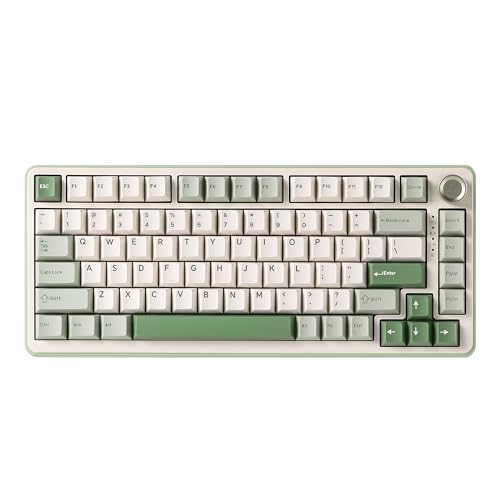
The AULA F75 Wireless occupies a sweet spot that many office gamers will find ideal: a 75% layout that retains the F-key row and dedicated arrow keys, triple-mode wireless connectivity, and a price that sits comfortably below £75. It is the keyboard for someone who has tried a 60% board and found the missing function row too disruptive during spreadsheet work, but still wants to reclaim some desk space compared to a tenkeyless or full-size board.
The 75% form factor is arguably the most practical layout for dual-purpose use. You keep F1 through F12 for software shortcuts, volume controls, and gaming hotkeys, you keep the arrow keys for navigating documents and editing code, and you lose only the numpad and the Insert/Delete cluster that most people never use anyway. The result is a board that looks at home on a professional desk and does not require any mental adjustment when switching between work tasks and gaming.
Wireless performance across all three modes, 2.4 GHz dongle, Bluetooth 5.0, and wired USB-C, is reliable. The 2.4 GHz mode delivers latency low enough for competitive gaming, while Bluetooth lets you pair to a second device such as a laptop or tablet without replugging anything. The 4,000 mAh battery provides several weeks of typical mixed-use before needing a charge, and the keyboard charges via USB-C while still functioning, so you are never left without a keyboard mid-session.
The hot-swap sockets accept both 3-pin and 5-pin switches, meaning you can swap in quieter linear switches for office hours and louder tactile ones for gaming without buying a new board. The gasket-style mounting on some variants softens the typing sound and feel further. Keycaps are double-shot PBT, which resist shine and legend fade far better than the ABS caps found on cheaper boards.
The knob on the top-right corner adjusts volume or media playback without reaching for a mouse, a small feature that pays dividends dozens of times per day during video calls and music streaming.
Verdict: Best value pick for office gamers who need a full function row, wireless freedom, and the ability to swap switches as their needs change.
Pros
- Triple-mode wireless covers 2.4 GHz gaming, Bluetooth multi-device, and wired in one board
- Hot-swap sockets let you change switches without soldering, adapting the board to office or gaming use
- Dedicated volume knob and F-key row make it genuinely practical for all-day office work
Cons
- Software for remapping and RGB customisation is less polished than Logitech or Razer equivalents
- 2.4 GHz dongle is small and easy to lose when travelling between home and office
The EPOMAKER X AULA F75 MAX takes the solid foundation of the standard F75 and adds a TFT display screen and a rotary knob, turning what would otherwise be a capable but unremarkable 75% wireless board into something that genuinely stands out on a desk. The TFT screen can show system stats such as CPU and RAM usage, custom animations, or a clock, all of which are more useful during a working day than they might first appear, particularly for developers or content creators who want at-a-glance system monitoring without opening a second application.
The tri-mode wireless setup mirrors the standard F75: 2.4 GHz for low-latency gaming, Bluetooth 5.0 for secondary device pairing, and USB-C wired as a fallback. The hot-swap PCB accepts both 3-pin and 5-pin switches, so the customisation options are identical to its sibling. Where the MAX differentiates itself further is in build quality: the case feels slightly more substantial, the gasket mounting is well-tuned, and the stock switches have a smoother linear feel straight out of the box compared to the standard F75.
For office use, the TFT screen is a genuine differentiator. Being able to glance at CPU load during a compile, check the time without moving the mouse, or simply have a subtle animated wallpaper running adds a layer of desk personality that colleagues will notice. It also makes the keyboard easier to identify as yours in a shared office environment, which sounds trivial but is genuinely useful.
The knob controls volume by default but is remappable to brightness, media skip, or any custom function via the companion software. PBT double-shot keycaps are standard, and the south-facing RGB LEDs produce even illumination without the hot-spot bleed that plagues cheaper boards. Battery life with the screen active is slightly reduced compared to the standard F75, but still comfortably exceeds a working week of mixed use.
The price premium over the standard F75 is modest, making this a straightforward upgrade recommendation for anyone who wants the extra screen functionality without a significant additional outlay.
Verdict: The TFT screen and refined build quality make this the most desk-friendly premium option in the sub-£100 category for office gamers who want personality alongside performance.
Pros
- TFT display screen shows system stats or custom animations, genuinely useful during office work
- Hot-swap PCB with gasket mounting delivers a refined typing feel without needing aftermarket modifications
- Tri-mode wireless covers every connectivity scenario with no compromise on gaming latency
Cons
- TFT screen reduces battery life compared to the standard F75 variant
- Companion software interface is functional but not as intuitive as Logitech G HUB or Razer Synapse
The YUNZII B75 PRO is the choice for the office gamer who prioritises typing feel above all else. Its gasket-mount construction, combined with a south-facing PCB and pre-lubed hot-swap switches, produces a typing experience that feels far more expensive than the price suggests. Gasket mounting isolates the PCB from the case using silicone or foam gaskets, which absorbs the impact of each keypress and produces a softer, lower-pitched thock rather than the sharp clack of a tray-mounted board. In an open-plan office, that difference in sound character is meaningful.
The 75% layout is identical in key coverage to the AULA F75, retaining the F-key row, arrow cluster, and a compact footprint. What sets the YUNZII apart is the attention to acoustic detail: the board ships with a silicone dampening layer between the PCB and the plate, foam under the PCB, and pre-lubed stabilisers on the larger keys. Most keyboards at this price require hours of modification work to achieve this level of sound dampening out of the box.
Wireless connectivity follows the now-standard tri-mode approach: 2.4 GHz via USB dongle for gaming, Bluetooth 5.0 for multi-device pairing, and USB-C wired. The 4,000 mAh battery delivers a quoted battery life that comfortably covers a working week of eight-hour days with RGB lighting on a moderate setting. Turning RGB off entirely extends this further, which is worth considering for office environments where backlighting is unnecessary.
Hot-swap sockets accept 3-pin and 5-pin switches, and the gasket mounting means that even budget linear switches will sound noticeably better in this board than in a tray-mount alternative. The knob on the top-right corner is a welcome addition for volume control, and the PBT keycaps are thick and well-printed. The south-facing LEDs provide clean RGB shine-through without the uneven glow that north-facing LEDs can produce with certain keycap profiles.
The YUNZII B75 PRO is not the flashiest option on this list, but for someone who types heavily all day and wants their keyboard to sound as good as possible without disturbing colleagues, it is the most acoustically refined choice under £70.
Verdict: The best-sounding keyboard on this list for its price, ideal for office environments where noise is a concern and typing quality matters as much as gaming performance.
Pros
- Gasket mount with pre-installed foam dampening layers produces a quiet, premium thock straight from the box
- Pre-lubed stabilisers on spacebar and modifier keys eliminate rattle without any DIY modification
- Hot-swap sockets and south-facing PCB make future switch and keycap upgrades straightforward
Cons
- No onboard display or knob-based system monitoring, so desk personalisation options are limited
- RGB software is basic and lacks the macro depth of Logitech or Razer ecosystems
5. Logitech G PRO X TKL LIGHTSPEED Wireless Gaming Keyboard
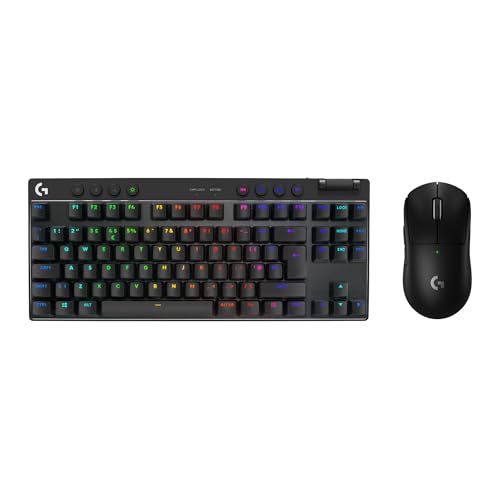
The Logitech G PRO X TKL LIGHTSPEED is the keyboard that professional esports players have used on tournament stages, and it translates that pedigree into an office gaming context with more grace than most flagship boards manage. The tenkeyless layout removes the numpad while retaining the full function row, navigation cluster, and arrow keys, making it the most complete layout for office work on this list without the bulk of a full-size board.
LIGHTSPEED wireless is Logitech's proprietary 2.4 GHz protocol, and it delivers a 1 ms report rate that is indistinguishable from wired in practice. For competitive gaming this matters, but for office use the more relevant benefit is the clean, cable-free desk that wireless enables. The battery life of up to 50 hours means most users will charge it once a week at most, and the keyboard charges via USB-C while remaining fully functional.
The GX switch range includes clicky Blue, tactile Brown, and linear Red options. For an office environment, the linear Red or tactile Brown variants are the sensible choices, as the clicky Blue switches are loud enough to draw complaints in a shared space. The tactile Brown offers a perceptible bump that aids typing accuracy without the sharp acoustic signature of a clicky switch, making it a reasonable all-day compromise.
Logitech G HUB software is the most mature companion application on this list: macro creation, per-key RGB customisation, and onboard profile storage are all handled through a polished interface that rarely crashes or requires workarounds. For office users who want to programme application-specific key bindings, such as different profiles for their IDE, their spreadsheet application, and their game, G HUB makes the process straightforward.
Build quality is exceptional: the aluminium top plate is rigid, the stabilisers are well-tuned from the factory, and the overall weight gives the board a planted feel on the desk. At this price point it is a significant investment, but the combination of tournament-proven performance, mature software, and wireless reliability justifies the outlay for serious office gamers.
Verdict: The most polished and reliable wireless gaming keyboard on this list, backed by mature software and a proven tournament track record, worth the premium for serious users.
Pros
- LIGHTSPEED 2.4 GHz wireless delivers a genuine 1 ms report rate, matching wired performance for competitive gaming
- Logitech G HUB software is the most mature and stable companion app on this list, with deep macro and profile support
- Up to 50-hour battery life means weekly charging is sufficient for most office and gaming schedules
Cons
- Price is significantly higher than the competition, making it hard to justify unless wireless latency and software depth are priorities
- No hot-swap sockets, so switch choice at purchase is permanent without soldering
The Razer Huntsman V3 Pro represents the most technologically advanced keyboard on this list, and arguably the most interesting development in gaming keyboard design in several years. Its analog optical switches do not simply register a keypress as a binary on/off event: they measure how far each key is pressed on a continuous scale, enabling analog input from a standard keyboard. In practice this means you can map partial keypresses to different actions, walk slowly in a game by pressing a movement key halfway, or sprint by pressing it fully, without needing a gamepad.
For office use, the analog capability is largely irrelevant during the working day, but the underlying optical switch technology delivers benefits that matter regardless of context. Optical actuation is faster than mechanical contact actuation because light travels faster than metal contact closure, and the switches have no physical contact points to wear down. The result is a keyboard that should maintain consistent performance for the entire lifespan of the product without the gradual degradation that affects conventional mechanical switches.
The full-size layout is the largest footprint on this list, which is a genuine consideration for office desks. If you have a wide desk and do not need to move your mouse far, the numpad is a useful addition for data entry and spreadsheet navigation. If desk space is at a premium, the full-size layout will feel intrusive. The wired USB-C connection is the other significant limitation for office use: cable management is required, and there is no wireless option on this model.
Razer Synapse software is comprehensive and well-maintained, with per-key actuation point adjustment, macro recording, and integration with a wide range of Razer peripherals. The Chroma RGB system is the most visually impressive on this list, with per-key addressable lighting and a library of effects that can be synchronised across Razer devices. For an office environment most users will set a single static colour, but the capability is there for those who want it.
Build quality is flagship-grade: the aluminium top frame is thick and rigid, the stabilisers are smooth, and the overall construction feels like a product that will outlast several generations of gaming hardware. At this price, the Huntsman V3 Pro is a long-term investment rather than an impulse purchase.
Verdict: The most technologically advanced keyboard on this list, best suited to office gamers who want analog input capability, optical switch longevity, and flagship build quality, and who do not mind a wired connection or a full-size footprint.
Pros
- Analog optical switches enable variable actuation depth for nuanced in-game movement control unavailable on any other keyboard here
- Optical actuation eliminates physical contact wear, offering exceptional long-term consistency for daily office and gaming use
- Razer Synapse software provides per-key actuation point adjustment and deep macro customisation
Cons
- Full-size layout occupies the largest desk footprint on this list, unsuitable for compact or shared office desks
- Wired only, requiring cable management that undermines a clean office desk setup
Buying Guide
Layout: How Much Keyboard Do You Actually Need?
The single most important decision for an office gaming keyboard is layout. Full-size boards include a numpad that is useful for data entry but adds roughly 15 cm to the keyboard's width, pushing your mouse further to the right and increasing shoulder strain during long gaming sessions. Tenkeyless boards remove the numpad while keeping every other key, which suits most office workers and all but the most dedicated spreadsheet users. The 75% layout removes the numpad and the Insert/Delete cluster but keeps the F-key row and arrow keys, offering the best balance of compactness and functionality for dual-purpose use. The 60% layout removes everything except the alphanumeric block and a handful of modifiers, which is the most gaming-focused choice and the most disruptive for heavy office work.
Switch Type: Noise, Feel, and Longevity
For office environments, linear switches are generally the quietest option, producing a smooth keystroke with no tactile bump and minimal acoustic signature. Tactile switches add a perceptible bump at the actuation point that aids typing accuracy without the sharp click of a clicky switch. Clicky switches are generally unsuitable for shared office spaces. Hall Effect magnetic switches, as found in the AULA WIN60 HE, offer the additional benefit of adjustable actuation depth and no physical contact wear. Analog optical switches, as found in the Razer Huntsman V3 Pro, offer similar longevity benefits with the added capability of variable actuation. For most office gamers, a good linear or tactile switch in a hot-swap board is the most flexible choice, since you can replace switches as your preferences evolve.
Wireless vs Wired
Wireless keyboards have closed the latency gap with wired to the point where only the most competitive esports players will notice a difference. For office gaming, the benefits of wireless, a cleaner desk, the ability to move the keyboard without unplugging, and compatibility with multiple devices via Bluetooth, outweigh the marginal latency disadvantage. Look for boards that offer both 2.4 GHz and Bluetooth connectivity, since 2.4 GHz is better for gaming and Bluetooth is better for pairing to secondary devices such as tablets or work laptops.
Software and Programmability
Companion software matters more for office gamers than for pure gamers, because the ability to create application-specific profiles, remap keys for productivity shortcuts, and adjust actuation points for different tasks adds genuine daily value. Logitech G HUB and Razer Synapse are the most mature options. Budget boards often ship with simpler software that covers the basics but lacks depth for power users.
Build Quality and Acoustics
Gasket-mounted keyboards absorb keystroke impact through silicone or foam gaskets between the PCB and the case, producing a softer, lower-pitched sound that is more office-appropriate than tray-mounted alternatives. Aluminium top plates add rigidity and a premium feel. Pre-lubed stabilisers on the spacebar and shift keys eliminate the rattle that makes cheap keyboards sound hollow. If acoustic comfort is a priority, look for boards that mention gasket mounting and pre-installed foam dampening in their specifications.
The AULA WIN60 HE is the overall winner for office gaming use. Its Hall Effect switches deliver adjustable actuation depth that suits both precise typing and fast gaming inputs, the 60% layout keeps the desk tidy and professional, and the price makes it accessible without compromising on the switch technology that sets it apart from conventional mechanical boards at the same price. For those who find the 60% layout too restrictive for daily office work, the AULA F75 Wireless is the best value upgrade, adding a full function row, triple-mode wireless, and hot-swap flexibility for under £70. Users who want the most polished ecosystem and the lowest wireless latency available should look at the Logitech G PRO X TKL LIGHTSPEED, accepting the higher price as the cost of tournament-grade reliability and mature software. The Razer Huntsman V3 Pro stands alone as the most technically innovative option, but its wired connection and full-size footprint limit its appeal for desk-sharing office environments.