Finding a gaming keyboard that doubles as a genuinely pleasant typing tool is harder than it sounds. Most boards are tuned for rapid actuation and RGB showmanship, leaving typists with mushy feedback, excessive noise, or layouts that sacrifice comfort for compactness. This year has brought a wave of hall-effect switches, analogue optical mechanisms, and improved wireless reliability that make the crossover between gaming performance and typing comfort more achievable than ever. Whether you work from home and game in the evenings, stream while answering emails, or simply want one keyboard that handles everything without compromise, the picks below cover the full spectrum from budget-friendly 60 per cent boards to premium tenkeyless flagships. Each has been assessed for key travel, actuation feel, build quality, connectivity options, and how well the typing experience holds up over long sessions, not just short gaming bursts.
Quick Verdict
Best Overall: SteelSeries Apex Pro TKL. Its adjustable OmniPoint switches let you dial in exactly the actuation point you want for typing or gaming, and the build quality is exceptional for long-term daily use.
Best Value: AULA WIN60 HE. Hall-effect magnetic switches at under fifty pounds deliver a smooth, consistent keystroke that punches well above its price bracket for typists on a budget.
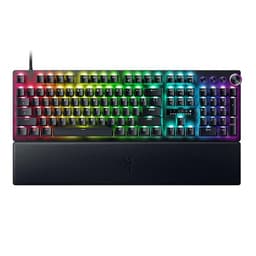
The SteelSeries Apex Pro TKL remains one of the most thoughtfully engineered keyboards for people who need to type seriously and game seriously in equal measure. Its headline feature is the OmniPoint 2.0 adjustable magnetic switch, which allows you to set the actuation point anywhere between 0.1 mm and 4.0 mm per key. For typing, most users find a setting around 1.5 mm to 2.0 mm gives a satisfying, deliberate keystroke that reduces accidental activations during fast typing. Drop it to 0.4 mm or lower for gaming and the board becomes extraordinarily responsive. This level of per-key customisation is genuinely rare and makes the Apex Pro TKL a board that adapts to you rather than the other way around.
The tenkeyless layout is the sweet spot for dual-use typists. You retain the full alphanumeric and function row, the navigation cluster, and the arrow keys, all of which matter enormously during document work, coding, or spreadsheet navigation. Losing the numpad frees up desk space for mouse movement without sacrificing the keys you actually need day to day. The aluminium alloy top frame feels premium and rigid, and the board sits firmly on any desk surface thanks to its substantial weight and well-designed rubber feet. The USB-C detachable cable is a practical touch, making it easy to pack away or swap between machines.
Typing sound is a subjective matter, but the Apex Pro TKL lands in a pleasant middle ground. The magnetic switches produce a clean, medium-pitched thock rather than the harsh clack of some optical boards, and the aluminium frame helps dampen resonance. SteelSeries includes a per-key OLED display strip and an OLED smart display on the top right, which some users find genuinely useful for macros and Discord notifications, and others consider unnecessary. The SteelSeries GG software is among the more polished in the gaming keyboard space, making remapping and actuation adjustment straightforward even for newcomers.
At its price point, the Apex Pro TKL is not cheap, but it is one of the few keyboards where the premium feels justified by functional advantage rather than branding alone. For anyone who types for several hours a day and games in the evenings, this is the board most likely to satisfy both demands without compromise.
Pros
- Per-key adjustable actuation from 0.1 mm to 4.0 mm suits both fast typing and precise gaming
- Aluminium frame and USB-C detachable cable make it durable and practical for daily use
- TKL layout retains navigation cluster and arrow keys essential for productivity
Cons
- Wired only, which limits flexibility for multi-device setups or clean desk arrangements
- OLED display strip adds cost without benefiting typing-focused users
The AULA WIN60 HE is a remarkable proposition for budget-conscious typists who also game. Hall-effect magnetic switches, which use magnets rather than physical contact to register keypresses, have traditionally been the preserve of mid-range and premium boards. AULA has brought that technology down to a price that makes it accessible to almost anyone, and the result is a switch feel that is noticeably smoother and more consistent than the membrane or basic mechanical switches found on most boards at this price.
Hall-effect switches offer two particular benefits for typists. First, they do not wear out in the same way as traditional mechanical contacts, meaning the keystroke feel remains consistent over millions of actuations. Second, many hall-effect implementations allow actuation point adjustment, so you can tune the sensitivity to match your typing style. The WIN60 HE supports rapid trigger functionality, which resets the actuation point dynamically and is beloved by competitive gamers for its responsiveness. For typists, the ability to set a slightly deeper actuation reduces accidental key presses during fast, flowing typing sessions.
The 60 per cent layout is the main caveat here. You lose the function row, navigation cluster, numpad, and arrow keys as dedicated keys, accessing them instead through function layer combinations. This is a significant adjustment for anyone accustomed to a full-size or tenkeyless layout, and it makes the WIN60 HE less suitable for heavy spreadsheet work or document editing where arrow keys and function shortcuts are used constantly. However, for typists who primarily work in a text editor, write code with keyboard shortcuts already memorised, or game in genres where the compact layout is advantageous, the trade-off is entirely worthwhile.
Build quality is solid for the price, with a reasonably rigid case and good stabilisers on the larger keys. The USB-C wired connection is reliable and the braided cable is a welcome inclusion. RGB lighting is present and customisable, though the software is more basic than premium alternatives. As a first hall-effect board or a secondary gaming and typing keyboard, the WIN60 HE is exceptional value.
Pros
- Hall-effect magnetic switches deliver smooth, consistent keystrokes at a budget price point
- Rapid trigger support benefits both competitive gaming and precise, fast typing
- USB-C wired connection with braided cable included
Cons
- 60 per cent layout removes dedicated arrow keys and function row, limiting productivity use cases
- Wired only with no wireless option for multi-device flexibility
- Software customisation is more limited than premium competitors
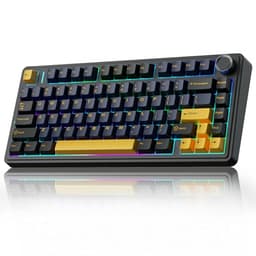
The EPOMAKER X AULA F75 MAX is the most feature-rich keyboard on this list relative to its price, and it makes a compelling case for the 75 per cent layout as the ideal form factor for typists who also game. The 75 per cent layout retains the function row, arrow keys, and a small navigation cluster in a footprint only marginally larger than a 65 per cent board. This means you get the keys that matter most for productivity without the full-size bulk, and the layout feels immediately familiar if you are transitioning from a standard keyboard.
What sets the F75 MAX apart from the standard AULA F75 is the addition of a TFT colour screen on the top right of the board, a rotary knob for volume and other controls, and a gasket-mount construction that gives the typing feel a softer, more cushioned quality than the typical top-mount or tray-mount designs. Gasket mounting is a feature usually found on boutique custom keyboards costing several times more, and its presence here meaningfully improves the typing experience by absorbing some of the impact from each keystroke and reducing the harsh, plasticky rebound that cheaper boards exhibit.
Connectivity is tri-mode: 2.4 GHz wireless for low-latency gaming, Bluetooth 5.0 for connecting to phones, tablets, or secondary computers, and USB-C wired for when you want a direct connection or need to charge. This flexibility is genuinely useful for typists who switch between a desktop gaming PC and a laptop for work. The hot-swap switch sockets allow you to change switches without soldering, which is ideal if you want to experiment with different switch types to find the perfect typing feel.
The TFT screen displays system stats, media information, or custom animations, and while it is not essential, it adds a premium feel. The rotary knob is practically useful for adjusting volume without interrupting typing flow. At its price point, the F75 MAX offers a level of build quality and feature density that is genuinely impressive, making it the strongest all-rounder for typists who want wireless flexibility and a refined feel.
Pros
- Gasket-mount construction provides a softer, more comfortable typing feel than typical budget boards
- Tri-mode connectivity covers 2.4 GHz, Bluetooth 5.0, and USB-C wired for multi-device use
- Hot-swap sockets allow switch experimentation without soldering
- Rotary knob and TFT screen add practical and visual value
Cons
- TFT screen and knob add complexity that may not appeal to minimalist users
- 75 per cent layout still omits the numpad, which matters for heavy numerical data entry
The AULA F75 Wireless shares its layout and general architecture with the EPOMAKER X AULA F75 MAX but strips back some of the premium additions to arrive at a slightly lower price while retaining the core features that make the 75 per cent form factor so appealing for dual-use typists. You still get the tri-mode wireless connectivity covering 2.4 GHz, Bluetooth 5.0, and USB-C wired, hot-swap switch sockets, and a rotary knob for volume control. What you lose compared to the MAX is the TFT colour screen and the gasket-mount construction, with the F75 using a more conventional mounting system.
The typing feel on the standard F75 is still very good for its price bracket. The switches available include several popular mechanical options with tactile or linear characteristics, and because the sockets are hot-swap compatible, you can replace them with whichever switches suit your typing preference. For typists who prefer a tactile bump to confirm each keystroke, a switch like the Gateron Brown or similar tactile variant works well in this board. For those who prefer a smooth, linear stroke, a linear switch keeps noise to a minimum in shared office or home environments.
The 75 per cent layout is one of the most typing-friendly compact formats available. The function row is present for shortcuts in productivity applications, the arrow keys are accessible without function layers, and the small navigation cluster handles page up, page down, home, and end, all of which are used constantly in document editing and coding. The rotary knob doubles as a media control and can be remapped in the accompanying software, which is a practical addition for anyone who switches frequently between music, video, and work applications.
Battery life in wireless mode is solid, with the board lasting several days of typical use between charges. The 2.4 GHz connection is reliable and low-latency enough for competitive gaming, while Bluetooth handles secondary device connections without issue. For typists who want wireless convenience, a sensible layout, and hot-swap flexibility without paying for features they do not need, the AULA F75 Wireless is a well-balanced choice.
Pros
- Tri-mode wireless with 2.4 GHz, Bluetooth 5.0, and USB-C covers most multi-device scenarios
- Hot-swap switch sockets allow easy switch changes to optimise typing feel
- 75 per cent layout retains function row and arrow keys for productivity use
Cons
- Standard mounting feels less premium than the gasket-mount found on the F75 MAX
- Software customisation interface is functional but not as polished as Logitech or SteelSeries equivalents
- No dedicated media keys beyond the rotary knob
Buying Guide
Layout: How Much Keyboard Do You Actually Need?
The layout you choose has a bigger impact on your daily typing experience than almost any other factor. Full-size keyboards with numpads are ideal if you work with numbers regularly, but they push your mouse further to the right, which can cause shoulder strain over long sessions. Tenkeyless boards remove the numpad and bring the mouse closer in, which most typists find more ergonomically comfortable without losing any keys they actually use day to day. The 75 per cent layout is a further reduction that removes the gap between the function row and the main cluster, creating a more compact footprint while retaining arrow keys and a small navigation cluster. The 60 per cent layout is the most compact option and is popular with gamers for its minimal desk footprint, but it requires function layer combinations to access arrow keys and the function row, which adds friction for productivity work.
Switch Type: The Single Biggest Factor in Typing Feel
If you are buying a mechanical keyboard primarily for typing comfort, the switch is the most important decision you will make. Tactile switches provide a physical bump partway through the travel to confirm actuation without requiring you to bottom out the key, which reduces finger fatigue and improves accuracy for touch typists. Clicky switches add an audible click to the tactile bump, which many typists find satisfying but which can be disruptive in shared spaces. Linear switches have a smooth, consistent travel with no bump or click, which suits gamers and typists who prefer a fluid, quiet keystroke. Hall-effect and analog optical switches add the ability to adjust the actuation point digitally, giving you greater control over how the switch behaves for different tasks.
Wireless vs Wired: Practical Considerations
Wireless keyboards have improved dramatically in recent years. Modern 2.4 GHz implementations from reputable manufacturers offer latency figures that are imperceptible in both gaming and typing contexts. Bluetooth is useful for connecting to secondary devices such as tablets or laptops but typically has slightly higher latency than 2.4 GHz. If you game competitively, 2.4 GHz or wired is preferable. If you primarily type and game casually, Bluetooth tri-mode boards offer the most flexibility. Battery life varies considerably: most wireless keyboards last between three days and several weeks depending on RGB usage and polling rate settings.
Build Quality and Stabilisers
The rigidity of the keyboard frame affects how stable the typing platform feels under your fingers. Aluminium frames are heavier and more rigid than plastic, which many typists prefer for the solid, planted feel. Gasket-mount construction, where the switch plate is suspended on silicone or foam gaskets rather than screwed directly to the case, produces a softer, more cushioned typing feel that reduces finger fatigue during long sessions. Stabilisers on the spacebar, shift, enter, and backspace keys should be smooth and rattle-free. Poor stabilisers are one of the most common complaints about budget keyboards and can make an otherwise good board feel cheap and imprecise.
Software and Customisation
For typists who want to remap keys, create macros, or adjust actuation points on hall-effect and analog optical boards, software quality matters. The best implementations allow per-key customisation, onboard memory storage so your settings travel with the board, and clear interfaces that do not require a degree in engineering to navigate. If you prefer a plug-and-play experience without software dependencies, look for boards that work well with default settings out of the box.
For most typists who also game, the SteelSeries Apex Pro TKL is the overall winner. Its per-key adjustable OmniPoint switches are a genuinely unique feature that allows you to optimise the actuation point for typing comfort and then shift it for gaming precision, all within the same board. The tenkeyless layout covers every key needed for serious productivity work, the aluminium build is durable and premium, and the typing sound is pleasant without being intrusive. It is not the cheapest option, but it is the one most likely to satisfy across the widest range of typing and gaming scenarios without asking you to compromise on either. For those on a tighter budget, the AULA WIN60 HE delivers hall-effect switch technology at a price that makes it one of the most impressive value propositions in the gaming keyboard market today.