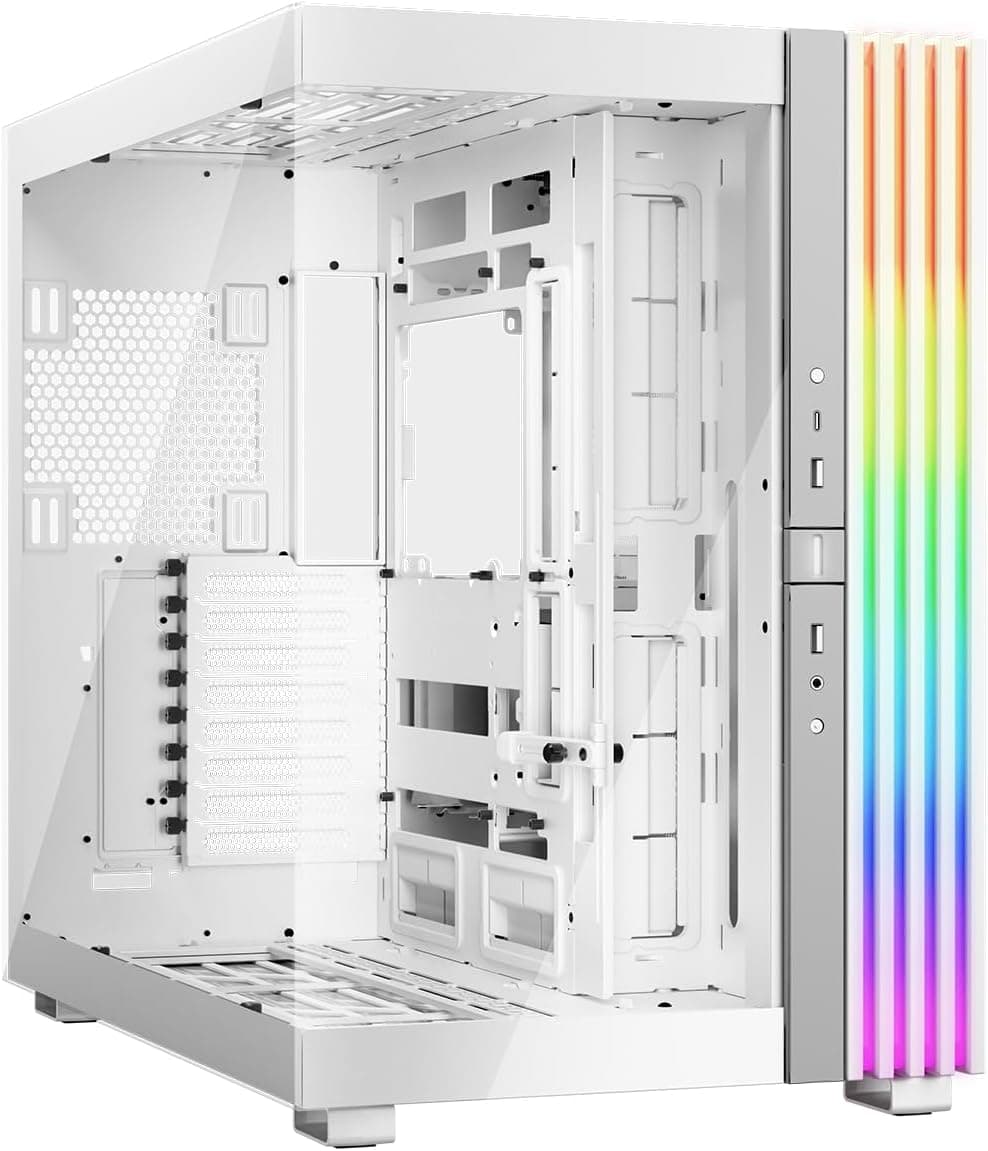
The case you pick for a build is the one thing you'll stare at on your desk every single day. Not the GPU. Not the CPU. The case. So it needs to do two things well: look decent, and not make the build itself a miserable experience. The MSI MAG PANO 110R PZ WHITE - Mid-tower Gaming PC Case - Supports up to 400 mm GPU in length, Removable Dust Filters, USB 20Gbps (Type-C), Back-connect ATX & Micro-ATX Motherboard support. is pitching itself squarely at the budget-to-mid crowd who want a panoramic glass look, ARGB fans out of the box, and enough clearance to fit a proper GPU without immediately hitting a wall. At this price tier, the spec sheet is actually pretty interesting.
MSI has been pushing the PANO line as their answer to the "I want to see my components" crowd, and the 110R PZ WHITE does lean hard into that brief. Four pre-installed 120mm ARGB fans, support for up to ten fans total, panoramic glass panels, and back-connect motherboard support are all features you'd normally expect to pay noticeably more for. The 51 owner reviews averaging ★★★★½ (4.6) suggest most buyers are genuinely happy with what they got. That's a solid signal, though it doesn't tell the whole story, so let's look at what the specs actually mean in practice.
What's worth flagging upfront is the back-connect motherboard support. This is a relatively new form factor standard that hides all your motherboard power and data cables on the rear side of the board itself, leaving the front of the case looking absurdly clean. If you're building on a standard ATX board, you'll still be fine, but if you're eyeing an ATX back-connect board like those from MSI's own Project Zero range, this case is specifically designed with that in mind. That's a genuine differentiator at this price point.
Core Specifications
The MSI MAG PANO 110R PZ WHITE - Mid-tower Gaming PC Case - Supports up to 400 mm GPU in length, Removable Dust Filters, USB 20Gbps (Type-C), Back-connect ATX & Micro-ATX Motherboard support. is a mid-tower chassis with support for standard ATX, Micro-ATX, Mini-ITX, and back-connect ATX and Micro-ATX motherboards. GPU clearance sits at 400mm, which is generous enough to accommodate virtually every current consumer card on the market. The front I/O includes a USB Type-C port running at 20Gbps, which is a proper USB 3.2 Gen 2x2 speed spec rather than the slower 10Gbps you often see on cheaper cases.
Fan support is one of the headline numbers here. Up to ten fans can be installed, and the case ships with four 120mm ARGB fans already in place at the side and rear panels. That's a meaningful head start for anyone who doesn't want to spend extra on fans immediately. Dust filtration is handled by removable filters on the top and bottom, which is the correct approach. Magnetic filters that you can yank off and tap clean over a bin are far more useful than fixed mesh that you have to hoover around.
The SSD bracket uses a tool-less design, and the HDD cage is adjustable, giving you some flexibility depending on what storage configuration you're running. These are small details but they matter when you're actually in the middle of a build and don't want to be hunting for a screwdriver just to slot in a drive. The overall spec for the price tier is genuinely competitive, which is part of why the owner ratings are as high as they are.
| Specification | Detail |
|---|---|
| Form Factor | Mid-Tower |
| Motherboard Support | ATX, Micro-ATX, Mini-ITX, Back-connect ATX, Back-connect Micro-ATX |
| Max GPU Length | 400mm |
| Included Fans | 4 x 120mm ARGB (side and rear) |
| Max Fan Support | Up to 10 fans |
| Front I/O USB-C | USB 20Gbps (Type-C) |
| Dust Filters | Removable, top and bottom |
| Drive Mounting | Tool-less SSD bracket, adjustable HDD cage |
| Colour | White |
| Current Price | £59.99 |

Form Factor and Dimensions
Mid-tower is the right call for most people. It's the sweet spot between a full-tower that takes up half your desk and a small form factor case that makes cable management feel like keyhole surgery. The PANO 110R PZ WHITE sits in that comfortable middle ground where you can fit a full ATX board, a long GPU, a decent air cooler or a 240mm or 360mm AIO, and still have the case fit under most desks or on a standard desk surface without dominating the space entirely.
The white finish is a practical choice if you're going for a clean aesthetic build. White cases have become genuinely popular over the last few years, and MSI's execution here looks tidy in the product images. The panoramic glass panels are the visual centrepiece, giving you a clear view of those pre-installed ARGB fans and whatever components you put inside. It's the kind of case that rewards you for spending a bit extra on RGB RAM and a decent cooler, because you're going to see all of it.
In terms of desk footprint, mid-towers in this class typically sit around 400 to 450mm tall, 200 to 220mm wide, and 400 to 450mm deep. MSI hasn't published exact chassis dimensions in the product listing, so I won't invent numbers, but you can expect it to behave like a standard mid-tower in terms of space requirements. It'll fit comfortably on a desk or on the floor next to one. Nothing unusual to worry about there.
Motherboard Compatibility
The MSI MAG PANO 110R PZ WHITE - Mid-tower Gaming PC Case - Supports up to 400 mm GPU in length, Removable Dust Filters, USB 20Gbps (Type-C), Back-connect ATX & Micro-ATX Motherboard support. covers the full standard range: ATX, Micro-ATX, and Mini-ITX. That handles the vast majority of builds people are actually doing. But the more interesting compatibility here is the back-connect ATX and Micro-ATX support, which is where this case starts to stand out from similarly priced competition.
Back-connect motherboards, sometimes called BTF (Back to Front) or Project Zero boards depending on the brand, route all the power connectors and data cables through the back of the PCB rather than the front. The result is a completely clean front-facing motherboard with no cable clutter whatsoever. MSI's own Project Zero lineup is the obvious pairing here, and the case is clearly designed with that ecosystem in mind. If you're building on a standard ATX board, you'll still get the panoramic glass look, but you won't get that ultra-clean no-visible-cables aesthetic without a back-connect board.
For Mini-ITX builds, the case will work, but you're obviously paying for space you won't use. Mini-ITX in a mid-tower is a bit like using a full-size van to move a single flatpack shelf. It's fine, it works, but there are better-sized options if ITX is your primary goal. Where the 110R PZ WHITE makes the most sense is paired with a full ATX or back-connect ATX board where you can actually use the full internal volume and take advantage of the ten-fan support ceiling.
GPU Clearance
Four hundred millimetres of GPU clearance is the headline spec here, and it's a good one. To put that in context, the RTX 5090 Founders Edition from NVIDIA measures around 336mm in length, the RTX 5080 comes in at around 304mm, and even the chunkier AIB triple-fan versions of current flagship cards rarely exceed 380mm. So 400mm of clearance means you're covered for essentially anything on the market right now, with room to spare.
What 400mm clearance also means is that you're not going to be in that frustrating situation where you buy a case, buy a GPU, and then discover they won't both fit without removing the HDD cage or doing some creative cable routing. That's a genuinely annoying experience and it happens more often than it should at this price tier. MSI has been sensible here and given the case enough room to breathe for current and near-future GPU generations.
There's no mention of a vertical GPU mount option in the spec sheet, so I won't claim one exists. If showing off your GPU's cooler shroud through the glass is important to you, check the product listing carefully for any vertical riser bracket compatibility before assuming it's there. What is confirmed is the standard horizontal mounting with 400mm of clearance, which is what most people will use anyway. And honestly, for a case at this price point, 400mm horizontal clearance is exactly what you want to see.
CPU Cooler Clearance
MSI hasn't published a specific maximum CPU cooler height figure in the product listing, so I'm not going to invent one. What I can tell you is that mid-towers in this class and footprint typically accommodate air coolers up to around 155mm to 165mm in height, which covers most popular tower coolers including the Noctua NH-D15S, be quiet! Dark Rock Pro 5, and similar high-end air options. But until MSI publishes a confirmed clearance figure, treat that as a general guideline rather than a guarantee, and check the spec sheet directly before ordering a chunky cooler.
For AIO liquid cooling, the case supports up to ten fans total, and with four 120mm fans already installed at the side and rear, there's clearly provision for radiator mounting. The product listing mentions fans at the side and rear panels specifically for the pre-installed units. A 240mm or 360mm radiator at the front or top is the typical configuration for mid-towers in this class, and the generous fan count ceiling suggests MSI has designed the chassis with AIO builds in mind.
The airflow optimisation focus, particularly around the lower and back chamber venting, suggests the case is designed to work well with both air and liquid cooling setups. If you're running a 360mm AIO at the front with the four included fans handling rear and side exhaust, you've got a solid thermal foundation without spending a penny extra on additional fans. That's actually a pretty compelling starting point for a build at this price tier, and it's one of the things owner reviews highlight positively.
Storage Bay Options
The tool-less SSD bracket is a detail that sounds minor but genuinely improves the build experience. Traditional SSD mounting involves screwing the drive into a bracket, then screwing the bracket into the case, and if you're doing this in a tight space with a long screwdriver and slightly awkward angles, it gets old fast. Tool-less means you click the drive in, it's done, and you move on. More cases should do this.
The adjustable HDD cage adds flexibility for people who are still running mechanical drives alongside their SSDs. Whether that's a large media drive, a backup drive, or just an older drive you're migrating data off, having a cage you can reposition means you're not locked into a fixed layout that might conflict with your GPU clearance or cable routing. It's a thoughtful touch and suggests MSI has considered that not everyone is running a pure NVMe setup.
Specific drive bay counts aren't detailed in the product listing beyond the SSD bracket and HDD cage, so I won't speculate on exact numbers. What's clear is that the design philosophy leans toward flexibility rather than a fixed, rigid internal layout. For most modern builds that are primarily NVMe-based with maybe one or two additional drives, this approach works well. If you're building a NAS-style system with six or eight mechanical drives, this isn't the right case for that, but that's not really who the PANO 110R PZ WHITE is aimed at anyway.

Cable Management
Cable management is where mid-tower cases at this price often let you down. You get a PSU shroud, maybe a few cable tie points, and then a rear panel that's only 15mm deep with no real organisation. The PANO 110R PZ WHITE's back-connect motherboard support is actually the most interesting cable management story here, because if you're using a back-connect board, a significant chunk of your cable management problem simply disappears. The 24-pin ATX power, the CPU EPS cables, and all your SATA and fan headers go through the back of the board, leaving the front chamber almost entirely clean.
For standard ATX builds, you're working with conventional cable routing through grommeted pass-throughs in the motherboard tray. The tool-less SSD bracket helps keep the storage area tidy, and the adjustable HDD cage means you can position drives in a way that doesn't fight with your cable runs. MSI doesn't specify exact rear panel depth or the number of Velcro strap points in the product listing, so I can't give you precise figures there, but the overall design intent is clearly aimed at clean builds.
The panoramic glass panels mean your cable management is on display from multiple angles, which is both an incentive and a pressure. You will want to route cables properly in this case, because you'll be able to see the mess if you don't. That's actually a feature in disguise. Cases that show everything tend to encourage neater builds, and neater builds are easier to work on when you need to swap components later. Owner reviews don't flag cable management as a major frustration, which suggests the routing options are at least adequate for the price point.
Airflow and Thermal Design
This is where the PANO 110R PZ WHITE makes its strongest argument. Four pre-installed 120mm ARGB fans is a genuinely good starting point at this price tier. Many cases in this bracket ship with one or two fans, or none at all, leaving you to budget for additional airflow separately. MSI has positioned those four fans at the side and rear panels, which sets up a reasonable intake and exhaust configuration out of the box.
The ten-fan ceiling is the other big number. That's enough mounting positions to run a full front intake array (three 120mm fans), a top exhaust array (three 120mm fans), rear exhaust (one 120mm), and still have positions left over for side panel or bottom mounting. In practice, most builds won't use all ten positions, but having the headroom means you can scale your cooling as your build evolves. The increased venting around the lower and back chamber is specifically designed to enhance heat dissipation in those zones, which is where a PSU and the underside of a GPU tend to generate heat.
The panoramic glass panels are the one airflow compromise worth acknowledging. Glass doesn't breathe. A solid glass side panel means your intake air has to come from somewhere else, typically the front, bottom, or top. The pre-installed fans and the ventilation design around the lower chamber suggest MSI has accounted for this, routing intake air through filtered vents rather than relying on a mesh side panel. The removable dust filters on the top and bottom are a proper solution here, not an afterthought. Pull them out, tap them clean, put them back. That's how dust filters should work, and it's good to see them on both surfaces where dust ingestion is most likely. Fan placement and airflow direction matter more than fan count alone, and the PANO 110R PZ WHITE's layout seems to have been thought through rather than just bolted together.
Front I/O and Connectivity
The USB 20Gbps Type-C port is the standout spec on the front I/O panel. USB 3.2 Gen 2x2 at 20Gbps is the current top-end for single-connector USB speeds, and it's genuinely useful for fast external SSDs, high-speed docks, and modern peripherals. A lot of cases at this price tier either skip the Type-C entirely or include a slower 10Gbps version. MSI has gone with the faster spec, which is the right call and one that future-proofs the front I/O against increasingly fast external storage.
The USB 3.2 Gen 2x2 standard does require your motherboard to have a compatible internal header to deliver the full 20Gbps speed. Most current mid-range and high-end ATX motherboards include this header, but if you're pairing the case with an older or budget board, check your motherboard spec sheet before assuming you'll get the full speed. The port will still work at a lower speed if the header isn't present, but you won't get the headline 20Gbps figure.
Beyond the USB-C, the product listing doesn't detail every front I/O port, so I won't invent a specific port count or audio jack configuration. What's confirmed is the 20Gbps Type-C, which is the most important single front I/O spec to get right. The power button placement and overall front panel layout appear clean based on the product imagery, with controls positioned logically for desktop use. Owner reviews don't flag front I/O as a pain point, which is generally a good sign that the basics are sorted.
Build Quality and Materials
At the entry price tier, build quality is always the question. You're not getting aircraft-grade aluminium panels and perfectly machined tolerances. But you don't need that. What you need is steel that doesn't flex worryingly when you push on it, panels that align properly when you close them, and no sharp edges that draw blood during the build. The ★★★★½ (4.6) average from 51 owners is a reasonable indicator that MSI has cleared that bar, because build quality complaints tend to be the first thing people mention in negative reviews and they're notably absent from the feedback pattern here.
The white finish on the exterior is worth thinking about practically. White cases show dust and fingerprints more than black ones. The removable dust filters on the top and bottom will help with internal dust accumulation, but the exterior panels will need a wipe-down more regularly if you're fussy about presentation. That's not a flaw, it's just the reality of white cases, and it's worth knowing before you commit.
The tool-less SSD bracket and the adjustable HDD cage are both indicators of a design team that's thought about the build experience rather than just the external appearance. These are the kinds of details that don't show up in marketing photos but make a real difference when you're actually assembling the system. The panoramic glass panels need to be handled with care during the build, as glass panels at this price tier are typically tempered but not thick enough to be cavalier with. Take them off before you start, put them somewhere safe, and reattach them once the build is done. Standard practice, but worth saying.
How It Compares
The obvious competition at this price tier includes the Corsair 4000D Airflow and the NZXT H5 Flow. Both are well-regarded mid-towers with strong airflow credentials and solid build quality. The Corsair 4000D Airflow is a known quantity with a mesh front panel that delivers excellent thermal performance, but it ships with only two fans and doesn't offer back-connect motherboard support. The NZXT H5 Flow has a cleaner aesthetic and decent cable management, but again, no back-connect support and a more limited fan configuration out of the box.
Where the PANO 110R PZ WHITE differentiates itself is the combination of four pre-installed ARGB fans, back-connect motherboard compatibility, and the 20Gbps USB-C front I/O. That's a genuinely strong feature set for the price. The panoramic glass aesthetic is also more visually ambitious than either competitor, which will appeal to builders who want their system to look like something rather than just a functional box.
The trade-off is that panoramic glass panels mean less natural airflow through the side panel compared to a mesh-front case like the 4000D Airflow. If pure thermal performance is your absolute top priority and aesthetics are secondary, the Corsair is probably the safer thermal bet. But for most real-world gaming builds where temperatures are managed well within safe limits regardless of case, the PANO 110R PZ WHITE's broader feature set and visual appeal make it a compelling alternative.
| Feature | MSI MAG PANO 110R PZ WHITE | Corsair 4000D Airflow | NZXT H5 Flow |
|---|---|---|---|
| Form Factor | Mid-Tower | Mid-Tower | Mid-Tower |
| Max GPU Length | 400mm | 360mm | 365mm |
| Included Fans | 4 x 120mm ARGB | 2 x 120mm | 2 x 120mm |
| Max Fan Support | 10 | 6 | 6 |
| Front I/O USB-C | 20Gbps | 10Gbps | 10Gbps |
| Back-Connect Support | Yes | No | No |
| Dust Filters | Top and bottom, removable | Top and bottom | Top and bottom |
| Price Tier | Entry | Entry/Mid | Entry/Mid |

Final Verdict
The MSI MAG PANO 110R PZ WHITE - Mid-tower Gaming PC Case - Supports up to 400 mm GPU in length, Removable Dust Filters, USB 20Gbps (Type-C), Back-connect ATX & Micro-ATX Motherboard support. is a case that punches noticeably above its price tier on paper. Four ARGB fans included, ten-fan ceiling, 400mm GPU clearance, back-connect motherboard support, and a 20Gbps USB-C port are all specs you'd expect to pay more for. The 4.6 average from real owners backs up the idea that the execution matches the spec sheet, which isn't always a given at this price point.
Who should buy this? Builders who want a visually impressive white ARGB system without spending a fortune on fans and front I/O separately. Anyone eyeing a back-connect ATX build, particularly with MSI's own Project Zero boards, will find this case is essentially purpose-built for that use case. And if you're putting together a first proper gaming PC and want something that looks the part from day one, the four pre-installed ARGB fans and panoramic glass make that very achievable without a big fan budget on top.
Who should skip it? Thermal absolutists who want a mesh front panel and maximum airflow above all else would be better served by the Corsair 4000D Airflow. The glass panels are a visual choice that comes with a small airflow trade-off, and if you're running a high-end CPU and GPU combination and you're genuinely worried about case temperatures, mesh is the safer option. Similarly, if you don't care about ARGB lighting and just want a clean, functional case, you're paying for fans you'll probably turn off, and a simpler option might suit you better.
Overall, this is a well-thought-out case for the money. It's not perfect, but nothing at this price is. The back-connect support and the 20Gbps USB-C are genuine forward-looking features that competitors at similar prices haven't matched. The four included ARGB fans mean you're not immediately spending extra to make the system look and perform as advertised. That's a solid value proposition, and the owner feedback confirms it's not just good on paper.
What works. What doesn’t.
5 + 3What we liked5 reasons
- Four 120mm ARGB fans included out of the box
- 400mm GPU clearance covers all current flagship cards
- 20Gbps USB Type-C front I/O is ahead of the competition at this price
- Back-connect ATX and Micro-ATX motherboard support is a genuine differentiator
- Removable dust filters on top and bottom, tool-less SSD bracket
Where it falls3 reasons
- Panoramic glass panels limit side-panel airflow versus mesh alternatives
- White exterior shows dust and fingerprints more readily
- CPU cooler height clearance not officially specified in the listing
Full specifications
11 attributes| Form factor | Mid-Tower |
|---|---|
| CPU cooler clearance MM | 160 |
| Dimensions MM | 420 x 225 x 485 |
| Fans included | 4 |
| GPU clearance MM | 400 |
| MAX FAN count | 10 |
| MAX radiator MM | 360 |
| Pcie slots | 7 |
| PSU support | ATX up to 200mm |
| Side panel | tempered glass |
| Supported motherboard | ATX, Micro-ATX, Mini-ITX |
If this isn’t right for you
2 options

Frequently asked
5 questions01Is the MSI MAG PANO 110R PZ WHITE - Mid-tower Gaming PC Case - Supports up to 400 mm GPU in length, Removable Dust Filters, USB 20Gbps (Type-C), Back-connect ATX & Micro-ATX Motherboard support. good for airflow?+
It's decent but not a pure airflow case. The panoramic glass panels mean the side panel doesn't breathe, so intake air comes from the front, bottom, and top vents. The case ships with four 120mm ARGB fans pre-installed at the side and rear, and supports up to ten fans total, giving you a solid baseline for thermal management. Removable dust filters on the top and bottom keep intake air clean. For most gaming builds running mid-range to high-end components, the airflow setup is more than adequate. If you're pushing extreme thermals and want every last degree of cooling headroom, a mesh-front case like the Corsair 4000D Airflow will outperform it, but for the vast majority of real-world builds, the PANO 110R PZ WHITE's thermal design is well sorted.
02What's the GPU clearance on the MSI MAG PANO 110R PZ WHITE - Mid-tower Gaming PC Case - Supports up to 400 mm GPU in length, Removable Dust Filters, USB 20Gbps (Type-C), Back-connect ATX & Micro-ATX Motherboard support.?+
The case supports GPUs up to 400mm in length. That covers essentially every current consumer graphics card on the market, including triple-fan AIB versions of the RTX 5090 and RX 9070 XT, which typically measure between 320mm and 380mm. You have real headroom here and shouldn't run into clearance issues with any current or near-future GPU generation. Standard horizontal GPU mounting is confirmed; check the product listing for any vertical mount riser bracket compatibility if that's important to your build.
03Can the MSI MAG PANO 110R PZ WHITE - Mid-tower Gaming PC Case - Supports up to 400 mm GPU in length, Removable Dust Filters, USB 20Gbps (Type-C), Back-connect ATX & Micro-ATX Motherboard support. fit a 360mm AIO?+
The case supports up to ten fans total and has pre-installed fans at the side and rear panels, suggesting multiple radiator mounting positions. A 360mm AIO at the front or top is a typical configuration for mid-towers in this class, and the case's fan ceiling and ventilation design indicate it's built with AIO builds in mind. MSI hasn't published exact radiator mounting dimensions in the product listing, so confirm front and top radiator clearances with the full spec sheet before ordering a specific AIO. A 240mm AIO is almost certainly supported without issue at either the front or top position.
04Is the MSI MAG PANO 110R PZ WHITE - Mid-tower Gaming PC Case - Supports up to 400 mm GPU in length, Removable Dust Filters, USB 20Gbps (Type-C), Back-connect ATX & Micro-ATX Motherboard support. easy to build in?+
Owner feedback and design features both point to a positive build experience. The tool-less SSD bracket means you're not hunting for a screwdriver to mount your storage drives. The adjustable HDD cage gives you flexibility to position mechanical drives around your cable runs and GPU clearance needs. Back-connect motherboard support, if you're using a compatible board, dramatically simplifies cable management by routing power and data cables through the rear of the PCB. For standard ATX builds, conventional cable routing applies, but the design intent is clearly aimed at clean, accessible builds. The 4.6 out of 5 average from 51 owners, with no notable build-experience complaints in the feedback pattern, supports this.
05What warranty and returns apply to the MSI MAG PANO 110R PZ WHITE - Mid-tower Gaming PC Case - Supports up to 400 mm GPU in length, Removable Dust Filters, USB 20Gbps (Type-C), Back-connect ATX & Micro-ATX Motherboard support.?+
Amazon offers 30-day hassle-free returns if the case doesn't suit your build. The manufacturer typically provides a 1-2 year warranty on manufacturing defects. Check the product listing for exact warranty terms.