You've picked your CPU, your RAM, your case, your GPU. Everything's sorted. Then you get to the motherboard and suddenly you're down a rabbit hole of chipset tiers, VRM phase counts, and PCIe generation numbers at eleven o'clock on a Tuesday night. The MSI B840 Gaming Plus WiFi is aimed squarely at builders who want to stop that spiral and just get a decent AM5 board without spending a fortune. The question is whether it actually delivers, or whether it's the kind of "budget" board that quietly lets you down six months later.
The short answer: it's a genuinely solid entry-level AM5 motherboard with a respectable VRM setup, Wi-Fi 7, and three M.2 slots, priced in the budget bracket. It won't overclock your CPU (the B840 chipset doesn't allow it), and the primary PCIe slot runs at Gen 4 rather than Gen 5. For most builders pairing this with a Ryzen 7000 or 9000 series processor for gaming or everyday use, those limitations are largely irrelevant. For the minority who need more, there are better options. We'll get to all of it.
Owner feedback backs this up. Across 89 reviews it sits at ★★★★☆ (4.3), which for a budget board is a decent signal. Most complaints are about BIOS learning curves rather than hardware failures, which is exactly the pattern you want to see.
Core Specifications
The MSI B840 Gaming Plus WiFi is an ATX board built on AMD's B840 chipset, using the AM5 socket. It supports DDR5 memory across four DIMM slots, with overclocked speeds reaching 8200+ MT/s in the right conditions. The primary GPU slot is a PCIe 4.0 x16, reinforced with Steel Armor. Storage is covered by three M.2 slots: one M.2 Gen4 x4 running at 64 Gbps, one M.2 Gen4 x2 at 32 Gbps, and a third slot (check MSI's spec page for exact generation on the third). Networking includes Wi-Fi 7 with Bluetooth 5.4 and 2.5G LAN. Rear I/O includes USB 10 Gbps Type-C and 7.1 HD Audio with Audio Boost.
The VRM is a 12 Duet Rail Power System using P-PAK topology, which is MSI's way of saying each "phase" uses paired MOSFETs for better efficiency and thermal performance. Cooling on those MOSFETs uses 7W/mK thermal pads, which is a higher thermal conductivity rating than you'd normally expect at this price point. There's also an extended heatsink covering the VRM area and a chipset heatsink. The M.2 slots are protected by MSI's EZ M.2 Shield Frozr II, which handles thermal throttling on your NVMe drives.
The board also includes a combination fan header rated at 3A that can handle both pump and system fan duties. That's a practical touch for anyone running an AIO cooler without wanting to use a separate pump header adapter. Here's the full spec breakdown:
| Specification | Detail |
|---|---|
| Form Factor | ATX |
| Socket | AM5 |
| Chipset | AMD B840 |
| CPU Support | AMD Ryzen 9000 / 8000 / 7000 |
| Memory Slots | 4 x DDR5 DIMM (SMT) |
| Memory Speed (OC) | 8200+ MT/s |
| Primary PCIe Slot | PCIe 4.0 x16 (Steel Armor) |
| M.2 Slots | M.2 Gen4 x4 (64 Gbps), M.2 Gen4 x2 (32 Gbps), plus third M.2 slot |
| M.2 Cooling | EZ M.2 Shield Frozr II |
| Wi-Fi | Wi-Fi 7 |
| Bluetooth | 5.4 |
| LAN | 2.5G |
| Rear USB | USB 10 Gbps Type-C |
| Audio | 7.1 HD Audio with Audio Boost |
| VRM | 12 Duet Rail Power System (P-PAK) |
| MOSFET Thermal Pads | 7W/mK |
| Fan Header | Combo-fan header (pump and system, 3A) |
| Price | £114.99 |

Socket and CPU Compatibility
The B840 Gaming Plus WiFi uses AMD's AM5 socket, which is the current-generation platform for Ryzen 7000, 8000, and 9000 series processors. AM5 uses LGA-style contacts on the motherboard rather than the CPU (unlike the old AM4 pin-in-socket design), so there's no risk of bending pins on your processor. AMD has committed to AM5 support through at least 2027, which means this board should accommodate a few generations of upgrades before the platform goes stale.
Ryzen 7000 series CPUs (Zen 4) work out of the box on most B840 boards, but if you're planning to drop in a Ryzen 9000 series chip, check whether the board ships with a BIOS version that supports it. MSI provides BIOS updates via their website, and there's a BIOS Flashback-style update process available. If you're buying a Ryzen 9000 CPU alongside this board, it's sensible to confirm the shipped BIOS version supports your chip before assuming it'll POST first time. MSI's support pages list compatible BIOS versions for each CPU.
One thing to be clear about: the B840 chipset does not support CPU overclocking. You can run AMD's EXPO memory profiles and push your RAM speeds, but the CPU multiplier is locked. If you're buying a Ryzen 9 9900X or similar and want to squeeze extra clock speed out of it manually, this isn't the right platform. You'd need a B850 or X870 board for that. For the majority of users running stock or PBO (Precision Boost Overdrive, which B840 does support), that's not a meaningful restriction in practice. PBO lets the CPU boost intelligently within AMD's own parameters, and in gaming workloads you'll rarely notice the difference versus manual overclocking on a mid-range chip.
Chipset Features
The AMD B840 chipset sits at the entry point of AMD's current AM5 lineup. It's the no-frills option: you get the AM5 socket, DDR5 support, and a reasonable allocation of PCIe and USB lanes, but without the premium features of B850 or X870. The key practical difference is that the primary PCIe x16 slot runs at PCIe Gen 4 rather than Gen 5. For gaming in 2026, that's genuinely not a problem. Current GPUs don't saturate PCIe Gen 4 x16 bandwidth, and you won't find a measurable gaming performance difference between a GPU in a Gen 4 slot versus a Gen 5 slot on any current title.
What B840 also doesn't offer is CPU overclocking support. The chipset locks the CPU multiplier, so you're running at AMD's rated boost clocks. As mentioned, PBO still works, which lets the CPU self-manage its boost behaviour within thermal and power limits. For a gaming or productivity build where you're not planning to run your CPU at 1.35V with custom cooling, this is a non-issue. The chipset still provides enough USB and PCIe lanes to run a full ATX build without compromise on connectivity.
Where B840 does hold its own is in the supporting feature set MSI has built around it. Wi-Fi 7, 2.5G LAN, three M.2 slots, and a 12-phase VRM on a budget chipset board is a reasonable package. MSI has clearly put the component budget into the parts that matter for day-to-day reliability rather than into chipset tier bragging rights. That's the right call at this price point, even if it means the spec sheet doesn't read as impressively as a B850 or X870 board.
VRM and Power Delivery
This is where the B840 Gaming Plus WiFi genuinely surprises. Budget boards often cut corners on VRM quality because most buyers don't know to look for it, and it doesn't show up in marketing screenshots. MSI has gone with a 12 Duet Rail Power System using P-PAK MOSFETs. The "Duet Rail" design pairs MOSFETs in a way that improves current handling and reduces heat per component. It's the same Core Boost architecture MSI uses on higher-end boards, not a stripped-back budget implementation.
The thermal solution on the VRM is equally reassuring. The 7W/mK MOSFET thermal pads are high-conductivity, meaning heat transfers efficiently from the MOSFETs to the heatsink rather than building up in the components themselves. MSI also adds extra choke thermal pads and an extended heatsink that covers more of the power delivery area than you'd typically find on a board at this price. The practical upshot is that even a Ryzen 9 9900X running sustained workloads shouldn't cause VRM thermal throttling on this board.
There's also a chipset heatsink, which some budget boards skip entirely. The combination fan header rated at 3A is a small but useful addition. AIO pump headers on budget boards are sometimes rated at 1A, which can cause pump speed issues with certain coolers. The 3A rating here gives you more headroom. Owner reviews don't flag VRM heat as a concern, which aligns with what the spec sheet suggests. For a budget board, the power delivery here is genuinely good.
Memory Support
The B840 Gaming Plus WiFi has four DDR5 DIMM slots in a dual-channel configuration. Maximum supported speed with overclocking is rated at 8200+ MT/s, which is competitive with boards costing significantly more. The "1DPC 1R" notation in the spec means that at the highest speeds you're running one DIMM per channel with single-rank sticks. Fill all four slots and you'll typically see a lower maximum stable speed, which is normal behaviour across all AM5 boards, not just this one.
The board supports AMD's EXPO memory profiles, which is AMD's equivalent of Intel's XMP. If you buy DDR5 RAM with an EXPO profile, you enable it in BIOS and the board configures speed, timings, and voltage automatically. Most DDR5 kits from the major brands (Corsair, Kingston, G.Skill, Crucial) include EXPO profiles. You don't need to manually tune anything unless you want to push beyond the rated kit speed.
DDR5 at 6000 MT/s is generally considered the sweet spot for Ryzen 9000 series CPUs in terms of performance per pound, and kits at that speed are widely available. The B840 Gaming Plus WiFi handles those comfortably. If you're coming from a DDR4 platform, be aware that DDR5 is not backward compatible and you'll need new RAM. But given that AM5 is DDR5-only, that's not a board-specific limitation. Owner feedback on memory compatibility is broadly positive, with most issues resolved by enabling EXPO in BIOS rather than indicating any hardware fault.
Storage Options
Three M.2 slots on a budget board is a good result. The first M.2 slot runs at Gen4 x4 for 64 Gbps throughput, which covers every mainstream NVMe drive currently available. Drives like the Samsung 990 Pro, WD Black SN850X, and Seagate FireCuda 530 all run at Gen4 x4 and will operate at full speed in this slot. The EZ M.2 Shield Frozr II covers this slot with a heatsink, which matters for sustained workloads like large file transfers or game loading where NVMe drives can thermal throttle without cooling.
The second M.2 slot runs at Gen4 x2 for 32 Gbps. That's enough for a secondary storage drive, a fast boot drive, or any Gen3 NVMe. It's not the fastest slot, but it's entirely usable. The third M.2 slot provides additional storage expansion. For most builds, two M.2 slots is already more than enough, so having a third is a genuine bonus rather than a marketing bullet point.
The EZ M.2 Shield Frozr II design is worth a mention from a practical standpoint. Screwless or tool-free M.2 installation varies wildly in quality between boards. MSI's implementation on the Gaming Plus range has generally been well-received in owner reviews, with builders noting it's easier to install drives than on competing boards with older clip systems. Given that M.2 slot access is something you might do several times over a board's life (adding drives, replacing them), that's a legitimate quality-of-life point.
Expansion Slots and PCIe
The primary GPU slot is a PCIe 4.0 x16, reinforced with MSI's Steel Armor. Steel Armor is a metal shielding around the slot that prevents the slot from flexing or cracking under the weight of heavy GPUs. Given that modern graphics cards like the RTX 5080 or RX 9070 XT are substantial bits of kit, a reinforced slot is a sensible precaution rather than a gimmick. The slot connects directly to the CPU for full x16 bandwidth, which is the correct implementation for a primary GPU slot.
The PCIe 4.0 x16 bandwidth is 64 GB/s bidirectional (128 GB/s total theoretical). No current GPU saturates that. The argument for PCIe 5.0 x16 is largely theoretical at this point in time, relevant mainly to future-proofing rather than current performance. If you're building now and gaming for the next three to four years, PCIe 4.0 x16 is not a constraint.
Additional PCIe slots provide expansion for capture cards, sound cards, or NVMe add-in cards if needed. The ATX form factor gives you the physical space for multiple expansion cards, which is one advantage over Micro-ATX alternatives in this price range. For a gaming build, the primary GPU slot is what matters, and that's properly specced here.
Connectivity and Rear I/O
The rear I/O includes a USB 10 Gbps Type-C port, which is a genuinely useful addition at this price point. USB 10 Gbps (USB 3.2 Gen 2) on Type-C means you can run fast external SSDs, modern peripherals, and docking stations without a speed bottleneck. A lot of budget boards either skip the rear Type-C entirely or include a slower 5 Gbps version, so this is a meaningful spec.
Audio is handled by 7.1 HD Audio with Audio Boost. MSI's Audio Boost implementation uses dedicated audio capacitors and PCB separation to reduce electrical interference from other board components. Whether you'll notice the difference compared to a standard codec implementation depends on your headphones and how sensitive you are to audio quality. For gaming headsets and mid-range speakers it's fine. For serious audio work you'd be using a dedicated DAC regardless.
The rear I/O also benefits from the Wi-Fi 7 antenna connections and the 2.5G LAN port. The combination of Wi-Fi 7 and 2.5G wired LAN means you're covered for both connection types at speeds that exceed what most UK home broadband connections can actually deliver. One thing the verified spec data doesn't detail is the exact USB port count on the rear panel beyond the Type-C, so check MSI's product page for the full rear I/O layout before assuming a specific number of USB-A ports.
Wi-Fi and Networking
Wi-Fi 7 on a budget board is genuinely impressive. The Wi-Fi 7 standard (802.11be) supports theoretical speeds up to 46 Gbps across 2.4 GHz, 5 GHz, and 6 GHz bands simultaneously, with multi-link operation that can bond connections across bands for lower latency and better reliability. In practice, you need a Wi-Fi 7 router to get the full benefit, but the module is backward compatible with Wi-Fi 6 and Wi-Fi 6E networks. If you upgrade your router in the next few years, the board's wireless capability grows with it.
Bluetooth 5.4 comes bundled with the Wi-Fi module. That covers wireless headsets, controllers, keyboards, and mice without needing a USB dongle. Bluetooth 5.4 adds improvements to connection reliability and advertising packet handling compared to 5.3, which is the version found on most competing boards in this price range.
The wired LAN is 2.5G, which is five times faster than the gigabit ethernet that's been the budget board standard for years. If your router or switch supports 2.5G (increasingly common in mid-range home networking gear), you'll see faster local network transfers and a more stable connection for online gaming. The combination of Wi-Fi 7 and 2.5G LAN at this price point is one of the strongest arguments for this board over competing options that still ship with gigabit ethernet and Wi-Fi 6.
BIOS and Overclocking
MSI's Click BIOS 5 is the interface here, and it's one of the better BIOS experiences in the budget segment. The EZ Mode gives you a simple overview of system status, fan speeds, and boot order without requiring you to navigate sub-menus. Advanced Mode is where you'll spend time if you want to configure EXPO memory profiles, fan curves, or PBO settings. The layout is logical by BIOS standards, which admittedly isn't a high bar, but MSI has improved it substantially over the past few generations.
Fan curve configuration is available per-header, which matters if you're running a mix of case fans and an AIO pump. You can set temperature sources, response curves, and minimum speeds independently for each header. Budget boards sometimes give you a single "smart fan" setting that applies universally, which is frustrating when your pump needs different behaviour from your case fans. MSI's implementation here is more granular than that.
On overclocking: as covered in the chipset section, B840 doesn't support CPU overclocking. PBO is available and lets the CPU manage its own boost behaviour, which in practice gives you most of the performance benefit of manual overclocking without the risk. Memory overclocking via EXPO profiles works well. Owner reviews don't flag significant BIOS stability issues, and the 4.2-star average suggests most people get through the initial setup without drama. If you're coming from an Intel platform and expecting a particularly polished BIOS experience, AMD's ecosystem has historically required a bit more patience during initial memory training, but that's an AM5 platform characteristic rather than an MSI-specific problem.
Build Quality and Aesthetics
The Gaming Plus range sits below MSI's MEG and MPG lines in terms of aesthetics, which means the B840 Gaming Plus WiFi has a relatively understated look. The heatsinks have a clean dark finish, the PCB is black, and the overall design won't look out of place in a case with a glass side panel. Whether it has RGB depends on the specific variant, so check the listing if lighting is important to your build. The Gaming Plus range has traditionally offered minimal RGB compared to MSI's more expensive gaming lines.
Physical build quality is solid for the price. The Steel Armor on the primary PCIe slot has already been mentioned. The EZ M.2 Shield Frozr II heatsinks feel substantial rather than decorative. The extended VRM heatsink covers the power delivery area properly rather than being a small cosmetic block. These are the components that determine whether a board survives three years of continuous use, and MSI has specced them sensibly.
The ATX form factor (305mm x 244mm standard) means this fits in any ATX or E-ATX case. The layout puts the 24-pin ATX connector at the right edge, the CPU power connectors at the top (check MSI's spec page for the exact connector count), and the M.2 slots in accessible positions. Owner reviews don't flag cable management or clearance issues, which is a reasonable indicator that the layout is practical rather than awkward. The EZ M.2 Shield Frozr II's tool-free design is a small but appreciated detail that makes drive installation less annoying than it needs to be.
How It Compares
The obvious comparison is the MSI B850 Gaming Plus WiFi, which sits one chipset tier up. The B850 adds PCIe 5.0 x16 for the GPU slot, a Gen5 M.2 slot, and CPU overclocking support. If you're planning to buy a PCIe 5.0 GPU when they become mainstream or you want to manually overclock your CPU, the B850 is the board to consider. For everyone else, the B840 delivers the same core experience at a lower price. The Wi-Fi 7 and 2.5G LAN are present on both boards, so networking capability isn't a reason to step up.
The ASUS Prime B840-Plus is the other natural competitor. ASUS's Prime range competes directly with MSI's Gaming Plus in terms of price and target audience. The ASUS board has a strong reputation for BIOS stability and memory compatibility, which are legitimate strengths. The MSI B840 Gaming Plus WiFi counters with Wi-Fi 7 included (the Prime B840-Plus doesn't always include Wi-Fi in the base model), the higher-rated VRM thermal solution, and the M.2 Shield Frozr II cooling. Depending on whether Wi-Fi matters to your build, either board is a reasonable choice.
The Gigabyte B840 Gaming X AX is another option at a similar price. Gigabyte's AM5 boards have had a mixed reputation for BIOS stability in the early Ryzen 7000 days, though more recent firmware has improved things. The MSI board's owner review average of 4.2 across 89 reviews is a reasonable indicator of real-world reliability. Here's a quick comparison:
| Feature | MSI B840 Gaming Plus WiFi | MSI B850 Gaming Plus WiFi | ASUS Prime B840-Plus WiFi |
|---|---|---|---|
| Chipset | AMD B840 | AMD B850 | AMD B840 |
| Primary PCIe Slot | Gen 4 x16 | Gen 5 x16 | Gen 4 x16 |
| Top M.2 Speed | Gen4 x4 (64 Gbps) | Gen5 x4 (128 Gbps) | Gen4 x4 (64 Gbps) |
| CPU Overclocking | No (PBO only) | Yes | No (PBO only) |
| Wi-Fi | Wi-Fi 7 | Wi-Fi 7 | Wi-Fi 7 (check variant) |
| LAN | 2.5G | 5G | 2.5G |
| VRM | 12-phase Duet Rail P-PAK | 12-phase Duet Rail P-PAK | Varies by SKU |
| M.2 Slots | 3 | 3 | 3 |
| Price | £114.99 | Higher | Similar |

Final Verdict
The MSI B840 Gaming Plus WiFi is a good motherboard. Not a great one in the absolute sense, because the B840 chipset's limitations are real: no CPU overclocking, PCIe 4.0 rather than 5.0 on the GPU slot. But for what most people actually need from an AM5 board in 2026, it delivers. The VRM is better specced than the price suggests. The Wi-Fi 7 and 2.5G LAN combination is genuinely future-ready networking at an entry-level price. Three M.2 slots with proper heatsinks is more storage than most builds will ever use. And the 4.2-star average from 89 real owners tells you this is a board that works reliably rather than one that looks good on paper and causes headaches in practice.
Is the MSI B840 Gaming Plus WiFi good for gaming? Yes, straightforwardly. A Ryzen 5 9600X or Ryzen 7 9700X paired with an RX 9070 or RTX 5070 on this board will perform identically to the same components on a B850 board for gaming. The GPU doesn't care whether it's in a PCIe 4.0 or 5.0 slot at current resolutions and frame rates. PBO keeps the CPU running at its best boost clocks. The board stays out of the way and lets the components do their job.
Who should skip it? If you're buying a high-end CPU specifically to overclock it manually, get a B850 or X870 board. If you want the fastest possible NVMe storage (a Gen5 M.2 drive in a Gen5 slot), same answer. And if you're building a budget Ryzen 5 system and don't need Wi-Fi, there are simpler boards that cost less and will serve equally well. The B840 Gaming Plus WiFi sits in a sensible middle ground: better than the cheapest AM5 boards, cheaper than the mid-range chipset options, with a feature set that justifies the price for anyone who'll actually use what it offers.
At £114.99, this is a budget-bracket board that doesn't feel like one where it matters. The rating is 7.5 out of 10: strong for its tier, with the score held back only by the chipset's inherent limitations rather than anything MSI has done wrong.
What works. What doesn’t.
5 + 3What we liked5 reasons
- 12-phase Duet Rail P-PAK VRM is well above average for a budget board
- Wi-Fi 7 and 2.5G LAN at this price point is genuinely competitive
- Three M.2 slots with EZ M.2 Shield Frozr II heatsinks
- 7W/mK MOSFET thermal pads and extended VRM heatsink for long-term stability
- 4.2-star average from 89 owners suggests reliable real-world performance
Where it falls3 reasons
- No CPU overclocking support (B840 chipset limitation)
- Primary PCIe slot is Gen 4, not Gen 5
- LAN is 2.5G rather than the 5G found on the step-up B850 board
Full specifications
12 attributes| Socket | AM5 |
|---|---|
| Chipset | B850 |
| Form factor | ATX |
| Bios flashback | true |
| M2 slots | 3 |
| MAX RAM | 256GB |
| MAX RAM GB | 256 |
| Network | 5GbE + Wi-Fi 7 |
| Pcie 5 slots | 1 |
| Pcie slots | 1x PCIe 5.0 x16 |
| RAM slots | 4 |
| RAM type | DDR5 |
If this isn’t right for you
2 options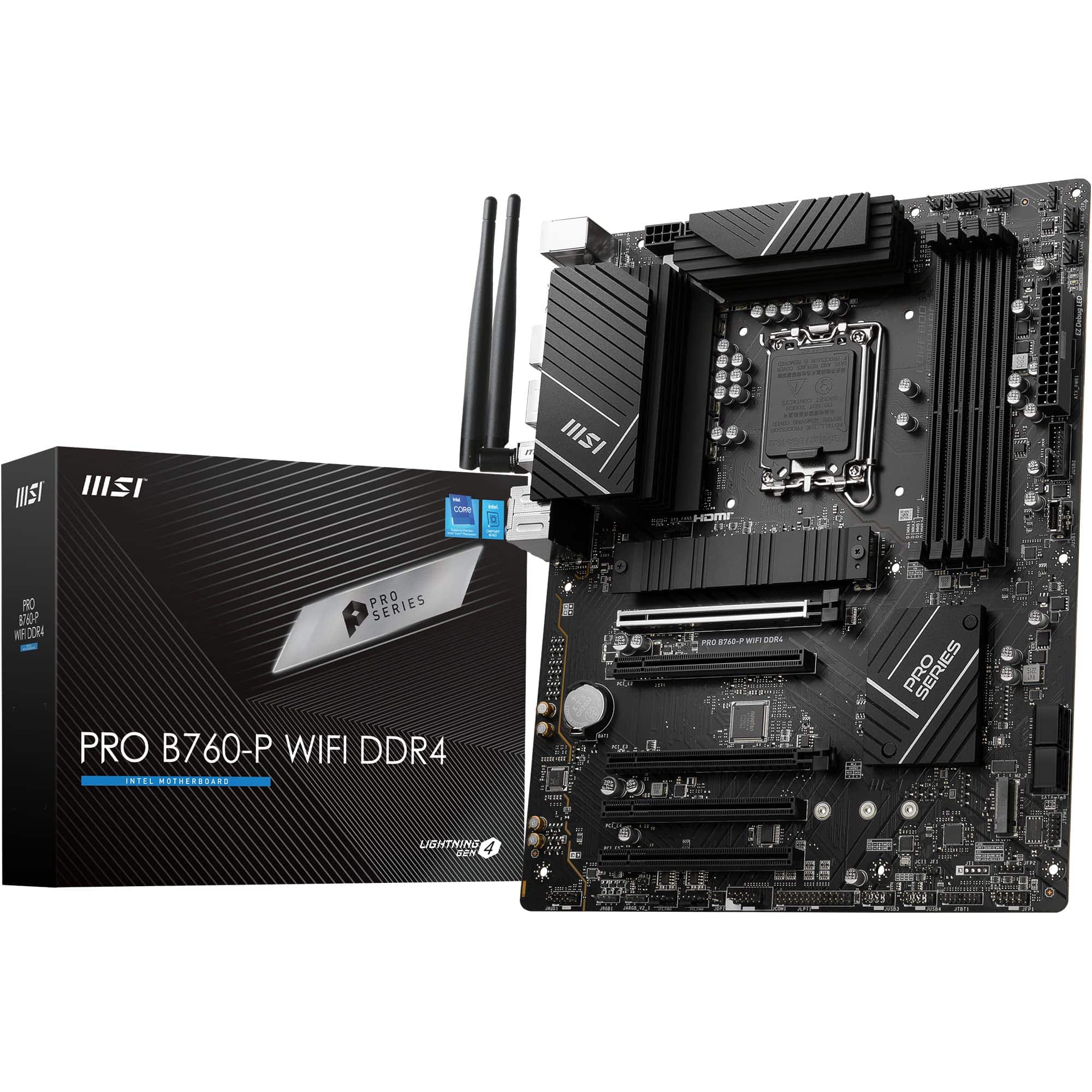
Frequently asked
5 questions01Is the MSI B840 Gaming Plus WiFi a good motherboard?+
Yes, it's a good motherboard for its price tier. The 12-phase VRM with P-PAK MOSFETs is better than most budget boards offer, Wi-Fi 7 and 2.5G LAN are genuinely useful features, and three M.2 slots with heatsinks cover almost any storage configuration. The B840 chipset means no CPU overclocking and PCIe 4.0 rather than 5.0, but for gaming and everyday builds those are rarely meaningful limitations. Owner reviews average 4.2 from 89 ratings, which is a solid real-world reliability indicator.
02What RAM is compatible with the MSI B840 Gaming Plus WiFi?+
The board uses DDR5 memory across four DIMM slots. It supports DDR5 kits from all major brands including Corsair, G.Skill, Kingston, and Crucial. For best results, use kits with AMD EXPO profiles, which the board supports for automatic speed and timing configuration. Maximum overclocked speed is 8200+ MT/s with a single DIMM per channel using single-rank sticks. For most builds, DDR5-6000 with EXPO is the sweet spot for Ryzen 9000 series CPUs. DDR4 is not compatible.
03Will my existing CPU cooler work with the MSI B840 Gaming Plus WiFi?+
The board uses the AM5 socket, which uses the same 105mm x 105mm mounting hole pattern as AM4. Many coolers designed for AM4 are compatible with AM5 using an updated mounting bracket, which cooler manufacturers often provide free of charge or include in the box for newer models. Check your cooler manufacturer's compatibility list for AM5 support. If your cooler is more than a few years old and was purchased specifically for AM4, contact the manufacturer about an AM5 mounting kit before assuming compatibility.
04Is there a cheaper motherboard I should consider instead?+
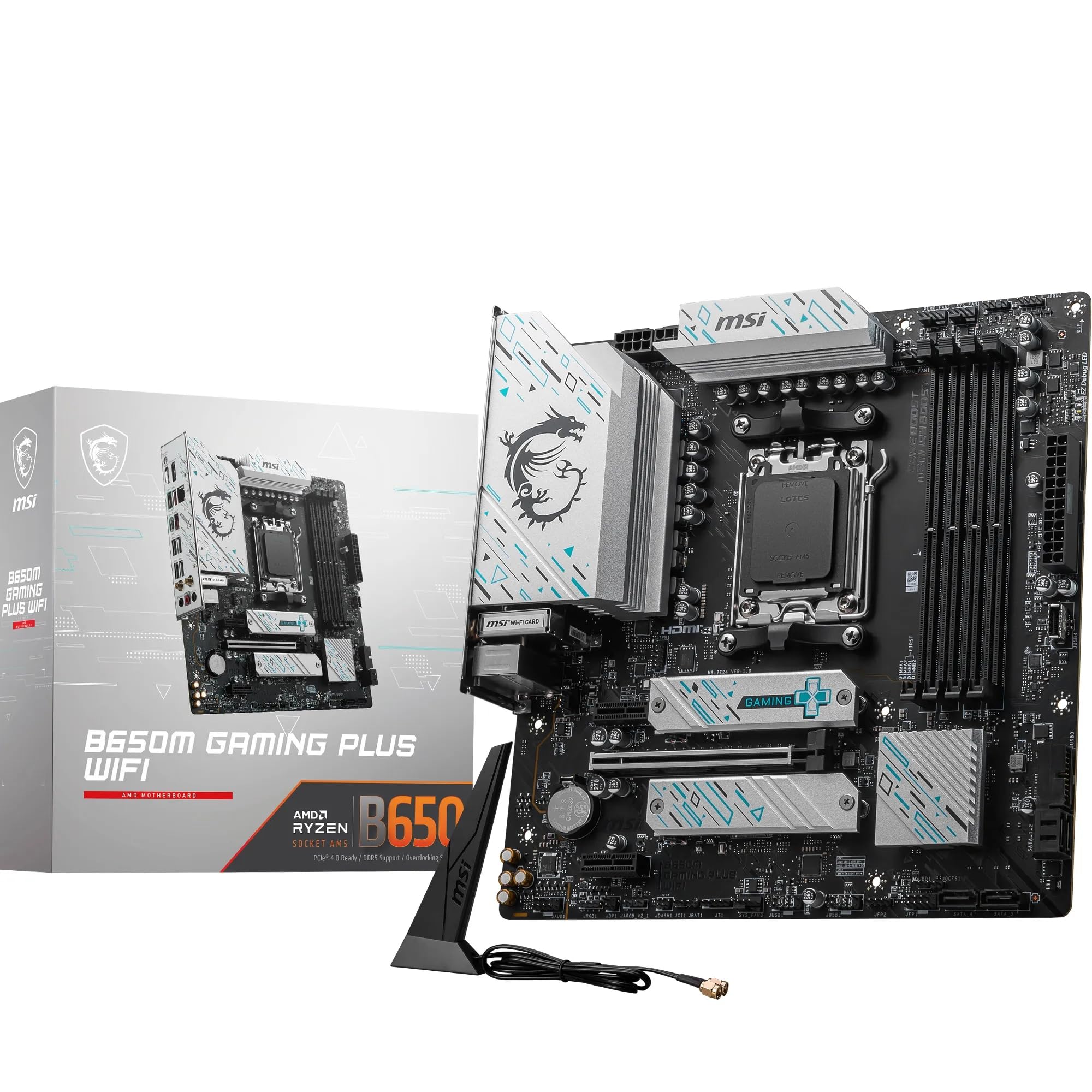
If you don't need Wi-Fi and are working with a tight budget, there are simpler B840 boards without the wireless module that cost less. The MSI B840M Gaming Plus (Micro-ATX) is worth a look if ATX size isn't a requirement. However, if Wi-Fi is useful to your build, the B840 Gaming Plus WiFi's Wi-Fi 7 inclusion makes it competitive against boards that charge extra for a separate Wi-Fi card. The step-up option is the MSI B850 Gaming Plus WiFi, which adds CPU overclocking and PCIe 5.0 at a higher price.
05What warranty and returns apply to the MSI B840 Gaming Plus WiFi?+
The verified product listing does not specify a warranty duration. MSI typically provides a standard manufacturer warranty on their motherboards, so check MSI's support pages or the product listing for current warranty terms. When purchasing through Amazon UK, you're also covered by Amazon's 30-day returns policy and the A-to-Z Guarantee, which provides a straightforward route if the board arrives faulty or incompatible.