Most people buying a motherboard don't realise they're also choosing how many headaches they'll have for the next five years. Not performance headaches. Stability headaches. BIOS headaches. "Why is my RAM running at 2133MHz when I paid for 3600MHz" headaches. The board is the one component that quietly determines whether your whole build is a pleasure or a slow-burn nightmare, and yet most buyers spend thirty seconds on it before clicking Add to Basket.
So here's where the 1200 ASUS TUF GAMING B550M-PLUS WIFI II slots in. It's a Micro-ATX B550 board aimed squarely at people building around AMD Ryzen 5000 series chips (and backwards to Ryzen 3000) who want a genuinely solid foundation without paying X570 money. With 496 owner reviews averaging ★★★★½ (4.6), it's clearly doing something right. But a high review average doesn't tell you why people are happy, or whether their priorities match yours. That's what this is for.
The verdict, upfront: this is one of the better-sorted budget-to-mid boards you can buy for AM4. It won't embarrass itself with a mid-range Ryzen 5 or even a Ryzen 7 5800X, the BIOS is actually usable (a low bar that many rivals trip over), and the connectivity punches above what you'd expect at this price point. The caveats are real though, and we'll get into all of them.
Core Specifications
The B550M-PLUS WIFI II is a Micro-ATX board, which immediately tells you something about who it's for. Micro-ATX is the sensible middle ground: smaller than a full ATX so it fits compact cases, but not so cramped that you're losing meaningful functionality. You get four DIMM slots for DDR4 memory, support up to 128GB, and a PCIe 4.0 x16 primary slot for your GPU courtesy of the direct CPU connection. There's also a PCIe 3.0 x16 slot (running at x4 electrical bandwidth) for secondary cards, plus a couple of PCIe 3.0 x1 slots if you need them.
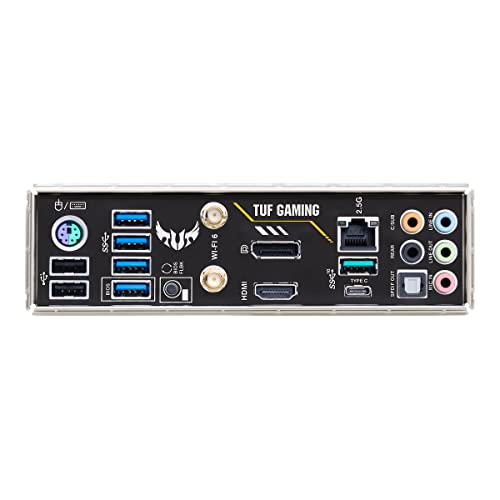
Storage is where B550 earns its keep over the older B450. You get one M.2 slot running at PCIe 4.0 x4 (direct from the CPU, so full speed on Ryzen 5000) and a second M.2 slot at PCIe 3.0 x4 via the chipset. Six SATA ports round things out for anyone still running spinning rust or older SSDs. The rear I/O is decent for this tier: USB 3.2 Gen 2 Type-A ports, a USB 3.2 Gen 2 Type-C, HDMI and DisplayPort for Ryzen APU builds, and the 2.5Gb ethernet plus WiFi antenna connectors.
One thing: this is the WIFI II revision, which means it's the updated version of the original B550M-PLUS WIFI. ASUS made some quiet improvements to the VRM and component selection with the II revision, which matters more than it sounds. The "II" isn't just a marketing badge; owner reviews consistently note improved stability under sustained load compared to the original. Always you're buying the right revision.
| Specification | Detail |
|---|---|
| Socket | AMD AM4 |
| Chipset | AMD B550 |
| Form Factor | Micro-ATX (244mm x 244mm) |
| Memory Slots | 4 x DDR4 DIMM, dual channel |
| Max Memory | 128GB |
| Memory Speed (OC) | Up to DDR4-4600+ |
| PCIe x16 Slots | 1 x PCIe 4.0 (CPU), 1 x PCIe 3.0 x4 (chipset) |
| M.2 Slots | 2 (1 x PCIe 4.0 x4, 1 x PCIe 3.0 x4) |
| SATA Ports | 6 x SATA 6Gb/s |
| USB Rear I/O | USB 3.2 Gen 2 Type-A, USB 3.2 Gen 2 Type-C, USB 3.2 Gen 1, USB 2.0 |
| Networking | Realtek 2.5Gb Ethernet, WiFi 6 (802.11ax) |
| Audio | Realtek ALC S1200A codec |
| Video Output | HDMI, DisplayPort (for APUs) |
| Price | £126.95 (Price checked 03:16, 3 Oct 2026, UK time) |

Socket & CPU Compatibility
The AM4 socket has been AMD's platform for a long time now, and that's genuinely a good thing for buyers. The B550M-PLUS WIFI II supports the full range of Ryzen 3000 and Ryzen 5000 desktop processors out of the box, and with a BIOS update it also covers certain Ryzen 4000G APUs. The AMD Ryzen 5000 series is the sweet spot here: chips like the Ryzen 5 5600X, Ryzen 7 5700X, and Ryzen 9 5900X all work properly without any drama.
What's the practical implication of that? It means if you're upgrading from a Ryzen 3000 build on an older board, you can drop in a Ryzen 5000 chip on this board and carry on. Or if you're building fresh, you can start with a more affordable Ryzen 5 5600 and upgrade to a 5900X later without changing the board. That kind of upgrade flexibility is genuinely useful and it's one of the reasons AM4 has been such a popular platform. AMD kept the socket alive for years, which is more than Intel managed with several of its consumer platforms over the same period.
One important practical note: if you're buying a Ryzen 5000 chip and the board has been sitting in a warehouse for a while, there's a chance it shipped with an older BIOS that only supports Ryzen 3000. ASUS does include BIOS Flashback on some boards to update without a CPU installed, but you'll want to check whether this specific board supports that feature or whether you'll need a compatible older CPU to do the initial update. Most retailers and builders are aware of this by now, and many boards have been updated in the supply chain, but it's still worth a quick check before you commit.
Chipset Features
B550 sits in the middle of AMD's chipset stack, below X570 but well above A520. The key practical difference versus X570 is that B550 doesn't support PCIe 4.0 across all its chipset lanes, only the CPU-connected M.2 slot and primary PCIe x16 slot run at Gen 4. The chipset-side lanes are Gen 3. For most people building a gaming or productivity rig, that distinction is almost entirely irrelevant. Your GPU doesn't need Gen 4 bandwidth (no GPU currently saturates Gen 3 x16), and your secondary storage running at Gen 3 speeds is still massively fast.
Where B550 genuinely wins over A520 is overclocking support. A520 locks you out of CPU and memory overclocking entirely. B550 lets you run XMP profiles, push memory speeds, and adjust CPU multipliers on unlocked Ryzen chips. That's a meaningful difference if you've paid for a Ryzen 5 5600X or above. The chipset also provides more USB bandwidth and additional PCIe lanes compared to A520, which is why B550 boards can offer two M.2 slots where A520 boards often only have one.
The B550 chipset also supports RAID configurations across SATA ports, which is niche but occasionally useful for NAS-adjacent builds or people who want software RAID for redundancy. USB connectivity from the chipset covers USB 3.2 Gen 1 and Gen 2 ports, plus the internal headers for front panel connections. One thing B550 doesn't do that X570 does is support PCIe 4.0 on multiple x16 slots simultaneously, so if you're planning an AMD multi-GPU setup (not that many people are in 2026) or need dual Gen 4 M.2 slots from the chipset, you'd need to look at X570 boards instead.
VRM & Power Delivery
This is the section that actually matters for long-term reliability, and it's where budget boards often quietly let you down. The B550M-PLUS WIFI II uses a 10+2 phase power delivery setup, which is a reasonable configuration for this price bracket. ASUS has equipped it with DrMOS power stages, which integrate the high-side MOSFET, low-side MOSFET, and gate driver into a single package. That's a more efficient and thermally manageable design than discrete components, and it's part of why this board handles Ryzen 7 and even Ryzen 9 chips better than some of its direct competitors.
The VRM heatsink is one of the more substantial ones you'll find at this price point. It's a proper chunky aluminium heatsink that covers the power stages with decent surface area. Owner reviews don't report thermal throttling issues even with Ryzen 9 5900X chips under sustained workloads, which is the real test. Some rival boards at similar prices use smaller heatsinks that struggle when you're running a 105W TDP chip hard for extended periods. The TUF Gaming line has always prioritised thermal headroom as part of its identity, and it shows here.
That said, be realistic about the ceiling. This isn't a board designed for extreme overclocking of a 5950X running at 200W. It'll handle the 5900X at stock or modest overclocks without complaint, but if you're planning to push a 16-core chip to its absolute limits, you'd want to look at X570 boards with beefier VRM setups. For the majority of builds in this price range, pairing a Ryzen 5 5600, 5700X, or 5800X with this board, the power delivery is more than adequate and the thermal management is genuinely good.
Memory Support
Four DDR4 DIMM slots, dual channel, max 128GB. Those are the numbers. What they mean in practice is you've got proper flexibility: start with 2 x 8GB, upgrade to 2 x 16GB later, or go straight in with 4 x 16GB if you need 64GB for video editing or heavy multitasking. The dual-channel configuration means you'll want to populate slots in pairs (slots A2 and B2 first, which are the second and fourth slots, not the first and second) for optimal bandwidth.
Memory overclocking is supported via XMP profiles, and ASUS's OptiMem II technology is worth a mention here. It's not marketing fluff; it refers to careful PCB trace routing and ground layer design that preserves signal integrity at higher memory frequencies. In practice, this means the board is more likely to successfully boot and run DDR4 at its rated XMP speeds without requiring manual voltage tweaking. Owner reviews consistently note that XMP profiles load and work reliably, which sounds basic but isn't guaranteed on cheaper boards.
Officially the board supports DDR4 up to 4600MHz with overclocking, though real-world results depend heavily on your specific memory kit and which Ryzen CPU you're using. Ryzen 5000's memory controller is generally happy up to around 3600MHz to 3800MHz before you start seeing diminishing returns or stability issues. The sweet spot for this board is DDR4-3200 or DDR4-3600 CL16 or CL18 kits, which are widely available and well-priced. Don't feel like you need to chase DDR4-4000+ kits; the performance gains above 3600MHz are marginal for most workloads.
Storage Options
Two M.2 slots is the minimum you'd want on any board you're buying in 2026, and B550M-PLUS WIFI II delivers both. The first slot (M2_1) runs at PCIe 4.0 x4, fed directly from the CPU. That means full Gen 4 speeds for drives like the Samsung 980 Pro or WD Black SN850X, which can hit sequential reads of around 7,000 MB/s. It's a meaningful step up from Gen 3 for large file transfers, though for gaming load times the difference is often smaller than the marketing suggests.
The second M.2 slot runs at PCIe 3.0 x4 via the chipset, which gives you bandwidth up to around 3,500 MB/s. That's still very fast for any practical workload, and it's the right slot for a secondary NVMe drive for games or a scratch disk. Both M.2 slots have heatsinks included, which is a nice touch. M.2 SSDs do run warm, particularly Gen 4 drives under sustained write loads, and having a heatsink keeps temperatures in check without needing to buy aftermarket solutions.
Beyond the M.2 slots you get six SATA 6Gb/s ports, which is generous. Most people won't use all six, but if you're building a system that doubles as a home server or NAS, or if you have a collection of older HDDs and SATA SSDs, you'll appreciate not having to add an expansion card. RAID is supported across SATA ports (RAID 0, 1, 10) for those who want it. One thing to check: the second M.2 slot and certain SATA ports share bandwidth, so using both simultaneously may disable some SATA ports. Check the manual before planning a maxed-out storage configuration.
Expansion Slots & PCIe
The primary PCIe x16 slot is reinforced with ASUS's SafeSlot design, which uses a metal shield and additional PCB anchoring to prevent the slot from cracking under the weight of heavy graphics cards. It's a small thing but genuinely useful if you're mounting a large triple-fan GPU and the case doesn't have a GPU support bracket. The slot runs at PCIe 4.0 x16 when using a Ryzen 5000 CPU, which is the full bandwidth that any current GPU can use.
The secondary PCIe x16 slot runs at x4 electrical bandwidth (PCIe 3.0) from the chipset. It's physically an x16 slot, so larger cards will fit, but they'll only use four lanes of bandwidth. That's fine for capture cards, sound cards, or network cards, but it's not suitable as a second GPU slot for any meaningful workload. There are also two PCIe 3.0 x1 slots for smaller expansion cards.
Being Micro-ATX, the board is more compact than full ATX, which means the slot layout is a bit tighter. If you're running a large GPU and want to add a PCIe capture card below it, check the physical clearance in your case. Some large triple-fan GPUs can block the x1 slots entirely just by their physical size. It's not a B550M-PLUS WIFI II problem specifically, it's a Micro-ATX reality. But it's worth thinking about before you plan a multi-card build.
Connectivity & Rear I/O
The rear I/O on this board is one of its stronger selling points. You get a solid selection of USB ports including USB 3.2 Gen 2 Type-A (10Gbps), USB 3.2 Gen 2 Type-C (10Gbps), USB 3.2 Gen 1 ports, and USB 2.0 ports. The presence of a Gen 2 Type-C on the rear is genuinely useful for connecting modern peripherals, external SSDs, or docking stations at full speed. It's not a feature you always get at this price point.
For display output, there's HDMI and DisplayPort for builds using Ryzen APUs (the G-series chips with integrated graphics). If you're using a discrete GPU, these ports are irrelevant, but for a budget build using something like a Ryzen 5 5600G, having video output directly from the board is useful for a clean, GPU-free setup or as a fallback if your discrete card dies. The audio stack uses Realtek's ALC S1200A codec, which is one of the better Realtek options and delivers noticeably cleaner output than the cheaper ALC887 used on entry-level boards.
Internal headers are well-covered too. There are multiple USB 3.2 Gen 1 internal headers for front panel USB, plus a front panel USB 3.2 Gen 1 Type-C header for cases that have a Type-C port on the front. Fan headers are hybrid (PWM and DC), and ASUS's Fan Xpert 2+ software gives you proper fan curve control without needing to mess around in the BIOS every time you want to adjust something. There's also an addressable RGB header and a standard RGB header if you want to connect lighting strips, though the board itself doesn't have onboard RGB lighting, which some people will consider a plus.
WiFi & Networking
The "WIFI" in the name isn't just decoration. This board includes WiFi 6 (802.11ax) built in, which is the current mainstream standard and a genuine step up from WiFi 5 in congested environments. WiFi 6 supports OFDMA and MU-MIMO, which means better performance when multiple devices are competing for bandwidth on the same router. If you're in a flat or house with lots of connected devices, this matters. The theoretical maximum speeds are higher too, though real-world gains depend heavily on your router also supporting WiFi 6.
The wired ethernet is handled by a Realtek 2.5Gb controller, which is a nice upgrade over the standard 1Gb ethernet that most budget boards still ship with. If your router or switch has a 2.5Gb port (increasingly common on newer routers), you'll get noticeably faster local network transfers. For online gaming, the difference between 1Gb and 2.5Gb ethernet is essentially zero, but for moving large files around a home network or streaming from a NAS, 2.5Gb is meaningfully faster. It's a feature that feels like it should cost more than it does at this price point.
Bluetooth is included alongside the WiFi, which is convenient for wireless peripherals, headsets, or controllers without needing a separate USB dongle. The antenna connectors on the rear panel accept the included antennas, and owner reviews generally report solid WiFi range and stability. A few reviewers have noted the antennas are a bit basic compared to higher-end boards, but for typical home use they're fine. If you're trying to reach a router two floors away through concrete walls, you might want a more powerful setup, but for normal home distances the built-in WiFi performs well.
BIOS & Overclocking
ASUS's UEFI BIOS is, genuinely, one of the better ones in the industry. That's not a compliment I'd throw around freely; plenty of manufacturers ship BIOS interfaces that look like they were designed in 2003 and navigated with a keyboard because the mouse support is broken. ASUS's interface is clean, logically organised, and has both an EZ Mode for beginners (shows you the basics at a glance, lets you enable XMP with one click) and an Advanced Mode for people who want to dig into voltages and timings.
For overclocking, B550 supports CPU multiplier adjustments on unlocked Ryzen chips (anything with an X suffix, plus the newer non-X chips that also have unlocked multipliers). In practice, Ryzen 5000 chips do a remarkably good job of boosting themselves automatically, so manual overclocking often delivers minimal gains over stock Precision Boost Overdrive settings. Where the BIOS matters more is memory overclocking: enabling XMP profiles, adjusting subtimings, and finding the stable ceiling of your specific memory kit. The ASUS BIOS handles this well, with clear options and good documentation of what each setting does.
Fan Xpert 2+ deserves a specific mention because fan control is one of those things that sounds boring until your PC sounds like a jet engine at 2am. The software lets you set fan curves based on CPU temperature, motherboard temperature, or specific sensor readings, and it works properly. Owner reviews rarely complain about fan control issues, which is the best endorsement. The BIOS also supports ASUS's Q-Fan feature for initial fan calibration, which automatically detects the minimum and maximum speeds of connected fans. It's a small quality-of-life thing but it saves time during the initial build setup.
Build Quality & Aesthetics
The TUF Gaming line has a specific aesthetic: dark PCB, angular heatsink styling, military-ish design language. It's not trying to be flashy. There's no onboard RGB lighting on the B550M-PLUS WIFI II, which will either be a relief or a disappointment depending on your preferences. If you want a clean, no-nonsense build that doesn't glow like a disco, this is your board. If you want everything to light up, you'll need to add your own RGB strips via the headers.
PCB quality is good for this tier. The board uses a high-quality PCB substrate and ASUS applies what they call "TUF Protection" to various components, which essentially means better filtering and protection against electrostatic discharge, power surges, and general abuse. Whether that translates to measurably longer lifespan in a controlled environment is debatable, but the component selection is genuinely above average for the price. The capacitors are Japanese-made solid polymer units, which have better longevity than the electrolytic capacitors you find on cheaper boards.
The heatsink coverage is thorough: VRM heatsink, M.2 heatsinks on both slots, and a PCH heatsink over the B550 chipset. The M.2 heatsinks in particular are a nice inclusion because they keep drives cooler under sustained writes, which matters for Gen 4 NVMe drives that can throttle when hot. Build quality in general is solid; the PCIe slots feel secure, the DIMM latches work properly, and the overall feel of the board is more "proper component" than "budget corner-cutting". Owner reviews consistently mention build quality as a highlight, with very few reports of DOA units or early failures.
How It Compares
The main alternatives at this price point are the MSI MAG B550M MORTAR WIFI and the Gigabyte B550M AORUS PRO-P. All three are Micro-ATX B550 boards with WiFi targeting similar builds, so the comparison is genuinely useful rather than just picking random rivals.
The MSI MAG B550M MORTAR WIFI is probably the closest direct competitor. It has a stronger VRM (12+2+1 phases versus the ASUS's 10+2), which gives it more headroom for high-end Ryzen 9 chips under heavy overclocking. If you're specifically planning to run a 5950X at aggressive settings, the MSI's power delivery is the better choice. But for everything up to a 5900X at stock or modest overclocks, the difference is academic. The MSI's BIOS is decent but most users find ASUS's interface more intuitive, particularly for memory overclocking.
The Gigabyte B550M AORUS PRO-P is a bit more budget-focused and shows it in a few places: the VRM heatsink is smaller, the audio codec is a step down, and the BIOS, while functional, lacks some of the polish of the ASUS implementation. It's a fine board for a Ryzen 5 build, but if you're putting a Ryzen 7 or above in it, the thermal headroom becomes more of a concern. The B550M-PLUS WIFI II sits in a sweet spot between the two: better thermal management than the Gigabyte, better BIOS than the MSI, and competitive pricing across the board.
| Feature | ASUS TUF B550M-PLUS WIFI II | MSI MAG B550M MORTAR WIFI | Gigabyte B550M AORUS PRO-P |
|---|---|---|---|
| Socket | AM4 | AM4 | AM4 |
| Form Factor | Micro-ATX | Micro-ATX | Micro-ATX |
| VRM Phases | 10+2 | 12+2+1 | 10+2 |
| M.2 Slots | 2 (PCIe 4.0 + PCIe 3.0) | 2 (PCIe 4.0 + PCIe 3.0) | 2 (PCIe 4.0 + PCIe 3.0) |
| Ethernet | 2.5Gb Realtek | 2.5Gb Realtek | 2.5Gb Realtek |
| WiFi | WiFi 6 | WiFi 6 | Not included |
| Audio Codec | ALC S1200A | ALC S1200A | ALC887 |
| USB Type-C Rear | Yes (Gen 2) | Yes (Gen 2) | No |
| BIOS Quality | Excellent | Good | Decent |
| Onboard RGB | No | No | No |

Final Verdict
The 1200 ASUS TUF GAMING B550M-PLUS WIFI II is a genuinely good board for what it costs. Not "good for the price" in the way that phrase usually means "acceptable but flawed". Actually good. The combination of a competent VRM with proper heatsinking, one of the best BIOS interfaces in the AM4 ecosystem, 2.5Gb ethernet, WiFi 6, and a Gen 2 Type-C on the rear is a strong package. The 4.6 average across nearly 503 reflects a product that works as advertised and doesn't generate the kind of frustrating edge-case failures that tank cheaper boards' ratings.
Who is this for? It's the right board if you're building a Ryzen 5 or Ryzen 7 based system and want something that'll run reliably for years without drama. It handles the Ryzen 5 5600 and 5700X brilliantly, and it's comfortable with the 5800X and 5900X at stock or moderate overclocks. The Micro-ATX form factor suits smaller cases and tidy builds. If you care about audio quality from the onboard codec, the ALC S1200A is noticeably better than what cheaper boards offer. And if you want WiFi built in rather than needing a separate card or USB dongle, this delivers a proper WiFi 6 implementation rather than a bolted-on afterthought.
Who should look elsewhere? If you're pairing this with a Ryzen 9 5950X and planning to push it hard with manual overclocking, the MSI MAG B550M MORTAR WIFI's beefier VRM is worth the consideration. If you're on a tight budget and can live without WiFi, there's a non-WIFI version of this board that costs less and is the smarter buy if your router is right next to your PC anyway. And if you're building a compact ITX system, this Micro-ATX board won't fit; you'd need to look at the B550I AORUS PRO AX or similar ITX options instead.
The honest value assessment: in the budget motherboard segment, this delivers features that used to cost significantly more. The 2.5Gb ethernet alone used to be a mid-range premium feature. WiFi 6 likewise. The fact that you're getting both, plus a proper BIOS and solid VRM thermals, at this price point makes it one of the better-value AM4 boards still available. AM4 as a platform is mature and well-understood, which means fewer surprises and better driver support than newer platforms. For a Ryzen 5000 build in 2026, this remains a sensible, well-sorted choice.
Score: 8.5 out of 10. It loses half a point for the VRM ceiling being a genuine constraint if you go full Ryzen 9 overclocking, and another point for being Micro-ATX (which is a layout preference, not a flaw, but it does limit expansion). Everything else is where it should be or better than expected.
What works. What doesn’t.
6 + 5What we liked6 reasons
- Excellent ASUS UEFI BIOS with intuitive EZ and Advanced modes, making memory overclocking and XMP configuration straightforward
- WiFi 6 and 2.5Gb Realtek ethernet included at this price point, features that used to cost considerably more
- Solid 10+2 phase VRM with DrMOS power stages and a substantial heatsink that handles Ryzen 7 and Ryzen 9 5900X at stock without thermal issues
- Realtek ALC S1200A audio codec delivers noticeably cleaner onboard sound than the cheaper ALC887 found on rival boards
- Both M.2 slots include heatsinks and the primary slot runs at PCIe 4.0 x4 directly from the CPU for full Gen 4 speeds
- USB 3.2 Gen 2 Type-C on the rear panel and a front panel Type-C header for modern case connectivity
Where it falls5 reasons
- VRM has a genuine ceiling: sustained heavy overclocking of a Ryzen 9 5950X is a stretch and the MSI MAG B550M MORTAR WIFI offers more headroom for that use case
- Micro-ATX form factor limits expansion slot availability and large triple-fan GPUs can physically block the PCIe x1 slots below
- Second M.2 slot and certain SATA ports share bandwidth, meaning a maxed-out storage configuration requires careful planning and may disable some SATA ports
- No onboard RGB lighting, which will disappoint builders who want an illuminated board without adding separate strips
- BIOS Flashback for CPU-free updates requires verification before purchase, as older stock may ship with a BIOS that does not support Ryzen 5000 out of the box
Full specifications
12 attributes| Socket | AM4 |
|---|---|
| Chipset | B550 |
| Form factor | Micro-ATX |
| Bios flashback | true |
| M2 slots | 2 |
| MAX RAM GB | 128 |
| Network | 2.5GbE + Wi-Fi 6 |
| Pcie 5 slots | 0 |
| Pcie slots | 1x PCIe 3.0 x16 (x16 mode), 1x PCIe 3.0 x16 (x4 mode), 1x PCIe 3.0 x1 |
| RAM slots | 4 |
| RAM type | DDR4 |
| Usb4 | false |
If this isn’t right for you
2 options 8.5 / 10
MSI PRO B760-P WIFI DDR4 Motherboard, ATX - Supports Intel 14th, 13th & 12th Gen Core Processors, LGA 1700 - DDR4 Memory Boost 5333+MHz/OC, PCIe 4.0 x16 Slots, M.2 Gen4 Slots, 2.5G LAN, Wi-Fi 6E
£129.95 · MSI
 8.5 / 10
MSI B650M GAMING PLUS WIFI Motherboard, mATX - Supports AMD Ryzen 9000/8000 / 7000 Series Processors, AM5 - DDR5 Memory Boost 7800+ MHz/OC, PCIe 4.0 x16, M.2 Gen4, Wi-Fi 6E
£143.50 · MSI
Frequently asked
7 questions01Does the ASUS TUF GAMING B550M-PLUS WIFI II support Ryzen 5000 processors out of the box?+
Most units sold now have been updated in the supply chain and support Ryzen 5000 without any additional steps. However, if the board ships with an older BIOS, you may need a compatible Ryzen 3000 CPU to perform the initial update. Check with your retailer or verify the BIOS version before building if you do not have an older Ryzen chip available.
02What is the difference between the original B550M-PLUS WIFI and the WIFI II revision?+
The II revision includes quiet improvements to the VRM and component selection. Owner reviews consistently note better stability under sustained load compared to the original. The WIFI II is not simply a rebadge; it reflects genuine refinements. Always confirm you are purchasing the II revision rather than older stock of the original.
03Can the ASUS TUF GAMING B550M-PLUS WIFI II handle a Ryzen 9 5900X?+
Yes, at stock settings or moderate overclocks it handles the 5900X without thermal issues. The 10+2 phase DrMOS VRM and the substantial heatsink manage the 105W TDP chip well under sustained workloads. For extreme manual overclocking of a 5950X, a board with a beefier VRM such as the MSI MAG B550M MORTAR WIFI would be a safer choice.
04Does using both M.2 slots disable any SATA ports?+
Yes, there is shared bandwidth between the second M.2 slot and certain SATA ports. When both M.2 slots are occupied, some SATA ports may be disabled depending on the configuration. Check the manual before planning a build that requires both M.2 slots and the maximum number of SATA drives simultaneously.
05Is WiFi 6 genuinely useful or just a marketing feature on this board?+
WiFi 6 offers real benefits in environments with many connected devices competing for bandwidth, as it supports OFDMA and MU-MIMO for more efficient channel use. To benefit fully, your router also needs to support WiFi 6. In a typical home with a modern router, the WiFi implementation here performs reliably at normal distances and is a proper built-in solution rather than an afterthought.
06Which memory speed should I target for a Ryzen 5000 build on this board?+
The sweet spot is DDR4-3200 or DDR4-3600 with CL16 or CL18 timings. Ryzen 5000's memory controller is generally comfortable up to around 3600MHz to 3800MHz before returns diminish. The board officially supports up to DDR4-4600 with overclocking, but chasing speeds above 3600MHz offers marginal real-world gains for most workloads and can introduce stability complications.
07Does the board have onboard RGB lighting?+
No. The ASUS TUF GAMING B550M-PLUS WIFI II has no onboard RGB. It does include an addressable RGB header and a standard RGB header so you can connect external lighting strips or components, but the board itself has a clean, dark aesthetic without any built-in illumination.