Video editing demands more from a PC case than casual gaming. You need excellent airflow to keep processors and graphics cards cool during long rendering sessions, ample drive bays for storing large project files, and organised cable management to maintain thermals and accessibility. This year's market has shifted towards cases that balance thermals with practical features like tool-free drive installation and reversible motherboard trays that suit both traditional and custom water cooling setups. Whether you're building a budget editing rig or upgrading existing hardware, six cases here deliver the thermal performance and storage flexibility creative professionals require.
Quick Verdict
Best Overall: Corsair 3500X ARGB. Premium thermals, panoramic glass, and reverse-connector motherboard tray justify the investment for serious editing builds.
Best Value: ANSAITE ATX Mid-Tower (B0DTHNFB9Z). Pre-installed fans, dual-chamber design, and adequate storage bays at under £60 make it ideal for budget-conscious editors.
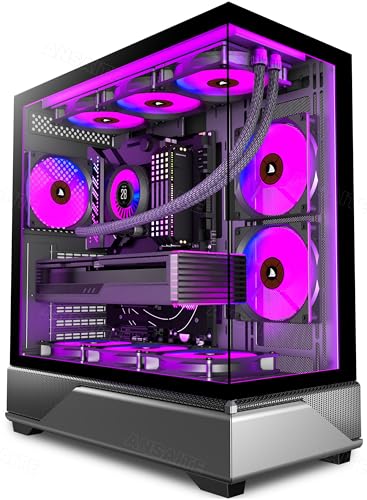
The ANSAITE ATX Mid-Tower delivers genuine value for editors operating on tight budgets. This case arrives with six 120mm PWM ARGB fans pre-installed across front, rear, and top positions, eliminating the need for additional fan purchases that quickly inflate case costs. The dual-chamber design separates the power supply into its own compartment, which is particularly beneficial for editing rigs where clean airflow to your CPU and GPU matters more than external RGB aesthetics.
Storage capacity stands out as a particular strength. Four 3.5-inch bays and two 2.5-inch slots provide space for multiple large-capacity drives essential when managing 4K or 6K video projects. The case supports E-ATX motherboards, meaning you can install professional-grade components without worrying about compatibility. Airflow design includes a front mesh panel that balances intake filtration with unrestricted air passage, critical when your system runs under sustained load during multi-hour rendering tasks. Tool-free drive mounting saves installation time and allows you to expand storage without complicated procedures.
At under £60, this case sacrifices some aesthetic refinement found in premium options, but it doesn't compromise on the practical features editors actually use. The interior layout provides reasonable cable routing, and the rear exhaust fan pulls warm air away from your components efficiently. The case maintains robust thermals even under extended workloads, making it an outstanding choice if your priority is maximising storage and cooling whilst minimising expenditure.
Pros
- Six pre-installed fans eliminate additional purchases, saving £40-60
- Four 3.5-inch bays support extensive drive expansion for large projects
- Dual-chamber design keeps power supply exhaust away from components
- E-ATX compatibility provides more motherboard options than standard ATX
Cons
- Plastic window lacks the clarity and durability of tempered glass
- Cable routing behind motherboard tray is less flexible than premium cases
The Cooler Master MasterBox 600 positions itself as a versatile mid-tower for editors who want solid thermals without premium pricing. This E-ATX capable case features a front mesh panel designed to maximise airflow, which becomes critical when rendering intensive timelines on high-performance components. The open frame design around drive bays allows excellent air circulation, preventing thermal dead zones that plague some budget cases.
Practicality dominates the design philosophy. The case includes four 3.5-inch and two 2.5-inch drive bays with tool-free mounting, allowing you to add storage capacity as your archive grows. The dedicated cable management space behind the motherboard tray, whilst not as generous as premium options, provides enough routing flexibility for most builds. Cooler Master has equipped the case with two 120mm intake fans and supports additional radiators, meaning you can upgrade cooling when your editing workload demands it. The top has a removable filter to prevent dust contamination of components during long rendering sessions.
At under £100, this case offers solid thermal performance and expansion capacity for editors building mid-range workstations. The E-ATX support matters if you're considering multi-GPU setups or professional-grade motherboards with extensive connectivity. The design prioritises function over aesthetics, which suits creative professionals who care more about thermals than RGB lighting. Build quality is respectable, though the case lacks the premium feel of higher-priced competitors. For editors who want reliability and modest cost, this represents a sensible middle ground.
Pros
- Front mesh design optimises intake airflow for sustained rendering
- E-ATX support allows professional-grade motherboards and multi-GPU flexibility
- Four 3.5-inch bays accommodate substantial drive expansion
- Tool-free drive mounting saves time when expanding storage capacity
Cons
- Minimal aesthetic appeal compared to cases with glass panels or RGB integration
- Cable routing space is functional but tighter than premium mid-towers
The Corsair 3000D RGB AIRFLOW strikes an effective balance between thermal performance and budget consciousness, making it popular with editors seeking Corsair quality without premium pricing. The case features three pre-installed 120mm RGB fans providing front intake, with a tempered glass side panel offering visibility into your build without sacrificing structural integrity. The front panel design uses a mesh-behind-glass approach that maintains aesthetic appeal whilst ensuring adequate intake airflow for sustained workloads.
Thermal characteristics favour sustained performance. The case supports up to 360mm radiators on the front, accommodating both air and liquid cooling configurations common in editing workstations. Cable management behind the motherboard tray is straightforward, with dedicated routing channels keeping your build tidy. The case includes two 3.5-inch and two 2.5-inch drive bays, providing moderate expansion capacity for editors managing multiple project archives. Power supply mounting features a dedicated compartment with its own ventilation pathway, preventing hot exhaust from circulating through your component area.
Build quality remains solid throughout. The tempered glass is considerably more durable than plastic alternatives, and the frame construction feels robust without excessive weight. At around £70-89 depending on the specific variant, this case delivers good value for editors who want Corsair's engineering reputation at a more accessible price point. The RGB integration connects to standard header connectors, allowing synchronisation with other RGB components through Corsair's iCUE software if desired. This case suits editors wanting proven thermal design with a touch of visual appeal, without paying premium prices for panoramic glass or reverse-connector trays.
Pros
- Three pre-installed RGB fans reduce additional cooling costs significantly
- Tempered glass side panel offers durability and component visibility
- Supports 360mm radiators for custom water cooling configurations
- Cable routing design keeps interiors organised for better thermals
Cons
- Only two 3.5-inch bays limit storage expansion compared to larger cases
- Front RGB fans cannot be individually controlled without additional controller
The AMANSON ATX Mid-Tower distinguishes itself through extraordinarily generous fan provision. This case arrives with nine 120mm ARGB PWM fans pre-installed, delivering unmatched cooling redundancy that suits editors running sustained multi-core rendering operations. The quantity might seem excessive, but in professional environments where your system runs continuously through long render jobs, multiple redundant fans provide system reliability and thermal headroom without additional investment.
Storage capacity matches larger workstations. Four 2.5-inch bays accommodate modern high-capacity SSDs ideal for video projects, whilst three 3.5-inch slots support archival drives for completed project backup. The ATX mid-tower form factor provides substantial internal volume, meaning component installation remains straightforward even with numerous cables present. The case supports large radiators and complex cooling loops common in professional setups. Front panel construction uses a ventilated approach balancing aesthetics with intake requirements.
The nine pre-installed fans represent exceptional value, as purchasing equivalent cooling separately costs £60-80. Each fan connects to dedicated PWM headers, allowing granular speed control based on thermal requirements. This level of redundancy appeals to editors running workstations that operate continuously, as individual fan failure doesn't immediately impact system viability. Build quality throughout is solid, with thoughtful internal layout that supports professional component arrangements. Cable routing behind the motherboard tray provides adequate flexibility for complex configurations. At around £79, this case delivers tremendous practical value for serious editing operations prioritising cooling capacity and drive expansion.
Pros
- Nine pre-installed fans provide exceptional cooling redundancy and professional reliability
- Four 2.5-inch bays accommodate multiple high-capacity SSDs for project management
- All fans use individual PWM connectors allowing granular speed control
- Substantial savings compared to purchasing equivalent fans separately
Cons
- Nine fans create significant noise at high speeds, requiring careful tuning in quiet studios
- Abundant fan provision may exceed thermal needs for moderate editing workstations
Buying Guide
Selecting a case for video editing requires understanding how cooling and storage interact with your specific workflow. Form factor represents the first decision: Micro-ATX cases like the 1ST PLAYER suit portable setups and space-constrained studios, whilst ATX mid-towers provide maximum storage flexibility and radiator support for professional workstations. Your motherboard choice drives this decision initially, but consider future upgrade paths when selecting case size.
Drive capacity planning matters considerably. Calculate your typical project storage needs by measuring average project size in gigabytes, multiplying by concurrent projects, then doubling for safety margin. Most editing rigs require minimum four drives: two fast SSDs for active projects, one for operating system and applications, and one large-capacity archive drive. Cases offering four or more drive bays accommodate this configuration without future expansion complications. Larger editing facilities managing multiple editors simultaneously often require six or more drive positions.
Thermal design becomes critical during sustained rendering. Front mesh intake design and adequate fan mounting positions directly correlate with component longevity under heavy workloads. Cases supporting 360mm radiators provide water cooling flexibility if you transition from air cooling as workload demands increase. Pre-installed fan quantity reduces initial setup cost, though verify fan quality and PWM control capability ensuring you can modulate speeds for quiet operation during client calls and recording sessions.
Cable management impacts both aesthetics and thermals. Dedicated routing channels behind the motherboard tray prevent cables from obstructing intake airflow. When evaluating cases, pay particular attention to motherboard tray design: tool-free SSD installation and modular drive bays save considerable time during expansion. GPU clearance matters if you plan professional graphics cards, as some powerful options require substantial mounting space. Finally, consider future needs when selecting cases: professional editing demands tend to intensify, so purchasing slightly larger capacity initially prevents premature outgrowing your case.
The Corsair 3500X ARGB emerges as the overall winner for video editors demanding premium performance and long-term reliability. Its exceptional thermal design through three pre-installed ARGB fans, support for 360mm radiators, and reverse-connector motherboard tray provide technical advantages that justify the premium pricing for serious professional systems. The panoramic glass design offers aesthetic appeal whilst maintaining the structural integrity and thermal efficiency editors require. Four 2.5-inch bays accommodate the multiple SSDs essential for managing complex projects, and Corsair's build quality ensures this case remains serviceable for five or more years of professional use.
However, if your budget constraints are genuinely restrictive, the ANSAITE ATX Mid-Tower at under £60 delivers exceptional practical value. Six pre-installed fans, four 3.5-inch drive bays, and E-ATX compatibility provide feature parity with cases costing double the price. For editors building workstations gradually or operating modest freelance operations, this case provides the storage flexibility and thermal performance necessary for professional work without excessive expenditure. The Corsair 3000D RGB AIRFLOW occupies the pragmatic middle ground, offering Corsair's engineering reputation and quality construction at accessible pricing for editors wanting proven reliability without premium features they may not require.