Pick the wrong case and you'll feel it for years. Wrong GPU clearance and your RTX 5080 won't fit. Wrong airflow design and your CPU runs 10 degrees hotter than it should. Wrong front I/O and you're fishing around the back of your desk every time you plug in a USB drive. These aren't cosmetic problems. They're build decisions that lock you in, and they're exactly the kind of thing worth getting right before you spend money on components.
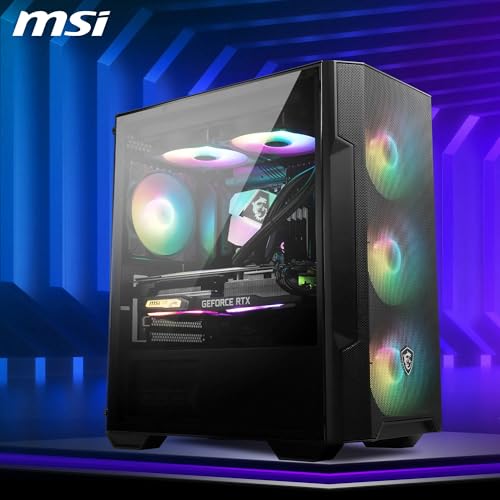
The MSI MAG FORGE M100R Midi Tower Gaming Computer Case 'Black is sitting at a budget price point with a spec sheet that, on paper, punches noticeably above it. Four included fans (three of them ARGB), a full-length mesh front panel, a 388 x 200 x 423mm footprint that keeps things compact without strangling airflow, 300mm GPU clearance, and a 160mm CPU cooler height limit. That's a decent hand for a case in this tier. Whether the execution matches the numbers is what 509 Amazon owners, averaging 4.5 out of five, have largely answered. Spoiler: most of them are pretty happy.
So who actually needs to read this? Anyone building a micro-ATX or mini-ITX system on a tight budget who doesn't want to compromise on airflow or aesthetics. Anyone who's been burned by cheap cases with paper-thin panels, rattly fans, and cable routing that's more of a suggestion than a system. And anyone wondering whether MSI's budget offering is actually worth it, or whether you should spend a bit more and get something better. We'll get into all of that.
Core Specifications
The MAG FORGE M100R is built around a compact 388 x 200 x 423mm chassis. That's a relatively small footprint for a case that supports micro-ATX boards, and it's worth keeping in mind if you're working with a tight desk setup. It's not a cube or a true SFF build, but it's noticeably narrower than a standard mid-tower, which is part of the appeal for anyone who doesn't want a hulking great case dominating their workspace.
Fan support is where this case genuinely earns its keep on paper. Up to six 120mm fans total, with radiator support across two mounting positions: a 240mm rad at the front, and a 120mm at the rear. The top panel adds a magnetic dust filter, and the bottom gets a non-magnetic version. Four fans come included in the box, which is genuinely unusual at this price. Most budget cases ship with one, maybe two. Getting four, with three of them being ARGB PWM units, means you're not immediately reaching for your wallet after purchase.
The built-in 1-to-6 ARGB hub is a thoughtful addition. It gives you 26 cyclable LED effects that can be controlled manually via the front I/O LED switch, or synced through MSI's Mystic Light software if your motherboard has a 3-pin 5V ARGB header. That's a proper lighting ecosystem, not just a couple of fans that flash whatever colour they feel like.
| Specification | Detail |
|---|---|
| Form Factor Support | Micro-ATX, Mini-ITX |
| Dimensions | 388 x 200 x 423mm |
| Included Fans | 3x 120mm ARGB PWM (front), 1x 120mm ARGB (rear) |
| Max Fan Support | 6x 120mm |
| Radiator Support | Front: 240mm, Rear: 120mm |
| GPU Clearance | 300mm |
| CPU Cooler Height | 160mm |
| PSU Support | ATX |
| Drive Bays | 2x 2.5", 1x 2.5"/3.5" combo, 1x 3.5" |
| Expansion Slots | 4 |
| Front I/O | USB 3.2 Gen 1 Type-A (5Gbps), mic/audio jacks, power, reset, LED switch |
| Side Panel | 3mm Tempered Glass |
| ARGB Hub | 1-to-6, 26 LED effects, Mystic Light compatible |
| Dust Filters | Top (magnetic), Bottom (non-magnetic) |
| Price | £54.99 |

Form Factor and Dimensions
At 388 x 200 x 423mm, the MAG FORGE M100R sits in a slightly awkward category that MSI calls a mini-tower, though it's listed elsewhere as a midi-tower depending on who's doing the describing. In practical terms, it's a compact micro-ATX case. It's narrower than most mid-towers you'll find, which is good news for anyone with limited desk space, but it does mean you need to be a bit more careful about what you're stuffing inside it.
The 200mm width is tight by mid-tower standards. Full-size ATX boards won't fit, which is by design, but it also means you're not getting acres of cable management space behind the motherboard tray. If you're coming from a larger case, that adjustment is worth knowing about before you start the build. The 423mm height is reasonable, and the 388mm depth gives you enough room to work with for most modern GPU lengths, which we'll get to properly in the GPU clearance section.
Footprint-wise, this is a case that will sit comfortably on most desks without dominating them. If you're building a secondary machine, a living-room PC, or just want something that doesn't look like a refrigerator next to your monitor, the compact dimensions make a lot of sense. The tempered glass side panel means the internal hardware is on show, and with the ARGB fans running, it's genuinely decent-looking for the money. Owner photos on Amazon back that up. Several reviewers specifically mention it looks more expensive than it is, which is about the best thing you can say about a budget case's aesthetics.
Motherboard Compatibility
The MAG FORGE M100R officially supports micro-ATX and mini-ITX motherboards. That's it. No full-size ATX, no E-ATX. If you're planning a high-end HEDT build or you've already bought a full ATX board, this case isn't for you and there's no workaround. But if you're building a capable gaming or productivity rig on a mATX or ITX platform, you're in the right place.
Micro-ATX is actually a solid choice for most gaming builds. You get four RAM slots, two or three PCIe slots depending on the board, and full support for modern CPUs from Intel and AMD. The smaller footprint of mATX boards also means more room inside the case for cable routing and airflow, which matters more in a compact chassis like this than it would in a larger mid-tower. Mini-ITX builds will have even more breathing room, though you'll obviously be limited to two RAM slots and a single PCIe slot on the board itself.
The four expansion slots on the case are worth noting. Most mATX boards have three or four PCIe slots total, so you're not losing anything there. You've got room for a GPU plus an additional card if needed, whether that's a capture card, a Wi-Fi card, or a sound card. The standoff layout is standard, and owner reviews don't flag any issues with board fitment, which is reassuring. A bad standoff layout is one of those things that only shows up when you're halfway through a build and suddenly furious.
GPU Clearance
Three hundred millimetres of GPU clearance. That's the headline number, and it's worth putting into context. The current RTX 5080 Founders Edition measures around 336mm in length, so it won't fit. Most aftermarket RTX 5070 cards are in the 280 to 310mm range depending on the cooler design, so some will fit and some won't. An RTX 4070 Super, which is a very common target GPU for this kind of build, is typically around 285 to 305mm depending on the variant. You'll want to check the specific card you're buying against that 300mm limit before committing.
The four expansion slots mean the GPU can be a double or triple-slot card without issue, which covers virtually every modern graphics card. Vertical GPU mounting isn't mentioned in the spec sheet, so we're not going to claim it's supported. If showing off your GPU cooler through the glass is the priority, a case with explicit vertical mount support would be a better fit.
For the target audience of this case, the 300mm limit is workable but not generous. If you're pairing this with a mid-range GPU like an RX 7600, an RTX 4060, or an RTX 4070 non-Ti, you'll almost certainly be fine. Going higher-end than that, particularly with triple-fan aftermarket coolers that tend to run longer, is where you need to do your homework. Several owner reviews mention measuring their GPU before buying, which is exactly the right approach. Don't assume. Check the card's exact length against 300mm and leave yourself a few millimetres of margin.
CPU Cooler Clearance
160mm of CPU cooler clearance is genuinely good for a compact case. That's enough for most popular tower coolers, including the Noctua NH-D15 (which actually clears at 165mm, so that one's too tall), but it comfortably fits the NH-U12S at 158mm, the be quiet! Dark Rock 4 at 159mm, and a wide range of 120mm and 140mm tower coolers from Deepcool, Arctic, and ID-Cooling. If you're not sure whether your cooler fits, the manufacturer's spec page will list the height, and 160mm is a reasonable ceiling for this chassis class.
AIO liquid coolers are also well supported. The front panel takes a 240mm radiator, which is the most common AIO size and covers options from 240mm all-in-ones from Corsair, NZXT, be quiet! and others. The rear supports a 120mm radiator, which is where a compact AIO or a rear exhaust fan would sit. There's no top radiator mounting listed in the spec sheet, so don't plan around fitting a top rad. The front 240mm position is your main AIO option, and it's the right one for intake cooling anyway.
One thing worth flagging: fitting a 240mm radiator at the front may affect GPU clearance depending on the radiator thickness and the fans attached to it. This is a common issue in compact cases and isn't unique to the M100R. Slim radiators (around 25 to 30mm) with slim fans will give you the best chance of maintaining that 300mm GPU clearance. Thicker rads with thick fans can eat into the available space. Owner reviews don't widely flag this as a major problem, but it's worth planning your component list carefully if you're combining a front AIO with a longer GPU.
Storage Bay Options
Storage is where compact cases often cut corners, and the M100R's bay configuration is worth understanding clearly. You get two dedicated 2.5-inch bays for SSDs, one combo bay that accepts either a 2.5-inch or a 3.5-inch drive, and one dedicated 3.5-inch bay. That's a total of four drives maximum, which is more than most builds at this level actually need.
In practice, most modern builds are running an M.2 NVMe SSD on the motherboard as the primary drive, which doesn't use any of these bays at all. The 2.5-inch bays are then available for a secondary SATA SSD if you need extra storage, and the 3.5-inch bays are there for anyone still running mechanical hard drives for bulk storage or media. It's a sensible layout that covers most use cases without wasting space on bay cages that nobody uses anymore.
Tool-less mounting isn't specifically called out in the spec data, so we're not going to promise it. What owner reviews do suggest is that the drive installation process is fairly straightforward, with no widespread complaints about fiddly mounting systems or drives that won't stay put. For a budget case, that's a reasonable outcome. The main thing to be aware of is that if you're planning a heavily storage-loaded build with four or five drives, you'll hit the limit of this case fairly quickly. For a typical gaming or productivity build with one or two drives, it's perfectly sorted.

Cable Management
Cable management in a 200mm-wide case is always going to be tighter than in a full mid-tower, and the M100R is no exception. The clean cable-management layout mentioned in the spec sheet points to cutouts and routing channels behind the motherboard tray, which is standard for cases in this class. The ATX PSU sits at the bottom, which is the right place for it in terms of weight distribution and airflow, and there's a shroud area that helps hide the PSU and the cables coming off it.
Owner reviews are mixed on cable management, which is honest feedback. Several builders report that with a modular PSU and some patience, the results look genuinely tidy. Others, particularly those using non-modular PSUs, find the rear panel clearance tight and the routing options limited. This is fairly typical for compact cases. A modular or semi-modular PSU is almost always the right choice in a build like this, and it makes a bigger difference here than it would in a larger chassis where you can just stuff cables wherever they fit.
The built-in ARGB hub actually helps with cable management in a roundabout way. Instead of running individual fan cables to a motherboard header or a separate controller, all six ARGB fan connections go through the hub, which then connects to the motherboard with a single 3-pin 5V cable. That's fewer cables snaking around the interior, which is a genuine quality-of-life improvement. The fan PWM cables still need routing, but reducing the ARGB cable count is a small but appreciated detail. If you're planning a clean build, take the time to route everything before you install the GPU. It's much harder to get in there afterwards.
Airflow and Thermal Design
This is where the MAG FORGE M100R Midi Tower Gaming Computer Case 'Black makes its strongest argument. The full-length mesh front panel is the key design decision here. Unlike cases with solid or partially-blocked front panels, a full mesh front means the three 120mm intake fans can actually pull air through without fighting significant restriction. That's not a trivial difference. Restricted intake is one of the most common causes of poor thermal performance in budget cases, and MSI has avoided that trap here.
The airflow configuration out of the box is three 120mm ARGB fans at the front (intake) and one 120mm ARGB fan at the rear (exhaust). That's a positive pressure bias, which is generally good for keeping dust out and maintaining consistent airflow through the case. The magnetic dust filter on top and the non-magnetic one on the bottom help keep things clean over time, though you'll still want to give the filters a clean every few months depending on your environment. The top filter is particularly easy to remove and refit, which matters because you'll actually do it if it's not a faff.
For a budget case, the thermal story here is genuinely competitive. Four fans included, proper mesh intake, dust filtration on the key entry points, and support for up to six 120mm fans total if you want to add more. You could run a 240mm AIO at the front and keep the rear exhaust fan for a very capable cooling setup without spending anything extra on fans. Owner reviews consistently mention good temperatures as a positive, which aligns with what the specs suggest. At this price, getting four fans and a mesh front is the kind of value that's hard to argue with.
Front I/O and Connectivity
The front I/O panel sits on the top of the case, which is a sensible location for a desktop build. You get a USB 3.2 Gen 1 Type-A port running at 5Gbps, a headphone jack, a microphone jack, a power button, a reset button, and the LED switch for cycling through the ARGB hub's 26 effects. That's a functional set of ports for most users.
The single USB Type-A port is the obvious limitation here. One port is tight, particularly if you regularly plug in USB drives, controllers, or other peripherals. There's no USB Type-C on the front I/O, which is increasingly common on mid-range and premium cases. Whether that matters to you depends on what you're connecting. If your peripherals are mostly wireless or you use a USB hub, one port is fine. If you're constantly swapping things in and out, it'll get old quickly. This is a budget case concession, and it's a real one.
The LED switch running through the ARGB hub for manual control is a nice touch. You don't need MSI Center or a compatible motherboard to cycle through lighting effects. Press the button, change the mode. Simple. The 26 cyclable effects cover static colours, breathing, rainbow, and various dynamic patterns, which is more than enough for most people. Mystic Light integration via a 3-pin 5V motherboard header gives you software control if you want it, and it'll sync with other Mystic Light-compatible components in your build. For a budget case, having a proper lighting ecosystem rather than just a couple of fans that do whatever they want is a meaningful differentiator.
Build Quality and Materials
The 3mm tempered glass side panel is a standout spec for this price tier. Thinner glass, around 4mm or less, is common on budget cases and it can feel flimsy and look cheap. 3mm is actually on the thicker end for this class of case, which means it feels more solid and is less likely to rattle or flex. Owner reviews are generally positive about the glass quality, with several noting it looks and feels better than expected. Scratches during installation are a risk with any tempered glass panel, so take care when fitting it.
The steel chassis is standard for a budget case. It's not going to feel as solid as a premium aluminium-fronted case, but it's not paper-thin either. Owner reviews don't flag excessive flex or poor panel alignment as widespread problems, which is the baseline you want. A few reviews mention that the panels can be a bit fiddly to remove and refit, particularly the side panel opposite the glass, but this is a common complaint across budget cases and it's not a dealbreaker.
Sharp edges are a known risk with budget cases, where the metal stamping and finishing processes are less refined than on premium products. Some owner reviews do mention catching themselves on edges during the build process, which is worth being aware of. Gloves aren't a bad idea for the initial build. The overall finish quality, particularly on the front mesh panel and the ARGB fans, is reported as good for the price. The fans themselves are PWM-controlled, which means they'll ramp up and down based on temperature rather than running at full speed all the time. That's proper fan control, not a budget afterthought.
How It Compares
The two most obvious alternatives at a similar budget price point are the Cooler Master MasterBox Q300L and the Fractal Design Focus 2. The Q300L is a popular compact mATX case that's been around for a while. It's similarly sized, has decent airflow, and is widely praised for its build experience. But it ships with no fans at all, which means you're immediately spending more to get airflow. The M100R's four included fans make a significant difference to the real-world cost comparison.
The Fractal Design Focus 2 is a proper mid-tower that supports full ATX, which gives it more flexibility. It has excellent build quality and a clean interior, and Fractal's reputation for build experience is well earned. But it's a larger case, it costs more, and it doesn't include ARGB fans. If you specifically want a compact mATX build with ARGB lighting and good out-of-the-box airflow, the Focus 2 isn't really competing in the same space.
Where the M100R wins clearly is value per pound. Four ARGB fans, a 1-to-6 hub, 3mm tempered glass, a mesh front, and a compact chassis at a budget price is a genuinely strong package. Where it loses ground is the limited front I/O, the 300mm GPU clearance that rules out some longer cards, and the tighter cable management space that comes with any compact case. Neither competitor fully replicates that combination of features at this price, which is why the M100R has built up 542 averaging 4.5 stars.
| Feature | MSI MAG FORGE M100R | Cooler Master MasterBox Q300L | Fractal Design Focus 2 |
|---|---|---|---|
| Form Factor | mATX, Mini-ITX | mATX, Mini-ITX | ATX, mATX, Mini-ITX |
| Included Fans | 4 (3x ARGB front, 1x ARGB rear) | 0 | 2 (non-ARGB) |
| Front Panel | Full mesh | Perforated mesh | Mesh |
| GPU Clearance | 300mm | 360mm | 467mm |
| CPU Cooler Height | 160mm | 157mm | 185mm |
| ARGB Hub | Yes (1-to-6) | No | No |
| Tempered Glass | Yes (3mm) | Yes | Yes |
| Front USB-C | Not specified | No | Yes |
| Price Tier | Budget | Budget | Mid-range |
Final Verdict
The MSI MAG FORGE M100R Midi Tower Gaming Computer Case 'Black is a budget case that's done its homework. The full-length mesh front, four included ARGB fans, the 1-to-6 ARGB hub, 3mm tempered glass, and a compact 388 x 200 x 423mm footprint add up to a package that's genuinely hard to match at this price. The 4.5-star average across 542 isn't an accident. Most people who buy this are happy with it, and the spec sheet explains why.
The limitations are real, though. One USB Type-A port on the front I/O is tight. The 300mm GPU clearance rules out some longer cards, so check your GPU length before buying. Cable management is workable but not spacious, and a modular PSU is basically a requirement rather than a nice-to-have. These are budget case trade-offs, and they're predictable ones. None of them are deal-breakers for the right buyer, but they might be for the wrong one.
If you're building a compact mATX or ITX gaming PC, want proper ARGB lighting without buying fans separately, and need a case that breathes well without spending mid-range money, this is a very solid choice. It's competitively priced for what it delivers, and it looks better in person than its price tag suggests. The 509 owners who've left reviews have largely confirmed what the specs promise. That's a decent endorsement.
- Pros: Four ARGB fans included, full mesh front for proper airflow, 1-to-6 ARGB hub with Mystic Light support, 3mm tempered glass, compact footprint for mATX builds
- Cons: Single front USB Type-A port only, 300mm GPU limit rules out longer cards, tight cable management space, no front USB-C
Our score: 7.5 out of 10. Excellent value for a compact mATX build. Know its limits before you buy, and it won't let you down.
What works. What doesn’t.
5 + 4What we liked5 reasons
- Four ARGB fans included out of the box, three of them PWM
- Full-length mesh front panel for unrestricted intake airflow
- Built-in 1-to-6 ARGB hub with Mystic Light compatibility
- 3mm tempered glass side panel looks premium for the price
- Compact 388 x 200 x 423mm footprint suits smaller desk setups
Where it falls4 reasons
- Single USB 3.2 Gen 1 Type-A on the front I/O is limiting
- 300mm GPU clearance rules out some longer aftermarket cards
- Tight rear cable management space, modular PSU strongly advised
- No front USB Type-C port
Full specifications
12 attributes| Form factor | Mid-Tower |
|---|---|
| Airflow type | mesh |
| MAX GPU length | 300 |
| MAX cooler height | 160 |
| Radiator support | 240mm front, 240mm top, 120mm rear |
| CPU cooler clearance MM | 160 |
| Dimensions | 388 x 200 x 423 mm |
| Dimensions MM | 388 x 200 x 423 |
| Drive bays | 2x 2.5", 2x 3.5" |
| FAN support | Front: 3 x 120 mm, Top: 2 x 120 mm, Rear: 1 x 120 mm |
| Fans included | 4 |
| GPU clearance | 300 mm |
If this isn’t right for you
2 options

Frequently asked
5 questions01Is the MSI MAG FORGE M100R Midi Tower Gaming Computer Case 'Black, 3x 120mm ARGB PWM Fans, 1x 120mm Fan, 1-6 ARGB Hub, Tempered Glass, MSI Center, mATX, mini-ITX' good for airflow?+
Yes, airflow is one of this case's strongest points. The full-length mesh front panel allows the three included 120mm ARGB intake fans to pull air through without restriction, which is a significant advantage over budget cases with solid or partially-blocked fronts. The rear 120mm ARGB fan handles exhaust. That four-fan configuration creates a positive pressure airflow setup that keeps temperatures in check. Magnetic and non-magnetic dust filters on the top and bottom panels help manage dust ingress. The case supports up to six 120mm fans total and a 240mm radiator at the front, so there's room to expand cooling further if needed.
02What's the GPU clearance on the MSI MAG FORGE M100R Midi Tower Gaming Computer Case 'Black, 3x 120mm ARGB PWM Fans, 1x 120mm Fan, 1-6 ARGB Hub, Tempered Glass, MSI Center, mATX, mini-ITX'?+
The maximum GPU length supported is 300mm. That covers most mid-range cards comfortably, including typical RTX 4060 and RX 7600 variants, but it rules out some longer triple-fan aftermarket cards and flagship GPUs like the RTX 5080 Founders Edition. If you're fitting a 240mm front radiator at the same time, the effective clearance may be reduced depending on radiator and fan thickness, so use slim fans where possible. Always check the exact length of your specific GPU model before purchasing this case.
03Can the MSI MAG FORGE M100R Midi Tower Gaming Computer Case 'Black, 3x 120mm ARGB PWM Fans, 1x 120mm Fan, 1-6 ARGB Hub, Tempered Glass, MSI Center, mATX, mini-ITX' fit a 360mm AIO?+
No. The MAG FORGE M100R supports a maximum 240mm radiator at the front and a 120mm radiator at the rear. There is no top radiator mount listed in the spec sheet, so a 360mm AIO will not fit this case. A 240mm AIO at the front is the largest liquid cooler this case accommodates, which covers a wide range of popular all-in-one options from Corsair, NZXT, be quiet! and others. For a 360mm AIO, you would need a larger mid-tower with top radiator support.
04Is the MSI MAG FORGE M100R Midi Tower Gaming Computer Case 'Black, 3x 120mm ARGB PWM Fans, 1x 120mm Fan, 1-6 ARGB Hub, Tempered Glass, MSI Center, mATX, mini-ITX' easy to build in?+
Generally yes, though it has the limitations you'd expect from a compact 200mm-wide chassis. The cable management layout includes routing cutouts behind the motherboard tray, and the PSU shroud helps hide cables at the bottom. Owner reviews suggest that builders using modular or semi-modular PSUs find the build process straightforward and the results tidy. Non-modular PSUs make cable management noticeably harder in this case. The 1-to-6 ARGB hub reduces the number of fan cables running to the motherboard, which helps keep things cleaner. Some reviewers mention sharp edges on the metal chassis, so care during the build is advised.
05What warranty and returns apply to the MSI MAG FORGE M100R Midi Tower Gaming Computer Case 'Black, 3x 120mm ARGB PWM Fans, 1x 120mm Fan, 1-6 ARGB Hub, Tempered Glass, MSI Center, mATX, mini-ITX'?+
Amazon offers 30-day hassle-free returns if the case doesn't suit your build. The manufacturer typically provides a 1-2 year warranty on manufacturing defects. Check the product listing for exact warranty terms.