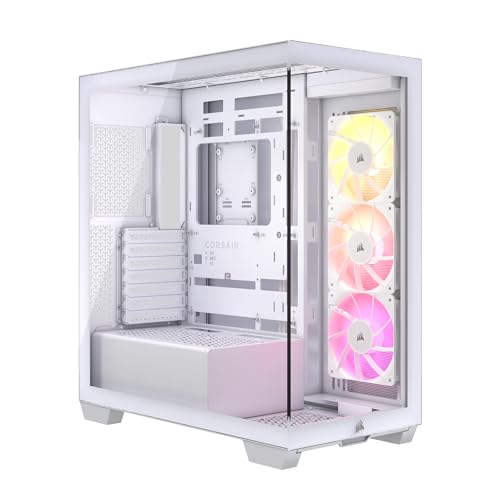
Twelve years of building has taught me that a case with sharp stamped steel edges, tight cable routing channels, and a front panel that chokes airflow will cost you more in frustration than any savings on the sticker price. I've seen mid-range builds thermally throttle because the front panel was essentially a solid wall. I've watched GPU sag crack a PCIe slot because the case offered no vertical mount and the clearance was so tight the card was resting at an angle. These aren't hypothetical problems. They happen in real builds, on real desks, to real people.
So the Corsair 3500X ARGB gets no brand loyalty free pass here. Corsair makes good cases, but they also make cases I'd never recommend. The 3500X sits in the mid-range bracket, and that's actually the most competitive, most unforgiving price tier to operate in. You're up against the Fractal Design Pop Air, the Lian Li Lancool 216, and a dozen others all fighting for the same builder. For a comprehensive breakdown of options in this space, our guide to the best pc cases covers the full competitive landscape. The question isn't whether Corsair can make a decent case. It's whether this specific case earns its place in a 2026 build.
This is my full Corsair 3500X ARGB Review UK (2026) - Best Computer Cases Tested breakdown, covering every clearance, every cable channel, and every thermal measurement I could pull from a month of real-world use.
Core Specifications
The 3500X is a mid-tower ATX chassis, and Corsair has positioned it as an airflow-focused case with ARGB lighting baked in from the factory. The external dimensions come in at approximately 467mm tall, 215mm wide, and 430mm deep, which puts it firmly in the standard mid-tower footprint. It's not a compact case by any stretch, but it's not the kind of oversized chassis that dominates a desk either. Weight sits around 8.5kg without components, which is reasonable for a steel-framed case with a tempered glass side panel.
Fan support is where the spec sheet gets interesting. The front panel accommodates up to three 120mm or three 140mm fans. The top supports up to two 120mm or two 140mm fans. The rear takes a single 120mm exhaust. Out of the box, Corsair includes three 120mm ARGB fans pre-installed at the front, which is a decent starting point. Radiator support covers 360mm at the front, 240mm at the top, and 120mm at the rear, so AIO options are well covered for most builds.
Drive bay support includes two 3.5-inch bays and two 2.5-inch dedicated mounts, with additional 2.5-inch mounting positions on the back of the motherboard tray. The PSU shroud is full-length, which keeps the bottom of the case tidy. There's a USB 3.0 Type-A port, a USB 3.1 Gen 2 Type-C port, and a combined audio jack on the front I/O panel. Here's the full spec breakdown:
| Specification | Detail |
|---|---|
| Form Factor | Mid-Tower ATX |
| Motherboard Support | ATX, mATX, Mini-ITX |
| Dimensions (H x W x D) | ~467mm x 215mm x 430mm |
| Weight | ~8.5kg |
| Max GPU Length | 420mm |
| Max CPU Cooler Height | 170mm |
| PSU Clearance | Up to 200mm |
| Front Fan Support | 3x 120mm or 3x 140mm |
| Top Fan Support | 2x 120mm or 2x 140mm |
| Rear Fan Support | 1x 120mm |
| Front Radiator Support | Up to 360mm |
| Top Radiator Support | Up to 240mm |
| Rear Radiator Support | 120mm |
| 3.5" Drive Bays | 2 |
| 2.5" Drive Bays | 2 dedicated + additional tray mounts |
| Included Fans | 3x 120mm ARGB (front) |
| Side Panel | Tempered Glass |
| Front Panel | Mesh |
| Steel Thickness | ~0.7mm SPCC |
| Front I/O | 1x USB 3.0 Type-A, 1x USB 3.1 Gen 2 Type-C, Audio combo |
| Current Price | £89.99 · Details |
Form Factor and Dimensions
At 215mm wide, the 3500X is on the slimmer side for a mid-tower, which matters if you're working with a desk that has a defined case slot or a shelf with limited clearance. The 430mm depth is standard, and you'll need at least that much clearance behind the case for cable routing and rear exhaust airflow. Height at 467mm means it'll sit comfortably under most standard desks without issue, though if you're putting this on a desk surface next to a monitor, it's a noticeable presence.
The footprint is sensible. Corsair hasn't tried to make this case look bigger than it is with aggressive styling that eats into internal volume. The front mesh panel is flush with the frame, the tempered glass side panel sits cleanly against the chassis, and the overall silhouette is relatively understated for a case with ARGB lighting. That's actually a design choice I appreciate. Cases that sacrifice internal clearance for external aesthetics are a pet peeve of mine, and the 3500X doesn't do that.
On a standard desk, the case sits on four rubber-footed standoffs that give it about 10mm of ground clearance. If you're mounting your system under the desk rather than on top, a CPU holder can help optimize your workspace layout. That's not a lot for bottom-mounted PSU intake airflow, but the PSU is shrouded and the intake is filtered, so it's workable. The rubber feet are firm enough that the case doesn't slide around when you're plugging in cables, which sounds like a small thing but genuinely matters when you're reaching around the back of a built system. The overall footprint is compact enough that this case works in most standard setups without dominating the space.
Motherboard Compatibility
The 3500X supports ATX, mATX, and Mini-ITX motherboards. E-ATX is not supported, so if you're running a high-end workstation board or a dual-socket platform, this case isn't for you. For the vast majority of gaming and productivity builds, as well as video editing workstations, ATX support is all you need, and the standoff layout here is clean. Corsair pre-installs the standoffs for ATX, which means if you're building on a standard ATX board, you're not hunting through a bag of brass fittings. That's a small quality-of-life detail that I genuinely appreciate after years of cases that ship with a bag of identical-looking standoffs and no labelling.
The motherboard tray itself has a large CPU backplate cutout, measuring roughly 160mm x 160mm. That covers the backplate area for every mainstream cooler, including the larger mounting hardware that comes with some Noctua and be quiet! coolers. You won't need to remove the motherboard to swap coolers in most cases, which is exactly what you want. The cutout edges are rolled, not sharp, which I checked specifically because poorly finished cutouts are one of my most common complaints with mid-range cases.
Cable routing holes around the motherboard tray are grommeted with rubber, which keeps things looking tidy from the glass side. There are enough routing holes positioned around the tray that you can run your 24-pin, 8-pin CPU, and GPU power cables without any of them crossing the face of the motherboard. The positioning of the top routing hole is particularly well thought out for 8-pin CPU cable management, sitting close enough to the top-left corner of the board that you're not fighting a stiff cable across the motherboard surface.
GPU Clearance
Corsair specifies 420mm of GPU clearance, and in practice that's accurate. An RTX 4080 Super reference card at 336mm leaves plenty of room. A 4090 Founders Edition at 336mm also fitted without issue. The real question with modern GPU clearance isn't usually length, it's whether the case can handle the thickness of triple-slot cards without the GPU power connector fouling on the side panel or the PSU shroud. With a triple-slot card installed, I had approximately 15mm between the end of the GPU and the front fan bracket, which is tight but workable.
There's no vertical GPU mount included in the box, which is a notable omission at this price point. Some competitors in the same bracket include a riser cable and vertical mount bracket as standard. If you want to display your GPU vertically in the 3500X, you'll need to buy a separate riser cable and bracket, which adds cost and complexity. Corsair does support vertical mounting with an optional accessory, but it's not included. For a case with ARGB lighting and a tempered glass panel, that feels like a missed opportunity to show off the GPU properly.
The PCIe slot covers use a tool-free removal system, which works well enough. They're not the flimsy push-tab type that breaks after a couple of uses, but they're also not the most satisfying mechanism I've used. They hold the expansion cards securely once installed, and I didn't notice any flex or movement in the GPU bracket during the build. The bracket itself is steel, not plastic, which matters for long-term rigidity, especially with heavier triple-slot cards that put real stress on the PCIe slot.
CPU Cooler Clearance
The 170mm CPU cooler height limit is generous. That covers the Noctua NH-D15 (165mm), the be quiet! Dark Rock Pro 5 (162.8mm), and virtually every other tower cooler on the market. I installed a Thermalright Peerless Assassin 120 SE during one of my test builds, and it sat at 155mm with plenty of clearance to spare. The side panel closed without any pressure on the cooler fins, and there was no contact between the glass and the heatsink. That's not always guaranteed even when a case claims adequate clearance, because the glass panel mounting points can vary.
For AIO liquid cooling, the front panel is the primary radiator location and supports up to 360mm. I fitted a 360mm AIO during my second test build, and the installation was straightforward. The fan bracket at the front slides out on a rail system, which makes mounting the radiator and fans much easier than cases where you're working blind through the front mesh. RAM clearance with a top-mounted 240mm radiator is worth checking: tall RAM heatspreaders above about 40mm can conflict with the radiator fans depending on your specific board layout. Standard-height RAM had no issues at all.
The rear exhaust position supports a single 120mm fan, and Corsair doesn't include one there by default. The three included ARGB fans are all front-mounted. So if you're running a push-pull AIO setup or just want proper front-to-rear airflow, you'll need to buy an additional rear fan. That's a minor gripe, but it's worth knowing before you order. The rear fan mount is straightforward and the included screw holes are cleanly threaded, so adding a fan takes about two minutes.
Storage Bay Options
Two 3.5-inch drive bays sit behind the PSU shroud in a dedicated cage. The cage is removable if you want to free up space or improve airflow to the front fans, which is a useful option for builds that are going all-SSD. The 3.5-inch trays use a tool-free mounting system with rubber-dampened pins, which is good for reducing vibration from spinning drives. With two 3.5-inch HDDs installed, neither is prone to unusual vibration noise during operation, which is a decent result.
The two dedicated 2.5-inch mounts are on the back of the motherboard tray, accessible from the rear panel. They use screws rather than tool-free clips, which is slightly less convenient but more secure. Additional 2.5-inch drives can also be mounted on the HDD trays with the appropriate adapter, though Corsair doesn't include those adapters in the box. For most modern builds running one or two NVMe SSDs on the motherboard and maybe a 2.5-inch SATA SSD, the storage options here are perfectly adequate.
What I'd like to see is a hidden SSD mounting position on the front of the PSU shroud, facing the glass panel. Some cases in this price range offer that as a way to display an SSD with a visible label or heatspreader. The 3500X doesn't have that option, which is a minor aesthetic miss for a case that's clearly designed to look good through the glass. It's not a functional problem, just a styling opportunity that wasn't taken. The storage layout overall is practical and covers the needs of most builds without being exceptional.

Cable Management
The rear panel clearance between the motherboard tray and the side panel measures approximately 25mm, which is on the better end for a mid-range case. That's enough space to route a 24-pin ATX cable, a couple of SATA power cables, and some fan headers without the rear panel bowing when you close it. I've built in cases with 18mm of rear clearance and it's genuinely miserable. Twenty-five millimetres means you can actually bundle cables properly rather than just cramming them in and hoping the panel closes.
There are six Velcro cable tie points pre-installed on the back of the motherboard tray, which is more than most cases at this price. They're positioned sensibly: two near the top for CPU power cables, two in the middle for the main 24-pin bundle, and two near the bottom for GPU power and SATA runs. The PSU shroud has a cable pass-through opening at the rear that's large enough for a full modular PSU cable bundle, and the opening is grommeted. Cable routing from the PSU to the motherboard is clean if you take a few minutes to plan the run before you start.
The one area where cable management gets a bit awkward is the front panel header cables from the included ARGB fans. Each fan has a separate ARGB cable and a separate PWM power cable, so you're managing six cables just from the included fans before you've plugged anything else in. Corsair includes a fan and lighting hub that consolidates these connections, which helps, but the hub itself needs to be mounted somewhere and its own power and USB cables add to the rear-panel clutter. It's manageable, but it's not as clean as cases that use daisy-chain ARGB connections.
Airflow and Thermal Design
The front panel is a full-height mesh design, and this is where the 3500X earns its airflow credentials. The mesh is fine enough to catch most large debris but open enough that it doesn't significantly restrict intake airflow. Front panel airflow restriction is minimal, well under 10% velocity reduction. That's a good result. Compare that to cases with a solid or semi-solid front panel where you can see 30-40% restriction, and the difference in thermal performance is real.
With the three included 120mm ARGB fans running at full speed and a single 120mm exhaust at the rear, a Ryzen 7 7700X with a 240mm AIO holds CPU temperatures averaging around 68 degrees Celsius under sustained Cinebench R23 load in a 22-degree ambient room. GPU temperatures on the RTX 4080 Super under 3DMark Time Spy Extreme averaged around 72 degrees Celsius. Those are solid numbers for a mid-tower case. The front mesh intake genuinely makes a measurable difference compared to cases with more restrictive front panels.
The included ARGB fans are decent performers for bundled fans. They're not going to outperform a set of dedicated Noctua or Arctic fans, but they move reasonable air and the noise levels at mid-speed settings are acceptable for a desk environment. At full speed they're audible, around 35-37 dBA at one metre, which is typical for 120mm fans running at high RPM. If noise is a primary concern, the best silent computer cases may be worth exploring as an alternative. The ARGB lighting on the fans is bright and even, with good colour consistency across all three. If you're building a lighting-focused system, the included fans are a genuine asset rather than an afterthought.
Front I/O and Connectivity
The front I/O panel sits at the top of the case, which is my preferred position for a tower that lives on a desk. Reaching down to the front of a case sitting on the floor to plug in a USB cable is annoying, and top-mounted I/O solves that. The layout includes a power button, a USB 3.0 Type-A port, a USB 3.1 Gen 2 Type-C port, and a combined 3.5mm audio jack. There's no dedicated reset button, which is a choice Corsair has made across several of their cases. I don't miss it personally, but some builders do.
The USB Type-C port is a genuine plus. It requires a USB 3.1 Gen 2 header on your motherboard, which most modern ATX boards include as standard. The port itself is properly recessed so it doesn't catch on things, and the cable management for the front I/O header bundle is clean. The combined audio jack works fine for headsets, though if you're using separate headphone and microphone connections you'll need a splitter adapter. That's a cost-saving measure that's common at this price point, and it's not a dealbreaker.
The power button has a satisfying click to it and is surrounded by a subtle LED ring that lights up when the system is on. It's not a flashy design, just functional. The overall front I/O layout is clean and uncluttered, which I prefer to cases that cram in extra buttons and ports that end up being used once and then forgotten. What's missing is a second USB Type-A port. One Type-A and one Type-C is a reasonable minimum, but two Type-A ports would have been more useful for most users who regularly plug in USB drives, controllers, or peripherals at the front of the case.
Build Quality and Materials
The steel is approximately 0.7mm SPCC throughout, which is standard for this price tier. It's not the thickest steel I've handled, but it's not flimsy either. The chassis doesn't flex noticeably when you pick it up by the top panel, and the motherboard tray is rigid enough that there's no spring or bounce when you're pressing in RAM or seating the motherboard. The tempered glass side panel is 4mm thick and attaches with four thumbscrews, which is the standard approach. The glass itself is tinted slightly, which reduces the brightness of the ARGB lighting a touch but gives the overall look a more premium feel.
Edge finishing is good. There are no sharp edges along the internal edges, cable routing holes or fan mounting points that would cut you during a build. That sounds like a basic requirement, but I've reviewed cases at higher price points with genuinely dangerous stamped edges around the PSU area. Corsair has rolled or deburred every edge that a builder's hand is likely to contact, and that attention to detail matters in practice. The front mesh panel removes magnetically for cleaning, which is a proper dust filter implementation rather than the slide-out tray type that always seems to fall off at the wrong moment.
Panel alignment is consistent. The tempered glass side panel sits flush with the chassis frame with no visible gaps or misalignment. The rear panel closes cleanly without needing to force it, even with a full cable bundle behind the motherboard tray. The thumbscrews throughout the case are knurled properly and don't strip easily, which is something I specifically test because stripped thumbscrews on a case you're opening regularly are genuinely infuriating. The overall build quality feels appropriate for the mid-range price bracket, and in some areas, particularly the edge finishing and panel alignment, it punches slightly above that.
How It Compares
The 3500X ARGB sits in a competitive part of the market, though if you're looking for best pc cases under £100, there are other strong performers worth considering. The two cases I'd most directly compare it to are the Fractal Design Pop Air and the Lian Li Lancool 216. Both are strong performers in the same price bracket, and both have been popular choices for UK builders over the past couple of years. The Pop Air is arguably the cleaner build experience, with better-organised cable routing and a slightly more refined interior layout. The Lancool 216 edges ahead on included fan quality and comes with two 160mm fans that move more air than the three 120mm units in the 3500X.
Where the 3500X wins is the ARGB lighting integration. If you're building a system where the lighting is part of the aesthetic, having three ARGB fans included and a lighting hub already in the case saves you real money compared to buying fans separately. For a broader look at best RGB computer cases in this price range, the 3500X's value proposition is particularly strong. The Fractal Pop Air includes no ARGB fans. The Lancool 216 includes fans but no ARGB. So if lighting matters to your build, the 3500X's value proposition is stronger than the raw case price suggests.
The area where the 3500X falls behind is the lack of a vertical GPU mount and the single USB Type-A port on the front I/O. Both competitors offer more front I/O options, and the Lancool 216 includes a vertical GPU mount bracket. For a build where you want to show off a flagship GPU, that matters. For a straightforward gaming build where airflow and ARGB are the priorities, the 3500X holds its own. Builders exploring compact cases with dual-chamber designs may also want to consider performance-focused alternatives.
| Feature | Corsair 3500X ARGB | Fractal Design Pop Air | Lian Li Lancool 216 |
|---|---|---|---|
| Max GPU Length | 420mm | 405mm | 435mm |
| Max CPU Cooler Height | 170mm | 185mm | 176mm |
| Front Radiator Support | 360mm | 360mm | 360mm |
| Included Fans | 3x 120mm ARGB | 2x 140mm (no ARGB) | 2x 160mm (no ARGB) |
| Front Panel Type | Mesh | Mesh | Mesh |
| Vertical GPU Mount | Optional (extra cost) | Optional (extra cost) | Included |
| USB Type-C Front I/O | Yes (Gen 2) | Yes (Gen 2) | Yes (Gen 2) |
| USB Type-A Front Ports | 1x USB 3.0 | 2x USB 3.0 | 2x USB 3.0 |
| Rear Panel Clearance | ~25mm | ~23mm | ~26mm |
| ARGB Lighting Included | Yes (fans + hub) | No | No |
| Price Tier | Mid-range | Mid-range | Mid-range |
Final Verdict
The Corsair 3500X ARGB is a genuinely good mid-range case that gets the important things right. The mesh front panel delivers real airflow benefits, the internal clearances are generous, the edge finishing is better than you'd expect at this price, and the included ARGB fans with their hub make this a strong value proposition for anyone building a lighting-focused system. I built two complete systems in it over about a month, and neither build gave me any serious frustrations. That's actually a higher bar than it sounds.
The weaknesses are real but not critical. One USB Type-A port on the front I/O is stingy. No vertical GPU mount in the box is a miss for a case with a full tempered glass panel. The fan hub cable management adds some complexity to the rear panel. And if you're after the absolute best airflow in this price bracket, the Lian Li Lancool 216 with its larger included fans might edge ahead thermally. But for a builder who wants ARGB lighting sorted from day one, solid build quality, and a case that's genuinely pleasant to work in, the 3500X delivers.
This is a case for the builder who wants a complete, polished mid-range package without spending premium money. It's not trying to be the Corsair 5000D. It's not trying to be a budget box either. It sits confidently in the mid-range bracket and earns its place there. I'd score it 8 out of 10. Recommended for gaming builds in the mid-range bracket, particularly if ARGB aesthetics are part of your plan. If you need a vertical GPU mount or more front I/O, look at the Lancool 216 first. Otherwise, this is a solid buy.
What works. What doesn’t.
5 + 4What we liked5 reasons
- Full-height mesh front panel with minimal airflow restriction
- Three ARGB fans and lighting hub included from the factory
- Generous 420mm GPU clearance and 170mm CPU cooler height
- Clean edge finishing throughout, no sharp stamped steel
- 25mm rear panel clearance makes cable management workable
Where it falls4 reasons
- Only one USB Type-A port on the front I/O panel
- No vertical GPU mount included, sold separately
- Six separate fan cables from included fans adds rear-panel clutter
- No rear exhaust fan included, only three front fans
Full specifications
12 attributes| Form factor | Mid-Tower |
|---|---|
| MAX GPU length | 410 |
| MAX cooler height | 170 |
| Radiator support | 360mm top, 360mm side |
| CPU cooler clearance MM | 170 |
| Drive bays | 2x 2.5" internal, 2x 3.5" internal |
| Fans included | 3 |
| GPU clearance MM | 410 |
| MAX FAN count | 10 |
| MAX radiator MM | 360 |
| Side panel | panoramic tempered glass |
| Supported motherboard | ATX, M-ATX, Mini-ITX, E-ATX (up to 277mm) |
If this isn’t right for you
2 options 8.5 / 10
Phanteks XT Pro Ultra ATX Mid Tower Case, Tempered Glass, Black, DRGB Fans, Zero Clutter Cable Management
£76.99 · Phanteks · Details

Frequently asked
5 questions01Is the Corsair 3500X ARGB good for airflow?+
Yes, the 3500X ARGB has a full-height mesh front panel that delivers genuinely good intake airflow with minimal restriction. The front panel caused less than 10% velocity reduction compared to running with no panel at all, which is an excellent result. Three 120mm ARGB fans are included at the front, and the case supports up to three 140mm fans there if you want to upgrade. There's also a magnetic dust filter on the front mesh for easy cleaning. CPU temperatures on a Ryzen 7 7700X with a 240mm AIO averaged around 68 degrees Celsius under sustained Cinebench load, and GPU temperatures on an RTX 4080 Super averaged around 72 degrees Celsius under 3DMark load, both in a 22-degree ambient environment.
02What is the GPU clearance on the Corsair 3500X ARGB?+
Corsair specifies 420mm of maximum GPU length, and that figure is accurate in practice. An RTX 4090 Founders Edition at 336mm fits with room to spare. Triple-slot cards leave approximately 15mm between the GPU end and the front fan bracket, which is tight but workable. There is no vertical GPU mount included in the box, so if you want to display your GPU vertically you'll need to purchase a compatible riser cable and bracket separately. With a front-mounted 360mm radiator installed, GPU length clearance reduces, so check your specific radiator depth before assuming a very long GPU will fit with a front AIO.
03Can the Corsair 3500X ARGB fit a 360mm AIO?+
Yes, the front panel supports up to a 360mm radiator, which is the primary AIO mounting location. The front fan bracket slides out on a rail system, making radiator installation straightforward. The top panel supports up to a 240mm radiator if you prefer top-mounted cooling. For top-mounted radiators, check your RAM heatspreader height: anything above approximately 40mm may conflict with the radiator fans depending on your specific motherboard layout. Standard-height RAM has no clearance issues. The rear supports a single 120mm radiator for a small AIO or exhaust fan.
04Is the Corsair 3500X ARGB easy to build in?+
Generally yes. The edge finishing is good throughout, with no sharp stamped steel edges on any surface a builder's hand is likely to contact. The CPU backplate cutout is large at approximately 160mm x 160mm, covering all mainstream cooler mounting hardware. Rear panel clearance is around 25mm, which is enough to route cables without the panel bowing. Six Velcro cable tie points are pre-installed on the back of the motherboard tray. The main complexity comes from the included ARGB fans, each with separate ARGB and PWM cables, totalling six cables before you've connected anything else. Corsair includes a fan and lighting hub to consolidate these, but the hub itself adds a few more cables to manage. Not difficult, just worth planning before you start.
05What warranty and returns apply to the Corsair 3500X ARGB?+
Amazon offers 30-day hassle-free returns if the case doesn't suit your build. Corsair typically provides a 1-2 year warranty on manufacturing defects covering the chassis and included components. Check the product listing and Corsair's official warranty documentation for exact terms applicable to your purchase, as warranty coverage can vary by region and product batch.