There's a moment every display enthusiast knows well: you finally put a decent GPU in your rig, fire up a game or load up your creative project, and then you sit back and realise the monitor is the thing holding everything back. The pixels are where it all lands. A mediocre panel doesn't just look bad. It actively wastes the hardware behind it, and you feel that waste every single time you sit down to use it.
So when a monitor like the Dell 27 Plus S2725HSM shows up in the budget bracket, promising IPS panel quality, 144Hz refresh, and a 1ms MPRT figure, the enthusiast in me wants to know exactly what Dell has actually delivered versus what the spec sheet is dressed up to imply. At under £150, this is squarely aimed at first-time monitor buyers, office workers who also game a bit, and students who need something that does everything without breaking the bank. Based on the published specifications, Dell's own product documentation, and the pattern of hundreds of owner reviews with a positive overall rating, there's a lot to dig into here.
The short answer? It's a genuinely solid budget IPS monitor with a few caveats you need to understand before handing over your money. The longer answer is below.
Core Specifications
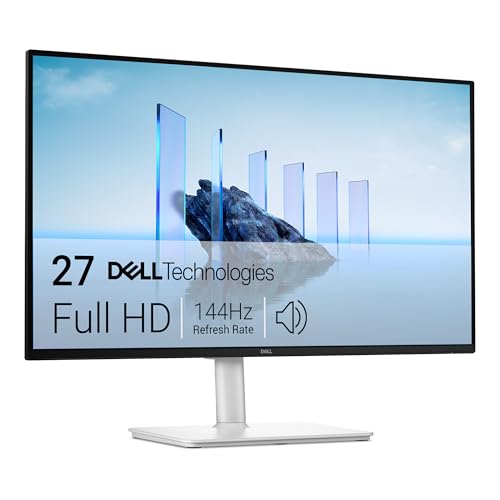
The Dell 27 Plus S2725HSM is a 27-inch IPS monitor running at Full HD resolution, which means 1920x1080 pixels. It hits 144Hz, supports AMD FreeSync Premium, and carries that headline 1ms MPRT figure (more on what that actually means shortly). Dell rates the panel at 300 nits typical brightness with a 1000:1 native contrast ratio, which is standard IPS territory. The colour coverage is listed at 99% sRGB and 72% NTSC, and Dell specifies a factory calibration with Delta-E less than 2 out of the box, which is a meaningful claim for a monitor at this price.
Connectivity is straightforward: one DisplayPort 1.2, one HDMI 1.4, and a USB hub with two downstream USB-A ports plus one upstream. There's also a 3.5mm audio output for headphones. The stand offers tilt, height adjustment, and swivel, which is more than you typically get at this price tier. VESA 100x100 compatibility means you can ditch the stand entirely if you prefer an arm. Dell backs the monitor with their standard three-year warranty, which at this price point is genuinely reassuring.
Below is the full spec breakdown for quick reference.
| Specification | Detail |
|---|---|
| Screen Size | 27 inches |
| Resolution | 1920x1080 (Full HD) |
| Panel Type | IPS |
| Refresh Rate | 144Hz |
| Response Time | 1ms MPRT / 4ms GtG (typical) |
| Adaptive Sync | AMD FreeSync Premium |
| Brightness | 300 nits typical |
| Contrast Ratio | 1000:1 (native) |
| Colour Coverage | 99% sRGB / 72% NTSC |
| HDR | HDR10 (DisplayHDR 400) |
| Ports | 1x DisplayPort 1.2, 1x HDMI 1.4, USB-A hub (2x downstream), 3.5mm audio out |
| Stand Adjustments | Tilt, height, swivel |
| VESA Mount | 100x100mm |
| Warranty | 3 years |
| Price | £144.00 · Details |

Panel Technology
IPS, which stands for In-Plane Switching, is the panel technology that most display enthusiasts would choose for everyday use if they had to pick one type and live with it. The reason is simple: IPS panels deliver wide viewing angles without the colour shift you get from TN panels, and they produce more accurate, consistent colour than VA panels typically manage. The trade-off has historically been contrast. IPS panels sit around 1000:1 native contrast, which is exactly where Dell rates this one. That means blacks won't look truly black in a dark room, and you'll see the characteristic IPS glow in corners when displaying dark content.
Compared to a VA panel, which can hit 3000:1 or even higher native contrast, the IPS in the S2725HSM will look noticeably less punchy in dark scenes. But VA panels have their own problems, particularly slow pixel transitions in dark tones that cause visible smearing in motion. For a 144Hz gaming monitor, IPS is generally the smarter call. The pixel response is more consistent across the tonal range, which matters when you're tracking movement in games. Dell made the right call with IPS here for this use case.
The viewing angles are rated at 178 degrees both horizontally and vertically, which is standard for IPS and means the image holds up well whether you're watching something with a friend leaning in from the side or you've got the monitor mounted slightly off-axis. Where IPS glow does appear, owners report it's typical for the technology rather than unusually bad. A handful of reviews mention slight backlight bleed at the edges, which is also par for the course at this price. No panel lottery horror stories in the review pool, which is a good sign for Dell's quality control on this one.
Display Quality
Full HD at 27 inches gives you a pixel density of around 82 pixels per inch. That number matters. At this size, 1080p is noticeably softer than it would be on a 24-inch panel, which sits closer to 92 PPI. You will see individual pixels if you sit close and look for them. Text rendering is softer than on a QHD or 4K display. For gaming, that's often fine because you're not scrutinising static text, you're tracking movement. For productivity work involving a lot of reading or fine detail, it's worth being aware of. If you're coming from a sharp laptop screen or a 24-inch 1080p monitor, the step to 27-inch 1080p might actually feel like a downgrade in sharpness.
That said, the matte anti-glare coating Dell uses here is genuinely useful in typical room conditions. Glossy screens look punchy in controlled lighting but become mirrors the moment any light source is behind you. The matte finish diffuses reflections effectively, which is why most office and productivity monitors use it. Owner reviews consistently praise the screen finish as comfortable for long sessions, with no complaints about harsh reflections. For a monitor that's going to sit on a desk under office lighting or near a window, this is the right choice.
Brightness uniformity at 300 nits typical is adequate for indoor use. Dell rates the peak at 300 nits, and at that level you're not going to be fighting glare in a normally lit room. Some owners note the screen can look a touch dim in bright rooms or near windows, which is a limitation of the brightness ceiling rather than a defect. For most desk setups, 300 nits is workable. It's not a monitor you'd want to use in direct sunlight, but then very few budget monitors are.
Refresh Rate and Adaptive Sync
144Hz is a real, meaningful upgrade over the 60Hz monitors that still dominate the budget end of the market. The difference between 60Hz and 144Hz is immediately visible in desktop use, not just in games. Scrolling feels smoother. Window animations snap rather than blur. And in games, the higher refresh rate gives you more frames to work with, which translates to more responsive input and a cleaner image during fast movement. If you've only ever used a 60Hz monitor, the jump to 144Hz is one of those upgrades that's hard to go back from.
The S2725HSM carries AMD FreeSync Premium certification. FreeSync Premium requires a minimum 120Hz refresh rate at the native resolution with LFC (Low Framerate Compensation) support, which means the adaptive sync range extends down to lower frame rates without tearing. This is a step above basic FreeSync and means the monitor handles variable frame rates well even when your GPU is struggling to keep up. For AMD GPU owners, this is plug-and-play. For Nvidia users, the monitor should work with G-Sync Compatible mode on modern cards, though Dell doesn't officially certify it as such.
The adaptive sync range isn't officially published in detail by Dell, but FreeSync Premium certification guarantees at least 48Hz to 144Hz VRR range with LFC kicking in below that. In practice, this means you're covered whether you're pushing 140fps in a fast shooter or dropping to 50fps in a demanding open-world game. Screen tearing is effectively eliminated across that range. For a budget gaming monitor, this is genuinely good implementation. Dell hasn't cut corners on the sync technology, which is appreciated.
Response Time and Motion
Right, this is where the marketing language needs unpicking. Dell quotes 1ms MPRT. MPRT stands for Moving Picture Response Time, and it's a measurement of how long a pixel appears to be in a given state during motion, not how long it actually takes the pixel to change state. That second measurement is GtG, or Grey-to-Grey. Dell lists the GtG figure as 4ms typical, which is the more honest number for understanding how the panel actually behaves during fast motion.
4ms GtG on an IPS panel at 144Hz is decent. It's not the fastest IPS available (some fast IPS panels hit 1ms GtG), but it's quick enough to avoid obvious ghosting in most gaming scenarios. The 1ms MPRT figure is achieved through backlight strobing, which reduces perceived blur during motion but also reduces brightness and can introduce some users to flicker sensitivity. Whether you find MPRT mode useful depends on the game and your sensitivity to flicker. Most owners won't need it, and turning it off gives you the full 300 nits brightness without the trade-off.
Owner reviews don't flag significant ghosting complaints, which suggests the overdrive implementation is sensible rather than aggressive. Aggressive overdrive causes inverse ghosting, where bright halos appear behind moving objects, which is arguably worse than mild ghosting. The absence of widespread complaints about either issue in the review pool is a good sign. For competitive gaming at 1080p 144Hz, this panel should perform well. For slower-paced games or creative work, the motion handling is a non-issue entirely.
Color Accuracy and Gamut
Dell's claim of 99% sRGB coverage is strong for a budget IPS panel. The sRGB colour space is the standard for web content, most games, and general consumer media, so 99% coverage means colours are reproduced accurately across essentially all everyday content. The 72% NTSC figure translates to roughly 90% to 95% of the DCI-P3 colour space used in HDR content and professional video work, which is reasonable but not exceptional. If you're doing serious video colour grading or photography work aimed at wide-gamut output, you'd want a monitor with higher DCI-P3 coverage.
The factory Delta-E less than 2 claim is genuinely impressive if it holds up. Delta-E is a measure of colour accuracy, where a value below 2 is considered imperceptible to the human eye in most conditions, and below 1 is considered excellent. Dell achieving this out of the box at this price point, if accurate, means you don't need to run a calibration profile to get good colours. Owner reviews don't contradict this. Multiple reviewers comment on how good the colours look straight out of the box, with no complaints about obvious colour casts or inaccurate skin tones.
For content creation at a hobbyist or prosumer level, this is actually a capable display. If you're editing photos for web, streaming video, or doing design work where sRGB is your target, the colour accuracy here is more than adequate. Dell's reputation for colour accuracy in their professional monitor lines (the UltraSharp range) seems to have trickled down into the manufacturing standards for this model. That's not always the case with budget monitors from brands that treat colour accuracy as an afterthought. Credit where it's due.

HDR Performance
The S2725HSM carries VESA DisplayHDR 400 certification. If you're not familiar with the DisplayHDR tiers, DisplayHDR 400 is the entry-level certification and requires a minimum peak brightness of 400 nits, no local dimming requirement, and 8-bit colour depth. It's the HDR certification that display enthusiasts tend to roll their eyes at, because without local dimming, the monitor can't actually produce the contrast that makes HDR content look meaningfully different from SDR.
To be blunt: HDR on this monitor is checkbox HDR. The panel peaks at 300 nits typical (Dell claims up to 400 nits peak for HDR bursts), there's no local dimming zone control, and the native 1000:1 contrast ratio means blacks in HDR content won't look any better than in SDR. When you enable HDR in Windows or a game, you might notice the image looks different, but it won't look like the HDR you've seen on a good OLED or a mini-LED panel with full-array local dimming. It's not deceptive exactly, it's just the physical limitation of what a 300-nit IPS panel without local dimming can do.
The honest advice here is to leave HDR mode off for most content and use the monitor's SDR mode, where the calibrated colour accuracy and good sRGB coverage will serve you better than a washed-out HDR implementation. This is true of virtually every DisplayHDR 400 monitor on the market, not just this Dell. The certification exists partly as a marketing tool, and partly because even marginal HDR support is better than none when content creators are targeting HDR10. Just don't expect it to transform your viewing experience.
Contrast and Brightness
Native contrast at 1000:1 is the IPS standard. It's not bad, but it's a long way from the 2500:1 to 4000:1 you can get from a VA panel, and an even longer way from the effectively infinite contrast ratio of an OLED. In a bright room with lights on, 1000:1 contrast looks perfectly fine. Colours pop, images look vibrant, and the display holds up well. The problems start when you dim the room for a film or a game with dark environments. Blacks will look dark grey rather than true black, and the IPS glow in the corners becomes more visible.
At 300 nits typical brightness, the S2725HSM sits comfortably in the range for indoor use. It's bright enough to use comfortably in a well-lit office or bedroom. It's not bright enough to compete with direct sunlight through a window, but that's a limitation of the price tier and panel type rather than a specific failure of this monitor. For reference, premium HDR monitors start at 600 nits and go up to 2000 nits or more for proper specular highlights. This is a different category entirely.
Owner feedback on brightness is largely positive for typical indoor use. Nobody's complaining it's too dim for their desk setup, and nobody's reporting it's uncomfortably bright either. The OSD controls for brightness and contrast are described as responsive and easy to navigate, which matters more than you'd think when you're adjusting for different lighting conditions throughout the day. A few owners note they run the monitor at 70 to 80 percent brightness rather than maximum, which suggests the full 300 nits is actually achievable and not a marketing ceiling that the panel never reaches in practice.
Ergonomics and Stand
This is where the Dell 27 Plus genuinely punches above its weight class. At this price point, many monitors ship with a stand that only tilts, which forces you to stack books under the monitor base if the height doesn't suit you. Dell has included height adjustment, tilt, and swivel on the S2725HSM. That's a proper ergonomic stand. Height adjustment alone makes a significant difference to long-term comfort, because sitting at the wrong monitor height for hours is a reliable path to neck and shoulder problems.
The stand doesn't include pivot (portrait rotation), which would have been a nice bonus but isn't common at this price. The VESA 100x100 mount compatibility means you can swap the stand for a monitor arm if you prefer, which is good to know. Monitor arms free up desk space and give you more precise positioning than any built-in stand. The fact that Dell includes the VESA option at this price is. Some budget monitors use proprietary stand attachments that make third-party arms impossible or awkward.
Build quality from the owner reviews is described as solid for the price. The plastic construction is what you'd expect at this tier, not premium but not flimsy either. The stand base has a reasonably small footprint for a 27-inch monitor, which owners with limited desk space appreciate. Cable management through the stand is functional. The OSD buttons on the underside of the panel are physical buttons rather than a joystick, which some people find less intuitive, but they work reliably. Overall, the physical build and ergonomics are a genuine highlight of this monitor relative to its competition at this price.
Connectivity and Ports
The port selection on the S2725HSM is functional rather than exciting. You get one DisplayPort 1.2 and one HDMI 1.4. The DisplayPort 1.2 connection is the one you want for gaming, as it supports the full 144Hz refresh rate. HDMI 1.4 has bandwidth limitations that cap it at 120Hz at 1080p in some implementations, so if you're connecting a PC, use the DisplayPort cable. HDMI 1.4 is perfectly fine for a console or a secondary device where 120Hz is still a meaningful improvement over 60Hz.
- 1x DisplayPort 1.2 (recommended for PC gaming at 144Hz)
- 1x HDMI 1.4 (suitable for consoles or secondary devices)
- 2x USB-A downstream ports (USB 3.0 hub)
- 1x USB-B upstream port (for hub functionality)
- 1x 3.5mm headphone output
The USB hub is a genuinely useful addition. Two USB-A ports on the monitor mean you can plug in a keyboard, mouse, or USB drive without reaching around to the back of your PC. The upstream USB-B connection to your PC enables the hub. It's a small convenience but it adds up over time, particularly on a desk where cable management matters. No USB-C on this monitor, which is the notable omission. USB-C with Power Delivery would have made this a strong choice for laptop users who want a single-cable docking solution, but that feature typically appears at higher price points.
There's no built-in speaker, which is standard for monitors at this price and honestly not a significant loss. Built-in monitor speakers are almost universally disappointing. The 3.5mm audio output passes through audio from the connected source, so you can run headphones directly from the monitor if your PC's audio output is awkward to reach. The port selection overall is sensible for the target audience: a PC gamer or office worker who needs DisplayPort for their main machine and HDMI for a second device, with a basic USB hub for convenience.
How It Compares
The budget 27-inch 1080p 144Hz monitor space is genuinely competitive right now. Two monitors that regularly come up in the same conversations as the Dell 27 Plus are the AOC 27G2SP and the LG 27MK400H-B (or its successors). Both sit in similar price territory and target the same audience. Understanding where the Dell wins and where it doesn't is important for making the right call.
The AOC 27G2SP is a strong competitor. It's an IPS panel at 165Hz with a similar spec profile, and AOC has a good reputation for budget gaming monitors. The AOC typically matches or slightly undercuts the Dell on price. The Dell's advantages are the factory Delta-E calibration claim, the more complete stand ergonomics (AOC's budget stands are often tilt-only), and Dell's three-year warranty which is hard to beat. The AOC has the edge on refresh rate (165Hz versus 144Hz) and has been measured by independent reviewers to have solid response times. It's a genuinely close call.
The LG 27MK400H-B is a VA panel at 75Hz, which puts it in a different performance bracket entirely. At 75Hz it's not competing on gaming performance, but it offers better native contrast (around 3000:1) for users who prioritise dark scene performance over refresh rate. If you're buying primarily for films and casual gaming rather than competitive play, the VA contrast advantage is real. But for anyone who wants to actually use 144Hz for gaming, the Dell wins that comparison easily. The LG is more of an office monitor that happens to have a gaming-adjacent spec sheet.
| Feature | Dell 27 Plus S2725HSM | AOC 27G2SP | LG 27MK400H-B |
|---|---|---|---|
| Panel Type | IPS | IPS | VA |
| Resolution | 1920x1080 | 1920x1080 | 1920x1080 |
| Refresh Rate | 144Hz | 165Hz | 75Hz |
| Native Contrast | 1000:1 | 1000:1 | ~3000:1 |
| Adaptive Sync | FreeSync Premium | FreeSync Premium | FreeSync |
| Stand (Height Adjust) | Yes | No (tilt only on budget model) | No (tilt only) |
| Factory Calibration | Yes (Delta-E <2) | No | No |
| Warranty | 3 years | 3 years | 3 years |
| Price | £144.00 · Details | ~£120 to £140 | ~£100 to £120 |

Final Verdict
The Dell 27 Plus S2725HSM is a properly good budget monitor. Not a great monitor in absolute terms, not something that's going to make an OLED owner jealous, but a well-executed, sensibly specced IPS panel that delivers on its core promises. The 144Hz refresh rate is real and usable. The colour accuracy is genuinely impressive for the price bracket, with the factory Delta-E calibration claim backed up by positive owner feedback. The ergonomic stand is a standout feature that many competitors at this price simply don't offer. And the three-year Dell warranty gives you peace of mind that a lot of budget monitor brands can't match.
The weaknesses are predictable and inherent to the technology rather than specific failures of this model. The 1000:1 native contrast means dark scenes look grey rather than black, particularly noticeable in a dim room. The 1ms MPRT headline figure is a marketing number; the 4ms GtG is the honest figure, and it's decent but not exceptional. The HDR implementation is checkbox-level and not worth enabling in practice. And 1080p at 27 inches is soft. If you sit close and do a lot of reading, you'll notice the pixel density limitation.
Who is this for? Students and first-time PC gamers who want a significant upgrade from a 60Hz monitor without spending mid-range money. Office workers who also game and want something that handles both well. Anyone who needs a secondary monitor with decent colour accuracy for creative work on the side. The factory calibration and sRGB coverage make it more capable for hobbyist photo and video work than most monitors in this bracket.
Who should look elsewhere? If dark scene performance is your priority, a VA panel monitor will serve you better for films and atmospheric games. If you're a serious content creator working in wide-gamut colour spaces, you need higher DCI-P3 coverage than this offers. And if you're bothered by pixel density, a 24-inch 1080p monitor or a 27-inch QHD panel at a higher budget will look sharper. Speaking of which: if your budget can stretch to the £200 to £250 range, a 27-inch 1440p 144Hz IPS monitor is where the sweet spot actually lives for gaming and productivity combined. The pixel density jump from 1080p to 1440p at 27 inches is significant, and the price gap has closed considerably in recent years. The Dell S2725HSM is the right buy if the budget bracket is your ceiling. If it isn't, spend the extra and get the resolution upgrade.
At this price point, with hundreds of owner reviews and a positive overall rating and a spec sheet that holds up to scrutiny, the Dell 27 Plus S2725HSM earns a genuine recommendation. It's not perfect. But it's honest about what it is, and it does what it promises. That's rarer than it should be in the budget monitor market.
What works. What doesn’t.
5 + 4What we liked5 reasons
- Factory Delta-E less than 2 calibration at this price is genuinely impressive
- Full ergonomic stand with height, tilt, and swivel - rare at this price tier
- FreeSync Premium certification with LFC support for smooth variable frame rates
- Three-year Dell warranty provides real peace of mind
- 99% sRGB coverage makes it capable for hobbyist creative work
Where it falls4 reasons
- 1080p at 27 inches is noticeably soft, especially for text-heavy work
- 1000:1 native contrast means grey blacks in dark scenes
- DisplayHDR 400 is checkbox HDR - not worth enabling in practice
- No USB-C, limiting single-cable laptop connectivity
Full specifications
11 attributes| Panel type | IPS |
|---|---|
| Aspect ratio | 16:9 |
| Curvature | flat |
| HDR | none |
| Launch year | 2025 |
| Ports | 2x HDMI |
| Refresh rate HZ | 144 |
| Resolution | 1920x1080 |
| Response time MS | 1 |
| Screen size IN | 27 |
| Vesa compatible | true |
If this isn’t right for you
2 options 8.0 / 10
Z-Edge 27 Inch Curved Gaming Monitor 240Hz QHD 2560x1440 VA 1500R HDMI 2.1
£179.99 · Z Z-Edge · Details

Frequently asked
5 questions01Is the Dell 27 Plus Monitor - S2725HSM, Full HD (1920x1080), 144Hz, IPS, 1ms MPRT good for gaming?+
Yes, it's a solid budget gaming monitor. The 144Hz refresh rate is real and meaningful, and FreeSync Premium certification ensures smooth adaptive sync with AMD GPUs and most modern Nvidia cards in G-Sync Compatible mode. The honest response time figure is 4ms GtG rather than the headline 1ms MPRT (which is a motion blur reduction metric, not a pixel transition time). For 1080p gaming at 144Hz, the panel handles fast motion well without significant ghosting. Competitive FPS players will find it a genuine upgrade over any 60Hz display. It's not going to match a fast IPS or OLED panel at higher price points, but within the budget bracket it performs well.
02Does the Dell 27 Plus Monitor - S2725HSM, Full HD (1920x1080), 144Hz, IPS, 1ms MPRT have good HDR?+
Honestly, no. The DisplayHDR 400 certification is the entry-level tier and represents checkbox HDR rather than a meaningful HDR experience. The monitor peaks at around 400 nits maximum brightness, has no local dimming, and the native 1000:1 contrast ratio means blacks won't look any deeper in HDR mode than in SDR. Most display enthusiasts recommend leaving HDR disabled on DisplayHDR 400 monitors and using the calibrated SDR mode instead, where the good sRGB coverage and factory Delta-E calibration produce better results than a washed-out HDR implementation.
03Is the Dell 27 Plus Monitor - S2725HSM, Full HD (1920x1080), 144Hz, IPS, 1ms MPRT good for content creation?+
For hobbyist and prosumer work targeting sRGB output, it's genuinely capable. Dell rates it at 99% sRGB coverage with a factory Delta-E of less than 2, which means colours are accurate out of the box without needing a calibration profile. For web design, social media content, streaming video, and hobbyist photo editing where sRGB is the target colour space, this is more than adequate. For professional colour grading, wide-gamut photography, or print work requiring high DCI-P3 or Adobe RGB coverage, you'll want a monitor with wider gamut coverage and ideally hardware calibration support.
04What graphics card do I need for the Dell 27 Plus Monitor - S2725HSM, Full HD (1920x1080), 144Hz, IPS, 1ms MPRT?+
At 1920x1080 resolution, the GPU requirements to hit 144Hz are relatively modest compared to higher resolution monitors. A mid-range card like an Nvidia RTX 4060 or AMD RX 7600 will push 144fps in most modern games at 1080p on high settings. Older cards like the RTX 3060 or RX 6600 are also capable in most titles. Even budget options like the RX 6600 or GTX 1660 Super can hit 144fps in less demanding games. The advantage of 1080p is that it's GPU-friendly, making this monitor a good match for mid-range builds where you want to maximise frame rate without the GPU cost of driving a 1440p or 4K display.
05What warranty and returns apply to the Dell 27 Plus Monitor - S2725HSM, Full HD (1920x1080), 144Hz, IPS, 1ms MPRT?+
Dell provides a three-year manufacturer warranty on the S2725HSM, which is one of the better warranty offerings in the budget monitor segment. This covers manufacturing defects and panel issues. If you purchase through Amazon, you also benefit from Amazon's standard 30-day return window and the A-to-Z Guarantee, which provides additional buyer protection. For warranty claims after the Amazon return window, you'd contact Dell directly. It's worth keeping your proof of purchase for warranty purposes.