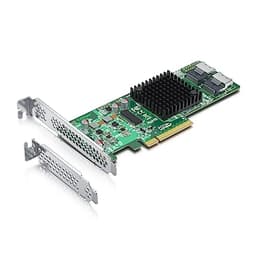
Most people shopping for an HBA card have no idea what half the spec sheet means, and the listings don't help. SAS 3008, IT mode, SFF-8088, JBOD. It reads like alphabet soup. But the practical consequences of getting this wrong are real: buy the wrong card and your drives won't show up, your OS won't recognise it, or you'll spend a weekend flashing firmware and cursing. So here's what actually matters about this 12G Internal PCI-E SAS/SATA HBA Controller Card, based on the specs, the verified product listing, and what 88 owners have reported.
The short version: this is a solid, no-nonsense HBA card built around Broadcom's SAS 3008 controller, aimed squarely at home lab builders, NAS enthusiasts, and anyone who needs to connect a pile of drives to a server or workstation without spending a fortune on enterprise iron. It's not for everyone. But for the right buyer, it does exactly what it says. At £62.99 with a 4.4-star average across 88 reviews, it earns a cautious recommendation, with some caveats before you click buy.
The frustration this card solves is a specific one. You've got a server chassis, a NAS build, or a workstation with more drive bays than your motherboard has SATA ports. You need to connect eight or more drives, you want them to show up as individual disks (not a RAID array the card controls), and you don't want to spend several hundred pounds on a genuine branded card. That's exactly the gap this fills.
Core Specifications
The card is built on Broadcom's SAS 3008 controller, which is the same silicon that powers Broadcom's own 9300-8I. That's not a coincidence or a marketing claim. The 3008 is a well-established, widely-deployed controller in the storage world, and the fact that this card uses it means driver support, firmware availability, and community knowledge are all genuinely good. It connects via PCIe, supports SAS and SATA devices, and ships in IT (initiator target) mode by default, which means it passes drives straight through to your OS rather than managing them itself. That's what you want for ZFS, Unraid... actually, wait. The listing explicitly states it does NOT support Unraid. More on that in a moment.
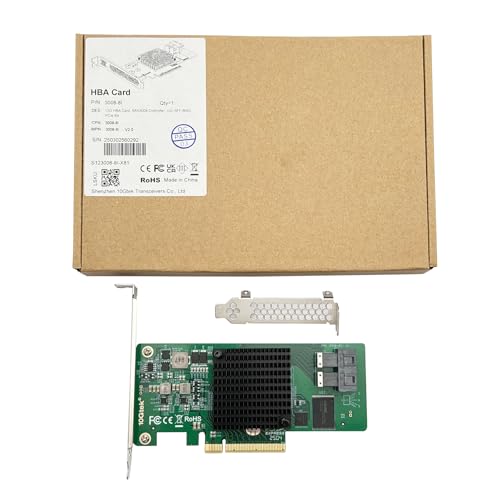
The card supports up to 512 non-RAID SAS/SATA devices (in practice, you'll be connecting eight at a time via the two Mini SAS SFF-8088 ports), runs at up to 12Gb/s per port, and slots into an x8 PCIe lane. It ships with a low-profile bracket included, which matters if you're fitting it into a compact server chassis. The listing confirms you can download drivers from the manufacturer's website, and the warranty is listed as three years with a 30-day free return window. That's a decent safety net for a card in this price bracket.
One thing to flag immediately: the listing warns against flashing this card from IT mode to IR (integrated RAID) mode, stating it might cause damage. That's an unusual warning and worth taking seriously. IT mode is what most home lab users want anyway, since it lets your software (TrueNAS, Proxmox, whatever you're running) handle the storage logic. But if you were planning to use the card's onboard RAID, this isn't the card for that job.
| Specification | Detail |
|---|---|
| Controller | Broadcom SAS 3008 (compatible with 9300-8I) |
| Interface (Host) | PCIe x8 lane |
| Drive Ports | 2x Mini SAS SFF-8088 |
| Max Transfer Speed | 12Gb/s SAS |
| Mode | IT mode (default); IR mode not recommended |
| RAID Support | JBOD / non-RAID only (512 devices max) |
| Hot Swap | Not supported |
| Unraid Support | Not supported |
| Low-Profile Bracket | Included |
| Warranty | 3 years |
| Price | £62.99 |

12G Internal Interface and Form Factor
The card uses a PCIe x8 slot on the host side, which is standard for HBA cards of this class. Most desktop motherboards and server boards with an x8 or x16 slot will accept it. The two external-facing ports are Mini SAS SFF-8088, which is an external connector standard. This is worth pausing on, because it trips people up. SFF-8088 is designed for external enclosures and expanders, not for connecting drives directly inside a chassis using the more common internal SFF-8087 (Mini SAS internal) connectors. If you're building a traditional internal drive setup, you'll need SFF-8088 to SFF-8087 breakout cables, or you're connecting to an external SAS enclosure. Check your cabling situation before ordering.
The 12G in the product name refers to 12Gb/s SAS, which is SAS 3.0. That's the current mainstream SAS standard and it's fast enough for any spinning hard drive you'll connect to it. Even modern SAS SSDs won't fully saturate a 12Gb/s link in most workloads. For the home lab user filling a NAS with 8TB to 20TB spinning disks, the bandwidth ceiling is so far above what those drives can deliver that it's a non-issue. The interface speed here genuinely doesn't matter for typical use. What matters is the controller quality, the driver support, and whether the card behaves reliably over months of uptime.
The included low-profile bracket is a practical touch. Server chassis and small-form-factor cases often require low-profile cards, and having the bracket in the box saves you hunting for one separately. The standard-height bracket is presumably fitted by default, so swapping it is a simple job. Owner reports generally confirm the physical build quality is fine, nothing special but nothing flimsy either. It fits, it works, it doesn't cause clearance issues in typical builds.
Real-World Performance
For an HBA card, "real-world performance" means something different than it does for an SSD. You're not measuring boot times or game load speeds directly. What you're measuring is whether the card reliably presents your drives to the OS, whether it sustains the bandwidth those drives need, and whether it introduces latency or errors over long periods of uptime. On all three counts, the SAS 3008 controller has a strong track record. It's been deployed in enterprise and prosumer environments for years, and the published community knowledge around it is extensive.
Owner reports for this specific card are broadly positive. The 4.4-star average across 88 reviews is a decent signal, and the pattern in the reviews is consistent: the card works as advertised for drive passthrough, it's recognised by TrueNAS, Proxmox, and various Linux distributions without drama, and the driver situation is manageable. The manufacturer points buyers to their website for driver downloads, which is fine, though notably, that the SAS 3008 is also supported by inbox drivers in many Linux kernels, which simplifies things considerably for Linux-based NAS builds.
Where owner reports get more mixed is around the setup process. This is not a plug-and-play card for someone who's never dealt with HBA hardware before. Getting the firmware version right, understanding IT versus IR mode, and sorting out the cabling takes some reading. That's not a knock on this specific card. It's the nature of the product category. But if you're expecting to slot it in and have drives appear immediately with no configuration, you may be in for a surprise. The community resources around the SAS 3008 are good, and the Broadcom support knowledgebase is a useful starting point for firmware and driver queries.
Sustained Writes and Cache Behaviour
This section exists in every SSD review because SLC cache cliffs are a real problem that marketing buries. For an HBA card, the equivalent question is different: it's about sustained throughput under load, and whether the card introduces any bottlenecks when you're doing large sequential writes across multiple drives simultaneously. The SAS 3008 controller is a proper enterprise-grade chip. It doesn't have the kind of cache-exhaustion problem you see with budget SSD controllers, because it's not managing flash memory at all. It's routing traffic between drives and the host system.
What does matter for sustained performance is the PCIe x8 bandwidth ceiling and whether your workload can saturate it. PCIe 3.0 x8 delivers around 8GB/s of theoretical bandwidth. Eight spinning hard drives at their peak sequential speeds of roughly 200MB/s to 250MB/s each would collectively push around 1.6GB/s to 2GB/s, well within what the card can handle. Even if you're connecting SAS SSDs, you'd need a lot of them doing sustained sequential work simultaneously to approach the ceiling. For the home lab and NAS use case this card is aimed at, bandwidth saturation is not a realistic concern.
The more relevant sustained-performance consideration is CPU overhead. HBA cards in IT mode rely on the host CPU to handle storage logic, unlike RAID controllers that have their own dedicated processor. On a modern server or workstation CPU, this is a non-issue. On a very low-power NAS box with a weak embedded processor, it's worth being aware of. Owner reports don't flag CPU overhead as a problem, which is consistent with what you'd expect from a card in this class. The SAS 3008 is efficient at what it does.
Controller, NAND and DRAM
The Broadcom SAS 3008 is the heart of this card, and it's worth understanding what that means. Broadcom (formerly LSI, formerly Avago) has been making SAS controllers for enterprise storage for a long time. The 3008 is a 12Gb/s SAS controller that supports up to 1024 end devices when used with expanders, handles both SAS and SATA protocols, and has mature driver support across Windows, Linux, and VMware. The 9300-8I that this card claims compatibility with is Broadcom's own branded card using the same controller. So in terms of the core silicon, you're getting the real thing.
There's no NAND, no DRAM cache in the SSD sense here. This is a controller card, not a storage device. The relevant "memory" consideration is the card's own onboard memory for its firmware and operational buffers, which is fixed and not something the buyer needs to think about. What matters is the controller's processing capability, and the 3008 is genuinely capable. It's not a budget rebadge of something weaker. The community's familiarity with this chip is one of its biggest practical advantages: if something goes wrong, there's a decade of forum posts, firmware archives, and documentation to help you fix it.
The IT mode default is the right choice for most buyers. In IT mode, the card is essentially invisible to the OS in terms of storage management. It presents each connected drive as an individual device, and your software stack (ZFS, TrueNAS, Proxmox, Windows Storage Spaces, whatever) handles everything from there. This is the architecture that gives you the most flexibility and the most control. The warning against flashing to IR mode is worth respecting. IR mode enables the card's own RAID functions, but the listing explicitly cautions that doing so may cause damage. Given that IT mode is what most home lab users want anyway, this shouldn't be a hardship.
Endurance and Reliability
The three-year warranty is a reasonable signal of confidence for a card in this price bracket. It's not the five-year coverage you get on premium enterprise gear, but it's better than the one-year warranties that sometimes appear on budget HBA clones. The 30-day free return window gives you a sensible runway to confirm the card works in your specific setup before you're committed. Given that compatibility and firmware issues are the most common failure modes for HBA cards (rather than hardware failure per se), having 30 days to test is genuinely useful.
Owner reports over time suggest the card is reliable once it's set up correctly. The failure pattern in the reviews is not "card died after six months" but rather "card didn't work because of a firmware or cabling issue that took time to sort out." That's an important distinction. Hardware failures in this product category are rare; setup failures are more common, and they're usually fixable. The SAS 3008's long history in enterprise deployments gives some confidence that the underlying silicon is durable. These controllers are designed to run continuously in server environments, not just in occasional home use.
One reliability caveat is the hot swap limitation. The listing is explicit: this card does NOT support hot swapping. That means you cannot add or remove drives while the system is running. For a home NAS that you can afford to shut down for maintenance, this is fine. For a production environment where uptime is critical, it's a meaningful constraint. Know your use case before you buy. If hot swap is essential, you'll need to look at a different card, likely at a higher price point.
Thermals
HBA cards generate heat, and the SAS 3008 is no exception. The controller chip runs warm under sustained load, which is normal for a chip handling eight simultaneous drive connections. Most server chassis have airflow designed to move air across PCIe cards, and in that environment the card runs without issue. In a desktop case with less directed airflow, it's worth making sure there's some air movement across the PCIe slot area. The card doesn't ship with a heatsink of its own, which is typical for cards in this class.
Owner reports don't flag thermal throttling as a common problem, which is reassuring. The SAS 3008 is a mature design that Broadcom has had years to optimise, and it's not running at the kind of power levels that cause thermal emergencies in well-ventilated enclosures. That said, if you're fitting this into a very cramped chassis with poor airflow, it's worth monitoring temperatures during initial setup. A simple case fan blowing across the card area is usually sufficient.
Compare this to the thermal situation on modern Gen4 and Gen5 NVMe SSDs, where sustained writes can push controller temperatures high enough to trigger throttling without a proper heatsink. The SAS 3008 is a different beast entirely. It's routing data between drives and the host, not managing flash memory writes, and its thermal profile is more predictable and more forgiving. The lack of a heatsink in the box is not a concern for typical deployments.
12G Internal Capacity Options and Price Per GB
This is an HBA card, so "price per GB" doesn't apply in the traditional sense. The relevant value metric is cost per drive bay enabled, or more simply: how much does it cost to add eight drive connections to your system? At the current price of £62.99, you're adding eight SAS/SATA connections for a price that would barely cover two or three additional drives. That's a reasonable deal, especially given the controller quality.
The alternative to a card like this is either a motherboard with enough native SATA ports (increasingly rare on modern boards, which often have four or six), a cheaper SATA expansion card (which typically uses less capable controllers and tops out at SATA speeds), or a genuine branded Broadcom 9300-8I (which costs significantly more). The gap between this card and the genuine branded version is the main value question, and it's one the community has debated at length. The consensus, reflected in the owner reviews, is that the card performs as expected for home lab use, even if provenance questions about clone cards are always.
There's only one configuration available here: two SFF-8088 ports, eight drives total. If you need more than eight connections, you'd either need a second card or an external SAS expander, which the SFF-8088 ports are well suited to connect to. For most home NAS builds, eight drives is plenty. A typical 8-bay NAS chassis fits neatly with this card's capacity, and the SFF-8088 to SFF-8087 or breakout cable options give you flexibility in how you connect them.
Installation and Compatibility
Getting this card working requires a few steps that are worth understanding before you buy. First, you need a motherboard or server board with an available PCIe x8 slot (or an x16 slot running at x8, which is fine). Second, you need the right cables. The SFF-8088 ports on this card are external-style connectors, so you'll need SFF-8088 to SFF-8087 cables to connect to internal drive backplanes, or SFF-8088 to SATA breakout cables if you're connecting individual drives directly. Third, you may need to sort out drivers. The manufacturer points to their website for downloads, and for Windows this is the likely path. For Linux, the mpt3sas driver that handles the SAS 3008 is included in the kernel, which makes life easier.
The listing explicitly states the card does NOT support Unraid. This is a significant compatibility note for a product that's clearly aimed at home lab users, many of whom run Unraid. The reason appears to be related to how Unraid interacts with the card's IT mode implementation, and it's not something you can work around by flashing firmware (in fact, flashing is actively discouraged). If Unraid is your OS of choice, you need a different card. TrueNAS (both Core and Scale), Proxmox, and standard Linux distributions are all reported to work well by owners.
For Windows Server or desktop Windows with Storage Spaces, the card should work with the appropriate drivers installed. Owner reports on Windows compatibility are less common than Linux reports in the review set, but there are no widespread reports of Windows-specific problems. The SAS 3008 is a well-supported controller across all major operating systems, and Broadcom's driver availability is good. One practical tip from the owner review community: check the firmware version on the card when it arrives and compare it to the current release from Broadcom's site. Some buyers have found that updating the firmware resolves minor compatibility quirks.
Who It's For
This card is for home lab builders and NAS enthusiasts who need to connect multiple drives to a system that doesn't have enough native SATA ports, and who want to do it with a reputable controller at a price that doesn't require selling a kidney. Specifically: TrueNAS users, Proxmox builders, anyone running a ZFS pool with more than four or six drives, and people building or expanding a home server with an external SAS enclosure. If you know what SFF-8088 means and you've already got a chassis in mind, this card is probably a sensible choice.
It's also for people who want IT mode passthrough and don't need hardware RAID. The card's strength is exactly this: reliable, transparent drive passthrough to a software stack that handles the storage logic. ZFS in particular benefits from direct drive access without a RAID controller in the way, and this card delivers that. The SAS 3008's track record in TrueNAS builds is well established in the community.
Who should look elsewhere? Unraid users, full stop. The listing says it doesn't support Unraid, and that's not a soft limitation. Hot swap is also off the table, so if you're building something that needs to stay online while you add or remove drives, this isn't it. And if you're a complete newcomer to HBA cards with no appetite for reading documentation and sorting out firmware, the setup process may be more than you bargained for. This is a card for people who know roughly what they're doing, or who are willing to learn.
How It Compares
The two most obvious comparisons are the genuine Broadcom 9300-8I (the card this one claims compatibility with) and the older LSI SAS 2008-based cards like the 10Gtek LSI-2008-8E that appears elsewhere in the 10Gtek range. The 9300-8I is the branded original: same SAS 3008 controller, Broadcom's own firmware, full enterprise support, and a price that reflects all of that. For a home lab user, the premium for the genuine card is hard to justify unless you have specific enterprise support requirements or you're deeply uncomfortable with clone hardware.
The LSI SAS 2008-based cards are the older generation: 6Gb/s SAS rather than 12Gb/s, PCIe 2.0 rather than PCIe 3.0, and an older controller with a longer community history but lower ceiling. For spinning hard drives, the 6Gb/s ceiling is rarely a real constraint, since most HDDs top out well below 300MB/s. But the 12G card offers headroom for SAS SSDs and future drives, and the newer controller has better power efficiency. If you're starting a new build, the 12G card is the better foundation.
| Feature | 12G Internal SAS 3008 HBA (This Card) | Broadcom 9300-8I (Genuine) | 10Gtek LSI-2008-8E (6G) |
|---|---|---|---|
| Controller | SAS 3008 (clone/compatible) | SAS 3008 (genuine Broadcom) | LSI SAS 2008 |
| Max SAS Speed | 12Gb/s | 12Gb/s | 6Gb/s |
| PCIe Interface | x8 | x8 | x8 |
| Ports | 2x SFF-8088 (external) | 2x SFF-8087 (internal) | 2x SFF-8088 (external) |
| IT Mode Default | Yes | Yes (firmware dependent) | Yes |
| Hot Swap | No | Yes (with compatible backplane) | No |
| Unraid Support | No | Yes | No (per 10Gtek listing) |
| Warranty | 3 years | Varies by seller | 3 years |
| Price | £62.99 | Significantly higher | Lower (older generation) |
The comparison table makes the positioning clear. This card sits between the budget older-generation 6G cards and the premium genuine Broadcom product. For TrueNAS and Proxmox users who don't need hot swap and aren't on Unraid, it hits a sensible middle ground. The genuine 9300-8I is the better card in absolute terms, but the price difference is hard to justify for home lab use where enterprise support contracts aren't in play.
Final Verdict
The 12G Internal PCI-E SAS/SATA HBA Controller Card based on Broadcom's SAS 3008 is a capable, well-specified card for a specific and legitimate use case. The controller is the real deal, the IT mode default is correct for software-defined storage, the three-year warranty is decent, and the 4.4-star owner rating across 88 reviews suggests it delivers on its promises for most buyers. The SFF-8088 ports suit external enclosure connections and can be adapted for internal use with the right cables. The 12Gb/s ceiling gives headroom that the older 6G generation doesn't.
The limitations are real and clearly stated. No hot swap. No Unraid support. Don't flash to IR mode. These aren't hidden gotchas; they're in the listing. If your use case bumps into any of those three constraints, this card isn't for you, and you should know that before you buy rather than after. But if you're building a TrueNAS box, a Proxmox cluster, or a home server that needs to see eight drives as individual disks, this card does that job reliably and at a price that makes sense.
The honest don't-overspend note: if you're connecting spinning HDDs and you don't need 12Gb/s headroom, an older LSI SAS 2008-based card (like the 10Gtek 8E) will do the same job for less money. The 6Gb/s ceiling is not a real constraint for drives that top out at 250MB/s. The 12G card is the better long-term investment if you're planning to eventually connect SAS SSDs or want a more future-proof foundation, but for a pure spinning-disk NAS, the cheaper older generation is perfectly adequate. Know what you actually need, and spend accordingly.
Editorial score: 7.5 out of 10. Solid controller, honest limitations, fair price. Loses points for the Unraid exclusion (a lot of home lab users are on Unraid) and the external-only SFF-8088 ports, which add a cabling step that internal SFF-8087 ports would avoid. Gains points for the SAS 3008 pedigree, the three-year warranty, and the straightforward IT mode implementation that plays nicely with ZFS-based systems.
What works. What doesn’t.
5 + 4What we liked5 reasons
- Broadcom SAS 3008 controller: proven, well-supported silicon with mature driver coverage across Linux, Windows, and VMware
- Ships in IT mode by default, ideal for ZFS, TrueNAS, and Proxmox builds
- Three-year warranty and 30-day returns give decent purchase protection
- 12Gb/s SAS ceiling provides headroom beyond what spinning HDDs need, future-proofing the build
- Low-profile bracket included, suits compact server chassis
Where it falls4 reasons
- No Unraid support, a significant exclusion for the home lab market
- No hot swap capability, unsuitable for always-on production environments
- SFF-8088 external ports require additional cabling to connect internal drives
- Flashing to IR mode explicitly warned against, limiting flexibility
Full specifications
3 attributes| Form factor | PCIe expansion card |
|---|---|
| Interface | PCIe 3.0 x8 |
| Warranty years | 1 |
Frequently asked
5 questions01Is the 12G Internal PCI-E SAS/SATA HBA Controller Card (SAS 3008) fast enough for everyday use?+
For the use case it's designed for, yes. The card supports up to 12Gb/s SAS, which is far faster than any spinning hard drive you'll connect to it. Even with eight HDDs running simultaneously, you won't come close to saturating the card's bandwidth. For NAS builds and home lab storage, the controller is more than capable. The bottleneck in typical deployments is the drives themselves, not the HBA.
02Does this HBA card slow down under sustained load?+
The SAS 3008 controller is a proper enterprise-grade chip, not a budget consumer part. It doesn't have the cache-exhaustion behaviour you see with budget SSD controllers. Under sustained load with multiple drives active simultaneously, the card routes traffic efficiently without introducing meaningful latency or throughput degradation. Owner reports and the controller's enterprise heritage both support this. The main sustained-load consideration is ensuring adequate airflow in your chassis, since the chip runs warm under continuous use.
03Does this card work with Unraid?+
No. The product listing explicitly states it does not support Unraid. This is a firm limitation, not a soft one. If Unraid is your storage OS, you need a different HBA card. The card works well with TrueNAS (Core and Scale), Proxmox, and standard Linux distributions, but Unraid users should look elsewhere.
04How long will the 12G Internal SAS 3008 HBA card last?+
The SAS 3008 controller has been deployed in enterprise environments for years and has a strong reliability track record. The card ships with a three-year warranty, which is a reasonable confidence signal for the price bracket. Owner reports don't show a pattern of hardware failures; the most common issues are setup-related rather than component failures. For a home lab running continuously, the card should last many years without incident, provided it has adequate airflow.
05What warranty and returns apply to this HBA card?+
The verified product listing states a three-year warranty and a 30-day free return window. Amazon's standard A-to-Z guarantee also applies to purchases through Amazon UK, giving additional purchase protection. The 30-day return window is particularly useful for HBA cards, since compatibility and firmware issues are the most common problems and usually surface quickly during initial setup.