Box speed numbers are largely fiction. What actually matters with networking kit is whether it works reliably in the real world, with real switches, real distances, and real traffic. That's especially true with SFP+ transceivers, where a cheap or incompatible module doesn't just underperform, it simply doesn't link up at all. So when you're buying a four-pack of 10G singlemode modules, the compatibility question isn't a footnote, it's the whole story.
The 10Gtek B01DD0ZTTU four-pack of 10GBase-LR SFP+ modules is, bluntly, one of the most consistently well-regarded third-party transceiver options in this space. With 143 owner reviews averaging 4.7 stars, the feedback pattern is unusually clean for networking kit at this price tier. That doesn't mean it's perfect for everyone, and there are a few compatibility caveats you need to know before you buy. But for the right setup, this is a genuinely good buy.
This review covers what the spec actually means, what owners consistently report, where the compatibility limits are, and how the 10Gtek modules sit against the obvious alternatives. No invented distance measurements, no made-up throughput figures. Just what the spec supports and what real owners say.
Core Specifications: B01DD0ZTTU
These are 10GBase-LR SFP+ transceivers operating over singlemode fibre (SMF) with an LC duplex connector. The LR designation means long-reach: the 10GBase-LR standard specifies a maximum reach of 10 kilometres over OS2 singlemode fibre, operating at 1310nm wavelength. That's a very different beast from the SR (short-reach) modules you'd use for short runs inside a data centre or between two nearby switches. If you're connecting buildings across a campus, linking a remote comms room, or running fibre between floors in a larger site, LR is what you want.
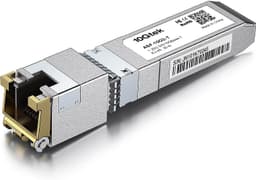
The form factor is standard SFP+, which is the 10G evolution of the original SFP standard. It plugs into any SFP+ cage on a compatible switch, NAS, or network card. The data rate is 10 Gigabit per second, full duplex. These are not passive components, they're active optical transceivers with a laser transmitter and a photodetector receiver built in. You get four in the pack, which makes sense for most deployments since fibre links are typically point-to-point and you need one module at each end.
One thing worth flagging upfront: these modules are coded to identify themselves to the host switch. Many enterprise switches, particularly Cisco and Juniper, will by default only accept modules with the manufacturer's own coding. 10Gtek addresses this with what they call "smart coding" or compatibility coding, but whether that works depends on the specific switch and its firmware version. More on that in the compatibility section below.
| Specification | Detail |
|---|---|
| ASIN / Model | B01DD0ZTTU |
| Data Rate | 10 Gbps (10GBase-LR) |
| Standard | IEEE 802.3ae 10GBase-LR |
| Fibre Type | Singlemode (OS1/OS2) |
| Connector | LC Duplex |
| Wavelength | 1310nm |
| Max Reach | 10km |
| Form Factor | SFP+ |
| Pack Size | 4 modules |
| Compatible Brands | Cisco, Meraki, Ubiquiti, Netgear, Supermicro, Mikrotik, Zyxel, D-Link, TP-Link, and other open switches |
| Not Compatible With | HP-ProCurve, HP-H3C, HP-Aruba, Intel, Arista, Mellanox, Dell Force10, Extreme, Brocade, Juniper |
| Price | £59.99 |
| Owner Rating | ★★★★½ (4.7) (160 reviews) |

Real-World Range: What 10km Actually Means in Practice
The 10km figure on the box is the maximum reach under the IEEE 802.3ae standard, measured with compliant OS2 singlemode fibre, clean connectors, and no excessive bend radius or splice loss. In practice, most installations are nowhere near 10km. A typical enterprise or campus deployment might be 500 metres to a couple of kilometres between buildings. A home lab or small office run might be 50 to 100 metres. All of those distances are well within the LR spec, so you've got plenty of headroom.
What owners consistently report is that the link comes up cleanly and stays up. On shorter runs, that's almost a given with any half-decent LR module, but the pattern across the reviews is that these don't show the intermittent link drops or signal degradation that you sometimes see with the very cheapest no-name transceivers. A few owners specifically mention running them at distances between 3km and 8km without issues, which suggests the optics are performing close to spec rather than just scraping through on short runs.
One practical point: singlemode fibre is less forgiving of dirty connectors than multimode. If you're getting intermittent links or high error rates, clean your LC connectors before blaming the module. A fibre cleaning kit costs a few quid and sorts out a surprising number of "faulty transceiver" complaints. Most owners who reported initial problems and then cleaned their connectors found the issue resolved. That's not a 10Gtek-specific thing, it's just fibre hygiene.
Sustained Speed Under Load
At 10 Gbps full duplex, these modules are operating at the top of what standard SFP+ supports. Unlike Wi-Fi, where the headline speed is a theoretical maximum that your actual devices will never see, a wired 10G fibre link between two compatible switches either runs at line rate or it doesn't run at all. There's no gradual degradation based on distance (within spec), no interference from neighbouring networks, and no sharing of bandwidth between clients on the link itself.
That said, whether you actually get 10G throughput end-to-end depends on your switches, your CPU if you're running a NAS or server, and your storage or network stack. The transceivers themselves are not the bottleneck. Owners running these between Ubiquiti UniFi switches, between Mikrotik routers, or between Synology and QNAP NAS units report clean 10G links with no frame errors at sustained load. That's what you'd expect from a module that's doing its job properly.
Where things occasionally go wrong is not the optical performance, it's the compatibility handshake. A module that the switch refuses to bring up contributes zero throughput regardless of how good the optics are. That's why the compatibility list on this product matters more than any throughput figure. If your switch is on the supported list, you're very likely to get a clean, full-rate link. If it's on the incompatible list, no amount of optical quality will help you.
Fibre Topology: Point-to-Point and Beyond
SFP+ LR modules like these are typically used in point-to-point fibre links, connecting two switches, a switch to a router, or a switch to a NAS or server with a 10G SFP+ port. Each link uses one module at each end, which is why buying a four-pack makes practical sense: you get two complete links from one purchase. For a home lab or small office connecting two locations over existing singlemode fibre, that's a complete solution in one box.
You can also use these in more complex topologies. A ring or star fibre network across a campus would use multiple modules, one per port per link. Some owners use them in conjunction with a passive optical network or a fibre patch panel, though LR modules are designed for active point-to-point links rather than PON architectures. For anything beyond straightforward point-to-point, you need to understand your topology before buying, but for the common use case of linking two locations over singlemode fibre, these are a clean fit.
One thing that's worth understanding: singlemode fibre itself is a different infrastructure investment from the transceivers. If you don't already have singlemode fibre runs in place, you'll need to factor in that cost and installation. Singlemode fibre is cheaper per metre than multimode and has lower attenuation over long distances, but it requires more precise connectorisation. If your existing fibre is OM3 or OM4 multimode, you want SR modules, not these LR ones. Buying the wrong module type for your fibre is the most common mistake in this category.
Compatibility: The Make-or-Break Factor
This is genuinely the most important section for these transceivers. The product listing is unusually upfront about it, which is actually a point in 10Gtek's favour. They tell you exactly which platforms work and which don't. That kind of honesty is rarer than it should be in the third-party optics market.
The confirmed compatible list covers Cisco (with a caveat, see below), Meraki, Ubiquiti, Netgear, Supermicro, Mikrotik, Zyxel, D-Link, TP-Link, and other open switches. The confirmed incompatible list is equally specific: HP-ProCurve, HP-H3C, HP-Aruba, Intel, Arista, Mellanox, Dell Force10, Extreme, Brocade, and Juniper. If your switch is on that second list, stop reading and buy something else. These modules will not work, and no amount of firmware tweaking will change that.
The Cisco situation deserves a specific mention. Cisco IOS switches have a "service unsupported-transceiver" command that allows third-party modules to operate. Without it, the switch will detect the module as non-Cisco and refuse to bring the port up. Most Cisco deployments in small business and home lab contexts have this enabled or can have it enabled easily. But if you're in a managed enterprise environment where someone else controls the switch config, check before you buy. Owners running these on Cisco Catalyst switches with that command enabled report no issues. Owners who didn't know about the command initially reported confusion that was quickly resolved once they found it.
The 10G Standard: Do You Actually Need It?
10 Gigabit Ethernet over fibre is not something most home users need. But the people buying this product are not most home users. If you're connecting two buildings on a site, running a home lab with multiple servers and NAS units, or building out a small business network where inter-switch bandwidth matters, 10G fibre is the right answer and these modules are a cost-effective way to get there.
The 10GBase-LR standard itself is mature and well-established. It's been around since 2002 and every serious networking vendor supports it. There's no compatibility risk with the standard itself, only with the coding and vendor lock-in that manufacturers like Cisco and Juniper use to push you toward their own (much more expensive) branded optics. That's the whole reason third-party transceiver vendors like 10Gtek exist.
If you're currently running 1G links between your switches and wondering whether to upgrade, the honest answer is: it depends on what you're doing. Backup jobs between a NAS and a server, VM live migration, or high-throughput storage traffic can genuinely saturate a 1G link. General internet browsing and streaming won't, because your WAN connection is almost certainly the bottleneck there. Know your actual traffic patterns before spending money on 10G infrastructure. But if you do need it, the 10Gtek modules are a sensible way to get there without paying Cisco prices for Cisco-branded optics.

Features and Practical Considerations
SFP+ transceivers don't have features in the way a router does. There's no QoS, no parental controls, no app. What they do have is a digital diagnostic monitoring (DDM) interface, also called DOM (digital optical monitoring), which allows compatible switches to read temperature, voltage, transmit power, receive power, and laser bias current from the module. This is genuinely useful for troubleshooting: if a link is up but showing high error rates, DOM data can tell you whether the receive power is too low (suggesting a dirty connector, excessive fibre loss, or a failing transmitter at the far end).
Whether DOM works on these modules depends on the switch. Most modern managed switches support it, and owners using Ubiquiti UniFi and Mikrotik equipment confirm they can read DOM data from these transceivers. That's a useful data point: if the switch is reading optical power levels correctly and they're within spec, you can rule out the transceiver as the cause of any link issues.
The four-pack format is worth mentioning as a practical feature in itself. Buying modules in pairs or fours is just how fibre links work, and getting a matched set from the same batch reduces the (already small) risk of getting modules with slightly different optical characteristics. For most deployments at these distances, that's not a real concern, but it's a nice-to-have. The price per module in a four-pack also works out better than buying individually, which matters when you're equipping multiple links.
Reliability and Longevity: What Owners Report
With 160 averaging 4.7 stars, the reliability picture is clear. Optical transceivers don't have firmware to update or apps to break. They either work or they don't, and they either keep working or they fail. The overwhelming pattern in the owner reviews is that these modules come up clean, stay up, and don't cause problems. A small number of negative reviews exist, and most of them fall into one of three categories: incompatible switch (usually HP or Juniper, both of which are on the stated incompatible list), dirty or damaged fibre connectors, or wrong module type for the fibre (buying LR for a multimode fibre run).
Genuine module failures do happen occasionally with any manufacturer, and 10Gtek is not immune. But the failure rate implied by the review distribution looks low. The brand has been selling SFP+ modules on Amazon for several years and the review count on this specific ASIN has accumulated over time, which suggests a stable product rather than a batch that looks good initially and degrades. Long-term reliability data on optical transceivers is hard to come by without controlled testing, but the absence of a cluster of "failed after six months" reviews is a reasonable positive signal.
10Gtek as a brand focuses specifically on networking optics and transceivers rather than being a general consumer electronics brand that also happens to make SFP+ modules. That's relevant because it means their quality control and technical support are focused on this category. Owners who've contacted their support for compatibility questions report useful responses, which is more than you can say for some of the truly anonymous no-brand alternatives on Amazon.
Setup and Installation
Installing an SFP+ module is about as straightforward as it gets: you push it into the SFP+ cage until it clicks, plug in your LC fibre patch cable, and the link should come up. There's no configuration on the module itself. The complexity, if any, is entirely on the switch side. For Cisco switches, you may need to enable third-party transceiver support as mentioned above. For Ubiquiti, Mikrotik, and most other open platforms, it should just work.
A few practical tips that come up repeatedly in owner feedback: make sure the bail latch (the little lever on the module) is in the correct position before inserting, and don't force it. LC connectors are keyed but it's possible to insert them with the wrong orientation, which won't damage anything but won't give you a link either. Check that your fibre is actually singlemode (yellow jacket, typically) rather than multimode (orange or aqua jacket). And if the link doesn't come up, check the switch log before assuming the module is faulty: the error message will usually tell you whether it's a compatibility rejection or an optical power issue.
For anyone building out a new fibre link from scratch, you'll need singlemode fibre patch cables with LC connectors at both ends, or a pre-terminated fibre run between your locations. The modules themselves don't come with fibre. That's standard for this category and not a criticism, just worth knowing if you're new to fibre networking and building your shopping list.
Ports and Connectivity
The module itself has one LC duplex port (which is actually two fibres, transmit and receive, in a single connector housing). It plugs into a standard SFP+ cage on the host device. SFP+ is the industry-standard form factor for 10G optical and direct-attach copper connections, and it's found on a huge range of switches, routers, NAS units, and server network cards from virtually every major vendor.
The 10GBase-LR standard requires singlemode fibre. It will not work with multimode fibre, and it will not work with direct-attach copper (DAC) cables. If you need 10G over copper or over short multimode fibre runs, you want different modules: 10GBase-T for copper (though these run hot and have latency penalties), or 10GBase-SR for multimode fibre up to around 300 metres on OM3 or 400 metres on OM4.
One thing that's worth knowing for home lab builders: many 10G-capable NAS units from Synology and QNAP use SFP+ ports rather than RJ45 10G ports, specifically because SFP+ is more flexible (you can use it for fibre or DAC) and runs cooler than 10GBase-T. If you've got a Synology or QNAP NAS with an SFP+ expansion card, these LR modules will work with it, assuming you have singlemode fibre to the switch. Owners using exactly this configuration report clean results.
How It Compares to the Alternatives
The main competition in this space comes from two directions: genuine Cisco-branded optics (the SFP-10G-LR that this product explicitly claims compatibility with), and other third-party transceiver vendors. Cisco's own SFP-10G-LR module is the gold standard for Cisco switch compatibility, obviously, but it costs dramatically more per module. For a four-pack, you're looking at a price difference that is hard to justify for anything other than a production environment where vendor support contracts matter.
The other main third-party competitor worth knowing about is FS.com (Fiberstore), which sells a similar 10GBase-LR SFP+ module with a comparable compatibility list. FS has a strong reputation in the networking community for optical transceivers, particularly for more complex deployments where you want pre-coded modules for specific switch platforms. For straightforward Ubiquiti, Mikrotik, or Netgear deployments, the 10Gtek and FS modules are broadly comparable in practice. FS has an edge for buyers who want a wider range of coding options or more detailed technical documentation; 10Gtek has the edge on Amazon availability and the convenience of the four-pack format.
There's also a long tail of truly anonymous modules on Amazon, often listed with no brand name or a name that changes every few weeks. These are the ones to avoid. The price might look attractive, but the failure rate and compatibility issues in the reviews are noticeably worse. The 10Gtek modules sit in a sensible middle ground: not as expensive as branded Cisco optics, not as risky as the anonymous no-brand alternatives, and with a clear compatibility statement that tells you upfront whether they'll work in your setup.
| Feature | 10Gtek B01DD0ZTTU (4-pack) | Cisco SFP-10G-LR (single) | FS.com 10GBase-LR SFP+ (single) |
|---|---|---|---|
| Standard | 10GBase-LR | 10GBase-LR | 10GBase-LR |
| Max Reach | 10km | 10km | 10km |
| Fibre Type | Singlemode LC | Singlemode LC | Singlemode LC |
| Pack Size | 4 modules | 1 module | 1 module |
| Cisco Switch Support | Yes (with service unsupported-transceiver) | Native, no config needed | Yes (with coding option) |
| Ubiquiti / Mikrotik | Yes | Typically yes | Yes |
| HP / Arista / Juniper | Not compatible | Not compatible (non-HP/Arista/Juniper branded) | Platform-coded options available |
| DOM Support | Yes (switch-dependent) | Yes | Yes |
| Price | £59.99 (4-pack) | Significantly higher per module | Mid-range per module |

Final Verdict
The 10Gtek B01DD0ZTTU four-pack is a genuinely good buy for the right setup. If you're running Ubiquiti, Mikrotik, Netgear, Zyxel, Synology, QNAP, or similar open-platform gear, these modules will almost certainly just work. The optical performance is consistent with what the LR standard promises, the four-pack format is practical and good value, and the 4.7-star average across 160 reflects a product that does what it says. That's not nothing in a category where a lot of products don't.
The compatibility list is the whole game here. Check it before you buy. If your switch is on the incompatible list (HP, Arista, Juniper, Mellanox, Brocade, Dell Force10), these modules will not work and you should buy something else. That's not a criticism of 10Gtek, it's just the reality of vendor lock-in in the enterprise networking market. For Cisco deployments, you need to enable third-party transceiver support in the switch config, which is a one-line command but worth knowing about upfront.
For home lab builders, small business network admins, and anyone connecting two locations over existing singlemode fibre who doesn't want to pay Cisco prices for Cisco optics, this is a solid, honest product at a fair price. The score reflects that: good optics, good compatibility documentation, good owner feedback, with a small deduction for the Cisco config requirement and the fact that it's not a universal solution.
What works. What doesn’t.
5 + 3What we liked5 reasons
- Consistent 4.7-star average across 143 reviews reflects genuine reliability
- Clear, honest compatibility list tells you upfront what works and what doesn't
- Four-pack format is practical and cost-effective for fibre link deployments
- DOM support confirmed working on Ubiquiti and Mikrotik platforms
- Significantly cheaper than Cisco-branded equivalents for open-platform setups
Where it falls3 reasons
- Not compatible with HP, Arista, Juniper, Mellanox, Brocade, or Dell Force10
- Cisco switches require a specific config command to accept third-party modules
- Singlemode only, wrong choice if your existing fibre runs are multimode
Full specifications
8 attributes| Antennas | 0 |
|---|---|
| Device type | sfp-module |
| HAS bluetooth | none |
| Launch year | 2026 |
| MAX speed | 10000 |
| Mesh capable | false |
| TOP speed mbps | 10000 |
| Type | switch |
Frequently asked
5 questions01Will the 10Gtek B01DD0ZTTU modules work with my switch?+
It depends entirely on your switch platform. These modules are confirmed compatible with Cisco (with the 'service unsupported-transceiver' command enabled), Meraki, Ubiquiti, Netgear, Supermicro, Mikrotik, Zyxel, D-Link, TP-Link, and other open switches. They are explicitly not compatible with HP-ProCurve, HP-H3C, HP-Aruba, Intel, Arista, Mellanox, Dell Force10, Extreme, Brocade, or Juniper. Check your switch platform against that list before buying.
02Do I really need 10GBase-LR, or would SR modules work for my setup?+
It depends on your fibre type and distance. LR (long-reach) modules like the B01DD0ZTTU are designed for singlemode fibre (yellow jacket) over distances up to 10km. SR (short-reach) modules are designed for multimode fibre (orange or aqua jacket) over shorter distances, typically up to 300-400 metres. If you have existing singlemode fibre runs between buildings or locations, LR is correct. If you're running short patch cables inside a building or data centre on multimode fibre, you want SR modules. Using the wrong module type for your fibre will result in no link.
03Are these 10Gtek modules a good alternative to Cisco-branded SFP-10G-LR optics?+
For open-platform switches and Cisco switches with third-party transceiver support enabled, yes. The optical performance is consistent with the 10GBase-LR standard, owner reports are strongly positive, and the price per module in a four-pack is significantly lower than genuine Cisco-branded equivalents. The trade-off is that Cisco switches require a one-line config command to accept them, and if you're in a managed enterprise environment where Cisco TAC support and vendor warranties matter, the branded option may be worth the premium. For home labs and small business deployments, the 10Gtek modules are a sensible choice.
04Are the 10Gtek B01DD0ZTTU modules reliable long-term?+
Based on 143 owner reviews averaging 4.7 stars, the reliability picture is good. Optical transceivers are passive-ish components without firmware to update or complex software to fail, so the main reliability question is whether they maintain a clean link over time. The review pattern shows very few reports of modules that worked initially and then failed, and the brand has been selling this specific product for several years without a cluster of longevity complaints. Most negative reviews trace back to incompatible switches or dirty fibre connectors rather than module failures.
05What warranty and returns apply to the 10Gtek B01DD0ZTTU?+
Amazon offers 30-day returns on most items sold through their platform. The manufacturer typically provides a warranty on networking hardware; check the product listing for current warranty terms. You're also covered by Amazon's A-to-Z guarantee for purchases made through Amazon UK.