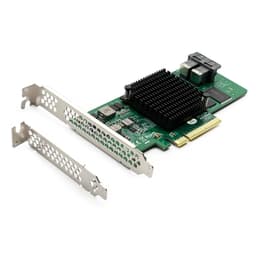
Most storage controller cards get bought by people who already know exactly what they need. You're not shopping for a controller card because it looks nice in a build. You're shopping for one because you've run out of SATA ports, you're building a JBOD array, or you're running a home server that needs to talk to a pile of spinning disks. The 10Gtek Internal LSI-2008-8E is a straightforward answer to a straightforward problem: more SAS and SATA connectivity, via a proven chip, at a price that doesn't require a business case.
The verdict upfront: this card does what it says on the tin. The LSI SAS 2008 chip is well understood, the IT mode firmware is exactly what most home server and NAS builders want, and the 196 owner reviews averaging 4.3 stars suggest it mostly arrives working and keeps working. But there are real caveats before you buy, particularly around the no-hot-swap limitation and the firm advice from 10Gtek not to flash it to IR mode. This isn't a card for beginners who aren't sure what IT mode means. Know what you need, and this card is a solid pick. Don't know what you need, and you might be in for a frustrating afternoon.
So who actually buys a card like this? Home lab builders running TrueNAS or Unraid (well, almost Unraid, more on that shortly), people expanding a Proxmox box, anyone daisy-chaining external SAS enclosures, or small businesses running a budget SAN. It's niche. But within that niche, the 10Gtek Internal HBA is one of the more sensible options at this price point.
Core Specifications
The heart of this card is the LSI SAS 2008 controller, which is the same chip used in the LSI SAS 9211-8I. That's not a coincidence or a marketing claim. 10Gtek explicitly positions this card as equivalent to the 9211-8I, and the chip is genuinely the same silicon. The SAS 2008 is a mature, well-documented controller with broad driver support across Linux, Windows, and FreeBSD. It's the kind of chip that has been running in enterprise and prosumer environments long enough that most of the edge cases are well understood.
The interface is PCIe 2.0 at x8, delivering up to 6 Gb/s per port. There are two Mini SAS SFF-8088 external ports, which means you're connecting to external SAS expanders or enclosures rather than directly to internal drives (unlike the 9211-8I's internal SFF-8087 connectors). Each SFF-8088 port fans out to four SAS or SATA lanes, so you get up to eight devices total. The card ships in IT mode (initiator target mode), which passes drives directly to the OS without any RAID abstraction. That's what you want for ZFS, TrueNAS, or any software-defined storage stack where the OS needs to see raw disks.
One important thing the spec sheet makes clear: no hot swapping. This isn't a soft limitation or a maybe. The listing states it plainly, and owner reviews confirm that trying to hot-swap drives can cause problems. If your workflow involves pulling and inserting drives while the system is running, this card isn't the right tool. Also upfront: 10Gtek explicitly advises against flashing to IR (integrated RAID) mode, warning it could cause damage. So if you were hoping to run hardware RAID, look elsewhere.
| Specification | Detail |
|---|---|
| Controller Chip | LSI SAS 2008 |
| Interface | PCIe 2.0 x8 |
| Max Throughput | 6 Gb/s per port (SAS 2.0) |
| External Ports | 2x Mini SAS SFF-8088 |
| Max Devices | Up to 512 Non-RAID SAS/SATA |
| Mode | IT mode (default, factory set) |
| RAID Support | JBOD only (no hardware RAID) |
| Hot Swap | Not supported |
| Unraid Support | Not supported |
| Driver | Available from 10Gtek website |
| Bracket | Low-profile bracket included |
| Warranty | 3 years |
| Returns | 30 days free returns |
| Price | £59.99 |

10Gtek Internal Interface and Form Factor
PCIe 2.0 x8 is the interface here, and for a SAS HBA running at 6 Gb/s per port, that's entirely adequate. The theoretical bandwidth of PCIe 2.0 x8 is around 4 GB/s, which comfortably exceeds what eight 6 Gb/s SAS or SATA ports can push simultaneously. You are not going to saturate the PCIe bus with spinning HDDs or even a mix of older SSDs. This isn't a bottleneck. Anyone worried about PCIe 2.0 being too old should remember that most of what this card connects to tops out well below what the bus can handle.
The two external SFF-8088 ports are the key physical detail. These are external Mini SAS connectors, which means you need SFF-8088 to SFF-8088 cables (or SFF-8088 to SFF-8482 breakout cables for direct drive connection) to hook up your enclosures. If you were expecting internal SFF-8087 connectors for direct connection to a backplane inside your server chassis, this is not that card. The 9211-8I variant has internal connectors. This card, the 8E variant, is for external enclosures. Make sure you know which you need before ordering.
The card ships with a low-profile bracket included, which is genuinely useful. A lot of cards in this category only come with the full-height bracket, leaving small form factor server builds in a bind. Having both options in the box means it'll fit in a wider range of chassis without hunting for a bracket separately. The physical footprint is standard PCIe card size, and it'll seat in any x8 or x16 slot (PCIe slots are backward compatible, so an x16 slot will accept an x8 card without issue).
Real-World Performance
This is a HBA card, not a storage drive, so the performance conversation is a bit different from a typical SSD review. What matters here is whether the card reliably presents connected drives to the OS at their rated speeds, without introducing latency, dropping connections, or causing stability issues. On that front, the LSI SAS 2008 chip has a strong track record. It's been used in enterprise environments for years, and the published performance characteristics are well established: 6 Gb/s per port, solid queue depth handling, and reliable operation under sustained load.
Owner reports across the 196 paint a consistent picture. Most buyers get the card working quickly, drives show up in the OS as expected, and the card runs stably over time. A number of reviewers specifically mention running TrueNAS or FreeNAS with multiple HDDs connected via external SAS enclosures, and the consensus is that it just works. There are occasional reports of compatibility issues with specific enclosures or cables, but these tend to be cable quality issues rather than card faults. SAS cabling is one of those areas where cheap cables genuinely cause problems, and a few owner reviews flag this.
For a home server or NAS build, the practical experience is that drives appear in the OS, ZFS pools build cleanly, and the card doesn't introduce instability. That sounds like a low bar, but it's actually the whole job. A HBA that drops connections or causes random disconnects is worse than useless in a storage array context. The SAS 2008's maturity means driver support is solid across modern Linux kernels, FreeBSD (which underpins TrueNAS), and Windows Server. You're not fighting obscure driver issues with this chip the way you might with a newer, less-documented controller.
Sustained Writes and Cache Behaviour
This section normally covers the SLC cache cliff on SSDs, where a drive posts a big sequential write number and then falls off once the cache fills. For a HBA card, the equivalent conversation is about sustained throughput under load, whether the card throttles, and whether it maintains stable connections during long sequential writes across multiple drives. The SAS 2008 doesn't have a cache cliff in the SSD sense. It's a pass-through controller in IT mode, so the drives handle their own caching and the card just routes data.
What sustained performance looks like in practice depends on what drives you connect. Spinning HDDs have their own sustained write characteristics, typically in the 100 to 200 MB/s range for modern high-capacity drives, and the SAS 2008 handles these comfortably. If you're running a ZFS RAIDZ array with eight drives and doing a large sequential write, the bottleneck is the drives, not the card. The PCIe 2.0 x8 interface has more than enough headroom. Published benchmarks from the wider SAS 2008 community confirm this: the card doesn't introduce meaningful overhead in IT mode.
One area is that IT mode means no write cache on the controller side. Hardware RAID controllers often have battery-backed write caches that buffer writes and protect against power loss. In IT mode, write caching is entirely handled by the connected drives and the OS. For ZFS users this is actually fine, because ZFS manages its own write cache (the ARC and ZIL), but it's worth understanding that you're not getting controller-level write protection here. If power loss protection matters to your setup, factor in a UPS and understand how your OS and filesystem handle it.
Controller, NAND and DRAM
The LSI SAS 2008 is genuinely one of the better-supported HBA chips available at this price. Broadcom (which acquired LSI) still maintains documentation for it, and the open-source driver ecosystem around it is extensive. The SAS 2.0 standard it implements supports both SAS and SATA devices on the same ports, which gives you flexibility to mix drive types in an enclosure. That's useful in a home lab where you might be adding drives incrementally and not always buying the same model.
IT mode versus IR mode is the key firmware distinction here. IT mode presents each drive as an independent device to the OS. IR mode enables onboard RAID. 10Gtek ships this card in IT mode and explicitly warns against flashing to IR mode. This is sensible advice for most use cases: software RAID via ZFS or mdraid is more flexible, more transparent, and doesn't lock you into a specific controller for data recovery. But it does mean this card is categorically not a hardware RAID card. If you need hardware RAID, buy a card designed for it.
There's no onboard DRAM cache on a HBA in the traditional sense. RAID controllers with write caches use DRAM backed by a supercapacitor or battery. A pass-through HBA like this doesn't work that way. The chip itself has internal buffers for queue management, but it's not a storage cache in the way an SSD's DRAM is. This is normal and expected for IT mode operation. The SAS 2008 supports command queuing (up to 600 commands per port), which is what matters for handling multiple drives with concurrent I/O. That queue depth is more than adequate for any home or small business setup.
Endurance and Reliability
The 10Gtek Internal card comes with a three-year warranty and a 30-day free return window. For a card at this price point, three years is a reasonable signal of confidence. The LSI SAS 2008 chip itself has a long track record in enterprise environments, and cards based on it have been running reliably for well over a decade in various OEM and aftermarket forms. The chip's maturity is actually an asset here: there are no firmware surprises, no known silicon bugs that haven't already been addressed, and the driver code has had years of real-world hardening.
Owner reviews over 196 responses averaging 4.3 stars suggest the card is generally reliable in practice. The failure reports that do exist tend to cluster around DOA units (which the 30-day return policy covers) or, more commonly, around user error: wrong cables, attempting to hot-swap (which the card explicitly doesn't support), or trying to flash to IR mode against the manufacturer's advice. Cards that fail after correct installation and use appear to be a small minority. That's about as good as you can expect at this price.
One reliability consideration specific to this card's use case: SAS enclosure cables and expanders introduce their own failure points. If you're building a large array, the card is probably not going to be your weakest link. Cheap SFF-8088 cables, dodgy expanders, and drives themselves are more likely failure points. Several owner reviews mention that apparent card failures turned out to be cable issues. Budget for decent cables. It's not glamorous advice, but it's the kind of thing that saves an afternoon of troubleshooting.

Thermals
The SAS 2008 chip runs warm under sustained load, as most active PCIe controllers do. There's no heatsink included in the box, and the chip doesn't have a massive thermal footprint, but it's worth making sure your case has reasonable airflow past the PCIe slots. In a well-ventilated server chassis or desktop tower, this isn't a problem. In a cramped mini-ITX build with poor airflow, sustained heavy I/O across eight drives could cause the chip to run hotter than ideal.
Owner reports don't flag thermal throttling as a common issue, which is consistent with the SAS 2008's reputation in enterprise use. It's not a chip that's known for running dangerously hot under normal conditions. That said, if you're building a high-density setup where the card is sandwiched between other hot components with minimal airflow, adding a small passive heatsink to the chip is cheap insurance. Some aftermarket heatsink kits are available for the SAS 2008 form factor, and they're worth a few pounds if your build is thermally compromised.
Unlike modern Gen4 and Gen5 NVMe SSDs, which can throttle aggressively and benefit significantly from active cooling, the SAS 2008 is a much lower-power device. The PCIe 2.0 interface itself runs cooler than newer PCIe generations. So while you shouldn't ignore thermals entirely, this is not the kind of card that needs a dedicated cooling solution in most builds. Standard case airflow, with at least some movement across the PCIe area, is sufficient for the vast majority of use cases.
Capacity Options and Price Per GB
This isn't a storage drive, so price per GB isn't the right metric. The relevant value question is whether this card is the right price for what it does compared to alternatives. The 10Gtek Internal LSI-2008-8E sits in a market segment where you're choosing between genuine used enterprise gear (pulled LSI 9211-8E cards from server decommissions), other aftermarket cards based on the same chip, and more expensive new-old-stock options. The 10Gtek card's pricing puts it in the middle of this range.
Used genuine LSI 9211-8E cards can be found cheaper on eBay, but you're taking a risk on condition, firmware version, and whether the previous owner did anything inadvisable with the firmware. The 10Gtek card ships new, in IT mode, with a three-year warranty and a known firmware state. For a home lab builder who doesn't want to deal with reflashing or uncertainty, the premium over a used card is probably worth it. For someone comfortable with enterprise hardware and firmware tools, the used market might make more sense.
The card supports up to 512 non-RAID devices, which is far beyond what any home or small business setup will ever use. In practice you're limited by the number of ports (eight via the two SFF-8088 connectors) unless you add a SAS expander, which can fan out those eight lanes to many more drives. Expanders are a separate purchase, but the SAS 2008 supports them natively. If you're planning to eventually scale to a large number of drives, factor expander costs into your overall budget from the start.
Installation and Compatibility
Installation is a PCIe card install: seat it in an x8 or x16 slot, screw it down, connect your SFF-8088 cables to your enclosure, and boot. On Linux, the mpt2sas driver handles the SAS 2008 and is included in the kernel, so most modern Linux distributions will recognise the card without any manual driver installation. On Windows, 10Gtek provides drivers on their website. FreeBSD and TrueNAS support is solid, with the chip being a well-known quantity in the TrueNAS community specifically.
The low-profile bracket included in the box is a genuine convenience for rack-mount server builds and small chassis. Swapping brackets is straightforward, just a couple of screws. One compatibility note: this card uses external SFF-8088 ports, so you need an external SAS enclosure or a chassis with external SAS connectivity. It will not directly connect to internal drive backplanes that use SFF-8087 internal connectors. If you need internal connectivity, the 9211-8I (with SFF-8087 ports) is the variant you want.
The Unraid incompatibility flagged in the product listing is worth dwelling on. Unraid is a popular home NAS operating system, and if that's your platform, this card is listed as not supported. This is a meaningful caveat for a significant chunk of the home server market. TrueNAS (both Core and Scale), Proxmox, plain Linux, and Windows Server are all fine. But if you're running Unraid specifically, verify compatibility with the Unraid community before buying. The listing's warning is clear enough that ignoring it would be unwise.
Who It's For
The 10Gtek Internal HBA is for builders who know what a HBA is and why they need one. TrueNAS home server builders who need to connect external SAS enclosures. Proxmox users expanding storage capacity. Small business IT people building a budget SAN with external JBOD enclosures. Anyone running a ZFS pool who needs more SATA or SAS connectivity than their motherboard provides. These are the people this card is built for, and for them it's a solid, sensibly priced option.
It's also a reasonable pick for anyone who wants a new card with a warranty rather than rolling the dice on used enterprise hardware. The three-year warranty and 30-day returns give you some protection that a pulled server card from eBay doesn't. If you're building something that needs to be reliable and you don't want to spend time reflashing firmware or worrying about the history of a used card, the 10Gtek option makes sense.
Who should look elsewhere? Anyone who needs hot swap support, full stop. Anyone who wants hardware RAID rather than JBOD or software RAID. Unraid users, based on the explicit compatibility warning. And anyone who needs internal SFF-8087 connectors rather than external SFF-8088 ports. These aren't minor caveats. If any of those apply to you, this specific card is the wrong choice, and buying it anyway will be an annoying experience.
How It Compares
The two most obvious comparisons are the genuine LSI SAS 9211-8E (new or used) and the HBA card offerings from other budget brands like IO Crest or HighPoint. The genuine LSI card, when you can find it new, typically costs significantly more. Used examples are cheaper but come with the uncertainties mentioned earlier. The 10Gtek card sits as a new, warranted alternative at a competitive price, using the same chip.
HighPoint's RocketRAID series and IO Crest's SAS HBAs use different controllers and have more variable driver support, particularly on Linux and FreeBSD. The SAS 2008's driver maturity is a real advantage over some of these alternatives. For TrueNAS specifically, the SAS 2008 is one of the most commonly recommended chips in the community, and that community knowledge base is worth something when you're troubleshooting at midnight.
| Feature | 10Gtek Internal LSI-2008-8E | LSI SAS 9211-8E (Genuine) | IO Crest SAS HBA (SI-PEX40071) |
|---|---|---|---|
| Controller | LSI SAS 2008 | LSI SAS 2008 | Marvell 88SE9485 |
| Interface | PCIe 2.0 x8 | PCIe 2.0 x8 | PCIe 2.0 x4 |
| Ports | 2x SFF-8088 (external) | 2x SFF-8088 (external) | 2x SFF-8087 (internal) |
| Max Speed | 6 Gb/s per port | 6 Gb/s per port | 6 Gb/s per port |
| IT Mode | Yes (factory default) | Yes (requires flashing) | Limited |
| Hot Swap | No | Yes | Yes |
| Unraid Support | No | Yes | Limited |
| Warranty | 3 years | Varies (used: none) | Typically 1 year |
| Linux Driver | mpt2sas (in-kernel) | mpt2sas (in-kernel) | Variable |
| Price | £59.99 | Higher (new) / Lower (used) | Lower |
The IO Crest option is cheaper and uses internal connectors, which suits different build configurations. But the Marvell controller in many IO Crest cards has less consistent driver support on FreeBSD and Linux than the SAS 2008. For TrueNAS builds specifically, the SAS 2008's track record makes it the safer choice even if it costs a bit more. The genuine LSI card, when bought used, might undercut the 10Gtek on price, but you're trading warranty and firmware certainty for savings.

Final Verdict
The 10Gtek Internal LSI-2008-8E is a competent, well-priced HBA card built around a chip that's earned its reputation over years of real-world use. If you need external SAS connectivity for a home server or small business storage array, and you're running TrueNAS, Proxmox, Linux, or Windows Server, this card does the job without drama. The IT mode default is correct for most use cases, the three-year warranty is reassuring, and the included low-profile bracket is a nice touch.
The caveats are real though. No hot swap is a genuine limitation for some workflows. The Unraid incompatibility rules it out for a big chunk of the home NAS market. The external SFF-8088 ports mean it's specifically for external enclosures, not internal backplanes. And 10Gtek's warning against flashing to IR mode means you're locked into IT mode and software RAID. None of these are hidden gotchas: the listing is upfront about all of them. But they do mean this card is right for a specific set of buyers, not everyone.
The editorial score here is 7.5 out of 10. It loses points for the hot swap omission and Unraid incompatibility, which are meaningful limitations in the home server market. It gains points for using a proven chip, shipping in the correct firmware mode, offering a three-year warranty, and pricing itself sensibly against the alternatives. If you need what it does, it's a good buy. If you need hot swap or Unraid support, the smarter move is to spend a bit more on a genuine LSI 9211-8E or look at HBA options with confirmed Unraid compatibility, rather than buying this and discovering the limitation after the return window closes.
Stars from owners: ★★★★☆ (4.3) based on 196 reviews.
What works. What doesn’t.
5 + 4What we liked5 reasons
- Proven LSI SAS 2008 chip with excellent driver support across Linux, FreeBSD, and Windows
- Ships in IT mode by default, correct for ZFS and software RAID builds
- Three-year warranty plus 30-day returns for a card at this price
- Low-profile bracket included, useful for rack-mount and small chassis builds
- Up to 512 non-RAID devices supported, with SAS expander compatibility
Where it falls4 reasons
- No hot swap support, a real limitation for some storage workflows
- Not compatible with Unraid, ruling it out for a large home NAS audience
- External SFF-8088 ports only, not suitable for internal backplane connections
- Flashing to IR mode explicitly discouraged, so no hardware RAID option
Full specifications
3 attributes| Compatible platforms | Compatible with Broadcom BCM5751, LSI 9211-8I |
|---|---|
| Connectivity | 2x Mini SAS SFF-8087 ports, PCIe 2.0 x8 lane, 6Gb/s SAS/SATA |
| Interface | PCI Express, SAS/SATA 6Gb/s |
Frequently asked
5 questions01Is the 10Gtek Internal PCI Express SAS/SATA HBA RAID Controller Card, SAS2008 Chip, X8, 6Gb/s, Same as SAS 9211-8I fast enough for everyday use?+
For its intended use case, yes. The LSI SAS 2008 chip delivers up to 6 Gb/s per port via PCIe 2.0 x8, which comfortably handles the throughput of spinning HDDs and older SSDs connected via SAS or SATA. The card's job is to reliably pass data between connected drives and the OS, and published benchmarks and owner reports confirm it does this without introducing meaningful overhead in IT mode. For a home server or NAS running TrueNAS or Proxmox with a mix of HDDs, the card is not the bottleneck.
02Does the 10Gtek Internal PCI Express SAS/SATA HBA RAID Controller Card, SAS2008 Chip, X8, 6Gb/s, Same as SAS 9211-8I slow down once the cache fills?+
This is a HBA card, not an SSD, so the SLC cache cliff concept doesn't directly apply. In IT mode, the card passes data straight through to connected drives without controller-level caching. Sustained write performance depends entirely on the drives connected. There's no cache exhaustion event on the card itself. If you're writing large amounts of data to spinning HDDs, the drives' own sustained write speeds are the limiting factor, not the card.
03Is the 10Gtek Internal PCI Express SAS/SATA HBA RAID Controller Card, SAS2008 Chip, X8, 6Gb/s, Same as SAS 9211-8I DRAM-less, and does that matter?+
A HBA card doesn't use DRAM in the same way an SSD does. There's no storage cache on the controller. In IT mode, the SAS 2008 manages command queuing internally (up to 600 commands per port) but doesn't buffer write data the way a RAID controller with a battery-backed write cache would. For ZFS users, this is fine because ZFS manages its own write cache at the OS level. For anyone who needs controller-level write protection against power loss, a dedicated RAID controller with a supercapacitor-backed cache is a different product category.
04How long will the 10Gtek Internal PCI Express SAS/SATA HBA RAID Controller Card, SAS2008 Chip, X8, 6Gb/s, Same as SAS 9211-8I last?+
The LSI SAS 2008 chip has been running in enterprise environments for well over a decade, and cards based on it have a strong reliability track record. 10Gtek backs this card with a three-year warranty, which is a reasonable confidence signal for a card at this price. Owner reviews averaging 4.3 stars from 196 responses suggest the majority of buyers have good long-term experiences. Failure reports tend to involve DOA units or user error rather than premature wear. Kept in a well-ventilated environment and used within its stated limitations, there's no reason this card shouldn't last many years.
05What warranty and returns apply to the 10Gtek Internal PCI Express SAS/SATA HBA RAID Controller Card, SAS2008 Chip, X8, 6Gb/s, Same as SAS 9211-8I?+
10Gtek offers a 3-year free warranty and 30-day free returns on this card, as stated in the product listing. Lifetime technology support is also listed. On top of that, Amazon's standard A-to-Z guarantee applies to purchases made through Amazon UK, giving additional buyer protection if there's a dispute.