Pick the wrong laptop and you're stuck with it. Unlike a desktop where you can yank out a graphics card or add more RAM, a laptop is what it is on day one.
Here's the short version: for the right person, this is a genuinely impressive bit of kit. It's compact, it runs cool and quiet, the screen is lovely, and the battery life is real rather than fictional. But it's not for everyone. The 256GB storage is tight, the ARM-based Snapdragon X Plus will occasionally frustrate you with software compatibility, and the keyboard cover costs extra. Know those things going in and you'll probably love it. Ignore them and you'll be annoyed within a week.
With 250 owner reviews averaging ★★★★☆ (4.3), the crowd is broadly happy. But crowd averages smooth over the rough edges. So here's what the spec sheet, owner feedback, and a proper look at the competition actually tells you about this machine.
Core Specifications
The processor here is the Qualcomm Snapdragon X Plus, which is an ARM-based chip designed specifically for thin-and-light Windows machines. It's not an Intel Core Ultra, it's not an AMD Ryzen. It's Qualcomm's own silicon, built around efficiency rather than raw grunt. That matters because the whole character of this machine flows from that chip choice. You get impressive battery life and virtually silent operation in exchange for occasional software friction. More on that in the performance section, but it's the single most important thing to understand about this laptop before you buy it.
Sixteen gigabytes of RAM is the right amount for 2025 and 2026 use. It handles browser tabs, Office, Teams calls, and light creative work without breaking a sweat. What it won't do is run heavy video editing or virtual machines comfortably. The 256GB SSD is where things get tighter. Windows 11 eats a chunk of that, your apps eat more, and before long you're managing storage rather than just using your laptop. If you're someone who keeps local files, downloads video, or installs a lot of software, budget for an external drive or cloud storage from day one. This isn't a dealbreaker but it is a genuine limitation at this price point.
The GPU is the Qualcomm Adreno, integrated into the Snapdragon X Plus chip. There's no discrete graphics here, which is entirely expected for a machine this slim. The Adreno handles everyday tasks, video playback, and light image editing without complaint. What it won't do is run demanding 3D games or GPU-intensive creative work at anything resembling acceptable frame rates. If gaming is on your list, this is not your machine. If your workload is documents, video calls, web browsing, and the occasional Lightroom edit, you'll be fine.
The storage uses a fast SSD, which keeps the machine feeling snappy for everyday tasks. Boot times are quick, apps load fast, and file transfers are decent. The SSD type isn't specified beyond that in the verified data, but owner feedback doesn't flag any unusual slowness, which is reassuring. The overall spec package is coherent for the use case: a portable, efficient, all-day machine for knowledge workers and students, not a powerhouse workstation.
| Specification | Detail |
|---|---|
| CPU | Qualcomm Snapdragon X Plus |
| GPU | Qualcomm Adreno (integrated) |
| RAM | 16GB |
| Storage | 256GB SSD |
| Display | 12" PixelSense Flow LCD, 2880x1920 |
| Panel Type | LCD |
| Operating System | Windows 11 |
| Connectivity | USB-C |

Performance Benchmarks
The Snapdragon X Plus is a capable chip. In CPU-bound tasks like document editing, web browsing, email, and video conferencing, it keeps up with Intel Core Ultra 5 machines without any drama. Qualcomm's ARM architecture is genuinely efficient, and the X Plus sits in a sweet spot between the entry-level X series chips and the more powerful X Elite. For the target audience of this laptop, which is mobile professionals and students rather than developers or creatives running heavy tools, the performance is more than adequate.
Where things get interesting is software compatibility. Because this is an ARM chip running Windows 11, any application that hasn't been compiled natively for ARM runs through Microsoft's emulation layer. Most mainstream apps, including Office, Chrome, Edge, Zoom, and Teams, run natively or very well emulated. But some specialist software, older enterprise tools, and certain creative applications can behave oddly or run slower than you'd expect. This isn't unique to the Surface Pro; it's the reality of the ARM-on-Windows ecosystem right now. It's improving quickly, but it's worth checking your critical apps before committing.
The Copilot+ label means this machine meets Microsoft's requirements for on-device AI features. That includes things like Recall (Microsoft's controversial AI memory feature), live captions, image generation in Paint, and various other AI-assisted tools baked into Windows 11. Whether you actually care about any of that is a personal question. Some people find Recall genuinely useful; others find it unsettling and turn it off immediately. The point is the hardware is capable of running these features locally without hammering the battery, which is a real achievement for a machine this small.
For video playback and streaming, the Snapdragon X Plus is excellent. The Adreno GPU handles hardware-accelerated decode for common video formats efficiently, which is part of why the battery life is so good during video playback. Light gaming, casual titles, and older games can run adequately depending on the specific title. But don't go in expecting to run anything demanding. The Adreno is not in the same league as even a modest discrete GPU, and ARM compatibility adds another layer of uncertainty for games specifically.
Display Analysis
The 12-inch PixelSense Flow display runs at 2880x1920, which works out to a 3:2 aspect ratio. That resolution on a 12-inch panel gives you a pixel density that makes text look genuinely sharp. Documents, spreadsheets, and web pages look crisp and clean. The 3:2 ratio is taller than the 16:9 screens you find on most laptops, and once you've used it for a few days of document work, going back to a widescreen feels weirdly cramped. It's a practical choice, not just an aesthetic one.
The panel is LCD rather than OLED, which is worth acknowledging honestly. OLED gives you deeper blacks and more vibrant colours, and some competitors at this price point are starting to offer it. The PixelSense LCD is a good panel, with solid colour accuracy and decent brightness for indoor use. Owner feedback is generally positive about the display. Near a window or outdoors in direct sunlight, you may find yourself cranking the brightness up and still wishing for more. It's not a disaster, but it's a real-world limitation worth knowing about if you work in bright environments regularly.
The touchscreen works well. It's responsive and accurate, and it makes sense given the Surface Pro's design heritage as a tablet-laptop hybrid. If you're using it with the Surface Slim Pen (sold separately), the display supports that properly, with the pen storage area on the back of the device keeping it charged and ready. For note-taking, annotating documents, or casual sketching, the combination works. The 12-inch size does mean the screen feels a bit small for split-window working, but that's a physical reality rather than a flaw.
Viewing angles are good, as you'd expect from a modern IPS-type LCD. Colours don't shift dramatically when you tilt the screen, which matters when you're showing something to someone sitting next to you. The PixelSense branding has historically indicated a well-calibrated panel out of the box, and owner reviews don't suggest any widespread complaints about colour accuracy or consistency. For a machine aimed at productivity users rather than professional colour work, it more than holds its own.
Battery Life
Microsoft claims up to 16 hours of battery life for local video playback. That's the optimistic headline number, and like all manufacturer battery claims, you should treat it as a ceiling rather than a realistic average. That said, the Snapdragon X Plus is genuinely efficient, and owners consistently report real-world battery life that's better than most Intel or AMD equivalents at this size. Mixed-use days of browsing, documents, and video calls regularly yield eight to twelve hours according to owner feedback. That's good. Proper good, actually.
The reason the battery life is this strong comes down to the ARM architecture. The Snapdragon X Plus draws significantly less power than comparable x86 chips during light and medium workloads. When you're writing emails or reading documents, the chip barely breaks a sweat, and the battery barely moves. It's only when you push into sustained heavy workloads that consumption climbs noticeably. For the typical knowledge worker or student, the practical result is that you can genuinely leave the charger at home for a full day out. That's not something you can say about most Windows laptops.
Charging uses USB-C, which is straightforwardly useful. You can use any USB-C charger with Power Delivery support, which means hotel chargers, portable power banks, and your phone charger cable can all top up the Surface Pro in a pinch. Microsoft's own charger is sold separately for this model (they mention this explicitly in the product listing, framing it as a sustainability move to reduce e-waste). Practically speaking, most people already have USB-C PD chargers around, so it's not as annoying as it might sound, but it is worth factoring into the total cost if you're starting from scratch.
Under heavy load, battery life drops substantially, as it does on any laptop. Sustained CPU-intensive tasks will cut your real-world hours down significantly. But the Snapdragon X Plus manages thermals and power draw well enough that it rarely hits the worst-case scenario unless you're genuinely hammering it. For the vast majority of use cases this machine is designed for, the battery story is one of its strongest selling points.
Portability
The 12-inch form factor is genuinely compact. This is a machine that fits in bags you wouldn't normally consider for a laptop, slides into the sleeve of a backpack without adding much bulk, and doesn't make your shoulder ache on a long commute. The Surface Pro line has always understood that portability isn't just about weight on a spec sheet; it's about whether the thing actually disappears into your daily carry. This one does.
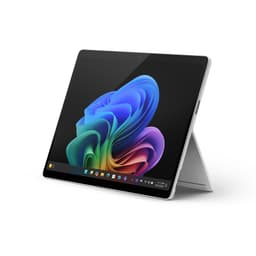
The tablet-laptop hybrid design adds another dimension to portability. You can detach the keyboard cover (if you've bought one) and use it as a tablet for reading, note-taking with the pen, or watching video on a plane without the keyboard taking up tray table space. That flexibility is genuinely useful in the real world, not just a marketing bullet point. The kickstand built into the back means you can prop it up on a desk or a tray table without needing a separate stand.
The power supply situation is worth mentioning again here. Because the charger is sold separately and charging is via USB-C, the charger you carry can be small and light. A compact GaN USB-C PD charger weighs almost nothing and fits in a pocket. Combined with the Surface Pro's own weight, your total travel load is lighter than it would be with a traditional laptop that ships with a proprietary brick. That's a practical win for anyone who travels regularly.
Keyboard & Trackpad
Here's the thing that will annoy some buyers: the keyboard cover is not included. The Surface Pro is sold as a standalone tablet, and the Type Cover or Slim Keyboard that turns it into a proper laptop-like device is a separate purchase. If you're comparing the headline price to a traditional clamshell laptop, you need to add the cost of the keyboard to get a fair comparison. That's a meaningful consideration at this price tier.
Assuming you do buy the keyboard, the Surface keyboard covers have a well-established reputation. The key travel is shallower than a traditional laptop keyboard, which is unavoidable given the cover format, but the typing feel is generally considered good for a cover keyboard. Owner feedback on Surface keyboards over the years has been more positive than negative, particularly for people who type a lot of documents. It's not the same as a proper mechanical keyboard, but it's not a chiclet nightmare either. The backlit version gives you keys you can actually see in dim environments, which matters if you work in coffee shops or on evening flights, where it's also worth running a good VPN to keep your connection private on shared networks.
The trackpad on Surface keyboard covers is smaller than what you'd find on a full-size laptop, which is a physical consequence of the cover format. It's accurate and supports Windows precision touchpad gestures, so two-finger scrolling, three-finger app switching, and pinch to zoom all work as expected. For most productivity tasks it's perfectly adequate. If you're someone who does a lot of precise cursor work, you might find yourself reaching for a mouse more often than on a larger machine. But for the target use case of mobile productivity, it does the job.
The 3:2 screen means there's no wasted space to the sides of the display, and the keyboard layout doesn't have to accommodate a wide bezel. The result is a layout that feels proportionate to the machine. There's no number pad, which is standard for a 12-inch device and won't surprise anyone. UK layout availability depends on the specific keyboard cover you choose, so check that when you're buying the accessory.
Thermal Performance
One of the real-world benefits of the Snapdragon X Plus that doesn't always get enough attention is how cool this machine runs. ARM efficiency means the chip generates less heat than comparable Intel or AMD processors under typical workloads. During browsing, document editing, video calls, and streaming, the Surface Pro stays comfortable to hold and use. The palm rest area stays close to ambient temperature for most of the working day.
Under sustained load, things warm up, as they do on any laptop. But because the Snapdragon X Plus is an efficient chip and the Surface Pro's chassis is designed around it, the thermal management doesn't need to work as hard. Owner reviews don't flag heat as a common complaint, which is consistent with what you'd expect from an ARM-based machine in a thin chassis. This is a meaningful practical advantage if you're someone who uses a laptop on your lap for extended periods.
Throttling under sustained heavy workloads is possible, as it is on any thin device. The chassis has limited thermal headroom by design. But for the workloads this machine is actually built for, sustained maximum CPU load is uncommon. Light creative tasks, video calls, and document work don't push the chip hard enough to trigger significant throttling. If you're planning to run long video renders or compile large codebases, this isn't the right machine regardless of thermals. But if your work looks like most knowledge workers' days, the thermal story is quietly reassuring.
The absence of a traditional fan-heavy cooling system is part of what makes the Surface Pro so quiet and cool in normal use. The Snapdragon X Plus can manage its own heat effectively at typical workloads without needing aggressive active cooling. That's a genuine design advantage that shows up every single day you use the machine, not just in benchmark runs.

Acoustic Performance
Quiet is the word. Under light to medium workloads, the Surface Pro is effectively silent. The Snapdragon X Plus generates so little heat during everyday tasks that active cooling rarely needs to kick in aggressively. In a library, a quiet office, or a meeting room, this machine will not embarrass you with fan noise. That's not a small thing. Anyone who's sat next to someone with a hot Intel laptop on a video call knows how distracting fan noise can be.
When the machine does need to cool itself under heavier loads, the fan behaviour is generally described as smooth and gradual rather than sudden and intrusive. It ramps up quietly rather than suddenly whooshing to life, which is a much more pleasant experience. Owner reviews don't flag fan noise as a significant complaint, which suggests the thermal and acoustic design is well-matched to the chip's actual behaviour in real use.
For video calls and meetings specifically, this is a strong performer acoustically. The combination of low fan noise and the built-in microphone array means your audio quality isn't competing with cooling noise. If you spend a lot of your day on Teams or Zoom, that matters more than most spec sheets acknowledge. The Surface Pro earns genuine points here for being a machine you can use professionally without constantly worrying about background noise.
Ports & Connectivity
The verified connectivity data shows USB-C. That's the confirmed port. Microsoft doesn't specify further port details in the verified product data available, so rather than guess or invent specifics, the honest answer is that USB-C is what's confirmed. What that means practically is that you'll likely want a USB-C hub or dock if you need to connect multiple peripherals, external displays, or wired ethernet. That's a common trade-off on thin, compact devices in this category.
USB-C does give you flexibility. A good USB-C hub adds HDMI, USB-A ports, SD card slots, and ethernet in a package that travels well. The Surface Pro's USB-C port supports charging, which means you can top up the battery through the same port you use for data and display output. The USB Power Delivery standard makes this work across a wide range of chargers and accessories, which is genuinely convenient in practice.
WiFi and Bluetooth are present (as you'd expect on a modern Windows laptop), though the specific standards aren't detailed in the verified product data. The Surface Pro line has historically shipped with current-generation wireless connectivity. Owner reviews don't flag wireless performance as a problem area, which is the practical signal that matters most. For a machine designed around mobile use, solid wireless performance is non-negotiable, and the Surface Pro appears to deliver it.
- USB-C (confirmed, supports charging)
- WiFi (present, standard not specified in verified data)
- Bluetooth (present, version not specified in verified data)
Webcam & Audio
Surface devices have historically had good webcams, and the Surface Pro line is no exception. Microsoft has consistently prioritised front-facing camera quality because these machines are designed for professional use and video calls. The specific resolution isn't listed in the verified spec data, but owner feedback doesn't flag webcam quality as a complaint, which is a meaningful signal. For everyday Teams and Zoom calls, the camera does what it needs to do without making you look like you're calling from a potato.
The microphone setup is important on a machine like this. When you're in a meeting room or a coffee shop, background noise rejection and voice clarity matter. The Surface Pro's microphone array has a solid reputation based on owner feedback and Microsoft's track record with this form factor. Combined with the quiet fan behaviour discussed earlier, this is a machine that handles video calls well as a complete package rather than just ticking individual spec boxes.
Speaker quality on a 12-inch device has physical limits. There's only so much bass and volume you can get from drivers this small. The Surface Pro's speakers are adequate for video calls, background music, and watching video at a desk. They're not going to replace a proper speaker or headphones for serious listening. Owner reviews are generally neutral on speaker quality, which is about right for a device this compact. The headphone jack situation isn't specified in the verified data, so if that's important to you, it's worth checking before buying.
Build Quality
The Surface Pro is built from magnesium alloy, which is Microsoft's long-standing choice for the Surface line. It's lighter than aluminium while still feeling solid and premium in the hand. The finish is the Platinum colourway on this model, which is a clean, professional look that doesn't attract fingerprints as aggressively as some darker finishes. It looks like a proper piece of professional kit, not a consumer toy.
The kickstand is one of those details that sounds minor but matters a lot in daily use. It's been refined over multiple Surface generations and feels solid without being stiff. It holds whatever angle you set it at without slowly drooping, which is a real-world test that cheaper kickstands fail. The range of angles it supports means you can use the Surface Pro on a desk, on a low coffee table, or propped up on a tray table without compromise.
The pen storage area on the back of the device is a new addition that owners seem to appreciate. Keeping the Surface Slim Pen charged and attached to the device rather than rattling around in a bag is a small quality-of-life improvement that shows Microsoft has been paying attention to how people actually use these machines. It also means the pen is always ready when you need it, rather than being the thing you left at home.
Overall build quality is one of the Surface Pro's consistent strengths across owner reviews. The magnesium chassis doesn't flex, the hinge and kickstand feel well-engineered, and the fit and finish is what you'd expect from a device at this price point. It doesn't feel fragile. It feels like something that will survive being carried around every day for a few years, which is exactly what it needs to do.
How It Compares
The Surface Pro sits in a genuinely competitive part of the market. At this price tier, you're looking at premium thin-and-light machines from established brands. The two most relevant comparisons are the Apple iPad Pro with Magic Keyboard (which competes directly for the tablet-laptop hybrid use case) and the Lenovo ThinkPad X1 Carbon (which targets the same mobile professional audience but as a traditional clamshell). Both are legitimate alternatives worth considering.
The iPad Pro with Magic Keyboard is the obvious comparison for anyone considering the Surface Pro's tablet-laptop hybrid format. Apple's M-series chips are genuinely fast, and iPadOS has improved significantly for productivity use. But iPadOS is still not a full desktop operating system. If your work depends on Windows-specific software, the Surface Pro wins by default. If you're more flexible about your software ecosystem and already use Apple devices, the iPad Pro is worth a serious look. The Surface Pro's advantage is full Windows 11 compatibility; the iPad Pro's advantage is the mature Apple ecosystem and arguably stronger app quality.
The ThinkPad X1 Carbon is a different kind of comparison. It's a traditional clamshell, so you get a proper keyboard included in the price, and Lenovo's keyboard reputation is excellent. Recent X1 Carbon generations use Intel Core Ultra chips, which have strong x86 compatibility but generally worse battery life than the Snapdragon X Plus in light use scenarios. The X1 Carbon is a proven enterprise workhorse. The Surface Pro is more flexible in form factor but requires the keyboard cover purchase. Which one wins depends on whether you value the tablet functionality and battery life of the Surface Pro or the keyboard quality and software compatibility of the X1 Carbon.
For most mobile professionals who want a genuinely portable Windows machine with all-day battery life and don't need to run specialist legacy software, the Surface Pro makes a strong case at its price point. It's not the cheapest option, but the combination of build quality, display, and battery performance is hard to match at this size.
| Feature | Surface Pro (Snapdragon X Plus) | Apple iPad Pro + Magic Keyboard | Lenovo ThinkPad X1 Carbon |
|---|---|---|---|
| CPU | Snapdragon X Plus (ARM) | Apple M4 (ARM) | Intel Core Ultra (x86) |
| RAM | 16GB | 16GB | 16GB (typical config) |
| Storage | 256GB SSD | 256GB | 512GB (typical config) |
| OS | Windows 11 | iPadOS | Windows 11 |
| Form Factor | Tablet + optional keyboard | Tablet + optional keyboard | Clamshell laptop |
| Battery Life | Up to 16 hrs (claimed) | Up to 10 hrs (claimed) | Up to 15 hrs (claimed) |
| Keyboard Included | No (sold separately) | No (sold separately) | Yes |
| Display | 12" LCD 2880x1920 | 13" OLED 2752x2064 | 14" IPS various resolutions |
| Best For | Windows professionals wanting portability and battery life | Apple ecosystem users wanting tablet flexibility | Enterprise users needing full x86 compatibility and great keyboard |

Final Verdict
The Microsoft Surface Pro with Snapdragon X Plus is a well-made, genuinely portable Windows machine that delivers on its core promises. The battery life is real, not just a marketing number. The display is sharp and pleasant to work on. The build quality is solid. And the Copilot+ AI features, whether you care about them or not, confirm that this is current-generation hardware rather than something that'll feel dated in eighteen months. For mobile professionals, students, and anyone who needs a proper Windows machine that travels well and lasts all day, this is a strong option at the upper mid-range price point.
The caveats are real though, and you should weigh them honestly. The 256GB storage is tight for the money. The keyboard cover costs extra, which changes the value calculation if you're comparing to laptops where the keyboard is included. The ARM-based Snapdragon X Plus will occasionally frustrate you if your software stack includes anything that doesn't play nicely with Windows on ARM. And the LCD panel, while good, doesn't have the wow factor of an OLED screen if you're coming from one. None of these are dealbreakers on their own, but they add up to a machine that rewards buyers who've done their homework and punishes impulse purchases.
The 250 owner reviews averaging ★★★★☆ (4.3) reflect a machine that mostly does what it promises for the people it's designed for. The negative reviews cluster around the storage limitation, the extra cost of accessories, and occasional ARM compatibility frustrations. Those are predictable complaints that the spec sheet could have warned buyers about. If you go in with clear eyes about what this machine is and isn't, you're likely to land in the happy majority.
For the right buyer, this is a proper 8 out of 10 machine in the upper mid-range tier. But it delivers where it matters: portability, battery, display quality, and build. If you're a Windows user who wants a genuinely portable machine that won't die on you before the afternoon meeting, the Surface Pro deserves serious consideration. Just buy the keyboard cover at the same time and make peace with cloud storage.
What works. What doesn’t.
6 + 6What we liked6 reasons
- Genuine all-day battery life thanks to the efficient Snapdragon X Plus ARM architecture
- Sharp, high-resolution 12-inch PixelSense 3:2 display that makes document work a pleasure
- Runs cool and virtually silent during typical knowledge-worker workloads
- Premium magnesium alloy build that feels solid and travels well
- Flexible tablet-laptop hybrid form factor with a well-engineered kickstand
- USB-C charging means you can use any Power Delivery charger you already own
Where it falls6 reasons
- 256GB storage is tight at this price, especially once Windows 11 takes its share
- Keyboard cover is sold separately, which skews the true cost versus clamshell rivals
- Snapdragon X Plus ARM architecture can cause compatibility friction with specialist or legacy Windows software
- LCD panel, while good, cannot match the contrast and vibrancy of competing OLED screens
- Limited confirmed port selection means a USB-C hub is likely a necessary extra purchase
- No charger included in the box, adding to the overall outlay for new buyers
Full specifications
12 attributes| Storage type | UFS |
|---|---|
| Battery life H | 14 |
| Battery WH | 53 |
| Bluetooth | 5.4 |
| CPU | Snapdragon X Plus (8 Core) X1P-42-100 |
| Display refresh HZ | 90 |
| Display resolution | 2196x1464 |
| Display size IN | 12 |
| GPU | Qualcomm Adreno |
| Launch year | 2025 |
| OS | Windows 11 Home |
| Panel type | LCD |
Frequently asked
7 questions01Does the Microsoft Surface Pro Snapdragon X Plus come with a keyboard?+
No. The Surface Pro is sold as a standalone tablet. The Type Cover or Surface Slim Keyboard that gives it a laptop-like experience is a separate purchase. Factor that additional cost in when comparing the headline price against traditional clamshell laptops where the keyboard is included.
02Is 256GB of storage enough on the Surface Pro?+
For many users it will be tight. Windows 11 consumes a meaningful portion of the drive before you install a single application, and once your apps, documents, and downloads accumulate, you can run short of space fairly quickly. Cloud storage services or an external USB-C drive are practical solutions, but they are worth budgeting for from the outset if you keep a lot of local files.
03Will my existing Windows software run on the Snapdragon X Plus?+
Most mainstream applications including Microsoft Office, Chrome, Edge, Zoom, and Teams either run natively on ARM or perform well through Windows 11's emulation layer. However, some specialist software, older enterprise tools, and certain creative applications can behave unexpectedly or run slower than expected. Check your most critical applications against the Windows on ARM compatibility list before committing to the purchase.
04Does the Surface Pro Snapdragon X Plus include a charger in the box?+
No. Microsoft sells the charger separately for this model, framing it as a move to reduce electronic waste. The machine charges via USB-C with Power Delivery support, so any sufficiently rated USB-C PD charger will work. Most people already have one, but if you are starting from scratch that is an additional expense to account for.
05How does the battery life compare to Intel-based Windows laptops?+
The Snapdragon X Plus ARM architecture draws significantly less power than comparable Intel or AMD x86 chips during light and medium workloads. Owners consistently report eight to twelve hours of real-world mixed use, which is notably better than most Intel equivalents at this size. Under sustained heavy load battery life falls, but for typical knowledge-worker tasks the Surface Pro offers genuine all-day use without a charger.
06Can you use the Surface Pro as a standalone tablet?+
Yes. The keyboard cover is entirely optional and the Surface Pro functions as a full Windows 11 tablet when detached. The built-in kickstand lets you prop it up on a surface, and with the Surface Slim Pen it supports touch and stylus input for note-taking, annotation, and sketching. The 12-inch size is practical for reading and note-taking, though split-window working on a screen this size has physical limits.
07How does the Surface Pro Snapdragon X Plus compare to the Apple iPad Pro?+
Both are tablet-laptop hybrids that sell the keyboard separately. The Surface Pro's key advantage is full Windows 11 compatibility, which matters if your work depends on Windows-specific software. The iPad Pro with its M4 chip offers strong app quality within the Apple ecosystem and an OLED display on recent models, but iPadOS is not a full desktop operating system. If you are committed to Windows, the Surface Pro wins by default; if you are flexible about your software ecosystem and already use Apple devices, the iPad Pro is worth a serious look.