Gaming keyboards have changed dramatically over the past twelve months. Hall Effect magnetic switches, once reserved for flagship boards costing well over £150, have filtered down into the sub-£100 bracket, bringing rapid-trigger technology and near-zero actuation drift to budget buyers. Alongside that shift, the 75% layout has become the default choice for desk-space-conscious gamers, while wireless connectivity at this price point is no longer a compromise. This roundup is aimed at PC gamers who want a genuine performance upgrade without spending more than £100, whether you are coming from a cheap membrane board, upgrading a first build, or looking for a compact travel keyboard that still holds its own in competitive play. We cover Hall Effect wired boards, tri-mode wireless options with screens and knobs, tenkeyless silicone-switch alternatives, and a reliable Logitech mechanical option, so there is a pick for every play style and preference here.
Quick Verdict
Best Overall: ATTACK SHARK X68 HE, for its 8000 Hz polling rate, 0.01 mm rapid-trigger accuracy, and Hall Effect switches at a genuinely accessible price point.
Best Value: AULA WIN60 HE, which brings Hall Effect magnetic switches and adjustable actuation to a 60% form factor for under £50, making it the most performance per pound in this entire list.
The ATTACK SHARK X68 HE is the standout performer in this entire roundup, and it earns that position not through marketing language but through measurable hardware specifications that were simply unavailable at this price point twelve months ago. This is a 65% layout board, meaning it retains dedicated arrow keys and a small cluster of navigation keys to the right of the main alpha block, but drops the function row and numpad entirely. That makes it a compact, desk-friendly option that still gives you the keys most gamers actually use during play.
The headline feature is the Hall Effect magnetic switch array, which uses magnets rather than physical contact points to register keystrokes. This means there is no debounce delay, no switch wear over time, and crucially, the keyboard supports rapid-trigger technology down to 0.01 mm of actuation accuracy. For competitive FPS players, this is transformative: you can set the actuation point anywhere between 0.1 mm and 4.0 mm, and the key resets the moment it begins to travel upward rather than waiting for a fixed reset point. In games like Counter-Strike 2, Valorant, or Apex Legends, this translates to faster strafe cancels and more responsive movement inputs.
The polling rate of 8000 Hz is the other standout figure. Most keyboards in this price range report at 1000 Hz, meaning the PC receives a position update every millisecond. At 8000 Hz, that drops to 0.125 ms, which reduces input latency to a level that is perceptible in high-frame-rate competitive play. The board connects via USB-C, and the cable is braided for durability. RGB backlighting is per-key, and the board ships with software for remapping and actuation adjustment.
Build quality is solid for the price. The top case is aluminium-topped with a plastic base, and the overall heft gives a premium feel on the desk. The switches are hot-swappable, so you can replace them with standard 3-pin or 5-pin mechanical switches if you ever want a different feel. The 65% layout will not suit everyone, particularly those who rely on the F-row for productivity shortcuts, but for a dedicated gaming board this is a minor trade-off.
Verdict: The best all-round gaming keyboard under £100 in 2025. Hall Effect switches, 8000 Hz polling, and hot-swap support at this price is genuinely remarkable value for competitive gamers.
Pros
- 8000 Hz polling rate reduces input latency to 0.125 ms, noticeable in competitive FPS titles
- Hall Effect rapid-trigger down to 0.01 mm actuation accuracy, adjustable via software
- Hot-swappable switch sockets accept standard 3-pin and 5-pin switches
Cons
- 65% layout omits the function row, which may frustrate users who rely on F-keys for macros or productivity
- Software setup required to unlock rapid-trigger and polling rate settings, with no Mac support
The AULA WIN60 HE is the most affordable Hall Effect keyboard on this list, and it makes a compelling case for itself as the best value gaming keyboard under £50 in the UK right now. Hall Effect technology at this price would have seemed implausible two years ago, and the WIN60 HE proves that the democratisation of performance switch technology is well and truly underway. This is a 60% board, which means it is the most compact layout here: no arrow keys, no function row, no navigation cluster. Everything is accessed via function-layer combinations, which takes adjustment if you are coming from a full-size or TKL board.
The magnetic switches deliver adjustable actuation, and AULA's software allows you to set the trigger point anywhere in the travel range. Rapid-trigger is supported, resetting the key registration as soon as upward travel begins, which is the same fundamental advantage offered by the ATTACK SHARK X68 HE above, though at a lower polling rate of 1000 Hz. For most gamers, 1000 Hz is entirely sufficient, and the difference between 1000 Hz and 8000 Hz is only meaningful at very high frame rates with extremely low system latency.
The 60% form factor gives you maximum desk space for mouse movement, which is particularly valuable for low-sensitivity FPS players who need wide sweeping arcs. The board connects via USB-C, and the cable is detachable. RGB lighting is present and per-key, with customisation available through the companion software. The switches are hot-swappable, which is an impressive inclusion at this price, allowing you to experiment with different switch weights and feels without buying a new board.
Build quality is reasonable for the price. The case is plastic throughout, which keeps weight down but does mean the board feels less premium than the ATTACK SHARK. Stabilisers on the larger keys, particularly the spacebar, benefit from a little lubrication out of the box, which is a common trait at this price point. The 60% layout also means there is a learning curve for users who need arrow keys or F-keys regularly, and this board is really best suited to those who game primarily and use a separate board or laptop for productivity tasks.
For the price, however, this is an extraordinary amount of keyboard. Hall Effect switches, rapid-trigger, hot-swap, and per-key RGB under £50 represents a genuine leap in budget gaming hardware.
Verdict: The best value Hall Effect keyboard available in the UK under £50. The 60% layout limits its appeal for productivity use, but for pure gaming performance per pound it is unmatched here.
Pros
- Hall Effect magnetic switches with rapid-trigger support at under £50, exceptional value
- Hot-swappable sockets allow switch replacement without soldering
- Extremely compact 60% footprint maximises mouse space on smaller desks
Cons
- 60% layout requires function-layer access for arrow keys and F-row, with a significant learning curve
- Plastic case feels less robust than metal-topped competitors at slightly higher price points
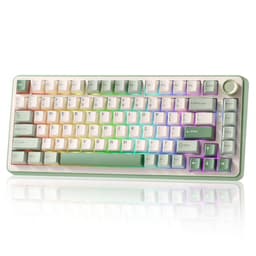
The EPOMAKER x AULA F75 MAX is the most feature-rich keyboard on this list, packing a TFT display screen, a volume and media control knob, tri-mode wireless connectivity, and a hot-swap PCB into a 75% layout board that sits just under the £80 mark. It is the keyboard for the buyer who wants the complete enthusiast experience without crossing into triple-figure territory, and it delivers that experience with surprising competence.
The 75% layout is the sweet spot for most gamers and typists. You retain the function row, arrow keys, and a small navigation cluster, losing only the numpad and a handful of duplicate keys. The result is a board that is noticeably smaller than a TKL but still fully functional without layer switching for everyday use. The F75 MAX adds a knob in the top-right corner for volume, media, or custom function control, and the small TFT screen beside it displays system stats, custom animations, or the current connection mode, depending on your software configuration.
Connectivity is tri-mode: 2.4 GHz wireless via a USB dongle for the lowest-latency wireless experience, Bluetooth 5.0 for up to three paired devices, and wired USB-C for zero-compromise performance or charging. The 2.4 GHz mode is responsive enough for competitive gaming, though it cannot match a wired Hall Effect board for absolute latency. Battery life is rated at several weeks in Bluetooth mode with RGB off, or around 20-30 hours with RGB on, which is typical for this class of board.
The switches are hot-swappable and the board ships with a gasket-mount design, meaning the PCB floats on silicone gaskets rather than screwing directly to the case. This gives the typing feel a softer, bouncier character that many enthusiasts prefer, and it reduces the harsh clack of bottoming out. The board is compatible with most standard 3-pin and 5-pin switches, so you can tailor the feel to your preference. RGB is per-key with south-facing LEDs, which suits most keycap sets.
The TFT screen and knob add genuine utility rather than gimmick value, particularly if you frequently adjust volume during gaming sessions or want to monitor CPU and GPU temperatures without alt-tabbing. Software support is solid, with macro programming, RGB customisation, and screen content configuration all available.
Verdict: The most fully featured keyboard under £80 in this roundup. The gasket mount, TFT screen, knob, and tri-mode wireless make it feel like a £130 board at a fraction of the price.
Pros
- Gasket-mount construction gives a noticeably softer, more premium typing feel than tray-mount alternatives at this price
- TFT screen and volume knob add practical daily-use value beyond gaming
- Tri-mode wireless covers 2.4 GHz, Bluetooth 5.0, and wired USB-C in one board
Cons
- Does not include Hall Effect switches, so lacks rapid-trigger capability compared to the ATTACK SHARK and AULA WIN60 HE
- TFT screen and RGB together reduce battery life significantly, requiring more frequent charging
The YUNZII B75 PRO occupies a similar space to the EPOMAKER x AULA F75 MAX but approaches the 75% wireless formula from a slightly different angle, prioritising build quality and typing feel over feature count. It is a gasket-mounted, hot-swap, tri-mode wireless board that comes in at a few pounds less than the EPOMAKER, and for buyers who do not need a TFT screen or volume knob, it represents an excellent alternative with a cleaner aesthetic.
The gasket mount is the defining characteristic of the B75 PRO's typing experience. YUNZII has used a south-facing PCB with per-key RGB, and the gasket-mounted floating plate gives keystrokes a satisfying bounce and thock that is genuinely difficult to achieve in boards under £100. The board ships with YUNZII's own linear switches, which are smooth and well-lubed from the factory, though the hot-swap sockets mean you can drop in your preferred switches within minutes of unboxing.
Tri-mode connectivity covers 2.4 GHz wireless, Bluetooth 5.0 with multi-device pairing for up to three hosts, and wired USB-C. The 2.4 GHz dongle stores in a slot under the board, which is a thoughtful detail that prevents it getting lost. Battery capacity is generous for the class, and YUNZII claims up to 4000 mAh, which translates to several weeks of use in Bluetooth mode with RGB disabled. With RGB enabled, expect more like 20-30 hours, consistent with competitors.
The 75% layout retains the function row and arrow keys, making this a genuinely usable daily-driver keyboard rather than a gaming-only tool. The build uses an aluminium top case over a polycarbonate bottom, giving a premium appearance and enough weight to stay planted on the desk during intense gaming sessions. Sound dampening foam is included between the PCB and the case, which reduces the hollow resonance common in cheaper boards and contributes to the satisfying typing sound profile.
Where the B75 PRO falls slightly short of the EPOMAKER is in software polish and the absence of the TFT screen and knob. If those features matter to you, the EPOMAKER is the better pick. If you prioritise typing feel, build quality, and a cleaner look, the YUNZII is arguably the superior choice at its price point.
Verdict: A beautifully built 75% wireless board with excellent gasket-mount feel and generous battery life. Slightly less feature-rich than the EPOMAKER but arguably better to type and game on day-to-day.
Pros
- Gasket-mount with sound dampening foam produces a premium thock that rivals boards costing twice as much
- Aluminium top case and generous 4000 mAh battery are unusual inclusions at this price
- 2.4 GHz dongle storage slot under the board prevents loss during travel
Cons
- No TFT screen or volume knob, so lacks the feature count of the similarly priced EPOMAKER x AULA F75 MAX
- Software customisation is less polished than Logitech or SteelSeries equivalents, with occasional firmware update issues reported
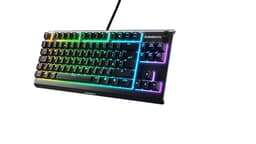
The SteelSeries Apex 3 TKL is the outlier in this roundup: it uses silicone switches rather than traditional mechanical or Hall Effect technology, and it carries an IP34 water-resistance rating that no other board here can match. It is the right choice for gamers who game near drinks, eat at their desk, or simply want a quieter typing experience that will not disturb flatmates or family members during late-night sessions.
SteelSeries describes the Apex 3 TKL's switches as 'whisper quiet' silicone, and that description is accurate. The switches have a smooth, linear feel with a soft bottom-out that produces significantly less noise than any mechanical switch. The actuation is light, which suits fast gaming inputs, but the lack of tactile feedback means touch typists may find the feel less satisfying than a mechanical board. For gaming, however, the smooth linear travel is perfectly adequate, and the quietness is a genuine practical advantage in shared living situations.
The IP34 rating means the board is protected against water splashes from any direction, which is a meaningful real-world benefit. Spilling a drink on most keyboards is a death sentence; the Apex 3 TKL is designed to survive exactly that scenario. The rating also covers dust ingress to a degree, making it more resilient in dusty environments than standard boards.
The TKL layout retains the full function row and navigation cluster, making it a complete keyboard for both gaming and productivity. RGB lighting is per-zone rather than per-key, with 8 RGB zones across the board, which gives reasonable visual customisation without the complexity of full per-key control. SteelSeries Engine software handles lighting, macros, and per-game profiles, and it is one of the more user-friendly software suites available for gaming peripherals.
Build quality is solid plastic throughout, which keeps the price accessible but means the board lacks the premium feel of the aluminium-topped Logitech or the gasket-mounted YUNZII. The board connects via a braided USB-A cable, which is non-detachable. At around £45, it is priced similarly to the Logitech G413 TKL SE and offers a different set of trade-offs: quieter operation and water resistance versus mechanical feel and per-key RGB.
Verdict: The best choice for quiet gaming environments or spill-prone desks. The IP34 rating and whisper-quiet switches are unique selling points at this price, though mechanical switch enthusiasts will prefer alternatives.
Pros
- IP34 water and dust resistance rating is unique in this price bracket, offering genuine protection against desk spills
- Whisper-quiet silicone switches are significantly quieter than any mechanical option here, ideal for shared spaces
Cons
- Silicone switches lack the tactile feedback of mechanical alternatives, which some gamers find less satisfying for both gaming and typing
- Non-detachable USB-A cable and zone-based rather than per-key RGB feel dated compared to newer competitors at a similar price
Buying Guide
Switch Type: Mechanical, Hall Effect, or Silicone?
The switch type is the single most important decision when buying a gaming keyboard. Traditional mechanical switches use a physical contact mechanism that wears over time and has a fixed actuation point. They feel great and come in a wide variety of tactile, clicky, and linear flavours, but they cannot match Hall Effect switches for competitive gaming performance.
Hall Effect switches use magnets to detect keystroke position without any physical contact. This means the actuation point is fully adjustable in software, the switch never wears out, and rapid-trigger technology becomes possible. Rapid-trigger resets the key registration the instant the key begins to travel upward, rather than waiting for a fixed reset point. In competitive FPS games, this allows faster strafe cancels and more responsive movement. If you play Counter-Strike 2, Valorant, or any other competitive shooter seriously, a Hall Effect board is worth prioritising even at a modest price premium.
Silicone switches, as found in the SteelSeries Apex 3 TKL, offer quiet operation and water resistance but lack the tactile feedback and performance ceiling of mechanical or Hall Effect options. They are best suited to casual gamers or those in noise-sensitive environments.
Layout: 60%, 65%, 75%, or TKL?
Layout choice depends on how you use your keyboard beyond gaming. A 60% board like the AULA WIN60 HE removes the function row, arrow keys, and navigation cluster, maximising desk space for mouse movement. This is ideal for low-sensitivity FPS players but requires function-layer combinations for everyday tasks. Those who need dedicated keys for productivity use may find this limiting.
A 65% board adds arrow keys and a small navigation cluster back to the 60% footprint, striking a balance between compactness and usability. The 75% layout further adds the function row, making it the most popular choice for gamers who also type regularly. TKL boards retain everything except the numpad and are the closest to a full-size experience in a compact form factor.
Wired vs. Wireless
Wired keyboards have zero latency and never need charging. For competitive gaming, wired is still the technically superior choice. However, modern 2.4 GHz wireless keyboards like the YUNZII B75 PRO and EPOMAKER x AULA F75 MAX have latency figures that are imperceptible in all but the most extreme competitive scenarios. If cable management is a concern or you value desk cleanliness, wireless is a perfectly valid choice under £100.
How Much Should You Spend?
For casual gaming, £30-£50 buys a reliable mechanical or silicone keyboard with good build quality. For competitive gaming where switch performance matters, £50-£80 now buys Hall Effect technology with rapid-trigger support, which was previously only available or more. Spending over £100 on a gaming keyboard is worthwhile for premium materials, custom switches, or advanced features, but the value curve flattens significantly above £80 for pure gaming performance.
Do Keyboards Really Matter for Gaming?
For casual and single-player gaming, the difference between a £20 membrane board and a £80 mechanical board is modest. For competitive multiplayer gaming, particularly FPS titles, switch actuation speed, polling rate, and rapid-trigger capability can provide a measurable edge. The gap between a standard mechanical keyboard and a Hall Effect board with rapid-trigger is more significant than the gap between any two mechanical keyboards, making switch technology the key differentiator in 2025.
The ATTACK SHARK X68 HE is the overall winner of this roundup. Its combination of Hall Effect magnetic switches, 8000 Hz polling rate, 0.01 mm rapid-trigger accuracy, and hot-swap sockets at under £60 represents a level of competitive gaming performance that simply did not exist at this price point twelve months ago. For any gamer who plays competitive FPS titles seriously, this board offers a genuine, measurable advantage over standard mechanical alternatives.
For buyers on a tighter budget, the AULA WIN60 HE delivers the same core Hall Effect and rapid-trigger technology for under £50, making it the best value gaming keyboard in the UK at this price. The 60% layout is a trade-off, but for dedicated gaming use it is entirely acceptable.
If wireless connectivity and a premium typing experience matter more than absolute competitive performance, the YUNZII B75 PRO and EPOMAKER x AULA F75 MAX are both excellent choices, with gasket-mount construction and tri-mode wireless at prices that feel almost too good to be true. The Logitech G413 TKL SE remains the safest brand-name choice for buyers who prioritise reliability and software support, and the SteelSeries Apex 3 TKL earns its place as the quietest, most spill-resistant option in the group.