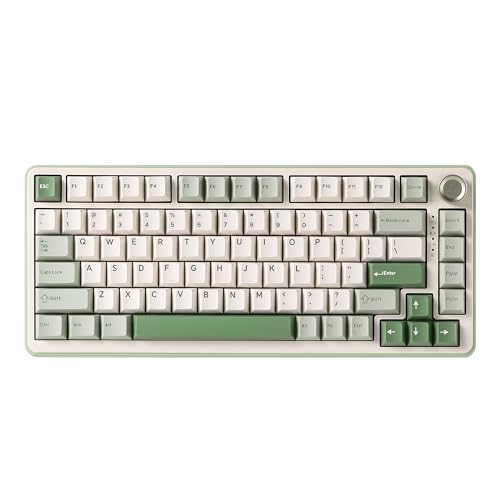
Choosing your first gaming keyboard can feel overwhelming when the market is flooded with options ranging from basic membrane boards to high-end mechanical switches. This guide is aimed squarely at newcomers to PC gaming who want a reliable, comfortable keyboard without spending a fortune or getting lost in enthusiast-level jargon. Since last year, the budget end of the market has improved dramatically: hot-swappable switches, wireless connectivity and even TFT display screens have all filtered down below the £80 mark, meaning beginners no longer have to sacrifice features to save money. Whether you play casual titles, are stepping into competitive shooters for the first time, or simply want something that feels better than the keyboard that came with your PC, there is a solid option here for every budget and play style. We have focused on ease of use, build quality, value for money and the kind of features that actually matter when you are just starting out.
Quick Verdict
Best Overall for Beginners: AULA F75 75% Wireless Mechanical Keyboard. It strikes the ideal balance of compact layout, triple wireless connectivity, hot-swap switches and a price that leaves room in the budget for a decent mouse. Best Value: Sumvision Seeker Destroyer 60% Pro Gaming Keyboard. At under £20, it is the most accessible entry point into mechanical-style gaming keyboards on this list, and it punches well above its price tag for casual and budget-conscious newcomers.
The AULA F75 is the keyboard we would hand to most beginners without hesitation. It sits in the sweet spot between compact and functional: the 75% layout removes the numpad and trims the navigation cluster, but it keeps arrow keys and function row shortcuts that beginners rely on far more than they might expect. If you have only ever used a full-size keyboard, the 75% form factor takes about a week to fully adjust to, but once you do, the extra desk space for mouse movement becomes genuinely noticeable, especially in games that demand wide sweeping movements.
Connectivity is one of this keyboard's strongest selling points for newcomers. You get three modes: a 2.4 GHz wireless dongle for near-zero latency gaming, Bluetooth 5.0 for connecting to a laptop or second device, and a wired USB-C connection for when the battery runs low. Being able to switch between devices without unplugging cables is a quality-of-life feature that beginners often underestimate until they have it. Battery life is rated generously, and with RGB switched off or dimmed, you can expect several days of use between charges.
The switches are hot-swappable, which is a significant bonus at this price. Hot-swap means you can pull out the switches and replace them with a different type without soldering. As a beginner, you may not know yet whether you prefer clicky, tactile or linear switches, so being able to experiment later without buying a whole new keyboard is a real advantage. The board ships with a choice of switch types depending on the variant you select, so read the listing carefully before ordering.
Build quality feels solid for the price. The case has a slight flex to it, which is normal at this tier, but there is no excessive wobble or rattle. Keycaps are double-shot PBT on some variants, which resist shine and wear far better than the ABS keycaps found on cheaper boards. RGB lighting is vibrant and easy to configure through onboard controls, with no software required, which is ideal for beginners who do not want to install yet another application.
Verdict: The AULA F75 is the best all-round beginner gaming keyboard on this list, offering wireless flexibility, hot-swap switches and a practical layout at a price that is hard to argue with.
Pros
- Triple connectivity (2.4 GHz, Bluetooth 5.0, USB-C wired) gives maximum flexibility
- Hot-swappable switches let beginners experiment without buying a new board
- 75% layout keeps arrow keys and function row, easing the transition from full-size
Cons
- No dedicated software for advanced macro or lighting customisation
- Case flex is noticeable under heavy typing, though not a dealbreaker
The AULA WIN60 HE is a genuinely interesting option for beginners who want something a step above the basics without spending close to £100. Its headline feature is Hall Effect magnetic switches, a technology that has historically been reserved for far more expensive keyboards. Hall Effect switches use magnets rather than physical contact points to register keypresses, which means they do not wear out in the same way traditional switches do and they offer adjustable actuation points. That last feature, the ability to set exactly how far down a key needs to travel before it registers, is particularly useful in gaming and is something you simply do not get on most budget boards.
The 60% layout keeps the footprint small and the desk clear, which is a genuine advantage for gaming where mouse movement space matters. As noted with the Sumvision board above, the 60% format does require learning function layer shortcuts for keys like F1-F12 and the arrow cluster, so it suits beginners who are willing to invest a little time in learning the layout. Those who need arrow keys regularly for work or certain game types may find the adjustment frustrating.
Being wired only, the WIN60 HE keeps latency as low as possible, which is a reasonable trade-off at this price. The cable is braided, which adds durability and a premium feel. RGB backlighting is present and looks clean through the switches, with per-key illumination giving a polished appearance. The board is compatible with Windows systems and requires no additional software for basic use, though some advanced actuation point adjustments may require a companion application.
Build quality is noticeably better than the Sumvision board. The case feels more substantial, and there is less flex under firm keystrokes. Keycap quality is solid for the price, and the overall typing experience is smoother and more consistent thanks to the Hall Effect mechanism. For a beginner who plays competitive games like first-person shooters and wants a genuine performance advantage without spending big, the adjustable actuation feature alone justifies the price premium over a standard budget board.
At around £48, the WIN60 HE sits in a competitive mid-budget tier and delivers technology that punches well above its price point. It is a forward-thinking choice for a beginner who wants room to grow.
Verdict: The AULA WIN60 HE brings Hall Effect switch technology to a beginner-friendly price, making it the most technically impressive keyboard on this list relative to its cost.
Pros
- Hall Effect magnetic switches offer adjustable actuation, a rare feature at this price
- Switches are highly durable with no physical contact wear over time
- Braided cable and solid build quality feel premium for the budget
Cons
- 60% layout removes arrow keys, which requires a learning period for new users
- Wired only, no wireless or Bluetooth option
The EPOMAKER X AULA F75 MAX is the most feature-rich keyboard on this list and sits at the top of the budget tier for beginners who want something that feels genuinely special without crossing into the £150-plus enthusiast bracket. The collaboration between EPOMAKER and AULA has produced a board that packs in a TFT display screen, a volume and function knob, hot-swappable switches, triple wireless connectivity and gasket-style mounting, all in a 75% form factor that remains practical for everyday gaming use.
The TFT screen is the headline talking point. Positioned in the top-right corner of the board, it can display system information such as CPU and GPU usage, custom animations, or simply a clock. For a beginner setting up their first gaming desk, it is undeniably cool and gives the keyboard a premium, high-tech appearance that far more expensive boards do not always offer. The knob beside it adds tactile volume control and can be remapped to other functions, which is a genuinely useful addition for anyone who adjusts audio frequently during gaming sessions.
Hot-swappable switches mean you can change the feel of the keyboard at any time without tools or soldering. This is particularly valuable for beginners who are still discovering their switch preferences. The gasket mounting, where the switch plate is suspended on silicone or foam rather than screwed directly to the case, gives the typing feel a softer, bouncier quality that many people find more comfortable during long sessions. It also reduces the harsh sound of bottoming out, which is a common complaint with cheaper boards.
Wireless performance across all three modes (2.4 GHz dongle, Bluetooth 5.0 and USB-C wired) is reliable. The 2.4 GHz connection is suitable for competitive gaming, and the Bluetooth mode makes it easy to connect to a phone or tablet for typing. Battery life is solid, particularly with the TFT screen brightness turned down.
The EPOMAKER X AULA F75 MAX is the keyboard to choose if you want to start with something that will grow with you as your skills and preferences develop, without feeling like a compromise from day one.
Verdict: The most feature-packed beginner keyboard on the list. The TFT screen, gasket mount and hot-swap switches make it feel far more expensive than it is.
Pros
- TFT display screen and volume knob add genuine functionality and visual appeal
- Gasket mounting delivers a noticeably softer, more premium typing feel
- Hot-swappable switches and tri-mode wireless give maximum long-term flexibility
Cons
- TFT screen and RGB together can drain the battery faster than simpler boards
- Slightly more complex setup than basic plug-and-play keyboards, which may overwhelm absolute beginners
The YUNZII B75 PRO occupies a thoughtful position in the beginner keyboard market. It is a 75% wireless board with a gasket mount, hot-swappable switches and tri-mode connectivity, which puts it in direct competition with the EPOMAKER X AULA F75 MAX. Where the YUNZII differentiates itself is in its focus on typing feel and acoustic performance rather than visual extras like TFT screens. If you want a keyboard that sounds and feels refined without the bells and whistles, the B75 PRO is the more focused choice.
The gasket mounting is a genuine highlight. By suspending the internal plate on a gasket layer, YUNZII has achieved a typing sound that is noticeably softer and more rounded than most boards in this price range. For beginners who share a room with family members or flatmates, or who game late at night, a quieter keyboard is a practical consideration rather than a luxury. Pair it with tactile or linear switches rather than clicky ones and you have a setup that is genuinely considerate of those around you.
Hot-swap support means the switch experience is not fixed. YUNZII typically ships the B75 PRO with a choice of pre-lubed switches, which out of the box feel smoother than the factory switches on many competing boards. Pre-lubed switches reduce the scratchy or gritty feeling that unlubed switches often exhibit, which is a detail that beginners will notice immediately even if they cannot name what makes the difference.
Wireless connectivity covers 2.4 GHz, Bluetooth 5.0 and USB-C wired, giving the same flexibility as the AULA F75 and EPOMAKER boards. Battery life is competitive, and the 75% layout keeps arrow keys and the function row accessible, which is a significant usability advantage over 60% alternatives for beginners still getting used to keyboard shortcuts.
RGB lighting is present and customisable, though the YUNZII software for advanced configuration is less polished than some competitors. Basic lighting effects can be cycled through onboard without any software, which is perfectly adequate for most users.
Verdict: The YUNZII B75 PRO is the best choice for beginners who prioritise typing feel and acoustic quality over visual features, delivering a refined experience at a competitive price.
Pros
- Gasket mount and pre-lubed switches produce a noticeably smooth, quiet typing experience out of the box
- 75% layout retains arrow keys and function row for easier adjustment from full-size keyboards
- Tri-mode wireless offers 2.4 GHz, Bluetooth 5.0 and wired USB-C in one board
Cons
- Companion software for advanced customisation is less polished than rivals
- No TFT screen or knob if those features appeal to you
Buying Guide
Layout: Which Size is Right for You?
Keyboard layout is the first decision to make and arguably the most important for a beginner. Full-size keyboards include the numpad and every key you are used to. Tenkeyless (TKL or 80%) keyboards remove the numpad, freeing up desk space while keeping the function row, arrow keys and navigation cluster intact. This is the easiest transition for most beginners. The 75% layout goes a step further, compressing the navigation cluster but retaining arrow keys and the function row in a tighter arrangement. It is the most popular format among gamers because it balances compactness with usability. The 60% layout removes the function row, navigation cluster and arrow keys entirely, relying on function layers accessed via key combinations. It has the smallest footprint and looks the most striking, but it has a real learning curve that can frustrate beginners who need those keys regularly.
Switch Type: Clicky, Tactile or Linear?
Mechanical switches come in three broad categories. Clicky switches produce an audible click and a tactile bump at the actuation point. They are satisfying to type on but loud, which can be disruptive in shared spaces. Tactile switches provide the bump without the click, offering feedback without the noise. Linear switches travel smoothly from top to bottom with no bump, which many gamers prefer for rapid repeated keypresses. As a beginner, tactile switches are often the best starting point as they provide feedback without being antisocial. If you are not sure, choose a board with hot-swappable switches so you can try different types later.
Wired vs Wireless
Wired keyboards have zero latency and never need charging. They are the simplest option and the most reliable. Wireless keyboards using 2.4 GHz dongles have closed the latency gap to the point where it is imperceptible in all but the most elite competitive play. Bluetooth is convenient for multi-device use but introduces slightly more latency and is less suitable for fast-paced gaming. For beginners, a wired connection is perfectly fine, but a board with tri-mode wireless gives you flexibility as your setup evolves.
RGB and Software
RGB backlighting looks impressive and is a major selling point for many beginners. However, it does consume more power on wireless boards and can add complexity if you want to customise it. Most boards on this list allow basic lighting effects to be cycled through onboard controls without any software, which is the most beginner-friendly approach. If you want deeper customisation, check whether the manufacturer provides software for Windows and that it is well-reviewed before buying.
Budget Expectations
For beginners, spending between £40 and £80 is the sweet spot. Below £40, you can find functional boards like the Sumvision Seeker Destroyer, but build quality and switch longevity will be limited. Between £40 and £80, you access hot-swap switches, wireless connectivity and gasket mounting. Above £80, you are entering territory where the improvements are real but incremental, and the gains are more relevant to experienced users who know exactly what they want. Start within your comfort zone and upgrade once you know what matters to you.
For most beginners, the AULA F75 75% Wireless Mechanical Keyboard is the clear overall winner. It combines the three most important features for a first gaming keyboard: a practical layout that keeps arrow keys and the function row, hot-swappable switches that allow experimentation without additional cost, and tri-mode wireless connectivity that future-proofs the purchase as your setup changes. It is priced accessibly, requires no complex software for basic use and delivers a typing and gaming experience that will satisfy newcomers for years rather than months. If budget is the primary concern, the Sumvision Seeker Destroyer is the right starting point, giving you a genuine mechanical experience at a price that makes the decision essentially risk-free. For those who want the most technically advanced option at a budget-friendly price, the AULA WIN60 HE with its Hall Effect switches is a forward-thinking choice that will remain relevant as your gaming improves.