Best Overall Value
Price: £499.95 | Rating: ★★★★★ (5.0)
Here's the thing: when you're looking at the best desktops for working from home under £700, you want a machine that won't make you want to throw it out the window by 10am. The Vibox I-7 delivers that. The AMD Ryzen 3 3200G is a proper modern processor with four cores running up to 4.0GHz, which handles video calls, browser tabs, spreadsheets, and email without breaking a sweat. It's not a powerhouse, but it's genuinely capable for a full working day.
The 16GB of DDR4 RAM is the real highlight at this price. Most budget machines cut corners here, landing at 8GB. Having 16GB means you can have Teams running, a dozen Chrome tabs open, and a PDF or two in the background without the machine slowing to a crawl. The 1TB SSD is equally impressive. Boot times are fast, file transfers are quick, and you won't run out of space for documents, downloads, and the occasional video file.
The Radeon Vega 8 integrated graphics are more than adequate for WFH use. You can run dual monitors if your setup needs it, which is a genuine productivity boost for home workers. WiFi is built in, so you're not tied to an ethernet cable. Windows 11 comes pre-installed, which matters now that Windows 10 support is winding down.
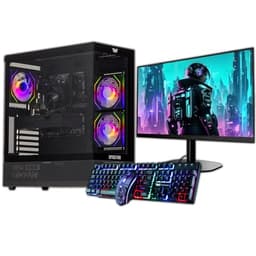
The main caveat is that this is a gaming-branded machine, so the aesthetic is a bit flashy for a home office. But if you can live with that, the specs-to-price ratio here is hard to beat. Real owner feedback highlights the fast boot times and the generous storage as standout positives. A few buyers noted the case runs a little warm under sustained load, but for WFH tasks that's unlikely to be an issue.
Pros
- Modern Ryzen 3 CPU handles WFH multitasking well
- 16GB RAM is generous at this price point
- 1TB SSD means fast boot and plenty of storage
- Windows 11 pre-installed, WiFi included
- Radeon Vega 8 supports dual monitor setups
Cons
- Gaming aesthetic won't suit every home office
- No monitor, keyboard, or mouse included
- Case can run warm under sustained load
Buy on Amazon£499.95
Best Build Quality
Price: £275.80 | Rating: ★★★★☆ (4.0)
Thirty-two gigabytes of RAM at this price. That's the headline. For working from home, 32GB means you can have everything open at once: Teams, Chrome with fifteen tabs, Excel, Outlook, a PDF viewer, and still have headroom. Most new machines at twice the price ship with 16GB. This refurbished Dell punches well above its weight on that front.
The Intel Core i7-6700 is a 6th-generation chip, which is getting on a bit now. But it's still a quad-core processor running up to 4.0GHz, and for WFH tasks it remains genuinely capable. It's not going to struggle with video calls or spreadsheets. The 1TB SSD keeps things snappy. Windows 11 Pro is pre-installed, which is a nice touch over the Home edition found on cheaper machines.
The SFF (Small Form Factor) case is compact and tidy on a desk. The USB WiFi adapter is included, which is a practical addition. HDMI output means connecting a modern monitor is straightforward. Dell OptiPlex machines were built for commercial environments, so the hardware is reliable and well-supported.
The honest limitation is the CPU generation. The i7-6700 is from 2015, and while it handles current WFH workloads fine, it won't receive certain Windows 11 features that require newer hardware. For most home workers that won't matter, but it's worth knowing. As a refurbished unit, check the seller's warranty terms carefully before buying.
Pros
- 32GB RAM is exceptional at this price
- 1TB SSD keeps the system fast and responsive
- Windows 11 Pro pre-installed
- Compact SFF design suits small desks
- Dell commercial build quality is reliable
Cons
- i7-6700 is a 2015 CPU, showing its age
- Refurbished, so warranty terms vary by seller
- No monitor, keyboard, or mouse included
Check availability
Best Complete Bundle
Rating: ★★★★☆ (4.3)
This one comes with a 23-inch monitor bundled in, which changes the value calculation considerably. If you don't already have a screen, buying a monitor separately typically adds £80 to £150 to any build. Getting one included at this price makes the overall package genuinely competitive for setting up a complete WFH workstation from scratch.
The i7 4th-generation processor is older than we'd ideally like. It's from around 2013 to 2014, and while it still handles everyday WFH tasks, it's noticeably behind more modern chips in sustained workloads. That said, for email, video calls, documents, and browser-based tools, it gets the job done. The 16GB RAM helps compensate for the older CPU, and the 500GB SSD keeps things reasonably quick.
Windows 11 Pro is pre-installed, which is a positive. The USB WiFi adapter means you're not tied to a wired connection. The SFF form factor keeps the desk tidy. For someone setting up a home office on a tight budget who needs everything sorted in one purchase, this bundle makes a lot of sense.
The CPU age is the main thing to be honest about. If you're doing anything beyond standard office work, you'll feel the limitations. But as a complete, ready-to-go WFH setup at a budget price, it's a practical choice. Owner feedback is generally positive about the monitor quality and the overall value of the bundle.
Pros
- 23-inch monitor included, saving significant extra cost
- 16GB RAM handles typical WFH multitasking
- 500GB SSD keeps the system responsive
- Windows 11 Pro pre-installed
- Complete WFH setup in one purchase
Cons
- 4th-gen i7 CPU is quite old now
- 500GB storage is on the modest side
- Refurbished unit, warranty varies by seller
Check availability
Best Modern All-in-One
Rating: ★★½☆☆ (2.9)
This is a newer all-in-one with a modern Intel i5 processor that boosts up to 4.4GHz. That's a meaningful step up from the Lenovo IdeaCentre's N100 chip, and it shows in more demanding WFH tasks. If you're running multiple applications simultaneously or doing light content work alongside your usual office tasks, this processor handles it more comfortably.
The 23.8-inch FHD IPS display is a solid work screen. IPS panels give you accurate colours and wide viewing angles, which matters if you're doing any design work or just want a screen that doesn't look washed out from the side. Keyboard and mouse are included, making this a genuinely complete setup. Windows 11 Pro is pre-installed, which is the better choice over Home for business use.
The 256GB SSD is the weak point. It's enough for the operating system and core applications, but you'll want to be disciplined about storage or invest in external drives for larger files. For a home worker dealing mainly with documents and cloud storage, it's manageable. But it's a compromise worth flagging.
Overall, this is a clean, modern all-in-one that sits at a sensible mid-range price. The processor is more capable than budget all-in-ones, the screen is good, and the setup is genuinely plug-and-play. Just keep an eye on that storage.
Pros
- Modern i5 up to 4.4GHz handles demanding WFH tasks
- 23.8-inch FHD IPS display is excellent for all-day use
- Windows 11 Pro pre-installed
- Keyboard and mouse included
- Clean, modern design
Cons
- 256GB SSD is tight for heavy users
- Less brand recognition than Lenovo or Dell
- Not easily upgradeable
Buy on Amazon
Best Storage Value
Price: £299.00 | Rating: ★★★★☆ (4.0)
The 1TB NVMe SSD in a machine at this price is genuinely impressive. NVMe storage is significantly faster than standard SATA SSDs, and having a full terabyte of it means you won't be hunting for space or waiting for files to load. For a home worker dealing with large documents, video files, or a substantial local library of work files, that storage spec is a real practical benefit.
The Intel i5-2400 is the honest caveat here. It's a Sandy Bridge processor from around 2011, which is quite old. It runs Windows 11 and handles basic WFH tasks, but it's not going to feel fast by modern standards. Video calls work, documents open, emails send. But if you're running demanding software or heavy multitasking, you'll notice the age of the chip. The 16GB RAM helps, but the CPU remains the bottleneck.
The 21.5-inch monitor bundle is a practical addition. It's not a premium display, but it's functional for a home office setup. WiFi is included. Windows 11 is pre-installed. Veno Scorp are a UK-based reseller who refurbish OptiPlex units, and their customer service reputation is generally decent based on owner feedback.
This one is best suited to light WFH use: email, documents, video calls, and browser-based tools. Don't expect it to handle anything more demanding without frustration. But if storage capacity is your priority and the budget is tight, the NVMe SSD spec is hard to match at this price.
Pros
- 1TB NVMe SSD is exceptional at this price
- 21.5-inch monitor included
- 16GB RAM for comfortable multitasking
- Windows 11 pre-installed
- UK-based reseller with decent support
Cons
- i5-2400 is a very old CPU (2011)
- Performance ceiling is low for demanding tasks
- Refurbished unit with variable warranty terms
Buy on Amazon
Best for After-Hours Gaming
Price: £289.00 | Rating: ★★★☆☆ (3.0)
This one is a bit of an odd duck. It's marketed as a gaming PC, but the GTX 750 4GB is a very old GPU now. It'll handle older titles and light gaming, but don't expect to run anything modern at decent settings. For working from home, the dedicated GPU does at least mean you can run dual monitors without any fuss, which is a practical WFH benefit.
The 22-inch monitor bundle is included, which helps the value case. The i5 processor and 16GB RAM are solid for WFH tasks. But the storage setup is a concern: 120GB SSD plus a 500GB HDD. The SSD is small enough that you'll need to manage what sits on it carefully. Windows 11 and your main applications will eat into that 120GB quickly, leaving limited room for anything else on the fast drive.
The ARGB gaming case is flashy. Very flashy. If your home office is a dedicated gaming den, that's fine. If it's a corner of the living room or a shared space, the RGB lighting might raise some eyebrows. It's entirely cosmetic, so it doesn't affect performance, but it's worth knowing what you're getting.
For pure WFH use, there are better options in this list. But if you want something that doubles as a light gaming machine in the evenings and comes with a monitor included, this is a reasonable compromise. Just manage your expectations on the GPU and the SSD size.
Pros
- 22-inch monitor included
- 16GB RAM handles WFH multitasking
- GTX 750 supports dual monitors and light gaming
- Windows 11 pre-installed
Cons
- GTX 750 is very dated for gaming
- 120GB SSD is too small for comfortable use
- ARGB case is very conspicuous
- HDD secondary storage is slow
Buy on Amazon
Best Compact Refurb
Price: £159.00 | Rating: ★★★★☆ (4.2)
The OptiPlex 7020 is a well-regarded commercial machine that was built to last. The i7-4770 is a 4th-generation Intel chip, so it's getting old, but it's a proper quad-core processor that still handles WFH tasks without drama. Video calls, spreadsheets, browser-based tools, and email all run fine. The 16GB RAM gives it enough breathing room for comfortable multitasking.
The 512GB SSD is a reasonable size for a home worker. It's enough for Windows 11, your applications, and a decent chunk of local files. The SFF case is genuinely compact and tidy on a desk. The USB WiFi adapter means you're not reliant on a wired connection. Windows 11 Pro is pre-installed.
At this price, it's a decent option for light to moderate WFH use. The main limitation is the CPU generation. The i7-4770 is from 2013, and while it's still functional, it won't receive certain Windows 11 features tied to newer hardware. For a home worker who needs reliability over raw performance, it's a solid choice. For anyone pushing the machine harder, look at the Vibox or ADMI options higher up the list.
Pros
- Dell commercial build quality is reliable
- 16GB RAM comfortable for WFH multitasking
- 512GB SSD is a reasonable size
- Compact SFF form factor
- Windows 11 Pro pre-installed
Cons
- i7-4770 is a 2013 CPU
- No monitor, keyboard, or mouse included
- Refurbished unit, warranty varies
Check availability
Best Under £100
Price: £79.99 | Rating: ★★★★☆ (4.3)
Under £100 for a Windows 11 Pro desktop with an i5 quad-core processor. That's the pitch, and it's genuinely remarkable that you can get a functional WFH machine at this price. But you need to go in with clear eyes about the compromises.
The i5-4570 is a 4th-generation Intel chip from 2013. It works, and for very light WFH tasks like email and basic documents it's adequate. The 8GB RAM is the minimum you'd want to accept for working from home in 2026. It'll handle one or two applications at a time, but don't expect smooth multitasking with Teams open alongside a browser and a spreadsheet. The 120GB SSD is the biggest practical concern. Windows 11 alone takes up a significant chunk of that. You'll need to be very disciplined about storage, or plan to add an external drive almost immediately.
For someone who needs an absolute bare-minimum machine for occasional light use, or as a secondary computer, this makes sense. It's also a reasonable option if you plan to upgrade the RAM and add a larger SSD yourself, since OptiPlex units are easy to work on. But as a primary WFH machine for a full working day, the limitations will frustrate most users fairly quickly.
Pros
- Exceptional price for a Windows 11 Pro machine
- i5 quad-core handles basic WFH tasks
- Easy to upgrade RAM and storage
- Compact SFF form factor
Cons
- 120GB SSD is critically small
- 8GB RAM is the bare minimum for WFH
- i5-4570 is a 2013 CPU
- No peripherals or monitor included
Check availability
Best Under £50 (Legacy)
Rating: ★★★★½ (4.8)
Look, we have to be straight with you here. The Lenovo Q190 is a machine from around 2014, and it shows. Windows 8.1 is the operating system, which Microsoft stopped supporting years ago. That means no security updates, no Windows 11 compatibility, and a growing list of modern applications that simply won't run on it. For working from home in 2026, that's a serious problem.
The Intel Celeron 1017U runs at 1.60GHz with just 4GB of RAM. Even for basic tasks, this combination feels slow by modern standards. The 500GB HDD (not an SSD) adds to the sluggishness. Boot times are long, applications take time to open, and any multitasking will test your patience. Video calls on Teams or Zoom are possible in theory, but the experience is likely to be frustrating.
The only scenario where this makes any sense is as an absolute last resort for the most basic possible tasks, or as a machine for someone who genuinely only needs a web browser and nothing else. Even then, the outdated OS creates security risks that make it unsuitable for any business use. We've included it here for completeness, but we'd strongly advise looking at any of the other options in this list instead. The refurbished Dell options offer dramatically better specs for not much more money.
Pros
- Very low price point
- Compact and quiet
- WiFi included
Cons
- Windows 8.1 is unsupported and insecure
- Celeron 1017U is extremely slow
- Only 4GB RAM, far below modern requirements
- HDD storage is slow and dated
- Not suitable for modern WFH applications
Check availability