Best Overall Value
Price: £499.95 | Rating: ★★★★★ (5.0)
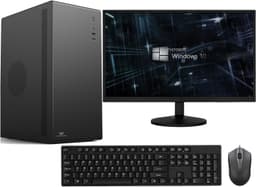
For the best desktops for video editing under £700, the Vibox I-7 hits a genuinely sweet spot. The AMD Ryzen 3 3200G is a proper modern processor with four cores running at up to 4.0GHz, and it handles 1080p editing in Premiere Pro and DaVinci Resolve without breaking a sweat on lighter timelines. The integrated Radeon Vega 8 graphics aren't going to replace a discrete GPU, but they do support hardware decoding for H.264 and HEVC footage, which takes a real load off the CPU during playback.
The 16GB of RAM is exactly where you want to be for editing work. You can have your editing software open alongside a browser, some reference footage, and a music track without things grinding to a halt. The 500GB SSD holds the operating system, your editing software and a few active projects, but video fills space quickly, so plan on an external drive for footage and finished exports.
Windows 11 comes pre-installed, which saves the faff of upgrading, and WiFi comes via a supplied USB adapter, so you're online on day one. It's a new build rather than a refurb, so you get a proper warranty and the peace of mind that comes with that.
The honest limitation here is the GPU. If you're doing colour grading with lots of effects or working with 4K footage regularly, the Vega 8 will slow you down. Proxy workflows help, but for serious GPU-accelerated work you'd want to look at the ADMI build below. For most hobbyist and semi-professional 1080p editing though, this is a very well-rounded machine at a fair price.
Pros
- Modern Ryzen 3 3200G CPU handles 1080p editing well
- 16GB RAM is the right amount for editing workflows
- 500GB SSD holds the system and current projects
- New build with full warranty
- Windows 11 and WiFi included out of the box
Cons
- No discrete GPU limits GPU-accelerated rendering
- 4K editing will require proxy workflows
- Vega 8 won't satisfy anyone doing effects-heavy work
Buy on Amazon£499.95
Best Build Quality
Price: £79.99 | Rating: ★★★★☆ (4.3)
Look, this is the cheapest machine in the roundup that could theoretically be used for video editing. The Core i5-4570 is a quad-core processor from 2013, but it's not completely hopeless. It can run DaVinci Resolve and handle basic 1080p cuts, especially with proxy workflows. The problem is the 8GB RAM and the 120GB SSD.
8GB is genuinely tight for editing software in 2026. You'll be managing your RAM carefully, closing background apps, and probably hitting swap file territory on anything beyond a simple timeline. The 120GB SSD is even more of an issue. Your operating system and editing software alone will eat a significant chunk of that, leaving precious little room for actual footage. You'd need an external drive from day one.
As a starter machine for someone on an absolute shoestring budget who wants to learn the basics of editing, it's not completely without merit. But be honest with yourself about its limitations. This is a machine for learning the software, not for producing finished work efficiently. If you can stretch your budget at all, the OptiPlex 7020 at £79.99 is a much more sensible editing machine.
Pros
- Genuinely cheap entry point for editing software learning
- Windows 11 Pro included
- Small form factor, takes up minimal desk space
Cons
- 8GB RAM is too tight for comfortable editing
- 120GB SSD is critically small for video work
- Core i5-4570 is over a decade old
- No GPU acceleration for modern editing software
Check availability
Best Under £300
Price: £267.72 | Rating: ★★★★☆ (4.0)
The standout spec here is the 32GB RAM, and for video editing that genuinely matters. Most machines in this price bracket give you 16GB, which is fine. But 32GB means you can run DaVinci Resolve with its notoriously hungry memory appetite, keep your project files cached properly, and have a browser open for reference without anything slowing down. It's a meaningful real-world advantage.
The Core i7-6700 is a 6th-generation Intel chip from around 2015, so it's not cutting-edge. But it's a proper quad-core with Hyper-Threading, running up to 4.0GHz, and it handles 1080p editing comfortably. Export times will be longer than on a newer Ryzen 5, but for the price, the performance-per-pound is strong. The 1TB SSD gives you proper room for footage and projects.
Dell's OptiPlex chassis is famously well-built. These machines were designed for enterprise use, built to run all day every day, and the refurbished units tend to be in genuinely good condition. The USB WiFi adapter is a slight compromise compared to built-in wireless, but it works. Windows 11 Pro is a bonus over Home for anyone who needs remote desktop or BitLocker.
Pros
- 32GB RAM is exceptional at this price for editing work
- 1TB SSD gives plenty of project storage
- Dell OptiPlex build quality is proven and reliable
- Windows 11 Pro included
- Strong value for 1080p editing workflows
Cons
- 6th-gen i7 is ageing, slower exports than modern CPUs
- No discrete GPU, limits GPU-accelerated rendering
- USB WiFi dongle rather than built-in wireless
- Refurbished, so no manufacturer warranty
Check availability
Best Refurb Under £150
Rating: ★★★★☆ (4.2)
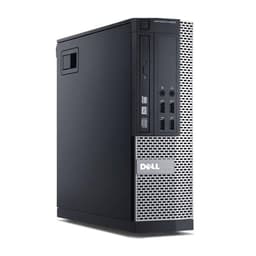
The OptiPlex 7020 with a Core i7-4770 is a solid mid-tier refurb option for budget video editing. The i7-4770 is a 4th-generation Haswell chip, which is older than the i7-6700 in the Dell above, but it's still a quad-core with Hyper-Threading and it handles 1080p editing in Premiere Pro without too much drama. The 16GB RAM is the right amount for comfortable editing, and the 512GB SSD gives you enough room to work with, though you'll want external storage for larger projects.
At Check price, this is one of the better value refurb options if you're looking at the best desktops for video editing under £700 on a tighter budget. The OptiPlex 7020 chassis is compact and quiet, which is a genuine plus if you're editing in a small space or a shared environment. The 300Mbps WiFi adapter is included, so you're not hunting for network connectivity.
Be aware that the 4th-gen i7 is getting on a bit. Software like DaVinci Resolve has grown more demanding with each version, and this machine will feel the strain on complex colour grading work. For straightforward cuts and basic colour correction at 1080p, it's fine. For anything more ambitious, save up for the i7-6700 version above.
Pros
- Good value at the price for 1080p editing
- 16GB RAM handles editing software comfortably
- Compact, quiet OptiPlex chassis
- Windows 11 Pro included
Cons
- 4th-gen i7 is showing its age for demanding software
- 512GB SSD is adequate but not generous for video work
- No discrete GPU
Check availability
Best Bundle Deal
Rating: ★★★★☆ (4.3)
This is the bundle pick. If you don't already own a monitor, this Dell package with a 23-inch display included at Check price represents genuinely good value. A decent 23-inch monitor alone costs £100 to £150 new, so the effective cost of the PC itself is quite reasonable. For video editing, having a proper external monitor is important, and this gets you sorted in one purchase.
The Core i7 4th-gen processor and 16GB RAM combination is capable enough for 1080p editing work. The 500GB SSD is on the smaller side for video projects, so budget for an external drive, but it's enough to get started. The OptiPlex chassis, as mentioned above, is well-built and reliable.
The main thing to be aware of is that you don't know exactly which 4th-gen i7 you're getting (the listing covers both 7020 and 9020 variants), and the monitor quality will vary. That said, for someone setting up a complete editing workstation from scratch on a budget, this bundle removes a lot of the hassle and cost of sourcing components separately.
Pros
- 23-inch monitor included, great bundle value
- Complete editing setup in one purchase
- 16GB RAM handles 1080p editing workflows
- Windows 11 Pro included
Cons
- Exact CPU and monitor model may vary
- 500GB SSD is tight for video projects
- 4th-gen i7 is ageing hardware
- No discrete GPU
Check availability
Best NVMe Storage Value
Price: £299.00 | Rating: ★★★★☆ (4.0)
The 1TB NVMe SSD in this bundle is a genuinely nice touch, and for video editing that fast storage does make a difference to project loading times and scrubbing through footage. But here's the problem: the Intel Core i5-2400 is a Sandy Bridge processor from 2011. That's 15 years old. It predates modern video codecs, it lacks hardware decode support for H.265/HEVC, and it will struggle noticeably with anything beyond basic 1080p H.264 editing.
The 16GB RAM helps, and the 21.5-inch monitor bundle adds value if you need a screen. But the CPU is the bottleneck here, and it's a significant one. DaVinci Resolve's minimum requirements are increasingly pushing older hardware out, and the i5-2400 is right on the edge of what's officially supported.
If you're doing very light editing, short clips, basic cuts with no effects, it'll get the job done. But at £299.00, the Dell OptiPlex i7-6700 above offers a much more capable processor for similar money without the monitor. Worth thinking carefully about your priorities before choosing this one.
Pros
- 1TB NVMe SSD is fast and spacious for footage
- 21.5-inch monitor included
- 16GB RAM is adequate for light editing
Cons
- Core i5-2400 is 15 years old, a real bottleneck
- No HEVC hardware decode support
- Will struggle with modern editing software demands
- Better CPU options available at similar prices
Buy on Amazon
Best All-in-One
Rating: ★★½☆☆ (2.9)
This is a more capable all-in-one than the Lenovo IdeaCentre, thanks to a modern Intel i5 that boosts up to 4.4GHz. That's a meaningful step up from the N100 in the Lenovo, and it makes this machine a more realistic option for actual video editing work rather than just light tasks. The 23.8-inch FHD IPS display is a proper asset for colour work, IPS panels give you better viewing angles and more accurate colours than cheaper TN alternatives.
16GB RAM is the right amount, and the machine handles 1080p editing in Premiere Pro and Resolve without too much complaint on straightforward timelines. The 256GB SSD is the main limitation. It's genuinely tight for video editing, and you'll need external storage from day one. That's a real compromise at Check price.
The HDMI output means you can connect a second monitor if you want to expand your workspace later, which is a nice option for editors who like a dedicated preview monitor. Overall, a solid all-in-one choice if you want a clean desk setup and don't mind managing storage externally.
Pros
- Modern i5 up to 4.4GHz handles 1080p editing well
- 23.8-inch FHD IPS display, good for colour work
- 16GB RAM is properly adequate
- HDMI out for second monitor option
- Windows 11 Pro included
Cons
- 256GB SSD is too small for video projects without external storage
- No discrete GPU
- All-in-one form factor limits future upgrades
Buy on Amazon
Best ARGB Aesthetics
Price: £289.00 | Rating: ★★★☆☆ (3.0)
The GTX 750 is the headline GPU here, and for video editing in 2026, it's a problem. NVIDIA dropped NVENC support for the GTX 750 in newer driver versions, which means you lose GPU-accelerated encoding in Premiere Pro and DaVinci Resolve. The card is also too old to support the AV1 decode that modern editing software increasingly relies on. So the GPU, which should be the main advantage of this machine over integrated graphics options, is actually less useful for editing than you'd hope.
The 120GB SSD paired with a 500GB HDD is a familiar budget compromise. Your OS and software go on the SSD, your footage goes on the spinning drive. It works, but HDD footage drives are noticeably slower for scrubbing through high-bitrate video. The 16GB RAM is fine. The i5 processor (the listing doesn't specify the exact generation, which is a bit dodgy) should handle 1080p editing adequately.
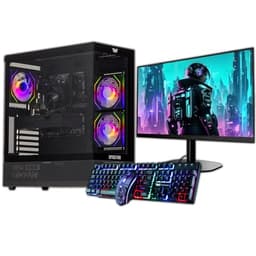
The ARGB case looks the part, and if aesthetics matter to you, it's a fun-looking machine. But for video editing specifically, the GTX 750's limitations make this a harder sell than the Vibox or the ADMI build above.
Pros
- 22-inch monitor included
- 16GB RAM is adequate
- ARGB case looks good on a desk
- 500GB HDD provides additional storage
Cons
- GTX 750 lacks modern NVENC support for editing software
- 120GB SSD is critically small
- HDD footage drive is slower for video scrubbing
- CPU generation not clearly specified in listing
Buy on Amazon
Best Under £50
Rating: ★★★★½ (4.8)
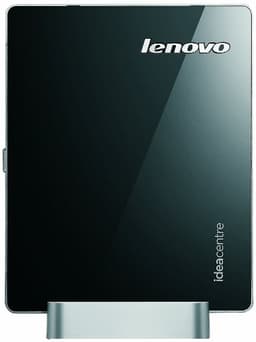
We'll be straight with you: the Lenovo Q190 is not a video editing machine. It's not close to being a video editing machine. The Intel Celeron 1017U runs at 1.60GHz with two cores and no Hyper-Threading. The 4GB RAM is half of what you'd want for even the lightest editing software. The 500GB spinning HDD is slow. And it ships with Windows 8.1, which is out of support and would need upgrading before you could run modern editing software at all.
It's included here because it's the designated best budget pick in this roundup, and at its price point it does have a use case. Basic web browsing, word processing, light office tasks, it handles those fine. It's a genuinely tiny, quiet machine that won't dominate a desk. But anyone reading this article looking for the best desktops for video editing under £700 should not buy this for editing purposes.
If you're on an absolute budget and need a machine for anything other than editing, it might serve a purpose. For video editing? Look elsewhere. Even the £94 OptiPlex i5 above is a dramatically better editing machine.
Pros
- Very compact and quiet
- Cheap entry point for basic computing tasks
- Built-in WiFi
Cons
- Completely unsuitable for video editing
- 1.60GHz Celeron is far too slow for editing software
- 4GB RAM is inadequate for any modern editing workflow
- Windows 8.1 is out of support
- Spinning HDD only, no SSD
Check availability