Adobe Premiere Pro rewards fast CPUs, plenty of RAM and a capable GPU for hardware-accelerated encoding and effects rendering. Whether you are cutting short-form social content or grading 4K documentary footage, the machine underneath makes a real difference to export times and timeline playback. This year the landscape has shifted noticeably: Nvidia's RTX 50-series cards have arrived in pre-built systems, Apple's M4 iMac delivers remarkable efficiency for macOS editors, and AMD's Ryzen 8000-series processors bring strong multi-thread performance at competitive prices. Budget editors who stretched to an RTX 3060 system last year can now access RTX 5060-class hardware for similar money. The five picks below cover everything from a compact mini-PC for a tidy desk to a full-tower powerhouse for heavy colour work. Each has been assessed specifically against Premiere Pro's demands: Mercury Playback Engine GPU acceleration, multi-core CPU rendering, RAM headroom for large project caches, and fast NVMe storage for smooth media playback.
Quick Verdict
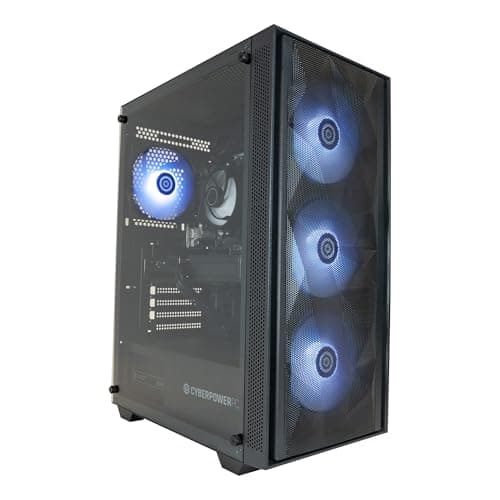
Best Overall: CyberPowerPC Luxe Gaming PC (Intel Core Ultra 7 265KF, RTX 5070 Ti, 32GB RAM). It combines a top-tier current-gen GPU with a high-core-count processor and 2TB NVMe storage, making it the most capable all-round Premiere Pro workstation in this group.
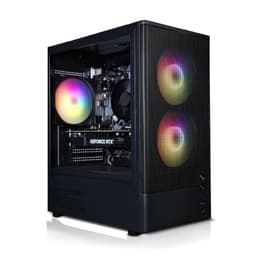
Best Value: CyberPowerPC Wyvern Gaming PC (Ryzen 5 8400F / RTX 5060 Ti). At under £1,000 it pairs a current-gen GPU with a capable six-core processor, giving Premiere Pro editors solid GPU-accelerated performance without breaking the budget.
The CyberPowerPC Luxe is the pick for professional and semi-professional video editors who need Premiere Pro to perform without compromise. At its heart sits Intel's Core Ultra 7 265KF, a processor from the Arrow Lake generation that offers a high core count and strong multi-threaded throughput. Premiere Pro's rendering pipeline is heavily multi-threaded, so the additional cores translate directly into faster export times when working with 4K H.264, HEVC or ProRes footage. Paired with the Nvidia GeForce RTX 5070 Ti, this machine has access to a substantial pool of VRAM and the latest CUDA cores, which Premiere Pro leverages through its Mercury Playback Engine GPU Acceleration mode. Effects such as Lumetri Colour, warp stabiliser and multiple adjustment layers all benefit from that GPU headroom, and real-time playback of complex timelines is noticeably smoother than on mid-range cards.
The 32GB of DDR5 RAM is the right starting point for editors working with 4K or multi-cam projects. Premiere Pro's media cache and background rendering processes consume memory quickly, and 32GB prevents the application from swapping to disk during intensive sessions. The 2TB NVMe SSD is equally important: fast storage means media files load without buffering, and scratch disk operations do not become a bottleneck. For editors who shoot on multiple cameras or maintain large project libraries, 2TB provides genuine breathing room without an immediate need for external drives.
The system ships with Windows 11 Home, which is fully compatible with the latest Premiere Pro release and Adobe's AI-powered tools including Firefly video features. The Core Ultra 7 265KF also supports Intel's hardware encoding for H.264 and HEVC, which Premiere Pro can use during export to accelerate render times beyond what the CPU alone could achieve. This is a genuine productivity advantage for anyone delivering content regularly to clients or platforms.
The asking price is high, but for editors who bill by the hour or work to tight turnaround deadlines, the time saved on exports and the reduction in dropped-frame frustration justify the investment. It is the strongest all-round Premiere Pro desktop in this selection.
Verdict: The most capable Premiere Pro workstation in this group, combining current-gen GPU power with a high-core-count CPU and generous storage.
Pros
- RTX 5070 Ti delivers excellent GPU-accelerated rendering in Premiere Pro's Mercury Playback Engine
- 32GB DDR5 RAM handles large multi-cam 4K projects without memory pressure
- 2TB NVMe SSD provides fast scratch disk and media storage in a single drive
Cons
- Premium price puts it out of reach for hobbyists and part-time editors
- Only 1TB listed in some configurations, so verify storage before purchasing
The Vibox VIII-75 is a striking proposition: an RTX 5090 with 32GB of VRAM inside a pre-built system at a price well below what you would expect to pay for that card alone at retail. For Premiere Pro editors who work with 8K footage, high-frame-rate 4K, or complex VFX-heavy timelines, the RTX 5090 is in a class of its own. Its VRAM capacity means Premiere Pro can hold enormous frame buffers and effect stacks in GPU memory without falling back to slower system RAM, and its CUDA core count makes GPU-accelerated effects processing dramatically faster than anything else in this list.
The processor is an Intel Core i9 12900KF, a 12th-generation chip from 2021. It remains a very capable CPU with 16 cores (8 performance, 8 efficiency) and strong single-thread performance, which matters for tasks like audio mixing and timeline scrubbing within Premiere Pro. However, it is worth acknowledging that this is an older generation architecture compared to the Arrow Lake chip in the Luxe, and its DDR4 memory platform means the 32GB of RAM runs at lower bandwidth than DDR5 systems. In practice, for most Premiere Pro workflows, the i9 12900KF is more than adequate, and the RTX 5090 will be the dominant factor in GPU-accelerated performance.
The 2TB NVMe SSD is a strong inclusion, giving editors ample space for project files, media cache and exported deliverables. Windows 11 is pre-installed, ensuring compatibility with current Premiere Pro versions and Adobe's cloud features. The Vibox brand is a UK-based system builder with a reasonable support reputation, which matters when buying a pre-built at this price point.
Where this machine sits awkwardly is in value terms: the CPU is not current-generation, and the overall system price reflects the RTX 5090's scarcity premium. Editors who do not work with 8K or extremely complex colour pipelines may find the RTX 5070 Ti in the Luxe a more balanced investment. But for those who specifically need the best possible GPU in Premiere Pro, the VIII-75 delivers it.
Verdict: The GPU powerhouse of this group, best suited to 8K editors and those running complex GPU-heavy effects pipelines who want the fastest possible Mercury Playback Engine performance.
Pros
- RTX 5090 with 32GB VRAM is the fastest consumer GPU available for Premiere Pro GPU acceleration
- 2TB NVMe SSD and 32GB RAM provide solid supporting infrastructure for large projects
- UK-based Vibox system builder with domestic support
Cons
- Intel Core i9 12900KF is a 2021-generation CPU, behind current-gen alternatives at similar prices
- High price is largely driven by RTX 5090 scarcity, making value-for-money difficult to assess
The Apple iMac with M4 is the obvious choice for editors who work within the Apple ecosystem, use Final Cut Pro alongside Premiere Pro, or simply want an all-in-one machine with a superb built-in display. The M4 chip's unified memory architecture means that the CPU and GPU share the same high-bandwidth memory pool, which has a meaningful effect on Premiere Pro performance. Rather than data shuttling between discrete CPU and GPU memory over a PCIe bus, the M4 can access all 16GB of unified memory from either processor, reducing latency and improving throughput for effects rendering and colour work.
Adobe Premiere Pro runs natively on Apple Silicon, having been fully optimised for the M-series architecture over the past few years. The M4's 10-core GPU supports Metal GPU acceleration within Premiere Pro, enabling hardware-accelerated effects, encoding and decoding. Apple's media engine, built into the M4, provides hardware-accelerated ProRes encode and decode, which is particularly valuable for editors working with camera-native ProRes footage or delivering ProRes masters. Export times for ProRes workflows on this machine are genuinely impressive relative to its price.
The 24-inch Retina display with P3 wide colour gamut is a significant advantage for colour grading work. Premiere Pro's Lumetri scopes and colour panels look exceptional on the iMac's screen, and the calibrated display means colour decisions are more reliable than on a generic monitor bundled with a Windows tower. The all-in-one form factor also means no separate monitor purchase is needed, which partially offsets the cost of the machine itself.
The limitations are real: 512GB of SSD storage is tight for video editing, and storage cannot be upgraded after purchase. The 16GB of unified memory is workable but will show strain on very large multi-cam projects. Editors who regularly work with 4K multi-cam or 6K+ footage should seriously consider upgrading to the 24GB or 32GB unified memory configuration at the point of purchase. The macOS-only environment also means Windows-specific plugins and some third-party tools are unavailable.
Verdict: The best choice for macOS-committed editors who value display quality, ProRes acceleration and a clean desk setup, but storage and RAM limitations require attention at the point of purchase.
Pros
- Hardware ProRes encode and decode via M4 media engine accelerates common video editing workflows significantly
- Built-in P3 wide-gamut Retina display removes the need for a separate colour-accurate monitor
- Unified memory architecture reduces CPU-to-GPU data transfer latency in Premiere Pro
Cons
- 512GB SSD is insufficient for large video projects without external storage from day one
- RAM and storage are non-upgradeable after purchase, so configuration choices at checkout are permanent
Buying Guide
GPU: the most important component for Premiere Pro
Adobe Premiere Pro uses GPU acceleration through its Mercury Playback Engine, and Nvidia CUDA is the best-supported path. The GPU handles real-time effects rendering, hardware-accelerated encode and decode, and AI-powered features such as scene edit detection and auto-reframe. For 1080p editing with moderate effects, an RTX 3050 or RTX 5060 is workable. For 4K with heavy colour grading and multiple adjustment layers, an RTX 5070 Ti or better is the right target. VRAM matters as much as raw GPU performance: 8GB is a practical minimum for 4K work, and 16GB or more is preferable for 8K or complex multi-layer timelines. Apple's M4 GPU takes a different approach through unified memory and Metal acceleration, which is highly competitive for ProRes workflows specifically.
CPU: cores and clock speed both matter
Premiere Pro benefits from high core counts for background rendering, multi-cam processing and export tasks, but it also relies on strong single-thread performance for timeline scrubbing and audio processing. Modern processors from Intel's Arrow Lake generation and AMD's Zen 4 generation offer a good balance of both. Aim for at least six cores; eight or more is preferable for 4K professional work. Hardware encoding support (Intel Quick Sync, AMD VCE, Nvidia NVENC) is a practical bonus that Premiere Pro can use during export to reduce render times significantly.
RAM: 16GB minimum, 32GB recommended
Adobe recommends 16GB of RAM as a minimum for Premiere Pro, but in practice 16GB leaves little headroom when the application is running alongside a browser, Audition and After Effects. 32GB is the comfortable working amount for 4K projects. Editors working with 6K or 8K footage, or running Dynamic Link between Premiere Pro and After Effects simultaneously, should consider 64GB if the platform supports it.
Storage: NVMe SSD is non-negotiable
Premiere Pro's media cache, preview files and project data generate large amounts of read and write activity. A traditional hard drive will cause stuttering and slow project load times. NVMe SSD is the minimum acceptable standard for a Premiere Pro machine in 2025. Capacity is also important: 1TB fills quickly with 4K media. Budget for at least 2TB total storage, either in a single drive or by adding a secondary NVMe or external SSD.
All-in-one versus tower
Tower desktops offer better upgradeability and generally better thermal performance under sustained load, which matters during long exports. All-in-one machines like the iMac trade upgradeability for a cleaner desk setup and, in Apple's case, a high-quality built-in display. For most editors, a tower with a separate colour-accurate monitor is the more practical long-term investment, but the iMac's display quality and ProRes acceleration make it genuinely competitive for macOS editors.
The CyberPowerPC Luxe Gaming PC with the Intel Core Ultra 7 265KF and Nvidia RTX 5070 Ti is the overall winner for Premiere Pro in 2025. It combines a current-generation, high-core-count CPU with one of the fastest consumer GPUs available, 32GB of DDR5 RAM and 2TB of NVMe storage, all running on Windows 11. That combination covers every Premiere Pro workflow from 1080p social content to 4K colour grading and multi-cam editing without compromise. The RTX 5070 Ti's VRAM and CUDA performance mean GPU-accelerated effects run smoothly, exports are fast, and the system has genuine longevity as Premiere Pro's AI features become more GPU-dependent over the coming years. For editors who cannot stretch to that price, the CyberPowerPC Wyvern with the Ryzen 7 8700F and RTX 5060 is the best value pick, delivering current-gen GPU acceleration at under £1,000.