Final Cut Pro is a macOS-exclusive application, which immediately narrows the field, but video editors who work across platforms or use proxy workflows on Windows machines still need serious hardware to handle 4K, 6K, and ProRes footage without dropped frames or sluggish scrubbing. Since last year, Apple's M4 silicon has redefined what integrated GPU performance means for colour grading and export speeds, while Windows alternatives have leapt forward with RTX 50-series cards that accelerate GPU-based rendering in compatible apps. This guide is aimed at content creators, YouTubers, documentary editors, and small studio professionals who need a desktop that can handle multicam timelines, Motion graphics, and Compressor exports without breaking a sweat. Whether you are committed to the Apple ecosystem or want a powerful Windows machine to complement a MacBook editing suite, there is a pick here for your budget and workflow.
Quick Verdict
Best Overall: Apple iMac with M4 (B0DL7M1FJ3). For native Final Cut Pro performance, nothing in this list comes close. The M4 chip's unified memory architecture and Apple's Metal GPU acceleration make it the definitive Final Cut Pro desktop at its price point.
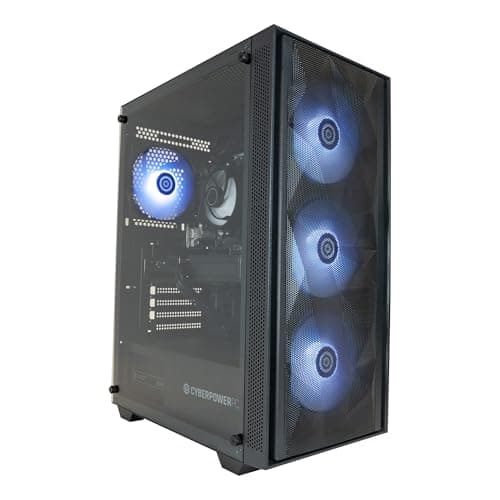
Best Value: CyberPowerPC Luxe Gaming PC with Intel Core Ultra 7 265KF and RTX 5070 Ti (B0FL7J799C). If you run a mixed Windows and macOS workflow, or need a powerful render node, this machine delivers extraordinary raw horsepower at a price that undercuts purpose-built workstations significantly.
The Apple iMac with M4 is the only machine on this list that can actually run Final Cut Pro natively, and that distinction matters enormously. Final Cut Pro is engineered from the ground up for Apple Silicon, exploiting the M4's Neural Engine for background rendering, the unified memory architecture for zero-copy media access, and the dedicated ProRes encode/decode hardware blocks that Apple has embedded in every M-series chip since M1 Pro. On the M4 iMac, a 4K ProRes 422 timeline with colour grades and titles plays back in real time without rendering, and export times for a ten-minute 4K sequence are measured in seconds rather than minutes.
The base M4 iMac ships with a 10-core CPU (four performance cores and six efficiency cores), a 10-core integrated GPU, 16 GB of unified memory, and a 512 GB SSD. The unified memory model means that 16 GB here behaves very differently from 16 GB in a conventional desktop: the GPU and CPU share the same pool without bandwidth penalties, so Final Cut Pro can hold large frame buffers, render caches, and proxy media in memory simultaneously. For editors working primarily in 1080p or 4K H.264 and HEVC, 16 GB is genuinely sufficient. For heavy multicam 4K ProRes or 6K RAW work, upgrading to 24 GB or 32 GB at the point of purchase is strongly advisable, though those configurations carry a higher price.
The 24-inch Retina 4.5K display is colour-accurate to the P3 wide colour gamut and reaches 500 nits of brightness, making it genuinely useful for colour grading without a separate reference monitor. The slim all-in-one chassis keeps desk clutter minimal, and the inclusion of Thunderbolt 4 ports means fast external SSD arrays for media storage are straightforward to attach. macOS Sequoia brings further optimisations for Final Cut Pro's background task management, and Apple's ecosystem integration with iPhone and iPad for importing footage via AirDrop or the Continuity Camera feature is a genuine time-saver in fast-turnaround workflows.
The limitations are real but manageable. Storage is soldered and cannot be upgraded after purchase, so buying the right configuration upfront is essential. The base 512 GB fills quickly with ProRes media, and most editors will want an external RAID or fast USB-C SSD from day one. The iMac also cannot run Windows applications natively, so if your pipeline includes Windows-only tools such as certain audio plugins or third-party VFX software, you will need a separate machine or a virtualisation solution.
Verdict: The only machine here that runs Final Cut Pro. Its M4 chip, ProRes hardware acceleration, and colour-accurate display make it the definitive choice for editors committed to the Apple ecosystem.
Pros
- Only desktop on this list that natively runs Final Cut Pro, with full ProRes hardware acceleration
- 10-core M4 GPU and unified memory deliver real-time 4K ProRes playback without rendering
- 24-inch 4.5K P3 display is colour-accurate enough for serious grading work
Cons
- 512 GB base storage fills rapidly with ProRes media, requiring immediate external storage investment
- RAM and storage are soldered and cannot be upgraded after purchase, so configuration choice is permanent
For editors who work in a mixed environment, using Final Cut Pro on a MacBook or Mac Studio while relying on a Windows desktop for Resolve colour grading, After Effects compositing, or Premiere Pro assembly, the CyberPowerPC Luxe represents extraordinary value as a companion workstation. It pairs an Intel Core Ultra 7 265KF processor with an Nvidia GeForce RTX 5070 Ti graphics card, 32 GB of DDR5 RAM, and a 2 TB NVMe SSD, all running Windows 11.
The RTX 5070 Ti is a genuinely powerful GPU for video work. In DaVinci Resolve, which many Final Cut Pro editors use for colour finishing before returning to FCP for assembly, the RTX 5070 Ti's CUDA cores and hardware-accelerated AV1 and HEVC encode/decode engines handle 4K and even 8K timelines with ease. Nvidia's NVENC encoder, updated in the RTX 50 series, is also significantly faster than software encoding for H.264 and HEVC output, cutting export times dramatically compared to CPU-only rendering.
The Intel Core Ultra 7 265KF is a strong multi-threaded processor. Its hybrid architecture blends performance cores with efficiency cores, making it responsive for background tasks like transcoding proxy files with Compressor (if you are running it on a Mac on the same network) or encoding deliverables in Handbrake while continuing to edit. The 32 GB of DDR5 RAM is the right amount for professional video work on Windows, providing headroom for large project caches and multiple open applications without page file thrashing.
The 2 TB NVMe SSD is a genuine differentiator at this price point. Many rivals at similar prices ship with 1 TB drives, and for video editors who cache proxies locally and keep active projects on the system drive, the extra terabyte delays the need for external storage. The CyberPowerPC Luxe ships in a full tower chassis with good airflow, which matters for sustained performance during long export sessions that would otherwise cause thermal throttling in smaller cases.
The key limitation is obvious: this machine cannot run Final Cut Pro. It is a Windows workstation, and while it excels at every other aspect of a professional video pipeline, editors who are exclusively Final Cut Pro users should look at the iMac instead. For those running a hybrid workflow, however, this is a compelling and versatile machine.
Verdict: The best Windows workstation on this list for video editors who use Final Cut Pro alongside other applications. Exceptional GPU power, generous RAM, and a large SSD make it a serious production machine.
Pros
- RTX 5070 Ti delivers class-leading GPU performance for DaVinci Resolve, After Effects, and NVENC encoding
- 32 GB DDR5 RAM and 2 TB NVMe SSD provide professional-grade capacity without immediate upgrades
- Intel Core Ultra 7 265KF handles heavy multi-threaded workloads including background transcoding efficiently
Cons
- Cannot run Final Cut Pro, limiting its role to a companion or render node in an Apple-centred workflow
- Full tower chassis is large and may not suit compact editing suites or home office setups
The Vibox VIII-75 is the most GPU-powerful machine in this selection, pairing an Intel Core i9 12900KF with the flagship Nvidia GeForce RTX 5090 carrying 32 GB of GDDR7 VRAM. For video editors who work in DaVinci Resolve with heavy node-based colour grading, GPU-accelerated noise reduction, or 8K RAW timelines, the RTX 5090 is in a category of its own. Its CUDA core count and memory bandwidth dwarf every other card in this list, and Nvidia's Blackwell architecture brings significant improvements to hardware-accelerated encoding and AI-based upscaling that benefit video workflows.
The Core i9 12900KF remains a strong CPU despite being a previous generation part. Its eight performance cores and sixteen efficiency cores provide excellent multi-threaded throughput for tasks like background transcoding, audio mixing, and running multiple applications simultaneously. Paired with 32 GB of DDR5 RAM and a 2 TB NVMe SSD, the system has the memory and storage capacity to handle large projects without constant cache management.
Where the Vibox VIII-75 becomes particularly interesting for Final Cut Pro users is as a dedicated render node or a secondary machine for Resolve colour work. Many professional editors use Final Cut Pro for assembly and rough cut, then export an XML to DaVinci Resolve for colour finishing, before returning to FCP for final output. On a machine with an RTX 5090, Resolve's GPU-accelerated noise reduction, which is one of the most computationally expensive operations in post-production, runs at speeds that would take an M4 iMac many times longer to complete using its integrated GPU.
The RTX 5090 also supports Nvidia's NVENC AV1 encoder, which produces smaller files at equivalent quality compared to H.264 or HEVC, useful for archiving or delivering to platforms that accept AV1. The 32 GB of VRAM is also future-proof for AI-assisted tools that load large models into GPU memory.
The price is the primary consideration. At its listed price, the Vibox VIII-75 is a significant investment, and the Core i9 12900KF, while capable, is a 12th-generation Intel chip that lacks the architectural refinements of the Core Ultra series found in newer machines. Editors on a strict budget will find better value elsewhere, but for those who need maximum GPU horsepower for Resolve or AI-assisted workflows, this machine is hard to argue against.
Verdict: The RTX 5090 makes this the most GPU-powerful option on the list. Ideal as a Resolve grading station or AI-assisted editing workstation, though the older CPU generation is a minor drawback at this price.
Pros
- RTX 5090 32 GB is the fastest consumer GPU available, transforming DaVinci Resolve grading and AI tool performance
- 32 GB RAM and 2 TB NVMe SSD provide ample headroom for large 4K and 8K project caches
Cons
- Intel Core i9 12900KF is a 12th-generation chip, lacking the efficiency and architectural improvements of Core Ultra processors
- Cannot run Final Cut Pro, and the price premium over the CyberPowerPC Luxe is hard to justify for most hybrid workflows
Buying Guide
macOS or Windows: The Most Important Decision
Final Cut Pro runs exclusively on macOS. If your primary goal is to run Final Cut Pro as your main editing application, you need a Mac. The Apple iMac with M4 is the only machine in this selection that meets that requirement. Every other machine in this list runs Windows and cannot run Final Cut Pro directly. This does not make them irrelevant to Final Cut Pro editors: many professionals use a Mac for editing and a Windows machine for colour grading in DaVinci Resolve, compositing in After Effects, or as a dedicated render node. But the macOS versus Windows question must be answered before any other consideration.
RAM: How Much Do You Actually Need?
For Final Cut Pro on an Apple Silicon Mac, 16 GB of unified memory is sufficient for most 4K H.264 and HEVC workflows. The unified memory architecture means the GPU and CPU share the same pool, so 16 GB behaves more like 24 GB in a conventional system. For heavy multicam 4K ProRes editing, 6K RAW work, or projects with many simultaneous Motion graphics layers, 24 GB or 32 GB is advisable. On Windows machines, 32 GB of DDR5 is the recommended minimum for professional video work, as the GPU and CPU have separate memory pools and the operating system overhead is higher.
GPU: Integrated vs Discrete
Apple's M4 integrated GPU is purpose-built for Final Cut Pro and handles ProRes playback and export with dedicated hardware blocks. For Windows machines used in video production, a discrete Nvidia GPU with NVENC support is strongly recommended. NVENC hardware encoding dramatically reduces export times for H.264, HEVC, and AV1 compared to software encoding. The RTX 5070 Ti and RTX 5090 in this selection represent the current generation of Nvidia hardware and offer significant improvements over older cards. Integrated graphics on Windows machines, such as the AMD Radeon 780M in the GMKtec K8 Plus, are suitable only for proxy workflows or secondary tasks.
Storage: Plan for Growth
Video production is storage-hungry. A single hour of 4K ProRes 422 footage occupies approximately 100 GB. A 512 GB SSD, as found in the base iMac, will fill within days of active production. Plan for external storage from day one: a fast USB-C or Thunderbolt SSD array for active projects, and a NAS or external hard drive array for archive. On Windows machines, a 2 TB internal SSD buys more time before external storage becomes essential, but the same principle applies.
Display Considerations
The iMac's built-in 4.5K P3 display is colour-accurate enough for serious grading work. Windows tower machines require a separate monitor, and for colour-critical work, a display with at least P3 wide colour gamut coverage and factory calibration is worth the investment. Budget at least an additional sum for a quality monitor when pricing up a Windows workstation for video production.
Future-Proofing
Apple Silicon Macs are not upgradeable after purchase. Choose the right RAM and storage configuration upfront. Windows towers are generally more upgradeable: RAM and storage can be expanded, and GPU upgrades are possible as your workflow demands grow. If long-term upgradeability matters to you, a Windows tower gives more flexibility, even if it cannot run Final Cut Pro natively.
The overall winner is the Apple iMac with M4 (B0DL7M1FJ3). It is the only machine in this selection that can run Final Cut Pro, and it does so with hardware-level ProRes acceleration, a unified memory architecture that makes 16 GB punch well above its weight, and a colour-accurate 4.5K display that removes the need for a separate monitor. For editors whose workflow centres on Final Cut Pro, there is no rational alternative on this list. The base configuration is sufficient for most 4K workflows, though editors working with ProRes RAW or heavy multicam projects should budget for a higher-memory configuration at the point of purchase. Pair it with a fast external SSD for media storage and you have a complete, professional editing station at a price that competes favourably with purpose-built Windows workstations of equivalent capability for Final Cut Pro specifically.
For editors who need a powerful Windows companion machine for Resolve grading, After Effects work, or as a render node, the CyberPowerPC Luxe with RTX 5070 Ti and 2 TB SSD is the best value proposition on the list, offering modern CPU architecture, excellent GPU performance, and generous storage in a single package.