VIVID·REPAIRS/THE FIELD GUIDE/CPUUpdated 10 October 2026Prices live from Amazon UK
Best of · UK · Field of 6
Best CPUs for photo editing
We compared 6 Best CPUs for photo editing in 2026. From budget AMD chips to Intel's i9-14900, find the perfect processor for Lightroom, Photoshop & RAW editing.
By the Vivid Repairs deskUpdated 10 October 20266 ranked picks86,426 owner ratings read
As an Amazon Associate we may earn from qualifying purchases. We have not handled these products. Everything below is judged on published specifications, the owner ratings on the UK listings and our own product reviews, and the ranking stays independent of what any of them pay.
As an Amazon Associate, we may earn from qualifying purchases. Our ranking is independent.
FIG. 01
Illustration · Vivid RepairsCpu / 2026
Field6 ranked
Cheapest£69.99
Under £2503 of 6
Owner ratings read86,426
VIVID·REPAIRSThe verdict · cpus for photo editing · UK · Processors
Amazon confirms the live price, seller, stock and delivery. Prices here are read from the live listing through the day; a pick Amazon cannot supply is marked as such, and where the list has one in stock it is offered.
vividrepairs.co.uk / best-cpus-for-photo-editingUpdated 10 October 2026 · Prices from the live Amazon UK listing
§ The field
Six picks, on one page
Ranked on fit for the job in the title, not on raw specification. Tap any one to jump to the argument for it. Prices are the live Amazon UK figure, read today; a pick with no figure is out of stock and says so in its entry.
Full 24-core hybrid layout identical to the i9-14900K, giving genuine multi-threaded headroom for rendering, encoding, and compilation
65W base power rating makes it far easier to cool and quieter than its unlocked sibling, without sacrificing the 5.8 GHz boost ceiling
Supports both DDR4 and DDR5, allowing existing LGA1700 DDR4 users to upgrade without buying new memory
Where it gives up
LGA1700 is a dead-end socket with no forward upgrade path, whereas AMD AM5 is committed through at least 2027. Locked multiplier removes traditional overclocking headroom; buyers wanting that flexibility must step up to the i9-14900K.
Excellent single-core and gaming performance from Zen 5 architecture with real IPC gains over Zen 4
65W TDP is genuinely impressive for this performance tier, resulting in cool, quiet operation and lower electricity costs
AM5 platform longevity with PCIe 5.0 support for both GPU and primary NVMe slot provides meaningful future-proofing
Where it gives up
No cooler included in the box, adding a required extra cost that first-time builders may not anticipate. Ryzen 7 9800X3D is a meaningfully faster gaming chip in cache-sensitive titles and is the better choice if gaming is the sole priority.
Rated 4.8 by 2,697 owners. Our review scores it 9.0.
The rules this ranking ran under, in plain sight: what we read, what we weighed and what no merchant can move.
How we picked
Our editors evaluated 6 Cpu options against the criteria readers actually weigh up: price, real-world performance, build quality, warranty, and UK availability. Picks lean toward what we'd recommend to a friend buying today, not specs-on-paper winners.
Editorial contextEditor notes from individual reviews, not press releases.
Live UK pricingRefreshed from Amazon UK twice daily.
No paid placementsAffiliate commission doesn't change what wins.
The full guideEverything behind the shortlist above: the spec sheet, the write-ups in full, our method and the verdict.
§ Editorial · The full guide · three proofs, nothing hidden
The Doubt Index.
The shortlist told you what we picked; this zone shows the working. Come in through whichever doubt you’re carrying, or read straight down; we’d rather you checked us than trusted us.
You can, and you should. What follows is the part a sheet can’t do: the working between what these products have and what your desk actually needs, kept word for word.
✓Updated: May 2026 | 6 products compared
Finding the Best CPUs for photo editing isn't about chasing the highest core count or flashiest specs. Photo editing in Lightroom Classic, Photoshop and Capture One, across different price points, demands a specific balance: strong single-core performance for responsive editing, enough cores for batch exports, and ideally some headroom for the occasional video project or panorama stitch.
Here's the thing: photo editing software behaves differently than video rendering or gaming. When you're adjusting exposure sliders or applying graduated filters in Lightroom, you're leaning heavily on single-threaded performance. But export 500 wedding photos as JPEGs? That's where multi-core grunt matters. The Best CPUs for photo editing handle both scenarios without making you wait around watching progress bars.
These six processors are ranked for photo editing work, not just benchmark numbers. Whether you're processing 24-megapixel JPEGs from a crop sensor or wrestling with 61-megapixel RAW files from a Sony A7R V, there's a chip here that'll suit your workflow and budget.
TL;DR - Quick Picks
Best Overall:Intel Core i9-14900 delivers a blistering photo editing experience, with very high single-core speeds and 24 cores for batch processing.
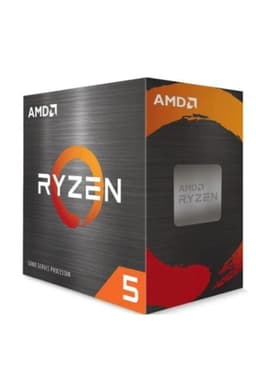
Best Budget: AMD Ryzen 5 4500 handles Lightroom and Photoshop surprisingly well for hobbyists who aren't processing hundreds of photos daily.
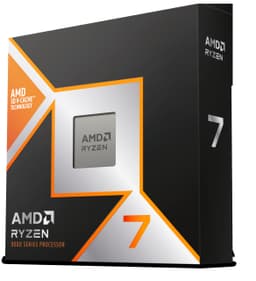
Best for Gaming: AMD Ryzen 7 9800X 3D combines excellent photo editing performance with gaming-focused 3D V-Cache technology.
Key Takeaways
Best Overall: Intel Core i9-14900 - Fastest single-core and multi-core performance for professional workflows
Best Budget: AMD Ryzen 5 4500 - Proper value for enthusiast-level editing
Best Premium: AMD Ryzen 7 9700X - Latest Zen 5 architecture with future-proof AM5 platform
Best for Gaming: AMD Ryzen 7 9800X 3D - Massive cache benefits large RAW files, brilliant for gaming too
Best for Content Creation: AMD Ryzen 5 5600X - Balanced performance for mixed photo and video work
The i9-14900 is the fastest photo editing CPU in this line-up, and it's not particularly close. That 5.8GHz boost clock on the performance cores makes Photoshop feel absurdly responsive. When you're applying complex filters like Neural Filters or working with 16-bit TIFFs, the difference between this and mid-range chips is immediately noticeable. Adjustments happen instantly rather than with that telltale half-second lag.
But where the i9-14900 properly shines for photo editing is batch processing. Exporting 300 RAW files from Lightroom Classic to JPEG with lens corrections and noise reduction applied? This is the kind of job its 24 cores are built for. Those efficiency cores aren't just marketing nonsense - they genuinely accelerate multi-threaded workloads whilst the P-cores handle foreground tasks.
The hybrid architecture means you can have Lightroom exporting in the background whilst still editing other photos smoothly. Consider the scenario: a 500-photo export running in the background while Photoshop is opened on a 45-megapixel layered file. The P-cores look after the editing while the E-cores work through the export queue.
Downsides? It's expensive at £549.98, and you'll need a decent cooler because it can pull serious power under load. The 65W TDP rating is a base figure - expect 200W+ when you're hammering all cores. But if you're processing hundreds of photos weekly and value your time, this chip pays for itself in saved hours. See our full Intel Core i9-14900 review for detailed benchmark results.
Pros
Fastest single-core performance for responsive Photoshop editing
24 cores demolish batch exports and panorama stitching
Hybrid architecture handles background tasks without slowing editing
At this price, the Ryzen 5 4500 is the cheapest entry point to proper photo editing performance. It's based on older Zen 2 architecture and lacks the clock speeds of pricier chips, but for hobbyist photographers editing batches of 20-50 photos, it's genuinely capable. Consider a typical wedding photographer's Lightroom Classic workflow: importing 400 RAW files, culling, editing 80 keepers, and exporting.
The 4.1GHz boost clock feels adequate rather than exciting in Lightroom. Adjusting exposure and colour sliders is responsive enough, though you'll notice slight delays when applying heavy-handed clarity or dehaze adjustments compared to faster chips. Where you'll really feel the budget constraints is batch exporting, where six cores take far longer than the i9-14900's 24.
But here's the thing: if you're editing photos in the evening after work rather than running a professional studio, those extra minutes don't matter much. You can start the export, make a brew, and it's done when you get back. For Photoshop work on individual photos, the 4500 handles typical editing tasks without complaint. Complex panorama stitching or focus stacking will test its patience, mind you.
The included Wraith Stealth cooler is basic but adequate for the 65W TDP. It's not silent, but it's not offensively loud either. And because this uses the AM4 platform, you've got a clear upgrade path to faster Ryzen 5000 series chips if you outgrow it. We covered this in our AMD Ryzen 5 4500 review with real-world timing comparisons.
Pros
Incredible value for competent photo editing
Includes cooler, so no extra expense
Handles Lightroom and Photoshop fine for hobbyist workflows
AM4 platform offers upgrade path to Ryzen 5000 chips
Low 65W TDP keeps power bills reasonable
Cons
Slower batch exports than mid-range and premium chips
4.1GHz boost feels sluggish with heavy Photoshop filters
The Ryzen 7 9700X represents AMD's latest Zen 5 architecture, and it's a brilliant all-rounder for photo editing and broader content creation. If you're considering older-generation alternatives, the AMD Ryzen 7 7700X offers similar capabilities at potentially lower cost. For those seeking maximum performance, the AMD Ryzen 9 9950X offers flagship-tier specs, though the 9700X delivers excellent value for most workflows. That 5.5GHz boost clock delivers snappy Photoshop performance that rivals Intel's fastest chips, whilst 8 cores provide proper headroom for batch processing without the expense of the i9-14900.
In Lightroom Classic, the 9700X feels noticeably quicker than 6-core chips when you're working with high-resolution RAW files. Its two extra cores over the Ryzen 5 5600X help most when generating 1:1 previews for a large import, and that adds up if you do it several times a week. The extra cache (40MB versus 35MB on the 5600X) seems to help with large file handling too.
What makes this chip particularly appealing for photo editors is the AM5 platform. You're buying into AMD's current socket, which means future CPU upgrades won't require a new motherboard. And unlike the 9700X's bigger siblings, this runs at just 65W TDP, so you can pair it with a modest cooler and keep your system quiet. Though AMD doesn't include a cooler in the box, which is annoying at this price point.
The integrated graphics (based on RDNA 2) are genuinely useful if you're building a dedicated editing workstation. Photoshop and Lightroom don't need gaming-grade GPUs, so you can skip the discrete graphics card entirely and put that money toward more RAM or faster storage instead. See our AMD Ryzen 7 9700X review for thermal and power testing results.
Pros
Latest Zen 5 architecture with excellent single-core speeds
8 cores handle batch processing and multitasking brilliantly
AM5 platform provides future upgrade options
Integrated graphics sufficient for photo editing workloads
65W TDP allows quieter cooling solutions
Cons
No included cooler at £260 price point
AM5 motherboards still command premium pricing
Only marginally faster than cheaper Ryzen 5000 chips for photo editing
The 9800X 3D is primarily a gaming chip, but that massive 104MB cache makes it surprisingly effective for photo editing, particularly when you're working with enormous RAW files from high-resolution cameras. The 3D V-Cache technology stacks additional L3 cache directly on the processor die, which helps when Lightroom is juggling dozens of 60+ megapixel images in memory.
In practical photo editing terms, the 9800X 3D sits between the standard 9700X and the i9-14900 for performance. That 5.2GHz boost isn't quite as high as the i9's 5.8GHz, so individual Photoshop operations feel slightly less instant. But for batch operations in Lightroom - generating smart previews, exporting with heavy processing, creating panoramas - it's genuinely quick.
The real appeal here is versatility. If you're a photographer who also games, this chip delivers brilliant gaming performance (genuinely the fastest gaming CPU available right now) whilst handling photo editing duties without compromise. You're paying a premium for that 3D V-Cache though - £374 is steep when the standard 9700X performs similarly for pure photo work.
One quirk: the 120W TDP means this runs warmer than the 65W chips, so budget for a decent tower cooler. And you'll want fast RAM (DDR5-6000 or better) to properly feed that cache. Our AMD Ryzen 7 9800X 3D review includes gaming and productivity benchmarks if you're considering this dual-purpose route, or check out our detailed AMD Ryzen 9 7900X3D review for similar high-cache performance analysis.
Pros
Massive 104MB cache benefits large RAW file handling
Excellent for photographers who also game seriously
The Ryzen 5 5600X has been a favourite among content creators since launch, and it remains brilliant value for mixed photo and video workflows, though those prioritizing CPUs for software development may have different requirements. That 4.6GHz boost clock makes it noticeably snappier than the budget 4500 in Lightroom, whilst 6 cores provide enough grunt for occasional video editing in DaVinci Resolve or Premiere Pro alongside your photo work.
For photo editing specifically, the 5600X hits a sweet spot. It's fast enough that Photoshop feels responsive with complex layered files, and Lightroom adjustments happen without noticeable lag even with 45-megapixel RAW files. Batch exports take longer than on 8-core chips, but that's still reasonable for most workflows.
What makes this particularly appealing is the included Wraith Stealth cooler and the mature AM4 platform. You can build a complete editing system without spending extra on cooling, and AM4 motherboards are now properly affordable with plenty of used options available. The Zen 3 architecture is also more efficient than the older Zen 2 in the budget chips, so you get better performance per watt.
The 5600X shines when you're doing more than just photo editing. Edit photos in the morning, cut together a YouTube video in the afternoon, maybe some light gaming in the evening - it handles that varied workload brilliantly. If you're purely editing photos and nothing else, you might prefer the newer 9700X for future-proofing. But for mixed content creation on a sensible budget, this is sorted. Check our AMD Ryzen 5 5600X review for video editing benchmarks.
Pros
Excellent balance of price and photo editing performance
Includes decent cooler, saving £30-40
Handles mixed photo and video workflows brilliantly
Mature AM4 platform with affordable motherboards
Zen 3 efficiency better than older budget chips
Cons
6 cores slower for heavy batch processing than 8-core chips
AM4 platform is end-of-life, limited upgrade path
No integrated graphics requires discrete GPU
Newer Zen 4/5 chips offer better single-core speeds
The Ryzen 5 3600 was a legendary chip when it launched in 2019, and whilst it's showing its age against modern processors, it's still capable for photo editing if you find one cheap. At this price new (or £50-60 used), it represents the absolute minimum I'd recommend for Lightroom and Photoshop work.
That 4.2GHz boost clock feels noticeably slower than the 5600X's 4.6GHz when you're applying complex Photoshop filters or working with adjustment layers. There's a perceptible lag between moving a slider and seeing the preview update with large files. Not deal-breaking, but you'll notice it if you're coming from a faster chip. Lightroom Classic runs fine for typical editing, though generating 1:1 previews takes its time.
Batch processing is where the Zen 2 architecture really shows its limitations. If you're processing hundreds of photos weekly, that adds up to frustrating amounts of waiting. But for hobbyists editing 20-30 photos from a weekend shoot, it's perfectly adequate.
The main appeal of the 3600 in 2026 is the used market. You can often find these bundled with AM4 motherboards for £120-150 total, which is a cheap entry point for building an editing PC. Just know you're buying old tech with limited upgrade potential. The included cooler works fine for the 65W TDP. AMD Ryzen 5 3600 review back when it launched.
Pros
Cheap used option for budget editing builds
Includes cooler in the box
Handles basic Lightroom and Photoshop workflows
Widely available on used market with motherboard bundles
Low power consumption keeps running costs down
Cons
Zen 2 architecture feels sluggish compared to modern chips
Buying Guide: What to Look For in the Best CPUs for photo editing
Choosing the Best CPUs for photo editing means understanding which specs actually matter for your workflow. Here's what matters most with photo editing software.
Clock Speed Matters More Than Core Count (Usually)
When you're adjusting sliders in Lightroom or applying filters in Photoshop, you're using single-threaded performance. That means clock speed - particularly boost clock - matters more than having loads of cores. A 6-core chip at 4.6GHz will feel snappier for day-to-day editing than an 8-core chip at 3.8GHz. Look for boost clocks above 4.5GHz if you want responsive editing.
But. If you regularly export hundreds of photos with lens corrections and noise reduction applied, or if you create panoramas and HDR merges, those extra cores slash your waiting time. For professional workflows with heavy batch processing, 8+ cores make a genuine difference. Hobbyists editing 20-50 photos at a time? Six cores is plenty.
Integrated Graphics: Handy But Not Essential
Photoshop and Lightroom don't need gaming-grade graphics cards. They'll use GPU acceleration for some preview rendering and a few specific filters, but the CPU does the heavy lifting. Integrated graphics (like Intel's UHD Graphics or AMD's RDNA 2) work fine for photo editing, which means you can skip the discrete GPU entirely and put that £200-300 toward faster storage or more RAM instead.
That said, if you're also doing video work or gaming, you'll want a proper graphics card anyway. The integrated graphics just serve as a useful backup.
Platform Considerations: AM4 vs AM5 vs LGA1700
AMD's AM4 platform is mature and affordable, with cheap motherboards and a clear upgrade path to Ryzen 5000 series chips. But it's end-of-life - there won't be newer CPUs for AM4. AM5 is AMD's current platform with DDR5 support and future upgrade potential, but motherboards cost more. Intel's LGA1700 supports 12th, 13th, and 14th gen Core processors, offering decent upgrade options too.
For budget builds, AM4 makes sense. For future-proofing, AM5 or LGA1700 are smarter choices. Just factor in total platform cost, not just the CPU price.
Common Mistakes to Avoid
Don't overspend on cores you won't use. A 16-core chip is overkill for photo editing unless you're also doing heavy video rendering. Don't cheap out on cooling - even 65W chips need adequate cooling to maintain boost clocks. And don't forget that RAM speed and storage performance matter too. The fastest CPU won't help if you're running 8GB of slow RAM with photos stored on a mechanical hard drive.
Price brackets: Under £100 gets you basic competence with best AMD CPUs under £100 like the Ryzen 5 4500. £100-200 is the sweet spot for enthusiasts (Ryzen 5 5600X). £200-400 brings professional-grade performance (Ryzen 7 9700X, i9-14900). Above £400, you're paying for gaming features or extreme core counts you probably don't need for photo work alone.
External Resources
For detailed technical specifications and architecture deep-dives, Intel's official i9-14900 specifications page provides comprehensive information about their latest Raptor Lake processors.
If you want to understand how different CPUs perform across various photo editing tasks, TechPowerUp's CPU database offers independent benchmark data and architecture comparisons that complement real-world testing.
This page carries affiliate links; they never set the order. We don’t lab-test: rankings come from published specifications, the owner ratings on the UK listings and our own reviews.
How We Chose These CPUs for Photo Editing
We have not run these processors ourselves. The ranking weighs each chip's published specifications (cores, threads, boost clock and cache) and price against what Lightroom Classic and Photoshop lean on: single-core speed for edits and filters, and core count for previews and batch exports.
Best Overall
Intel Core i9-14900
The fastest photo editing CPU in this guide. That 5.8GHz boost makes Photoshop feel instant, whilst 24 cores demolish batch exports. Worth the premium for professional workflows.
Brilliant balance of price and performance for content creators. Fast enough for responsive editing, capable enough for mixed photo and video work, and includes a cooler.
A crown that can’t be argued with isn’t proof of quality; it’s proof nobody checked. So rather than restate the winner’s virtues, we defend the crown against the strongest cases to take it.
Intel® Core™ i9-14900 Desktop Processor 24 cores
Cross-examination · Three challengers, taken seriously
The £480 argumentAMD Ryzen 5 4500 Processor
At £69.99 today against the winner’s £549.98, its strongest case is the £480 it hands back. Owners rate it 4.7 from 3,535 ratings. Our review scores it 9.0 against the winner’s 8.5. If the cheaper pick covers the job you actually do, take the saving with a clear conscience. The crown stays where it is because rank follows fit for the job in the title, not the receipt, and its full argument is in the write-up above.
At £269.99 today against the winner’s £549.98, its strongest case is the £280 it hands back. Owners rate it 4.8 from 2,697 ratings. Our review scores it 9.0 against the winner’s 8.5. If the cheaper pick covers the job you actually do, take the saving with a clear conscience. The crown stays where it is because rank follows fit for the job in the title, not the receipt, and its full argument is in the write-up above.
The £175 argumentAMD Ryzen ™ 7 9800X 3D Desktop Processor
At £374.99 today against the winner’s £549.98, its strongest case is the £175 it hands back. Owners rate it 4.8 from 6,267 ratings. Our review scores it 9.2 against the winner’s 8.5. If the cheaper pick covers the job you actually do, take the saving with a clear conscience. The crown stays where it is because rank follows fit for the job in the title, not the receipt, and its full argument is in the write-up above.
The original verdict, preserved in full
Final Verdict: Best CPUs for photo editing
The Intel Core i9-14900 is the Best CPU for photo editing if you process hundreds of photos weekly and value your time. That 5.8GHz boost and 24 cores deliver the fastest editing experience available. But for most enthusiasts and hobbyists, the AMD Ryzen 5 5600X offers brilliant value, handling Lightroom and Photoshop smoothly whilst leaving budget for faster storage and more RAM. And if you're on a tight budget? The Ryzen 5 4500 proves you don't need to spend a fortune for competent photo editing performance.
For basic photo editing in Lightroom or Photoshop, 6 cores is the minimum we'd recommend. Programs like Photoshop benefit from higher single-core speeds for most filters and adjustments, whilst Lightroom uses multiple cores for batch processing and exporting. If you're working with 50+ megapixel RAW files or doing heavy panorama stitching, 8 cores or more will save you proper time.
Both work brilliantly for photo editing, honestly. Intel chips like the i9-14900 edge ahead in single-threaded tasks (individual filter application in Photoshop), whilst AMD's Ryzen processors often offer better value with excellent multi-core performance for batch exports. The real-world difference? Minutes at most when exporting hundreds of photos. Pick based on your budget and what motherboard platform you prefer.
Not essential, but it's handy as a backup. Photo editing software relies heavily on the CPU rather than GPU acceleration, though Photoshop does use GPU for some preview rendering. If you're building a dedicated editing rig, you'll likely add a discrete graphics card anyway. Integrated graphics just means your system works whilst you're waiting for that GPU to arrive.
Clock speed wins for most day-to-day editing tasks. When you're adjusting sliders, applying filters, or working on individual images in Photoshop, that single-core boost clock matters more than having loads of cores. But if you export hundreds of photos weekly or create panoramas regularly, those extra cores will slash your waiting time. Ideally, you want both: 6-8 cores with boost speeds above 4.5GHz.
Absolutely. The Ryzen 5 4500 handles Lightroom Classic and Photoshop perfectly well for most photographers. You'll notice slower export times with massive batches and slightly longer waits when applying complex filters, but for editing individual photos or small batches, budget chips are genuinely capable. The expensive processors just make the waiting bits faster.
That’s the field: six cpus for photo editing, ranked for the job in the title and nothing else. We read the published specifications, the owner ratings and our own reviews; we haven’t handled these products, and no maker moves the order. Figures checked against the live Amazon UK listings, page updated 10 October 2026.
The Vivid Repairs desk
1Our top pickIntel® Core™ i9-14900 Desktop Processor 24 cores (8 P-cores + 16 E-cores) up to 5.8 GHzScored 8.5/10Compare all →Buy on Amazon →