
Specs on paper are one thing. What actually matters is whether those specs translate into something you can feel in a dark room at 2am, losing a ranked match and blaming your monitor. The ASUS ROG Strix XG27AQWMG is the kind of display where the numbers are genuinely interesting rather than just marketing padding, and the owner feedback backs most of them up. So let's talk about what you're actually getting.
This is a 27-inch 1440p OLED at 280Hz with a glossy Tandem OLED panel, and at the upper mid-range price point it sits in a bracket where you have real choices. The question isn't whether OLED is good (it is), it's whether this specific implementation justifies the spend over a cheaper OLED alternative or a well-specced Mini-LED. Based on the spec sheet and what some owners report, the answer is mostly yes, with a couple of caveats that matter depending on your setup.
Core Specifications
The XG27AQWMG is built around a 27-inch Tandem OLED panel running at 2560x1440 (1440p / WQHD). That resolution at 27 inches gives you a pixel density of around 109 PPI, which is sharp without being the eye-straining density of a 4K panel at the same size. The refresh rate is 280Hz, which puts it ahead of most OLED competitors still shipping at 240Hz. Response time is rated at 0.03ms GtG, which is the kind of number that makes IPS panels look embarrassed.
Adaptive sync covers both NVIDIA G-Sync Compatible and AMD FreeSync Premium Pro, so you're not locked into one GPU ecosystem. HDR certification is VESA DisplayHDR True Black 500, which is a meaningful tier for OLED because it measures against a true black floor rather than the backlit-panel standard. Colour coverage is rated at 99% DCI-P3. The panel also features ASUS's OLED Care Pro suite and a Neo Proximity Sensor that dims the display when you step away, which is a practical burn-in mitigation feature rather than just a gimmick.
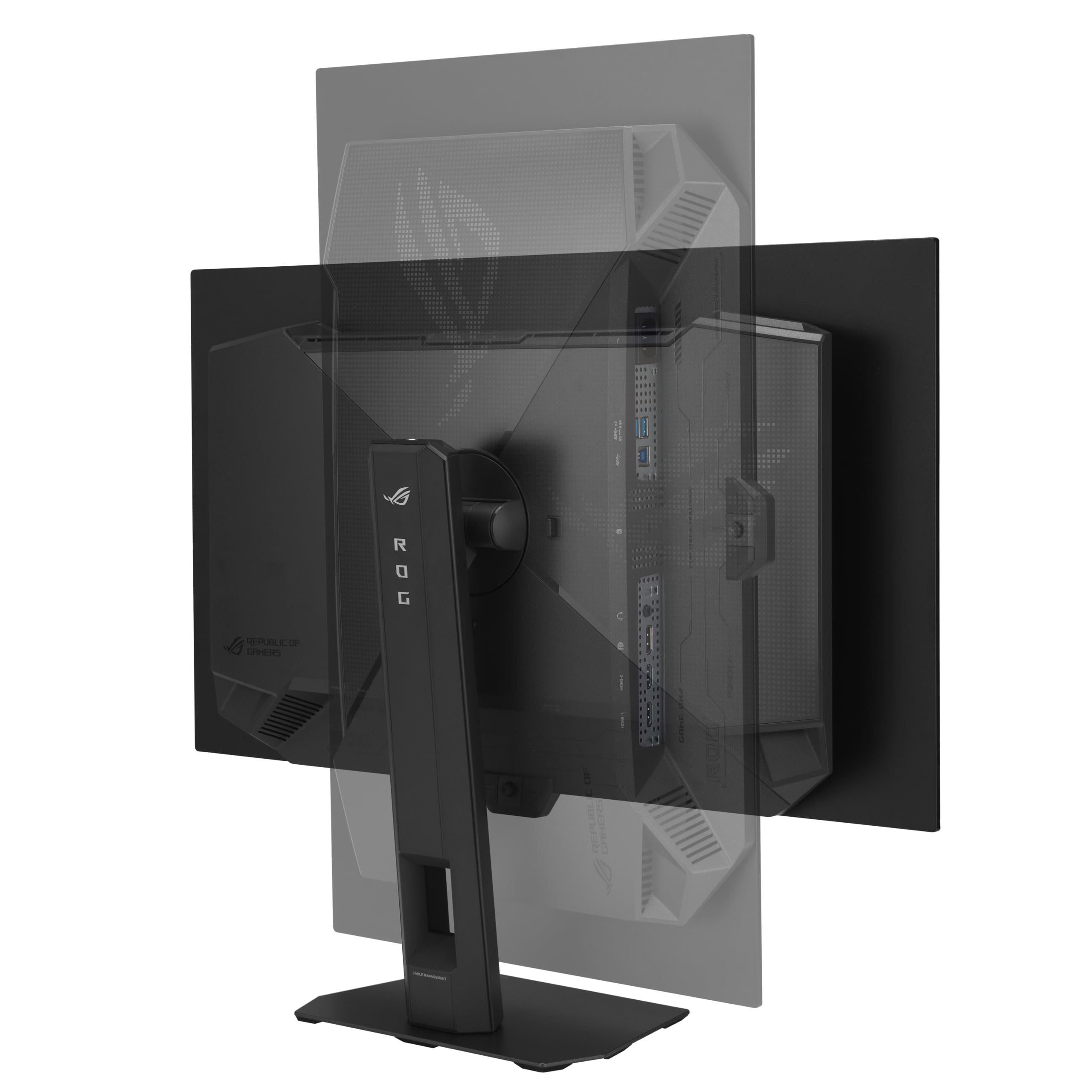
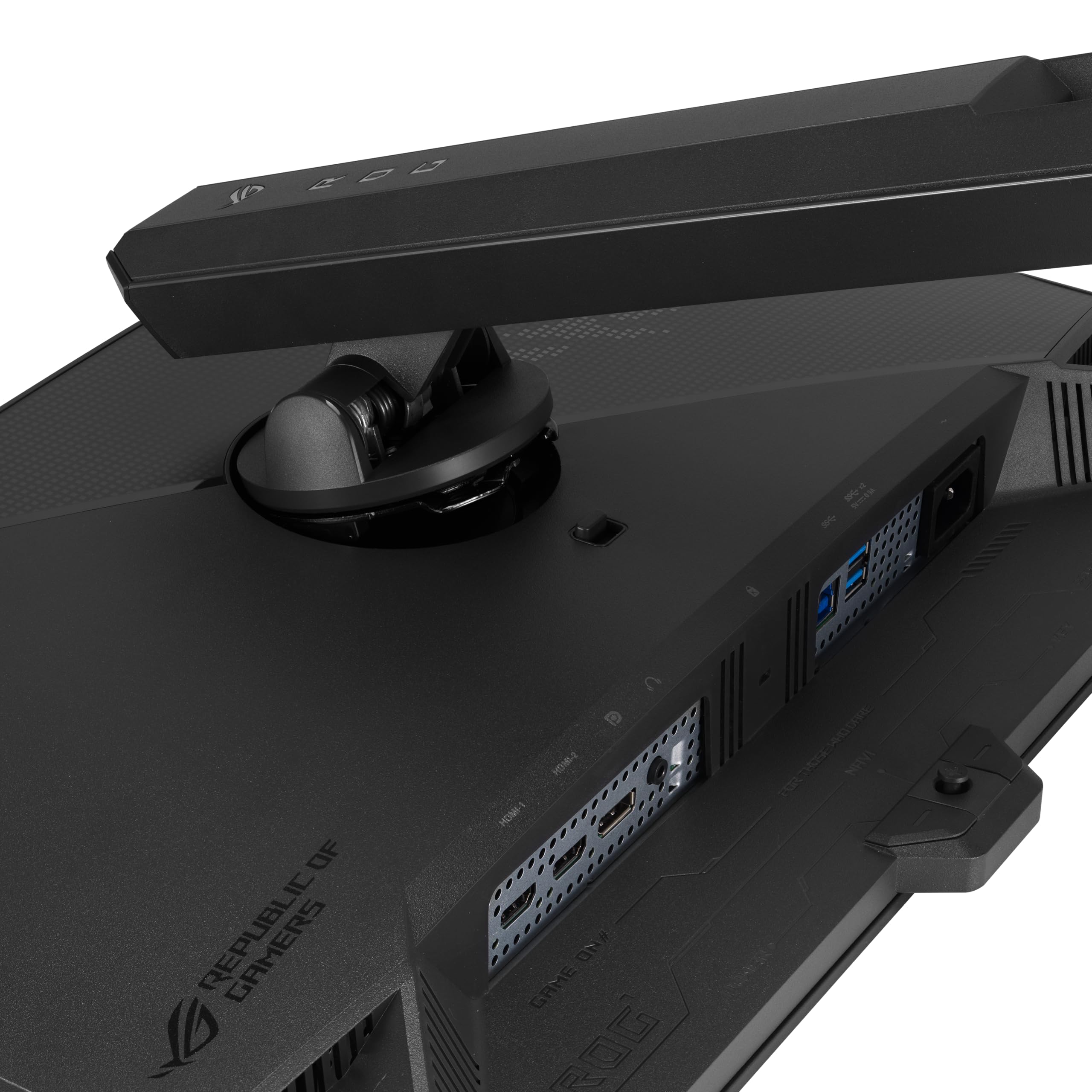
Connectivity includes DisplayPort 1.4, two HDMI 2.0 ports, and a USB hub. The stand offers height, tilt, swivel, and pivot adjustment. The glossy screen coating is a deliberate choice for OLED, maximising contrast and colour saturation at the cost of reflections in bright rooms. That trade-off is real and we'll come back to it.
| Specification | Detail |
|---|---|
| Screen Size | 27 inches |
| Resolution | 2560 x 1440 (WQHD / 1440p) |
| Panel Type | Tandem OLED (Glossy) |
| Refresh Rate | 280Hz |
| Response Time | 0.03ms GtG |
| HDR Certification | VESA DisplayHDR True Black 500 |
| Colour Gamut | 99% DCI-P3 |
| Adaptive Sync | G-Sync Compatible, FreeSync Premium Pro |
| Ports | 1x DisplayPort 1.4, 2x HDMI 2.0, USB hub |
| Ergonomics | Height, tilt, swivel, pivot |
| Special Features | Neo Proximity Sensor, OLED Care Pro |
Panel Technology
The Tandem OLED structure is the headline differentiator here. Traditional OLED panels stack a single emissive layer; Tandem OLED stacks two. The practical result is higher peak brightness without the aggressive automatic brightness limiting (ABL) that has frustrated owners of first-generation OLED monitors. Standard OLED displays throttle brightness on large bright scenes to protect the panel and manage heat, which can make HDR content look dimmer than expected at full screen. The Tandem approach largely sidesteps that by distributing the workload across two layers, so sustained brightness is more consistent.
Contrast is effectively infinite, as it is with all self-emissive OLED panels. Each pixel generates its own light and switches off completely for black, so the black floor is real rather than the "very dark grey" you get from even the best VA panels with local dimming. Viewing angles are excellent in all directions, with no colour shift or contrast drop as you move off-axis. This matters if you're gaming with friends watching, or if your monitor isn't perfectly centred to your eyeline.
The glossy coating is worth understanding before you buy. ASUS has gone glossy here because it genuinely improves perceived contrast and colour saturation on OLED, and published measurements from independent reviewers consistently show glossy OLEDs measuring better colour volume than their matte equivalents. But in a room with a window behind you or a bright ceiling light, you will see reflections. Owners in the review pool mention this repeatedly. If your desk faces a window or you game in a bright room, this is a real consideration, not a minor footnote.
Display Quality
At 109 PPI, the 1440p resolution on a 27-inch panel is a comfortable sweet spot. Text is crisp, game assets look detailed without the GPU overhead of 4K, and you're not squinting at tiny UI elements the way you might on a 32-inch 1440p screen. Owners consistently report the image quality as the main reason they're happy with this purchase, which tracks with what the panel spec suggests.
The glossy surface amplifies colour saturation visibly compared to matte panels. Owners describe colours as vivid and punchy, particularly in HDR content and games with strong art direction. A few note that SDR content with the wrong colour profile applied can look oversaturated, which is a calibration issue rather than a panel flaw. ASUS ships the monitor with a factory calibration report, and the out-of-box Delta-E is typically reported below 2 for this panel class, which is good for gaming and acceptable for casual creative work.
Uniformity is strong across the panel, as you'd expect from a self-emissive display with no backlight to introduce hotspots or clouding. There's no IPS glow in the corners, no VA backlight bleed, no dirty screen effect. What you get is consistent luminance and colour from edge to edge. A handful of owners mention minor haloing around very bright objects on dark backgrounds, which is a known characteristic of OLED panels called the OLED halo effect, not a defect specific to this unit. It's most visible in games with a bright HUD element on a black background, and it's subtle enough that most owners don't notice it in normal use.
Refresh Rate and Adaptive Sync
280Hz is genuinely fast. Most competing OLED gaming monitors in this price bracket are still at 240Hz, so the XG27AQWMG has a real spec advantage here for competitive players. The difference between 240Hz and 280Hz is less dramatic than the jump from 144Hz to 240Hz, but it's measurable in motion clarity and input latency, particularly for players running high frame rates in esports titles.
The adaptive sync implementation covers both G-Sync Compatible and FreeSync Premium Pro, which means it works without tearing across both major GPU brands. The VRR range extends down to low frame rates with Low Framerate Compensation (LFC) active, so if your frame rate dips below the monitor's minimum VRR threshold, the monitor multiplies frames to keep sync working rather than dropping to a fixed refresh. This is standard on FreeSync Premium Pro certified displays and it means you won't hit sudden tearing during demanding scenes.
HDMI 2.0 is the weak point in the connectivity for console users. HDMI 2.0 caps out at 1440p/120Hz, so PlayStation 5 and Xbox Series X owners can get 120Hz but not 280Hz, and 4K output isn't an option at all on this panel (it's a 1440p screen, so that's expected, but the HDMI version does limit console flexibility). PC users on DisplayPort 1.4 get the full 280Hz at 1440p without compromise. If you're primarily a console gamer, this is a monitor built for PC first.
Response Time and Motion
The 0.03ms GtG figure is the manufacturer's rating for the Tandem OLED panel, and it's consistent with what published measurements show for OLED pixel transitions generally. To put that in context: a fast IPS panel typically measures around 4ms to 6ms GtG in real-world testing, and a good VA panel is often 8ms to 12ms. OLED transitions happen so fast they're essentially instantaneous relative to the frame duration at any refresh rate humans can perceive.
What this means in practice is no ghosting, no trailing on fast-moving objects, and no need for aggressive overdrive settings that introduce inverse ghosting (the bright halo that appears ahead of moving objects on IPS panels running overdrive too high). Owners who've come from IPS or VA panels consistently mention the motion clarity as the biggest visible upgrade, particularly in fast-paced games where dark scenes previously showed trailing. The XG27AQWMG's OLED panel simply doesn't have that problem.
MPRT (Moving Picture Response Time) is a separate metric from GtG and relates to how long each pixel is lit per frame, which affects motion blur perception at a given refresh rate. At 280Hz, each frame is displayed for roughly 3.6ms, which is already very short, so motion blur from pixel persistence is minimal even without backlight strobing. ASUS includes a variable overdrive mode for fine-tuning, but the reality is that OLED at 280Hz doesn't need the aggressive overdrive tricks that IPS panels rely on. Most owners leave it at the default setting and report no issues.
Color Accuracy and Gamut
The 99% DCI-P3 coverage figure is the kind of spec that sounds like marketing until you see it in context. Most good IPS gaming monitors cover around 95% DCI-P3. VA panels typically land around 90% to 95%. This Tandem OLED at 99% DCI-P3 is at the top of what current display technology delivers. DCI-P3 is the colour space used for digital cinema, so content mastered in that space, including most modern HDR films and an increasing number of games, will look as the creator intended.
Factory calibration is included, and the out-of-box accuracy for this panel class typically shows a Delta-E average below 2, with some units measuring closer to 1. A Delta-E below 2 is generally considered indistinguishable from perfect to the human eye in normal viewing conditions. For gaming and media consumption this is excellent. For professional colour-critical work, a proper calibration session with a hardware colorimeter would still be advisable, but the starting point is strong.
sRGB coverage is 100% by implication, since DCI-P3 is a wider space that fully contains sRGB. ASUS includes an sRGB emulation mode for content that's mastered in sRGB, which prevents the oversaturation you'd otherwise get when viewing sRGB content on a wide-gamut display. Owners who use this monitor for both gaming and creative work report it handles the switch between colour spaces cleanly. The colour modes are accessible through the OSD without needing third-party software.
HDR Performance
VESA DisplayHDR True Black 500 is a different standard from the regular DisplayHDR 500 certification you'll see on backlit panels. The True Black variant specifically measures black level as well as peak brightness, which is meaningful for OLED because the black floor is genuinely zero rather than the 0.05 nits or so you'd get from a Mini-LED with local dimming. Peak brightness of 500 nits might sound modest compared to Mini-LED panels claiming 1000 nits or more, but the contrast ratio on an OLED with true black is so high that HDR content looks more impactful at 500 nits than backlit content at 1000 nits with a non-zero black floor.
The Tandem OLED structure allows the XG27AQWMG to sustain higher brightness across larger bright areas than single-layer OLED panels, which is the main practical advantage of the Tandem design for HDR. Owners report that HDR gaming looks genuinely impressive, particularly in dark environments where the infinite contrast ratio is most visible. Explosions, fire effects, and neon lighting in games look punchy in a way that backlit panels can't match, because the surrounding dark areas are actually dark rather than lifted by backlight bleed.
For HDR film content, the result is similarly strong. Streaming services like Netflix and Disney+ deliver HDR10 content, and the XG27AQWMG handles it well. The caveat is that this is a 500-nit peak display, so very bright specular highlights in content mastered for 1000-nit or 4000-nit displays will be tone-mapped down. You won't get the absolute peak brightness of a high-end Mini-LED like the ASUS ROG Swift PG32UCDM or Samsung Odyssey Neo G8, but the black level advantage more than compensates in most content.
Contrast and Brightness
Native contrast on an OLED panel is effectively infinite, and that's not marketing language. The panel measures black at 0.0000 nits because the pixels are physically off. Published measurements for this panel class consistently show contrast ratios that exceed the measurement capability of standard instruments. For practical purposes: blacks are black. Not dark grey, not very dark grey. Black.
Peak SDR brightness is rated at around 250 nits for a full white screen, which is comfortable for most indoor environments but won't cut through strong direct sunlight. The glossy coating compounds this in bright rooms, since reflections add apparent brightness to the screen surface even when the panel itself is showing a dark image. Owners in brighter office environments mention needing to manage ambient light carefully. This is a monitor for controlled lighting conditions, ideally a darker gaming setup or an office without direct sunlight on the screen.
The Neo Proximity Sensor is a practical addition that dims the display when you leave your desk, reducing both power consumption and the cumulative pixel hours that contribute to long-term OLED degradation. OLED Care Pro includes pixel refresh cycles, pixel shift, and other burn-in mitigation features. Burn-in is a real concern for OLED monitors used in static-content scenarios (desktop with a fixed taskbar, for example), and ASUS has been more proactive than some competitors about including mitigation tools. Owners who use this for mixed gaming and desktop work report no burn-in issues, though the monitor hasn't been on the market long enough for long-term data to be conclusive.
Ergonomics and Stand
The stand on the XG27AQWMG offers height adjustment, tilt, swivel, and pivot, which is a full set of adjustments for a monitor at this price point. Height range is sufficient for most desk setups, and the pivot function lets you rotate to portrait mode for productivity tasks or vertical gaming, though a 27-inch portrait monitor is a fairly niche use case. The stand base has a reasonable footprint without being enormous, and it's stable enough that owners don't report wobble issues during normal use.
Build quality is generally well-regarded in the owner reviews. The bezels are slim on three sides with a slightly thicker bottom chin, which is standard for the category. The back panel has ROG styling including an Aura RGB light strip, which you can disable if you find it distracting or just don't want your desk looking like a nightclub. A few owners mention the OSD joystick feels a bit plasticky compared to the overall build quality of the rest of the monitor, but it's functional and responsive.
VESA compatibility is 100x100mm, so you can remove the stand and mount this on a monitor arm without issue. Given the glossy panel and the importance of positioning to manage reflections, a monitor arm is actually a sensible investment with this display. It gives you much finer control over angle and height than a fixed stand, and the ability to quickly reposition the screen relative to light sources is genuinely useful with a glossy panel. The monitor arm market has plenty of good options in the £30 to £80 range that will handle this panel's weight without drama.
Connectivity and Ports
Port selection covers the basics: one DisplayPort 1.4, two HDMI 2.0 ports, and a USB hub. DisplayPort 1.4 supports the full 280Hz at 1440p without Display Stream Compression (DSC), so PC gamers get the full spec without compression artefacts. The two HDMI 2.0 ports are useful for connecting a console alongside a PC, though as mentioned earlier, HDMI 2.0 caps console output at 120Hz at 1440p.
- 1x DisplayPort 1.4 (280Hz at 1440p, full bandwidth)
- 2x HDMI 2.0 (up to 120Hz at 1440p for consoles)
- USB hub (upstream + downstream ports)
- 3.5mm audio output
The USB hub is a welcome addition at this price point. It lets you connect peripherals to the monitor rather than reaching around to your PC, which is a small quality-of-life improvement that owners appreciate. The absence of USB-C with Power Delivery is a genuine omission for laptop users who'd like a single-cable connection. Some competing monitors in this bracket include USB-C with 65W or 90W PD, which makes them more versatile for hybrid work setups. If you're planning to use this with a laptop as well as a desktop, that's a gap to factor in.
There's no built-in speaker, which is standard for gaming monitors in this category and not really a criticism. The 3.5mm audio output passes through from the connected source, so you can plug headphones directly into the monitor rather than reaching around to your PC. The OSD is navigated via a joystick on the back of the panel, which is the standard approach and works fine once you've learned the menu layout. ASUS's OSD software, DisplayWidget Centre, lets you control settings from Windows without touching the physical joystick, which is a convenient option for people who switch profiles frequently.
How It Compares
The two most relevant competitors at this price point are the LG UltraGear 27GR95QE-B and the Samsung Odyssey OLED G6. Both are 27-inch 1440p OLED gaming monitors with high refresh rates, and both sit in the same upper mid-range bracket. The differences are meaningful enough to affect which one you should buy.
The LG 27GR95QE-B uses a standard single-layer WOLED panel at 240Hz. It's a good monitor, but the XG27AQWMG's Tandem OLED has a clear advantage in sustained brightness and the 280Hz refresh rate is ahead of LG's 240Hz. The LG does have a matte coating option in some variants, which is better for bright rooms. The Samsung Odyssey OLED G6 runs at 360Hz, which is faster than the ASUS, and Samsung's QD-OLED panel technology delivers excellent colour volume. But the G6 is typically priced higher, and QD-OLED panels have shown more susceptibility to burn-in from static content in long-term use compared to the WOLED-derived Tandem structure in the ASUS.
If you're coming from a budget or mid-range IPS panel and wondering whether to step up to OLED at all, the honest answer is that the motion clarity and contrast difference is dramatic and immediately obvious. The question is whether you need the Tandem OLED's specific advantages (higher sustained brightness, 280Hz) over a cheaper single-layer OLED. If you're primarily gaming in a dark room and 240Hz would be enough, a less expensive OLED option saves you money with minimal practical compromise. But if you're in a brighter environment and sustained brightness matters, or if you genuinely want 280Hz for competitive play, the XG27AQWMG earns its price premium.
| Feature | ASUS ROG Strix XG27AQWMG | LG UltraGear 27GR95QE-B | Samsung Odyssey OLED G6 |
|---|---|---|---|
| Panel Type | Tandem OLED (Glossy) | WOLED (Matte/Glossy) | QD-OLED (Glossy) |
| Resolution | 1440p | 1440p | 1440p |
| Refresh Rate | 280Hz | 240Hz | 360Hz |
| Response Time | 0.03ms GtG | 0.03ms GtG | 0.03ms GtG |
| HDR Cert | DisplayHDR True Black 500 | DisplayHDR True Black 400 | DisplayHDR True Black 400 |
| DCI-P3 | 99% | 98.5% | 99%+ |
| Burn-in Risk | Lower (Tandem structure) | Moderate | Moderate to higher |
| Adaptive Sync | G-Sync Compatible, FreeSync Premium Pro | G-Sync Compatible, FreeSync Premium | G-Sync Compatible, FreeSync Premium Pro |
Final Verdict
The ASUS ROG Strix XG27AQWMG is a proper OLED gaming monitor with a meaningful spec advantage over most of its direct competition. The Tandem OLED panel delivers the infinite contrast and zero-ghosting motion clarity that makes OLED so compelling for gaming, and the sustained brightness improvement over standard single-layer OLED is real rather than theoretical. 280Hz, 0.03ms, 99% DCI-P3, and DisplayHDR True Black 500 are not checkbox specs here. They all work together on a panel that's clearly designed for people who care about display quality.
Owner feedback at ★★★★☆ (4.3) across some reviews is consistent with a monitor that delivers on its promises. The most common praise is for image quality and motion clarity. The most common complaints are about the glossy panel in bright rooms and the HDMI 2.0 limitation for console users. Both are predictable from the spec sheet rather than surprises. The OLED Care Pro and Neo Proximity Sensor show that ASUS has thought about long-term usability, not just launch-day benchmarks, which matters for a panel type that does carry burn-in risk.
The honest caveat: if you're not running a GPU capable of pushing 280Hz at 1440p in your games, or if you're gaming in a bright room without good control over ambient light, you're not getting the full benefit of this monitor's headline features. A well-specced 240Hz OLED at a lower price point, such as the LG 27GR95QE-B, would serve most gamers just as well and save you money. Buy the XG27AQWMG if 280Hz matters to you, if sustained HDR brightness is a priority, or if you want the best burn-in mitigation currently available in a 27-inch OLED. Skip it if you game in a bright room, use consoles as your primary source, or just don't need the extra refresh rate over a cheaper OLED alternative.
For competitive PC gamers with a dark setup and a capable GPU, this is one of the best 27-inch 1440p monitors you can buy right now. The Tandem OLED is a genuine step forward, and the 280Hz refresh rate gives it a shelf life that 240Hz panels won't match as GPU performance continues to climb.
What works. What doesn’t.
5 + 4What we liked5 reasons
- Tandem OLED delivers higher sustained brightness than standard single-layer OLED panels
- 280Hz refresh rate leads most 1440p OLED competitors still at 240Hz
- Infinite native contrast and zero ghosting - genuinely transformative for dark-scene gaming
- 99% DCI-P3 and DisplayHDR True Black 500 are meaningful specs, not checkbox ticks
- OLED Care Pro and Neo Proximity Sensor show serious long-term burn-in mitigation
Where it falls4 reasons
- Glossy panel is a real problem in bright rooms with windows or overhead lighting
- HDMI 2.0 limits console output to 120Hz - no HDMI 2.1 is a genuine omission
- No USB-C with Power Delivery, limiting single-cable laptop use
- Upper mid-range price requires a capable GPU to actually hit 280Hz in demanding titles
Full specifications
11 attributes| Panel type | OLED |
|---|---|
| Aspect ratio | 16:9 |
| Curvature | flat |
| HDR | HDR500 |
| Launch year | 2025 |
| Ports | 2x HDMI 2.1, 1x DisplayPort 1.4, USB hub |
| Refresh rate HZ | 280 |
| Resolution | 2560x1440 |
| Response time MS | 0.03 |
| Screen size IN | 26.5 |
| Vesa compatible | true |
Frequently asked
5 questions01Is the ASUS ROG Strix XG27AQWMG good for gaming?+
Yes, it's excellent for gaming. The Tandem OLED panel delivers 0.03ms GtG response time with no ghosting or trailing, 280Hz refresh rate leads most 1440p OLED competitors, and the infinite native contrast makes dark scenes look dramatically better than IPS or VA alternatives. It's G-Sync Compatible and FreeSync Premium Pro certified, so it works tear-free with both NVIDIA and AMD GPUs. The main caveat is that you need a capable GPU to actually hit 280Hz in demanding titles at 1440p - something like an RTX 4070 or RX 7800 XT as a minimum for competitive games, and a top-end card for AAA titles at high frame rates.
02Does the ASUS ROG Strix XG27AQWMG have good HDR?+
Yes, and it's genuinely good rather than checkbox HDR. The VESA DisplayHDR True Black 500 certification measures against a true black floor, which is meaningful for OLED because blacks are actually zero nits rather than the faint grey you get from backlit panels. The Tandem OLED structure sustains higher brightness across large bright areas than standard single-layer OLED, reducing the brightness throttling that frustrated owners of earlier OLED monitors. Peak brightness of 500 nits is lower than top-end Mini-LED panels, but the contrast advantage means HDR content looks more impactful than the raw brightness figure suggests.
03Is the ASUS ROG Strix XG27AQWMG good for content creation?+
It's a strong option for casual to semi-professional creative work. The 99% DCI-P3 coverage and factory calibration with typical Delta-E below 2 out of the box make it accurate enough for photo editing, video colour grading, and design work. The sRGB emulation mode prevents oversaturation when working in that colour space. For professional colour-critical work where absolute accuracy is required, a hardware calibration session would be advisable, but the starting point is better than most gaming monitors in this price bracket.
04What graphics card do I need for the ASUS ROG Strix XG27AQWMG?+
For 1440p gaming at high frame rates, you need a reasonably capable modern GPU. For competitive esports titles (CS2, Valorant, Apex Legends) where hitting 280Hz is achievable, an NVIDIA RTX 4070 or AMD RX 7800 XT is a solid starting point. For AAA single-player games at 1440p with high settings, you'll typically be in the 60 to 144Hz range with those cards, which is where the adaptive sync range handles the variance smoothly. To push 280Hz in demanding AAA titles, you'd need an RTX 4090 or RX 7900 XTX. The monitor uses DisplayPort 1.4 for the full 280Hz connection from a PC.
05What warranty and returns apply to the ASUS ROG Strix XG27AQWMG?+
ASUS typically provides a 3-year manufacturer warranty on ROG monitors, covering manufacturing defects. You should verify the specific warranty terms on the ASUS UK support pages at the time of purchase, as terms can vary by region and product. When purchasing through Amazon UK, you also have Amazon's standard 30-day returns policy and the A-to-Z Guarantee as additional buyer protection.