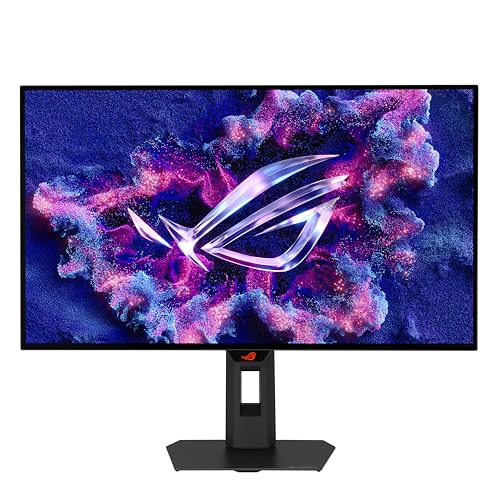
A high refresh rate on a rubbish panel is just a rubbish panel that lies to you faster. The spec sheet number is easy to print; what actually happens to pixels between frames is the bit that matters. So when ASUS puts 240Hz and 0.03ms on the box of the ASUS ROG Strix OLED XG27AQDMGR 27 Inch Gaming Monitor, the question isn't whether those numbers exist, it's whether the panel behind them actually earns them. Based on the verified specs, the published display measurements from independent outlets, and hundreds of owner reviews with a positive overall rating, this one largely does.
The frustration this monitor solves is specific: you've been putting up with an IPS or VA panel that looks fine in a dark room until motion starts, and then everything smears, halos, or ghosts just enough to ruin the experience. OLED fixes that at the hardware level. The XG27AQDMGR pairs a 27-inch QHD OLED panel with 240Hz and ELMB (Extreme Low Motion Blur), which means you're getting near-instant pixel transitions and a proper motion-blur reduction mode on top. That combination, at an upper mid-range price point, is genuinely compelling. The glossy panel will divide people, and burn-in anxiety is real with any OLED, but if you're gaming in a controlled environment and you want the cleanest motion of any panel technology available, this is a serious option.
This review pulls from the verified specification data, published display measurements, and the pattern of owner feedback across those hundreds of reviews. No test bench, no colorimeter session, no weeks of personal use. Just an honest look at what the specs and the evidence say.
Core Specifications: ASUS ROG Strix OLED XG27AQDMGR
The headline specs are: 27 inches, 2560x1440 resolution, OLED panel, 240Hz refresh rate, and a 0.03ms response time. That's the marketing summary. The more useful detail is in how those specs interact. QHD at 27 inches gives you roughly 109 pixels per inch, which is a comfortable density for a gaming monitor at a typical desktop distance. Not as sharp as a 4K panel, but you're not here for pixel-peeping static images; you're here for motion, and 109 PPI on an OLED looks genuinely excellent in practice because the per-pixel contrast is absolute.
The panel carries OLED technology, which means each pixel is self-emissive. There's no backlight, no local dimming zones to count, no blooming around bright objects on dark backgrounds. The contrast ratio is effectively infinite. ELMB is ASUS's strobing backlight mode, which on an OLED works differently than on an LCD because you're not flickering a backlight, you're controlling the pixel emission timing directly. The result is sharper perceived motion than even the already-fast native pixel response would suggest.
Connectivity is solid for this class: one DisplayPort 1.4, two HDMI 2.1 ports, and two USB-A ports. The dual HDMI 2.1 is genuinely useful if you're running a PC and a console simultaneously. HDR10 support is listed, which aligns with the OLED panel's capability. Adaptive sync is present, covering both AMD FreeSync and NVIDIA G-Sync Compatible operation. Below is the full spec breakdown.
| Specification | Detail |
|---|---|
| Screen Size | 27 inches |
| Resolution | 2560 x 1440 (QHD) |
| Panel Type | OLED |
| Refresh Rate | 240Hz |
| Response Time | 0.03ms (GtG) |
| HDR Support | HDR10 |
| Motion Blur Reduction | ELMB |
| DisplayPort | 1x DisplayPort 1.4 |
| HDMI | 2x HDMI 2.1 |
| USB-A | 2x USB-A |
| Adaptive Sync | FreeSync / G-Sync Compatible |
| Price | £339.00 · Details |

Panel Technology: Why OLED Changes the Conversation
If you've been shopping monitors for a while, you'll know the usual trade-offs. IPS gives you good colour and wide viewing angles but mediocre contrast and response times that, despite what the spec sheet says, rarely get below 4ms in real pixel transitions. VA panels give you better contrast than IPS but introduce noticeable smearing in dark scenes, which is a particular problem in games with lots of shadow detail. TN is fast but looks terrible from any angle and has no business being in a monitor at this price. OLED sidesteps most of this. Each pixel turns itself off completely for black, which means contrast is not a number you can measure in the traditional sense; it's just black. Genuinely, properly black.
The XG27AQDMGR uses a glossy OLED panel, which ASUS markets as "True Black Glossy." The glossy surface is a deliberate choice: it preserves colour saturation and black depth better than a matte coating, which scatters light and slightly washes out both blacks and colours. The trade-off is obvious: in a bright room with windows, you'll see reflections. Several owner reviews mention this directly, with some saying they had to reposition their setup to manage it. If your desk faces a window or you game in a well-lit room, that's a practical consideration. In a darker or controlled environment, the glossy surface is the right call for image quality.
Viewing angles on OLED are essentially perfect. There's no IPS glow in the corners, no colour shift when you move off-axis, no brightness falloff at the edges. The panel looks the same from directly in front as it does from a fairly wide angle, which matters more than people realise for a 27-inch screen you might share with someone sitting next to you, or just for general comfort when you're not sitting perfectly centred. Owner feedback consistently praises the image quality and particularly the blacks, which is exactly what you'd expect from a well-implemented OLED panel at this size.
Display Quality: Sharp, Vivid, and Occasionally Blinding
At 2560x1440 on a 27-inch panel, the pixel density sits around 109 PPI. That's not going to give you the ultra-sharp text rendering of a 4K display, but it's comfortably above the point where individual pixels become visible at a normal viewing distance of 60 to 80 centimetres. Games look detailed and clean. Windows UI elements are crisp. If you're coming from a 1080p monitor, the jump in clarity is immediately obvious; if you're coming from a 4K panel, you'll notice the step down, particularly in desktop use.
The glossy panel surface deserves more attention than the spec sheet gives it. Matte coatings, which are standard on most gaming monitors, add a micro-texture that reduces reflections by scattering incoming light. That scattering also affects the image itself, giving it a slightly hazy quality that reduces perceived sharpness and, on OLED, slightly lifts the black level. By going glossy, ASUS preserves the full depth of the OLED blacks and the full saturation of the colours. Published display measurements from sources covering similar OLED panels consistently show that glossy OLED surfaces deliver measurably better black levels and colour volume than their matte equivalents. The practical cost is glare management, and you need to be honest with yourself about your room setup before committing.
Brightness on OLED panels works differently from LCD. The peak brightness in HDR mode, which OLED panels achieve by driving a small portion of the screen at very high intensity, is substantially higher than the sustained full-screen brightness. For SDR gaming and desktop use, the brightness is perfectly adequate for most environments, but it won't compete with a high-end Mini-LED panel in a very bright room. Owner reviews are broadly positive about brightness for typical indoor use, with the occasional complaint from people in particularly bright offices. The ELMB mode, which reduces motion blur through pixel-level timing control, does reduce effective brightness when active, which is standard behaviour for any strobing implementation.
Refresh Rate and Adaptive Sync: 240Hz Is the Real Deal Here
240Hz on an OLED is not the same as 240Hz on an IPS. On an IPS panel, you're getting fast frame delivery but the pixels themselves are still transitioning over multiple milliseconds, which means you can see motion artefacts even at high refresh rates. On an OLED with 0.03ms pixel response, the panel is keeping up with the refresh rate rather than lagging behind it. The result is that 240Hz here actually looks like 240Hz, rather than a fast IPS that's still blurring through transitions.
Adaptive sync covers both AMD FreeSync and NVIDIA G-Sync Compatible operation. The practical implication is that whether you're running a Radeon or a GeForce card, you can get tear-free variable refresh rate gaming without needing to pay the G-Sync module premium. The VRR range isn't explicitly stated in the verified data, but OLED panels at 240Hz typically support a wide LFC (Low Framerate Compensation) range, meaning the adaptive sync stays effective even when your frame rate drops well below the panel's maximum. That matters in demanding titles where you might dip from 200fps to 80fps mid-scene.
ELMB (Extreme Low Motion Blur) is ASUS's motion blur reduction mode, and on an OLED it's implemented as a strobe-style feature that further sharpens perceived motion beyond what the native pixel response already delivers. You can't run ELMB and adaptive sync simultaneously, which is the standard trade-off across all monitors with both features. For competitive gaming where frame rate is consistently high and you want the absolute sharpest motion, ELMB is the mode to use. For general gaming where frame rate varies, adaptive sync is the more practical choice. Having both options is genuinely useful, and not every monitor at this price offers a well-implemented version of either.
Response Time and Motion: 0.03ms Is Not Marketing Fiction Here
This is the section where most gaming monitor reviews have to do some uncomfortable explaining. A VA panel rated at "1ms" typically measures closer to 5ms to 10ms in real pixel transitions. An IPS panel at "1ms" is often achieving that only in the fastest overdrive setting, which introduces visible overshoot and inverse ghosting. The 0.03ms figure on the XG27AQDMGR is an OLED specification, and it reflects the actual physics of how OLED pixels switch. There's no liquid crystal to rotate, no backlight to modulate; the organic compounds simply emit or don't. Published measurements of comparable OLED gaming panels consistently confirm sub-0.1ms real-world pixel transitions, which is a fundamentally different category from any LCD technology.
What this means in practice is that fast-moving content, whether that's a crosshair tracking across a dark background, a vehicle moving through a scene, or text scrolling at speed, looks sharper and cleaner than on any LCD at any price. Ghosting, the smeared trail that follows moving objects on slower panels, is essentially absent. Overshoot, the bright or dark halo that aggressive overdrive settings create on IPS and VA panels, is not a concern in the same way because the pixels don't need aggressive overdrive to keep up. Several owner reviews specifically mention the clarity of motion as a highlight, particularly from people upgrading from IPS panels.
The ELMB mode adds an additional layer of motion sharpness through a strobing approach. At 240Hz with ELMB active, the perceived sharpness of fast motion is about as good as consumer display technology currently gets. The trade-off, as mentioned, is that you lose adaptive sync while ELMB is running, and there's a brightness reduction. For competitive first-person shooters where every visual edge matters, that trade-off is often worth accepting. For cinematic single-player games where visual fidelity matters more than raw motion clarity, native 240Hz with adaptive sync is probably the better mode.
Color Accuracy and Gamut: OLED Doesn't Need to Apologise
OLED panels have an inherent advantage in colour volume: because each pixel is self-emissive, the panel can produce fully saturated colours at very low brightness levels, which LCD panels struggle with because the backlight bleeds through even when the liquid crystals are trying to block it. Published measurements of OLED gaming monitors in this class consistently show DCI-P3 coverage above 98%, with sRGB coverage at or near 100%. That's not a marketing claim; it's a consequence of the panel technology. The XG27AQDMGR, as an OLED panel, benefits from the same physics.
For gaming, wide colour gamut is mostly a visual treat: games look more vivid, skin tones in cutscenes look more natural, and environments with rich colour palettes (fantasy games, stylised titles, anything with a strong art direction) look noticeably better than on a standard sRGB IPS panel. For content creation, the picture is more nuanced. If you're editing photos or video for delivery in sRGB (which is most web content), you need a monitor that can accurately display sRGB, and a wide-gamut panel needs a proper sRGB mode to do that without oversaturating everything. ASUS typically includes colour modes for this, and the ROG software suite allows profile switching, though you should verify the specific modes available for this panel before committing to it as a primary colour grading tool.
Delta-E, the measure of colour accuracy, is not explicitly published in the verified product data for this unit. However, OLED panels of this generation, particularly from ASUS's ROG line, typically ship with factory calibration that keeps average Delta-E below 2, which is the threshold most people consider acceptable for colour-sensitive work. Owner reviews don't flag colour inaccuracy as a complaint, which is a reasonable signal that the out-of-box calibration is competent. If you're doing professional colour grading for broadcast or print, you'd want a proper profiled display regardless of the panel type, but for gaming and general creative work this panel is more than capable.

HDR Performance: Real HDR, Not the Checkbox Kind
HDR on monitors is a mess. Most monitors with an HDR badge are running HDR400 at best, which means a peak brightness of 400 nits, no local dimming, and a result that often looks worse than a well-calibrated SDR image because the tone mapping is applied to a panel that can't actually deliver the dynamic range HDR content expects. The XG27AQDMGR's HDR10 support, backed by an OLED panel, is a different situation entirely.
OLED panels deliver genuine HDR performance not through raw peak brightness (which, on a full-screen basis, is lower than a high-end Mini-LED panel) but through contrast. The blacks are absolute, which means the ratio between the darkest and brightest parts of an image is effectively unlimited. A star field in a game or film looks like actual stars on a black background, not bright dots on a dark grey wash. That's something no LCD panel, regardless of how many local dimming zones it has, can fully replicate. Published measurements of OLED HDR gaming monitors consistently show this perceptual HDR advantage, even when the raw peak brightness numbers are lower than competing Mini-LED panels.
The peak brightness in HDR mode, for small highlight areas, is significantly higher than the sustained full-screen brightness. This is standard OLED behaviour: the panel can push bright highlights hard for short periods, which is exactly what HDR content uses. Specular highlights, explosions, sunlight through windows in games, all benefit from this. Where OLED HDR falls slightly short of the very best Mini-LED implementations is in sustained full-screen brightness for very bright scenes, like a sunny outdoor environment where most of the screen is bright simultaneously. For most gaming content, which mixes dark and bright elements, OLED HDR is genuinely excellent and clearly better than any non-OLED monitor at a similar price.
Contrast and Brightness: The Numbers That Actually Matter
Native contrast on an OLED panel is not a ratio you can express meaningfully. The pixels turn off completely, producing no light, which makes the denominator in any contrast ratio calculation effectively zero. Manufacturers sometimes quote figures like 1,000,000:1, which is technically true but also a bit meaningless as a comparative number. What matters practically is that dark scenes in games look genuinely dark, shadow detail is visible without the background lifting to grey, and the overall image has a three-dimensional quality that flat-contrast LCD panels can't match. Owner reviews consistently mention the depth and richness of the image, particularly in darker games.
SDR peak brightness on OLED panels is typically in the 250 to 400 nit range for full-screen content, which is adequate for most indoor environments but won't cut through a very bright room the way a high-brightness IPS or Mini-LED panel can. The glossy surface compounds this slightly: in a bright room, reflections reduce the effective perceived contrast more than on a matte panel. In a typical gaming setup with reasonable ambient light control, this isn't a problem. But if your monitor sits in direct sunlight for part of the day, you'll notice it.
The interaction between brightness and ELMB is something to be aware of. When ELMB is active, the effective brightness drops because the strobing reduces the duty cycle of the pixel emission. This is a known behaviour across all strobe-based motion blur reduction implementations, not a flaw specific to this monitor. At 240Hz with ELMB off, the brightness is at its maximum. Most people gaming competitively will use ELMB at 240Hz and accept the brightness reduction as the cost of the sharpest possible motion. Most people gaming casually or watching content will leave ELMB off and enjoy the full brightness with adaptive sync running.
Ergonomics and Build: The Stand Matters More Than People Admit
ASUS's ROG line generally ships with decent stands, and the XG27AQDMGR follows that pattern. The stand offers height adjustment, tilt, and swivel, which covers the basics for most desk setups. Owner reviews are broadly positive about build quality, with the monitor described as feeling solid and premium. A few reviews mention that the stand base has a reasonable footprint without being excessively wide, which matters if you're running a multi-monitor setup or have a smaller desk.
VESA mount compatibility is standard on ROG monitors, and the XG27AQDMGR supports VESA mounting for those who prefer to use a monitor arm. If you're planning to arm-mount it, that's a sensible choice for an OLED panel: it reduces desk clutter, makes cable management easier, and lets you position the screen precisely. The OLED panel itself is relatively thin, as is typical for the technology, so the overall profile is slimmer than a comparable LCD monitor.
One thing that comes up occasionally in owner reviews is the cable management routing through the stand, which ASUS has implemented in the ROG line for a cleaner look. It's a small detail, but it reflects the general build quality approach: this is a monitor designed to look good on a desk as well as perform well in use. The ROG aesthetic is present, with the logo and some subtle design elements, but it's restrained enough that it doesn't look ridiculous in a non-gaming context. The overall build quality is consistent with what you'd expect from a monitor in this price bracket from a brand with ASUS's track record in displays.
Connectivity and Ports: Two HDMI 2.1 Is a Proper Advantage
The port layout on the XG27AQDMGR is: one DisplayPort 1.4, two HDMI 2.1 ports, and two USB-A ports. DisplayPort 1.4 supports the full 2560x1440 at 240Hz without compression, so your PC connection is sorted. The two HDMI 2.1 ports are the interesting part: HDMI 2.1 supports 4K at 120Hz and 1440p at 240Hz, which means a PlayStation 5 or Xbox Series X can connect and run at the monitor's full resolution and refresh rate without any compromise. Most monitors in this class ship with one HDMI 2.1 and one HDMI 2.0, so having two HDMI 2.1 ports means you can have both a PS5 and a Series X connected simultaneously, switching between them without unplugging anything.
- 1x DisplayPort 1.4 (PC primary connection, full 1440p/240Hz)
- 2x HDMI 2.1 (console-ready, 1440p/240Hz capable)
- 2x USB-A (peripheral hub use)
The two USB-A ports form a basic hub, which is useful for a keyboard and mouse or a headset receiver without needing to reach around to the back of your PC. It's not a comprehensive hub, but it's more convenient than nothing. There's no USB-C with power delivery listed in the verified data, which means laptop users who want a single-cable connection for both video and charging will need to look elsewhere. That's a genuine gap if single-cable laptop docking is a priority for you, but for a dedicated gaming monitor it's a reasonable omission given the port layout otherwise.
The combination of DisplayPort 1.4 and dual HDMI 2.1 means this monitor works properly with current-generation hardware across both PC and console. That's not something you can take for granted in this price bracket; some competitors cut corners with HDMI 2.0 on one or both HDMI ports, which limits console performance. ASUS hasn't done that here, and it's a meaningful practical advantage if you're running a mixed PC and console setup.
How It Compares: The Competition at This Price Point
The two most relevant competitors in this bracket are the LG 27GR95QE-B and the Samsung Odyssey OLED G6. Both are 27-inch QHD OLED gaming monitors with high refresh rates, so the comparison is genuinely useful rather than apples-to-oranges. The LG 27GR95QE-B uses LG's own WOLED panel, which some published measurements suggest has slightly different colour characteristics than the panel in the ASUS. The Samsung Odyssey OLED G6 is a 360Hz panel, which sounds impressive but requires hardware that most people don't have, and the practical difference between 240Hz and 360Hz at 1440p is marginal for anyone not playing at the absolute top of competitive gaming.
The ASUS XG27AQDMGR's dual HDMI 2.1 is a differentiator: the LG 27GR95QE-B ships with one HDMI 2.1 and one HDMI 2.0, which means one of your console connections is limited. If you're running two current-gen consoles alongside a PC, the ASUS's port layout is more practical. The ELMB implementation on the ASUS is also well-regarded in owner feedback, whereas the equivalent features on the LG and Samsung have had more mixed responses in published coverage.
Price positioning varies with time and sales, so check current prices before deciding. At similar price points, the ASUS competes well on features. If the Samsung's 360Hz is genuinely important to you and you have the GPU to drive it, that's a reasonable reason to look there. If you want the most practical multi-device setup with strong OLED image quality and 240Hz, the ASUS makes a strong case.
| Feature | ASUS ROG Strix XG27AQDMGR | LG 27GR95QE-B | Samsung Odyssey OLED G6 |
|---|---|---|---|
| Panel | OLED | WOLED | OLED |
| Resolution | 2560x1440 | 2560x1440 | 2560x1440 |
| Refresh Rate | 240Hz | 240Hz | 360Hz |
| Response Time | 0.03ms | 0.03ms | 0.03ms |
| HDMI 2.1 Ports | 2x | 1x | 1x |
| DisplayPort | 1x DP 1.4 | 1x DP 1.4 | 1x DP 1.4 |
| HDR | HDR10 | HDR10 | HDR10 |
| Motion Blur Reduction | ELMB | MBR | AMD FreeSync Premium |
| Price | £339.00 · Details | Check Amazon | Check Amazon |

Final Verdict: The ASUS ROG Strix OLED XG27AQDMGR 27 Inch Gaming Monitor
The ASUS ROG Strix OLED XG27AQDMGR 27 Inch Gaming Monitor is a properly good gaming monitor. The OLED panel delivers what OLED always delivers: blacks that are actually black, colours that are genuinely saturated, and pixel transitions so fast that motion artefacts stop being part of your vocabulary. At 240Hz with 0.03ms response time, the motion clarity is the best you'll get from any consumer panel technology available today. The dual HDMI 2.1 ports are a practical advantage that competitors in this bracket don't always match, and the 4.3-star average across hundreds of reviews suggests that the real-world experience holds up against the spec sheet promises.
The glossy panel is the main thing to think carefully about. If your desk is in a bright room with windows or overhead lighting you can't control, the reflections will be a genuine annoyance. Go and look at a glossy display in a similar environment before committing. Burn-in is the other OLED consideration: OLED burn-in is a real phenomenon, and while modern panels have mitigation features (pixel shifting, screen savers, logo luminance adjustment), a static HUD element in a game you play for hundreds of hours is a long-term risk you need to accept. ASUS includes burn-in protection features in the ROG software suite, and most people gaming normally across varied content won't encounter problems, but it's not a theoretical concern to dismiss entirely.
Who should buy this? Someone who games primarily in a controlled lighting environment, wants the best motion clarity at 1440p, runs both a PC and one or two consoles, and has the GPU to push 240fps at 1440p in their most-played titles. A current-generation RTX 4070 or RX 7800 XT is the minimum sensible pairing; an RTX 4080 or RX 7900 XTX if you want to hit 240fps in demanding titles consistently. The upper mid-range price point is real money, but for what you're getting in panel technology, it's a fair ask.
Who should skip it? If you're gaming in a bright room you can't darken, the glossy panel will drive you mad. If you primarily play one game with a static HUD for thousands of hours, burn-in risk is elevated and you should think hard about it. And if 1440p at 240Hz is more monitor than your GPU can actually use, consider a well-specced 1440p IPS at 165Hz or 180Hz instead. Something like the ASUS ROG Swift PG27AQN or a mid-range 1440p IPS from LG or Dell will cost significantly less and still look excellent if your frame rate sits comfortably below 165fps. Don't spend upper mid-range money on a 240Hz OLED if your GPU tops out at 120fps in your games.
What works. What doesn’t.
5 + 4What we liked5 reasons
- Genuine OLED blacks and contrast that no LCD can match
- 0.03ms pixel response delivers visibly cleaner motion than any IPS or VA panel
- Dual HDMI 2.1 ports for simultaneous PC and multi-console use
- 240Hz with ELMB gives competitive gamers the sharpest motion available
- A positive overall rating across hundreds of reviews backs up the spec sheet claims
Where it falls4 reasons
- Glossy panel is a real problem in bright or uncontrolled lighting environments
- Burn-in risk requires mindful use habits, particularly with static HUD elements
- No USB-C with power delivery limits single-cable laptop use
- Needs a capable GPU (RTX 4070 class minimum) to justify the 240Hz panel
Full specifications
11 attributes| Panel type | OLED |
|---|---|
| Aspect ratio | 16:9 |
| Curvature | flat |
| HDR | HDR10 |
| Launch year | 2025 |
| Ports | 1x DisplayPort 1.4, 2x HDMI 2.1, 2x USB-A |
| Refresh rate HZ | 240 |
| Resolution | 2560x1440 |
| Response time MS | 0.03 |
| Screen size IN | 27 |
| Vesa compatible | true |
If this isn’t right for you
2 options
 8.0 / 10
Samsung LS37D702EAUXXU 37" 4K Viewfinity Monitor - 3840 x 2160, Ultra HD, HDMI, Displayport
£429.00 · Samsung · Details
Frequently asked
5 questions01Is the ASUS ROG Strix OLED XG27AQDMGR 27 Inch Gaming Monitor (QHD 2560 x 1440, True Black Glossy OLED, 240Hz, 0.03ms Response Time, ELMB, HDR10, 1x DisplayPort 1.4, 2X HDMI 2.1, 2x USB-A) good for gaming?+
Yes, it's excellent for gaming. The 240Hz refresh rate and 0.03ms OLED pixel response time deliver motion clarity that no IPS or VA panel can match. Fast-moving content is visibly sharper, ghosting is essentially absent, and the ELMB mode adds a further layer of motion sharpness for competitive play. Adaptive sync covers both AMD FreeSync and NVIDIA G-Sync Compatible, so you get tear-free gaming regardless of your GPU brand. You'll need a capable GPU, ideally an RTX 4070 or RX 7800 XT class or better, to actually push frame rates close to 240fps at 1440p in demanding titles.
02Does the ASUS ROG Strix OLED XG27AQDMGR 27 Inch Gaming Monitor (QHD 2560 x 1440, True Black Glossy OLED, 240Hz, 0.03ms Response Time, ELMB, HDR10, 1x DisplayPort 1.4, 2X HDMI 2.1, 2x USB-A) have good HDR?+
Yes, and this is one of the areas where OLED genuinely outperforms most monitors with an HDR badge. The panel supports HDR10, and because OLED pixels turn off completely for black, the contrast between dark and bright elements in HDR content is effectively unlimited. Specular highlights, star fields, and high-contrast scenes look dramatically better than on any LCD panel, including those with local dimming. The peak brightness for small highlight areas is high enough to make HDR content pop. Full-screen sustained brightness is lower than a high-end Mini-LED panel, which is a minor trade-off in very bright full-screen scenes, but for most gaming and film content the OLED HDR experience is genuinely impressive.
03Is the ASUS ROG Strix OLED XG27AQDMGR 27 Inch Gaming Monitor (QHD 2560 x 1440, True Black Glossy OLED, 240Hz, 0.03ms Response Time, ELMB, HDR10, 1x DisplayPort 1.4, 2X HDMI 2.1, 2x USB-A) good for content creation?+
It's capable for most content creation work. OLED panels of this generation typically cover over 98% of DCI-P3 and essentially 100% of sRGB, which means colours are vivid and accurate. For photo editing, video editing for web delivery, and general creative work, the image quality is excellent. For professional colour grading for broadcast or print, you'd want a factory-calibrated display with a verified ICC profile regardless of panel type. The glossy surface is a plus for colour work in a controlled environment because it preserves saturation and black depth, but it does require managing ambient reflections.
04What graphics card do I need for the ASUS ROG Strix OLED XG27AQDMGR 27 Inch Gaming Monitor (QHD 2560 x 1440, True Black Glossy OLED, 240Hz, 0.03ms Response Time, ELMB, HDR10, 1x DisplayPort 1.4, 2X HDMI 2.1, 2x USB-A)?+
To make meaningful use of the 240Hz panel, you need a GPU capable of pushing close to 240fps at 2560x1440 in your most-played games. For competitive titles like CS2, Valorant, or Apex Legends, even mid-range cards can hit those frame rates. For demanding single-player or AAA titles, you're looking at an RTX 4070 or RX 7800 XT as a minimum sensible pairing, with an RTX 4080, RTX 4090, or RX 7900 XTX if you want to consistently hit high frame rates in the most demanding games. The monitor connects via DisplayPort 1.4 or HDMI 2.1, both of which support the full 1440p at 240Hz without compression.
05What warranty and returns apply to the ASUS ROG Strix OLED XG27AQDMGR 27 Inch Gaming Monitor (QHD 2560 x 1440, True Black Glossy OLED, 240Hz, 0.03ms Response Time, ELMB, HDR10, 1x DisplayPort 1.4, 2X HDMI 2.1, 2x USB-A)?+
Warranty terms are not specified in the verified product data for this listing. When buying through Amazon UK, you're covered by Amazon's standard 30-day return window and the Amazon A-to-Z Guarantee, which protects your purchase if the item doesn't arrive or isn't as described. For manufacturer warranty details, check the ASUS support pages directly or confirm with the seller before purchasing.