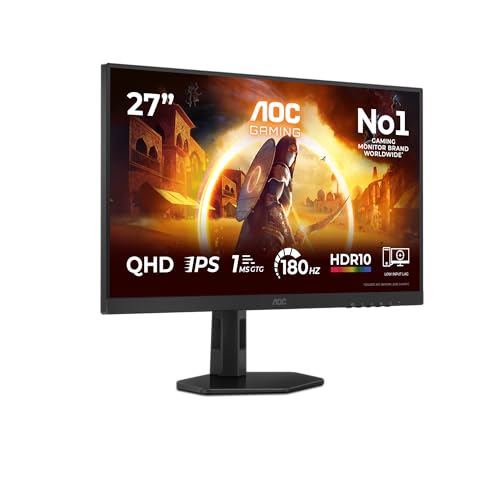
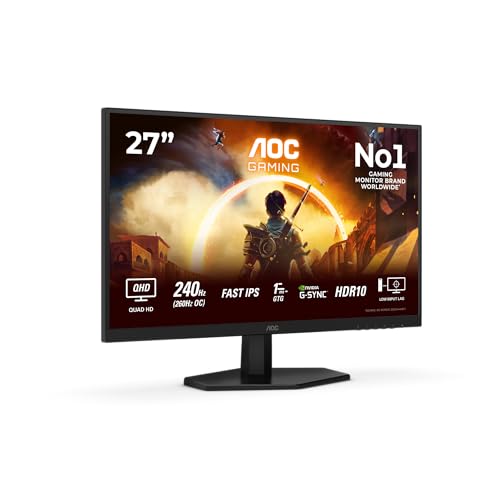
Most gaming monitors are a negotiation. You want high refresh, sharp resolution, and decent colour accuracy, but the panel physics and the price point rarely let you have all three at once. The AOC Q27G42ZE makes a bold opening bid: 260Hz, 2560x1440, Fast IPS, and a budget price tag. On paper, that combination should not exist at this tier. So the obvious question is where the compromise is hiding.
The short answer is: it's a genuinely strong package for competitive gaming at 1440p, with the usual caveats that apply to every Fast IPS panel in this price bracket. The HDR is checkbox-grade, the contrast is IPS-typical (nothing more), and the port selection is minimal. But if your priority is fluid, sharp, tear-free gaming at WQHD resolution without spending mid-range money, this is one of the most compelling options currently sitting in the budget tier. The hundreds of owner reviews with a positive overall rating are not an accident.
Core Specifications
Start with the headline numbers, because they're genuinely unusual for this price tier. You're getting a 27-inch IPS panel at 2560x1440 (WQHD) with a 260Hz maximum refresh rate, a 1ms GtG response time claim, HDR10 support, and G-Sync compatibility. The panel is what AOC calls "Fast IPS", which is a term the industry uses to denote IPS panels with accelerated pixel response, as distinct from standard IPS and the older, slower variants. The pixel density works out at roughly 109 PPI, which on a 27-inch screen is the sweet spot: sharp enough to look clean without needing display scaling, unlike some 32-inch 1440p panels that start to look a bit soft.
Connectivity is where the spec sheet gets thin. You're looking at one DisplayPort 1.4 and one HDMI 2.0. That's it. No USB hub, no USB-C, no audio passthrough beyond a headphone jack. For a dedicated gaming monitor at this price that's not shocking, but if you were hoping to daisy-chain peripherals through the display, you'll need a separate hub. The HDMI 2.0 port is specifically: it caps out at 1440p/144Hz over HDMI, so to hit 260Hz you'll need to be on DisplayPort. Console users on PS5 or Xbox Series X will be limited to 120Hz maximum over HDMI regardless, which is still fine but upfront.
The stand offers tilt adjustment (minus 5 to plus 23 degrees according to AOC's published specs) and height adjustment, which puts it above the cheapest fixed-tilt budget options. VESA 100x100mm mount compatibility is confirmed, so swapping to a third-party arm is straightforward if the stock stand doesn't suit your desk setup. The panel is rated at 350 nits typical brightness, with HDR peak brightness not separately specified beyond the HDR10 certification. The native contrast ratio is listed at 1000:1, which is standard IPS territory.
| Specification | Detail |
|---|---|
| Screen Size | 27 inch |
| Resolution | 2560x1440 (WQHD) |
| Panel Type | Fast IPS |
| Refresh Rate | 260Hz |
| Response Time | 1ms GtG (marketed) |
| Adaptive Sync | G-Sync Compatible / FreeSync Premium |
| HDR | HDR10 |
| Brightness | 350 nits typical |
| Native Contrast | 1000:1 |
| Colour Gamut | sRGB coverage (spec not separately published by AOC at launch) |
| Ports | 1x DisplayPort 1.4, 1x HDMI 2.0 |
| VESA Mount | 100x100mm |
| Stand Adjustments | Tilt, Height |
| Pixel Density | ~109 PPI |
| Price | £197.00 · Details |

Panel Technology
Fast IPS is a specific category worth understanding properly, because the marketing around it is often muddier than the underlying technology. Standard IPS panels have historically had pixel response times in the 4ms to 8ms GtG range, which is perfectly adequate for most use cases but shows visible smearing in very fast motion at high refresh rates. Fast IPS, as a category, uses different liquid crystal compounds and driving voltages to push pixel transitions down toward 1ms GtG. The trade-off, which AOC doesn't shout about in the marketing material, is that aggressive overdrive settings on Fast IPS panels can introduce inverse ghosting (sometimes called coronas), where bright halos appear behind fast-moving objects on dark backgrounds.
The fundamental IPS characteristics still apply here. Viewing angles are wide, typically 178 degrees horizontal and vertical, which is a genuine advantage over VA and TN panels for anyone who doesn't sit perfectly centred in front of their display. Colour consistency off-axis is good. The flip side is IPS glow: that milky, luminous bleed in the corners of the screen when viewing dark content in a dim room. It's inherent to the IPS panel construction and not a defect. Some owner reviews do mention it, and it's worth being realistic about: if you play a lot of dark atmospheric games in a dark room, IPS glow will be more noticeable than it would be on a VA panel. That said, at this price, VA panels with comparable refresh rates are rare, and the motion performance of VA at high refresh rates has historically been worse than Fast IPS anyway.
The 1000:1 native contrast ratio is exactly what you'd expect from IPS. It's not low by IPS standards, but it is significantly behind what a VA panel can offer (typically 3000:1 to 5000:1 native) and nowhere near OLED territory. For competitive gaming in a well-lit room, this is largely irrelevant. For cinematic single-player gaming in the dark, the black levels will look grey rather than black, and that's a real limitation to understand before buying. There is no local dimming on this panel. At this price tier, that's expected rather than disappointing.
Display Quality
At 109 PPI, the Q27G42ZE sits in a comfortable zone for desktop use at a normal viewing distance of 60 to 80cm. Individual pixels are not visible, text is crisp without needing aggressive ClearType tuning, and the overall image sharpness is a clear step up from 1080p on the same screen size. This is one of the underrated benefits of 1440p over 1080p at 27 inches: the image just looks more resolved, even in games that don't push framerates high enough to benefit from the full 260Hz. The jump from 1080p/144Hz to 1440p/260Hz is a meaningful upgrade on both axes simultaneously.
The anti-glare coating on the panel is a standard matte finish. This handles reflections well in brighter rooms, which is practically useful for a monitor that's likely to be used on a desk near a window. The trade-off is that matte coatings can slightly diffuse the image compared to a glossy panel, reducing perceived saturation and sharpness at very close inspection. For gaming, this is a non-issue. For photo editing where absolute colour fidelity matters, glossy panels are generally preferred, but that's not really the target use case here.
Owner feedback on image quality is consistently positive. Multiple reviewers highlight the image as looking "bright and vivid" out of the box, and the general consensus is that colours are punchy without being oversaturated in the default mode. Brightness uniformity is reported as good across the panel, with no significant clouding complaints in the owner reviews, though a small number of reviews mention minor backlight bleed in corners, which is again typical for IPS at this price. AOC's factory calibration on budget panels is not always documented with published Delta-E figures, but the owner feedback suggests the default colour presentation is acceptable for gaming without manual adjustment.
Refresh Rate and Adaptive Sync
260Hz at 1440p is a serious headline number, and it's worth contextualising it properly. The difference between 144Hz and 240Hz is perceptible to most people in fast-paced games. The difference between 240Hz and 260Hz is, honestly, marginal for most players. What the 260Hz rating does signal is that this is a panel built for high-frequency operation, which typically means the overdrive circuitry and pixel response characteristics have been optimised for fast motion rather than colour depth or contrast. That's the right trade-off for competitive gaming.
G-Sync Compatible certification means NVIDIA has validated the panel for variable refresh rate operation without major artefacts. It's not the same as a full G-Sync module (which adds hardware and cost), but in practice the difference for most users is minimal. The monitor also supports FreeSync Premium, which covers AMD GPU users and requires a minimum 120Hz low framerate compensation (LFC) threshold, meaning VRR stays active even when framerates drop significantly below the maximum refresh rate. The VRR range hasn't been explicitly published in the product listing, but Fast IPS panels at this refresh rate typically support a range starting from 48Hz or lower with LFC active.
For competitive titles like Valorant, CS2, or Apex Legends, where framerates regularly exceed 200 FPS on mid-range hardware at 1440p, the 260Hz ceiling is genuinely usable rather than theoretical. You'll need a capable GPU to push those numbers at 1440p, but the monitor won't be the bottleneck. For single-player titles at 60 to 100 FPS, the VRR support ensures a smooth, tear-free experience across a wide framerate range, which is arguably more valuable day-to-day than the raw maximum refresh rate.
Response Time and Motion
The "1ms GtG" claim needs unpacking, because this is where monitor marketing and real-world behaviour diverge most dramatically. GtG (grey-to-grey) response time is measured at specific transition points under ideal overdrive conditions. Published independent measurements of similar Fast IPS panels at this refresh rate typically show average GtG response times in the 3ms to 5ms range across the full range of pixel transitions, with the fastest transitions hitting sub-2ms and slower transitions (particularly dark grey to dark grey) taking longer. The 1ms figure represents the best-case transition, not the average.
That said, at 260Hz the frame time is approximately 3.85ms per frame. If the average pixel response is in the 3ms to 5ms range, you're looking at some degree of motion blur from pixel persistence, particularly in the slower transitions. AOC's overdrive options (typically accessible through the OSD) let you push the response harder, but aggressive overdrive on Fast IPS panels introduces inverse ghosting, where bright coronas appear around fast-moving dark objects. The sweet spot is usually the medium overdrive setting, which balances response speed against overshoot artefacts. Owner reviews don't flag significant ghosting complaints, which suggests the default overdrive tuning is reasonable.
For competitive gaming, the motion performance of this panel is good. It's not OLED-level clarity (nothing in this price range is), and it's not as sharp in motion as a 1080p/360Hz TN panel, but it's a significant step above standard IPS panels and well above what VA panels typically deliver at high refresh rates. The MPRT (Moving Picture Response Time) specification isn't separately listed, and backlight strobing (ELMB or similar) doesn't appear to be confirmed in the feature set, so motion clarity is dependent on pixel response rather than strobe-backlight tricks. For most competitive gaming scenarios, that's fine.
Colour Accuracy and Gamut
AOC hasn't published a detailed colour specification sheet for the Q27G42ZE at launch, which is fairly typical for budget gaming monitors. The panel is an IPS type, and Fast IPS panels from the major panel manufacturers (typically Samsung or AUO supply chains, though AOC doesn't publicly confirm panel sourcing for this model) generally cover 95 to 99 percent of the sRGB colour space. Full DCI-P3 coverage is not claimed and not expected at this price tier. For gaming and general desktop use, 95 percent-plus sRGB coverage is entirely adequate.
Factory calibration on budget monitors is rarely documented with published Delta-E figures, and the Q27G42ZE is no exception. Owner feedback suggests the out-of-box colour presentation is good for gaming, with colours described as vibrant and accurate enough for everyday use. If you're doing serious colour-critical work, a budget gaming monitor is not the right tool regardless of brand, and you'd be looking at something with a published Delta-E below 2 and a factory calibration report. For everything else, including casual photo viewing, video streaming, and gaming, the colour output here is more than acceptable.
The monitor includes multiple preset modes in the OSD, which is standard for AOC displays. These typically include sRGB mode (which clamps the output to sRGB gamut for accurate colour in SDR content), a racing mode, an FPS mode, and a standard mode. The sRGB mode is worth using for any content where colour accuracy matters, as it prevents the panel from over-saturating colours. For competitive gaming, the FPS or racing modes often boost brightness and contrast in ways that can improve target visibility, though the impact is subjective. AOC's OSD navigation on their gaming monitors is generally functional if not elegant, and owner reviews don't flag any specific issues with menu usability on this model.
HDR Performance
HDR10 support is listed, and it's important to be direct about what that means on a 350-nit panel with no local dimming. HDR10 is a content format standard, not a performance standard. A monitor can be technically HDR10-compatible while delivering HDR results that are barely distinguishable from SDR. The minimum requirement for a meaningful HDR experience, per the VESA DisplayHDR certification tiers, starts at DisplayHDR 400, which requires 400 nits peak brightness. The Q27G42ZE is rated at 350 nits typical, which puts it below even the entry-level DisplayHDR 400 tier.
Without local dimming, the panel cannot selectively brighten highlights while maintaining dark shadows, which is the fundamental mechanism that makes HDR look good. In HDR mode, the monitor will tone-map HDR content to its available brightness range, which means HDR content will look similar to SDR content with slightly different tone mapping. Some users actually find HDR mode on budget monitors looks worse than SDR because the tone mapping can crush shadow detail or clip highlights in ways the SDR mode doesn't.
The honest verdict on HDR here is to treat it as a checkbox feature rather than a selling point. Enable HDR in Windows for games that support it if you want, but don't expect the visual transformation you'd get from a proper HDR display with 600-plus nits and full-array local dimming. For the target use case of competitive gaming, HDR is largely irrelevant anyway. Competitive players typically run lower brightness settings and prioritise motion clarity over HDR spectacle. The HDR10 support means the monitor won't refuse to output HDR content, which is the practical floor of what you need.
Contrast and Brightness
The 1000:1 native contrast ratio is the standard IPS figure and it's consistent across virtually every IPS panel in this category. In a well-lit room, 1000:1 contrast looks perfectly good. Blacks appear dark, whites are bright, and the image has reasonable punch. The limitation becomes apparent in dim or dark environments: blacks take on a grey cast, and the IPS glow in the corners becomes more visible. This is a physics constraint of the IPS panel construction, not a quality control issue specific to AOC.
At 350 nits typical brightness, the Q27G42ZE is adequate for most indoor environments. It's not going to fight off direct sunlight through a window, but for a typical desk setup in a room with ambient lighting, 350 nits is comfortable. Many users actually run monitors at 60 to 70 percent brightness in normal use, so the headroom above that is useful for particularly bright rooms. Owner reviews don't flag brightness as a limitation, which suggests the 350-nit rating is sufficient for the typical gaming desk environment.
The combination of 350 nits and 1000:1 contrast gives a black level of approximately 0.35 nits in SDR mode. That's a standard IPS black level, and it compares unfavourably to VA panels (which can achieve 0.1 nits or lower at the same brightness) but is broadly similar to every other IPS panel in this price range. For competitive gaming where you're running a bright, colourful game in a lit room, this is a non-issue. For watching films in a dark room, it's a genuine limitation, and a VA panel or OLED would serve you better if that's a priority.
Ergonomics and Build
The stand on the Q27G42ZE offers tilt adjustment from minus 5 to plus 23 degrees and height adjustment. What it does not offer is swivel or pivot (portrait mode rotation). For a gaming monitor at this price, that's a reasonable feature set. Tilt and height cover the ergonomic basics for most users, and the absence of swivel is rarely a problem for a single-monitor gaming setup. If you need portrait mode for coding or document work, you'll need a VESA arm, but the 100x100mm VESA compatibility means that's straightforward.
Build quality feedback from owners is generally positive. The monitor is described as feeling solid without being particularly heavy, and the stand is reported as stable without wobble. The bezels are thin on three sides, with a slightly thicker bottom bezel housing the AOC branding, which is typical for this category. The overall aesthetic is clean and functional without the aggressive RGB lighting and angular plastic that some gaming monitors use to justify their price. For a desk that doesn't need to look like a gaming peripheral catalogue, this is actually a point in its favour.
The OSD controls are physical buttons on the underside of the monitor, which is the standard approach for this category. Some owners find button-based OSD navigation fiddly compared to joystick controls, and a few reviews mention this as a minor frustration. It's not a dealbreaker, but notably, that the OSD interaction is not as slick as monitors with a single joystick navigator. The power LED is reported as unobtrusive, which is a small but genuinely appreciated detail for a monitor that might be used in a dark room.
Connectivity and Ports
The port selection is minimal but functional for the target use case. One DisplayPort 1.4 and one HDMI 2.0 is enough for a single-PC gaming setup. DisplayPort 1.4 has more than sufficient bandwidth for 1440p at 260Hz, and the HDMI 2.0 port handles console connections or a secondary device at up to 1440p/144Hz. DisplayPort 1.4 supports up to 32.4 Gbps bandwidth, which covers 1440p/260Hz without needing Display Stream Compression, so you're getting the full uncompressed signal.
- 1x DisplayPort 1.4 (required for 260Hz at 1440p)
- 1x HDMI 2.0 (1440p up to 144Hz, or 1080p/120Hz for consoles)
- 1x 3.5mm headphone jack
- No USB hub
- No USB-C
- No built-in speakers
The absence of a USB hub is a practical limitation if you have multiple peripherals and limited desk space. There's no USB-C port, which rules out single-cable laptop connections. And there are no built-in speakers, which is fine for gaming (dedicated headphones or a separate speaker setup is always preferable) but means you'll need a headphone jack or separate audio solution. The 3.5mm headphone output is present, which handles the basics.
For a PC gaming monitor in a fixed desk setup with a dedicated audio solution, the port selection covers everything you need. For a more flexible setup where you're switching between a PC and a laptop, or connecting multiple devices, the two-port limitation will feel restrictive. A DisplayPort KVM switch or a simple HDMI switcher can work around this, but it adds complexity and cost that shouldn't be necessary on a monitor in this category. It's the most significant practical limitation of the spec sheet for anyone with a multi-device desk.
How It Compares
The two most relevant competitors at this price tier are the AOC Q27G3XMN, which uses a Mini-LED VA panel at 1440p/180Hz and costs a similar amount, and the Gigabyte M27Q X, a 1440p/240Hz Fast IPS panel that typically sits slightly higher in price. These three monitors represent different answers to the same question: what do you prioritise at the budget-to-mid boundary for WQHD gaming?
The AOC Q27G3XMN is an interesting alternative from the same brand. Its Mini-LED VA panel delivers significantly better contrast (native contrast around 3000:1 or higher, with local dimming zones adding further punch) and more credible HDR performance. The trade-off is the lower 180Hz maximum refresh rate and the slower pixel response that VA panels typically exhibit compared to Fast IPS. For single-player gaming and mixed-use, the Q27G3XMN's superior contrast and HDR might be the better choice. For competitive multiplayer where refresh rate and motion clarity are the priority, the Q27G42ZE's 260Hz Fast IPS wins.
The Gigabyte M27Q X at 240Hz Fast IPS is the more direct like-for-like comparison. It adds a USB-C port, a USB hub, and has been measured by independent reviewers with published Delta-E and colour coverage figures that confirm solid out-of-box accuracy. The AOC Q27G42ZE counters with a higher 260Hz ceiling and a lower price. If connectivity and documented colour accuracy matter, the Gigabyte is worth the extra spend. If you want the highest refresh rate and the lowest price in this category, the AOC makes a strong case.
| Feature | AOC Q27G42ZE | AOC Q27G3XMN | Gigabyte M27Q X |
|---|---|---|---|
| Panel Type | Fast IPS | Mini-LED VA | Fast IPS |
| Resolution | 2560x1440 | 2560x1440 | 2560x1440 |
| Refresh Rate | 260Hz | 180Hz | 240Hz |
| Response Time (marketed) | 1ms GtG | 1ms GtG | 1ms GtG |
| Native Contrast | 1000:1 | 3000:1+ | 1000:1 |
| HDR | HDR10 | HDR400 (Mini-LED) | HDR400 |
| Brightness | 350 nits | 400+ nits | 350 nits |
| USB-C | No | No | Yes |
| USB Hub | No | No | Yes (2x USB-A) |
| Adaptive Sync | G-Sync Compatible / FreeSync | FreeSync Premium | G-Sync Compatible / FreeSync |
| Price | £197.00 · Details | Similar budget tier | Mid-range tier |

Final Verdict
The AOC Q27G42ZE review verdict is straightforward once you're clear on what you're buying. This is a competitive gaming monitor first, and everything else second. The 260Hz Fast IPS panel at 1440p is a genuinely impressive specification for the budget tier, and the positive overall rating across hundreds of reviews suggests that owners who bought it for the right reasons are happy with it. The motion performance is good, the resolution is sharp, the adaptive sync works correctly, and the price is hard to argue with.
The limitations are real but predictable. The HDR10 support is nominal rather than meaningful, the 1000:1 contrast will show grey blacks in dark scenes, the port selection is minimal, and the "1ms GtG" claim is marketing shorthand rather than a measured average. None of these are surprising for a Fast IPS panel in the budget tier, and none of them should disqualify the monitor for its intended purpose. The IPS glow is worth being aware of if you game in a dark room, and the lack of a USB hub will be an inconvenience for some desk setups.
Who should buy this? Primarily PC gamers on a budget who play competitive titles, want 1440p sharpness over 1080p, and can push 144Hz or more in their games. If you're on an RTX 3070 or RX 6700 XT or better, you'll be able to use a meaningful portion of that 260Hz ceiling in lighter titles. The WQHD resolution adds genuine visual quality over 1080p at 27 inches, and the Fast IPS motion performance is a step above what you'd get from a budget VA panel at the same refresh rate.
Who should skip it? Anyone who prioritises dark scene performance and HDR quality should look at the AOC Q27G3XMN instead. Its Mini-LED VA panel delivers significantly better contrast and more credible HDR at a similar price, and 180Hz is still very fast for most gaming scenarios. If you need USB-C connectivity for a laptop or want a documented colour accuracy figure for content creation, the Gigabyte M27Q X is worth the extra spend. And if you're primarily gaming at 60 to 100 FPS in single-player titles, the 260Hz ceiling is largely wasted, and a cheaper 1440p/144Hz IPS panel will serve you just as well for less money.
Overall score: 8 out of 10. At the budget tier, this is one of the strongest 1440p gaming monitors available right now. The spec sheet punches well above its price, the owner feedback is consistently positive, and the trade-offs are predictable rather than unpleasant surprises. Just go in knowing it's a competitive gaming tool, not a colour-accurate workstation display or a proper HDR monitor, and you'll be sorted.
What works. What doesn’t.
5 + 4What we liked5 reasons
- 260Hz at 1440p is exceptional value for the budget tier
- Fast IPS delivers good motion clarity for competitive gaming
- Wide IPS viewing angles and solid out-of-box colour for gaming
- G-Sync Compatible and FreeSync Premium for tear-free VRR
- Height-adjustable stand and 100x100mm VESA mount included
Where it falls4 reasons
- HDR10 is checkbox-grade: 350 nits and no local dimming
- Only two ports (1x DP 1.4, 1x HDMI 2.0), no USB hub or USB-C
- 1000:1 native contrast shows grey blacks in dark scenes
- 1ms GtG is a marketing best-case, not average measured response
Full specifications
11 attributes| Panel type | IPS |
|---|---|
| Aspect ratio | 16:9 |
| Curvature | flat |
| HDR | HDR10 |
| Launch year | 2025 |
| Ports | 1x HDMI 2.0, 1x DisplayPort 1.4 |
| Refresh rate HZ | 260 |
| Resolution | 2560x1440 |
| Response time MS | 1 |
| Screen size IN | 27 |
| Vesa compatible | true |
If this isn’t right for you
2 options

Frequently asked
5 questions01Is the AOC Q27G42ZE 27 inch WQHD Gaming Monitor 260Hz, Fast IPS Panel, 1ms GtG, HDR10, G-Sync Compatible, (2560x1440 HDMI 1x 2.0) Black good for gaming?+
Yes, it's well-suited to competitive PC gaming. The 260Hz refresh rate and Fast IPS panel deliver smooth, responsive motion at 1440p resolution, and the G-Sync Compatible and FreeSync Premium adaptive sync support ensures tear-free performance across a wide framerate range. You'll need DisplayPort 1.4 to reach 260Hz (HDMI 2.0 caps at 144Hz at this resolution). For competitive titles like CS2, Valorant, and Apex Legends where high framerates are achievable, this monitor is an excellent choice at the budget price tier.
02Does the AOC Q27G42ZE 27 inch WQHD Gaming Monitor 260Hz, Fast IPS Panel, 1ms GtG, HDR10, G-Sync Compatible, (2560x1440 HDMI 1x 2.0) Black have good HDR?+
No, not in any meaningful sense. The HDR10 certification means it can accept and display HDR content, but with a 350-nit typical brightness rating and no local dimming, the actual HDR output is barely distinguishable from SDR. It doesn't meet even the entry-level VESA DisplayHDR 400 standard. For gaming, this is largely irrelevant, but if HDR picture quality matters to you, this monitor won't deliver it. A Mini-LED VA panel or a proper OLED display is required for credible HDR performance.
03Is the AOC Q27G42ZE 27 inch WQHD Gaming Monitor 260Hz, Fast IPS Panel, 1ms GtG, HDR10, G-Sync Compatible, (2560x1440 HDMI 1x 2.0) Black good for content creation?+
It's adequate for casual creative work but not ideal for professional colour-critical tasks. Fast IPS panels typically cover 95 to 99 percent of the sRGB colour space, which is sufficient for general photo editing and video work viewed on standard displays. However, AOC hasn't published a factory Delta-E figure or a detailed colour coverage spec for this model, and the matte anti-glare coating slightly reduces perceived saturation compared to glossy panels. For professional colour work requiring documented accuracy, a monitor with a published calibration report and Delta-E below 2 is a better choice.
04What graphics card do I need for the AOC Q27G42ZE 27 inch WQHD Gaming Monitor 260Hz, Fast IPS Panel, 1ms GtG, HDR10, G-Sync Compatible, (2560x1440 HDMI 1x 2.0) Black?+
To reach 260Hz at 1440p in competitive titles, you'll want a GPU capable of sustained high framerates at that resolution. An NVIDIA RTX 3070 or AMD RX 6700 XT is a reasonable minimum for pushing above 200 FPS in lighter esports titles. For more demanding games at 1440p, an RTX 4070 or RX 7800 XT is a better match. You'll also need a DisplayPort 1.4 output on your GPU to run at 260Hz, as HDMI 2.0 is limited to 144Hz at 1440p. Note that AMD and NVIDIA both support FreeSync/G-Sync Compatible VRR on this monitor, so either GPU brand works.
05What warranty and returns apply to the AOC Q27G42ZE 27 inch WQHD Gaming Monitor 260Hz, Fast IPS Panel, 1ms GtG, HDR10, G-Sync Compatible, (2560x1440 HDMI 1x 2.0) Black?+
AOC's standard UK warranty for monitors is typically three years, but we'd recommend confirming the specific warranty terms directly with AOC or the retailer before purchasing, as terms can vary by region and seller. If bought through Amazon UK, you're also covered by Amazon's standard 30-day return policy and the A-to-Z Guarantee, which provides a solid baseline of buyer protection regardless of manufacturer warranty.