Monitor spec sheets lie. Not all of them, not always, but the response time figure is almost always the one you should treat with the most suspicion. "1ms" printed on a box tells you almost nothing about how a panel actually behaves in motion, because manufacturers measure it under ideal conditions using the most aggressive overdrive setting, which typically introduces overshoot artefacts that look worse than the ghosting they're trying to eliminate. The number that actually matters is the grey-to-grey transition time measured at a sensible overdrive level, and for VA panels like the one in the AOC C27G4ZXED, that figure tends to be noticeably higher than the marketing claim. So before you get swept up in the 280Hz headline, it's worth understanding what you're actually buying here.
The AOC Gaming C27G4ZXED is a 27-inch Full HD curved monitor aimed squarely at the budget gaming crowd. It's a 1500R curved Fast-VA panel running at 280Hz, with FreeSync Premium, HDR10 support, and a price that sits comfortably in the budget bracket (under £150). On paper, that combination sounds almost too good. In practice, there are trade-offs, and the VA panel behaviour is the main one worth talking about at length. But there's also a lot to like here, especially if you're coming from a 60Hz or 144Hz monitor and want a serious refresh rate upgrade without remortgaging.
With 425 owner reviews averaging ★★★★☆ (4.2), this monitor clearly makes a lot of people happy. The question is whether it'll make you happy, and that depends almost entirely on what you're using it for and how sensitive you are to VA panel quirks. So here's the honest breakdown.
Core Specifications
The C27G4ZXED is built around a 27-inch VA panel with a 1920x1080 resolution, a 1500R curve radius, and a 280Hz maximum refresh rate. AOC rates the response time at 1ms (MPRT), the brightness at 300 cd/m², and the contrast at 3000:1. That contrast figure is the one that genuinely stands out, because it's a real advantage VA has over IPS at this price point. The panel is matte finish, which is sensible for a gaming monitor that might be used in a room with overhead lighting.
Connectivity is solid for the price: you get two HDMI 2.0 ports and one DisplayPort 1.4. There's also a headphone output, which is a small but welcome touch. The monitor is VESA 100x100 compatible, so you can ditch the stand and wall-mount it if you want. The stand itself is removable, which is standard, but the ergonomic adjustability is limited (more on that in the build section).
AOC includes FreeSync Premium support, which requires a minimum 120Hz at the native resolution with LFC (Low Framerate Compensation) support. This is a step up from basic FreeSync and means the adaptive sync range is properly usable even when your GPU dips below the monitor's native VRR range. The HDR10 support is present but, as we'll discuss, it's checkbox HDR rather than anything transformative at this price tier.
| Specification | Detail |
|---|---|
| Screen Size | 27 inches |
| Resolution | 1920x1080 (Full HD) |
| Panel Type | Fast-VA (1500R curve) |
| Refresh Rate | 280Hz |
| Response Time (marketed) | 1ms (MPRT) |
| Brightness | 300 cd/m² |
| Contrast Ratio | 3000:1 |
| Adaptive Sync | FreeSync Premium |
| HDR | HDR10 |
| Ports | 2x HDMI 2.0, 1x DisplayPort 1.4 |
| Audio Output | Headphone jack |
| VESA Mount | 100x100mm |
| Finish | Matte anti-glare |
| Colour | Black/Grey |
| Price | £129.99 |
Panel Technology
VA panels occupy an interesting middle ground in the display world. They're not as fast as IPS panels at pixel transitions, and they don't have the viewing angle consistency of IPS either. But they do something IPS can't match at this price: proper deep blacks and high native contrast. The 3000:1 contrast ratio on the C27G4ZXED is a genuine spec, and in a darkened room, VA panels produce blacks that look genuinely dark rather than the washed-out grey you get from a budget IPS. For gaming in the evenings, that matters more than many people realise until they've experienced it.
The "Fast-VA" designation is AOC's way of saying this panel has been optimised for faster pixel transitions compared to traditional VA. And it is faster than older VA designs. But it's important to be clear-eyed about this: published measurements of similar Fast-VA panels in this class typically show grey-to-grey response times in the 4ms to 8ms range at moderate overdrive settings. The "1ms" on the box refers to MPRT (Moving Picture Response Time), which is a backlight strobing measurement and not the same as the panel's actual pixel transition speed. It's a common industry trick and it's genuinely frustrating, but it's not unique to AOC.
Viewing angles are the other VA trade-off. From straight on, the image looks great. Shift off-axis and you'll notice some colour shift and gamma change, particularly in the vertical axis. For a single-user gaming setup where you're sitting directly in front of the screen, this is rarely a problem. If you're sharing the screen or watching content with someone sitting at an angle, IPS would serve you better. The 1500R curve actually helps here slightly, since it's designed to keep more of the panel surface facing you directly, reducing the effective off-axis viewing compared to a flat screen of the same size.
Black uniformity on VA panels can vary between units. Some owners report excellent uniformity; others note slight backlight bleed at the edges. The matte coating helps manage reflections in bright rooms, and at 300 cd/m² peak brightness, the panel is adequately bright for most indoor environments, though it won't compete with direct sunlight. The 1500R curve radius is fairly aggressive for a 27-inch screen, more aggressive than the 1800R you see on some competitors, and a small number of owners find it too curved for desktop productivity work. For gaming, most people adapt quickly.
Display Quality
At 1920x1080 on a 27-inch panel, you're looking at a pixel density of roughly 82 PPI. That's noticeably lower than a 1440p 27-inch panel (around 109 PPI), and it does mean individual pixels are visible if you sit close. Whether that bothers you depends on your viewing distance and how critical you are about sharpness. For fast-paced gaming at normal desk distances (60cm to 80cm), most people don't find 1080p on 27 inches a problem in practice. For desktop work, web browsing, or reading text for long periods, some users do notice the lower sharpness.
The matte anti-glare coating is well-implemented. It diffuses reflections effectively without adding excessive grain to the image, which is a balance some cheaper matte coatings get wrong. Owners consistently praise the image clarity for gaming, and the 3000:1 contrast ratio means dark scenes in games have genuine depth rather than looking flat. The colour presentation out of the box is described by most owners as punchy and vibrant, which is typical of VA panels. They tend to look impressive to the eye even if measured colour accuracy isn't as tight as a calibrated IPS.
The built-in game presets (FPS, racing, RTS) are a nice touch. They're not transformative, but they're a quick way to shift the image profile for different game types without diving into the full OSD. The OSD itself is reportedly straightforward to navigate, which is something AOC has historically done well compared to some competitors whose menu systems feel like they were designed to discourage use. You can also set and save custom profiles, which is genuinely useful if you switch between gaming and productivity use.
Brightness uniformity across the panel is generally good based on owner reports, though as with any VA panel, some variation at the edges is possible. At 300 cd/m² maximum brightness, the screen handles reasonably lit rooms without issue. It's not a monitor you'd want to use in a sun-drenched conservatory, but for a typical UK room with overhead lighting, it's perfectly adequate. The Low Blue Light technology is mentioned in AOC's marketing and is useful for late-night sessions, though dedicated eye-comfort modes do reduce colour accuracy slightly.
Refresh Rate and Adaptive Sync
280Hz is a serious refresh rate. Not the highest available (some IPS panels now push 360Hz and beyond), but well beyond what the vast majority of games and GPUs can actually sustain at 1080p. The jump from 144Hz to 280Hz is real but less dramatic than the jump from 60Hz to 144Hz. If you're coming from 60Hz, this monitor will feel transformative. If you're coming from 144Hz, it'll feel smoother, particularly in competitive titles where frame rates genuinely hit the ceiling. If you're coming from 240Hz, the difference is subtle.
FreeSync Premium is the adaptive sync implementation here, and it's a proper one. FreeSync Premium requires a minimum 120Hz refresh rate at native resolution, mandatory LFC support (which kicks in when your frame rate drops below the VRR range minimum, doubling the refresh rate to maintain sync), and low framerate compensation. This is meaningfully better than basic FreeSync, which has no LFC requirement. In practice, it means the sync works smoothly across a wide range of frame rates rather than only in a narrow band.
For Nvidia GPU owners, FreeSync Premium monitors are compatible with G-Sync Compatible mode on modern Nvidia drivers. Nvidia validates certain FreeSync monitors officially, but even unvalidated ones typically work well in G-Sync Compatible mode. So if you're on an RTX card, you're not locked out of adaptive sync. The DisplayPort 1.4 connection is the one to use for maximum refresh rate, as HDMI 2.0 supports 1080p at up to 240Hz but may limit you at 280Hz depending on the implementation. Worth checking your GPU's HDMI version if you plan to use that connection at the full 280Hz.
Response Time and Motion
This is the section where the VA trade-off becomes most relevant. The marketed 1ms figure is MPRT, achieved through backlight strobing (MPRT mode reduces perceived blur by flashing the backlight in sync with each frame). The actual grey-to-grey pixel transition time is higher. For Fast-VA panels in this class, published measurements from display testing sites typically show around 4ms to 6ms at the balanced overdrive setting before overshoot becomes visible. That's still fast enough for most gaming scenarios, but it's not 1ms in any meaningful sense.
The practical consequence is that very fast dark-to-dark transitions, common in games with lots of dark environments, can show some trailing. This is a known characteristic of VA panels and is sometimes called "dark level smearing" or just VA ghosting. At 280Hz, the panel is refreshing so frequently that the ghosting window is shorter than it would be at 144Hz, which helps. But if you're playing competitive shooters with dark maps, you may notice it on fast camera movements. Owners in the reviews are split on this: some say it's not noticeable in normal play, others mention it specifically as a drawback in dark games.
For the majority of gaming use cases, including racing games, RTS titles, sports games, and most action games with well-lit environments, the motion performance is excellent. The combination of 280Hz and FreeSync Premium means the gaming experience is smooth and responsive in a way that genuinely competitive budget IPS monitors often can't match on contrast and visual depth. The overdrive settings in the OSD let you tune the aggressiveness of the pixel transition boost, and finding the right balance between ghosting and overshoot is worth spending a few minutes on during setup. Most owners seem to land on the medium overdrive setting as the sweet spot.
Colour Accuracy and Gamut
AOC doesn't publish specific sRGB or DCI-P3 coverage figures for the C27G4ZXED in their official spec sheet, which is fairly typical for monitors at this price tier. Based on what's known about Fast-VA panels in this class, sRGB coverage in the high 90s percentage-wise is a reasonable expectation, which is perfectly adequate for gaming and general use. DCI-P3 coverage will be more limited, likely in the 80% to 85% range, which is typical for non-wide-gamut VA panels. These aren't panels designed for professional colour work.
Factory calibration at budget price points is rarely impressive, and the C27G4ZXED is no exception. Out of the box, the colours tend toward the punchy and slightly warm end, which looks good for gaming but means Delta-E figures (the measure of colour accuracy) are unlikely to be below 3 without some manual calibration. For gaming and media consumption, this is fine. For photo editing or video grading where colour accuracy genuinely matters, you'd want a properly calibrated IPS or an OLED, neither of which you'll find at this price point.
The game preset modes (FPS, racing, RTS) adjust colour temperature and gamma to suit different game types. FPS mode typically boosts visibility in dark areas, which is useful for games like tactical shooters where spotting enemies in shadows matters. These presets are a practical feature rather than a gimmick, and several owners mention using them regularly. The ability to save custom profiles means you can set up a calibrated mode for productivity alongside a punchy gaming mode and switch between them quickly.
For content creation work, the honest answer is that this monitor is not the right tool. Not because it's bad, but because the combination of VA panel characteristics, uncalibrated factory output, and 1080p resolution makes it unsuitable for professional colour work. If you're a hobbyist who does light photo editing alongside gaming, it'll do the job acceptably. If colour accuracy is a primary concern, look at IPS panels with factory calibration certificates, which exist in the mid-range bracket.
HDR Performance
HDR10 support is listed as a feature, and it's important to be clear about what that means on a monitor at this price. HDR10 is a signal standard, not a quality certification. The VESA DisplayHDR certification tiers (DisplayHDR 400, 600, 1000) give you a more meaningful indication of actual HDR capability. The C27G4ZXED doesn't carry a published DisplayHDR certification in the spec sheet, and at 300 cd/m² peak brightness, it's operating at roughly the DisplayHDR 300 level, which is below even the entry-level DisplayHDR 400 tier.
Real HDR requires peak brightness well above 400 cd/m² and ideally local dimming to control which parts of the screen are bright versus dark simultaneously. The C27G4ZXED has neither. What you get in HDR mode is the monitor accepting an HDR signal and tone-mapping it to its brightness range, which at 300 cd/m² means the highlights aren't particularly bright and the overall HDR impact is modest. This isn't unique to the C27G4ZXED; it's the reality of HDR on budget monitors generally.
That said, the 3000:1 native contrast ratio does give VA panels a genuine advantage over IPS in HDR-adjacent scenarios. Even in SDR mode, dark scenes look genuinely dark, which is something IPS panels at this price can't replicate. So while the HDR mode itself isn't transformative, the underlying panel characteristics mean dark content looks better than it would on a comparable budget IPS. Think of the HDR10 support as a compatibility feature (games and consoles can send HDR signals without needing to switch modes) rather than a quality upgrade.
Contrast and Brightness
The 3000:1 static contrast ratio is the headline spec that genuinely differentiates this monitor from IPS alternatives at the same price. Typical budget IPS panels deliver around 800:1 to 1000:1 native contrast. The difference in a dark room is visible to the naked eye. Black scenes in games look properly dark on the C27G4ZXED, and the shadow detail in dark environments is rendered with more depth than you'd get from a comparable IPS. This is the core reason to choose VA over IPS at the budget end of the market, assuming you can live with the response time trade-offs.
At 300 cd/m² peak brightness, the monitor is bright enough for typical indoor use in the UK. It's not going to compete with a high-brightness IPS or an OLED in terms of peak luminance, but for a gaming setup in a normally lit room, 300 cd/m² is adequate. In a very bright room with lots of ambient light, you might find yourself wishing for more headroom. The matte coating helps by reducing glare rather than fighting it with brute brightness, which is generally the more practical approach for desk setups.
Brightness uniformity across the panel is generally reported as good by owners. Some minor variation at the edges is normal for any LCD panel and is typically only visible on solid-colour test patterns rather than real content. The VA panel's stronger backlight uniformity compared to some IPS panels (which can suffer from IPS glow in the corners) is another small advantage in real-world use. Overall, the contrast and brightness performance punches above the price point, and it's one of the genuine strengths of this monitor.
Ergonomics and Build
The build quality is appropriate for the price. The plastic construction is standard for budget monitors, and the slim bezels on three sides give it a modern look that doesn't feel cheap. The stand is a different story: like most budget gaming monitors, the C27G4ZXED's stand offers tilt adjustment only. There's no height adjustment, no swivel, and no pivot. If you want to raise the screen, you're adding a monitor arm or stacking something under the stand. This is a common frustration at the budget end of the market, and it's worth flagging for anyone who cares about ergonomics.
The good news is that VESA 100x100 compatibility means you can mount this on any standard monitor arm, and the stand is removable. A decent monitor arm costs relatively little and transforms the ergonomic situation completely. If you're planning to use this monitor for long sessions, investing in an arm alongside the monitor is worth considering. The footprint of the stand is reasonably compact, which is welcome on smaller desks, and the 1500R curve means the screen edges don't extend as far forward as a flat panel of the same size would.
The OSD controls are physical buttons on the underside of the monitor, which is a more tactile experience than some touch-sensitive implementations that can be fiddly to use. The menu structure is reportedly clear and logical, which matters more than it might seem when you're trying to adjust settings mid-session. The headphone output on the back is a useful addition for keeping your desk tidy without needing a separate audio interface. Cable management is helped by the slim profile, though the stand doesn't have a cable routing slot, which is a minor omission.
The black and grey colour scheme is understated and works well in most setups. There's no RGB lighting, which will disappoint some and delight others. The overall impression from owner reports is of a monitor that feels solid enough for daily use without feeling premium. At this price, that's the right balance. Nothing about the build feels like it's going to fail prematurely, and the removable stand means you're not stuck with the ergonomic limitations if you choose to upgrade later.
Connectivity and Ports
The port selection on the C27G4ZXED covers the gaming essentials without overcomplicating things. Two HDMI 2.0 ports means you can have two devices connected simultaneously, which is genuinely useful if you're switching between a PC and a console. The single DisplayPort 1.4 is the connection to use for the full 280Hz experience from a PC, as DisplayPort 1.4 has the bandwidth headroom for 1080p at high refresh rates without any compromise. HDMI 2.0 supports 1080p at up to 240Hz, so if you're connecting a console or a GPU with only HDMI, you may be limited to 240Hz rather than the full 280Hz.
The headphone output is a welcome inclusion. It's not going to replace a dedicated DAC/amp for audiophiles, but for a gaming headset it's perfectly functional and keeps your desk tidier. There's no USB hub on this monitor, which is a common omission at the budget tier. If you need USB ports at your monitor for peripherals, you'll need a separate hub or rely on your PC's rear ports. It's not a dealbreaker, but it's worth knowing.
- 2x HDMI 2.0 (supports up to 240Hz at 1080p)
- 1x DisplayPort 1.4 (recommended for 280Hz)
- 1x Headphone output (3.5mm)
The box includes a power cable, HDMI cable, DisplayPort cable, installation CD, and warranty sheet. Getting cables in the box is a nice touch that not all manufacturers bother with, and it means you can be up and running immediately without a separate cable purchase. The inclusion of both HDMI and DisplayPort cables is particularly thoughtful. The installation CD is a legacy inclusion that most people will ignore, but the warranty documentation is worth keeping.
How It Compares
The budget 1080p gaming monitor market is genuinely competitive right now. AOC isn't the only brand offering high refresh rates at accessible prices, and the C27G4ZXED sits in a category where the Acer Nitro XV272U and the MSI G274F are reasonable alternatives worth considering. The choice between them comes down to the IPS versus VA trade-off more than anything else.
The MSI G274F is a 27-inch 1080p IPS monitor running at 180Hz, typically available in the same budget bracket. It offers better viewing angles and faster real-world pixel transitions than the C27G4ZXED's VA panel, but its native contrast ratio is around 1000:1 compared to the AOC's 3000:1. If you game in a bright room and care more about motion clarity than deep blacks, the MSI might suit you better. If you game in a darker environment and want that VA contrast depth, the AOC wins on that metric. The AOC also has a significant refresh rate advantage at 280Hz versus 180Hz, which matters for competitive gaming.
The Acer Nitro XV272U is a 27-inch 1440p IPS option that typically sits at the upper end of the budget bracket or into mid-range territory. It offers the resolution upgrade that the AOC lacks, which makes a visible difference for desktop clarity and game detail. But it costs more, runs at a lower refresh rate (typically 144Hz or 165Hz depending on the variant), and has the lower IPS contrast. The AOC C27G4ZXED is the better choice if raw refresh rate and price are the priorities; the Acer makes more sense if you want sharper images and can live with lower Hz.
| Feature | AOC C27G4ZXED | MSI G274F | Acer Nitro XV272U |
|---|---|---|---|
| Panel Type | Fast-VA | IPS | IPS |
| Resolution | 1920x1080 | 1920x1080 | 2560x1440 |
| Refresh Rate | 280Hz | 180Hz | 165Hz |
| Native Contrast | 3000:1 | ~1000:1 | ~1000:1 |
| Adaptive Sync | FreeSync Premium | FreeSync Premium | FreeSync Premium |
| Curve | 1500R | Flat | Flat |
| HDR | HDR10 | HDR Ready | HDR400 |
| Price | £129.99 | ~Budget tier | ~Mid-range |
What Buyers Say
With 559 averaging ★★★★☆ (4.2), the C27G4ZXED has a strong owner satisfaction record. The most consistent praise centres on the image quality for the price, with owners repeatedly noting that the colours look vibrant and the contrast is excellent for dark game environments. Several reviewers coming from 144Hz monitors describe the 280Hz experience as a genuine upgrade in competitive titles, particularly in games like Valorant, CS2, and Apex Legends where high frame rates are achievable and make a tangible difference to responsiveness.
The setup experience gets positive mentions too. Owners appreciate that the monitor comes with both HDMI and DisplayPort cables, making unboxing-to-gaming a quick process. The OSD is described as easy to navigate, and the game preset modes get specific praise from owners who game across multiple genres. Build quality is generally rated positively, with the slim bezels and clean aesthetic noted as better than expected for the price.
The criticisms that appear with some regularity are predictable given the panel choice. A subset of owners note VA ghosting in dark game environments, particularly in horror games or any title with lots of dark scenes. The limited stand ergonomics (tilt-only) frustrate owners who want height adjustment. A smaller number mention the 1080p resolution feeling slightly soft on a 27-inch panel compared to 1440p screens they've used previously. These are real criticisms, not edge cases, but they're also exactly the trade-offs you'd expect from a budget VA monitor at this specification level.
Value Analysis
In the budget bracket (under £150), the C27G4ZXED offers a combination of specs that's genuinely hard to argue with. 280Hz at this price is unusual; most budget competitors top out at 165Hz to 180Hz. The 3000:1 contrast ratio is a real differentiator over IPS alternatives. FreeSync Premium (not just basic FreeSync) shows AOC has paid attention to the adaptive sync implementation. And the inclusion of two HDMI 2.0 ports plus DisplayPort 1.4 means you're not compromising on connectivity.
The trade-offs are real but known quantities. VA ghosting in dark scenes is a characteristic of the panel technology, not a manufacturing defect. The 1080p resolution on a 27-inch screen is a deliberate choice that keeps the GPU requirements low (great for mid-range cards) but does mean lower pixel density than 1440p alternatives. The tilt-only stand is a cost-saving measure that's easily remedied with a VESA arm. None of these are surprises if you've done your research.
For the target audience, which is someone who wants a high refresh rate gaming monitor without spending mid-range money, the value proposition is strong. You're getting a monitor that will genuinely improve competitive gaming performance over anything below 200Hz, with better dark scene contrast than IPS alternatives at the same price, and with proper adaptive sync support. The 4.2-star average from 425 owners reflects a product that delivers on its core promise. Budget doesn't have to mean disappointing, and this monitor proves that.
Final Verdict
The AOC Gaming C27G4ZXED is a proper budget gaming monitor that doesn't pretend to be something it isn't. The 280Hz refresh rate is the headline, and it's legitimate. The 3000:1 contrast is the sleeper spec that IPS rivals can't match at this price. The Fast-VA panel brings real trade-offs in dark-scene response time, and the 1080p resolution on 27 inches isn't for everyone. But if you go in with clear eyes about those trade-offs, this monitor delivers excellent value.
The competition at this price mostly offers lower refresh rates or worse contrast. The MSI G274F gives you better IPS viewing angles and motion clarity but runs at 180Hz with weaker blacks. The step up to 1440p IPS requires a meaningful budget increase. The C27G4ZXED sits in a sweet spot for competitive gamers on a budget who prioritise refresh rate and contrast over pixel density and viewing angle perfection. It's not the right tool for content creation or colour-critical work, but for gaming, it's a well-considered package.
The 4.2-star average across 559 is earned. Most owners are happy, and the complaints that exist are about known VA characteristics rather than quality control failures. If you're upgrading from a 60Hz or 144Hz monitor and want to feel the difference that high refresh rates make in competitive gaming without spending mid-range money, the C27G4ZXED deserves serious consideration. It's not perfect. But at this price, it's a very good monitor.
Editorial Score: 7.5/10. Excellent value in the budget bracket for competitive gamers who understand the VA trade-offs.
What works. What doesn’t.
5 + 4What we liked5 reasons
- 280Hz refresh rate is genuinely rare at budget pricing
- 3000:1 native contrast ratio beats IPS rivals on dark scene depth
- FreeSync Premium (not just basic FreeSync) with LFC support
- Two HDMI 2.0 ports plus DisplayPort 1.4 with cables included in box
- VESA 100x100 compatible for easy monitor arm upgrade
Where it falls4 reasons
- VA ghosting visible in dark game environments on fast camera movements
- 1080p on 27 inches is lower pixel density than 1440p alternatives
- Tilt-only stand with no height or swivel adjustment
- HDR10 support is checkbox-level, not transformative at 300 cd/m2
Full specifications
12 attributes| Refresh rate | 280 |
|---|---|
| Screen size | 27 |
| Panel type | VA |
| Adaptive sync | FreeSync |
| Aspect ratio | 16:9 |
| Curvature | 1500R |
| HDR | HDR10 |
| Launch year | 2023 |
| Ports | 2x HDMI 2.0, 1x DisplayPort 1.4 |
| Refresh rate HZ | 280 |
| Resolution | 1920x1080 |
| Response time | 1ms |
If this isn’t right for you
2 options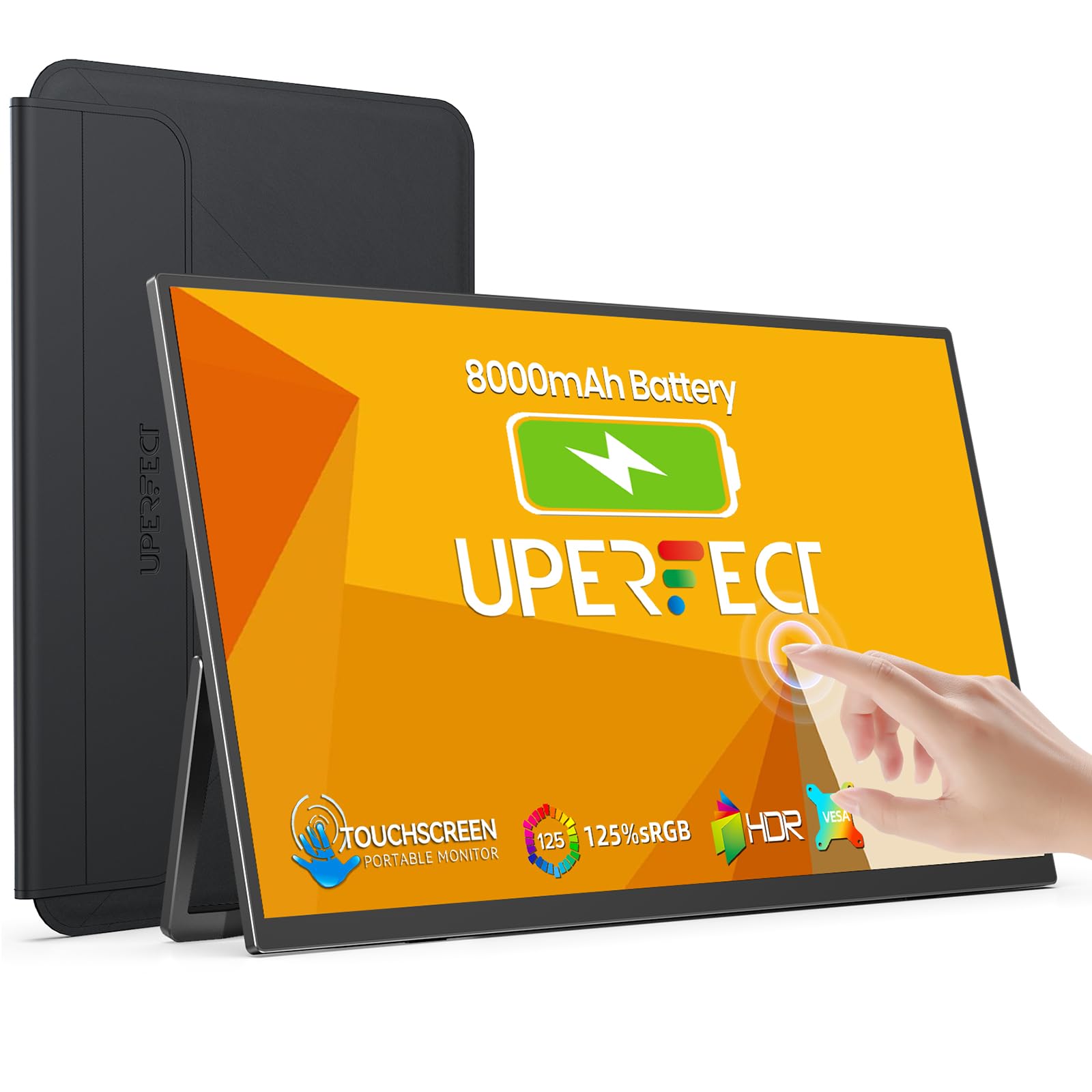 8.0 / 10
UPERFECT 15.6" Portable Monitor Touchscreen w/8000mAh Rechargeable Battery
£159.99 · UPERFECT · Details
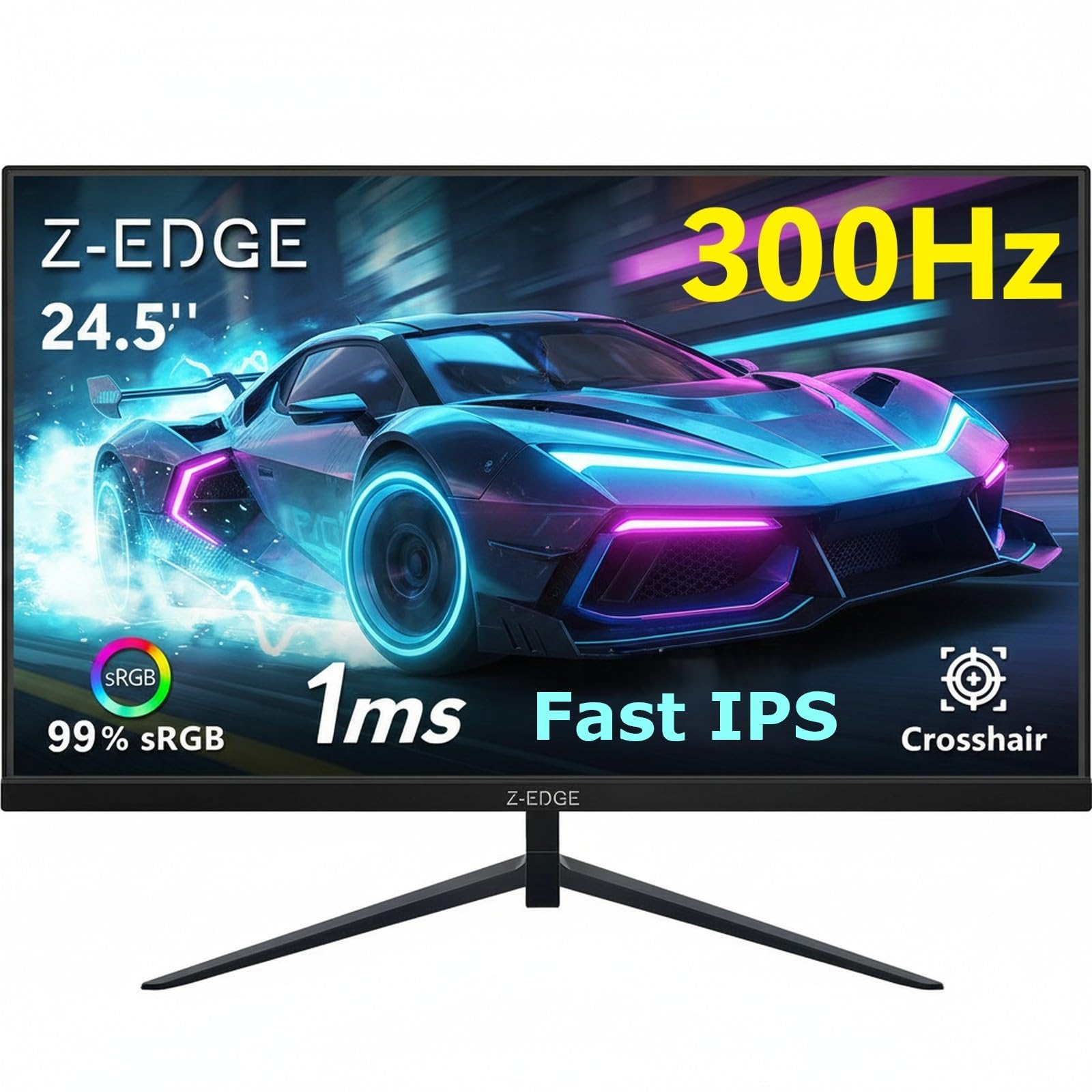 7.5 / 10
Z-Edge 24.5 Inch Gaming Monitor 300Hz 240Hz 1ms IPS 1080P 99% sRGB DP HDMI
£119.99 · Z Z-Edge · Details
Frequently asked
5 questions01Is the AOC Gaming C27G4ZXED - 27 inch FHD curved monitor, 280 Hz, 1ms, HDR10, FreeSync Premium (1920x1080, HDMI, DisplayPort) black/gray good for gaming?+
Yes, for most gaming use cases it's excellent value. The 280Hz refresh rate is the headline spec and it's legitimate, making a real difference in competitive titles like CS2 and Valorant where frame rates can hit the ceiling at 1080p. FreeSync Premium with LFC support means adaptive sync works smoothly across a wide frame rate range. The main caveat is VA panel ghosting in dark game environments, which can be visible in horror games or titles with lots of dark scenes. For well-lit competitive games, it's a strong performer at the budget price point.
02Does the AOC Gaming C27G4ZXED - 27 inch FHD curved monitor, 280 Hz, 1ms, HDR10, FreeSync Premium (1920x1080, HDMI, DisplayPort) black/gray have good HDR?+
Not really, in the transformative sense. It supports HDR10 as a signal standard, meaning it can accept HDR content from games and consoles without needing a mode switch. But at 300 cd/m2 peak brightness and without local dimming, the actual HDR impact is modest. The VESA DisplayHDR 400 certification (the entry-level tier) requires 400 cd/m2, and this monitor sits below that. What it does have is a 3000:1 native contrast ratio, which gives genuinely deep blacks in SDR mode. That's more practically useful for most gaming than checkbox HDR support.
03Is the AOC Gaming C27G4ZXED - 27 inch FHD curved monitor, 280 Hz, 1ms, HDR10, FreeSync Premium (1920x1080, HDMI, DisplayPort) black/gray good for content creation?+
Not as a primary tool for professional colour work. AOC doesn't publish sRGB or DCI-P3 coverage figures, and the factory calibration at this price tier won't produce tight Delta-E figures out of the box. The VA panel also has colour shift off-axis. For casual photo browsing or light editing alongside gaming, it's perfectly acceptable. For serious photo editing, video grading, or any work where colour accuracy matters, you'd want a calibrated IPS panel with published colour coverage specifications.
04What graphics card do I need for the AOC Gaming C27G4ZXED - 27 inch FHD curved monitor, 280 Hz, 1ms, HDR10, FreeSync Premium (1920x1080, HDMI, DisplayPort) black/gray?+
The good news about 1080p is that it's relatively easy to drive at high frame rates. To make use of the 280Hz refresh rate in competitive titles, an Nvidia RTX 3060 or AMD RX 6600 XT or better is a sensible starting point. In games like CS2 or Valorant, even mid-range cards can push well above 200fps at 1080p with settings optimised. For more demanding titles, aim for an RTX 4060 or RX 7600 to consistently hit the 200fps to 280fps range. The FreeSync Premium adaptive sync means the monitor performs well even when frame rates fluctuate, so you don't need to hit 280fps constantly to benefit from the high refresh rate.
05What warranty and returns apply to the AOC Gaming C27G4ZXED - 27 inch FHD curved monitor, 280 Hz, 1ms, HDR10, FreeSync Premium (1920x1080, HDMI, DisplayPort) black/gray?+
Amazon offers 30-day returns on most items, which is helpful for checking for dead pixels or backlight uniformity issues straight out of the box. AOC typically provides a 3-year warranty on their monitors, which is standard for the industry and covers manufacturing defects. You're also covered by Amazon's A-to-Z guarantee for purchase protection. It's worth checking AOC's UK warranty terms directly for the specifics of their dead pixel policy, as manufacturers vary on how many dead pixels constitute a warranty claim.