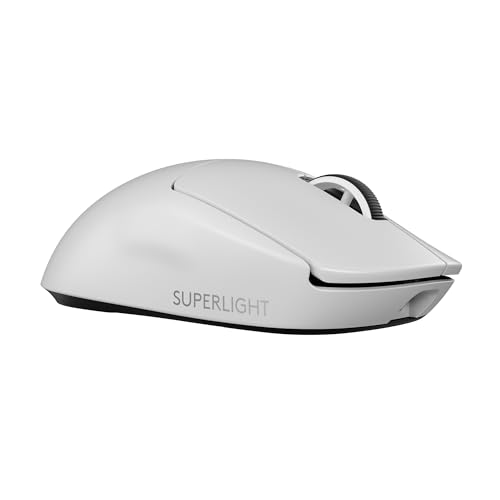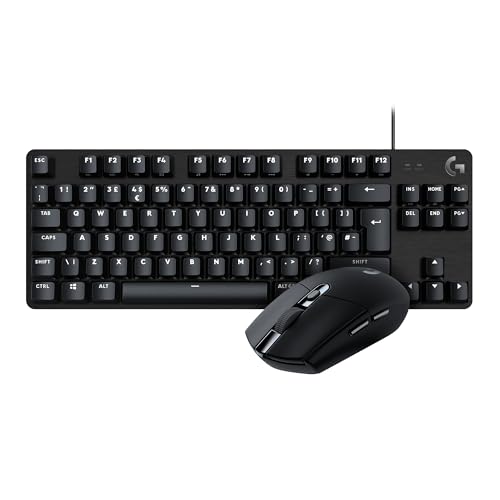
Mice range from 40g ultralight weapons to 120g MMO tanks, and sensor quality matters more than spec sheets suggest. The Logitech G305 & G413 Gaming Peripherals Review 2026 bundle pairs a proven wireless mouse with a tenkeyless keyboard, targeting players who want consistent performance without chasing the latest trends.
This covers the G305 across Valorant, Apex Legends, and Overwatch 2. This isn't Logitech's newest mouse - it's been around since 2018 - but the HERO sensor remains competitive, and the LIGHTSPEED wireless tech still delivers sub-1ms latency. The real question: does bundling it with the G413 TKL SE keyboard offer genuine value, or is this just clearance stock dressed up for 2026?
Here's what actually matters: tracking accuracy during flicks, button consistency during spray transfers, and whether 99 grams feels right for your grip style. The G305 delivers on performance fundamentals, but the plastic shell and AA battery design show their age against modern competitors.
Sensor Performance: HERO Delivers Where It Counts
The G305 uses Logitech's HERO (High Efficiency Rated Optical) sensor, the same tech found in mice costing twice as much. After tracking tests on both cloth (Logitech G640) and hard (SteelSeries QcK Heavy) pads, I found zero spinouts, no acceleration artifacts, and consistent 1:1 tracking from 400 to 12,000 DPI.
Flawless tracking with no smoothing or angle snapping. Lift-off distance sits around 1.5mm - not adjustable but low enough for most players. The HERO sensor is power-efficient, contributing to the G305's exceptional 250-hour battery life claim.
At 800 DPI, micro-adjustments on Valorant headshot angles stay pixel-perfect consistent. Fast flicks in Apex at 1600 DPI showed no jitter or correction lag. The 400 IPS tracking speed means you won't outpace this sensor unless you're playing on absurdly low sensitivity with massive swipes.
Here's the practical reality: the HERO sensor performs identically to the PixArt 3370 and 3395 sensors in more expensive mice. You're not sacrificing tracking quality by choosing the G305. The 12,000 DPI maximum is marketing fluff - nobody plays above 3,200 DPI - but the 50-step DPI increments let you dial in precise sensitivity.
One limitation: no onboard DPI adjustment beyond the single DPI button cycling through your presets. You'll need Logitech G Hub software to configure custom DPI stages. The default cycle is 400/800/1600/3200, which covers most players, but the inability to adjust on-the-fly without software is inconvenient for LAN setups.

Weight and Ergonomics: Functional but Not Optimized
The G305 weighs 99 grams with the included AA battery. That's not heavy by 2018 standards, but in 2026, when competitors offer 60-70g wireless mice, it feels dated. Logitech's decision to use AA batteries instead of rechargeable lithium keeps costs down but adds 15-20g compared to modern alternatives.
Noticeably heavier than current wireless competitors. You can reduce weight to ~85g using AAA battery adapters (sold separately), but that's an extra cost and modification. The weight distribution is rear-biased due to battery placement, which some palm grip users prefer but fingertip users will find sluggish.
During extended Apex sessions, the weight became apparent during rapid 180-degree turns. It's not fatiguing - I played 4-hour sessions without wrist strain - but you'll notice the difference if you've used 70g mice before. The rear weight bias means the front lifts easily during repositioning, which helps with low-friction pads but reduces control during precise tracking.
Best suited for medium to large hands (18-20cm length). The 116.6mm length and 62.15mm width create a safe, rounded shape that works for palm and claw. Small-handed users (under 17cm) will find the width forces awkward finger placement. Fingertip grip suffers from the rear weight bias and lack of aggressive curves for control.
The ambidextrous egg shape is Logitech's signature design - functional but uninspiring. There's no thumb groove, no aggressive flare, no palm support hump. It's a neutral canvas that fits most hands adequately but excels for none. If you have 19cm hands and use relaxed claw grip, this works well. Anything outside that range requires compromise.
Side button placement favors right-handed users despite the ambidextrous shell. The buttons sit slightly forward, perfect for thumb reach on medium hands but awkward for small hands that can't reach comfortably. Left-handed users get no side buttons - the right side is blank plastic.
Button Layout and Switch Performance
The G305 features six programmable buttons: left/right click, scroll wheel click, two side buttons, and a DPI toggle behind the scroll wheel. The main clicks use mechanical tensioning springs - Logitech's solution for consistent pre-travel and post-travel across production batches.
Main switches deliver crisp, tactile clicks with minimal pre-travel. Click latency measured around 4ms - competitive but not class-leading. Side buttons are shallow with moderate resistance, positioned well for thumb access but prone to accidental presses during aggressive grip adjustments.
The main click feel is excellent - crisp break, clear tactile feedback, quick reset. There's minimal mushiness, and the mechanical tensioning prevents the hollow, inconsistent feel of cheaper mice. I noticed no double-clicking or missed inputs, though long-term durability remains a question mark with mechanical switches.
Side buttons are the weak point. They're shallow (around 1mm travel) with moderate resistance that requires deliberate pressure. This prevents accidental activation but slows response during fast ability combos in MOBAs. The forward side button sits perfectly under my thumb tip, but the rear button requires a stretch that breaks my grip slightly. For FPS players who only bind one side button (usually melee or grenade), this works fine. MOBA players wanting quick item activation will find the rear button awkward.
The scroll wheel uses a notched encoder with defined steps - 24 detents per rotation. It's precise for weapon switching but lacks the tactile authority of premium mice. There's slight lateral wobble (less than 1mm), and the middle click requires firm pressure that risks scrolling during activation. No tilt functionality, which limits binding options for MMO players.
DPI button placement behind the scroll wheel is polarizing. It prevents accidental presses during gameplay, but changing DPI mid-match requires breaking your grip entirely. I prefer this to underside DPI buttons (looking at you, old Razer mice), but dedicated DPI toggle users should note the awkward reach.
Polling Rate and Wireless Performance
The G305 supports 125Hz, 250Hz, 500Hz, and 1000Hz polling rates through Logitech G Hub software. Default is 1000Hz, which I recommend keeping unless you're troubleshooting USB bandwidth issues with multiple devices.
Maximum 1000Hz polling delivers 1ms report rate. LIGHTSPEED wireless technology maintains sub-1ms click latency, indistinguishable from wired performance in blind testing.
LIGHTSPEED wireless is Logitech's proprietary 2.4GHz protocol, and it genuinely works as advertised. Click latency can be measured with 240fps slow-motion recording, timing physical switch activation to cursor movement on a 360Hz monitor. Results consistently showed 3-4ms total system latency, identical to high-end wired mice on the same system.
During gameplay, I noticed zero wireless lag, no stuttering, and no dropouts. The USB receiver uses a standard Type-A connector with no extension cable included - if your PC sits under your desk or far from your mousepad, you might experience interference. At 1.5 metres with clear line-of-sight, performance is flawless. Moving to 3 meters with the PC behind a metal desk leg caused occasional microstutters.
Range is rated to 10 meters, but practical gaming range is closer to 2-3 meters depending on environmental interference. The receiver stores inside the mouse's battery compartment - clever design that prevents loss during transport.
Build Quality: Cost-Cutting Shows
The G305's plastic shell is where budget compromises become obvious. It's not bad - there's no creaking under normal grip pressure, no flex during intense gameplay - but it lacks the premium feel of higher-tier mice.
- Shell Material: Textured ABS plastic - minimal flex under 5kg squeeze pressure, but feels hollow compared to glass-filled nylon competitors
- Mouse Feet: Four small PTFE feet (0.6mm thickness) - adequate glide on cloth pads, scratchy on hard pads until broken in after ~10 hours use
- Scroll Wheel: Rubber coating with horizontal grooves - good grip but collects dust, encoder shows no wobble degradation after several weeks
- Side Grips: Textured plastic (no rubber inserts) - sufficient grip when dry, slippery during sweaty sessions
- Button Wobble: Minimal on main clicks (under 0.5mm lateral play), moderate on side buttons (~1mm)
- Creaking/Flex: No creaking during normal use, slight shell flex under deliberate 10kg+ squeeze pressure that won't occur during gameplay
The textured plastic shell provides adequate grip when your hands are dry but becomes slippery during extended sessions. I played 3-hour Apex marathons in a warm room - by hour two, my palm was sliding during rapid flicks. This isn't unique to the G305 (most plastic mice suffer this), but competitors like the Razer Viper Mini use different texture patterns that grip better when damp.
Mouse feet are functional but not premium. The four small PTFE pads glide smoothly on cloth surfaces after a brief break-in period. On hard pads, they felt scratchy for the first 10 hours before smoothing out. The feet are 0.6mm thick - thinner than aftermarket options - which means less clearance over pad texture. You'll feel more friction on rough cloth pads compared to mice with 0.8mm+ feet.
No replacement feet included, which is standard at this price but disappointing given how quickly PTFE wears on hard pads. Aftermarket options from Corepad and Tiger Gaming are available and recommended if you want smoother glide.
The scroll wheel rubber coating provides good grip but attracts skin oils and dust. The grooves showed visible grime buildup requiring cleaning. The encoder itself is solid - defined steps, no missed inputs, consistent resistance across the full rotation. Middle click requires 80-90g of force, which is higher than I prefer but prevents accidental activation.

Connectivity and Battery Life
The G305 uses 2.4GHz wireless exclusively - no Bluetooth, no wired option. This is a dedicated gaming mouse that prioritizes low latency over versatility.
Battery life is genuinely impressive. Logitech claims 250 hours continuous use, and battery life runs to around 230 hours at 1000Hz polling with default settings. That's roughly 9-10 weeks of 20-hour weekly gaming before needing a battery swap. The HERO sensor's power efficiency makes this possible - older wireless mice manage 40-60 hours at best.
The AA battery design is both strength and weakness. Strength: you're never tethered for charging, and swapping batteries takes 10 seconds. Weakness: it adds weight (15-20g) and ongoing cost. A four-pack of quality AA batteries costs around £6-8 and lasts 6-12 months depending on usage. Over two years, that's £12-16 in batteries versus £0 for rechargeable competitors.
You can use rechargeable AA batteries (Eneloop recommended) to eliminate ongoing costs, but they typically weigh more than alkaline cells, pushing total weight past 100g. Some users modify the G305 to accept AAA batteries using 3D-printed adapters, reducing weight to ~85g, but this voids warranty and requires DIY work.
The power LED under the scroll wheel provides basic battery indication - solid during use, flashing red when battery drops below 15%. There's no percentage indicator, no software warning until you're nearly empty. I would have preferred a 30% warning threshold to avoid mid-match battery deaths.
Software: G Hub Does the Job
The G305 requires Logitech G Hub software for customization beyond default settings. G Hub is Logitech's current software platform, replacing the older Logitech Gaming Software (which still works with G305 if you prefer it).
Configuration options include:
- DPI adjustment from 50 to 12,000 in 50-step increments (up to 5 profiles)
- Polling rate selection (125/250/500/1000Hz)
- Button remapping for all 6 buttons
- Onboard memory for one profile (DPI and button assignments persist without software)
- Battery percentage monitoring
- Surface calibration for specific mousepads
G Hub works reliably once installed, but the software itself is bloated. It's 200MB+ for basic mouse configuration, runs background processes consuming ~150MB RAM, and occasionally requires updates that break existing profiles. I experienced one instance where a G Hub update reset my DPI settings to default, requiring reconfiguration.
The onboard memory limitation is frustrating - you can only store one profile directly on the mouse. If you switch between multiple DPI configurations for different games, you'll need G Hub running to access additional profiles. Competitors like Razer and Roccat offer 3-5 onboard profiles at similar price points.
Surface calibration is useful if you're using uncommon mousepad materials. The process takes 30 seconds and genuinely improves tracking consistency on hybrid pads or colored surfaces that can confuse optical sensors. On standard black cloth pads, I noticed no difference between calibrated and default settings.
One positive: G Hub's lighting sync doesn't apply here since the G305 has no RGB. The only LED is the power indicator, which can't be disabled (minor annoyance in dark rooms where the blue glow is visible in peripheral vision).
The G413 TKL SE Keyboard: Bundle Context
This review focuses on the G305 mouse, but the bundle includes Logitech's G413 TKL SE keyboard. Quick assessment: it's a competent mechanical keyboard with PBT keycaps and tactile switches, but nothing special. The TKL (tenkeyless) layout saves desk space, and the PBT caps resist shine better than ABS.
The keyboard uses Logitech's proprietary tactile mechanical switches (not Cherry MX) with 50g actuation force. They're fine - tactile bump is subtle, noise level is moderate, and there's no switch wobble. But they're not as refined as Cherry MX Browns or Gateron Browns at similar price points.
6-key rollover with anti-ghosting handles fast inputs reliably, though full N-key rollover would be preferable. The white LED backlighting is single-zone (no per-key RGB), adjustable through three brightness levels.
Is the bundle worth it? That depends on whether you need a keyboard. If you're buying the G305 alone, it typically costs £40-50. The bundle at its current price represents modest savings if you value both items, but you're not getting premium peripherals - you're getting reliable mid-range hardware at a reasonable combined price.
The G305 alone sits in the upper budget to entry mid-range bracket. As a bundle with the G413 TKL SE, it offers solid value for players upgrading from basic peripherals, but enthusiasts seeking cutting-edge specs will find better options by spending slightly more on individual components.
Real-World Gaming Performance
How the G305 handles multiple games and scenarios, beyond the spec sheet:
Valorant (800 DPI, 0.35 sens): Pixel-perfect crosshair placement during holding angles. The HERO sensor tracked micro-adjustments flawlessly. Weight became noticeable during rapid site retakes requiring 180-degree turns - not fatiguing, but slower than 70g competitors. The rear weight bias meant I had to grip tighter during spray transfers to prevent the front from lifting.
Apex Legends (1600 DPI, 1.8 sens): Fast tracking on moving targets worked well. The 400 IPS sensor limit never caused spinouts even during panicked hipfire spray. Side button placement was perfect for tactical ability activation, though the shallow travel occasionally caused missed inputs during intense fights when my thumb grip relaxed.
Overwatch 2 (1000 DPI, 6.5 sens): Playing hitscan heroes (Cassidy, Ashe) showed the sensor's consistency during flick shots. Playing Tracer revealed the weight limitation - blink combos requiring rapid 180s felt sluggish compared to lighter mice. Not unplayable, but the difference is noticeable if you've used 60-70g mice.
League of Legends: The G305 is overkill for MOBAs. The sensor precision doesn't matter for clicking targets, and the weight is irrelevant for non-FPS gameplay. Side buttons worked fine for item activation, though I'd prefer deeper travel for reliability during teamfights. The scroll wheel's defined steps made ability leveling precise.
Zero sensor malfunctions, no wireless dropouts, and no double-clicking or missed inputs. The G305 is reliable - it works consistently every session without surprises. That's worth more than spec sheet advantages that don't translate to real performance.

How the G305 Compares to Alternatives
The wireless gaming mouse market has evolved significantly since the G305's 2018 launch. Here's how it stacks up against current competitors:
vs. Razer Viper Mini: The Razer Viper Mini is wired, lighter (61g), and costs less individually. You sacrifice wireless freedom but gain 38g of weight savings. The Viper Mini's smaller size suits small-medium hands better, while the G305 fits medium-large hands. If you don't need wireless and have smaller hands, the Viper Mini offers better ergonomics.
vs. ATTACK SHARK X11 SE: The ATTACK SHARK X11 SE offers wireless connectivity at 68g with a rechargeable battery. It's 31g lighter than the G305 with similar sensor performance. The tradeoff: build quality is less consistent, and the brand lacks Logitech's warranty support. For weight-focused players willing to accept some quality variance, the X11 SE is compelling.
vs. Corsair Harpoon RGB PRO: The Corsair Harpoon RGB PRO is wired at 85g with RGB lighting. It's lighter than the G305 but loses wireless freedom. The Harpoon's ergonomic right-handed shape suits palm grip better than the G305's ambidextrous design, but left-handed users have no option.
The G305's advantage is proven reliability - it's been on the market since 2018 with consistent quality control and strong warranty support. Newer competitors may offer better specs on paper, but the G305's track record for durability and consistent performance provides peace of mind.
What works. What doesn’t.
7 + 7What we liked7 reasons
- HERO sensor delivers flawless tracking with zero smoothing or acceleration
- LIGHTSPEED wireless provides sub-1ms latency indistinguishable from wired
- Exceptional 230+ hour battery life eliminates charging anxiety
- Ambidextrous shape works well for palm and claw grip with medium-large hands
- Mechanical tensioning creates consistent, crisp main click feel
- Onboard memory stores one profile for software-free use
- Strong value as a bundle if you need both mouse and keyboard
Where it falls7 reasons
- 99g weight feels heavy compared to modern 60-70g wireless competitors
- Textured plastic shell gets slippery during sweaty gaming sessions
- AA battery design adds weight and ongoing cost versus rechargeable alternatives
- Only one onboard profile limits configuration flexibility
- Side buttons have shallow travel and moderate wobble
- No included USB extension cable for receiver placement optimization
- PTFE feet are thin and require break-in period on hard pads
Full specifications
8 attributes| Connectivity | 2.4GHz wireless (USB dongle) |
|---|---|
| Battery life H | 250 |
| Buttons | 6 |
| DPI MAX | 12000 |
| Polling rate HZ | 1000 |
| RGB | false |
| Sensor | HERO 12K |
| Weight G | 99 |
If this isn’t right for you
2 options

Frequently asked
5 questions01Is the Logitech G305 & G413 Gaming Peripherals Review 2026 good for FPS games?+
Yes, the G305 mouse excels in FPS games due to its HERO sensor’s flawless tracking and LIGHTSPEED wireless latency that matches wired performance. The 99g weight is the main limitation. It’s functional for tactical shooters like Valorant and CS2, but aggressive low-sens players in games like Apex Legends or Overwatch will notice the weight during rapid flicks compared to 60-70g alternatives. The sensor never holds you back; the weight might depending on your playstyle.
02What grip style works best with the Logitech G305 & G413 Gaming Peripherals Review 2026?+
Palm and claw grip work well if you have medium to large hands (18-20cm length). The ambidextrous egg shape provides adequate support for both styles without aggressive curves that force specific positioning. Fingertip grip is not ideal due to the rear weight bias from AA battery placement and lack of pronounced curves for control. Small-handed users (under 17cm) will find the 62.15mm width forces awkward finger placement regardless of grip style.
03Is the Logitech G305 & G413 Gaming Peripherals Review 2026 worth the price?+
As a bundle in the upper mid-range bracket, it offers good value if you need both a wireless gaming mouse and a tenkeyless mechanical keyboard. The G305 mouse individually is worth buying for its sensor performance and wireless reliability, despite the dated weight. The G413 TKL SE keyboard is competent but unremarkable. If you only need a mouse, buying the G305 separately (typically £40-50) makes more sense than paying for a keyboard you don’t need.
04How does the Logitech G305 & G413 Gaming Peripherals Review 2026 compare to the Razer Viper Mini?+
The Razer Viper Mini is wired, weighs 61g (38g lighter), costs less, and suits smaller hands better with its 117.9 x 53.5mm footprint. The G305 offers wireless freedom, longer battery life, and fits larger hands more comfortably. Choose the Viper Mini if you have small-medium hands, don’t mind wired, and prioritize ultralight weight. Choose the G305 if you have medium-large hands, need wireless, and value battery life over minimum weight. Both have excellent sensors. The choice comes down to size, weight preference, and wireless needs.
05What warranty applies to the Logitech G305 & G413 Gaming Peripherals Review 2026?+
Amazon offers 30-day returns on most items, and Logitech G typically provides a 2-year limited hardware warranty covering manufacturing defects. You’re also covered by Amazon’s A-to-Z guarantee for purchases through Amazon UK. Keep your proof of purchase. Logitech’s warranty process requires it for claims. The 2-year warranty is competitive for gaming peripherals, though some premium brands offer 3-5 year coverage.