That "AC1200" badge on the front of the box? It's a maths problem, not a promise. You take the 300Mbps theoretical ceiling on the 2.4GHz band, add the 867Mbps theoretical ceiling on the 5GHz band, and you get 1,167Mbps, which someone's rounded up and slapped on the packaging. Neither number is what your laptop will see at the far end of the landing, through a plasterboard wall and a loft hatch. What actually matters is how much usable throughput survives that journey, and whether the router holds it together when the whole house is online at once.
So: the Linksys EA6100. It's an older AC (Wi-Fi 5) dual-band router, sitting at the budget-to-mid end of the market, and it's aimed squarely at people who've had enough of their ISP-supplied box and want something they can actually configure. The Smart Wi-Fi app angle is the main pitch here, letting you manage the network remotely. That sounds good. The question is whether the underlying hardware and software can back it up, or whether this is just a slightly nicer version of the plastic box your broadband provider already gave you for free. With hundreds of owner reviews and a positive overall rating, there's real-world signal here to work with. Let's see what it actually tells us.
The honest verdict, before anything else: the EA6100 is a decent, no-drama router for small homes and light users, but it's showing its age in ways that matter. If your household has more than a dozen connected devices, or you're regularly pushing 4K streams and large downloads simultaneously, you'll feel the ceiling. For a first-step upgrade from an ISP router in a flat or a small two-bed, though, it does the job without making you read a manual the size of a paperback.
Core Specifications: What You're Actually Buying
The EA6100 is a Wi-Fi 5 (802.11ac) dual-band router. That means it operates on two radio frequencies simultaneously: 2.4GHz, which is slower but travels further and punches through walls more willingly, and 5GHz, which is faster but shorter-ranged and less tolerant of obstacles. The 2.4GHz band tops out at 300Mbps (theoretical, N300 spec), and the 5GHz band tops out at 867Mbps (theoretical, AC867 spec). Add those together and you get the AC1200 headline. Real-world throughput on either band will be considerably lower, particularly at range or under load.
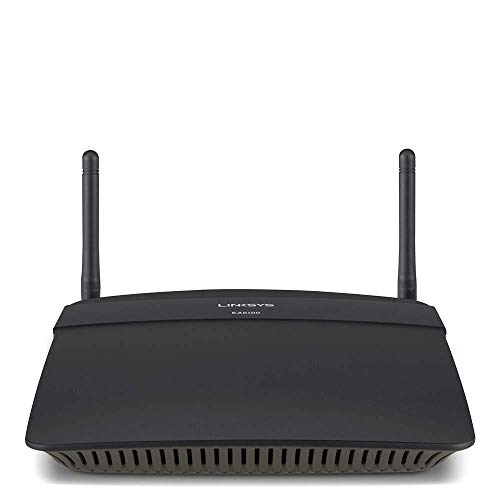
The physical design is fairly standard for the era: a compact rectangular unit with two external antennas. Linksys rates it for coverage up to around 1,000 square feet (roughly 93 square metres), which puts it in small-flat or small-house territory. The port layout is functional rather than generous: four 10/100/1000 Mbps LAN ports and one 10/100 Mbps WAN port. Note that WAN port speed. It's 10/100 Fast Ethernet, not Gigabit. If your broadband connection delivers more than 100Mbps, that WAN port becomes the bottleneck before your Wi-Fi even gets involved. That's a meaningful limitation worth understanding before you buy.
There's no USB port on the EA6100, so no NAS functionality, no USB printer sharing, nothing like that. It connects to Linksys's Smart Wi-Fi cloud platform, which is what enables the remote management app. Setup is handled through either the app or a browser-based interface. MU-MIMO (Multi-User, Multiple Input Multiple Output, which allows the router to talk to several devices simultaneously rather than queuing them) is not present on this model. That's relevant when you're looking at device capacity, which we'll get to shortly.
| Specification | Detail |
|---|---|
| Wi-Fi Standard | Wi-Fi 5 (802.11ac) |
| Band Layout | Dual-band (2.4GHz + 5GHz) |
| Max Theoretical Speed (2.4GHz) | 300Mbps (802.11n) |
| Max Theoretical Speed (5GHz) | 867Mbps (802.11ac) |
| Combined Theoretical Speed | 1,167Mbps (marketed as AC1200) |
| Antennas | 2 external antennas |
| LAN Ports | 4 x Gigabit Ethernet (10/100/1000) |
| WAN Port | 1 x Fast Ethernet (10/100 Mbps) |
| USB | None |
| MU-MIMO | No |
| OFDMA | No (Wi-Fi 5 feature set) |
| App Management | Yes (Linksys Smart Wi-Fi) |
| Coverage Rating | Up to ~1,000 sq ft (manufacturer estimate) |
| Price | £101.46 · Details |
Real-World Coverage: What Owners Actually Report
Linksys quotes around 1,000 square feet of coverage, which sounds reasonable until you remember that figure assumes open-plan, minimal-obstruction conditions. Real homes have walls, floors, kitchen appliances, neighbouring Wi-Fi networks competing for the same channels, and the occasional thick Victorian brick wall that eats signal for breakfast. The manufacturer's coverage estimate is always a ceiling, not a guarantee. That said, for a flat or a small terraced house, the EA6100 generally delivers what it promises, according to the pattern in owner reviews.
Owners in flats and small two-bed houses consistently report solid coverage throughout the space, with the 5GHz band working well in the same room or adjacent rooms and the 2.4GHz band reaching further but at reduced speeds. The picture gets murkier in larger properties. Three-bed semis with thick partition walls, or any home where the router can't be centrally placed, generate more complaints about dead zones upstairs or at the back of the house. That's not unique to this router, it's physics, but the EA6100's two-antenna configuration and Wi-Fi 5 radio set means it has less headroom to fight back against a difficult layout than a modern Wi-Fi 6 router with beamforming would.
A meaningful subset of owners specifically mention that range on the 5GHz band is noticeably shorter than they expected, which is accurate to the spec. 5GHz is always the shorter-range band; the trade-off for speed is penetration. If your main use case is getting a fast connection in the room where the router lives, or the room next door, 5GHz will serve you well. If you need coverage across two floors or at the end of a long house, you're going to lean on 2.4GHz more heavily, and that band's 300Mbps ceiling will show itself. For most small-home scenarios, owners report it's fine. For anything bigger, it's not the tool for the job.
Sustained Speed Under Load: The Gap Between the Box and Reality
The AC1200 headline is, as established, a theoretical maximum that nobody's devices will hit in normal use. The more useful question is what sustained throughput looks like when the network is actually busy. On the 5GHz band, real-world throughput in good conditions (close range, clear line of sight) is typically in the 200 to 400Mbps range for Wi-Fi 5 hardware of this class. Move further away, add walls, or put more devices on the network, and that number drops. The 2.4GHz band in real use tends to land somewhere between 50 and 150Mbps depending on interference and distance.
The more pressing bottleneck, though, is that 100Mbps WAN port. If your broadband package delivers 200Mbps, 300Mbps, or more (which is increasingly common with FTTP connections across the UK), the EA6100 physically cannot pass more than 100Mbps to your devices. The WAN port is the pipe through which all your internet traffic flows, and it maxes out at 100Mbps. Your internal network speeds between wired devices are fine (those LAN ports are Gigabit), but your internet speeds are capped. This is a genuine, hardware-level limitation that no firmware update will fix, and it's the single biggest reason to think carefully before buying this router if your broadband is fast.
Owner reviews reflect this. People on ADSL or older VDSL connections (where the broadband speed is under 100Mbps anyway) report perfectly happy experiences. People who've upgraded to faster fibre and then noticed their speeds haven't improved are less thrilled, and some have worked out why, others haven't. The router itself isn't slow in any pathological sense. It handles streaming, browsing, and light gaming without drama for small households. But it has a hard ceiling, and if your broadband already exceeds it, you're paying for hardware that's holding you back.
Mesh and Backhaul: This Isn't a Mesh System
To be clear upfront: the EA6100 is a single router, not a mesh networking system. There's no satellite node, no dedicated backhaul band, no whole-home mesh topology here. If you need to cover a large property with consistent Wi-Fi across multiple floors or outbuildings, this router on its own won't do it, and it's not designed to. You'd need either a separate range extender, a powerline adapter kit, or a proper mesh system like the Linksys Velop range or similar from other brands.
What the EA6100 does offer is the ability to place it as the central router in a network, and it can technically work alongside a range extender if you add one separately. But that's not mesh. A Wi-Fi extender creates a separate network or repeats the signal with an associated throughput penalty (typically halving the available bandwidth on the band it's extending on). It's a different, less elegant solution than a proper mesh system with a dedicated backhaul band keeping the nodes talking to each other without eating into your usable client bandwidth.
The distinction matters because "mesh" has become a marketing term that gets applied loosely, and some buyers come to a router like this expecting whole-home coverage from a single box. The EA6100 is a capable single-point router for the space it can cover. Beyond that space, you need more hardware. If you're already looking at adding an extender to make it reach the whole house, it's worth doing the maths on whether a two-node mesh system from the start would be a cleaner, more reliable solution. For a small flat where one router is genuinely enough, the mesh question is irrelevant and the EA6100 is fine.
Device Capacity: How Many Devices Before It Struggles?
The EA6100 does not support MU-MIMO. In plain English: MU-MIMO (Multi-User, Multiple Input Multiple Output) lets a router talk to several devices at the same time, rather than cycling through them one at a time. Without it, the router serves devices sequentially, which is fine when you have a handful of clients but starts to introduce latency and throughput drops as the device count climbs. The average UK home in 2024 has somewhere between 10 and 25 connected devices, depending on how enthusiastically the household has adopted smart home kit. Phones, laptops, tablets, smart TVs, streaming sticks, games consoles, smart speakers, thermostats, doorbells, plugs, bulbs. It adds up fast.
For a household with under a dozen active devices, the EA6100 handles the load without obvious drama. Owner reviews from smaller households are mostly positive about stability and day-to-day performance. But the pattern shifts when you look at reviews from people with busier networks. More simultaneous streams, more IoT devices, teenagers with consoles and phones all active at once, and the cracks start to show. Throughput per device drops, latency creeps up, and the occasional drop or slowdown appears. That's not a bug, it's the architecture. A single-radio-chain, non-MU-MIMO router from the Wi-Fi 5 era has a finite capacity, and modern homes push against it.
There's also no OFDMA here, which is a Wi-Fi 6 feature that lets the router divide each channel into smaller resource units and serve multiple devices more efficiently. The EA6100 predates this entirely. For a light user with a small device count, none of this matters. For anyone building out a smart home, or anyone with a family of four all doing different things online simultaneously, the lack of MU-MIMO and OFDMA is a real constraint. The router will cope, but it won't cope gracefully under that kind of pressure the way a more modern chipset would.
Wi-Fi Standard and Future-Proofing: Honest Talk About AC
The EA6100 runs Wi-Fi 5 (802.11ac), which was the mainstream standard for most of the 2010s and is still perfectly functional for a lot of use cases. The jump to Wi-Fi 6 (802.11ax) brought MU-MIMO improvements, OFDMA, better performance in congested environments, and improved battery efficiency for connected devices. Wi-Fi 6E extended that into the 6GHz band. And Wi-Fi 7 (802.11be) is now arriving in higher-end hardware, with multi-link operation and significantly higher theoretical throughputs. The EA6100 is two full generations behind the current standard.
Does that matter for you specifically? Probably less than the marketing would suggest. Most devices in most homes are not the bottleneck; the broadband connection is. If your internet connection is 50 to 80Mbps, a Wi-Fi 5 router can deliver that to your devices without breaking a sweat. The EA6100's Wi-Fi 5 radio is not going to be the limiting factor in that scenario. Where Wi-Fi 5's age starts to bite is in the device-capacity and congestion scenarios described above, and in the WAN port limitation already covered. If you're on a fast FTTP connection and you have a busy household, the standard matters. If you're on a slower connection and your household is small, it genuinely doesn't.
Future-proofing is where the age really shows, though. Wi-Fi 5 hardware is not getting better. The EA6100 won't receive new features, its chipset won't be updated to support newer standards, and as devices increasingly expect Wi-Fi 6 capabilities (particularly around power management for battery-powered IoT devices), an older router becomes less optimal over time. It's not broken, it still works, but buying it new in the current market means you're starting from a position that's already behind. For a short-term fix or a secondary router, that's acceptable. As a long-term investment, it's harder to justify when Wi-Fi 6 routers are now available at comparable price points.
Features and QoS: What's Actually Useful Here
The headline feature of the EA6100, beyond the Wi-Fi hardware itself, is the Linksys Smart Wi-Fi platform. This gives you remote access to your router settings via the app or a web portal, which means you can check who's connected, pause internet access for specific devices, and adjust settings without being on the home network. For parents wanting basic parental controls, or anyone who travels and occasionally needs to check on the home network, that remote access is genuinely useful rather than a box-ticking exercise.
QoS (Quality of Service, the feature that lets you prioritise certain types of traffic, so your video call doesn't get murdered by someone downloading a game update) is present in the Linksys Smart Wi-Fi interface, though it's fairly basic by current standards. You can prioritise by device or by application type, which is enough for most households. It's not the granular, per-application control you'd get on a higher-end router, but it covers the common scenarios: gaming, video streaming, video calls. Buffer bloat (the latency spike that happens when the router's queue fills up under heavy load) is a known issue on older consumer routers, and the EA6100 isn't immune to it. Owners on faster connections with heavy simultaneous use do report some latency variability.
Guest network support is present, which is good practice for security. You can run a separate SSID for guests that keeps them off your main network and away from your devices. There's no VPN server built in, so if you want to tunnel into your home network remotely, you're out of luck at the router level, though running a good VPN on your devices still adds a privacy layer on top of this network and keeps you protected on public Wi-Fi when you're away from home. Parental controls through the Smart Wi-Fi platform allow you to set access schedules and filter content by device, which is a useful starting point for families, though it's not as sophisticated as the dedicated parental control suites you'd find on higher-end routers from ASUS or Netgear. For basic use, it works. For anyone wanting detailed content filtering or per-user profiles, it'll feel limited.
Firmware, App and Security Updates: The Uncomfortable Truth
This is where the age of the EA6100 becomes genuinely uncomfortable. The router was released in 2014. That's over a decade ago. Linksys's firmware update history for this model has thinned out considerably, and security patch cadence for hardware this old is not something you should rely on. Home routers are a known attack surface. They sit on the boundary between your home network and the internet, they run 24/7, and if they're running outdated firmware with known vulnerabilities, they're a problem. The Wi-Fi Alliance's security guidance consistently emphasises keeping router firmware current, and for a router this old, "current" is a relative term.
The Linksys Smart Wi-Fi app itself has had a mixed history in owner reviews. The majority of users find it functional for basic tasks: checking connected devices, running a speed test, adjusting settings remotely. But a meaningful number of reviews mention the app being slow to connect, occasionally losing sync with the router, or requiring the router to be rebooted to restore remote access. The reboot question is relevant here: a subset of owners report needing to reboot the EA6100 periodically (weekly to monthly) to clear what seems to be a memory leak or connection-table overflow. It's not universal, but it's frequent enough to be a pattern rather than an outlier.
Linksys as a brand has gone through ownership changes (from Cisco to Belkin, and Belkin was subsequently acquired by Foxconn's Foxconn Interconnect Technology), and long-term firmware support for older models has not always been a priority through those transitions. If you're buying this router and expecting active security maintenance for the next three to five years, that expectation is not well-founded. For a short-term fix or a secondary router on a segregated IoT network, the security posture is less critical. As your primary home router, especially if you're handling sensitive data or have smart home devices on the same network, the firmware situation is worth taking seriously.
Setup and Management: Surprisingly Painless
One area where the EA6100 consistently gets credit in owner reviews is setup. The Linksys Smart Wi-Fi guided setup is genuinely accessible for non-technical users. You plug it in, connect to the default network, open the app or browser interface, and follow the prompts. Most owners report being up and running within 15 minutes, which is about as good as it gets for a home router. There's no requirement to understand what a subnet mask is, no confusing port configuration screens on first boot, just a guided flow that gets the basics sorted.
The web interface (accessible at 192.168.1.1 by default) is more detailed than the app and gives you access to the full feature set, including the more granular QoS settings, DHCP configuration, port forwarding, and DMZ options. It's not the most modern-looking interface, but it's organised logically and doesn't require a networking degree to navigate. For a technical user who wants to dig in, it's adequate. For someone who just wants to set it and forget it, the app covers the day-to-day needs without ever needing to touch the browser interface.
Ongoing management is where the remote access genuinely earns its place. Being able to check what's connected to your network from your phone while you're out, or pause a child's device without being in the same room, is the kind of feature that sounds gimmicky until you actually use it. Owner reviews that mention the app positively tend to focus on exactly these use cases: parental control on the fly, quick checks on network status, the occasional reboot from outside the house. The app isn't perfect (see the firmware section), but for routine management it does what it promises more often than not.
Ports and Connectivity: A Tale of One Bottleneck
The port situation on the EA6100 is clearly because it's the most consequential hardware limitation on this router. The four LAN ports are Gigabit Ethernet (10/100/1000 Mbps), which is perfectly adequate for wired devices. If you've got a desktop PC, a NAS, a smart TV, or a games console connected by cable, those connections will run at up to 1Gbps, which is faster than most broadband connections and fast enough for everything short of a local network file transfer that needs maximum speed.
The WAN port, however, is Fast Ethernet only: 10/100 Mbps. This is the port that connects to your modem or ISP-supplied router, and it caps your internet throughput at 100Mbps regardless of what your broadband can deliver. In 2014 when this router launched, 100Mbps broadband was fast. In 2024, with Openreach's full-fibre rollout accelerating and many UK households on 150Mbps, 300Mbps, or even 900Mbps FTTP connections, a 100Mbps WAN port is a genuine problem. It's not a theoretical concern; it's a hard ceiling on your internet speed that you cannot work around in software.
There's no USB port, so no attached storage, no USB printer sharing, no 4G modem failover. There's no link aggregation support (combining multiple LAN ports for higher throughput to a single device). And there's no 2.5GbE anywhere on the router, which is increasingly common on mid-range hardware. For the era this router was designed in, the port layout was reasonable. By current standards, the WAN port in particular is the single biggest reason to think twice about this purchase if your broadband is faster than 100Mbps.
How It Compares: The Competition Has Moved On
The EA6100 sits in a market that has changed substantially since 2014. The two most relevant comparisons at a similar price point in the current market are the TP-Link Archer AX23 (Wi-Fi 6, dual-band, Gigabit WAN) and the ASUS RT-AX55 (Wi-Fi 6, dual-band, Gigabit WAN). Both are available at prices that overlap with what the EA6100 currently sells for, and both offer a meaningfully more capable platform.
The TP-Link Archer AX23 brings Wi-Fi 6 with OFDMA and MU-MIMO, a Gigabit WAN port, and TP-Link's Tether app, which is generally well-regarded for reliability. The ASUS RT-AX55 adds Wi-Fi 6 with a more capable QoS implementation, ASUS's AiProtection security (powered by Trend Micro), and a track record of longer firmware support than Linksys has managed on older hardware. Both routers handle modern device loads better than the EA6100 by virtue of their Wi-Fi 6 chipsets, and neither has the 100Mbps WAN bottleneck that limits the Linksys.
The EA6100's advantage, if there is one, is simplicity and the Linksys Smart Wi-Fi ecosystem if you're already invested in it. The app is genuinely accessible, and for a user who just wants to replace an ISP router with something that has remote management and basic parental controls, it delivers that without complexity. But on raw capability, future-proofing, security update prospects, and the WAN port situation, the competition has simply moved past it. The honest answer is that the EA6100 is not the best use of money at its current price when Wi-Fi 6 alternatives exist in the same bracket.
| Feature | Linksys EA6100 (AC1200) | TP-Link Archer AX23 (AX1800) | ASUS RT-AX55 (AX1800) |
|---|---|---|---|
| Wi-Fi Standard | Wi-Fi 5 (802.11ac) | Wi-Fi 6 (802.11ax) | Wi-Fi 6 (802.11ax) |
| Band Layout | Dual-band | Dual-band | Dual-band |
| WAN Port Speed | 100Mbps (Fast Ethernet) | 1Gbps (Gigabit) | 1Gbps (Gigabit) |
| LAN Ports | 4 x Gigabit | 4 x Gigabit | 4 x Gigabit |
| MU-MIMO | No | Yes | Yes |
| OFDMA | No | Yes | Yes |
| USB Port | No | No | No |
| App Management | Yes (Linksys Smart Wi-Fi) | Yes (TP-Link Tether) | Yes (ASUS Router app) |
| Security Suite | Basic | HomeCare (basic) | AiProtection (Trend Micro) |
| Approx. Price | £101.46 · Details | Similar bracket | Slightly higher |
Final Verdict: Right Answer, Wrong Decade
The Linksys EA6100 is not a bad router. It's an old one. And in networking, those two things are increasingly hard to separate. For the specific buyer it suits, which is someone on a sub-100Mbps broadband connection, living in a small flat or compact two-bed, with under a dozen devices and no appetite for network configuration, it does the job. Setup is genuinely easy, the Smart Wi-Fi app works well enough for basic remote management, and the positive overall rating across hundreds of owners reflects a real base of satisfied users in exactly those circumstances. It's not a disaster. It's just narrow in who it actually serves well.
The WAN port is the dealbreaker for anyone on fast broadband. If your FTTP connection delivers more than 100Mbps, the EA6100 will cap your internet speed before the Wi-Fi ever gets a chance to be the limiting factor. That's not a minor caveat; it's a fundamental mismatch between the hardware and the broadband infrastructure that much of the UK is now on. Combined with the Wi-Fi 5 chipset's lack of MU-MIMO and OFDMA, the thin firmware update prospects for a decade-old product, and the intermittent reboot requirement that a meaningful number of owners report, the case for buying this new rather than a current-generation alternative is genuinely difficult to make.
Owner reviews ★★★★☆ (4.1) (752 reviews) tell a consistent story: happy in small, simple deployments; frustrating in anything bigger or faster. That's the honest summary. The EA6100 is a product that made sense in 2014 and still makes sense in 2024 only for a very specific, shrinking slice of use cases. For most buyers reading this, there's a better option at a similar price.
The smarter buy at this price point is a current-generation Wi-Fi 6 dual-band router: the TP-Link Archer AX23 is the obvious first look, with a Gigabit WAN port, MU-MIMO, OFDMA, and a well-maintained app, all for a price that overlaps with what the EA6100 currently sells for. You get a router that won't bottleneck your broadband, handles a modern device count more gracefully, and has a better prospect of receiving security updates for the next few years. If you're already on a slow broadband connection and you've found the EA6100 at a price that makes it genuinely cheaper, it'll serve you. But buying it at parity with Wi-Fi 6 alternatives doesn't make sense.
Who should buy it: Sub-100Mbps broadband users, small flats, light device loads, anyone who wants simple setup and basic remote management without spending more.
Who should skip it: Anyone on FTTP or a broadband package delivering over 100Mbps, busy households with 15-plus devices, anyone who needs reliable long-term firmware support, anyone planning to keep this router for more than a couple of years.
Score: 6.5/10. Competent for its era, genuinely limited for the current market. The Linksys Smart Wi-Fi platform is its strongest point. The WAN port is its biggest weakness. Both are hardware facts that no firmware update changes.
What works. What doesn’t.
5 + 5What we liked5 reasons
- Setup is genuinely quick and accessible, with most owners reporting they are connected within 15 minutes using the guided app flow
- The Linksys Smart Wi-Fi platform provides useful remote management, letting you check connected devices, pause access, and adjust settings from outside the home
- Four Gigabit LAN ports deliver fast wired connections for desktops, consoles, and smart TVs without any bottleneck on the local network
- Guest network support is included, keeping visitors off your main network without any complicated configuration
- Solid day-to-day stability for small households on sub-100Mbps broadband, with a positive overall rating across hundreds of owner reviews reflecting genuine satisfaction in the right use case
Where it falls5 reasons
- The WAN port is Fast Ethernet only, capping all internet traffic at 100Mbps regardless of your broadband speed, which is a hard hardware limit no update can fix
- No MU-MIMO means the router queues devices sequentially rather than serving several simultaneously, causing throughput drops and latency creep in busier households
- Firmware update cadence for a router released in 2014 is poor, raising real concerns about ongoing security patches on a device that sits at the boundary of your home network
- No USB port rules out attached storage, printer sharing, or 4G modem failover, features now common even on budget alternatives
- A meaningful subset of owners report needing periodic reboots, suggesting a memory leak or connection-table overflow that has not been resolved in firmware
Full specifications
6 attributes| Antennas | 2 |
|---|---|
| Launch year | 2014 |
| Mesh capable | false |
| TOP speed mbps | 1200 |
| Type | router |
| Wifi standard | Wi-Fi 5 |
If this isn’t right for you
2 options

Frequently asked
7 questions01Will the Linksys EA6100 bottleneck my broadband if I am on a fast fibre connection?+
Yes. The EA6100's WAN port is Fast Ethernet, which means it is physically limited to 100Mbps. If your broadband delivers 150Mbps, 300Mbps, or more, the router will cap your internet speed at 100Mbps regardless of what your ISP provides. This is a hardware limitation that cannot be resolved through firmware or settings changes. If your broadband exceeds 100Mbps, you should consider a router with a Gigabit WAN port instead.
02Does the Linksys EA6100 support mesh networking?+
No. The EA6100 is a single-point router with no mesh functionality, no dedicated backhaul band, and no satellite node support. It can work alongside a separate Wi-Fi range extender, but that is not mesh networking. An extender repeats the signal with an associated throughput penalty and typically creates a separate network. If you need whole-home coverage across multiple floors or a large property, a proper mesh system such as the Linksys Velop or similar would be a more effective solution.
03How many devices can the EA6100 handle before performance drops?+
The EA6100 lacks MU-MIMO, which means it serves connected devices sequentially rather than simultaneously. For households with under a dozen active devices, most owners report stable performance. As the device count climbs beyond that, particularly when several devices are streaming or downloading simultaneously, throughput per device drops and latency increases. If your household has 15 or more connected devices or heavy simultaneous usage from multiple users, a router with MU-MIMO and a Wi-Fi 6 chipset will handle the load considerably more gracefully.
04Is the Linksys Smart Wi-Fi app reliable for remote management?+
For basic tasks it is generally functional. Most owners use it to check connected devices, pause internet access for specific devices, and run occasional speed tests from outside the home. However, a meaningful number of reviews mention the app being slow to connect, occasionally losing sync with the router, or requiring a router reboot to restore remote access. It is not as consistently reliable as the management apps on some newer hardware, but for routine light use it does what it promises more often than not.
05Is the EA6100 still receiving firmware and security updates?+
This is a genuine concern. The router was released in 2014, and firmware update activity for this model has thinned out considerably. Linksys has gone through multiple ownership changes since launch, and long-term support for older hardware has not been consistently maintained through those transitions. If you are planning to use this as your primary home router and you want confidence in ongoing security patching, that expectation is not well-founded for a decade-old product. For a secondary or isolated router role it is less critical, but for a primary router handling sensitive home network traffic it is worth factoring in seriously.
06How does the EA6100 compare to current Wi-Fi 6 routers at a similar price?+
The honest answer is unfavourably on most technical measures. Routers such as the TP-Link Archer AX23 and the ASUS RT-AX55 are available at prices that overlap with the EA6100 and offer Wi-Fi 6 with MU-MIMO, OFDMA, and crucially a Gigabit WAN port. They handle modern device loads better, will not bottleneck broadband connections above 100Mbps, and have a more credible prospect of receiving security updates for the next few years. The EA6100's main advantage over these alternatives is the Linksys Smart Wi-Fi ecosystem and its straightforward setup, but those advantages do not outweigh the hardware gap for most buyers.
07What is the real-world Wi-Fi coverage of the EA6100 in a typical UK home?+
Linksys rates the EA6100 for up to around 1,000 square feet, which is roughly 93 square metres. In practice, owners in flats and small two-bedroom terraced houses generally report adequate coverage throughout the property, with the 5GHz band working well in adjacent rooms and the 2.4GHz band reaching further at lower speeds. In larger properties, particularly those with thick partition walls or multiple floors where the router cannot be centrally placed, dead zones become more common. The manufacturer's figure assumes open-plan conditions; real homes with obstacles will see shorter effective range.