Monitor specs are genuinely confusing territory. Manufacturers throw numbers at you, refresh rates get inflated with "overclocked" marketing, and "1ms" response times appear on panels that couldn't touch that figure under real measurement conditions. So when a relatively unknown brand like KTC turns up with a 24-inch QHD IPS panel rated at 180Hz (185Hz overclocked) for well under £150, the analytical question isn't "sounds good" or "sounds dodgy" in isolation. It's: what do the actual specifications tell us, what do thousands of owners report, and how does this stack up against what else you can buy at this price point?
The short answer: this is a genuinely competitive budget QHD monitor with a Fast IPS panel, proper ergonomics, and a refresh rate that most sub-£150 displays simply don't offer. The caveats are real and worth understanding before you buy, particularly around HDR performance and the "1ms" claim. But for the money, the KTC H24T7 punches above its weight in ways that matter for gaming and everyday use. That verdict is grounded in the spec sheet and what owners consistently report across a large review pool, not marketing copy.
The KTC 24 inch 1440p Gaming Monitor sits in a bracket where the competition is fierce and the compromises are usually obvious. At this price tier, you're typically choosing between 1080p at high refresh rates or 1440p at lower ones. This monitor claims to sidestep that trade-off entirely. Whether it delivers on that promise is what this review addresses, section by section.
Core Specifications
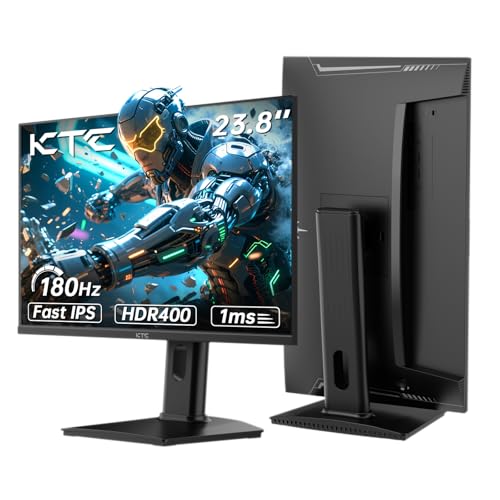
The headline numbers here are legitimately impressive for the price bracket. A 24-inch IPS panel running at 2560x1440 (QHD) with a native 180Hz refresh rate and an overclocked 185Hz mode is not a combination you see often under £150. Most monitors at this price settle for 1080p or cap out at 144Hz if they do offer QHD. KTC is making a genuine spec-sheet argument here.
The panel is specified as Fast IPS, which is a meaningful distinction from standard IPS. Fast IPS variants use faster pixel transition circuitry to reduce grey-to-grey response times, typically achieving figures in the 1ms to 4ms range in published measurements (compared to 4ms to 8ms for standard IPS). The "1ms" claim on the listing refers to MPRT (Moving Picture Response Time), which is a motion blur reduction metric rather than actual pixel transition speed. Real GtG figures for Fast IPS panels at this tier typically land between 1ms and 4ms depending on overdrive settings, which is still very good for fast-paced gaming.
Connectivity includes two HDMI ports and one DisplayPort, which is a solid arrangement for a budget monitor. HDMI 2.0 supports 1440p at up to 144Hz, and DisplayPort 1.4 handles 1440p at 180Hz without compression, so you'll want to use DisplayPort for gaming at the full refresh rate. Adaptive Sync is listed, and the panel carries HDR400 certification. The stand offers height adjustment, which is genuinely uncommon at this price and.
| Specification | Detail |
|---|---|
| Screen Size | 24 inches |
| Resolution | 2560x1440 (QHD) |
| Panel Type | Fast IPS |
| Refresh Rate | 180Hz native / 185Hz overclocked |
| Response Time | 1ms (MPRT) |
| Adaptive Sync | Yes (FreeSync / Adaptive Sync) |
| HDR | HDR400 |
| Ports | 2x HDMI, 1x DisplayPort |
| Ergonomics | Height adjustable stand |
| Eye Care | Low Blue Light, Flicker-Free |
| Price | £149.99 · Details |

Panel Technology
Fast IPS is the right choice for this type of monitor. The core trade-off in panel technology is between IPS (wide viewing angles, accurate colour, decent contrast) and VA (higher native contrast, narrower viewing angles, slower pixel response). For a gaming monitor at this refresh rate, Fast IPS makes more sense than VA because pixel smearing and dark-scene ghosting are genuine problems with VA panels at high refresh rates. IPS panels handle fast motion more cleanly, and Fast IPS specifically tightens up the pixel transition times that standard IPS struggles with above 144Hz.
The viewing angle performance of IPS is a practical benefit beyond the spec sheet. Colour and contrast remain consistent across wide horizontal and vertical angles, typically rated at 178 degrees in both directions. This matters if you're not always sitting perfectly centred in front of the display, or if you occasionally share your screen. VA panels at this price often show noticeable colour shift and contrast crushing when viewed off-axis, which IPS avoids. It also means the monitor is usable for occasional productivity work and media consumption without the image looking washed out from an angle.
The one area where IPS panels genuinely trail VA is native contrast. IPS typically delivers contrast ratios around 1000:1, while VA panels often achieve 3000:1 or higher. This means blacks on an IPS panel look more like a very dark grey in a dim room, and IPS glow (a backlight bleed visible in the corners of dark screens) is a known characteristic of the technology. Owner reviews for the KTC H24T7 don't flag excessive IPS glow as a widespread issue, which suggests quality control on the panel backlight uniformity is acceptable, though individual unit variation is always a factor with budget displays. If you're primarily gaming in a dark room and deep blacks are your priority, a VA panel would serve you better. For everything else, Fast IPS is the stronger call.
Display Quality
At 2560x1440 on a 24-inch panel, the pixel density works out to approximately 122 PPI (pixels per inch). That's a meaningful step up from 1080p at the same size, which lands around 92 PPI. In practice, the difference is visible in text rendering, fine detail in games, and general desktop sharpness. Icons and UI elements look noticeably crisper, and you get more screen real estate without needing to scale the OS interface. For a 24-inch display, 1440p is arguably the sweet spot: dense enough to look sharp at normal viewing distances (60cm to 80cm) without demanding the GPU horsepower that larger 1440p panels require.
The anti-glare coating on IPS panels at this price tier is typically a matte finish, which handles reflections well in bright rooms without the sharpness penalty of some heavier coatings. Owner reviews consistently mention the image looking clean and clear without excessive graininess, which suggests the coating is on the lighter side. This is a positive for everyday use. Matte coatings that are too aggressive can make the image look slightly foggy, particularly with darker content. The consensus from owners seems to be that the KTC H24T7 avoids this problem.
Brightness uniformity is harder to assess without independent measurements, but Fast IPS panels at this price generally show some variation across the panel, typically within 10% to 15% from centre to corner. This is normal and usually imperceptible in everyday use. Where it becomes noticeable is in large areas of flat colour, particularly white or light grey backgrounds. A handful of owners mention minor backlight variation, but this doesn't appear to be a consistent complaint in the review pool. The positive overall rating across thousands of reviews suggests the majority of buyers are satisfied with the image quality straight out of the box.
Refresh Rate and Adaptive Sync
180Hz is a proper gaming refresh rate. Not long ago, 144Hz was considered the ceiling for mainstream gaming monitors; 180Hz puts the KTC H24T7 above that baseline and into territory where motion genuinely looks smoother and input latency feels more responsive. The 185Hz overclocked mode is a small bonus, and while the difference between 180Hz and 185Hz is imperceptible in practice, the fact that the panel can sustain it is a mild indicator of headroom in the hardware. Most owners who mention the overclocked mode report it working without issues.
Adaptive Sync is listed without a specific AMD FreeSync tier designation on the listing, but the technology functions as FreeSync compatible, which also works with Nvidia's G-Sync Compatible mode on RTX graphics cards. AMD FreeSync eliminates screen tearing by synchronising the monitor's refresh rate to the GPU's frame output, and G-Sync Compatible extends this to Nvidia hardware. The practical upshot is that whether you're running a Radeon or an RTX card, you should get tear-free variable refresh rate gaming. The VRR range isn't explicitly published in the listing, but for a 180Hz panel, a typical range would be 48Hz to 180Hz, which covers the frame rates most mid-range GPUs produce in 1440p gaming.
One thing worth being clear about: to run this monitor at its full 180Hz refresh rate, you need DisplayPort. HDMI 2.0, which this monitor uses, has a bandwidth ceiling that limits 1440p to around 144Hz. So if you're connecting via HDMI (say, from a console or a laptop with no DisplayPort output), you're capped at 144Hz rather than 180Hz. That's still excellent, but check it before you buy. For PC gaming with a dedicated GPU, DisplayPort is the right cable to use, and the monitor includes the port for exactly this reason.
Response Time and Motion
The "1ms" claim on this monitor is MPRT, not GtG. This distinction matters. MPRT (Moving Picture Response Time) is a measure of how long a pixel is visible during a frame, which is influenced by backlight strobing. GtG (grey-to-grey) measures the actual time it takes a pixel to transition between grey values, which is what determines ghosting and trailing in fast motion. Fast IPS panels at 180Hz typically achieve GtG figures between 1ms and 4ms in published measurements from display testing outlets, depending on the overdrive setting used. That's genuinely fast and competitive with TN panels, which used to dominate high-refresh gaming monitors precisely because of their pixel response speed.
The risk with Fast IPS and aggressive overdrive settings is inverse ghosting, sometimes called overshoot. This appears as a bright halo around moving objects, caused by the overdrive circuit pushing pixels too hard and overshooting the target value. Owner reviews for the KTC H24T7 don't flag this as a widespread problem, which suggests the overdrive implementation is reasonably well-tuned. The monitor likely offers multiple overdrive modes in the OSD, and the default or recommended setting appears to produce clean motion for most users. For competitive gaming at 180Hz, particularly in fast-paced titles like CS2, Valorant, or Apex Legends, the motion performance should be more than adequate.
For context, a 180Hz refresh rate means each frame is displayed for approximately 5.6 milliseconds. A GtG response time of 1ms to 4ms means the pixel transition completes well within a single frame at this refresh rate, which is the threshold that matters for gaming. Monitors where the response time exceeds the frame duration produce visible ghosting; this one shouldn't. The flicker-free backlight (no PWM dimming) is a separate but related benefit: it reduces eye strain during long sessions, which matters if you're gaming for several hours at a stretch. Low Blue Light mode is also listed, giving you the option to reduce the blue light spectrum during evening use without needing third-party software.
Color Accuracy and Gamut
The listing doesn't publish specific sRGB or DCI-P3 coverage figures, which is common for budget monitors. Fast IPS panels at this price tier typically achieve 95% to 99% sRGB coverage, which is solid for gaming and general use. DCI-P3 coverage usually lands around 70% to 80% for standard IPS panels without wide-gamut backlights, which means colours in HDR content and professional creative work won't be as vivid as a wide-gamut display. For gaming and everyday computing, sRGB coverage is the relevant metric, and Fast IPS panels generally perform well here.
Factory calibration on budget monitors is rarely impressive. Delta-E values (the measure of colour accuracy, where lower is better; Delta-E below 2 is considered accurate) are typically in the 2 to 4 range out of the box on monitors at this price point, without individual calibration. This is fine for gaming but not ideal for colour-critical work like photo editing or video grading. Owner reviews don't raise colour accuracy as a specific concern, and the general consensus is that the image looks vibrant and accurate enough for gaming and media consumption. If you need Delta-E below 2 for professional work, you'd need to spend more and look at panels with factory calibration certificates.
The colour temperature out of the box on budget IPS panels tends to run slightly cool (towards blue), which is common and easily corrected via the OSD colour temperature settings or Windows display calibration. A few owners mention adjusting the colour temperature settings in the menu to warm the image slightly, which is a normal setup step for monitors in this category. The OSD appears to offer standard colour temperature presets (warm, normal, cool) and individual RGB adjustments, giving you enough control to dial in a comfortable picture without needing external calibration hardware. For the price, this is exactly the level of colour control you'd expect.

HDR Performance
HDR400 certification from VESA's DisplayHDR standard is the entry-level tier of the HDR certification programme. It requires a minimum peak brightness of 400 nits, no local dimming requirement, and a minimum 8-bit colour depth. To be direct about what this means in practice: HDR400 on a budget IPS panel without local dimming is not transformative HDR. The lack of local dimming means the backlight is either fully on or fully off (or at a fixed brightness level), so you don't get the dramatic contrast enhancement between bright highlights and dark shadows that makes HDR compelling on premium displays.
What HDR400 does deliver is a brighter peak luminance than SDR mode (up to 400 nits) and support for the HDR10 metadata standard, which means HDR-flagged content will be processed and displayed rather than tone-mapped to SDR. Games and video that support HDR will look slightly more vivid and punchy than in SDR mode, particularly in bright highlights. But the absence of local dimming means dark areas of the image don't get meaningfully darker, and the overall HDR effect is modest compared to HDR600 or HDR1000 certified displays with full-array local dimming.
This is not a criticism unique to the KTC H24T7. HDR400 on budget monitors is essentially a checkbox feature across the category. If HDR is a priority for you, you need to spend significantly more and look at displays with local dimming, Mini-LED backlights, or OLED panels. For gaming in SDR mode at 180Hz on a Fast IPS panel, the KTC H24T7 is a strong performer. For HDR gaming specifically, manage your expectations: it's better than nothing, but it's not the HDR experience you'd get from a premium panel. Most owners appear to use the monitor in SDR mode for gaming and are happy with the results.
Contrast and Brightness
Native contrast on IPS panels is typically specified around 1000:1, and Fast IPS variants don't significantly change this figure. In real-world use, 1000:1 contrast means blacks in a dark room look dark grey rather than true black. This is the fundamental physics of LCD technology with a backlight: the backlight can't be fully extinguished locally without local dimming, so some light bleeds through even when pixels are set to black. For gaming in a normally lit room, this is rarely an issue. In a completely dark room, it's more noticeable, particularly during cinematic cut-scenes or horror games with dark environments.
Peak SDR brightness at 400 nits (the HDR400 rating implies this ceiling) is adequate for most indoor environments. In a bright office or near a window, you may find yourself pushing the brightness towards maximum, but 400 nits handles typical UK indoor lighting conditions without the image washing out. For gaming in a dimmer room, you'd typically run the brightness at 50% to 70%, which reduces eye strain and keeps the image looking punchy. Owner reviews don't flag brightness as a weakness, which suggests the panel hits close to its specified figure.
The matte anti-glare coating helps considerably in managing reflections in bright environments. Glossy panels look more vivid in controlled lighting but become mirrors near windows; the matte finish on this panel diffuses reflections and maintains image readability in varied lighting conditions. For a monitor that's likely to be used in a typical home setup with ambient lighting, this is the right coating choice. It's a practical decision that suits the target audience, even if the coating adds a very slight haze compared to glossy alternatives.
Ergonomics and Stand
Height adjustment on a budget monitor is a genuinely useful feature that many displays at this price omit entirely. Being able to set the screen at eye level reduces neck strain during long sessions, and it's the kind of ergonomic feature that sounds minor until you've spent a week with a monitor that's fixed at the wrong height. The KTC H24T7 includes it, which puts it ahead of several competitors in this bracket that offer only tilt adjustment. Owner reviews mention the stand as a positive, and the height adjustment range appears sufficient for most desk setups.
Tilt adjustment is standard on virtually all monitors, and the KTC H24T7 includes it. Swivel and pivot (portrait rotation) are not confirmed in the listing, which is typical for budget monitors. If you need portrait mode for coding or document work, you'd either need a VESA mount arm or a monitor that explicitly lists pivot in its specs. The listing doesn't confirm VESA compatibility explicitly, but many monitors in this category include VESA 75x75 or 100x100 mounting holes. If VESA compatibility is important to you, it's worth confirming before purchase.
Build quality at this price is always a relative discussion. The KTC H24T7 uses a plastic chassis, which is the norm for budget displays. Owner reviews describe the build as solid enough without feeling premium. The stand base footprint is moderate, which is expected for a 24-inch monitor. A few owners note that the OSD buttons are responsive and the menu navigation is straightforward, which is a practical positive: a confusing OSD is one of those low-level annoyances that grinds on you over time. The overall impression from owner feedback is a monitor that feels appropriately built for the price, without obvious quality issues that would give you pause.
Connectivity and Ports
The port layout on the KTC H24T7 is two HDMI ports and one DisplayPort. For a single-monitor desktop gaming setup, this is perfectly adequate. Two HDMI ports means you can keep a console and a PC connected simultaneously and switch between them via the OSD input selector, without unplugging cables. The DisplayPort connection is where you'll want to connect your gaming PC for full 180Hz operation at 1440p, as HDMI 2.0's bandwidth limits 1440p to around 144Hz.
- 2x HDMI 2.0 (1440p up to 144Hz)
- 1x DisplayPort 1.4 (1440p up to 180Hz)
There's no USB hub on this monitor, which is common at the budget tier. If you need USB ports on your monitor for peripherals or a webcam, you won't find them here. Similarly, there's no USB-C port, which rules out single-cable connections from laptops that support DisplayPort Alt Mode over USB-C. For a dedicated desktop gaming monitor, neither of these omissions is a dealbreaker. But if you're planning to use this with a modern laptop as a docking hub, the connectivity is more limited than monitors with USB-C with power delivery.
Audio output isn't confirmed in the listing, and there's no mention of built-in speakers. Budget gaming monitors frequently omit speakers entirely, which is fine if you're using headphones or a dedicated speaker setup. If you need audio from the monitor itself, check the product listing for confirmation before purchasing. The overall connectivity package is lean but functional for the primary use case: a gaming monitor connected to a desktop PC or console, with the option to keep two sources connected simultaneously.
How It Compares
The two most relevant comparisons at this price point are the AOC Q24G2A and the Gigabyte G24F 2. The AOC Q24G2A is a 24-inch 1440p IPS panel rated at 165Hz, widely available in the UK and often found at a similar or slightly higher price. The Gigabyte G24F 2 is a 24-inch 1080p Fast IPS panel at 165Hz, which sits at the top of the 1080p gaming monitor market. These represent the two directions a buyer might go: same resolution at lower refresh rate, or higher refresh rate at lower resolution.
Against the AOC Q24G2A, the KTC H24T7's main advantage is the higher refresh rate: 180Hz versus 165Hz. The AOC has a stronger brand reputation and more published independent measurements to reference, which gives buyers more confidence in the stated specs. The KTC's edge is purely in the refresh rate headroom and the height-adjustable stand, which the AOC also includes. Both are Fast IPS panels at 1440p, so the core image quality proposition is similar. The AOC is the safer buy if brand confidence matters to you; the KTC is the better spec on paper if you're prioritising refresh rate.
Against the Gigabyte G24F 2 at 1080p, the comparison is about resolution versus established brand quality. The Gigabyte delivers excellent motion performance at 165Hz with a well-measured Fast IPS panel, and 1080p at 24 inches is a proven, sharp combination. But 1440p at 24 inches is objectively sharper, and the KTC's 180Hz rating exceeds the Gigabyte's 165Hz. For gaming, the KTC offers more pixels and more refresh rate for a comparable or lower price, which is a compelling argument if the panel quality holds up to the spec sheet's promise. The positive overall rating across thousands of reviews suggests it largely does.
| Feature | KTC H24T7 | AOC Q24G2A | Gigabyte G24F 2 |
|---|---|---|---|
| Screen Size | 24 inch | 24 inch | 24 inch |
| Resolution | 2560x1440 | 2560x1440 | 1920x1080 |
| Panel Type | Fast IPS | Fast IPS | Fast IPS |
| Refresh Rate | 180Hz / 185Hz OC | 165Hz | 165Hz |
| Adaptive Sync | Yes | FreeSync Premium | FreeSync Premium |
| HDR | HDR400 | HDR10 | HDR400 |
| Height Adjust | Yes | Yes | Yes |
| HDMI Ports | 2x HDMI 2.0 | 2x HDMI 2.0 | 2x HDMI 2.0 |
| DisplayPort | 1x DP 1.4 | 1x DP 1.4 | 1x DP 1.2 |
| Price | £149.99 · Details | Similar bracket | Similar bracket |

Final Verdict
The KTC 24 inch 1440p Gaming Monitor delivers a spec sheet that would have been considered mid-range territory two years ago, at a price that now puts it firmly in the budget bracket. Fast IPS, 2560x1440, 180Hz, height-adjustable stand, two HDMI ports, and DisplayPort 1.4. That's a genuinely strong combination for the money, and the positive overall rating from thousands of owners gives it a level of social proof that many budget monitors at this price don't have. KTC isn't a household name, but the review volume here is large enough to be meaningful rather than a handful of early adopter opinions.
The honest limitations are these: HDR400 without local dimming is a checkbox feature, not a real HDR experience. The "1ms" claim is MPRT, not GtG, and while Fast IPS response times are genuinely fast, the marketing number overstates the case. And buying from a less established brand carries more uncertainty than buying from AOC or Gigabyte, where independent measurements and long-term reliability data are more readily available. These are real considerations, not dealbreakers, but they're.
Who is this for? Primarily PC gamers who want the sharpness of 1440p and the smoothness of 180Hz without crossing into mid-range monitor pricing. It's also a solid choice for anyone upgrading from a 1080p or 60Hz display who wants a meaningful improvement in both resolution and refresh rate in a single purchase. The height-adjustable stand makes it more ergonomically complete than many rivals at this price, which matters for daily use beyond gaming sessions.
Who should skip it? If you game primarily in a dark room and deep blacks are important to you, a VA panel monitor (even at a lower refresh rate) will deliver better contrast. If you need USB-C connectivity for a laptop, this monitor doesn't have it. And if you're doing colour-critical creative work that requires accurate, calibrated output, you need a monitor with published Delta-E measurements and factory calibration, which this doesn't offer.
The honest don't-overspend note: if you're primarily gaming at 1080p with a mid-range GPU and 144Hz is your ceiling, you don't need the 1440p resolution or the 180Hz refresh rate this monitor offers. A 24-inch 1080p 144Hz IPS monitor costs noticeably less and will deliver excellent gaming performance without demanding as much from your graphics card. The KTC H24T7 makes sense when you're ready to commit to 1440p gaming with a GPU that can push frame rates towards 180fps in your titles of choice. At that point, it's a properly good monitor for the money.
Editorial score: 7.5 out of 10. Strong specs for the price tier, solid owner satisfaction, and a few honest limitations that are typical of the budget category rather than specific failures of this monitor.
What works. What doesn’t.
5 + 4What we liked5 reasons
- QHD 1440p resolution at 180Hz for well under £150 is genuinely competitive
- Fast IPS panel delivers wide viewing angles and fast pixel response
- Height-adjustable stand is uncommon at this price point
- Two HDMI ports plus DisplayPort covers most multi-source setups
- A positive overall rating from thousands of owners gives meaningful confidence
Where it falls4 reasons
- HDR400 without local dimming is a checkbox feature, not real HDR
- 1ms claim is MPRT marketing, not GtG pixel response
- No USB hub or USB-C connectivity
- Less established brand means fewer independent published measurements
Full specifications
12 attributes| Refresh rate | 180 |
|---|---|
| Screen size | 24 |
| Panel type | IPS |
| Adaptive sync | Both |
| Aspect ratio | 16:9 |
| Curvature | flat |
| HDR | HDR400 |
| Launch year | 2024 |
| Ports | 2x HDMI, 1x DisplayPort |
| Refresh rate HZ | 180 |
| Resolution | 2560x1440 |
| Response time | 1ms |
If this isn’t right for you
2 options 8.0 / 10
UPERFECT 15.6" Portable Monitor Touchscreen w/8000mAh Rechargeable Battery
£159.98 · UPERFECT · Details
 8.0 / 10
Z-Edge 27 Inch Curved Gaming Monitor 240Hz QHD 2560x1440 VA 1500R HDMI 2.1
£179.99 · Z Z-Edge · Details
Frequently asked
5 questions01Is the KTC 24 inch 1440p Gaming Monitor, QHD 180Hz Monitor with 185Hz Overlocked, 1ms, Fast IPS, Adaptive Sync, HDR400, Height Adjustable, Low Blue Light, Flicker-Free, 2 x HDMI, 1 x DP H24T7 good for gaming?+
Yes, it's a strong gaming monitor for the price. The Fast IPS panel at 180Hz delivers smooth, responsive motion with wide viewing angles. Adaptive Sync eliminates screen tearing whether you're on AMD or Nvidia. For competitive titles like CS2, Valorant, or Apex Legends, the combination of 1440p resolution and 180Hz refresh rate is excellent at this price point. Use DisplayPort for the full 180Hz; HDMI 2.0 caps 1440p at around 144Hz.
02Does the KTC 24 inch 1440p Gaming Monitor, QHD 180Hz Monitor with 185Hz Overlocked, 1ms, Fast IPS, Adaptive Sync, HDR400, Height Adjustable, Low Blue Light, Flicker-Free, 2 x HDMI, 1 x DP H24T7 have good HDR?+
Honestly, no, not in any transformative sense. HDR400 is the entry-level VESA DisplayHDR certification, requiring only 400 nits peak brightness and no local dimming. Without local dimming, the contrast between bright highlights and dark shadows doesn't improve meaningfully in HDR mode. It's better than nothing, and HDR-flagged content will display with slightly more vivid highlights, but this is checkbox HDR rather than the real thing. For impressive HDR, you need to spend significantly more on displays with local dimming or OLED panels.
03Is the KTC 24 inch 1440p Gaming Monitor, QHD 180Hz Monitor with 185Hz Overlocked, 1ms, Fast IPS, Adaptive Sync, HDR400, Height Adjustable, Low Blue Light, Flicker-Free, 2 x HDMI, 1 x DP H24T7 good for content creation?+
It's adequate for casual content creation and general editing, but not ideal for professional colour-critical work. Fast IPS panels at this price typically achieve 95% to 99% sRGB coverage, which is solid for gaming and general use. However, the listing doesn't publish specific Delta-E or DCI-P3 figures, and factory calibration on budget monitors rarely achieves the Delta-E below 2 that professional photo or video editing demands. For gaming and everyday computing, colour accuracy is fine. For professional creative work, look at monitors with published calibration data.
04What graphics card do I need for the KTC 24 inch 1440p Gaming Monitor, QHD 180Hz Monitor with 185Hz Overlocked, 1ms, Fast IPS, Adaptive Sync, HDR400, Height Adjustable, Low Blue Light, Flicker-Free, 2 x HDMI, 1 x DP H24T7?+
To get meaningful use from the 180Hz refresh rate at 1440p, you need a mid-to-upper-range GPU. For AMD, the RX 6700 XT or RX 7700 XT and above will push competitive frame rates in most titles at 1440p. For Nvidia, the RTX 3070 or RTX 4070 and above are comfortable choices. Less powerful cards like the RX 6600 or RTX 3060 can still use the monitor at 1440p, but you'll often be running below 180fps in demanding games, which is where Adaptive Sync becomes particularly useful for smooth frame delivery.
05What warranty and returns apply to the KTC 24 inch 1440p Gaming Monitor, QHD 180Hz Monitor with 185Hz Overlocked, 1ms, Fast IPS, Adaptive Sync, HDR400, Height Adjustable, Low Blue Light, Flicker-Free, 2 x HDMI, 1 x DP H24T7?+
Specific warranty terms aren't listed in the verified product data. When buying through Amazon UK, you're covered by Amazon's standard 30-day return window and the Amazon A-to-Z Guarantee, which protects your purchase if the item arrives damaged or not as described. For manufacturer warranty details beyond Amazon's return policy, check the product listing directly or contact KTC support before purchasing.