Best Overall Value
KTC monitors punch well above their price point, which is exactly why they've earned loyal followers across the UK. Four of their strongest performers are covered here, to see which ones deserve a spot on your desk. Some deliver excellent value for everyday work, whilst others crank up the specs for gaming and design work. You'll find detailed breakdowns of each model's strengths and weaknesses below, plus a quick comparison table to help you pick the right one for your budget and needs.
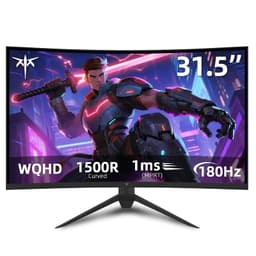
Here's the thing: when you're compiling the best KTC monitors UK 2026 list, this one basically writes itself as the top pick. Under £100 for a 180Hz curved gaming monitor with a VA panel, Adaptive Sync, HDR10, and both HDMI 2.0 and DisplayPort 1.4? That's a spec sheet that would have cost you significantly more from a mainstream brand even two years ago.
The 1500R curve is fairly aggressive, which suits close-up desktop use well. It's not a panel you'd want stretched across a large room, but for a typical desk setup it creates a genuinely immersive feel, especially in fast-paced games. The VA panel brings strong contrast ratios compared to IPS, so dark scenes in games look properly dark rather than washed out grey. That's a real advantage for titles like horror games or anything with moody lighting.
The 180Hz refresh rate is the headline number, and it delivers. Paired with Adaptive Sync (compatible with both AMD FreeSync and Nvidia cards in G-Sync Compatible mode), screen tearing is essentially a non-issue. The 1ms MPRT keeps motion blur under control, though it's worth knowing MPRT is a backlight strobing measurement rather than a true pixel response time. In practice, fast movement looks clean.
For console gamers, the HDMI 2.0 port handles PS5 and Xbox Series X at 1080p 120Hz without any fuss. It's listed as compatible with both, and owners confirm this works as expected. The VESA mount support is a nice touch at this price, giving you flexibility if you want to add a monitor arm later.
Limitations? The 1080p resolution on a 24-inch panel is fine, but if you're used to 1440p you'll notice the difference. The HDR10 implementation is also fairly basic. It's not the kind of HDR that'll blow you away. But for the money, this is the standout pick in our best KTC monitors UK 2026 testing.
Pros
- Exceptional value under £100
- 180Hz with Adaptive Sync for smooth gaming
- VA panel delivers strong contrast
- PS5 and Xbox compatible via HDMI 2.0
- VESA mount support included
- DP 1.4 and HDMI 2.0 connectivity
Cons
- 1080p resolution only
- HDR10 is basic rather than transformative
- 1500R curve won't suit everyone
- VA panels can have slower pixel response in some conditions
Buy on Amazon
Best Build Quality
£159.99 | ★★★★☆ (4.3)
This is the monitor in the KTC range that genuinely surprised us. At around £127, you're getting a 27-inch Fast IPS panel with 2K resolution, 210Hz overclocked refresh rate, 131% sRGB coverage, 101% DCI-P3, and a deltaE under 2. That colour accuracy figure is legitimately impressive. Most monitors at this price don't even bother quoting deltaE.
The Fast IPS panel is a meaningful upgrade over standard IPS. You get the wide viewing angles and accurate colours that IPS is known for, but with faster pixel transitions that make it more competitive for gaming. At 210Hz (via overclocking), motion is extremely smooth. The 450 cd/m2 brightness also means HDR400 content actually has some punch to it, unlike the more token HDR implementations you see on cheaper panels.
Built-in speakers are included, which is rare at this price. They're not going to replace a proper audio setup, but for casual use or video calls they're perfectly adequate. It's one of those features you don't think you'll use until you actually need them.
The 101% DCI-P3 coverage makes this a genuinely capable monitor for content creators working on a budget. If you're editing photos or video and don't want to spend on a dedicated colour-accurate display, this is a strong option. The deltaE under 2 means colours are accurate enough for most non-professional work.
For gaming specifically, the combination of 2K resolution and 210Hz is excellent. You're getting both visual clarity and competitive-level smoothness. Adaptive Sync keeps things tear-free. The only real knock here is that the stand options aren't detailed in the listing, so check before buying if ergonomics matter to you.
In the context of the best KTC monitors UK 2026 lineup, this is the one we'd recommend to anyone who wants the most capable all-rounder and can stretch to around £127.
Pros
- Excellent colour accuracy with deltaE under 2
- 131% sRGB and 101% DCI-P3 coverage
- 210Hz overclocked refresh rate
- Built-in speakers included
- 450 cd/m2 brightness for genuine HDR400 performance
- Fast IPS panel with wide viewing angles
Cons
- Stand ergonomics not fully detailed in listing
- 210Hz requires overclocking, not native
- Built-in speakers are functional rather than impressive
Buy on Amazon£159.99
Best for Beginners
£149.99 | ★★★★☆ (4.3)
If you're moving up from a basic 1080p monitor for the first time, this KTC 24-inch 1440p model is a proper decent starting point. At around £140, it bridges the gap between budget and mid-range in a way that makes sense for someone who wants a noticeable upgrade without committing to a big spend.
The jump from 1080p to 1440p on a 24-inch screen is genuinely visible. Text is sharper, game environments have more detail, and everything just looks a bit more polished. The Fast IPS panel helps here too. Colours are accurate and consistent across the screen, which matters when you're spending hours in front of it.
The height-adjustable stand is a feature that beginners often overlook but quickly appreciate. Being able to set the monitor at the right eye level makes a real difference to comfort over long sessions. It's the kind of ergonomic feature that tends to appear on more expensive monitors, so it's good to see it here.
Two HDMI ports is another practical touch. You can have a PC and a console connected simultaneously and switch between them without unplugging anything. For someone setting up their first proper gaming station, that's genuinely useful.
The 180Hz refresh rate (185Hz overclocked) with Adaptive Sync keeps gameplay smooth. Low blue light and flicker-free certification are worth mentioning too, especially for anyone who spends long hours at a desk. HDR400 support rounds out a solid feature set.
The main limitation is that at £140, you're not far off the 27-inch 2K model, which offers better colour coverage and a larger screen. So beginners who are comfortable spending a little more should consider that step up. But if 24 inches is the target size and 1440p is the goal, this delivers.
Pros
- 1440p QHD resolution on a 24-inch panel
- Height-adjustable stand for ergonomic setup
- Two HDMI ports for multi-device use
- Fast IPS panel with accurate colours
- Low blue light and flicker-free certified
- 180Hz with Adaptive Sync
Cons
- Close in price to the more capable 27-inch model
- 24 inches at 1440p is a smaller jump than 27 inches
- HDR400 is entry-level HDR
Buy on Amazon£149.99
Best Under £100
★★★★☆ (4.3)
Look, the KTC 32-inch curved monitor is the most expensive in this roundup by a significant margin. At over £400, it sits in a completely different bracket to the other three. And that creates a problem: at that price, the competition from established brands gets very serious indeed.
The 32-inch curved screen is genuinely impressive in person. A large curved display creates real immersion for gaming and for productivity work where you want lots of screen real estate. The 170Hz refresh rate is solid, and curved panels at this size do make a difference to how engaging the experience feels compared to a flat equivalent.
But here's the honest assessment. For the best KTC monitors UK 2026 list, this model is the weakest value proposition. The 170Hz refresh rate is lower than the smaller, cheaper models in this very range. You're paying a significant premium for the screen size, and at over £400 you're competing with monitors from LG, Samsung, and AOC that have stronger brand support, better-documented specs, and more established track records.
That said, if you specifically want a large KTC curved monitor and brand loyalty or aesthetic consistency matters to you, it's not a bad screen. The curved format at 32 inches works well for racing games, flight sims, and open-world titles where peripheral vision adds to the experience. It's also a reasonable choice for someone who wants a big display for mixed use, including work and gaming.
Owner feedback on Amazon is generally positive about the screen quality and build, which is reassuring. But we'd strongly suggest comparing it against similarly priced alternatives before committing. The value story that makes KTC compelling at £80 to £140 doesn't hold as strongly at £400 plus.
Pros
- Large 32-inch curved screen for genuine immersion
- 170Hz refresh rate for smooth gaming
- Positive owner feedback on build quality
- Good for mixed work and gaming use
Cons
- Significantly more expensive than the rest of the KTC range
- Lower refresh rate than cheaper KTC models
- Faces strong competition from established brands at this price
- Value proposition is much weaker than other KTC options
- Specs are less detailed in the listing than other models
Check availability