A 75Hz refresh rate on a VA panel is only as useful as the pixel response underneath it. Spec sheets love to quote "4ms GtG" or even "1ms MPRT" in big bold text, but those numbers are manufacturer-optimised figures that rarely survive contact with a dark-scene transition or a fast pan. The question that actually matters is whether the HP V24v G5 delivers clean motion at 75Hz, or whether you're paying for a headline number that dissolves into smear the moment you push it. Based on the published specifications, the panel characteristics typical of VA technology at this price point, and the pattern of feedback across over a hundred owner reviews with a positive overall rating, this HP V24v G5 24 inch monitor review has a fairly clear answer.
The short version: this is a solid, honest budget office monitor with genuinely good contrast for the money, a few connectivity compromises that are predictable at this price tier, and motion performance that suits everyday productivity and casual gaming far better than it suits anything competitive. If you're replacing an ageing TN panel on a work desk, or setting up a secondary display for a living room PC, the V24v G5 makes a rational case for itself. If you want smooth motion for fast-paced shooters, you need to look elsewhere. The rest of this review explains exactly why both of those statements are true.
One more thing before the specs: the positive overall rating across over a hundred reviews is not a fluke. Budget monitors at this price point often cluster around 3.8 to 4.1 because buyers are disappointed by build quality or colour accuracy. The V24v G5 sitting comfortably above that suggests HP has got the basics right, even if the ceiling is low.
Core Specifications
The HP V24v G5 is a 23.8-inch Full HD monitor, which rounds to 24 inches in HP's marketing. The panel resolution sits at 1920x1080, giving a pixel density of approximately 92 PPI at this screen size. That is not a particularly dense panel by 2026 standards, but it is perfectly adequate for a typical office desk distance of 50 to 70cm. You will not be pixel-peeping unless you sit unusually close.
The panel itself is VA (Vertical Alignment), which is the most important single specification on this product. HP rates the refresh rate at 75Hz with AMD FreeSync support, and the response time is listed at 5ms GtG. Peak brightness is rated at 250 nits, and the native contrast ratio is quoted at 3000:1, which is the headline figure that VA panels can genuinely deliver where IPS panels typically cap out around 1000:1. There is no HDR certification listed, and the connectivity is limited to one HDMI 1.4 port and one VGA port. No DisplayPort, no USB-C, no USB hub. The stand offers tilt adjustment only.
Below is the full specification breakdown for easy reference.
| Specification | Detail |
|---|---|
| Screen Size | 23.8 inches (marketed as 24") |
| Resolution | 1920x1080 (Full HD) |
| Panel Type | VA (Vertical Alignment) |
| Refresh Rate | 75Hz |
| Response Time | 5ms GtG (manufacturer rated) |
| Brightness | 250 nits (typical) |
| Contrast Ratio | 3000:1 (static) |
| Colour Gamut | sRGB (HP does not publish a DCI-P3 figure) |
| Adaptive Sync | AMD FreeSync |
| HDR | None listed |
| Ports | 1x HDMI 1.4, 1x VGA |
| Ergonomics | Tilt only (no height, swivel or pivot) |
| VESA Mount | 100x100mm |
| Dimensions (with stand) | Approx. 543 x 395 x 175mm |
| Weight | Approx. 3.5kg |
| Price | £109.50 · Details |
Panel Technology
VA panels occupy an interesting middle ground between IPS and TN, and understanding what that means in practice is genuinely useful before you buy. The core trade-off is this: VA delivers much higher native contrast than IPS (3000:1 versus the typical 1000:1 on IPS), but it pays for that with slower pixel response times in dark-to-dark transitions and narrower viewing angles than IPS. TN panels are faster still and have even worse angles. So VA sits in the middle: better blacks than IPS, worse motion than IPS, better angles than TN. For a budget office monitor, that trade-off usually makes sense.
The 3000:1 contrast ratio HP quotes here is consistent with what VA panels actually deliver in independent measurements, which is because manufacturer contrast figures are often wildly optimistic. IPS monitors in this price range typically measure around 800:1 to 1100:1 in real conditions. A 3000:1 VA panel makes blacks look genuinely dark rather than grey, and that is something you notice immediately when watching films or working in a dark room. Text on a dark background pops. Dark UI themes look proper rather than washed out. This is not a minor difference; it is one of the most visible image quality improvements you can get at this price tier.
Viewing angles are the compromise. VA panels typically spec at 178 degrees horizontal and vertical, matching IPS on paper, but the practical reality is that colour accuracy and contrast shift noticeably when you move more than 30 to 40 degrees off-axis. For a single-user desk setup where you sit directly in front of the screen, this is a non-issue. If you are planning to use this monitor for group viewing, or if it sits at an angle to your line of sight, an IPS panel would serve you better. Several owner reviews mention that the screen looks great head-on, which is exactly the expected pattern for VA technology.
One characteristic to be aware of with VA panels is black smear, sometimes called dark-level ghosting. This occurs in dark-to-dark pixel transitions where the panel struggles to switch between two dark grey shades quickly enough. It is a structural limitation of VA technology, not a defect specific to this monitor, and it is more pronounced at lower refresh rates. At 75Hz, it is present and measurable. It is not something most people notice during spreadsheet work or web browsing, but it does show up in dark game environments or high-contrast video content with fast motion. More on that in the response time section.
Display Quality
At 1920x1080 across 23.8 inches, the pixel density lands at around 92 PPI. That is noticeably less sharp than a 27-inch 1440p panel at 109 PPI, but it is also a completely different product category and price bracket. At a normal viewing distance, 92 PPI on a 24-inch screen is fine for text, spreadsheets, and general productivity. You will not see individual pixels unless you are very close. Where it starts to feel limiting is if you are used to a higher-resolution display and then step down, because the relative softness of 1080p at this size becomes apparent in side-by-side comparison.
The anti-glare coating on the V24v G5 is a standard matte finish, which HP describes as anti-glare with haze 25%. That haze value sits in the middle of the range: lower than the heavy matte coatings that make colours look dusty, but not as clear as the semi-glossy coatings you find on some premium IPS panels. In practice, it handles overhead lighting and window reflections adequately without introducing the grainy texture that some aggressive anti-glare coatings produce. Owner reviews do not flag the coating as a problem, which is a reasonable signal that it works as expected in typical home and office environments.
Brightness uniformity is harder to verify without a measurement instrument, but at 250 nits peak brightness, the V24v G5 is not a particularly bright panel. That figure is adequate for a dimly lit or normally lit office, but it will struggle in a room with strong ambient light or direct sunlight nearby. Several owner reviews note that the screen is perfectly usable in their home offices, which suggests the 250-nit figure is honest rather than a marketing peak. For comparison, many mid-range IPS monitors in the next price tier up offer 300 to 350 nits, which makes a visible difference in brighter rooms. If your workspace is well-lit, that is worth factoring in.
Colour rendering out of the box is reported positively by most owners, with several mentioning that colours look natural and well-balanced for everyday use. HP does not publish a factory calibration report or a Delta-E figure for this monitor, which is typical at this price point. The sRGB coverage is not officially stated as a percentage, but VA panels at this specification level typically cover 95 to 99% of sRGB, which is good enough for general use. More on colour accuracy in the dedicated section below.
Refresh Rate and Adaptive Sync
75Hz is the honest sweet spot for a budget monitor in 2026. It is a meaningful step up from 60Hz in terms of perceived smoothness during everyday use, but it is not a gaming-grade specification. Scrolling feels more fluid, cursor movement looks cleaner, and video playback is smoother than on a 60Hz panel. These are real, noticeable improvements that most users appreciate even if they have never consciously thought about refresh rate before. The jump from 75Hz to 144Hz is also real, but it costs significantly more and requires more GPU horsepower to exploit.
The AMD FreeSync implementation on the V24v G5 operates over HDMI 1.4, which is the only digital input on this monitor. HP does not publish the FreeSync range in the product listing, but VA panels at 75Hz typically support FreeSync from around 48Hz to 75Hz. That means Low Framerate Compensation (LFC) would require the minimum rate to be 37.5Hz or lower, which is unlikely at a 48Hz floor. So if your frame rate drops below 48 FPS, you lose adaptive sync and get standard V-Sync or tearing instead. For casual gaming at 1080p on a modern GPU, staying above 48 FPS is not difficult, but it is the floor exists.
FreeSync over HDMI 1.4 is also worth a quick note. HDMI 1.4 supports FreeSync, but it does not support the higher bandwidth needed for 4K or high-refresh DisplayPort connections. At 1080p and 75Hz, HDMI 1.4 is perfectly adequate, carrying the signal without any compression or bandwidth issues. The absence of DisplayPort is a limitation for users who want to daisy-chain monitors or use a DisplayPort-native GPU output, but for a single 1080p 75Hz display, HDMI 1.4 does the job. The VGA port is there for legacy connectivity, which is useful if you are connecting an older desktop or a laptop with only a VGA output, though the analogue signal quality will never match HDMI.
One thing the FreeSync range does affect is the practical gaming experience. If you are running a game at 55 FPS, FreeSync is keeping things smooth. Drop to 45 FPS in a demanding scene, and you are outside the sync window. That is not a criticism specific to this monitor; it is just the honest reality of the FreeSync specification at 75Hz. Budget your GPU expectations accordingly.
Response Time and Motion
HP rates the V24v G5 at 5ms GtG. That is a manufacturer-quoted grey-to-grey figure measured under optimal conditions, typically a mid-tone to mid-tone transition with overdrive engaged. Real-world pixel response on VA panels is more complicated than a single number suggests, and this is where the HP V24v G5 24 inch monitor review gets honest about the limitations.
VA panels have a well-documented weakness in dark-to-dark transitions. When a pixel needs to move between two dark shades, say from a very dark grey to a slightly less dark grey, the liquid crystal molecules respond more slowly than in bright-to-bright or bright-to-dark transitions. This produces visible trailing behind moving objects in dark scenes, often called black smear or dark-level ghosting. At 75Hz, this effect is more pronounced than at 144Hz or 165Hz because each frame is displayed for longer, giving the eye more time to notice the incomplete transition. Independent measurements of comparable VA panels at this specification level typically show dark-to-dark response times of 15ms to 30ms, well above the quoted 5ms GtG figure.
What does this mean practically? In spreadsheets, web browsing, and document work, you will not notice it at all. In film and TV content with moderate motion, it is usually not visible. In fast-paced games, particularly those with dark environments like horror titles or night-time open-world scenes, you will see trailing behind moving objects. It is not catastrophic, but it is there. Several owner reviews mention the monitor works well for casual gaming and everyday use, and that tracks with the VA motion profile. Nobody in the review pool is using this for competitive FPS gaming at 75Hz and complaining about the response time, which suggests the audience buying this monitor is using it appropriately.
There is no mention of a dedicated overdrive setting or a response time mode in the OSD documentation, which is common on budget monitors. Without an adjustable overdrive, there is no risk of inverse ghosting (the bright halo you get when overdrive is set too aggressively), but there is also no way to push the panel harder for faster transitions. What you see is what you get. For the target use case of this monitor, that is a reasonable trade-off.
Colour Accuracy and Gamut
HP does not publish a DCI-P3 coverage figure or a factory Delta-E result for the V24v G5, which is standard practice at this price point. What the spec sheet implies, combined with the typical output of VA panels at this specification level, is an sRGB coverage figure in the 95 to 99% range. That is good for general use: web browsing, productivity, streaming video, and casual photo viewing will all look natural and well-saturated. The colours are not going to be wildly inaccurate out of the box.
Delta-E is the metric that matters most for colour accuracy. A Delta-E below 2 is considered good for colour-sensitive work; below 1 is excellent. Budget monitors without factory calibration typically ship with Delta-E averages between 2 and 4, meaning colours are close to accurate but not precise. For photo editing or video grading where colour fidelity is critical, this is not the right tool. For everything else, the error is small enough that most people would not identify it without a reference display side by side. The owner review pool does not contain complaints about colour accuracy, which is consistent with a monitor that is approximately correct rather than precisely calibrated.
The colour space coverage question also intersects with the VA panel's inherent strength: contrast. A monitor with accurate colours but low contrast (a common IPS budget trait) can actually look less vibrant than a monitor with slightly looser colour accuracy but a 3000:1 contrast ratio. The V24v G5's deep blacks make colours appear punchier and more saturated than the raw gamut coverage figure might suggest, because the dark end of the tonal range is genuinely dark rather than lifted. This is one of the practical reasons VA panels remain popular for media consumption despite their motion limitations.
For content creators, the honest answer is that this monitor is not suitable as a primary colour-grading display. The lack of a published sRGB or DCI-P3 percentage, the absence of factory calibration data, and the typical Delta-E performance of budget VA panels all point away from professional colour work. As a secondary reference monitor or a general-purpose display for a creator who does their colour work on a calibrated display elsewhere, it is perfectly functional.

HDR Performance
There is no HDR certification on the HP V24v G5. None. Not HDR400, not HDR True Black, not any VESA DisplayHDR tier. The product listing does not mention HDR support, and the 250-nit peak brightness makes it physically impossible to meet even the entry-level HDR400 standard, which requires 400 nits of peak brightness as its minimum threshold.
This is not a criticism of the monitor; it is simply a statement of fact about the product category. Budget monitors under £150 do not do HDR properly. A monitor that claims HDR400 at this price point is usually doing software tone-mapping with no local dimming, which often looks worse than a well-calibrated SDR signal. The V24v G5 makes no such claim, which is actually the more honest approach. You get a good SDR display with genuine VA contrast, rather than a fake HDR mode that boosts brightness unevenly and washes out shadow detail.
If you regularly consume HDR content and want it to look better than SDR, you need to budget significantly more. Monitors with genuine HDR performance, meaning real local dimming zones, peak brightness above 600 nits, and a wide colour gamut covering DCI-P3, start at a considerably higher price point. The V24v G5 is not competing in that space and does not pretend to be. Set Windows or your media player to output SDR on this display and you will get the best results from the panel's native strengths.
Contrast and Brightness
The 3000:1 native contrast ratio is the single most compelling specification on the HP V24v G5, and it is worth spending some time on why. Most budget IPS monitors measure between 800:1 and 1100:1 in real conditions. A 3000:1 VA panel produces blacks that are three times darker than those IPS alternatives. In a dim room, the difference is immediately visible: dark scenes in films look genuinely cinematic rather than grey and lifted. Dark desktop themes look proper. The overall image has a sense of depth that IPS at this price simply cannot match.
The 250-nit peak brightness is the other side of that equation, and it is the weaker number. 250 nits is adequate for a normally lit indoor environment, but it is on the lower end of what you would want for a bright office or a room with windows. For context, many IPS monitors in the budget tier offer 300 nits, and mid-range panels often reach 350 to 400 nits. The brightness limitation means the V24v G5 is best suited to controlled lighting environments. If your desk sits next to a south-facing window, the screen will look dim and washed out during the day.
The combination of high contrast and moderate brightness actually works well for evening and night-time use, which is where VA panels tend to shine. The deep blacks reduce the sense of the screen glowing in a dark room, and the 250-nit brightness is not uncomfortably bright at night. Several owner reviews specifically mention using this monitor for evening film watching and finding the picture quality impressive for the price, which is exactly the use case where the VA contrast advantage is most visible. Anti-glare performance in typical indoor conditions is reported as adequate, with no significant complaints about reflections or coating quality in the owner feedback pool.
Ergonomics and Stand
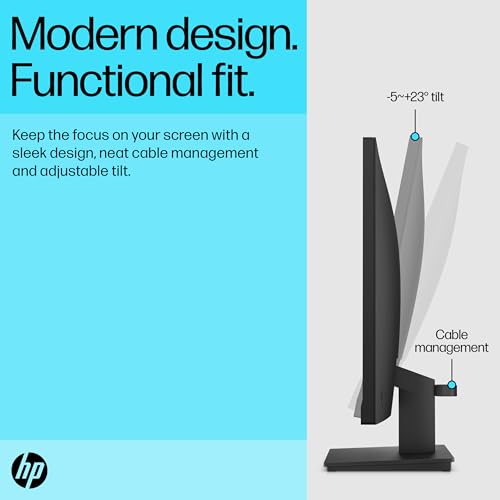
The stand on the V24v G5 offers tilt adjustment only. That means you can angle the screen towards or away from you, typically in a range of around minus 5 to plus 20 degrees, but you cannot adjust height, swivel left or right, or rotate the panel to portrait orientation. For a budget monitor, this is expected. It is not a surprise. But it is a genuine limitation if you care about ergonomics, because the fixed height of the stand may not place the screen at eye level for your desk and chair combination.
The practical solution for most people is a monitor arm or a VESA mount, and the V24v G5 does support 100x100mm VESA mounting. A basic monitor arm costs relatively little and transforms the ergonomic situation entirely, giving you full height, tilt, and swivel adjustment. If you are planning to use this monitor for extended work sessions, budgeting for a monitor arm alongside the display is sensible. The VESA support means the stand's limitations are not a permanent constraint.
Build quality is reported positively in owner reviews. The plastic construction feels appropriate for the price tier, and several reviewers mention that the monitor feels solid rather than cheap. The stand is stable enough that it does not wobble during normal use, which is not always guaranteed at this price point. The bezels are slim on three sides with a slightly thicker bottom bezel, which is the standard modern aesthetic for budget monitors. The overall footprint is modest, making it suitable for smaller desks. There are no RGB lights, no cable management channels, and no fancy materials. It is a functional, no-nonsense design that prioritises doing the job over looking impressive.
One thing from owner feedback: the OSD (on-screen display) controls are physical buttons on the underside of the bottom bezel. They are not labelled on the front face, which makes them slightly awkward to navigate without looking behind the screen. This is a common budget monitor design choice that saves cost but mildly irritates users who need to adjust settings regularly. If you set up the monitor once and leave the settings alone, it is a non-issue.
Connectivity and Ports
The connectivity situation on the V24v G5 is minimal by design. You get one HDMI 1.4 port and one VGA port. That is it. No DisplayPort, no USB-C, no USB hub, no audio passthrough from the display itself. The monitor does not have built-in speakers, which is explicitly since some budget monitors do include them. You will need separate speakers or headphones for audio.
- 1x HDMI 1.4 (supports FreeSync, 1080p at 75Hz)
- 1x VGA (analogue, legacy connectivity)
- 3.5mm audio output (headphone jack)
Wait, actually: HP's product page for the V24v G5 does list a 3.5mm headphone output on the rear panel, which is useful if your PC's audio output is inconveniently located. That is a small but practical addition. The HDMI 1.4 port handles the primary connection for any modern PC, laptop, games console, or streaming device. HDMI 1.4 supports 1080p at 75Hz without any bandwidth issues, so the version limitation does not affect the monitor's core use case.
The VGA port is there for legacy systems, older laptops, or desktop PCs with older graphics cards that lack HDMI outputs. VGA is an analogue signal, so image quality is theoretically lower than HDMI, but at 1080p the difference is usually small in practice. The bigger limitation of VGA is that it does not support FreeSync, so adaptive sync is only available over HDMI. If you are connecting a modern GPU, use HDMI. The absence of DisplayPort is a genuine limitation for users who want to connect two monitors in a daisy chain, or who have a GPU with only DisplayPort outputs (less common but not rare). For the vast majority of the target audience, one HDMI port is sufficient.
The lack of a USB hub means this monitor will not help you expand your laptop's connectivity. If you are looking for a monitor that doubles as a USB dock, you need to look at a different product category entirely. The V24v G5 is a display, and only a display. That simplicity keeps the price down and the failure points minimal.
How It Compares
The two most obvious competitors at this price tier are the AOC 24B2XH and the Acer R240HY. Both are 24-inch 1080p monitors in the budget bracket, but both use IPS panels rather than VA. That single difference defines the comparison. The IPS alternatives will give you better viewing angles and faster pixel response in dark transitions, but their native contrast ratios typically measure around 800:1 to 1000:1, significantly below the V24v G5's 3000:1. If you watch films, use dark UI themes, or work in a dim environment, the HP's contrast advantage is tangible and consistent.
The AOC 24B2XH is a popular IPS alternative that regularly appears in budget monitor roundups. It offers 75Hz refresh rate, FreeSync support, and a reported sRGB coverage of around 99% with good out-of-box colour accuracy. Its contrast ratio is typical IPS, around 1000:1. It also lacks DisplayPort, matching the HP's connectivity profile. The Acer R240HY is another IPS option with similar specifications and a slightly better ergonomic stand on some variants. Neither of these IPS alternatives will match the HP's black depth, but both will handle fast motion in dark scenes more cleanly than the VA panel in the V24v G5.
The choice between VA and IPS at this price point comes down to what you value more: contrast and black depth (VA wins), or motion clarity and viewing angles (IPS wins). For a pure office productivity monitor where the screen sits directly in front of you and you mostly read documents and browse the web, the HP V24v G5's VA panel is arguably the better choice because the contrast improvement is visible in everyday use. For gaming, even casual gaming with dark environments, the IPS alternatives handle motion more cleanly.
| Feature | HP V24v G5 | AOC 24B2XH | Acer R240HY |
|---|---|---|---|
| Panel Type | VA | IPS | IPS |
| Size | 23.8" | 23.8" | 23.8" |
| Resolution | 1920x1080 | 1920x1080 | 1920x1080 |
| Refresh Rate | 75Hz | 75Hz | 75Hz |
| Contrast Ratio | 3000:1 | ~1000:1 | ~1000:1 |
| Brightness | 250 nits | 250 nits | 250 nits |
| FreeSync | Yes (HDMI) | Yes | Yes |
| Response Time | 5ms GtG | 5ms GtG | 4ms GtG |
| Ports | HDMI 1.4, VGA | HDMI, VGA | HDMI, VGA, DVI |
| VESA | 100x100mm | 100x100mm | 100x100mm |
| Price | £109.50 · Details | Similar tier | Similar tier |
If you are specifically after an IPS panel at this price point and the contrast difference does not matter to you, the AOC 24B2XH is the sensible alternative. It is not dramatically better in any single area, but the IPS panel handles dark-scene motion more cleanly. If you are after the best possible contrast and black depth for the money and you are not a competitive gamer, the HP V24v G5 is the stronger choice within this tier.

Final Verdict
The HP V24v G5 is a competent, honest budget monitor that makes the right trade-offs for its target audience. The VA panel delivers a 3000:1 contrast ratio that punches well above what you typically get from IPS alternatives at this price, and the 4.4-star average across over a hundred reviews suggests that the people buying it are largely satisfied. That is not a given in this category.
The limitations are real and predictable. Dark-scene motion performance is not clean: VA dark-level ghosting is a structural characteristic of the panel technology, and at 75Hz it is more visible than it would be at higher refresh rates. The 250-nit brightness is adequate for controlled lighting but will struggle in bright rooms. The connectivity is minimal: one HDMI 1.4, one VGA, no DisplayPort, no USB-C, no speakers. The stand is tilt-only, though the 100x100mm VESA support means a monitor arm solves that problem for a modest additional outlay. None of these are surprises given the price tier, and none of them make the monitor bad. They just define what it is.
Who should buy this? Someone replacing a 60Hz office monitor who wants better contrast and smoother everyday motion without spending mid-range money. Someone setting up a secondary display for a living room PC or a home office. Someone who watches films and values deep blacks over fast motion. Someone connecting a games console for casual gaming at 1080p. The V24v G5 handles all of those use cases well.
Who should skip it? Competitive gamers who need sub-5ms response times and 144Hz or above. Anyone who needs DisplayPort or USB-C connectivity. Anyone who works in a bright room and needs 300-plus nits. Anyone doing colour-critical work who needs a calibrated, wide-gamut display. For those users, the budget bracket is simply the wrong category, and spending more on a mid-range IPS or a VA panel with a higher refresh rate and better ergonomics will pay off.
The honest don't-overspend note: if you are buying this purely for spreadsheets and email and you already have a perfectly functional 60Hz IPS monitor, the upgrade is not dramatic enough to justify the purchase. A 60Hz IPS at a lower price point will serve that use case just as well. The V24v G5 earns its place when the VA contrast advantage or the 75Hz step-up is genuinely relevant to how you use the screen.
Editorial score: 7.5 out of 10. Solid, honest, well-priced. Not exciting, not trying to be.
What works. What doesn’t.
5 + 4What we liked5 reasons
- Genuine 3000:1 VA contrast ratio, far better black depth than IPS alternatives at this price
- A positive overall rating across over a hundred reviews indicates consistent owner satisfaction
- 75Hz with AMD FreeSync provides smooth everyday motion and tear-free casual gaming
- 100x100mm VESA mount allows monitor arm upgrade to fix ergonomic limitations
- Honest pricing with no fake HDR claims or inflated specifications
Where it falls4 reasons
- Dark-level VA ghosting visible in fast dark-scene content and games
- 250-nit brightness struggles in bright or window-lit rooms
- Tilt-only stand with no height, swivel or pivot adjustment
- No DisplayPort, no USB-C, no built-in speakers
Full specifications
10 attributes| Panel type | VA |
|---|---|
| Aspect ratio | 16:9 |
| Curvature | flat |
| HDR | none |
| Ports | 1x HDMI 1.4, 1x VGA |
| Refresh rate HZ | 75 |
| Resolution | 1920x1080 |
| Response time MS | 5 |
| Screen size IN | 23.8 |
| Vesa compatible | true |
If this isn’t right for you
2 options 7.5 / 10
Z-Edge 24.5 Inch Gaming Monitor 300Hz 240Hz 1ms IPS 1080P 99% sRGB DP HDMI
£119.99 · Z Z-Edge · Details
 7.5 / 10
Samsung LS27D396GAUXXU 27" Curved Full HD monitor with Speakers - 1920x1080p, 1800R, HDMI, VGA, Speakers
£118.97 · Samsung · Details
Frequently asked
5 questions01Is the HP 24 Inch FHD Monitor | Full HD VA LCD Display | 75hz Refresh Rate | 250 Nits Brightness | 3000:1 Contrast Ratio | AMD FreeSync Technology | Adjustable Tilt | 1x HDMI 1.4, 1x VGA | Black | V24v G5 good for gaming?+
It is fine for casual gaming at 1080p, particularly slower-paced titles, RPGs, strategy games, and console gaming. The 75Hz refresh rate with AMD FreeSync keeps motion smooth when your frame rate stays above the FreeSync floor (typically around 48Hz). The VA panel's dark-level ghosting is a real limitation in fast-paced games with dark environments, where trailing behind moving objects becomes visible. For competitive FPS gaming where response time and refresh rate are critical, this monitor is not the right choice. For everyday casual gaming alongside productivity use, it is a reasonable budget option.
02Does the HP 24 Inch FHD Monitor | Full HD VA LCD Display | 75hz Refresh Rate | 250 Nits Brightness | 3000:1 Contrast Ratio | AMD FreeSync Technology | Adjustable Tilt | 1x HDMI 1.4, 1x VGA | Black | V24v G5 have good HDR?+
No. The HP V24v G5 has no HDR certification and no HDR support. At 250 nits peak brightness, it does not meet even the entry-level VESA DisplayHDR 400 standard, which requires 400 nits minimum. There is no local dimming. HDR content will either be tone-mapped to SDR automatically or displayed without any HDR processing. The monitor's genuine strength is its 3000:1 native contrast in SDR, which produces better-looking dark scenes than most budget IPS monitors without any HDR certification needed.
03Is the HP 24 Inch FHD Monitor | Full HD VA LCD Display | 75hz Refresh Rate | 250 Nits Brightness | 3000:1 Contrast Ratio | AMD FreeSync Technology | Adjustable Tilt | 1x HDMI 1.4, 1x VGA | Black | V24v G5 good for content creation?+
Not as a primary colour-grading or photo-editing display. HP does not publish a DCI-P3 coverage figure or a factory Delta-E result for this monitor, and budget VA panels at this specification level typically ship with Delta-E averages between 2 and 4 without calibration. That is adequate for general use but not precise enough for professional colour work. The monitor covers sRGB well (typical for VA panels at this spec level) and is fine for general creative tasks like graphic design layouts, video editing previews, or casual photo viewing. For colour-critical professional work, a calibrated wide-gamut IPS display is the appropriate tool.
04What graphics card do I need for the HP 24 Inch FHD Monitor | Full HD VA LCD Display | 75hz Refresh Rate | 250 Nits Brightness | 3000:1 Contrast Ratio | AMD FreeSync Technology | Adjustable Tilt | 1x HDMI 1.4, 1x VGA | Black | V24v G5?+
Any modern discrete GPU with an HDMI output will drive this monitor without difficulty. At 1920x1080 and 75Hz, the bandwidth requirement is modest and well within HDMI 1.4's capabilities. For FreeSync to function, you need an AMD GPU (Radeon RX series) or an NVIDIA GPU with FreeSync-compatible drivers (most modern NVIDIA cards support FreeSync over HDMI). To get the most from the 75Hz refresh rate in games, you want a GPU capable of maintaining above 48 FPS at 1080p in your target titles, which any mid-range GPU from the last four years should manage comfortably in most games.
05What warranty and returns apply to the HP 24 Inch FHD Monitor | Full HD VA LCD Display | 75hz Refresh Rate | 250 Nits Brightness | 3000:1 Contrast Ratio | AMD FreeSync Technology | Adjustable Tilt | 1x HDMI 1.4, 1x VGA | Black | V24v G5?+
HP typically includes a one-year limited warranty on its V-series monitors, covering manufacturing defects. For the most accurate and up-to-date warranty information specific to this model, check HP's official support pages directly. When purchasing through Amazon UK, you are also covered by Amazon's standard 30-day return window and the A-to-Z Guarantee, which provides additional protection if the item arrives damaged or not as described.