Corsair K70 PRO RGB Optical-Mechanical Gaming Keyboard
~£307approx
The choice we'd make at this price band. Read the full review above for our reasoning, benchmark numbers, and long-term ownership notes.

As an Amazon Associate we may earn from qualifying purchases. Our ranking stays independent.
OPX optical-mechanical switches with 1mm actuation: genuinely fast linear feel
No hot-swap switch support at premium pricing
8,000Hz hyper-polling is the highest available in production keyboards
Stock alert
The Corsair K70 PRO RGB Optical-Mechanical Gaming Keyboard - OPX Linear Switches, PBT Double-Shot Keycaps, 8,000Hz Hyper-Polling, Magnetic Soft-Touch Palm Rest - NA Layout, QWERTY - White is out of stock right now. Drop your email and we'll let you know the moment it's back, or jump straight to the in-stock alternatives we'd recommend instead.
Most gaming keyboards at this price bracket are selling you a story: premium aluminium chassis, per-key RGB that'll make your desk look like a nightclub, and some proprietary switch name that sounds impressive until you actually look at what's underneath. The Corsair K70 PRO RGB Optical-Mechanical Gaming Keyboard is doing something a bit different. It's built around optical-mechanical OPX switches, an 8,000Hz polling rate that most gaming peripherals don't even attempt, and PBT double-shot keycaps on a full-size layout. That combination either makes this a genuinely serious performance board, or an expensive way to buy features you'll never actually notice in a real game.
The honest answer, based on the spec sheet and what 399 owners have reported (averaging ★★★★☆ (4.4)), is that this keyboard earns most of its premium price tag. But not all of it. And there are some specific use cases where you'd be better off spending less. The verdict up front: if you're a competitive FPS or battle royale player who wants the lowest possible input latency and a genuinely fast linear switch, this is one of the strongest wired options available right now. If you're a typist first and a gamer second, or you want wireless, the maths changes considerably.
So let's get into the specifics, because at this price point, specifics are what matter.
The K70 PRO is a full-size wired keyboard, which means you're getting the numpad and function row. That's not nothing at this price: plenty of premium boards go TKL or 65% to justify the cost with a smaller footprint, so Corsair is at least giving you the whole layout. The switch choice is Corsair's own OPX optical-mechanical linear, with a 1mm actuation point and 45g actuation force. The polling rate tops out at 8,000Hz, which is eight times the standard 1,000Hz you'll find on most gaming keyboards. Build materials are an aluminium top plate with a plastic bottom case, and the keycaps are PBT double-shot in a white colourway.
The magnetic palm rest is included in the box, which is a proper bonus at this tier. Some keyboards charge separately for wrist rests, or bundle a cheap foam thing that falls apart within months. The soft-touch finish on the K70 PRO's rest is reported by owners as comfortable for extended sessions. Connection is USB-A via a braided cable, and the board supports full N-key rollover with anti-ghosting across all keys. On-board memory stores up to 50 lighting and macro profiles, so you're not tethered to iCUE software once you've set things up.
One thing worth flagging before the table: this is a NA layout, QWERTY board. That means the physical key arrangement follows the North American standard rather than UK ISO. For most UK buyers that's a minor annoyance (the pound sign lives in a different place, the enter key is a different shape), but it's worth knowing before you order. Some owners mention this in their reviews, usually in passing rather than as a dealbreaker, but it's the kind of thing that'll irritate you every time you reach for a key that isn't where you expect it.
| Specification | Detail |
|---|---|
| Switch Type | Corsair OPX Optical-Mechanical Linear |
| Actuation Point | 1.0mm |
| Actuation Force | 45g |
| Total Travel | 3.2mm |
| Polling Rate | 8,000Hz (selectable: 125Hz / 250Hz / 500Hz / 1,000Hz / 2,000Hz / 4,000Hz / 8,000Hz) |
| Layout | Full-size, NA QWERTY |
| Keycaps | PBT Double-Shot |
| Backlighting | Per-key RGB |
| Connection | Wired USB-A (braided cable) |
| N-Key Rollover | Yes, full |
| On-board Memory | 50 profiles |
| Palm Rest | Magnetic soft-touch, included |
| Colour | White |
| Price | £317.91 |

The OPX switches are the most interesting part of this keyboard, technically speaking. Traditional mechanical switches register a keypress when a physical contact closes, which introduces a small but measurable amount of debounce delay. Optical switches work differently: an infrared beam is broken by the stem descending, and the signal fires at the speed of light rather than waiting for a contact to settle. Corsair pairs this optical detection mechanism with the physical construction of a mechanical switch, including the familiar travel feel and audible click of a linear. The result is a switch that behaves like a mechanical linear in your fingers but registers closer to an optical in latency terms.
The numbers: 1.0mm actuation point, 45g actuation force, 3.2mm total travel. To put that in context, a standard Cherry MX Red actuates at 2.0mm with 45g of force. The OPX actuates at half the pre-travel distance, which is meaningful for gaming. In fast-paced titles where you're tapping keys in rapid succession, a switch that fires at 1mm rather than 2mm means your keypresses register earlier in the physical stroke. Whether you'll consciously feel this difference is debatable, but the physics are real. The 45g actuation force is light enough that the switch doesn't fatigue your fingers over long sessions, but not so light that you're triggering keys accidentally by resting on them.
Owner feedback on the switch feel is broadly positive. The consistent theme across reviews is that the OPX is genuinely smooth throughout the keystroke, with no scratchy texture or wobble. A small number of owners note that the very short actuation distance takes adjustment if you're coming from a 2mm switch, with a few reporting accidental keypresses during the first week. That's expected with any ultra-short-actuation linear, and most report adapting quickly. There's no hot-swap support on this board, which is a legitimate criticism at the premium price point. If you decide you want a different switch feel, you're stuck with what you've got.
PBT double-shot keycaps are the right answer at this price bracket, and Corsair has delivered them. PBT (polybutylene terephthalate) is harder and more heat-resistant than the ABS plastic used on cheaper keyboards. The practical consequence is that PBT resists the greasy shine that develops on ABS keycaps within a few months of regular use. Double-shot construction means the legends (the letters and symbols) are moulded from a separate piece of plastic inserted during manufacture, rather than printed on the surface. They cannot fade, ever. You could sand the top of the keycap and the legend would still be there underneath.
The white colourway is a specific choice that looks striking when the RGB is on, but it does show dirt and oils more visibly than a black board. A few owners mention this in their reviews, particularly those who game without washing their hands first (no judgement). PBT is easier to clean than ABS, and the texture holds up, but if you're particular about your desk setup looking pristine, white keyboards require more maintenance. The legends themselves are reported as crisp and well-defined, with the RGB shining through cleanly. The font choice is Corsair's standard, which is functional if not particularly characterful.
The NA layout is the elephant in the room for UK buyers. The enter key is a single-row rectangle rather than the L-shaped ISO enter most UK users are accustomed to. The backslash key is in a different position, and the left shift is longer. None of this is functionally worse, it's just different, and muscle memory takes time to update. If you've used ANSI layouts before, you'll be fine immediately. If you've exclusively used UK ISO keyboards, budget a week or two of occasional frustration. Replacement keycap sets are widely available for ANSI boards, which is actually an advantage over ISO in terms of customisation options.
The K70 PRO uses an aluminium top plate over a plastic bottom case. This is a well-established construction approach in the premium gaming keyboard market, and it works well here. The aluminium plate provides rigidity where you need it (under your fingers) while keeping overall weight manageable. Corsair doesn't publish the exact weight, but owner reports consistently describe it as substantial without being awkward to move around. The board doesn't flex under typing pressure, which is the main thing you want from a plate-mounted design.
The magnetic palm rest attachment is genuinely well-implemented. Magnetic connectors are always a bit of a gamble on keyboards because weak magnets mean the rest shifts around during use. Owners report the K70 PRO's magnetic connection is solid, with the rest staying put through aggressive gaming sessions. The soft-touch surface material is comfortable and doesn't create the sweaty-palm problem that some rubberised surfaces develop after extended use. It's not a padded memory foam rest, so if you have wrist issues, you might want something more substantial, but for general comfort it does the job.
Stabilisers are worth discussing because they're where premium keyboards often quietly cut corners. The K70 PRO's stabilisers on the spacebar, shift keys, and enter are reported as acceptably tuned from the factory, with minimal rattle. A small number of owners mention the spacebar has a slightly different sound profile to the other keys, which is common even on high-end boards and usually fixable with a small amount of lubricant. The braided USB cable is a nice touch: it feels durable and doesn't develop the curl that straight rubber cables get over time. The cable is fixed rather than detachable, which is a minor inconvenience for portability but not a problem for desk use.
Per-key RGB is standard at this price, and the K70 PRO delivers it properly. Each key has its own LED, which means you can run gradient effects, reactive lighting, and custom per-key colour assignments without any zone limitations. The white case and keycaps make the RGB pop more visibly than on a black board: the light diffuses through the PBT and reflects off the white surfaces in a way that makes the keyboard look genuinely impressive in a dark room. Whether that matters to you is personal, but if RGB is part of your desk aesthetic, this delivers.
Brightness levels are high without being uncomfortable, and the LEDs are reported as consistent across all keys with no obvious dim spots. Some keyboards at this price have slight variations in LED brightness between keys, particularly on the edges of the board, but owner feedback on the K70 PRO doesn't flag this as a problem. The lighting effects library in iCUE is extensive, covering everything from static colours to audio-reactive patterns. On-board memory stores up to 50 profiles, so once you've configured your preferred lighting setup, you don't need the software running to use it.
One practical note: white keyboards with RGB look great in photos and in person, but the white case does show the internal electronics slightly through the plate on some lighting angles. It's not distracting during normal use, but it's worth knowing that the aesthetics of a white keyboard are slightly more demanding than a black one. A few owners mention that the RGB bleeds slightly between adjacent keys on very close inspection, but this is normal for any per-key RGB implementation and isn't visible at normal viewing distances. Corsair's RGB ecosystem integrates with their other peripherals through iCUE, which is useful if you have a Corsair mouse or headset and want unified lighting.
Corsair's iCUE software is powerful and genuinely comprehensive, but it comes with the usual trade-offs of a large, feature-rich application. The macro editor is capable, supporting complex multi-step macros with timing control. Profile management is straightforward, and the lighting editor gives you granular control over every key. The software also handles firmware updates for the keyboard, which is important for a board with selectable polling rates: higher polling rates have been added via firmware updates on similar Corsair products, and having a clean update path matters for longevity.
The criticism that appears consistently in owner reviews is that iCUE is resource-hungry. On lower-spec systems, it can consume a noticeable amount of CPU and RAM. For a keyboard primarily marketed at gamers, running background software that affects system performance is a real tension. The good news is that once you've configured your profiles and stored them in on-board memory, you can close iCUE entirely and the keyboard runs perfectly from its stored profiles. The 50-profile on-board storage is generous enough that most users will never hit the limit.
The dedicated media controls and volume wheel on the K70 PRO are a genuine quality-of-life feature. A physical volume wheel is faster and more reliable than software volume controls, and having dedicated media keys means you're not using function-layer shortcuts during a game. The polling rate selector is also accessible via a key combination rather than requiring software, which is useful if you want to drop from 8,000Hz to 1,000Hz for productivity work without opening iCUE. Macro support covers all keys, and the profile switching is fast enough that competitive players can switch configurations between rounds without noticeable delay.
The K70 PRO is a wired-only keyboard, full stop. USB-A connection via a braided cable. No wireless, no Bluetooth, no 2.4GHz dongle. For competitive gaming, this is the right choice: wireless keyboards have improved enormously in the last few years, but wired still means zero battery anxiety and a connection that doesn't have any radio interference to worry about. At 8,000Hz polling, you also want a wired connection: that polling rate generates a lot of USB bandwidth, and while modern wireless protocols can technically handle it, wired is cleaner.
The USB-A connector is the only real connectivity criticism here. USB-C is the modern standard, and a keyboard at this price point should probably have made the switch. USB-A works fine, and the braided cable is long enough for most desk setups, but if you're building a clean cable-managed desk with USB-C everything, you'll need an adapter or a hub with USB-A ports. It's a minor point, but at premium pricing, minor points add up.
The polling rate selector is worth discussing in more detail because 8,000Hz is genuinely unusual. Standard gaming keyboards run at 1,000Hz, meaning the keyboard reports its state to the computer 1,000 times per second. At 8,000Hz, that becomes 8,000 times per second, which theoretically reduces the maximum input latency from 1ms to 0.125ms. In practice, the benefit is most measurable in competitive scenarios where you're executing rapid key sequences, and even then, the human perceptual threshold for input latency is generally considered to be around 10 to 15ms. The 8,000Hz polling is a genuine technical achievement, but it's honest to say that most players won't consciously perceive the difference versus 1,000Hz. What it does signal is that Corsair is engineering for the performance ceiling, which matters for the category this keyboard is competing in.
There is no battery. The K70 PRO is wired-only, so battery life is not applicable here. This is worth stating clearly because it's a deliberate design choice rather than an omission. Wired keyboards don't have batteries to degrade, charge cycles to manage, or the risk of running flat mid-session. For a competitive gaming keyboard, this is the correct decision.
If wireless is something you specifically need, this keyboard is not the right choice regardless of its other merits. The Corsair K70 MAX and the Logitech G915 TKL are the alternatives to consider in that scenario, both offering wireless at a similar or slightly lower price point. But they make compromises elsewhere: the G915 uses low-profile switches that divide opinion, and wireless keyboards at this polling rate are only just beginning to appear from any manufacturer.
The power draw through USB is standard for a wired keyboard with RGB: expect roughly 500mA at full RGB brightness, which is well within what any USB port can supply. If you're running the board through a USB hub, a powered hub is sensible to ensure consistent performance at 8,000Hz polling. Unpowered hubs can introduce latency or connection instability at higher polling rates, and that would rather defeat the purpose of paying for 8,000Hz in the first place.

The OPX switch's 1mm actuation point is the defining characteristic of the typing experience on this board. It makes the K70 PRO feel noticeably faster and more responsive than keyboards with 2mm actuation, but it also makes it less forgiving for touch typists who are used to resting fingers lightly on keys. The 45g actuation force is light enough that you will occasionally fire a key you didn't intend to, at least initially. Owner reports suggest this is a genuine adjustment period rather than a permanent problem, with most users adapting within a few days to a couple of weeks.
For gaming specifically, the short actuation is a meaningful advantage in titles where rapid key sequences matter. Strafing in FPS games, ability combos in MOBAs, and fast input execution in fighting games all benefit from a switch that fires early in the stroke. The optical detection mechanism means there's no debounce delay added on top of the physical actuation, so the signal fires as close to instantaneously as current technology allows. Combined with 8,000Hz polling, the K70 PRO is genuinely engineered for minimum latency from key movement to computer response.
The sound profile is quiet for a mechanical keyboard, which is a consequence of the linear switch design and the OPX's optical mechanism. There's no tactile bump and no click, just a smooth downstroke and a soft bottom-out sound. Owners describe it as satisfying without being loud, which is accurate for a well-damped linear. It's not silent: bottom-out on a hard plate-mounted board will always produce some sound, and the spacebar has a slightly different resonance to the alphanumeric keys as mentioned earlier. But you could use this in a shared office without causing problems, and it won't bleed into a streaming microphone at normal distances. N-key rollover across all keys means you can hold down as many keys simultaneously as you can physically press, with no ghosting.
Windows compatibility is complete and well-supported, with iCUE available for Windows 10 and 11. The keyboard functions as a standard HID device on any operating system, so basic functionality (typing, media keys, on-board profiles) works without any software installation on Windows, macOS, and Linux. The polling rate selector and on-board profile switching are hardware-level functions that don't require software, which means you're not locked to Windows for the core performance features.
macOS support for iCUE exists but is more limited than the Windows version. Some advanced features and lighting effects are Windows-only, and the software has historically been less stable on macOS. If you're primarily a Mac user, the keyboard will work, but you'll be missing some of the software functionality. Linux users get the basic HID functionality with no official software support, which is standard for gaming peripherals from any major brand. The open-source community has produced iCUE-compatible tools for Linux, but Corsair doesn't officially support or maintain these.
Console compatibility is limited. The K70 PRO will function as a basic USB keyboard on PlayStation 5 and Xbox Series X, meaning you can type in text fields and navigate menus. Game-specific key bindings and the advanced features obviously don't apply in a console context, and the polling rate will default to what the console's USB implementation supports. If console is your primary platform, this keyboard is solving a problem you don't really have. It's built for PC gaming, and that's where it should live.
The two most relevant competitors at this price point are the SteelSeries Apex Pro and the Razer BlackWidow V4 Pro. The Apex Pro is arguably the K70 PRO's most direct rival: it features adjustable actuation (you can set the actuation point per-key from 0.1mm to 4.0mm), OmniPoint 2.0 magnetic switches, and a similar full-size layout. The BlackWidow V4 Pro goes in a different direction, offering wireless connectivity with Razer's HyperSpeed technology alongside optical switches.
Against the Apex Pro, the K70 PRO's fixed 1mm actuation is a disadvantage if you want customisation, but the 8,000Hz polling rate is a genuine differentiator. The Apex Pro tops out at 1,000Hz on its standard version (with a higher-polling variant available separately). The K70 PRO's PBT double-shot keycaps are a clear win over the ABS keycaps on the standard Apex Pro. Build quality is comparable between the two, with both using aluminium plates.
Against the BlackWidow V4 Pro, the comparison is simpler: if you need wireless, the Razer wins by default. If you don't, the K70 PRO's 8,000Hz polling and optical switches make a stronger case for competitive gaming. The BlackWidow V4 Pro's keycaps are also ABS on some variants, which is a material step down from the K70 PRO's PBT double-shot. The Corsair iCUE ecosystem is more mature than Razer Synapse for cross-peripheral integration, though both have their fans and detractors.
| Feature | Corsair K70 PRO | SteelSeries Apex Pro | Razer BlackWidow V4 Pro |
|---|---|---|---|
| Switch Type | OPX Optical-Mechanical Linear | OmniPoint 2.0 Magnetic | Razer Yellow Optical Linear |
| Actuation Point | 1.0mm (fixed) | 0.1 to 4.0mm (adjustable) | 1.2mm (fixed) |
| Polling Rate | 8,000Hz | 1,000Hz (standard) | 1,000Hz |
| Keycaps | PBT Double-Shot | ABS | ABS (standard) / PBT (Pro) |
| Wireless | No | No | Yes (HyperSpeed 2.4GHz) |
| Palm Rest | Magnetic, included | Magnetic, included | Leatherette, included |
| Hot-swap | No | No | No |
| Layout | Full-size NA | Full-size | Full-size |
Corsair backs the K70 PRO with a two-year warranty in the UK, which covers manufacturing defects and hardware failures under normal use. The RMA process runs through Corsair's UK support portal, and the general consensus from owners who have needed to use it is that the process is functional if not particularly fast. Corsair is a large enough company to have established UK support infrastructure, which matters: smaller peripheral brands sometimes have warranty processes that route through European distributors with extended turnaround times. For a keyboard at this price, two years is acceptable but not exceptional. Some competitors in this bracket offer three years.
Resale value for premium gaming keyboards holds reasonably well over a 24 to 36 month period, provided the board is in good condition. The K70 line has strong brand recognition, which helps on the second-hand market. PBT keycaps age much better than ABS, so the physical condition of a used K70 PRO will typically look better than a comparable ABS-capped board of the same age. The optical switches have no physical contacts to wear, which means the switch mechanism itself should outlast the keycaps and the cable in terms of longevity. Corsair rates the OPX switches at 150 million keystrokes, which is a figure you're unlikely to reach in any realistic ownership period.
The upgrade path question is worth thinking about at this price. The K70 PRO is already at or near the ceiling of what Corsair produces in the wired gaming keyboard category, so there's no obvious next step within the brand unless Corsair releases a K70 PRO successor with hot-swap support or a detachable cable. More broadly, the keyboard market at this level is moving toward customisation features like hot-swap sockets and gasket mounting, which the K70 PRO doesn't offer. If those features matter to you in two or three years, you may find yourself looking at enthusiast-tier boards from brands like Keychron or Glorious rather than staying in the Corsair ecosystem. The K70 PRO is a very good gaming keyboard, but it's not a gateway into the custom keyboard hobby in the way that a hot-swap board would be.
The sticker price includes UK VAT at 20%, so what you see is what you pay. There are no required co-purchases: the magnetic palm rest is in the box, the braided cable is in the box, and the keyboard functions fully without iCUE installed. Optional extras that some owners add include custom keycap sets (ANSI sets are widely available from vendors like Keychron and Drop, typically in the £30 to £80 range depending on material and design) and switch lubricant if you want to reduce the already-minimal scratchiness further. Neither is necessary, and neither is particularly expensive relative to the keyboard's price.
Running costs for a wired keyboard are essentially zero beyond electricity, which at roughly 500mA draw and UK electricity rates is negligible even at 8 hours of daily use. There's no battery to replace, no wireless dongle to lose, and no subscription software. iCUE is free. The main financial consideration over a three-year ownership period is whether the keycaps or cable need replacing, and given the PBT construction and braided cable, neither is likely within that timeframe under normal use.
Where the total cost conversation gets interesting is in the context of what else you could buy at this price. The premium gaming keyboard bracket is competitive, and the K70 PRO is not obviously better than everything else in it. The SteelSeries Apex Pro's adjustable actuation is a genuinely different feature set that some users will value more than 8,000Hz polling. If you're building a full gaming setup, the money spent on the K70 PRO versus a competent mid-range keyboard (the Corsair K70 RGB Pro MK.2 or a Keychron Q series, for example) could go toward a better monitor, GPU, or audio setup where the performance gains would be more perceptible. That's not an argument against the K70 PRO, it's an argument for being clear about why you specifically want its headline features before committing.
The most commonly reported issue across the K70 PRO's owner reviews relates to iCUE software stability rather than hardware failure. A subset of owners report that iCUE conflicts with other system software, causes occasional crashes, or fails to recognise the keyboard after system updates. These issues are software-side and typically resolvable through reinstallation or profile resets, but they're annoying on a premium product. The hardware itself, meaning the switches, plate, and keycaps, generates very few complaints in the 399-review pool. The optical switch design, with no physical contacts, removes one of the most common failure modes of traditional mechanical keyboards.
The spacebar stabiliser rattle is mentioned by a small number of owners and is worth flagging as a quality-control variable. Most units ship with well-tuned stabilisers, but some owners report a spacebar that's noisier than expected from the factory. This is fixable with a small amount of dielectric grease applied to the stabiliser wire, which is a five-minute job if you're comfortable opening the board, but it's the kind of thing that shouldn't be necessary on a keyboard at this price. Whether you get a unit with perfectly tuned stabilisers or one that needs attention is somewhat luck-of-the-draw.
Under UK consumer rights, you have 30 days to return via Amazon for any reason, and 12 months of statutory rights under the Consumer Rights Act 2015 on top of Corsair's two-year manufacturer warranty. If you receive a unit with a defective stabiliser, dead LEDs, or switch issues, Amazon's A-to-Z guarantee makes the return process straightforward within the first 30 days. Beyond that, the Consumer Rights Act gives you the right to a repair or replacement for up to six years if a fault develops that was present at the time of sale, though proving this gets harder as time passes. The practical advice: test the keyboard thoroughly in the first few days, check every key, every stabiliser, and every LED, and return immediately if something is wrong rather than waiting to see if it improves. A bad unit is worth a re-roll at this price; the majority of K70 PRO owners report no hardware issues, so the odds are in your favour.
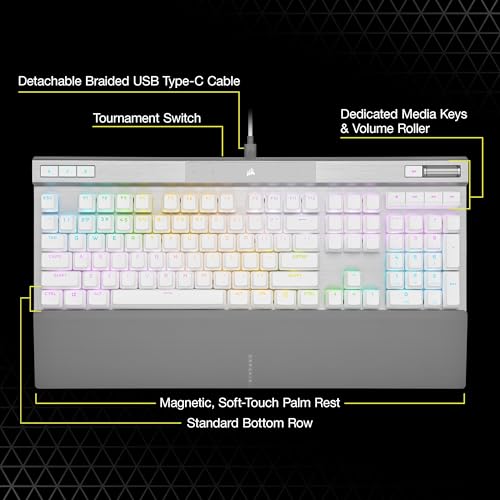
The Corsair K70 PRO RGB Optical-Mechanical Gaming Keyboard is a technically strong, well-built competitive gaming keyboard that earns its premium price for a specific type of buyer. The OPX optical-mechanical switches with 1mm actuation are genuinely fast, the 8,000Hz polling rate is the highest available in a production keyboard right now, and the PBT double-shot keycaps mean this board will still look good in three years. The included magnetic palm rest is a proper bonus. The 4.5-star average across 399 owners reflects a keyboard that delivers on its core promises.
The weaknesses are real though. No hot-swap support at this price is a legitimate criticism: if you decide you want a different switch feel, you're buying a new keyboard. The NA layout will need adjustment for UK ISO users. iCUE is powerful but heavy, and some owners encounter stability issues. The USB-A cable is behind the times. And the 8,000Hz polling, while impressive on paper, is a feature whose real-world benefit most players won't consciously perceive. You're paying for the engineering ceiling, not for a perceptible daily improvement over a good 1,000Hz board.
Who should buy this? Competitive PC gamers, primarily FPS and battle royale players, who want the lowest possible input latency from their keyboard and are willing to pay for it. People who've thought about polling rate and actuation distance and decided they want the best available numbers. Corsair ecosystem users who want unified iCUE lighting across their setup.
Who should skip it? Anyone who wants wireless, anyone who wants hot-swap flexibility, and anyone who primarily types rather than games. If you want a fast linear keyboard for competitive gaming but don't need the 8,000Hz headline, the Corsair K70 RGB Pro MK.2 with Cherry MX Speed switches sits at a considerably lower price point and covers most of the same ground. That's the honest alternative: spend less, get a very capable board, and put the difference toward something else in your setup.
| Switch type | CORSAIR OPX Optical-Mechanical |
|---|---|
| Layout | Full-size |
| Connectivity | USB 3.0 or 3.1 Type-A wired |
| Backlighting | Per-key RGB |
| HOT swappable | false |
| Keycaps | PBT double-shot |
| Polling rate HZ | 8000 |
| Switch actuation | linear |
The K70 PRO uses Corsair's own OPX optical-mechanical linear switches. These combine a physical mechanical switch construction with infrared optical detection, meaning the keypress registers when an infrared beam is broken rather than when a physical contact closes. The actuation point is 1.0mm (half the distance of a standard Cherry MX Red), actuation force is 45g, and total travel is 3.2mm. The result is a very fast, smooth linear switch with no tactile bump or audible click.
Yes, it's one of the most performance-focused gaming keyboards available. The OPX switches actuate at 1.0mm, meaning keypresses register earlier in the physical stroke than standard 2.0mm switches. The 8,000Hz hyper-polling rate reports the keyboard state to the computer 8,000 times per second, reducing maximum input latency to 0.125ms versus 1ms at standard 1,000Hz polling. Full N-key rollover ensures no keypresses are dropped regardless of how many keys are held simultaneously. It's particularly well-suited to competitive FPS and battle royale titles.
It's capable for typing but requires adjustment if you're coming from a keyboard with longer actuation. The 1.0mm actuation point means the switch fires very early in the keystroke, which can cause accidental keypresses for touch typists who rest their fingers lightly on keys. Most owners adapt within a week or two. The PBT double-shot keycaps have a pleasant texture, and the linear switch is quiet enough for shared spaces. If typing comfort is your primary concern over gaming performance, a keyboard with a tactile switch and 2.0mm actuation might suit you better.
No, it's relatively quiet for a mechanical keyboard. The OPX linear switches have no tactile bump and no audible click, producing only a soft bottom-out sound when keys are fully depressed. Owner reports consistently describe the sound profile as satisfying without being intrusive. It would not cause problems in a shared office environment and is unlikely to bleed into a streaming microphone at normal distances. The spacebar has a slightly different resonance to the alphanumeric keys, which is common on plate-mounted boards.
Corsair provides a two-year manufacturer warranty covering hardware defects under normal use. Amazon's standard 30-day return window applies for any reason within the first month. Beyond that, UK buyers are also protected by the Consumer Rights Act 2015, which provides statutory rights for up to six years if a fault can be shown to have been present at the time of sale. For any issues, Corsair's UK support portal handles warranty claims. If you receive a unit with defects, Amazon's A-to-Z guarantee makes returns straightforward within the initial 30-day window.
The competition at a glance
~£307approx
The choice we'd make at this price band. Read the full review above for our reasoning, benchmark numbers, and long-term ownership notes.
Where it wins
Where it falls short
Where it wins
Where it falls short
Prices are approximate UK street prices at time of review. Live pricing on each retailer.
A technically serious competitive gaming keyboard with genuinely fast optical switches and class-leading polling rate, let down slightly by fixed switches and a dated cable standard.
Read our pick: Corsair K100 RGB Mechanical Gaming Keyboard (CHERRY MX SP... →



More from