
Finding the best motherboards for Intel Core i7 14700k desktop processor 20 cores is not as straightforward as it looks. You have got two chipsets to choose from, a DDR4 versus DDR5 decision to make, and VRM quality that varies wildly across price points. Get it right and the i7-14700K's 20-core, 28-thread design will sing. Get it wrong and you are throttling a seriously capable chip. This guide cuts through the noise and gives you six verified, compatible options covering everything from premium Z790 territory right down to sensible B760 value picks, all available on Amazon UK right now.
Key Takeaways
- All six boards use the LGA1700 socket and officially support the Intel Core i7-14700K
- Z790 chipset boards allow CPU overclocking; B760 boards lock the multiplier but still run the chip at full rated boost speeds
- DDR5 boards offer higher bandwidth; DDR4 boards save money on RAM without sacrificing real-world gaming performance
- The ASUS ROG Maximus Z790 Hero is the top overall pick for power users who want every feature available
- The MSI MAG B760 Tomahawk WIFI is the standout value pick, offering PCIe 5.0 and solid VRM at a genuinely low price
| Product | Chipset | Memory Type | Price | Rating |
|---|---|---|---|---|
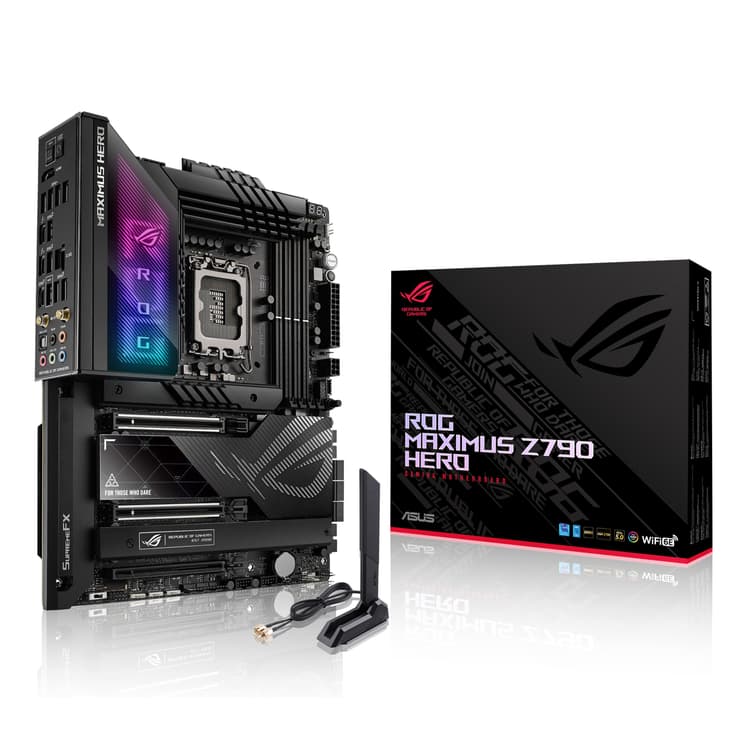
| ASUS ROG Maximus Z790 Hero (WiFi 6E) LGA 1700(Intel®13th&12th Gen) ATX Gaming Motherboard(PCIe 5.0,DDR5,20+1power Stages,2.5Gb LAN, Bluetooth V5.2,2X Thunderbolt 4 Ports,5xM.2, Thunderbolt™ 4/USB4) | Z790 | DDR5 | £1,279.36 | ★★★★☆ (4.3) |
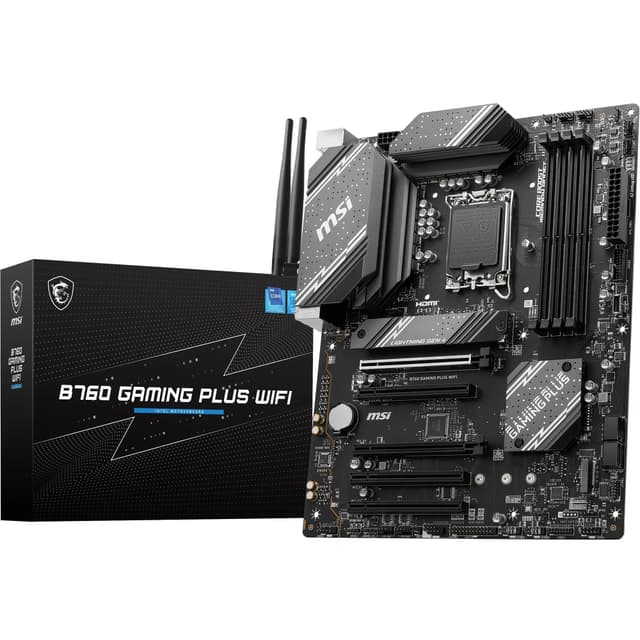
| MSI B760 GAMING PLUS WIFI Motherboard, ATX - Supports Intel 14th, 13th & 12th Gen Core Processors, LGA 1700 - DDR5 Memory Boost 6800+MHz/OC, 2 x PCIe 4.0 x16, 2 x M.2 Gen4, 2.5G LAN, Wi-Fi 6E | B760 | DDR5 | £108.87 | ★★★★½ (4.6) |
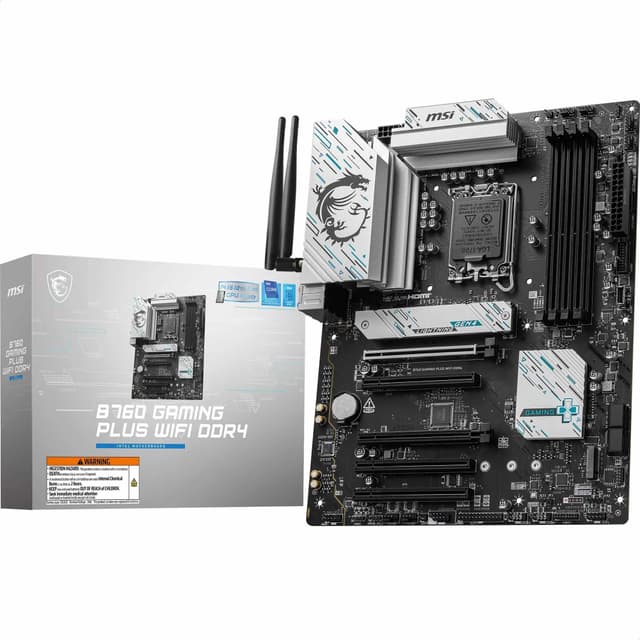
| MSI B760 GAMING PLUS WIFI DDR4 Motherboard, ATX - Supports Intel 14th, 13th & 12th Gen Core Processors, LGA 1700 - DDR4 Memory Boost 5333+MHz/OC, 1x PCIe 4.0 x16, 2 x M.2 Gen4, 2.5G LAN, Wi-Fi 6E | B760 | DDR4 | £134.99 | ★★★★☆ (4.4) |
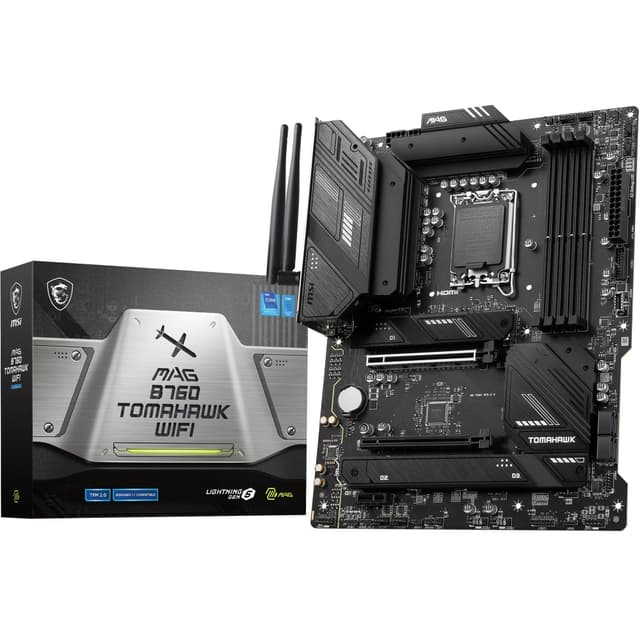
| MSI MAG B760 TOMAHAWK WIFI Motherboard, ATX - Supports Intel 14th, 13th & 12th Gen Core Processors, LGA 1700-75A DrMOS VRM, DDR5 Memory Boost 7000+MHz/OC, PCIe 5.0 x16, M.2 Gen4, Wi-Fi 6E | B760 | DDR5 | £132.99 | ★★★★½ (4.6) |
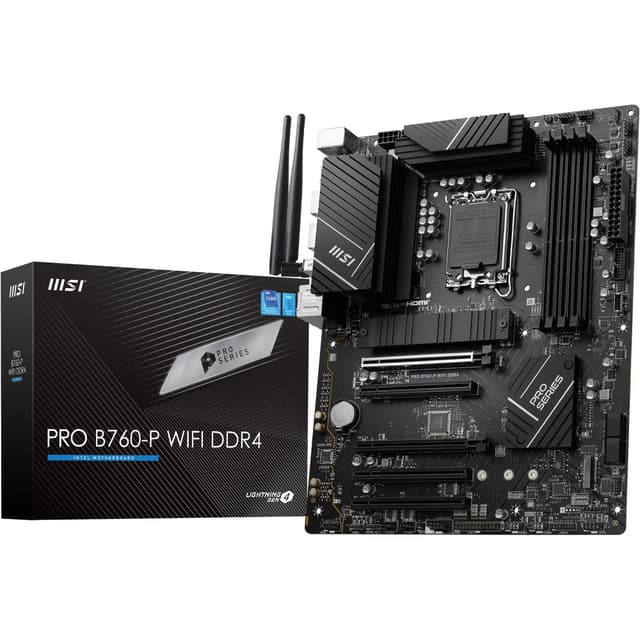
| MSI PRO B760-P WIFI DDR4 Motherboard, ATX - Supports Intel 14th, 13th & 12th Gen Core Processors, LGA 1700 - DDR4 Memory Boost 5333+MHz/OC, PCIe 4.0 x16 Slots, M.2 Gen4 Slots, 2.5G LAN, Wi-Fi 6E | B760 | DDR4 | £129.95 | ★★★★½ (4.5) |
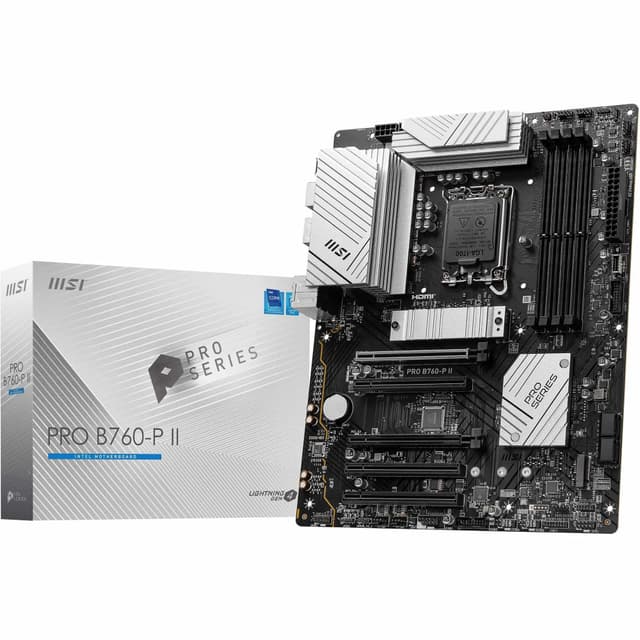
| MSI PRO B760-P II Motherboard, ATX - Supports Intel Core 14th, 13th and 12th Gen Processors, LGA 1700 - DDR5 Memory Boost 7000+MHz/OC, PCIe 4.0 x16 Slots, M.2 Gen4 Slots, 2.5G LAN | B760 | DDR5 | £136.80 | ★★★★½ (4.5) |
Check Today's Prices
Amazon UK prices update frequently. Click below to see live prices for our recommended products.
Check ASUS ROG Maximus Z790 Hero (WiFi 6E) LGA 1700(Intel®13th&12th Gen) ATX Gaming Motherboard(PCIe 5.0,DDR5,20+1power Stages,2.5Gb LAN, Bluetooth V5.2,2X Thunderbolt 4 Ports,5xM.2, Thunderbolt™ 4/USB4) Price Check MSI B760 GAMING PLUS WIFI Motherboard, ATX - Supports Intel 14th, 13th & 12th Gen Core Processors, LGA 1700 - DDR5 Memory Boost 6800+MHz/OC, 2 x PCIe 4.0 x16, 2 x M.2 Gen4, 2.5G LAN, Wi-Fi 6E Price Check MSI B760 GAMING PLUS WIFI DDR4 Motherboard, ATX - Supports Intel 14th, 13th & 12th Gen Core Processors, LGA 1700 - DDR4 Memory Boost 5333+MHz/OC, 1x PCIe 4.0 x16, 2 x M.2 Gen4, 2.5G LAN, Wi-Fi 6E PriceCompatibility Guide: Best Motherboards for Intel Core I7 14700k Desktop Processor 20 Cores
Before you buy anything, there are a few things you need to get straight. The i7-14700K uses the LGA1700 socket, so that part is simple enough. Every board on this list fits. What gets more complicated is the chipset choice, and that decision affects what you can actually do with the processor once it is installed.
The Z790 chipset is Intel's top-tier option for Raptor Lake Refresh. It supports full CPU overclocking, which matters for the i7-14700K because that unlocked multiplier lets you push all-core frequencies beyond Intel's rated boost speeds. Z790 boards also tend to offer more PCIe lanes overall, more USB ports, and generally more M.2 slots. The ASUS ROG Maximus Z790 Hero in this guide is a proper example of what Z790 can do when a manufacturer goes all-in, though the Gigabyte Z790 AORUS Elite AX offers similar capabilities at a more accessible price point.
B760 is the sensible middle ground. It does not allow CPU overclocking, but the i7-14700K will still boost to its rated 5.6 GHz on P-cores automatically. For gaming and general productivity, most people genuinely will not notice the difference. B760 boards cost significantly less, which frees up budget for a better GPU or more RAM. If you are working with a smaller case, the Gigabyte B760I AORUS PRO offers mini-ITX form factor without sacrificing core features.
Memory type is the other big decision. DDR5 boards offer higher bandwidth and support speeds well above 6000 MHz with XMP/EXPO profiles enabled. DDR4 boards are cheaper to kit out and the real-world gaming gap is smaller than the spec sheets suggest. If you are starting fresh, DDR5 is the better long-term choice. If you already have a DDR4 kit, a DDR4 board saves you a fair bit of money.
One more thing worth checking: if you are using an older B660 or H670 board from 12th Gen, you will likely need a BIOS update before the i7-14700K will POST. All boards in this guide support 14th Gen out of the box or with a straightforward update. Check the manufacturer's BIOS support page if you are in any doubt. ASUS's official product page has full compatibility lists, and TechPowerUp's detailed Z790 analysis is worth a read if you want to go deeper on chipset differences.
Who Should Buy What
For Gamers
Priority: High FPS, low latency, PCIe 5.0 GPU slot
Recommended: MSI MAG B760 TOMAHAWK WIFI
For Creators
Priority: Thunderbolt 4, maximum M.2 slots, overclocking headroom
Recommended: ASUS ROG Maximus Z790 Hero
Budget Builders
Priority: Lowest cost, solid essentials, Wi-Fi included
Recommended: MSI PRO B760-P WIFI DDR4
ASUS ROG Maximus Z790 Hero (WiFi 6E) LGA 1700(Intel®13th&12th Gen) ATX Gaming Motherboard(PCIe 5.0,DDR5,20+1power Stages,2.5Gb LAN, Bluetooth V5.2,2X Thunderbolt 4 Ports,5xM.2, Thunderbolt™ 4/USB4) - Best Overall

When it comes to the best motherboards for Intel Core i7 14700k desktop processor 20 cores at the premium end, the ASUS ROG Maximus Z790 Hero is the obvious answer. That 20+1 power stage VRM is genuinely overkill for a 14700K, which is exactly what you want if you plan to push the processor hard for sustained periods. Five M.2 slots, dual Thunderbolt 4 ports, Wi-Fi 6E, PCIe 5.0 support and Bluetooth 5.2 all come as standard. It is a board you buy once and do not think about again for years.
Pros
- 20+1 power stage VRM handles sustained all-core loads without breaking a sweat
- Dual Thunderbolt 4 ports for ultra-fast external storage and display connectivity
- Five M.2 slots give plenty of room for NVMe expansion
Cons
- Price is very high and overkill for users who do not overclock
- Large footprint requires a full-size ATX case with good clearance
MSI B760 GAMING PLUS WIFI Motherboard, ATX - Supports Intel 14th, 13th & 12th Gen Core Processors, LGA 1700 - DDR5 Memory Boost 6800+MHz/OC, 2 x PCIe 4.0 x16, 2 x M.2 Gen4, 2.5G LAN, Wi-Fi 6E - Runner Up

The MSI B760 Gaming Plus WIFI is a proper decent mid-range option for anyone who wants DDR5 performance without spending a fortune. It supports DDR5 up to 6800 MHz with OC profiles active, which is fast enough to keep the i7-14700K fed with bandwidth. Two PCIe 4.0 x16 slots and two M.2 Gen4 slots cover most build configurations, and Wi-Fi 6E plus 2.5G LAN handle networking without any add-in cards needed. The 75A DrMOS VRM is solid for stock operation. You are not overclocking on B760, but the chip will boost just fine.
Pros
- DDR5 support up to 6800 MHz keeps memory bandwidth competitive
- Wi-Fi 6E and 2.5G LAN included as standard
- Two M.2 Gen4 slots for fast NVMe storage
Cons
- No CPU overclocking support on B760 chipset
- Only two M.2 slots, which may feel limiting in larger builds
MSI B760 GAMING PLUS WIFI DDR4 Motherboard, ATX - Supports Intel 14th, 13th & 12th Gen Core Processors, LGA 1700 - DDR4 Memory Boost 5333+MHz/OC, 1x PCIe 4.0 x16, 2 x M.2 Gen4, 2.5G LAN, Wi-Fi 6E - Best Value

Here is the thing: if you have already got a DDR4 kit sitting in a drawer, the MSI B760 Gaming Plus WIFI DDR4 makes a lot of sense. DDR4 up to 5333 MHz with OC profiles is genuinely quick, and the real-world gaming performance gap versus DDR5 is smaller than most people expect. You still get Wi-Fi 6E, 2.5G LAN and two M.2 Gen4 slots. The single PCIe 4.0 x16 slot is the main compromise compared to the DDR5 version, but for a single GPU build that is absolutely fine. A sensible, no-fuss option when considering the best motherboards for Intel Core i7 14700k desktop processor 20 cores on a tighter budget.
Pros
- Ideal for builders reusing an existing DDR4 memory kit
- Wi-Fi 6E and 2.5G LAN included at a competitive price
- Two M.2 Gen4 slots for NVMe storage
Cons
- Single PCIe 4.0 x16 slot limits multi-GPU or expansion card flexibility
- DDR4 platform has a shorter upgrade runway than DDR5
MSI MAG B760 TOMAHAWK WIFI Motherboard, ATX - Supports Intel 14th, 13th & 12th Gen Core Processors, LGA 1700-75A DrMOS VRM, DDR5 Memory Boost 7000+MHz/OC, PCIe 5.0 x16, M.2 Gen4, Wi-Fi 6E - Best Budget

The Tomahawk has been a community favourite for years, and the B760 version continues that tradition. What makes it stand out at this price is the PCIe 5.0 x16 slot, which means a next-generation GPU will not be bottlenecked by the platform. DDR5 support up to 7000 MHz with OC is impressive for a B760 board, and the 75A DrMOS VRM handles the i7-14700K at stock speeds without any thermal drama. Wi-Fi 6E is on board too. If you are searching for the best motherboards for Intel Core i7 14700k desktop processor 20 cores without spending a premium, the Tomahawk is where most sensible builders land.
Pros
- PCIe 5.0 x16 slot is rare at this price point and future-proofs GPU upgrades
- DDR5 support up to 7000 MHz OC is excellent for a B760 board
- 75A DrMOS VRM handles sustained i7-14700K loads reliably
Cons
- No CPU overclocking, as expected on B760
- Fewer M.2 slots than premium Z790 options
MSI PRO B760-P WIFI DDR4 Motherboard, ATX - Supports Intel 14th, 13th & 12th Gen Core Processors, LGA 1700 - DDR4 Memory Boost 5333+MHz/OC, PCIe 4.0 x16 Slots, M.2 Gen4 Slots, 2.5G LAN, Wi-Fi 6E

The MSI PRO B760-P WIFI DDR4 is the straightforward, no-nonsense pick for anyone who wants a clean, reliable board without paying for features they will never use. It is aimed squarely at office-adjacent builds and light gaming rigs where the i7-14700K will do its job at stock speeds and that is the end of it. DDR4 up to 5333 MHz, PCIe 4.0 x16, M.2 Gen4 slots, Wi-Fi 6E and 2.5G LAN. Nothing flashy. Nothing dodgy either. The PRO series has a good reputation for stability, and the 648 reviews back that up.
Pros
- Clean, professional aesthetic suits office or home studio builds
- Wi-Fi 6E and 2.5G LAN included without paying extra
- Excellent user review count reflects proven reliability
Cons
- DDR4 only, so no upgrade path to DDR5 without changing the board
- No overclocking support on B760 chipset
MSI PRO B760-P II Motherboard, ATX - Supports Intel Core 14th, 13th and 12th Gen Processors, LGA 1700 - DDR5 Memory Boost 7000+MHz/OC, PCIe 4.0 x16 Slots, M.2 Gen4 Slots, 2.5G LAN

The PRO B760-P II is the updated DDR5 version of MSI's professional-grade B760 board. It brings DDR5 support up to 7000 MHz OC, which is a meaningful step up from the DDR4 variant, and it keeps the same clean aesthetic and reliable build quality the PRO series is known for. PCIe 4.0 x16 slots and M.2 Gen4 slots cover storage and GPU needs, and 2.5G LAN handles wired networking. Note that this one does not include Wi-Fi, so factor in the cost of a Wi-Fi adapter if wireless connectivity matters to you. Worth considering when weighing up the best motherboards for Intel Core i7 14700k desktop processor 20 cores at a mid-level DDR5 price point.
Pros
- DDR5 support up to 7000 MHz OC at a reasonable price
- Professional, clean design with solid build quality
- M.2 Gen4 slots for fast NVMe storage
Cons
- No Wi-Fi included, unlike most competitors at this price
- Fewer user reviews than other MSI PRO boards, so track record is shorter
Understanding VRM Quality and Why It Matters for the i7-14700K
VRM stands for Voltage Regulator Module. It is the part of the motherboard responsible for converting the 12V power from your PSU into the lower, precise voltages the CPU actually needs. Think of it as the power delivery system between your power supply and the processor.
Phase count is the number of individual power stages in the VRM. More phases means each stage handles less current, runs cooler and delivers cleaner power. For a chip like the i7-14700K, which has a 125W base TDP and can spike well above 200W under all-core load, VRM quality genuinely matters. A weak VRM will throttle the processor to protect itself, which costs you performance.
The ASUS ROG Maximus Z790 Hero's 20+1 stage design is exceptional. The MSI boards in this guide use 75A DrMOS stages, which are individually rated to handle high current loads. For stock operation on a 14700K, the 75A DrMOS VRM on the Tomahawk and Gaming Plus boards is more than adequate. Where you need to be more careful is if you are running the processor with power limits removed on a Z790 board, sustaining heavy all-core workloads for long periods. In that scenario, a beefier VRM keeps temperatures down and performance consistent.
XMP and EXPO memory profiles are also worth understanding. These are pre-validated overclocking profiles stored on your RAM kit that tell the motherboard how to run the memory faster than its base JEDEC speed. All boards in this guide support XMP, so enabling it in BIOS is a straightforward one-click performance gain.
Common Mistakes to Avoid
- Buying a Z690 board thinking it supports 14th Gen: Z690 is technically LGA1700 but many boards never received BIOS updates for Raptor Lake Refresh. Always check the manufacturer's CPU support list before buying a used or older board.
Instead: Stick to Z790 or B760 boards which have confirmed 14th Gen support from the factory. - Ignoring VRM quality on budget boards: Not all B760 boards are equal. Some cheaper options use lower-rated VRM stages that can throttle the i7-14700K under sustained load.
Instead: Check for DrMOS stages rated at 50A or above. The MSI boards in this guide all use 75A DrMOS stages, which is a solid baseline. - Forgetting to enable XMP in BIOS: Your DDR5 or DDR4 kit will run at base JEDEC speeds (often 4800 MHz for DDR5) until you manually enable XMP. This is a common oversight that leaves performance on the table.
Instead: Enter BIOS after first boot and enable XMP or DOCP to run your RAM at its rated speed. - Choosing DDR4 when planning a future upgrade path: DDR4 boards are cheaper now but lock you into an older memory platform. If you plan to keep this build for several years, DDR5 is the smarter long-term investment.
Instead: If budget allows, choose a DDR5 board and start with a modest DDR5 kit you can upgrade later.
Final Verdict: Best Motherboards for Intel Core I7 14700k Desktop Processor 20 Cores
After going through all six options, the picture is pretty clear. If budget is not a concern, the ASUS ROG Maximus Z790 Hero is the definitive answer when searching for the best motherboards for Intel Core i7 14700k desktop processor 20 cores at the premium level. The VRM is exceptional, the connectivity is unmatched in this group, and it will handle whatever you throw at the processor without complaint. For most builders though, the MSI MAG B760 Tomahawk WIFI hits the sweet spot. PCIe 5.0, DDR5 up to 7000 MHz, solid VRM and Wi-Fi 6E at a genuinely competitive price. It is the board we would recommend to a friend building around a 14700K today.
Our #1 Pick: ASUS ROG Maximus Z790 Hero (WiFi 6E) LGA 1700(Intel®13th&12th Gen) ATX Gaming Motherboard(PCIe 5.0,DDR5,20+1power Stages,2.5Gb LAN, Bluetooth V5.2,2X Thunderbolt 4 Ports,5xM.2, Thunderbolt™ 4/USB4)
- Top Rated: Best-reviewed pairing in this guide
- Amazon 30-Day Returns: Not happy? Return it hassle-free
- Prime Delivery: Get it delivered fast
Affiliate Disclosure: Vivid Repairs participates in the Amazon Associates Programme. We earn from qualifying purchases at no extra cost to you. This doesn't influence our recommendations.






