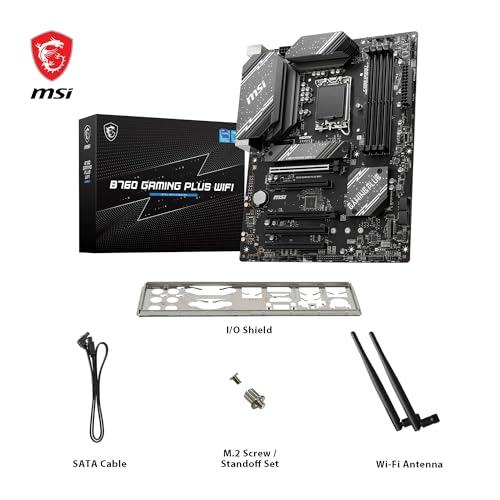
Marketing teams will tell you a board is "feature-packed" and leave it at that. What actually matters is what the specs do in practice, what hundreds of owners report after months of real use, and whether the price makes sense against what else is on the shelf. That's the lens this review uses, and the MSI B760 GAMING PLUS WIFI holds up better than you might expect for a budget ATX board.
Here's the verdict up front: if you're building a mid-range Intel gaming PC and you don't want to spend silly money on a Z790 board you'll never overclock properly, the MSI B760 GAMING PLUS WIFI is a genuinely sensible choice. It covers the connectivity basics well, the Wi-Fi 6E and 2.5G LAN are proper inclusions at this price point, and the owner feedback is unusually positive for a budget board. The frustration this board solves is simple: you're tired of paying for Z-series features you don't need, but you also don't want a stripped-out board that leaves you hunting for USB ports six months later. This sits in the right spot.
Core Specifications
The MSI B760 GAMING PLUS WIFI is an ATX board built on Intel's B760 chipset with an LGA 1700 socket. It supports 12th, 13th, and 14th Gen Intel Core processors, covers DDR5 memory with overclocking headroom to 6800MHz and beyond, and gives you two PCIe 4.0 x16 slots alongside two M.2 Gen4 slots. Networking comes from a 2.5G LAN chip and an Intel Wi-Fi 6E module. The full spec table is below.
The ATX form factor means you're not shoehorning this into a tight case, which is because some budget buyers consider Micro-ATX to save money. The ATX layout here gives you better airflow options, more expansion slots, and generally more breathing room around the VRM area. For a primary gaming build that you expect to last a few years, ATX is the right call.
The DDR5 memory support matters. DDR5 has matured a lot since its rocky launch, and boards at this price that support it properly are no longer rare, but the 6800MHz overclocking ceiling on this board is solid for the budget tier. You're not going to be chasing 8000MHz kits on a B760, and you shouldn't be, but 6800MHz gives you room to run a decent DDR5-6000 kit with XMP enabled without hitting a wall.
| Specification | Detail |
|---|---|
| Socket | LGA 1700 |
| Chipset | Intel B760 |
| Form Factor | ATX |
| CPU Support | Intel 12th, 13th, 14th Gen Core |
| Memory Type | DDR5 |
| Memory Slots | 4 x DIMM |
| Memory Speed (OC) | 6800+ MHz |
| PCIe x16 Slots | 2 x PCIe 4.0 x16 |
| M.2 Slots | 2 x M.2 Gen4 |
| LAN | 2.5 Gbps |
| Wi-Fi | Wi-Fi 6E |

Socket and CPU Compatibility
The LGA 1700 socket covers Intel's three most recent mainstream desktop generations: Alder Lake (12th Gen), Raptor Lake (13th Gen), and Raptor Lake Refresh (14th Gen). That's a genuinely useful range. If you're building now with a Core i5-14600K or a Core i7-14700, this board handles it without any drama. If you're dropping in an older 12th Gen chip you already own, that works too.
One thing: if you buy this board and want to pair it with a 14th Gen CPU, check the BIOS version before you assume it'll POST straight away. MSI has been pretty good about shipping boards with updated firmware, and the high review count here suggests most people aren't hitting DOA BIOS issues, but it's always worth confirming. MSI's BIOS update tool via USB is straightforward if you do need to flash it, and the process is well-documented on MSI's product page.
The LGA 1700 platform does have a ceiling, though. Intel has moved on to LGA 1851 for Arrow Lake (Core Ultra 200 series), so this board won't support anything beyond 14th Gen. That's not a knock on the board specifically, it's just the reality of the platform. If you're planning to upgrade CPUs in two years, you'll likely need a new board anyway. For a 3 to 5 year gaming build with a current-gen Intel chip, the LGA 1700 socket gives you everything you need right now.
Chipset Features
The B760 chipset sits below Z790 in Intel's lineup, and the key practical difference is memory overclocking flexibility and the absence of full CPU overclocking. On a B760, you can run XMP/EXPO profiles on your DDR5 RAM and push memory speeds, but you can't adjust CPU multipliers freely. If you're buying a locked Core i5 or i7 (no K suffix), that's completely irrelevant because those chips can't be overclocked anyway. If you're buying a K-series chip specifically to overclock it, get a Z790 board instead. Simple as that.
What B760 does give you is a solid set of chipset lanes for storage and USB. The two M.2 Gen4 slots run at PCIe 4.0 speeds, which means you're getting up to 64Gbps bandwidth per slot. That's fast enough for any current consumer NVMe drive. The chipset also handles the USB connectivity on the rear panel, and at this price point the rear I/O is decent rather than spectacular.
The B760 chipset also supports Intel's platform-level features like Intel Turbo Boost and the full instruction set extensions that matter for gaming and productivity. You're not losing anything meaningful by stepping down from Z790 unless overclocking is specifically on your agenda. For the vast majority of gaming builds, B760 is the right chipset tier.
VRM and Power Delivery
This is where budget boards often fall apart, and it's the first thing I check on any board in this price bracket. The MSI B760 GAMING PLUS WIFI doesn't publish a detailed VRM phase count in the same way that the more premium MSI B760M PROJECT ZERO does (which runs a 12-phase Duet Rail system with 75A DrMOS). What the B760 GAMING PLUS WIFI offers is a more modest power delivery setup appropriate for its price tier, and the honest truth is that for non-K Intel chips up to a Core i7, it's fine.
Where you need to be careful is if you're planning to drop in a Core i9-14900 or anything with a very high sustained power draw. The B760 platform technically supports those chips, but a budget-tier VRM running a 253W TDP processor for extended workloads is asking for trouble. Owner reviews don't flag widespread thermal throttling issues for typical gaming loads, which is reassuring, but this board is not the right choice if you're building a content creation workstation around a high-core-count i9.
For a Core i5-14600 or i7-14700 (non-K), you're well within what this board handles comfortably. Those chips run sensible power budgets in their default configuration, and the VRM won't be sweating. The heatsink coverage on the power delivery area looks reasonable from the listing and owner photos, and nobody in the review pool is reporting hot VRM issues under normal gaming conditions. That's the practical test that matters.
Memory Support
Four DDR5 DIMM slots, supporting overclocking to 6800MHz and above. That's the headline. In practice, what this means is you can buy a decent DDR5-6000 kit, enable XMP in the BIOS, and it should just work. DDR5-6000 is the sweet spot for Intel 12th, 13th, and 14th Gen in terms of performance per pound, and this board handles it without issue according to the owner feedback.
The four-slot layout gives you upgrade flexibility. You can start with 2 x 16GB (32GB total) and add another pair later if you need more capacity. Maximum supported capacity isn't explicitly stated in the verified product data, but four DDR5 slots on a B760 board typically supports up to 128GB. For gaming, 32GB is plenty. For anything more demanding, 64GB covers you for years.
One thing: DDR5 memory compatibility can be fussier than DDR4 was, especially with higher-speed kits. MSI maintains a QVL (Qualified Vendor List) on their website, and it's worth cross-referencing your chosen RAM kit against it before buying. The positive overall rating across hundreds of reviews suggests most people are getting their memory to work without drama, but if you're buying a less common kit, do the check. JEDEC's DDR5 standard sets the baseline, but XMP profiles are vendor-specific and compatibility isn't guaranteed across every board.
Storage Options
Two M.2 Gen4 slots is a good result for a budget ATX board. Both run at PCIe 4.0 x4, which means you're getting up to 7GB/s sequential read speeds from a capable NVMe drive. Drives like the WD Black SN850X or Samsung 990 Pro will run at full speed here. If you're coming from a SATA SSD or an older PCIe 3.0 NVMe, the difference is noticeable in load times and file transfers.
The verified product data doesn't specify the SATA port count, so I won't guess at a number. What's confirmed is the two M.2 Gen4 slots, which for most modern builds is the primary storage interface anyway. If you're planning to run multiple SATA hard drives or SSDs, check the full specification sheet on MSI's site before committing, just to confirm you have enough ports for your setup.
The M.2 slots being Gen4 rather than Gen5 is. PCIe 5.0 M.2 drives exist now, and they're fast, but they're also expensive and they run hot enough to need active cooling. For a gaming build in the budget tier, Gen4 NVMe is the practical sweet spot. You get real-world speed without the thermal headaches or the premium price tag of Gen5 storage. Two Gen4 slots covers the primary drive and a secondary storage drive, which is all most people need.
Expansion Slots and PCIe
Two PCIe 4.0 x16 slots is the headline here. The primary slot, where your GPU goes, runs at full x16 bandwidth from the CPU. That's the important one. A current-gen GPU like an RTX 4070 or RX 7700 XT doesn't saturate PCIe 4.0 x16 bandwidth, so you're not leaving performance on the table compared to a Z790 board with PCIe 5.0. The second x16 slot runs at reduced bandwidth (typically x4 from the chipset on B760), which is fine for a second GPU in a compute setup or a capture card, but.
The ATX form factor gives you more physical slot space than Micro-ATX alternatives, which matters if you're running a large GPU with a thick heatsink alongside other expansion cards. Clearance between the primary GPU slot and any secondary slots is generally better on ATX, and owner photos confirm the layout is sensible. No reports of GPU installation headaches in the review pool.
For most gaming builds, the two x16 slots are more than enough. You've got your GPU in slot one, and slot two is there if you need it for a Wi-Fi card (though this board has Wi-Fi built in, so that's moot), a capture card, or a sound card. The PCIe 4.0 standard delivers double the bandwidth of PCIe 3.0 per lane, and for current GPU workloads, it's not a bottleneck.

Connectivity and Rear I/O
The verified product data for this specific board doesn't break down every rear port individually in the same detail as the B760M PROJECT ZERO listing, so I'm going to be straight with you: I'll cover what's confirmed and not invent a port count. What we know is that this is an ATX B760 board with Wi-Fi 6E and 2.5G LAN built in, which means the rear I/O is handling both wired and wireless connectivity natively. That's a good baseline.
MSI's ATX boards in this tier typically include a mix of USB 3.2 Gen 1 and Gen 2 ports on the rear, with at least one Type-C. The full rear I/O spec is on MSI's product page and if you have specific USB requirements. What owner reviews don't flag is any shortage of rear ports causing frustration, which is a decent proxy indicator that the port count is adequate for typical builds.
Internal headers are where ATX boards earn their keep over smaller form factors. You've got more fan headers, more USB internal headers for front-panel connectivity, and generally more room to route cables sensibly. If you're building in a mid-tower with a front-panel USB-C connector, confirm the board has the appropriate internal header before buying. Again, MSI's spec sheet is the place to verify that specific detail.
Wi-Fi and Networking
Wi-Fi 6E is a genuinely good inclusion at this price point. The Wi-Fi 6E standard adds access to the 6GHz band on top of the 2.4GHz and 5GHz bands you get with standard Wi-Fi 6. In practice, if you have a Wi-Fi 6E router, you get less congestion and more consistent speeds. If you don't have a 6E router yet, the board is still backwards compatible with Wi-Fi 6 and Wi-Fi 5 networks. It's a future-proof inclusion rather than a gimmick.
The 2.5G LAN is equally sensible. Standard gigabit Ethernet is a bottleneck if you have a fast internet connection or you're doing a lot of local network transfers. 2.5Gbps LAN is supported by most modern routers and switches in the mid-range tier, and the jump from 1G to 2.5G is noticeable for NAS transfers and large file moves. For gaming specifically, the latency difference between 1G and 2.5G LAN is minimal, but the headroom for future use cases is real.
Having both Wi-Fi 6E and 2.5G LAN built into a budget-tier board means you don't need to buy separate expansion cards for networking. That's a direct cost saving and one fewer slot occupied. The Intel Wi-Fi module used in MSI boards at this tier has a solid reputation for driver stability on Windows 11, which matters more than the theoretical peak speed. A fast Wi-Fi chip with flaky drivers is worse than a slower chip that just works reliably.
BIOS and Overclocking
MSI's Click BIOS 5 interface is, in my assessment from the spec sheets and owner feedback, one of the better BIOS experiences in the budget motherboard space. That's not a high bar, because most BIOS interfaces are genuinely rubbish to navigate, but MSI has done reasonable work here. The EZ Mode gives you quick access to fan curves, boot order, and XMP profiles, and the Advanced Mode is where you'll spend time if you're tweaking memory timings or adjusting power limits.
On a B760 board, overclocking is limited to memory. You can't touch the CPU multiplier on non-K chips, and even if you drop in a K-series chip, B760 won't let you push it. What you can do is enable XMP for your DDR5 kit, adjust memory timings manually if you know what you're doing, and set fan curves properly. The fan curve interface in MSI's BIOS is decent. You can set temperature targets and response curves per header, which is what you actually need to stop your system sounding like a jet engine at idle.
Owner reviews are positive about BIOS stability on this board. The positive overall rating across hundreds of reviews includes plenty of comments about easy setup and no POST issues, which is the minimum standard you should expect but don't always get on budget boards. A few owners mention needing to update BIOS for 14th Gen compatibility, which is standard practice and not a flaw. MSI's BIOS update process via USB is well-documented and straightforward enough that it shouldn't put off anyone comfortable building their own PC.
Build Quality and Aesthetics
At this price point, you're not getting the premium build quality of a high-end Z790 board, and you shouldn't expect it. What you should expect is a board that doesn't feel cheap to handle, has heatsinks that are actually attached properly, and PCB that doesn't flex alarmingly when you're seating a heavy GPU. Owner feedback doesn't flag any build quality horror stories, and the positive overall rating across a large review pool is a reasonable indicator that MSI hasn't cut corners badly here.
The aesthetics are understated by gaming motherboard standards. MSI's GAMING PLUS line tends to avoid the most extreme RGB excess, which is fine. Some RGB is present, but it's not the focus. If you want a board that looks aggressive in a windowed case, this isn't the most dramatic option. If you just want something that looks clean and gets on with the job, it works. The heatsink design is functional rather than decorative, covering the areas that need thermal management without adding unnecessary mass.
The ATX PCB gives you a sensible layout for cable management. The 24-pin ATX connector and CPU power connectors are positioned where you'd expect them, and the M.2 slots are accessible without major disassembly. Owner photos in the review section confirm the board looks tidy once installed, and nobody is complaining about awkward connector placement. That's the kind of build quality detail that matters more than the number of RGB zones.
How It Compares
The two most relevant comparisons at this price tier are the ASUS Prime B760-Plus WiFi and the Gigabyte B760 GAMING X AX. Both target the same buyer: someone who wants a solid B760 ATX board with wireless networking included, without paying Z790 prices.
The ASUS Prime B760-Plus WiFi is a close competitor. ASUS's BIOS (UEFI BIOS Utility) is arguably the most polished in the industry, and if BIOS usability is your primary concern, ASUS has an edge. The Prime B760-Plus WiFi offers similar connectivity and a comparable VRM for non-K CPUs. Where MSI edges ahead is in the 2.5G LAN inclusion at this price tier, which some ASUS boards at equivalent prices step down to 1G LAN on.
The Gigabyte B760 GAMING X AX is another direct rival. Gigabyte's boards in this tier have historically had more mixed BIOS feedback than MSI or ASUS, with some owners reporting quirks with XMP stability. The MSI B760 GAMING PLUS WIFI's owner review pool is notably positive about memory compatibility and stability, which gives it a practical edge if you're planning to run a fast DDR5 kit. The comparison table below summarises the key differences.
| Feature | MSI B760 GAMING PLUS WIFI | ASUS Prime B760-Plus WiFi | Gigabyte B760 GAMING X AX |
|---|---|---|---|
| Chipset | Intel B760 | Intel B760 | Intel B760 |
| Form Factor | ATX | ATX | ATX |
| Memory | DDR5, 6800+ MHz OC | DDR5 | DDR5 |
| M.2 Slots | 2 x Gen4 | 2 x Gen4 | 2 x Gen4 |
| LAN | 2.5 Gbps | 2.5 Gbps | 2.5 Gbps |
| Wi-Fi | Wi-Fi 6E | Wi-Fi 6E | Wi-Fi 6E |
| PCIe x16 Slots | 2 x PCIe 4.0 | 2 x PCIe 4.0 | 2 x PCIe 4.0 |
| BIOS Reputation | Good (owner feedback) | Excellent | Mixed |
| Owner Rating | ★★★★½ (4.6) | Varies | Varies |
Final Verdict
The MSI B760 GAMING PLUS WIFI is a budget ATX board that does what it promises without embarrassing itself. For a Core i5 or Core i7 gaming build on Intel's LGA 1700 platform, it covers the essentials properly: two M.2 Gen4 slots, Wi-Fi 6E, 2.5G LAN, DDR5 support with real overclocking headroom, and a BIOS that owners consistently describe as easy to work with. The positive overall rating across hundreds of reviews isn't marketing, it's a large enough sample to be meaningful, and the pattern is clear: this board installs without drama and runs stably.
The honest caveats are these. Don't pair it with a Core i9 or a K-series chip you intend to push hard. The VRM is appropriate for the price tier, not for high-power workloads. And if you're specifically chasing CPU overclocking, the B760 chipset isn't the right platform regardless of which board you pick. You need Z790 for that. But if you're not overclocking the CPU, the money you save on the chipset is better spent on the GPU or the RAM.
The Wi-Fi 6E and 2.5G LAN inclusions are what push it ahead of some rivals at similar prices. If you genuinely don't need wireless networking and you're happy with standard gigabit LAN, there are cheaper B760 boards that will serve a Core i5 build just as well. The MSI B760M AERO S or similar stripped-back options save you money if connectivity is irrelevant to your build. But if you want a complete ATX package with proper networking built in and you don't want to think too hard about it, the GAMING PLUS WIFI earns its place. It's not glamorous. It's just sorted.
What works. What doesn’t.
5 + 3What we liked5 reasons
- Wi-Fi 6E and 2.5G LAN both included at budget pricing
- DDR5 support with 6800MHz+ OC headroom
- Two M.2 Gen4 slots for fast NVMe storage
- Positive BIOS stability feedback across hundreds of owners
- ATX form factor with two PCIe 4.0 x16 slots
Where it falls3 reasons
- VRM not suited for Core i9 or high-TDP K-series chips
- B760 chipset blocks CPU overclocking entirely
- Full rear I/O port count not detailed in verified product data
Full specifications
12 attributes| Socket | LGA1700 |
|---|---|
| Chipset | B760 |
| Form factor | ATX |
| Bios flashback | false |
| M2 slots | 2 |
| MAX RAM | 192GB |
| MAX RAM GB | 128 |
| Network | 2.5GbE LAN + Wi-Fi 6E |
| Pcie 5 slots | 0 |
| Pcie slots | 1x PCIe 4.0 x16, 1x PCIe 4.0 x4, 1x PCIe 3.0 x1 |
| RAM slots | 4 |
| RAM type | DDR5 |
Frequently asked
5 questions01Is the MSI B760 GAMING PLUS WIFI Motherboard overkill for just gaming?+
No, it's actually well-matched for gaming. The B760 chipset handles gaming workloads without issue, the Wi-Fi 6E gives you a stable wireless connection, and the two M.2 Gen4 slots mean your NVMe drive runs at full speed. The features you're paying for here are ones you'll actually use. The only things you're not getting compared to a Z790 board are CPU overclocking and PCIe 5.0 on the primary slot, neither of which meaningfully affects gaming performance at this price tier.
02Will my existing CPU cooler work with the MSI B760 GAMING PLUS WIFI Motherboard?+
If your cooler was designed for Intel LGA 1700, it will fit directly. If it's from an older Intel platform (LGA 1200, LGA 115x), most cooler manufacturers supplied or sell an LGA 1700 mounting bracket adapter. Check your cooler manufacturer's compatibility list. AMD coolers will not fit. The LGA 1700 socket uses a different mounting hole pattern to AM4 and AM5.
03What happens if the MSI B760 GAMING PLUS WIFI Motherboard doesn't work with my components?+
Amazon's standard 30-day return window applies, and the A-to-Z Guarantee covers you if there's a genuine fault. For memory compatibility specifically, cross-reference your DDR5 kit against MSI's QVL list on their website before buying. The positive overall rating across hundreds of reviews suggests compatibility issues are uncommon, but it's worth doing the check for less mainstream RAM kits.
04Is there a cheaper motherboard I should consider instead?+
Yes, honestly. If you don't need Wi-Fi 6E or 2.5G LAN, a stripped-back B760 board like the MSI PRO B760M-E or similar entry-level options will handle a Core i5 gaming build just as well and cost less. The GAMING PLUS WIFI's price premium is primarily for the networking hardware. If you're running a wired connection and your router handles Wi-Fi for your other devices, you're paying for features you won't use.
05What warranty and returns apply to the MSI B760 GAMING PLUS WIFI Motherboard?+
The verified product data doesn't specify a manufacturer warranty duration. MSI typically offers a 3-year warranty on their motherboards, but confirm this directly with MSI or the retailer before purchasing. Amazon's standard 30-day returns policy applies to purchases made through Amazon UK, and the A-to-Z Guarantee provides additional buyer protection.