A monitor is a long-term commitment. You'll sit in front of it for eight, ten, maybe twelve hours a day. Pick the wrong one and you're not just out of pocket. You're stuck with eye strain, washed-out colours, and a nagging sense that you should have done more research. That's the practical reality. So the question for MSI's Modern MD342CQPW is simple: does it actually deliver on its promises, or is it just a list of bullet points dressed up as a product?
The MD342CQPW sits in a busy part of the market. The mid-range ultrawide bracket is genuinely competitive right now. You've got LG, Samsung, AOC, and Philips all fighting for the same wallets, and the gap between a good buy and a mediocre one isn't always obvious from a spec sheet. MSI is positioning this as a productivity-first ultrawide. The 34-inch 3440x1440 UWQHD panel, the KVM switch, the PiP/PbP support, and the built-in speakers all point at someone running a multi-device desk setup rather than chasing frame rates. That's a specific pitch, and the question is whether the specification backs it up.
It's a VA panel with a wide colour gamut on the spec sheet, and MSI's Productivity Intelligence App adds extra display and colour settings if you fancy fine-tuning it. Here's how the specification stacks up.
Core Specifications
The MD342CQPW is a 34-inch ultrawide with a 3440x1440 resolution on a VA panel. The curve is 1500R, which is on the tighter end for a 34-inch display. MSI rates this 34in UWQHD panel at 120Hz over DisplayPort or USB-C and 100Hz over HDMI. That's a clear step up from the 60Hz of older office monitors. MSI quotes 4ms GtG and 1ms MPRT, and variable refresh is AMD FreeSync Premium.
Connectivity is sensible for a productivity monitor. You get one DisplayPort 1.4a and two HDMI 2.0b ports, which covers most desktop and laptop combinations. There's also a USB-C input with 98W power delivery, so a laptop that draws up to 98W can run and charge over one cable. MSI lists a KVM, so connected computers can share one keyboard and mouse, and PiP and PbP modes for showing two sources at once. Together they're the reason to buy this over a plain ultrawide if you run two machines.
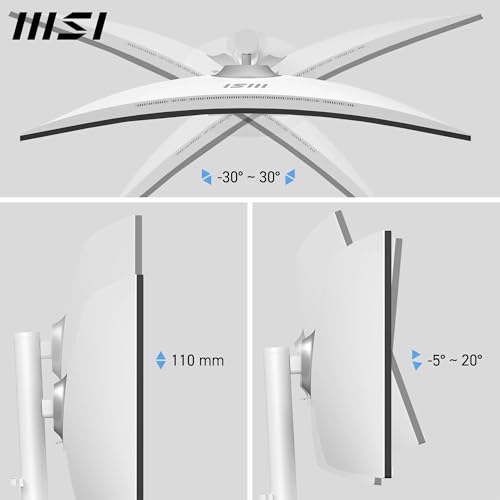
The stand tilts from -5° to 20°, rises by 110 mm and swivels 30° each way. MSI also lists a pivot, but it's only 5° either side, enough to level the screen and nowhere near portrait. The built-in speakers are 2 x 3W. MSI's eye-comfort features come under its EyesErgo name, and the wide colour gamut works out at 95% DCI-P3, more on which in the colour section.
MSI's MD342CQP, without the W, has a datasheet that lists the same specifications, line for line. This review covers the MD342CQPW, so check the model code and the finish before you buy.
| Specification | Detail |
|---|---|
| Screen Size | 34 inches |
| Resolution | 3440 x 1440 (UWQHD) |
| Panel Type | VA |
| Refresh Rate | 120Hz (DisplayPort, USB-C); 100Hz (HDMI) |
| Response Time | 4ms GtG / 1ms MPRT |
| Curve | 1500R |
| Brightness | 300 cd/m2 (typical) |
| Contrast Ratio | 3500:1 |
| Colour Gamut | 95% DCI-P3, 119% sRGB, 92% Adobe RGB (CIE 1976) |
| HDR | HDR Ready |
| Adaptive Sync | AMD FreeSync Premium |
| Ports | 1x DisplayPort 1.4a, 2x HDMI 2.0b |
| USB | 1x USB-C (DP Alt, 98W power delivery), 2x USB-A 5Gbps, 1x USB-B upstream |
| Audio | 2x 3W speakers, headphone out |
| KVM | Yes |
| PiP/PbP | Yes |
| Stand Adjustment | Tilt, height (110 mm), swivel; pivot ±5° only |
| VESA Mount | 75 x 75 mm |
| Dimensions (with stand) | 808.6 x 424.1 x 250.6 mm |
| Weight | 8.05 kg net |
| Current Price | £238.97 |

Panel Technology
VA panels have a specific set of strengths and weaknesses, and it's worth being clear about them before anything else. The big advantage is contrast. VA panels produce much deeper blacks than IPS, which makes a real difference when you're watching films, working in dark-themed applications, or just sitting in a dimly lit room. The MD342CQPW's rated 3500:1 contrast is typical for VA. Blacks look black rather than dark grey.
The trade-off is viewing angles and something called black crush. VA panels lose colour accuracy and brightness as you move off-axis, more so than IPS. On a 34-inch curved display you're generally sitting close enough and centred enough that this isn't a major issue for solo use. But if you're regularly sharing your screen with someone sitting beside you, IPS would serve you better. Black crush is the other VA quirk: dark shadow detail in near-black areas can get swallowed up, which shows up in games and films with dark scenes.
The 1500R curve on this panel is tighter than the 1800R you see on many ultrawides. At 34 inches, a 1500R curve brings the edges round towards you without being extreme. Sitting at a normal desk distance of around 60 to 80cm, the curve wraps the edges into your peripheral vision naturally. The curve also helps with the VA viewing angle issue by keeping more of the panel surface facing you directly. The VA panel technology here is doing what it's supposed to do: delivering strong contrast and decent colour in a format that suits a single-user desk setup.
Display Quality
At 3440x1440 on a 34-inch panel, you're looking at a pixel density of around 109 PPI. That's not retina-sharp by any stretch, but it's perfectly comfortable for everyday work. Text is clear and readable without any scaling tricks. Spreadsheet columns, code editors, browser tabs, all of it sits cleanly on screen. The resolution is unlikely to hold you back as a primary work display. The extra horizontal real estate compared to a 27-inch 1440p monitor is genuinely useful for side-by-side document work.
The anti-glare coating is matte, which is the right call for a productivity monitor.
The 300 cd/m2 peak brightness is adequate for indoor use. It's not going to cut it in a very bright room with direct sunlight, but for a typical UK office or home setup it's fine. MSI sells it as an eye-friendly screen under its EyesErgo features, which is worth having if you're in front of it all day.
Refresh Rate and Adaptive Sync
MSI rates the MD342CQPW at 120Hz, but only over DisplayPort and USB-C. HDMI stops at 100Hz at full resolution, which is where the 100Hz figure you'll sometimes see for this monitor comes from. Plug in over DisplayPort or USB-C and you get the full 120Hz. Coming from 60Hz, scrolling and dragging windows around look noticeably smoother. Coming from a 144Hz gaming monitor, it'll feel a touch slower.
Variable refresh is AMD FreeSync Premium, which MSI names on the datasheet. NVIDIA owners can try G-Sync Compatible mode in the driver, but MSI doesn't list the monitor as certified for it, so there's no promise it'll behave with an RTX card.
Getting near 120fps in modern games at 3440x1440 takes a strong graphics card, so for most people buying this the refresh rate is about a smoother desktop rather than frame rates. The DisplayPort 1.4a input and the USB-C port both carry 3440x1440 at 120Hz. The two HDMI 2.0b ports carry it at 100Hz, fine for a second machine or a console.
Response Time and Motion
MSI quotes 4ms GtG for this panel. That's a realistic number for a VA panel at this price, and it's not the kind of inflated marketing figure you see on some budget monitors. But 4ms GtG still means this isn't a fast panel by gaming standards. Fast IPS gaming monitors and OLEDs switch pixels quicker still. The VA panel here is doing what VA panels do: prioritising contrast and colour depth over raw speed.
VA panels are prone to smearing in fast-paced game scenes, particularly in dark areas. The pixel transitions from dark to dark (dark grey to black, for example) are slower than light-to-dark transitions, which shows up as trailing in shadow areas during fast camera movement. It matters far less in slower-paced games or productivity work. But if you're planning to play competitive shooters or fast-action games at high frame rates, this isn't the right panel for that job.
MSI's datasheet doesn't mention overdrive settings. What it does give you is 120Hz, which smooths motion compared with 60Hz, and for office work and casual games that's what counts.
Color Accuracy and Gamut
MSI quotes 95% DCI-P3, 119% sRGB and 92% Adobe RGB, all to the CIE 1976 standard. Going past 100% sRGB means the panel can show colours more saturated than web content is made for. That's useful for photo editing and video work, but it also means you need to be aware of colour management. If you're doing colour-critical work and your software doesn't handle wide gamut profiles properly, colours can look oversaturated.
Out-of-the-box colour accuracy figures aren't specified, so if you're doing colour-critical work, plan to calibrate it. For web browsing and office work, you want software colour management or a calibration profile so everyday content isn't oversaturated.
It isn't sold as a grading monitor, and MSI makes no calibration claim for it. For photo editing and video work, though, 95% of the DCI-P3 colour space is the reason to look at it.
HDR Performance
MSI lists the MD342CQPW as HDR Ready at 300 cd/m², with no DisplayHDR certification. HDR Ready means it accepts an HDR signal, not that it can show one the way it was mastered. Its rated 300 cd/m² is below even the 400 nits of VESA's entry DisplayHDR 400 tier, and a long way short of DisplayHDR 600.
The VA panel's contrast should keep blacks dark in HDR mode, but with a 300-nit ceiling, highlights can't stand out the way they do on a brighter, certified HDR display.
Leave HDR switched off and use it in SDR. If HDR matters to you, look for a brighter monitor with DisplayHDR certification; on a productivity screen like this, HDR Ready is a box ticked rather than a reason to buy.
Contrast and Brightness
This is where the VA panel earns its keep. MSI rates it at 3500:1. That contrast is what you're buying a VA panel for: in a dark room, with films or dark game scenes, blacks should stay dark where an IPS panel turns them grey.
The 300 nits peak brightness is adequate for most indoor environments. In a normally lit room you'll rarely need it at full brightness. Brightness uniformity isn't specified, which is worth knowing if you're planning to use this for photography work where uniform brightness matters.
The combination of high contrast and decent brightness makes this monitor particularly good for mixed-use environments where you're switching between productivity work and media consumption. The deep blacks and rich colours that the VA panel delivers suit cinematic content well. If you regularly watch films or TV on your monitor, the VA contrast advantage is a practical benefit you'll notice every time you use it.
Ergonomics and Stand
The stand is functional and covers the basics. Height adjustment gives you 110 mm of travel, enough to get the panel to eye level at most desks. Tilt runs from -5 to 20 degrees and swivel 30 degrees each way. That's the three-way adjustment MSI advertises; the ±5° pivot is for levelling, not portrait, which you wouldn't expect at 34 inches anyway.
The footprint of the stand is fairly wide, as you'd expect from a 34-inch ultrawide. It takes up a meaningful chunk of desk depth. If you're working on a shallow desk, you might find the stand pushes the panel further back than you'd like. VESA mounting is 75 x 75 mm, smaller than the 100 x 100 mm many arms default to, so check the arm lists 75 x 75 mm and is rated for the 8.05 kg MSI quotes.
In the box, MSI lists a DisplayPort cable, a USB Type-B to A cable for the KVM, an external power adaptor with its mains cord, and four VESA screws. There's no HDMI or USB-C cable. If you want to charge a laptop at the full 98W, buy a USB-C cable rated for 100W.
Connectivity and Ports
The port selection is practical for a dual-machine productivity setup. One DisplayPort 1.4a and two HDMI 2.0b ports cover the most common connection scenarios. The KVM switch is the headline feature. It lets connected computers share the keyboard and mouse plugged into the monitor's USB-A ports, so a desktop and a laptop can use one screen and one set of peripherals. MSI's datasheet doesn't set out how each machine should be cabled for it, so check the manual before you plan a desk around it.
The USB hub includes two USB-A downstream ports for peripherals. That's enough for a keyboard and mouse, which is all you need for the KVM to work. There's a USB-C port with 98W power delivery, and for laptop users it's the port that matters most. Modern laptops increasingly rely on USB-C for both data and charging, and having USB-C here makes this a much more compelling option for laptop users. With it, you can run your laptop over a single cable rather than juggling HDMI plus a separate charger. That's a real-world convenience that MSI's target audience will appreciate.
- 1x DisplayPort 1.4a (3440x1440 at up to 120Hz)
- 2x HDMI 2.0b (3440x1440 at up to 100Hz)
- 1x USB-C (DisplayPort Alt mode, 3440x1440 at up to 120Hz, 98W power delivery)
- 2x USB-A 5Gbps downstream (for KVM peripherals)
- 1x USB-B upstream (for KVM)
- 1x 3.5mm headphone output
- Built-in 2 x 3W speakers
The built-in speakers deserve a mention because they're included and some people will use them. They're 2 x 3W, so keep your hopes for music modest. The headphone output is a standard 3.5mm jack. HDMI is the one input that stops at 100Hz, so keep DisplayPort or USB-C for the machine you use most.
Value Analysis
Ultrawides at this size typically cost more than 27-inch monitors, and the KVM functionality adds genuine value for multi-device users. If you price up a separate KVM switch to add to a cheaper monitor, the cost difference narrows considerably. The feature set MSI has put together here makes practical sense for the target buyer.
The KVM matters most if you switch between two computers every day, and then it's worth real money. With one machine and a taste for games, compare its 120Hz against faster ultrawides before you buy.
For what it is, the MD342CQPW represents fair value in the mid-range bracket. You're getting a large, high-resolution VA panel with genuine productivity features, decent colour coverage, and a height-adjustable stand. You're not getting a gaming monitor. If you go in with clear expectations, the value is there.
Final Verdict
The MD342CQPW is built for a desk shared by two machines, and it has what that desk needs. There's a KVM and PiP/PbP, a USB-C port that'll charge a laptop at up to 98W, and a stand that adjusts for height. The 34-inch 3440x1440 VA panel is rated at 3500:1 and 95% DCI-P3, and at around 109 pixels per inch text stays comfortable to read all day.
The limitations are real and worth knowing upfront. The 3W speakers and 300-nit brightness are modest. At 120Hz with a 4ms VA response, it's not one for competitive gaming. The HDR implementation is checkbox-level and best ignored. And the VA panel's black crush in dark scenes is something you'll notice if you play games with dark environments. None of these are deal-breakers for the right buyer, but they matter for the wrong one.

Full Specifications
From MSI's Modern MD342CQPW datasheet.
| Specification | Detail |
|---|---|
| Model | MSI Modern MD342CQPW |
| Screen Size | 34 inches diagonal |
| Resolution | 3440 x 1440 (UWQHD / 21:9) |
| Panel Technology | VA (Vertical Alignment) |
| Curve Radius | 1500R |
| Refresh Rate | 120Hz (DisplayPort, USB-C); 100Hz (HDMI) |
| Response Time | 4ms GtG / 1ms MPRT |
| Brightness | 300 cd/m2 typical |
| Contrast Ratio | 3500:1 |
| Colour Gamut | 95% DCI-P3, 119% sRGB, 92% Adobe RGB (CIE 1976) |
| Colour Depth | 8-bit (10-bit via FRC) |
| HDR | HDR Ready |
| Adaptive Sync | AMD FreeSync Premium |
| Display Inputs | 1x DisplayPort 1.4a, 2x HDMI 2.0b, 1x USB-C (DP Alt) |
| USB-C Power Delivery | 98W |
| USB Ports | 2x USB-A 5Gbps downstream, 1x USB-B 5Gbps upstream |
| Audio | 2x 3W built-in speakers, 3.5mm headphone out |
| KVM | Yes |
| PiP/PbP | Yes |
| Stand Adjustment | Tilt (-5 to +20 degrees), height (110 mm), swivel (30 degrees each way), pivot (±5 degrees) |
| VESA Mount | 75 x 75 mm |
| Eye Care | MSI EyesErgo |
| Power | External adaptor, 19V 9.47A |
| Dimensions (with stand) | 808.6 x 424.1 x 250.6 mm |
| Weight | 8.05 kg net |
| ASIN | B0DH59TRZ8 |
| Current Price | £238.97 |
What works. What doesn’t.
6 + 4What we liked6 reasons
- High VA contrast (3500:1, MSI figure) makes blacks genuinely dark
- KVM switch and PiP/PbP for dual-machine setups
- USB-C with 98W power delivery runs a laptop on one cable
- Wide colour gamut: 95% DCI-P3 (MSI figure)
- 120Hz over DisplayPort or USB-C
- Stand adjusts for height, tilt and swivel
Where it falls4 reasons
- Only ±5° of pivot, so no portrait mode
- 120Hz ceiling (100Hz over HDMI) limits gaming appeal
- VA panel prone to black crush in dark game scenes
- HDR implementation is checkbox-level only
Full specifications
12 attributes| Refresh rate | 120 |
|---|---|
| Screen size | 34 |
| Panel type | VA |
| Adaptive sync | FreeSync |
| Aspect ratio | 21:9 |
| Colour depth | 8-bit+FRC |
| Curvature | 1500R |
| HDR | HDR Ready |
| Ports | HDMI 2.0b, DisplayPort 1.4a, USB-C, USB hub, audio out |
| Refresh rate HZ | 120 |
| Resolution | 3440x1440 |
| Response time | 1ms |
If this isn’t right for you
2 options
Frequently asked
6 questions01Is the MSI Modern MD342CQPW good for gaming?+
For casual and slower-paced games, yes; for competitive play, no. It runs at 120Hz over DisplayPort or USB-C (100Hz over HDMI), a step up from 60Hz. The VA panel's 4ms GtG response shows some smearing in dark, fast scenes, which is a known VA trait. FreeSync Premium deals with tearing. If gaming comes first, look for 144Hz or more on a faster panel.
02Does the MSI Modern MD342CQPW have good HDR?+
No. It's labelled 'HDR Ready', which means it accepts an HDR signal without the hardware to show it properly. At 300 nits it's below even the 400 nits of VESA's entry DisplayHDR 400 tier. The high VA contrast keeps blacks dark in HDR mode, but highlights won't stand out the way they do on a real HDR display. Leave HDR off and use it in SDR.
03Is the MSI Modern MD342CQPW good for content creation?+
For photo editing and light video work, the gamut is its strength: MSI quotes 95% DCI-P3, 119% sRGB and 92% Adobe RGB. There's no factory accuracy figure, though, so calibrate it before colour-critical work, and for professional grading pick a factory-calibrated display.
04What graphics card do I need for the MSI Modern MD342CQPW?+
For desktop work, any graphics output that supports 3440 x 1440 will do. Game performance at that resolution depends on the title and settings, so check benchmarks for the games you play before counting on 120fps. FreeSync Premium works with AMD cards; NVIDIA owners can try G-Sync Compatible mode, though MSI doesn't list the monitor as certified. Use DisplayPort 1.4a or USB-C for the full 120Hz, as HDMI stops at 100Hz.
05Does the MSI Modern MD342CQPW have USB-C charging, and what's in the box?+
Yes. The USB-C port carries video at up to 120Hz and delivers up to 98W, enough for most laptops on one cable. MSI lists a DisplayPort cable, a USB Type-B to A cable, a power adaptor and cord, a quick guide and four VESA screws in the box, but no USB-C or HDMI cable, so budget for a 100W-rated USB-C cable.
06What warranty and returns apply to the MSI Modern MD342CQPW?+
Amazon offers 30-day returns on most items, which gives you time to check for dead pixels and backlight uniformity. MSI's UK store lists a three-year (36-month) warranty. The dead-pixel policy isn't stated, so check that with MSI UK before you buy.