Choosing the right laptop for programming means balancing processing power, RAM, screen quality and battery life in a way that suits your specific workflow. Whether you are a student writing Python scripts, a web developer juggling Docker containers, or a machine learning engineer training models locally, the demands on your hardware differ considerably. Since last year, the arrival of Qualcomm Snapdragon X Plus chips and Intel's Core Ultra series has shifted the performance-per-watt landscape, making some mid-range machines genuinely competitive with premium workstations for everyday coding tasks. Copilot+ AI features are now baked into several Windows 11 machines, though their practical benefit for developers remains limited for now. This comparison covers seven laptops from the UK market, ranging from an entry-level Chromebook to a high-end gaming powerhouse that doubles as a serious development rig, so you can find the right tool for your budget and stack.
Quick Verdict
Best Overall: Samsung Galaxy Book4 Pro 360, for its Dynamic AMOLED display, Thunderbolt 4 connectivity and polished Windows 11 experience that suits professional developers.
Best Value: Lenovo IdeaPad Slim 3 14-inch (i5-12450H), which delivers a capable Intel Core i5 processor, 16GB RAM and a 512GB SSD at a price that leaves room in your budget for peripherals.
The Samsung Galaxy Book4 Pro 360 is aimed squarely at professional developers who want a premium, versatile machine that can handle demanding workloads without sacrificing portability or display quality. With its 16-inch Dynamic AMOLED 2X panel running at 2880x1800 resolution, this is one of the finest screens you will find on a Windows laptop, making long coding sessions noticeably less fatiguing. Colours are accurate enough for front-end developers who also do design work, and the brightness is more than sufficient for use near a window.
Under the hood, the Intel Core Ultra 7 155H is a strong performer for multi-threaded tasks. It handles compiling large codebases, running multiple Docker containers, and switching between a Node.js server, a database client and a browser with many tabs open without any meaningful slowdown. The 16GB of RAM is adequate for most developers, though those working with particularly heavy virtual machines may wish for more. The 512GB SSD is fast, but fills up quickly if you are storing large repositories or datasets locally.
The 360-degree hinge makes this a convertible, which is a genuine bonus if you occasionally want to use it as a tablet for reviewing documentation or sketching out architecture diagrams. The port selection is excellent for a machine of this size: two Thunderbolt 4 ports, a full-size HDMI, a USB-A port and a microSD slot cover most connectivity needs without requiring a hub. Intel Arc Graphics handles light GPU-accelerated tasks such as TensorFlow with DirectML, though it is not suited to heavy local model training.
Battery life is respectable for a 16-inch machine, and the build quality feels premium throughout. The keyboard is well-spaced and comfortable for extended typing, which matters enormously for developers. At its price point, it competes with Apple's MacBook Pro range, and while it cannot quite match Apple Silicon's efficiency, it offers Windows compatibility and a more flexible port selection that many developers will prefer.
Verdict: The best all-round programming laptop in this comparison for professionals who want a stunning display, strong connectivity and a polished Windows experience.
Pros
- Dynamic AMOLED 2X display is exceptional for long coding sessions and front-end work
- Two Thunderbolt 4 ports plus HDMI and USB-A cover most developer connectivity needs
- Intel Core Ultra 7 155H handles heavy multi-threaded compilation and containerised workloads well
Cons
- 512GB storage fills up quickly for developers storing large repositories or datasets
- Price is significantly higher than most competitors in this comparison
The Dell XPS 13 9345 is a premium ultraportable aimed at developers who need a compact, high-quality machine they can take anywhere. It uses the same Qualcomm Snapdragon X Plus platform as the ASUS Vivobook S 14, but in a smaller 13.4-inch chassis that is among the most refined in the Windows laptop market. The build quality is exceptional, with a tight, premium feel that rivals Apple's MacBook Air in terms of fit and finish.
The 13.4-inch FHD+ display runs at 120Hz with an IPS panel, which makes scrolling through code and documentation feel smooth and responsive. The 16GB of RAM and 512GB PCIe 4 NVMe SSD are the same configuration as several competitors here, providing a solid foundation for most development workflows. Windows 11 Pro is included, which is useful for developers who need Hyper-V for local virtualisation or BitLocker for drive encryption.
As with the Vivobook S 14, the Snapdragon X Plus architecture brings strong efficiency and good multi-core performance for ARM-native workloads. Battery life is excellent, and the machine stays cool and quiet under moderate loads. For developers who primarily use cloud-based development environments, VS Code with remote extensions, or ARM-native toolchains, the performance is more than adequate.
The XPS 13 is one of the most portable serious development machines available. Its compact footprint and low weight make it ideal for developers who travel frequently or work from varied locations. The keyboard, while compact, is well-regarded for its feel and accuracy, which matters for long coding sessions.
The price is the main sticking point. At its asking price, it is significantly more expensive than the Lenovo IdeaPad Slim 3 and the ASUS Vivobook S 14, despite offering similar core specifications. You are paying for the premium build, the Dell brand, the compact form factor and Windows 11 Pro. For developers who value those attributes highly, it is justifiable, but for others the value proposition is harder to make.
Verdict: The best choice for developers who want a premium, ultra-compact Windows machine with excellent build quality and Windows 11 Pro included, if the price is within budget.
Pros
- Premium build quality and compact 13.4-inch form factor make it ideal for travel and mobile working
- Windows 11 Pro includes Hyper-V and BitLocker, which are useful for professional developers
- 120Hz display makes scrolling through large codebases and documentation noticeably smoother
Cons
- Significantly more expensive than competitors with similar core specifications
- ARM architecture requires toolchain compatibility checks before purchase
- 512GB storage is limiting at this price point compared to the ASUS Vivobook S 14's 1TB
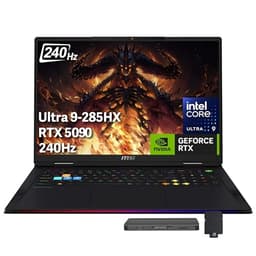
The MSI Raider 18 is not a conventional programming laptop recommendation, but it earns its place in this comparison for a specific type of developer: those working in machine learning, computer vision, data science or any field that requires serious local GPU compute. With an Nvidia GeForce RTX 5090 24GB GDDR7 GPU, an Intel Core Ultra 9 285HX processor, 64GB of RAM and 5TB of NVMe SSD storage, this is a mobile workstation that can handle tasks most laptops cannot approach.
For developers training neural networks locally, running large language models on-device, processing video data or working with GPU-accelerated simulation, the RTX 5090 is transformative. CUDA support is mature and well-integrated with PyTorch, TensorFlow and similar frameworks. The 24GB of GDDR7 VRAM means you can work with models and datasets that would be impossible on integrated graphics or lower-end discrete GPUs.
The 18-inch QHD+ 240Hz IPS display is enormous and sharp, making it genuinely comfortable to work with multiple code windows, terminals and visualisation tools side by side without needing an external monitor. The 64GB of RAM means you can run multiple virtual machines, Docker environments and heavy IDEs simultaneously without any memory pressure. The 5TB SSD provides effectively unlimited local storage for large datasets, model checkpoints and project files.
Connectivity is exceptional: two Thunderbolt 5 ports, three USB-A 3.2 Gen2 ports, HDMI 2.1, an RJ45 Ethernet port, an SD card reader and an audio jack. The Ethernet port alone is a significant advantage for developers who work with large file transfers or need reliable, low-latency network connections. Thunderbolt 5 supports the fastest external displays and storage currently available.
The downsides are significant for most developers. The price is extremely high, the machine is heavy and large, and battery life is limited under load. This is a desktop replacement, not a portable workstation. But for the developer who needs maximum GPU compute and is willing to accept those trade-offs, nothing else in this comparison comes close.
Verdict: The only sensible choice for machine learning engineers and data scientists who need serious local GPU compute, but overkill and overpriced for most other developers.
Pros
- RTX 5090 with 24GB GDDR7 VRAM enables serious local machine learning and GPU-accelerated development
- 64GB RAM and 5TB NVMe SSD handle the most demanding multi-environment development setups
- Thunderbolt 5 and RJ45 Ethernet provide best-in-class connectivity for professional use
Cons
- Extremely high price makes it unjustifiable for developers who do not need GPU compute
- Large, heavy chassis with limited battery life under load, making it unsuitable for mobile use
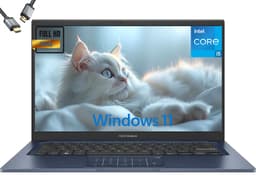
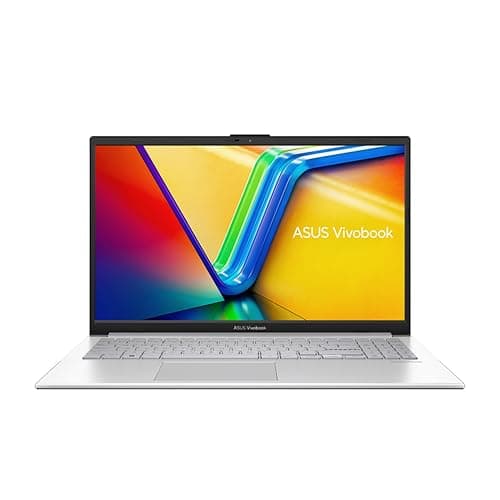
The ASUS Vivobook 14 (2025) occupies an interesting position in this comparison. Its Intel Core i5-1334U processor is a 13th-generation chip that delivers solid everyday performance for development tasks, and the 24GB of RAM is the highest in this comparison outside of the MSI Raider. For developers who keep many applications open simultaneously, run memory-hungry tools like IntelliJ IDEA or Eclipse, or work with large datasets in memory, that extra RAM headroom is genuinely useful.
The 2TB SSD is another standout specification. For developers who work with multiple large projects, store local databases, maintain several virtual machine images or keep extensive local copies of repositories, 2TB of storage removes the constant juggling that 512GB configurations require. The combination of 24GB RAM and 2TB storage makes this a surprisingly capable machine for its price bracket.
The 14-inch FHD IPS display is functional rather than exceptional. At 1920x1080, it is sharp enough for coding, though it lacks the pixel density of the Samsung or ASUS Vivobook S 14 displays. Colour accuracy is adequate for web development work but not ideal for those who also do graphic design or colour-critical work. The Intel UHD Graphics integrated GPU handles basic tasks but is not suited to GPU-accelerated workloads.
The Intel Core i5-1334U is a 15W efficiency processor rather than a high-performance chip like the i5-12450H in the Lenovo IdeaPad Slim 3. This means it is more efficient and runs cooler and quieter, but it will be slower under sustained heavy loads such as long compilation tasks. For developers whose work is primarily I/O-bound or involves moderate CPU loads, this distinction matters less.
At its price point, the Vivobook 14 (2025) is hard to recommend over the Lenovo IdeaPad Slim 3 for most developers, given the Lenovo's stronger CPU at a lower price. However, if you specifically need more than 16GB RAM or more than 512GB storage without spending on a premium machine, the Vivobook 14 makes a reasonable case for itself.
Verdict: Best suited to developers who need more than 16GB RAM and generous local storage but cannot stretch to a premium machine, though the CPU is less powerful than some cheaper alternatives.
Pros
- 24GB RAM is the most in this comparison outside the MSI Raider, ideal for memory-hungry IDEs and multi-environment setups
- 2TB SSD removes storage constraints for developers with large local datasets or multiple VM images
Cons
- Intel Core i5-1334U is a 15W efficiency chip that is slower under sustained heavy compilation loads than the i5-12450H
- FHD IPS display lacks the sharpness and colour quality of higher-resolution panels at similar price points
- Price is high relative to the CPU performance on offer compared to the Lenovo IdeaPad Slim 3
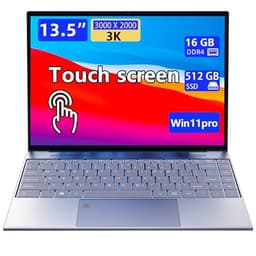
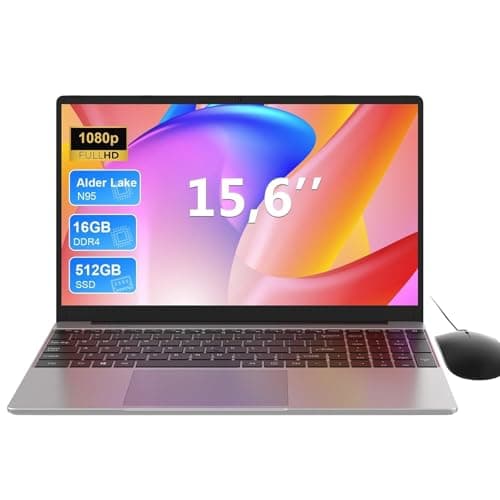
The Morostron 13.5-inch portable touchscreen laptop is the most unconventional pick in this comparison. Its headline feature is a 3000x2000 resolution touchscreen display in a compact 13.5-inch chassis, which gives it an exceptionally high pixel density. For developers who value screen sharpness above all else and want a portable machine, the display quality at this price point is genuinely surprising. Text rendering is crisp, and the touchscreen functionality adds flexibility for those who occasionally want to annotate diagrams or navigate documentation by touch.
The 16GB of RAM and 512GB SSD configuration is competitive at its price point, providing enough memory for most development workflows and adequate storage for a primary development machine. The compact 13.5-inch form factor makes it easy to carry, and the portable design suits developers who work from multiple locations.
The Morostron is a lesser-known brand, and the verified specifications do not confirm the processor model or operating system, which introduces some uncertainty. Developers should verify compatibility with their required development tools before purchasing. The lack of confirmed port specifications also means you should check connectivity carefully before buying, as this could affect whether you need a hub for external displays or peripherals.
For developers who primarily work with lightweight tools, web-based IDEs or cloud development environments, the Morostron's high-resolution display and 16GB RAM configuration could represent strong value. However, the uncertainty around the processor and OS makes it harder to recommend confidently compared to the more established brands in this comparison.
It is best suited to developers on a tight budget who want the sharpest possible display for reading code, are comfortable with a lesser-known brand and plan to verify compatibility with their specific toolchain before purchasing. It is not the right choice for developers who need guaranteed compatibility with specific enterprise tools or who require a known, well-supported hardware platform.
Verdict: An intriguing option for budget-conscious developers who prioritise display sharpness, but the unconfirmed processor and OS specifications introduce risk that better-known alternatives do not carry.
Pros
- 3000x2000 resolution touchscreen display delivers exceptional pixel density for reading code at this price point
- 16GB RAM and 512GB SSD provide a solid foundation for most development workflows
Cons
- Processor and OS specifications are unconfirmed, making toolchain compatibility harder to verify before purchase
- Lesser-known brand with less established support and warranty infrastructure than major manufacturers
- Port specifications not confirmed, which may require additional hub investment
Buying Guide
How much RAM do you actually need?
For most developers, 16GB of RAM is the practical minimum in 2025. Running VS Code or a JetBrains IDE alongside a browser, a local development server and a database client will consume 8-12GB on its own. If you work with Docker containers, virtual machines or memory-hungry data science tools like Jupyter Notebook with large datasets, 24GB or more becomes worthwhile. The ASUS Vivobook 14 (2025) with 24GB stands out here, as does the MSI Raider with 64GB for ML engineers. Avoid machines with 8GB or less for serious development work, as you will hit memory limits quickly and performance will suffer.
Which processor architecture should you choose?
Intel and AMD x86 processors offer the broadest compatibility with development tools, virtualisation software and legacy applications. Qualcomm Snapdragon X Plus (ARM) machines like the Dell XPS 13 and ASUS Vivobook S 14 offer excellent battery life and efficiency, but require you to verify that your specific toolchain, Docker configuration and any required native binaries are available for ARM Windows. Most modern web development, Python and JavaScript tools work well on ARM Windows, but some enterprise tools, certain .NET frameworks and specific database clients may require x86 emulation, which reduces performance.
Storage: how much and how fast?
A 512GB SSD is the minimum for a comfortable development setup, but it fills up faster than you expect once you factor in your OS, applications, multiple project repositories, node_modules folders, Docker images and virtual environments. If you work with large datasets, video files or multiple VM images, 1TB or more is strongly advisable. PCIe Gen4 SSDs, as found in the ASUS Vivobook S 14, offer noticeably faster read and write speeds than older PCIe Gen3 drives, which benefits tasks like large file operations and build processes that are I/O-intensive.
Display quality for long coding sessions
You will spend many hours looking at your laptop screen, so display quality matters more for developers than for casual users. Higher resolution panels (2560x1600 or above) render text more crisply and reduce eye strain over long sessions. IPS panels offer better colour accuracy and viewing angles than TN panels. AMOLED displays, as on the Samsung Galaxy Book4 Pro 360, offer the best contrast and colour, though they are more expensive. Aim for at least 1920x1080 on a 14-inch or smaller screen, and consider higher resolutions for larger displays.
Ports and connectivity
Most developers need to connect at least one external monitor, a keyboard, a mouse and possibly external storage. Check that your chosen laptop has the ports you need without requiring a hub. Thunderbolt 4 or USB4 ports are the most flexible, supporting high-resolution displays, fast storage and power delivery. HDMI is useful for direct monitor connection. An SD card reader is handy for developers who work with embedded systems or cameras. Ethernet is valuable for developers who need reliable, low-latency network connections for large file transfers or server work.
The Samsung Galaxy Book4 Pro 360 is the overall winner for professional developers who want the best combination of display quality, connectivity, processing power and build quality in a single Windows laptop. Its Dynamic AMOLED 2X display, Thunderbolt 4 ports and Intel Core Ultra 7 155H processor make it a genuinely premium development machine that justifies its price for those who can afford it.
For the majority of developers who want strong performance without a premium price tag, the Lenovo IdeaPad Slim 3 14-inch with the Intel Core i5-12450H is the clear best value pick. It delivers a genuine performance processor, 16GB RAM, 512GB SSD and a practical port selection at a price that leaves room in your budget for a good external monitor, keyboard and mouse, which will improve your development experience more than spending extra on the laptop itself.
If battery life and portability are your top priorities and your toolchain is ARM-compatible, the ASUS Vivobook S 14 S3407QA offers the best combination of all-day battery, sharp display and generous 1TB storage. Machine learning engineers and data scientists with serious local compute needs should look at the MSI Raider, accepting its size and price as the cost of having RTX 5090 GPU power in a portable form. For everyone else, the Lenovo IdeaPad Slim 3 remains the most sensible starting point.