Best Overall Value
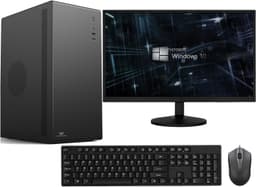
If you're looking for the best desktop under £500 that you can buy new, this is it. The Vibox I-7 is built around AMD's Ryzen 3 3200G, a processor that was genuinely well-regarded when it launched and still holds up well for everyday computing in 2026. Pair that with 16GB of RAM and a 1TB SSD and you've got a machine that won't frustrate you. Boot times are fast, apps open quickly, and multitasking is handled without complaint.
The integrated Radeon Vega 8 graphics are a genuine bonus. You're not going to run Cyberpunk 2077 at high settings, but older titles, indie games, and anything from a few years back will run at playable frame rates. It's a proper step above the basic integrated graphics you get on Intel chips at this price. For a family PC that doubles as a light gaming machine, this is the sweet spot.
Windows 11 comes pre-installed and properly licensed. WiFi is built in. And unlike the refurbished options in this list, you're getting a new machine with a warranty. Owner feedback is largely positive, with most buyers highlighting the speed and the value for money. A few have noted the case is fairly basic looking, which is fair, but that's a cosmetic gripe rather than a functional one.
For anyone searching for the best desktops under £500 that cover everyday tasks, light gaming, and home office work without compromise, the Vibox I-7 is the one to beat.
Pros
- Modern Ryzen 3 3200G CPU, still competitive in 2026
- 16GB RAM and 1TB SSD is a strong spec at this price
- Radeon Vega 8 handles light gaming and media tasks
- Brand new with warranty, not refurbished
- Windows 11 properly licensed out of the box
Cons
- No dedicated GPU for serious gaming
- Case design is fairly plain
- No monitor included
Buy on Amazon£499.95
Best Under £100
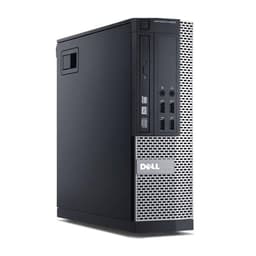
Under £100 for a Windows 11 Pro desktop with a quad-core i5 and an SSD. That's the headline, and it's a good one. This refurbished OptiPlex is a compact small form factor machine that takes up very little desk space and runs surprisingly well for basic tasks. Web browsing, email, word processing, video calls, spreadsheets. It handles all of that without breaking a sweat.
The i5-4570 is a 4th generation Intel chip, so it's not exactly cutting edge. But it's a proper quad-core processor with decent single-core performance for its age, and it's a world away from the Celeron chips you find in some budget machines. The 8GB of RAM is adequate for light use, though you might feel the pinch if you're running lots of browser tabs alongside other apps. The 120GB SSD is the main limitation here. It's enough for Windows and a handful of applications, but you'll want an external drive or cloud storage if you're storing photos, videos, or large files.
As a second PC, a kids' homework machine, or a basic home office setup, this is genuinely hard to fault at the price. Owner reviews are solid, with most buyers impressed by how capable it is for the money. Just go in with realistic expectations about storage.
Pros
- Exceptional value under £100
- Compact SFF design saves desk space
- Quad-core i5 handles everyday tasks well
- Windows 11 Pro included
- SSD means fast boot times
Cons
- 120GB SSD is very limited on storage
- 8GB RAM is the minimum for comfortable use
- Older 4th gen Intel platform
- No WiFi mentioned, likely needs ethernet or USB adapter
Buy on Amazon£80.00
Best Build Quality
Here's the thing: 32GB of RAM in a desktop under £300 is genuinely unusual. Most machines at this price cap out at 16GB. The Dell OptiPlex i7-6700 blows past that, and combined with a 1TB SSD and a 6th gen Core i7, you've got a machine that can handle serious multitasking, light video editing, and demanding productivity workloads without complaint.
Dell's OptiPlex range has a well-earned reputation for build quality. These were originally business machines built to run all day, every day, for years. The SFF chassis is compact but solid, and Dell's component quality is consistently reliable. That matters with refurbished machines, where the original build quality determines how well the unit holds up after refurbishment.
The i7-6700 is a 6th gen chip, so it's not the newest architecture around. But it's a proper four-core, eight-thread processor that still performs well for most tasks in 2026. The USB WiFi adapter is a slightly inelegant solution compared to built-in WiFi, but it works. HDMI output is a useful touch for connecting to modern monitors without adapters.
For anyone who needs a capable productivity machine and values build quality above all else, this Dell is one of the best desktops under £500 in the refurbished category.
Pros
- 32GB RAM is exceptional at this price point
- 1TB SSD offers plenty of storage
- Dell OptiPlex build quality is proven and reliable
- Core i7-6700 handles demanding productivity tasks
- Windows 11 Pro properly licensed
Cons
- 6th gen Intel platform is getting long in the tooth
- USB WiFi dongle rather than built-in wireless
- No dedicated GPU for gaming
Check availability
Best Mid-Range Refurb
The OptiPlex 7020 is a slightly older machine than the i7-6700 above, but it still makes a strong case for itself at under £150. The i7-4770 is a 4th gen Haswell chip with four cores and eight threads, and it remains a capable processor for general computing, office work, and web browsing in 2026. Paired with 16GB of RAM and a 512GB SSD, the everyday experience is smooth and responsive.
The 7020 chassis is classic OptiPlex: compact, well-built, and designed to last. These machines were workhorses in offices across the UK for years, and the better refurbishment sellers clean them up properly and test them thoroughly before shipping. The 300Mbps USB WiFi adapter is included, which is handy, though a machine at this age won't have built-in wireless as standard.
At under £150, this sits in a sweet spot for anyone who wants a reliable, fast desktop for everyday tasks without spending much. It's not a gaming machine and it won't handle video editing comfortably, but for home office use, studying, or a family computer, it's a solid choice among the best desktops under £500.
Pros
- Strong value at under £150
- 16GB RAM and 512GB SSD is a good everyday spec
- i7-4770 has eight threads for smooth multitasking
- Proven Dell OptiPlex reliability
- Windows 11 Pro included
Cons
- 4th gen Intel is showing its age
- USB WiFi rather than built-in
- No dedicated GPU
- No monitor included
Check availability
Best Monitor Bundle
If you need a complete workstation setup and don't already own a monitor, this bundle is genuinely hard to argue with. For £200, you get a capable refurbished Dell OptiPlex with a Core i7 4th gen processor, 16GB RAM, 500GB SSD, and a 23-inch monitor thrown in. That's a full desktop setup for less than many standalone monitors cost new.
The PC itself is similar in spec to the standalone 7020 above, so the same caveats apply around the older CPU platform. But the addition of the monitor changes the value equation significantly. Setting up a home office, a study space for a teenager, or a spare room PC becomes a much simpler and cheaper proposition when you don't need to budget separately for a screen.
The 23-inch monitor won't be a premium IPS panel, but for everyday use it'll do the job. Owner feedback on this bundle is generally positive, with buyers highlighting the convenience and the overall value. It's one of the best desktops under £500 if you're starting from scratch with no peripherals.
Pros
- Complete setup with 23" monitor included
- Exceptional value for a full workstation
- 16GB RAM and 500GB SSD for everyday tasks
- Windows 11 Pro properly licensed
- Dell reliability and build quality
Cons
- 4th gen Intel CPU is ageing
- Monitor quality is unknown, likely basic
- USB WiFi dongle rather than built-in
- No dedicated GPU
Check availability
Best Storage Value
A 1TB NVMe SSD in a budget bundle is a proper highlight. Most machines at this price either skimp on storage or use a slower SATA SSD. The Veno Scorp V100 bundle goes further, pairing that fast storage with 16GB of RAM and throwing in a 21.5-inch monitor. For under £250, that's a lot of kit.
The catch is the processor. The Intel Core i5-2400 is a Sandy Bridge chip from 2011. It's not slow exactly, and for basic tasks it copes fine, but it's the oldest CPU in this entire roundup. You'll notice the age if you're doing anything demanding, and it's worth being aware that some software and security features in Windows 11 are designed around newer processor generations.
That said, for web browsing, streaming, office work, and general family use, the i5-2400 gets the job done. The NVMe SSD makes the system feel snappier than the CPU spec might suggest. And the bundle value, with monitor included, is genuinely competitive among the best desktops under £500 in this category. Just go in with eyes open about the CPU age.
Pros
- 1TB NVMe SSD is fast and spacious
- 21.5-inch monitor included
- 16GB RAM for comfortable multitasking
- Good bundle value under £250
- Windows 11 included
Cons
- i5-2400 is a very old CPU (2011 Sandy Bridge)
- Older platform limits future-proofing
- No dedicated GPU
Buy on Amazon
Best for Beginners
All-in-one PCs divide opinion, but for the right buyer they make complete sense. Everything is built into the screen. No tower to find space for, no cable mess, no separate monitor to buy. You unbox it, plug it in, and you're done. For beginners, elderly users, or anyone who just wants a clean and simple setup, this 23.8-inch all-in-one is a genuinely appealing option.
The specs are decent for the form factor. An Intel i5 processor reaching up to 4.4GHz, 16GB of RAM, and a full HD IPS display. IPS matters here. It means better colours and wider viewing angles than the TN panels you sometimes find in budget all-in-ones. The 256GB SSD is on the smaller side, but it's enough for Windows and everyday apps. Cloud storage or an external drive will sort you out if you need more space.
Keyboard and mouse are included, which is a nice touch. WiFi is built in. HDMI output means you can connect a second screen if needed. At under £380, it's not the cheapest option in this roundup, but the convenience factor and the quality of the display make it worth the premium for the right buyer. Among the best desktops under £500 for sheer ease of use, this one wins.
Pros
- Clean all-in-one design, no cable clutter
- 23.8" FHD IPS display is genuinely good
- Modern Intel i5 up to 4.4GHz
- 16GB RAM handles everyday tasks comfortably
- Keyboard and mouse included
Cons
- 256GB SSD is limited on storage
- All-in-one design limits upgradability
- Pricier than comparable tower options
- No dedicated GPU
Buy on Amazon
Best for Casual Gaming
This is the only machine in the roundup with a dedicated graphics card, and that matters if gaming is on your agenda. The GTX 750 4GB is an old card by modern standards, but it's a real GPU with dedicated VRAM, and it opens up a world of older titles, indie games, and less demanding modern releases that the integrated graphics options simply can't touch.
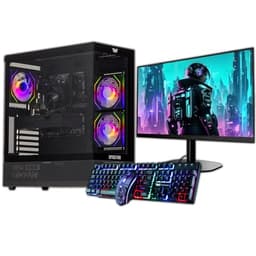
The ARGB case looks the part, which will appeal to anyone who wants their setup to look like a gaming PC. The 16GB of RAM is solid. But the storage situation is a compromise. 120GB SSD for the operating system and a 500GB HDD for storage. The HDD will feel slow compared to an SSD, and 120GB is tight for games. You'll be managing storage carefully or investing in an upgrade fairly quickly.
The 22-inch monitor is included, which helps justify the £289 price tag. And the Core i5 processor is capable enough for gaming at this level. Look, the GTX 750 won't run anything from the last few years at decent settings, but for older games, esports titles, and casual play, it's a step up from anything else in this list. If gaming is your priority among the best desktops under £500, this is your machine.
Pros
- Only machine with a dedicated GPU (GTX 750 4GB)
- 22" monitor included
- 16GB RAM is solid for gaming
- ARGB case looks the part
- Windows 11 included
Cons
- GTX 750 is very old and limited for modern games
- 120GB SSD is too small for a gaming machine
- HDD secondary storage is slow
- Older Core i5 generation
Buy on Amazon
Best Under £50
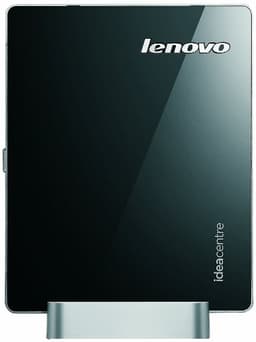
Honesty first: this is the weakest machine in the roundup by a significant margin. The Lenovo Q190 runs on an Intel Celeron 1017U clocked at 1.6GHz, which is a dual-core processor with no hyperthreading and very limited performance. The 4GB of RAM is the bare minimum, and the 500GB HDD is slow compared to any SSD. Windows 8.1 with Bing is the operating system, which Microsoft stopped supporting years ago.
So why is it here? Because it's cheap, compact, and it does exist in the market. If your budget is genuinely under £50 and all you need is a machine for very basic web browsing on a wired connection, it technically functions. The Q190 was designed as a mini desktop for light use, and in that narrow context it still works after a fashion.
But we'd strongly recommend against it for most buyers. Windows 8.1 is a security risk. The Celeron chip will struggle with modern websites and applications. And 4GB of RAM makes multitasking genuinely painful. Even the £94 OptiPlex i5 above is a dramatically better machine for not much more money. The Q190 earns its place in this roundup as the best under £50 option, but that's a very specific badge for a very specific situation.
Pros
- Very compact and low power consumption
- Built-in WiFi
- Cheapest option in the roundup
- 500GB HDD offers reasonable storage space
Cons
- Windows 8.1 is unsupported and a security risk
- Celeron 1017U is very slow by modern standards
- 4GB RAM is painfully limited
- HDD only, no SSD
- Not recommended for most buyers in 2026
Check availability