Choosing the right desktop for programming means balancing CPU performance, RAM headroom, storage speed and display flexibility. Whether you are a student writing Python scripts, a professional running Docker containers and virtual machines simultaneously, or a machine-learning engineer training models locally, the demands on your machine differ considerably. Since last year, AMD's Ryzen 8000-series and Intel's Core Ultra range have raised the bar for multi-threaded workloads, and the arrival of Nvidia's RTX 50-series cards has made GPU-accelerated development far more accessible at mid-range price points. Apple's M4 iMac also brings a compelling all-in-one option for developers who live in the Unix ecosystem. This guide covers carefully selected desktops across a wide price range, so you can find the right fit for your workflow and budget without overspending on gaming features you will never use.
Quick Verdict
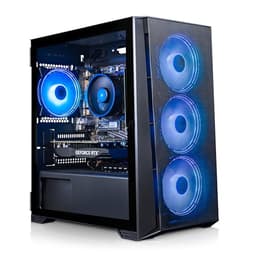
Best Overall: CyberPowerPC Luxe Gaming PC (Intel Core Ultra 7 265KF, RTX 5070 Ti, 32GB), a powerhouse that handles compiling, virtualisation and GPU-accelerated ML workloads without compromise.
Best Value: GMKtec K8 Plus Mini PC (AMD Ryzen 7 8845HS, 32GB DDR5), compact, quiet, genuinely capable for everyday development, and priced sensibly for developers who do not need a discrete GPU.
The CyberPowerPC Luxe is the pick for developers who need raw computational muscle across every dimension: fast compilation, heavy virtualisation, and GPU-accelerated workloads such as CUDA-based machine learning or computer vision pipelines. It is the machine you buy when your IDE, Docker stack, browser with forty tabs, and a local LLM inference server all need to coexist without throttling each other.
At the heart of the system sits the Intel Core Ultra 7 265KF, a 20-thread processor built on Intel's latest architecture with strong single-threaded performance for tasks like building large C++ projects or running test suites, and excellent multi-threaded throughput for parallel compilation. Paired with 32GB of RAM, you have comfortable headroom for multiple virtual machines or large in-memory datasets. The 2TB NVMe SSD is a genuine highlight for developers: cloning large repositories, running database-heavy applications, and managing Docker image caches all benefit enormously from fast, spacious local storage.
The Nvidia GeForce RTX 5070 Ti is, frankly, more GPU than most developers will ever need for coding tasks alone. However, if your work touches machine learning, data science with GPU acceleration, or real-time rendering for game development, it becomes a serious productivity tool rather than a luxury. CUDA support is mature, and the RTX 5070 Ti handles PyTorch or TensorFlow training runs at a level that would otherwise require cloud compute credits.
Running Windows 11, the system is compatible with WSL2, which gives you a near-native Linux development environment without dual-booting. The CyberPowerPC build quality is solid, with a well-ventilated tower chassis that keeps thermals in check during sustained workloads. For professional developers, data scientists, or anyone building GPU-accelerated applications, this machine represents the most complete package in the catalogue.
Verdict: The definitive choice for professional developers and ML engineers who want a single machine to handle everything without compromise.
Pros
- Intel Core Ultra 7 265KF delivers fast single-thread and multi-thread performance for compilation and virtualisation
- 32GB RAM and 2TB NVMe SSD provide ample headroom for complex development environments
- RTX 5070 Ti enables serious CUDA-accelerated ML and data science workloads locally
Cons
- Premium price is difficult to justify if your work does not require GPU acceleration
- Large tower form factor demands significant desk or floor space
The Apple iMac with M4 is the standout choice for developers who are already embedded in the Apple ecosystem or who work primarily with macOS-native tools. It is particularly well suited to iOS and macOS app developers using Xcode, web developers who prefer a Unix-based environment without the overhead of WSL, and anyone who values a clean, space-efficient workstation setup.
The M4 chip's 10-core CPU is a remarkable piece of engineering. Its performance cores handle demanding compilation tasks with impressive speed, while the efficiency cores manage background processes without drawing significant power. In practice, building a large Swift or Objective-C project in Xcode feels snappy and responsive. The unified memory architecture means the 16GB of RAM is shared between CPU and GPU with very low latency, which benefits tasks like running local development servers, managing multiple browser tabs, and keeping a terminal session active simultaneously.
The integrated 10-core GPU is not a CUDA device, so if your workflow depends on Nvidia's GPU compute ecosystem, the iMac is not the right fit. However, Apple's Metal framework and the Neural Engine on the M4 chip provide genuine acceleration for on-device machine learning inference using Core ML, and many popular frameworks including TensorFlow and PyTorch now offer Metal-accelerated backends.
The 512GB SSD is the most significant limitation here. For developers managing large repositories, Docker images, or datasets, you will likely need external storage or a cloud-based solution relatively quickly. The macOS operating system itself is polished, stable, and receives long-term software support, which matters for production development environments. The all-in-one form factor also means a tidy desk with fewer cables, and the display quality is excellent for long coding sessions.
The iMac runs macOS, which means native access to Homebrew, zsh, and the full Unix toolchain without any virtualisation layer. For web and app developers, this is a meaningful quality-of-life advantage over Windows-based alternatives.
Verdict: The best desktop for macOS developers and Xcode users, with outstanding performance per watt and a clean all-in-one form factor, held back only by limited base storage.
Pros
- Apple M4 chip delivers exceptional performance per watt with a native Unix environment for web and app development
- All-in-one design eliminates cable clutter and includes a high-quality display
- Long macOS software support lifecycle benefits production development environments
Cons
- 512GB base storage fills quickly with large repositories, Docker images, and development tools
- No CUDA support limits compatibility with Nvidia-specific ML frameworks and GPU compute workflows
The Vibox VIII-75 is the most GPU-heavy machine in this selection, pairing an Intel Core i9 12900KF with the flagship Nvidia RTX 5090 32GB. This combination is specifically relevant for developers working in fields where GPU VRAM is the primary bottleneck: training large language models locally, running high-resolution generative AI workloads, or developing real-time 3D rendering pipelines. The 32GB of GPU VRAM is a specification that no other machine in this catalogue comes close to matching.
The Core i9 12900KF is a 12th-generation Intel processor, which means it is not the newest architecture available. However, it remains a very capable chip for development work, with 16 cores (8 performance, 8 efficiency) and strong multi-threaded throughput for compilation and virtualisation tasks. Paired with 32GB of system RAM and a 2TB NVMe SSD, the rest of the system is well balanced for a demanding development environment.
For most programmers, the RTX 5090 is overkill. But for those working at the frontier of AI development, where loading a 13B or 70B parameter model into local VRAM is a daily requirement, the 32GB of GPU memory is a genuine enabler rather than a luxury. It removes the need to rely on cloud GPU instances for development and testing, which can represent significant cost savings over time for teams or individual contractors.
The Vibox brand is a UK-based system builder with a solid reputation for value-oriented custom builds. The VIII-75 runs Windows 11 and supports WSL2, making it compatible with Linux-based development toolchains. The chassis is a standard gaming tower with adequate cooling for the i9 and RTX 5090 combination.
It is worth noting that the Core i9 12900KF, while powerful, does not have the AI-specific NPU found in Intel's Core Ultra range. For pure CPU and GPU development work, this is not a meaningful limitation, but it is worth being aware of if you are evaluating AI-accelerated system features.
Verdict: The specialist choice for AI and ML developers who need maximum GPU VRAM locally, with 32GB on the RTX 5090 enabling workloads that no other machine here can match.
Pros
- RTX 5090 with 32GB VRAM enables local training and inference of large AI models that would otherwise require cloud GPU instances
- 2TB NVMe SSD and 32GB system RAM provide a well-rounded development environment beyond the GPU
Cons
- Core i9 12900KF is a 12th-gen chip and lacks the NPU and architectural improvements of Intel's Core Ultra range
- The RTX 5090 represents significant overspend for developers whose work does not require large GPU VRAM
- Price-to-performance ratio for general development tasks is poor compared to alternatives in this list
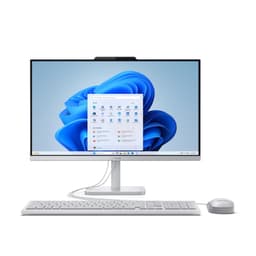
The Lenovo IdeaCentre A100 is the most modest machine in this selection, and it is important to be honest about what it is and is not suited to. It is a 24-inch all-in-one desktop built around the Intel N100 processor, a four-core efficiency chip designed for light workloads. It is best suited to developers who are learning to code for the first time, students working on introductory programming courses, or professionals who need a secondary machine for light scripting, documentation, or remote development via SSH.
The Intel N100 is an efficient, low-power processor that handles simple development tasks adequately. Running a text editor, a browser, and a terminal simultaneously is fine. However, developers who need to run local development servers, Docker containers, or anything more demanding than a single-language interpreter will find the N100's limitations frustrating relatively quickly. It is not a chip designed for sustained multi-threaded workloads, and compilation times for larger projects are noticeably slower than any other machine in this list.
The 16GB of RAM is a positive aspect of the IdeaCentre A100's specification, providing more memory than you might expect at this price point. The 512GB SSD is adequate for a light development setup, though it will fill quickly if you are managing multiple projects, development tools, and a browser cache simultaneously. The integrated GPU handles display output for the built-in 24-inch Full HD display, but it is not suitable for any GPU-accelerated development tasks.
The all-in-one form factor is genuinely convenient for space-constrained environments: one power cable, a built-in display, and a compact footprint make it easy to set up and move. Running Windows 11 Home, it supports WSL2, which means even on this modest hardware you can run a Linux development environment for learning purposes.
For experienced developers with demanding workflows, the IdeaCentre A100 is not the right choice. But as a first coding machine, a secondary workstation, or a dedicated machine for remote development where the heavy lifting happens on a server, it offers reasonable value in an all-in-one package.
Verdict: A light-duty all-in-one suitable for beginners learning to code or as a secondary machine for remote development, but not recommended for developers with demanding local workloads.
Pros
- All-in-one form factor with built-in 24-inch display minimises desk clutter and simplifies setup
- 16GB RAM is generous for the price tier and supports basic multi-tasking during learning and light development
Cons
- Intel N100 processor struggles with sustained multi-threaded workloads like compilation, Docker, or local development servers
- 512GB SSD fills quickly once development tools, repositories, and browser data accumulate
- No discrete GPU and limited CPU performance make this unsuitable for any GPU-accelerated or computationally intensive development work
Buying Guide
CPU: The Most Important Spec for Most Developers
For the majority of programming tasks, the CPU is the single most important component. Compilation, running test suites, managing virtual machines, and executing build pipelines are all CPU-bound operations. Look for a processor with at least 6 cores and 12 threads for comfortable professional development. Modern architectures matter: AMD's Zen 4 (Ryzen 7000 and 8000 series) and Intel's Core Ultra range offer meaningfully better performance per core than older generations. If you are choosing between a machine with a newer, slower chip and an older, faster chip, the newer architecture will generally serve you better over a longer ownership period.
RAM: How Much Do You Actually Need?
16GB is the practical minimum for professional development in 2025. If your workflow involves running multiple Docker containers, virtual machines, or memory-intensive databases alongside your IDE and browser, 32GB will make a noticeable difference to your day-to-day experience. DDR5 RAM offers higher bandwidth than DDR4, which benefits tasks that are memory-bandwidth-sensitive, though the real-world difference in most development scenarios is modest. Prioritise capacity over speed if you are choosing between the two.
Storage: Speed and Space Both Matter
An NVMe SSD is essential for a development machine. The difference between an NVMe drive and a SATA SSD is noticeable in build times, Docker image pulls, and IDE indexing. PCIe 4.0 NVMe drives are faster than PCIe 3.0, though both are dramatically better than SATA. For storage capacity, 1TB is a reasonable starting point, but developers managing large datasets, multiple Docker images, or video assets will benefit from 2TB. External storage is always an option, but internal NVMe speed is preferable for active project files.
GPU: Do You Need One for Development?
Most developers do not need a discrete GPU for their primary workflow. Web development, backend engineering, mobile app development, and general software engineering are all CPU and RAM bound. However, if your work touches machine learning, computer vision, GPU-accelerated data processing, or game development, a discrete Nvidia GPU with CUDA support becomes a meaningful productivity tool. The amount of GPU VRAM matters significantly for ML work: 8GB is adequate for smaller models and experimentation, while 16GB or more is needed for training larger models locally. If you are using Apple hardware, the Metal framework provides GPU acceleration for ML tasks, but CUDA-specific frameworks require an Nvidia GPU.
Operating System: Windows, macOS, or Linux?
macOS provides the most native Unix-like development experience on a desktop, which is particularly valuable for web developers and iOS/macOS app developers. Windows 11 with WSL2 provides a very capable Linux development environment and is the most compatible platform for a wide range of development tools and games. Most of the machines in this list run Windows 11, which supports WSL2 out of the box. If you are a Linux purist, any of the Windows machines can be dual-booted or have Linux installed natively.
Form Factor: Tower, Mini PC, or All-in-One?
Tower desktops offer the best upgradeability and thermal headroom for sustained workloads. Mini PCs like the GMKtec K8 Plus are excellent for space-constrained environments and offer surprisingly strong performance for their size, though they are harder to upgrade and may throttle under extreme sustained loads. All-in-one desktops are the tidiest option and often include a quality display, but they are the hardest to upgrade and repair. For most developers, a tower or mini PC paired with a good external monitor is the most flexible long-term choice.
The CyberPowerPC Luxe Gaming PC with the Intel Core Ultra 7 265KF, RTX 5070 Ti, and 32GB of RAM is the overall winner for developers who want a single machine that handles every aspect of modern professional development without compromise. The combination of a cutting-edge CPU architecture, ample RAM, a 2TB NVMe SSD, and a powerful GPU capable of CUDA-accelerated ML workloads makes it the most complete development machine in this catalogue. For developers who do not need GPU acceleration and want to keep costs down, the GMKtec K8 Plus is the standout value pick: 32GB of DDR5 RAM, a fast Zen 4 processor, and a compact form factor at a price that makes it genuinely hard to beat for everyday development work.