Photoshop demands more from a desktop than most people realise. The application leans heavily on single-core CPU speed for brush strokes and layer operations, GPU acceleration for Neural Filters and Liquify, and fast NVMe storage for scratch disk performance. Since last year, Adobe has expanded GPU-accelerated features significantly, meaning a capable discrete graphics card is no longer optional for serious retouchers and compositors. Whether you are a professional photographer processing hundreds of RAW files, a graphic designer working with large multi-layer PSDs, or a content creator who dips into Photoshop alongside video editing, the right desktop makes a tangible difference to your workflow. This guide covers five machines ranging from budget-friendly all-rounders to high-end powerhouses, assessing each against Photoshop's real-world requirements so you can spend your money where it actually counts.
Quick Verdict
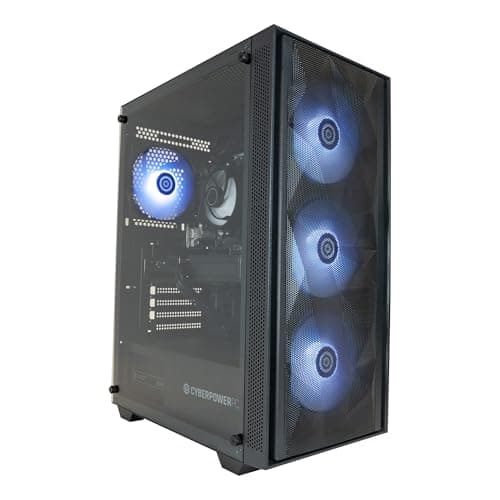
Best Overall: CyberPowerPC Luxe Gaming PC (Intel Core Ultra 7 265KF, RTX 5070 Ti, 32GB RAM) delivers the best balance of CPU muscle, GPU acceleration and storage for demanding Photoshop workflows at a price that stops short of the extreme tier.
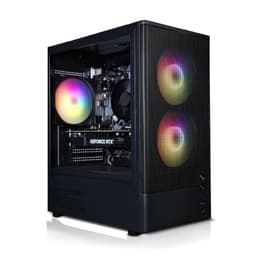
Best Value: ADMI Gaming PC (AMD Ryzen 5 5500, RTX 3050, 16GB RAM) gives competent Photoshop performance with GPU acceleration at a price that undercuts most rivals, making it the sensible starting point for hobbyists and part-time creatives.
The CyberPowerPC Luxe is the pick for professional photographers, retouchers and digital artists who need Photoshop to feel genuinely fast rather than merely functional. It pairs Intel's Core Ultra 7 265KF, a processor that sits at the top of Intel's mainstream desktop stack with strong single-core boost performance, with the Nvidia GeForce RTX 5070 Ti. That GPU carries enough VRAM and CUDA cores to handle Photoshop's GPU-accelerated features, including Neural Filters, Generative Fill, Liquify, and Camera Raw's AI masking tools, without breaking a sweat. Adobe's Photoshop GPU acceleration scales meaningfully with the RTX 5070 Ti compared to mid-range cards, and the difference is most apparent when working with high-resolution files above 100 megapixels or running multiple AI-powered adjustments in sequence.
The 32GB of RAM is the right amount for Photoshop in 2025. Adobe recommends at least 16GB but performs best with 32GB when you are working on complex composites, running Lightroom and Photoshop simultaneously, or keeping a browser and communication apps open in the background. The 2TB NVMe SSD matters too: Photoshop uses a scratch disk when RAM is exhausted, and a fast NVMe drive keeps that process from becoming a bottleneck. Two terabytes also means you can store a substantial catalogue of RAW files locally without immediately reaching for external drives.
The machine runs Windows 11, which is fully compatible with the latest Creative Cloud builds, and the tower form factor means upgrading RAM or adding a second storage drive later is straightforward. The CyberPowerPC Luxe is not cheap, but for anyone billing clients or spending serious hours in Photoshop each week, the time saved on filter renders and file saves pays back the premium quickly.
Verdict: The best all-round Photoshop desktop in this selection, combining a fast modern CPU, a top-tier GPU with ample VRAM, 32GB of RAM and 2TB of fast storage into one ready-to-use package.
Pros
- Intel Core Ultra 7 265KF delivers excellent single-core performance for brush and layer operations
- RTX 5070 Ti accelerates all GPU-dependent Photoshop features including Neural Filters and Generative Fill
- 32GB RAM and 2TB NVMe SSD cover demanding multi-app creative workflows
Cons
- Price is high for users who only use Photoshop occasionally
- 16GB RAM may feel limiting if you later move to 3D or heavy video work alongside Photoshop
The Vibox VIII-75 is the machine for those who want the most powerful GPU currently available in a pre-built desktop. The Nvidia RTX 5090 carries 32GB of GDDR7 VRAM, which is more than any other consumer GPU on the market, and it provides a level of GPU headroom that is genuinely future-proof for Photoshop's expanding AI toolset. Generative Fill, Neural Filters and AI-powered selection tools all benefit from VRAM capacity, and the RTX 5090 ensures none of those processes will ever be GPU-limited on this machine.
The CPU is an Intel Core i9 12900KF, a 12th-generation processor that remains competitive for creative workloads despite being a couple of generations old. Its hybrid architecture, combining performance and efficiency cores, handles Photoshop's single-threaded operations well, and the 5.2GHz boost clock is fast enough that CPU will rarely be the bottleneck. The 32GB of RAM and 2TB NVMe SSD match the Luxe at the storage level, so scratch disk performance and multitasking headroom are both solid.
Where the Vibox VIII-75 sits awkwardly is in its pricing relative to the Luxe. The RTX 5090 is a spectacular GPU but Photoshop does not scale linearly with GPU power beyond a certain point. The practical difference between an RTX 5070 Ti and an RTX 5090 in Photoshop is measurable but not dramatic for most workflows. Where the 5090 genuinely pulls ahead is in 3D rendering within Photoshop, very large canvas GPU operations, and future-proofing as Adobe continues to expand GPU reliance. If you also use Blender, DaVinci Resolve or other GPU-intensive applications alongside Photoshop, the 5090 justifies itself more convincingly.
The machine ships with Windows 11 and Vibox's standard build quality, which is generally solid for a UK-assembled pre-built. The tower chassis gives good internal access for future upgrades.
Verdict: The most GPU-powerful option in this selection, best suited to professionals who combine heavy Photoshop use with 3D rendering or video production and want the most capable single GPU available.
Pros
- RTX 5090 with 32GB GDDR7 VRAM is the most capable consumer GPU available for GPU-accelerated Photoshop features
- 32GB RAM and 2TB NVMe SSD provide ample headroom for large PSDs and scratch disk operations
- Intel Core i9 12900KF at 5.2GHz handles single-threaded Photoshop tasks efficiently
Cons
- The RTX 5090's performance advantage over the RTX 5070 Ti is marginal for most Photoshop-only workflows
- 12th-gen CPU is older than rivals at a similar price point
The Apple iMac with M4 chip is the only macOS option in this selection and it earns its place on the strength of Apple Silicon's remarkable efficiency and the iMac's all-in-one convenience. The M4 chip uses a unified memory architecture, meaning the CPU, GPU and Neural Engine share the same 16GB of RAM rather than splitting it between separate pools. In practice, this means Photoshop can allocate memory fluidly between processing tasks, and the Neural Engine accelerates AI-powered features including Select Subject, Denoise and Neural Filters in ways that feel noticeably snappier than equivalently priced Windows machines.
Adobe has invested heavily in native Apple Silicon optimisation for Photoshop, and the result is an application that runs exceptionally well on M4. Brush latency is low, filter renders are fast, and the machine does all of this without a fan spinning up noticeably. The 24-inch Retina display with P3 wide colour gamut is a genuine advantage for colour-critical work: you are editing on a calibrated, colour-accurate screen rather than relying on a separate monitor.
The limitations are real, however. The base configuration ships with 512GB of SSD storage, which is tight for a photographer storing RAW files locally. Photoshop's scratch disk on 512GB will fill quickly if you work with large files regularly, so external storage or a NAS becomes a practical necessity. The 16GB of unified memory is adequate for moderate Photoshop work but can feel constrained when running Lightroom, Photoshop and a browser simultaneously. Apple's upgrade pricing for more RAM and storage at point of sale is steep.
For portrait photographers, graphic designers and retouchers who prioritise display quality, workflow efficiency and a clean desk, the iMac M4 is a compelling choice. For those who need raw GPU compute or large local storage, the Windows options are more practical.
Verdict: The best choice for colour-critical work and clean-desk setups, with outstanding Photoshop optimisation and a superb built-in display, though storage limitations require planning.
Pros
- Apple M4 with Neural Engine accelerates Photoshop's AI features including Denoise, Select Subject and Neural Filters
- Built-in 24-inch P3 wide colour gamut Retina display is ideal for colour-accurate retouching
- Unified memory architecture allows efficient RAM sharing between CPU and GPU tasks
Cons
- 512GB base storage is insufficient for photographers storing large RAW libraries locally
- 16GB unified memory can feel constrained when running multiple Creative Cloud applications simultaneously
Buying Guide
CPU: Single-Core Speed Matters Most
Photoshop is not a heavily multi-threaded application. The majority of its core operations, including brush strokes, layer compositing, transform operations and most filter renders, run primarily on a single CPU core. This means a processor with a high single-core boost clock will feel faster in day-to-day Photoshop use than a processor with more cores but lower per-core speed. Intel's Core Ultra 7 and Core i9 12900KF both offer strong single-core performance. AMD's Ryzen 7 8700F is competitive, while the Ryzen 5 5500 is adequate for moderate workloads. If you are batch processing large numbers of files or running Lightroom's export queue alongside Photoshop, multi-core performance becomes more relevant, but for interactive editing, single-core speed is the priority.
GPU and VRAM: The New Priority
Adobe has significantly expanded GPU acceleration in Photoshop over the past two years. Neural Filters, Generative Fill, the GPU-accelerated Liquify tool, Select Subject, Denoise and Camera Raw's AI masking features all benefit from a capable discrete GPU. The minimum practical VRAM for working with GPU acceleration enabled on large files is 6GB, though 8GB is more comfortable and 16GB or more future-proofs you against Adobe's expanding AI toolset. Nvidia GPUs are generally better supported than AMD in Photoshop due to CUDA acceleration, though AMD's RDNA architecture has improved compatibility. The Apple M4's integrated GPU benefits from tight software integration with Adobe's native Apple Silicon builds.
RAM: 32GB is the New Comfortable Minimum
Adobe recommends 8GB as the minimum and 16GB for better performance, but in practice, 32GB is the comfortable working amount for professionals in 2025. Photoshop allocates a percentage of available RAM as its memory allowance, and more RAM means less reliance on the scratch disk. If you run Lightroom, a browser and Photoshop simultaneously, 16GB will be under pressure. 32GB gives you genuine headroom. For most users, upgrading RAM after purchase is straightforward in a tower desktop, so buying a machine with upgrade potential is a practical strategy.
Storage: NVMe SSD for the Scratch Disk
Photoshop writes temporary data to a scratch disk when it runs out of RAM. If that scratch disk is a slow drive, performance degrades significantly. An NVMe SSD scratch disk keeps this process fast. Ideally, the scratch disk should be on a separate drive from your operating system and application files, so a machine with two drive bays or an available M.2 slot is worth prioritising. Storage capacity of 1TB is a reasonable starting point, but photographers with large RAW libraries will want 2TB or supplemental external storage.
All-in-One vs Tower
All-in-one desktops like the Apple iMac offer a clean setup with a built-in calibrated display, which is genuinely useful for colour-critical retouching. Tower desktops offer better upgrade flexibility, easier component access and generally better thermal performance under sustained load. For most Photoshop users who plan to keep a machine for four or five years, a tower with upgrade potential is the more practical long-term investment.
macOS vs Windows
Both platforms run Photoshop well. Adobe's Apple Silicon optimisation is excellent, and the M4 iMac benefits from tight hardware-software integration. Windows machines offer more hardware choice, better upgrade flexibility and generally better value at equivalent price points. The choice often comes down to your existing ecosystem and whether you need the iMac's built-in display quality.
For the majority of Photoshop users, the CyberPowerPC Luxe Gaming PC with the Intel Core Ultra 7 265KF, Nvidia RTX 5070 Ti and 32GB of RAM is the overall winner. It combines a fast modern CPU with a GPU that handles every GPU-accelerated Photoshop feature comfortably, 32GB of RAM to keep the scratch disk idle during normal workflows, and 2TB of NVMe storage for both application files and a substantial RAW library. The Vibox VIII-75 with the RTX 5090 is more powerful on paper but the real-world Photoshop advantage over the RTX 5070 Ti is marginal for most retouching and compositing work, making the Luxe the smarter spend for the majority of creative professionals. The Apple iMac M4 is the pick for colour-critical work and clean-desk setups. The CyberPowerPC Wyvern is the sensible mid-range choice, and the ADMI Gaming PC is the best-value entry point for anyone stepping up to GPU-accelerated Photoshop for the first time.