Working from home has shifted from a temporary arrangement to a permanent fixture for millions of people across the UK, and the desktop you choose makes a real difference to your daily comfort and output. This year's crop of home office desktops is notably stronger than last year's, with AMD's Ryzen 8000-series chips, Apple's M4 silicon, and a new wave of compact mini-PCs giving buyers far more choice at every price point. Whether you need a sleek all-in-one that keeps your desk clutter-free, a compact mini-PC that tucks behind a monitor, or a tower that doubles as a light gaming rig after hours, there is something on this list for you. We have focused on machines that handle video conferencing, spreadsheets, browser-heavy workflows, and occasional creative tasks without breaking a sweat, while also considering noise levels, upgrade paths, and value for money across a range of budgets from under £700 to just over £1,300.
Quick Verdict
Best Overall: Apple iMac (M4), unbeatable all-in-one experience for most home workers, with a stunning display, whisper-quiet operation, and exceptional performance per watt.
Best Value: Lenovo IdeaCentre A100, a tidy all-in-one with a 24-inch Full HD screen and 16 GB RAM at a price that is hard to argue with for pure office work.
The Apple iMac with M4 chip is, without question, the most refined desktop experience available for home office workers who are happy within the Apple ecosystem. Launched in late 2024 and now widely available in the UK, the M4 generation represents a meaningful step up from the M3 in both CPU and GPU throughput, with Apple claiming roughly 1.7x faster performance than the M1 iMac in everyday tasks. For the home worker, that translates to fluid multitasking across dozens of Safari tabs, buttery-smooth video calls on Zoom, Teams, or FaceTime, and snappy performance in creative apps such as Final Cut Pro, Logic Pro, and the full Adobe suite.
The 24-inch Retina display with its 4480 x 2520 resolution and True Tone technology is genuinely one of the best panels you will find on any all-in-one at any price. Colours are accurate, text is razor-sharp, and the anti-reflective coating makes it comfortable to use near a window, which matters enormously in a home office setting. The integrated 12-megapixel Centre Stage webcam is far superior to anything bundled with a tower PC, and the six-speaker sound system with spatial audio means you can take calls without reaching for a headset.
Under the hood, the M4 chip pairs a 10-core CPU (four performance cores, six efficiency cores) with a 10-core GPU and a 16-core Neural Engine. The 16 GB of unified memory is shared between CPU and GPU, and because Apple's memory architecture is so efficient, it feels closer to 32 GB on a conventional Windows machine in real-world use. Storage is 512 GB SSD, which is fast but on the lean side if you store large video or photo libraries locally. The machine runs macOS, which is a deal-breaker for anyone who relies on Windows-only software, but for the majority of home workers using browser-based tools, Microsoft 365 (available on Mac), or Apple's own productivity suite, it is a non-issue.
Noise is essentially non-existent under office loads. The iMac's thermal design is so effective that the fans rarely spin up during typical work tasks, making it ideal for quiet home environments. The all-in-one form factor also eliminates cable clutter, and the magnetic power connector keeps the desk tidy. The slim aluminium chassis comes in a range of colours, which is a minor but pleasant touch.
The main caveats are the premium price, the limited upgradeability (RAM and storage are soldered), and the macOS lock-in. If you need Windows natively, this is not the machine for you. But for the vast majority of home office workers who prioritise reliability, display quality, and a calm working environment, the M4 iMac is the standout choice in 2025.
Pros
- Exceptional 24-inch 4.5K Retina display with True Tone, ideal for long working days
- Near-silent operation under typical office workloads
- Integrated 12MP Centre Stage webcam eliminates the need for an external camera
Cons
- RAM and storage are soldered and cannot be upgraded after purchase
- macOS excludes users who depend on Windows-only business software
The Lenovo IdeaCentre A100 is the most affordable all-in-one on this list, and it punches well above its weight for pure office productivity. Built around Intel's N100 processor, a quad-core chip designed specifically for low-power, always-on computing, it handles the bread-and-butter tasks of home working with ease: Microsoft 365 applications, video calls, email, web browsing, and light data work all run without complaint. The 24-inch Full HD display is a significant selling point at this price, giving you a usable screen without the need to buy a separate monitor, which would quickly erode any cost saving from choosing a cheaper tower.
Lenovo has fitted 16 GB of RAM, which is genuinely impressive for an entry-level all-in-one and means you can run multiple applications simultaneously without the machine grinding to a halt. Storage is 512 GB SSD, which is adequate for most home workers who store documents in the cloud via OneDrive, Google Drive, or Dropbox. Windows 11 Home comes pre-installed, so you are ready to work straight out of the box.
The design is clean and unobtrusive. The slim stand takes up minimal desk space, and the integrated display means there are no tower cables to manage. The Intel N100 processor uses very little power, so electricity costs are lower than with a full tower, and the machine runs quietly. It is not a machine for video editing, photo retouching, or any GPU-intensive task, as the integrated graphics are firmly in the basic category. But for the home worker whose day consists of calls, documents, and browser tabs, that is not a limitation.
Where the IdeaCentre A100 falls short is in future-proofing. The N100 chip, while efficient, will feel constrained if your workload grows significantly, and upgradeability in an all-in-one of this size is limited. There is also no discrete GPU, so creative professionals or those who dabble in light gaming after hours will need to look elsewhere. That said, as a dedicated home office machine for a budget-conscious buyer, it is an excellent choice, particularly if you want the tidiness of an all-in-one without the Apple price tag.
For small business owners, freelancers, or employees who simply need a reliable, quiet, and space-efficient workstation, the IdeaCentre A100 delivers everything required at a price that leaves money in the budget for a decent chair or a second monitor. It is our Best Value pick for good reason.
Pros
- 24-inch Full HD all-in-one form factor keeps the desk tidy without buying a separate monitor
- 16 GB RAM is generous for this price bracket and supports genuine multitasking
- Intel N100 chip is energy-efficient, keeping running costs low
Cons
- Intel N100 processor will struggle with video editing, large spreadsheets, or GPU-accelerated tasks
- 512 GB storage fills up quickly if you work with large files locally
The ADMI Gaming PC built around the AMD Ryzen 5 5500 and NVIDIA GeForce RTX 3050 6 GB is a tower that bridges the gap between a pure office machine and a capable light gaming rig. For the home worker who wants a desktop that handles all professional tasks during the day and then switches to casual gaming in the evening, this represents a sensible, cost-effective solution without overspending on GPU power that would be wasted in a work context.
The Ryzen 5 5500 is a six-core, twelve-thread processor based on AMD's Zen 3 architecture. It is not the newest chip on the market, but it remains a strong performer for office workloads, video conferencing, content consumption, and light creative work. Paired with 16 GB of DDR4 RAM running at 3200 MHz and a 1 TB NVMe SSD, the system feels responsive and capable across a wide range of tasks. Boot times are fast, application launches are snappy, and there is no perceptible lag when switching between a Teams call and a spreadsheet.
The RTX 3050 6 GB is the component that sets this machine apart from the integrated-graphics options elsewhere on this list. While it is not a powerhouse by 2025 standards, it provides hardware video encoding and decoding acceleration, which is genuinely useful for home workers who record screen captures, edit short videos for presentations, or use AI-powered tools that benefit from CUDA cores. It also means the machine can drive multiple high-resolution monitors without any strain, which is a practical advantage for productivity-focused setups.
Windows 11 comes pre-installed, and the tower form factor means upgrading RAM, storage, or even the GPU in the future is straightforward. This is a meaningful advantage over all-in-ones and mini-PCs for buyers who want a machine that can grow with their needs. The case design is functional rather than flashy, which suits a home office environment where subtlety is often preferred.
The main limitation is that the Ryzen 5 5500 and RTX 3050 are both ageing components in 2025, and buyers who anticipate demanding workloads or want to future-proof for several years may find the step up to a newer platform worthwhile. For current office use, however, this machine is more than adequate and offers a genuine discrete GPU advantage over similarly priced alternatives.
Pros
- RTX 3050 provides hardware video encoding and multi-monitor support beyond what integrated graphics can offer
- Tower form factor allows straightforward RAM, storage, and GPU upgrades in the future
- Ryzen 5 5500 handles all standard office and video conferencing workloads without issue
Cons
- Ryzen 5 5500 and RTX 3050 are both 2021-era components, limiting long-term future-proofing
- 16 GB DDR4 RAM cannot be supplemented with faster DDR5 on this platform
Buying Guide
Form Factor: Tower, All-in-One, or Mini-PC?
The first decision to make when choosing a home office desktop is the form factor. Towers offer the most flexibility: they are easier to upgrade, tend to run cooler under sustained loads, and can accommodate discrete GPUs that all-in-ones and mini-PCs cannot. The trade-off is that they require a separate monitor, keyboard, and mouse, which adds to the total cost and creates more cables to manage. If you already have quality peripherals, a tower is usually the best value proposition.
All-in-ones like the Apple iMac and Lenovo IdeaCentre A100 integrate the computer and display into a single unit. This dramatically reduces desk clutter and simplifies setup, making them ideal for home workers who share a space or value a clean aesthetic. The downside is that upgradeability is limited, and if the display fails, the entire unit needs attention. They also tend to cost more per unit of computing power than an equivalent tower.
Mini-PCs, represented here by the GMKtec K8 Plus, offer a compelling middle ground. They are tiny, often VESA-mountable, and surprisingly powerful. You supply your own monitor and peripherals, giving you full control over the display quality. The main limitation is thermal headroom: a small chassis can restrict sustained performance under heavy loads.
How Much RAM Do You Need?
For general office work, 16 GB of RAM is the comfortable minimum in 2025. It handles video calls, multiple browser tabs, Microsoft 365, and most business applications without issue. If you work with large spreadsheets, run virtual machines, edit video, or keep dozens of tabs open simultaneously, 32 GB is worth the investment. All-in-ones and mini-PCs with soldered RAM cannot be upgraded, so choose carefully at the point of purchase.
Storage: How Much and What Type?
An NVMe SSD is now the baseline expectation for any desktop purchased in 2025. The speed difference over a traditional hard drive is transformative for boot times, application launches, and file transfers. 512 GB is workable if you rely heavily on cloud storage, but 1 TB is the more comfortable choice for most home workers. If you store large video or photo libraries locally, consider 2 TB or plan to add an external drive.
Do You Need a Discrete GPU?
For pure office work, a discrete GPU is not strictly necessary. Modern integrated graphics from both AMD (Radeon 780M) and Apple (M4 GPU) handle 4K video playback, multiple monitor outputs, and light creative work without issue. A discrete GPU becomes valuable if you edit video professionally, use GPU-accelerated AI tools, run machine learning workloads, or want to game after hours. The RTX 3050 and RTX 5060 options on this list provide meaningful GPU acceleration without the premium of a high-end card.
Operating System Considerations
Windows 11 is the default for most desktops and is compatible with virtually all business software. macOS, found on the iMac, offers an excellent user experience and strong security but excludes Windows-only applications. If your business relies on specific Windows software, verify Mac compatibility before purchasing. Most cloud-based tools, Microsoft 365, and creative applications from Adobe are available on both platforms.
Budget Planning
Set a realistic budget that accounts for peripherals. A tower without a monitor, keyboard, or mouse will require an additional investment. A quality 27-inch 1080p or 1440p monitor typically costs between £150 and £350, and a decent keyboard and mouse combination adds another £50 to £150. All-in-ones and mini-PCs with bundled displays offer a more predictable total cost. Factor in any software licences you may need, and consider whether a machine's upgradeability justifies a slightly higher upfront cost if you plan to keep it for five or more years.
For the majority of home office workers in 2025, the Apple iMac (M4) is the outright winner. It combines the best display of any machine on this list, near-silent operation, a built-in high-quality webcam, and performance that handles every office task with ease, all in a form factor that eliminates desk clutter. The M4 chip's efficiency means it will remain capable for many years, and the macOS ecosystem is increasingly well-suited to modern business workflows. Yes, it costs more than the Windows alternatives, and the soldered RAM and storage require careful configuration at purchase. But for buyers who can work within macOS and want the best possible day-to-day experience, nothing else on this list comes close.
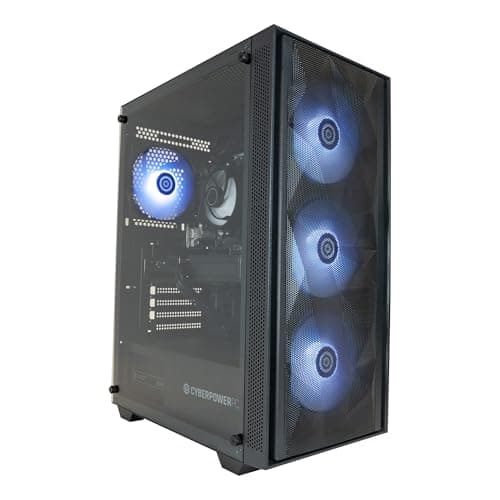
If budget is the primary concern, the Lenovo IdeaCentre A100 is the Best Value pick, delivering a complete all-in-one setup with a 24-inch display and 16 GB RAM at a price that is genuinely accessible. For those who want a future-proof tower with a current-generation GPU, the CyberPowerPC Wyvern with the Ryzen 7 8700F and RTX 5060 is the strongest choice, offering a platform that will serve well into the second half of the decade. Whichever machine you choose from this list, you are getting a desktop that is more than capable of supporting a productive, comfortable home working life.