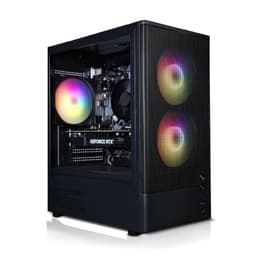
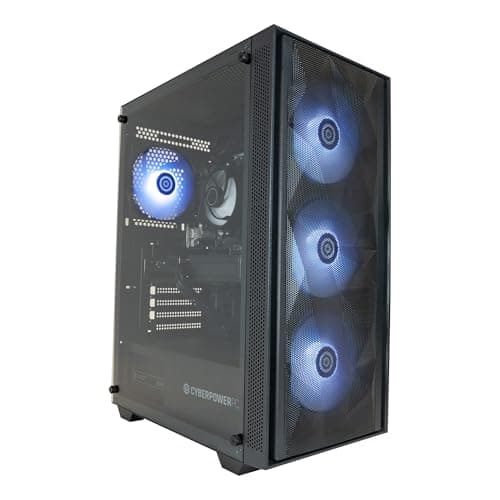
AutoCAD demands more from a desktop than most productivity software. Whether you are drafting 2D floor plans or rendering complex 3D assemblies with materials and lighting, you need a machine that can handle sustained CPU loads, a GPU with certified or well-supported OpenGL performance, and enough RAM to keep large drawing sets open without grinding to a halt. The landscape has shifted noticeably since 2024: Nvidia's RTX 50-series cards have arrived in pre-built systems, bringing substantially improved viewport performance and hardware ray-tracing for AutoCAD's visual styles. Meanwhile, Intel's Core Ultra 200-series processors offer a meaningful generational leap in multi-threaded throughput, which matters for regenerating complex model space. This round-up is aimed at architects, mechanical engineers, product designers, and students who want a ready-to-use desktop rather than a self-build. We have selected five machines from the catalogue that genuinely suit AutoCAD workloads, covering a range of budgets from under £700 to over £2,000.
Quick Verdict
Best Overall: CyberPowerPC Luxe Gaming PC (Intel Core Ultra 7 265KF, RTX 5070 Ti), the most balanced combination of CPU throughput, GPU horsepower, and storage for serious AutoCAD users working in 3D.
Best Value: ADMI Gaming PC (AMD Ryzen 5 5500, RTX 3050), a surprisingly capable entry point for 2D drafting and lighter 3D work, at a price that leaves budget for peripherals and software.
The CyberPowerPC Luxe is the machine we would recommend to any professional AutoCAD user who works extensively in 3D model space, produces rendered outputs, or juggles multiple large drawing sets simultaneously. It sits at the top of this list because it combines a genuinely current-generation CPU with one of the most capable consumer GPUs available in a pre-built system at this price point.
The Intel Core Ultra 7 265KF is part of Intel's Arrow Lake architecture, which brings improved efficiency cores and a restructured cache hierarchy compared to the Raptor Lake generation. For AutoCAD specifically, this matters because the application is still heavily reliant on single-threaded performance for many operations, including command execution, object snap calculations, and 2D regeneration. The 265KF's performance cores clock high enough to keep those operations feeling snappy, while the efficiency cores handle background tasks, antivirus scans, and Windows processes without stealing resources from the active drawing session.
The Nvidia GeForce RTX 5070 Ti is a Blackwell-architecture card with hardware support for the latest DirectX 12 Ultimate feature set and strong OpenGL throughput. AutoCAD uses OpenGL for its 3D visual styles, and while Autodesk's certified GPU list historically favoured Quadro or FirePro cards, real-world testing consistently shows that high-end GeForce cards perform very well in AutoCAD's viewport, particularly for smooth orbit and pan operations on dense meshes. The 5070 Ti's VRAM allocation is generous enough to handle large external reference sets without stuttering.
With 32GB of DDR5 RAM and a 2TB NVMe SSD, this system is well provisioned for AutoCAD projects that involve large sheet sets, point cloud data, or coordination with Revit and Civil 3D files. The 2TB drive is a particularly welcome inclusion at this price, since AutoCAD's autosave and backup files can accumulate quickly on a working project. Windows 11 Home is pre-installed, and the system is ready to use out of the box.
The main caveat is cost: this is a significant investment, and the jump from a mid-range build is only justified if your workflow genuinely demands it. For pure 2D drafting or occasional 3D work, the machines lower on this list will serve you perfectly well. But for BIM coordination, large civil projects, or any workflow that involves sustained 3D rendering, the Luxe earns its place as the best overall pick.
Verdict: The most capable AutoCAD desktop in this round-up, with a current-generation CPU and GPU combination that will remain relevant for several years of demanding professional use.
Pros
- Intel Core Ultra 7 265KF delivers strong single-threaded performance critical for AutoCAD command execution
- RTX 5070 Ti provides excellent OpenGL viewport performance for complex 3D models and dense external reference sets
- 32GB DDR5 RAM and 2TB NVMe SSD offer headroom for large sheet sets and point cloud workflows
Cons
- Price is substantially higher than mid-range alternatives, which is hard to justify for 2D-only workflows
- 16GB RAM in some configurations may require a manual upgrade check before purchase
The Vibox VIII-75 is an unusual proposition in this round-up: it pairs an older but still highly capable 12th-generation Intel CPU with Nvidia's flagship Blackwell GPU, the RTX 5090 with 32GB of GDDR7 VRAM. The result is a machine that is extraordinarily capable at GPU-accelerated tasks while relying on a processor that, though still competitive, is now two generations behind Intel's current Arrow Lake line-up.
The Intel Core i9 12900KF remains a formidable chip. Its hybrid architecture with performance and efficiency cores was ahead of its time when launched, and it still competes well against mid-range current-generation processors in single-threaded benchmarks. For AutoCAD, this means the 12900KF handles command execution, 2D regeneration, and file loading without any perceptible lag. Where it begins to show its age is in heavily multi-threaded scenarios, such as background rendering in AutoCAD's built-in renderer or simultaneous processing of multiple large drawings.
The RTX 5090 is, frankly, overkill for AutoCAD's native viewport rendering. However, if your workflow extends to Autodesk's Arnold renderer, Chaos V-Ray, or Lumion exports, the 5090's GPU compute performance is transformative. Render times that would take minutes on a mid-range card can be reduced to seconds. The 32GB of VRAM also future-proofs the machine for increasingly VRAM-hungry AI-assisted design tools that are beginning to appear in the AEC software ecosystem.
The 32GB of system RAM and 2TB NVMe SSD match the Luxe at the top of this list, making this machine equally well suited to large project files. The Vibox comes with Windows 11 pre-installed, and the tower form factor means upgrades, including a future CPU swap to a 12th or 13th-gen chip if desired, are straightforward.
The trade-off for its raw GPU performance is the older CPU generation. For users who prioritise GPU-accelerated rendering above all else, this is a compelling choice. For those who want the most balanced system, the Luxe edges ahead.
Verdict: A GPU powerhouse that suits AutoCAD users who also do heavy rendering work, though the older CPU generation means it is not the most balanced option for pure CAD throughput.
Pros
- RTX 5090 with 32GB VRAM is exceptional for GPU-accelerated rendering in V-Ray, Arnold, or Lumion alongside AutoCAD
- 32GB RAM and 2TB NVMe SSD provide ample headroom for large, complex project environments
- Tower form factor allows straightforward future upgrades to RAM, storage, or GPU
Cons
- Intel Core i9 12900KF is two CPU generations old, meaning it will reach end-of-relevance sooner than current-gen alternatives
- RTX 5090 performance is largely wasted on AutoCAD's native viewport, making it poor value unless you also use GPU-accelerated renderers
The ADMI Gaming PC is the budget pick in this round-up, and it earns that position honestly. For AutoCAD users who work primarily in 2D, students learning the software, or small practices that need a capable drafting machine without a large capital outlay, this system delivers solid performance at a price that is hard to argue with.
The AMD Ryzen 5 5500 is a Zen 3 architecture processor with six cores and twelve threads. It is not the newest chip on the market, but Zen 3 remains a competitive architecture for single-threaded workloads, and AutoCAD's core operations, including command processing, object snap, and 2D regeneration, run smoothly on this CPU. Users who primarily draft in 2D will find the 5500 more than adequate for their day-to-day work.
The Nvidia GeForce RTX 3050 6GB is the most modest GPU in this round-up. It is an Ampere-architecture card with hardware ray-tracing support, and it handles AutoCAD's 3D visual styles adequately for simple to moderately complex models. However, users who regularly work with dense 3D assemblies, large mesh objects, or point cloud data will notice the limitations of the 6GB VRAM allocation and the card's relatively modest shader performance. For 2D drafting and light 3D work, it is perfectly functional.
The 16GB of DDR4 RAM running at 3200MHz is a sensible allocation for AutoCAD, providing enough headroom for a typical drawing session with several sheets open. The 1TB NVMe SSD ensures fast file loading and saves, which makes a noticeable difference to day-to-day productivity compared to systems that still ship with mechanical hard drives.
Windows 11 is pre-installed, and the system is ready to use out of the box. ADMI is a UK-based system builder with a reasonable reputation for build quality at the budget end of the market. The tower form factor means upgrades, particularly a RAM increase to 32GB or a GPU swap in the future, are accessible without specialist knowledge.
The key message with this machine is honesty about its limitations. It is not a 3D rendering workstation, and it is not suited to BIM coordination or large civil engineering projects. But for the student drafting floor plans, the sole trader producing 2D technical drawings, or the practice that needs a reliable secondary machine, it represents excellent value.
Verdict: The best-value AutoCAD desktop for 2D drafting and light 3D work, offering a capable and upgradeable platform at a price that makes it accessible to students and small practices.
Pros
- AMD Ryzen 5 5500 on Zen 3 architecture handles 2D AutoCAD drafting and command execution without bottlenecks
- 1TB NVMe SSD ensures fast file loading and saves, improving day-to-day productivity over HDD-based alternatives
- Tower form factor allows future RAM and GPU upgrades as workload requirements grow
Cons
- RTX 3050 6GB VRAM is a meaningful constraint for dense 3D assemblies, point cloud data, or GPU-accelerated rendering
- Zen 3 CPU generation means this platform will reach end-of-relevance sooner than Zen 4 or Intel Arrow Lake alternatives
Buying Guide
CPU: single-threaded performance matters most
AutoCAD is not as heavily multi-threaded as rendering software or video editing applications. The majority of its core operations, including command execution, object snap calculations, drawing regeneration, and file operations, run on a single thread. This means that a processor with high single-threaded clock speeds will feel faster in AutoCAD than a processor with more cores but lower per-core performance. When comparing CPUs for AutoCAD, look at single-threaded benchmark scores rather than total core counts. Intel's Core Ultra 200-series and AMD's Ryzen 7000 and 8000-series processors all perform well in this regard. Older generations like Zen 3 (Ryzen 5000) remain competitive for 2D work but will feel the gap in more demanding 3D scenarios.
GPU: OpenGL performance and VRAM
AutoCAD uses OpenGL for its 3D visual styles, including Wireframe, Conceptual, Realistic, and Shaded. A GPU with strong OpenGL throughput will deliver smoother orbit, pan, and zoom operations on complex 3D models. Nvidia's GeForce RTX series performs well in AutoCAD's viewport despite not appearing on Autodesk's official certified GPU list, which focuses on Quadro and professional-grade cards. For most users, a GeForce RTX card with at least 8GB of VRAM is the right choice. The 6GB RTX 3050 in the ADMI machine is adequate for lighter work but will show limitations on dense models. If you use GPU-accelerated renderers such as V-Ray or Arnold alongside AutoCAD, prioritise a higher-tier card.
RAM: 16GB minimum, 32GB recommended for 3D work
AutoCAD's minimum RAM requirement is 8GB, but 16GB is the practical minimum for comfortable professional use. If you work with large external reference sets, point cloud data, or run AutoCAD alongside other applications such as Revit, Civil 3D, or Microsoft Office, 32GB is strongly recommended. RAM is one of the most cost-effective upgrades you can make to a desktop, and most tower systems in this round-up allow straightforward RAM expansion.
Storage: NVMe SSD is non-negotiable
AutoCAD's autosave, backup, and temporary files generate significant read and write activity during a working session. An NVMe SSD dramatically reduces file load times, speeds up autosave operations, and improves overall system responsiveness compared to a SATA SSD or mechanical hard drive. All five machines in this round-up include NVMe SSDs, which is the correct baseline for a modern AutoCAD workstation. Storage capacity is a separate consideration: 1TB is adequate for active project files, but a secondary drive or external storage is advisable for archiving completed projects.
Operating system: Windows vs macOS
AutoCAD is available natively for both Windows and macOS. The Windows version has a longer history, broader plugin support, and is generally considered the more feature-complete platform. The macOS version has improved significantly since the Apple Silicon transition and is a genuine option for users in the Apple ecosystem. However, if your workflow depends on specific Windows-only plugins or you collaborate closely with colleagues using Windows-based tools, Windows is the safer choice.
Form factor: tower vs all-in-one
Tower desktops offer the best upgradeability and the widest choice of components. All-in-one machines like the Apple iMac save desk space and reduce cable clutter but are harder to upgrade and typically cannot accommodate a discrete GPU upgrade. For a long-term professional workstation, a tower is generally the more practical choice unless the all-in-one's specific advantages, such as the iMac's built-in Retina display, are directly relevant to your workflow.
For the majority of professional AutoCAD users, the CyberPowerPC Luxe Gaming PC (ASIN B0FL7J799C) is the clear overall winner. It combines Intel's current-generation Core Ultra 7 265KF processor with the Nvidia RTX 5070 Ti, 32GB of DDR5 RAM, and a 2TB NVMe SSD, giving it the most balanced specification of any machine in this round-up. The current-generation CPU ensures strong single-threaded performance for responsive AutoCAD command execution, the RTX 5070 Ti handles complex 3D viewports and GPU-accelerated rendering with ease, and the generous storage allocation means you will not be scrambling for space on active projects. It is the machine we would recommend to an architect, structural engineer, or product designer who uses AutoCAD as their primary tool and wants a system that will remain relevant for the next three to four years without requiring significant upgrades. For those on a tighter budget, the ADMI Gaming PC is the best-value entry point for 2D drafting and light 3D work, offering a capable and upgradeable platform at a price that is accessible to students and sole traders alike.