Working from home demands a laptop that can handle back-to-back video calls, long document sessions, and the occasional presentation without running out of charge before lunch. A 2-in-1 or versatile laptop adds the bonus of switching to tablet mode for sketching, annotating PDFs, or propping up on the sofa for an evening review. This year's market has shifted significantly: Qualcomm Snapdragon X-series chips have arrived in force, bringing fanless designs and genuinely all-day battery life to Windows machines, while Intel and AMD continue to refine their efficiency cores. If you bought a home-office laptop in 2023 or early 2024, the battery life and AI-assisted features on offer now represent a meaningful step forward. This guide is aimed at remote workers, hybrid professionals, and anyone who needs a reliable, comfortable daily driver that handles productivity tasks without fuss. We have ranked five strong options across a range of budgets and use cases.
Quick Verdict
Best Overall: HP OmniBook 5 Next Gen AI 16" (B0FQJP49NP)an exceptional all-day work machine with a stunning OLED display, up to 34.75 hours of battery life, and a Snapdragon X-series chip that keeps things whisper-quiet. Best Value: Microsoft Surface Pro Copilot+ PC (B0DYDQKJ9P)the most genuinely versatile 2-in-1 on the list, with a high-resolution touchscreen and Snapdragon X Plus efficiency, at a mid-range price that makes sense for hybrid workers who need tablet flexibility.
The HP OmniBook 5 is the standout home-office laptop in this round-up, and it earns that position on the strength of three attributes that matter most to remote workers: battery life, display quality, and quiet operation. Powered by the Qualcomm Snapdragon X1-26-100, this is a Copilot+ PC built around ARM efficiency rather than brute-force clock speeds, and the result is a machine that HP rates at up to 34.75 hours of real-world battery life. That figure is ambitious, but even under typical mixed workloads, video calls, browser tabs, cloud documents, you will comfortably get through a full working day and into the evening without hunting for a charger.
The 16-inch OLED panel running at 1920×1200 is a genuine highlight. OLED brings perfect blacks, vivid colour accuracy, and excellent contrast, which makes a meaningful difference when you are staring at a screen for eight or more hours. The 16:10 aspect ratio provides more vertical real estate than a standard 16:9 panel, so you see more of a document or spreadsheet without scrolling. Brightness is sufficient for home-office environments, and the anti-glare coating handles most window reflections.
The Snapdragon X1-26-100 handles all standard productivity tasks with ease: Microsoft 365, video conferencing via Teams or Zoom, browser-heavy research, and PDF annotation. It is not a machine for video editing or 3D rendering, but that is not what home-office workers need. The integrated Qualcomm Adreno GPU manages light image work and casual use without complaint. The 16GB of RAM is sufficient for most workloads, and the 512GB PCIe NVMe SSD keeps app launches and file transfers snappy.
Port selection is sensible for a slim machine: two USB-C ports running at 10Gbps, one USB-A at 10Gbps, and a 3.5mm combo jack. Both USB-C ports support charging, so you are not locked to a single side. The lack of a full-size HDMI port is a minor inconvenience for those who connect to external monitors without a dock, but a USB-C to HDMI adapter resolves this immediately.
The keyboard is well-spaced and comfortable for long typing sessions, and HP has included a capable webcam and microphone array that performs well in standard home-office lighting. Windows 11 runs smoothly on the ARM architecture, and most productivity software is now natively optimised or runs well under emulation. This is the best all-round home-office laptop on this list.
Pros
- Up to 34.75 hours of rated battery life, comfortably outlasting any working day
- 16" OLED panel with 1920×1200 resolution and 16:10 aspect ratio for document work
- Fanless Snapdragon X design runs silently under typical office workloads
Cons
- No full-size HDMI port, requiring an adapter for external monitor connections
- ARM architecture means a small number of legacy Windows applications may not run natively
The Microsoft Surface Pro is the most genuinely versatile device on this list, and for hybrid workers who split time between desk work and tablet use, it makes a compelling case. The 12-inch 2880×1920 LCD touchscreen is sharp, bright, and responsive, and the Surface form factor, a kickstand-equipped tablet that pairs with an optional keyboard cover, gives you a proper 2-in-1 experience that a conventional clamshell cannot match. You can prop it on a desk with a keyboard for focused typing, detach it for a Teams call from the sofa, or sketch meeting notes directly on the screen with a Surface Pen.
Under the hood, the Snapdragon X Plus processor brings Copilot+ PC credentials, meaning you get on-device AI features including Windows Recall, live captions, and Cocreator in Paint. More importantly for daily use, the Snapdragon X Plus delivers strong efficiency: Microsoft rates the Surface Pro at all-day battery life, and real-world experience confirms you can get through a standard eight-hour working day without anxiety. The chip runs cool and silent, which matters if you are taking calls in a quiet home environment.
The 16GB of RAM is plenty for productivity work, though the 256GB of internal storage is on the tighter side. If you rely heavily on local file storage rather than OneDrive or another cloud service, you may find yourself managing space more carefully than you would like. The single USB-C port is the most significant hardware limitation: you will almost certainly want a USB-C hub or dock to connect a monitor, keyboard, mouse, and any peripherals simultaneously. That is an added cost to factor in.
The built-in front-facing camera is excellent for video calls, Microsoft has consistently prioritised webcam quality on Surface devices, and the Pro is no exception. The microphone array handles background noise well, and the screen's high pixel density makes it easy to read fine text in documents and spreadsheets. The Surface Pro is sold as a tablet; the keyboard cover is a separate purchase, which pushes the effective cost up, but the combination is one of the best portable work setups available.
For home-office workers who value flexibility and portability above all else, and who are happy to invest in a dock and keyboard cover, the Surface Pro Copilot+ PC is an outstanding choice and earns its Best Value 2-in-1 badge.
Pros
- Genuine tablet-and-laptop versatility with a high-resolution 2880×1920 touchscreen
- Snapdragon X Plus delivers all-day battery life in a silent, fanless design
- Outstanding front-facing webcam quality for video calls
Cons
- Only one USB-C port, making a hub or dock essential for a full desk setup
- 256GB of storage is limited; keyboard cover and pen are sold separately, adding to the total cost
The Samsung Galaxy Book4 Pro 360 is the premium 2-in-1 on this list, and it earns its higher price tag through a combination of a spectacular display, a versatile 360-degree hinge, and a port selection that puts most rivals to shame. The 16-inch Dynamic AMOLED 2X panel running at 2880×1800 is simply one of the best laptop screens available: colours are vivid and accurate, the 120Hz refresh rate makes scrolling and animations feel silky, and the OLED-class contrast ratio means blacks are genuinely black rather than grey. For anyone who spends long hours reading, writing, or reviewing visual content, this display reduces eye strain noticeably.
The 360-degree hinge means you can fold the screen all the way back into tent or tablet mode, making it practical for presentations, video calls in tight spaces, or handwriting notes with a Samsung S Pen (included). This genuine 2-in-1 capability sets it apart from the clamshell-only machines on this list, and the large 16-inch screen in tablet mode is particularly useful for annotating documents or reviewing design work.
The Intel Core Ultra 7 155H is a powerful processor that handles demanding multitasking with ease. Running multiple video call windows, large spreadsheets, and browser-heavy research simultaneously is no problem. Intel Arc Graphics handles light creative work beyond standard office tasks. The 16GB of RAM is sufficient for most professional workloads, and the 512GB SSD keeps things responsive.
Port selection is a genuine strength: two Thunderbolt 4 ports, a full-size HDMI output, a USB-A port, and a microSD slot mean you can connect monitors, peripherals, and storage devices without a hub in most scenarios. This is particularly valuable for a home-office setup where you want to plug in and be productive immediately.
Battery life is good for a 16-inch machine with a high-refresh AMOLED display, though the Intel Core Ultra 7 is more power-hungry than the Snapdragon alternatives. You will get through a full working day with moderate use, but heavy workloads will see you reaching for the charger by late afternoon. The premium price reflects the premium specification, and for workers who want the best possible display and genuine 2-in-1 flexibility, it is justified.
Pros
- 16" Dynamic AMOLED 2X at 2880×1800 with 120Hz is among the finest laptop displays available
- 360-degree hinge with included S Pen enables genuine tablet and tent-mode working
- Comprehensive port selection including two Thunderbolt 4 ports and full-size HDMI
Cons
- Intel Core Ultra 7 155H is more power-hungry than Snapdragon rivals, reducing all-day battery confidence
- Premium price makes it hard to justify unless you actively use the 2-in-1 hinge and AMOLED display
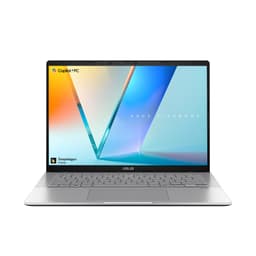
The ASUS Vivobook S 14 S3407QA occupies a sweet spot in this round-up: it delivers Copilot+ PC credentials, a generous 1TB of storage, and a sharp 2560×1600 display in a compact 14-inch chassis, all at a price that undercuts the Samsung and sits comfortably in the mid-range. For home-office workers who want a portable, capable daily driver without spending over a thousand pounds, this is a strong contender.
The Qualcomm Snapdragon X Plus processor brings the same efficiency-focused architecture as the Surface Pro and the HP OmniBook 5, meaning you get a fanless design that runs silently under typical office workloads. Battery life is rated strongly for all-day use, and real-world productivity tasks, video calls, document editing, cloud-based work, will comfortably see you through a standard working day. The Snapdragon X Plus is not quite as powerful as the X1-26-100 in the OmniBook 5, but the difference is imperceptible for standard office tasks.
The 14-inch IPS panel at 2560×1600 with a 16:10 aspect ratio is sharp and colour-accurate, providing a comfortable workspace for document-heavy tasks. It is not OLED, so contrast and black levels do not match the Samsung or the OmniBook 5, but brightness and colour reproduction are solid for the price. The 16:10 ratio is genuinely useful for productivity, showing more of a document or spreadsheet than a 16:9 screen of the same diagonal.
The 1TB of PCIe Gen4 storage is a standout specification at this price point, giving you ample room for local files, large project folders, and software installations without the need to manage space carefully. The 16GB of RAM handles multitasking comfortably. Port selection is excellent for a slim 14-inch machine: two USB4 Type-C ports, two USB-A 3.2 ports, a full-size HDMI 2.1 output, and a 3.5mm audio jack. You can connect an external monitor directly without an adapter, which is a practical advantage for a home-office setup.
The keyboard is comfortable for extended typing sessions, and ASUS has included a decent webcam for video calls. The machine weighs around 1.4 kg, making it easy to move between rooms or take to a co-working space. For workers who want a compact, efficient, well-specified machine at a sensible price, the Vivobook S 14 S3407QA is an excellent choice.
Pros
- 1TB of PCIe Gen4 storage is generous at this price, removing the need to manage local files carefully
- USB4 Type-C ports and full-size HDMI 2.1 allow direct monitor connection without a hub
- Snapdragon X Plus delivers silent, efficient operation for all-day home-office use
Cons
- IPS panel lacks the contrast and vibrancy of the OLED screens on the OmniBook 5 and Vivobook S14 Metal
- ARM architecture means occasional compatibility checks are needed for legacy Windows software
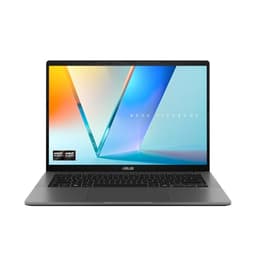
The ASUS Vivobook S14 M3407HA Metal is the most powerful laptop on this list in terms of raw CPU performance, and it earns its place as the pick for home-office workers who regularly push their machine harder than standard document and video-call tasks. The AMD Ryzen 9 270 processor is a high-performance chip that handles demanding workloads, large data sets, complex spreadsheets, local video editing, software development, with a composure that the Snapdragon alternatives cannot match when sustained performance is required.
The 32GB of RAM is the standout specification here, doubling the memory of every other machine on this list. If you routinely run multiple virtual machines, keep dozens of browser tabs open, or work with large files in applications like Adobe Acrobat, Lightroom, or data analysis tools, 32GB removes the risk of slowdown entirely. Combined with a 1TB SSD, this is a machine that will not feel constrained by its hardware for years to come.
The 14-inch OLED panel at 2560×1600 is a genuine pleasure to work on. OLED brings perfect blacks, wide colour gamut, and excellent contrast, making text crisp and images vivid. The 16:10 aspect ratio provides useful extra vertical space for documents and code. Colour accuracy is strong out of the box, which is useful for anyone doing light creative work alongside their office tasks.
Port selection covers the essentials well: two USB-A 3.2 Gen 1 ports, two USB-C 3.2 Gen 1 ports with DisplayPort 1.2 and Power Delivery 3.0, a full-size HDMI 2.1 output, and a 3.5mm audio jack. You can connect an external monitor via HDMI or USB-C, charge via USB-C, and connect peripherals without a hub in most scenarios.
The main trade-off compared to the Snapdragon machines is battery life and thermal behaviour. The Ryzen 9 270 is a more power-hungry chip, and under sustained loads the fan will become audible. Battery life is good for a high-performance machine but will not match the OmniBook 5 or Surface Pro. For workers who need maximum performance in a compact chassis and are happy to work near a charger, the Vivobook S14 Metal is the most capable machine on this list.
Pros
- 32GB of RAM is unique on this list, future-proofing the machine for demanding multitasking and large files
- AMD Ryzen 9 270 delivers the strongest sustained CPU performance for complex office and creative workloads
- 14" OLED at 2560×1600 provides exceptional display quality for long working sessions
Cons
- Ryzen 9 270 is more power-hungry than Snapdragon alternatives, resulting in shorter battery life under load
- Fan becomes audible under sustained CPU workloads, which can be noticeable in quiet home environments
Buying Guide
Battery Life
For home-office use, battery life is the single most important specification. A machine that dies at 3pm forces you to work tethered to a wall, which defeats the flexibility of working from home. Look for laptops rated at 10 hours or more under mixed workloads, and treat manufacturer claims with appropriate scepticism: real-world battery life is typically 60, 80% of the rated figure under active use. Qualcomm Snapdragon X-series chips currently lead the Windows market for efficiency, and the HP OmniBook 5 and Microsoft Surface Pro both demonstrate what this architecture can deliver. If you want all-day confidence without anxiety, prioritise these platforms.
Display Quality
You will spend more time looking at your laptop screen than interacting with any other component, so display quality deserves serious attention. For productivity work, a 16:10 or 3:2 aspect ratio provides more vertical space than the standard 16:9, letting you see more of a document or spreadsheet without scrolling. Resolution matters: anything below 1920×1200 on a 14-inch or larger screen will look noticeably soft at normal working distances. OLED panels offer superior contrast and colour accuracy compared to IPS, which reduces eye fatigue over long sessions. If your budget allows, prioritise OLED.
RAM and Storage
For standard office tasks, Microsoft 365, video calls, browser research, 16GB of RAM is the comfortable minimum in 2025. If you work with large data files, run virtual machines, or keep many applications open simultaneously, 32GB provides meaningful headroom. For storage, 512GB is sufficient for most users who rely on cloud storage for large files, but 1TB removes the need to manage space carefully. Prioritise NVMe SSD over eMMC for snappier application launches and file transfers.
Ports and Connectivity
A home-office setup typically involves at least one external monitor, a keyboard, a mouse, and possibly a headset or webcam. Check that your chosen laptop can support your peripherals without requiring a hub, or budget for a quality USB-C hub or dock. Thunderbolt 4 ports are the most capable, supporting high-bandwidth monitors and fast external storage. At minimum, look for one USB-C port with DisplayPort support and at least one USB-A port for legacy peripherals. Wi-Fi 6 or Wi-Fi 6E is standard on current machines and ensures reliable wireless connectivity for video calls.
2-in-1 Flexibility
Not every laptop on this list is a traditional 2-in-1, but touchscreens and flexible hinges add genuine value for home-office workers who annotate documents, sketch ideas, or use their laptop in different rooms and postures throughout the day. A 360-degree hinge allows tent and tablet modes, which are useful for presentations and video calls. Consider whether you will genuinely use these modes before paying a premium for them: if you work at a desk all day, a conventional clamshell with a great keyboard and display may serve you better.
Keyboard and Webcam
Keyboard comfort is subjective, but key travel, spacing, and feedback all contribute to typing accuracy and fatigue over a full working day. If possible, test a keyboard in person before buying. For webcam quality, look for at least 1080p resolution with a decent microphone array: poor video and audio quality on calls creates a poor impression and increases fatigue. Microsoft Surface devices and HP's premium range consistently deliver above-average webcam performance.
The HP OmniBook 5 Next Gen AI 16" is the overall winner for home-office and WFH use. Its combination of a 34.75-hour rated battery life, a 16-inch OLED display with a 16:10 aspect ratio, silent Snapdragon X1-26-100 operation, and a practical port selection makes it the most complete all-day work machine on this list. It is not the cheapest option, but for a machine you will rely on every working day, the investment in display quality and battery confidence is well justified. The Microsoft Surface Pro Copilot+ PC earns the Best Value 2-in-1 title for workers who genuinely need tablet flexibility and a high-resolution touchscreen. The Samsung Galaxy Book4 Pro 360 is the premium choice for those who want the finest display and a true 360-degree hinge, while the ASUS Vivobook S 14 S3407QA offers excellent value with generous storage and strong connectivity. The ASUS Vivobook S14 M3407HA Metal rounds out the list as the power-user option, with 32GB of RAM and AMD Ryzen 9 performance for demanding workloads.