Buying a monitor at the enthusiast end of the market is genuinely stressful. You're looking at specs that sound impressive, marketing numbers that are essentially fiction, and a price tag that makes you want to sit down for a minute. So when ASUS drops the ROG Strix XG27ACMES into the enthusiast bracket, the question isn't whether it looks good on paper. It's whether it actually delivers where it counts, or whether you're paying a premium for a badge and a spec sheet full of asterisks.
Here's the short version: the XG27ACMES is a genuinely strong 1440p gaming monitor. The 255Hz Fast IPS panel is the real headline, not the marketing fluff around it. If you're running a high-end GPU and you want fluid, responsive gameplay at QHD without jumping to OLED money, this is one of the more honest options in its price bracket. But it's not perfect, and at this price point, it absolutely needs to justify itself against some serious competition. We've dug into the specs, cross-referenced owner feedback from the reviews currently averaging ★★★★☆ (4.0), and compared it to what else you could buy. Here's what we found.
The ASUS ROG Strix 27" 1440P HDR Gaming Monitor sits in a bracket where every pound matters. You're not buying a budget screen here. You're buying into a specific set of promises: speed, image quality, and a build that should last. Whether those promises hold up is what this review is about.
Core Specifications
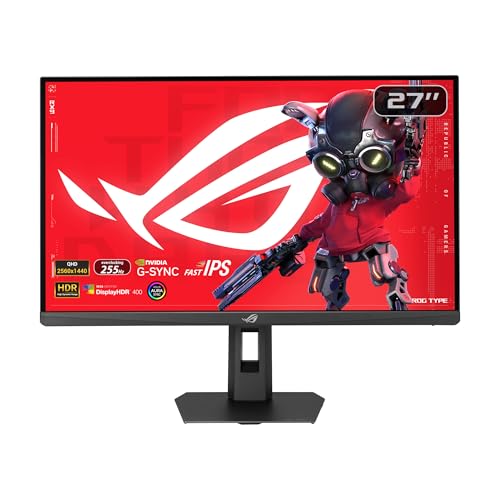
Start with what's actually on the box. The XG27ACMES is a 27-inch panel running at 2560x1440 (QHD), which hits a pixel density of around 109 PPI. That's a sweet spot for a 27-inch screen. Not so sharp you need to squint at everything, not so loose that individual pixels become visible during normal use. The panel type is Fast IPS, which is ASUS's branding for a high-speed IPS variant designed to close the gap with TN panels in terms of response time while keeping IPS's colour and viewing angle advantages.
The refresh rate is 255Hz, which is notably higher than the 240Hz you'll find on most competitors at this tier. Whether that extra 15Hz is perceptible in practice is debatable (more on that in the refresh rate section), but it's there. ASUS rates the response time at 0.3ms, which is the MPRT (Moving Picture Response Time) figure, not the GtG (grey-to-grey) pixel transition time. That distinction matters, and we'll unpack it properly later. G-SYNC Compatible certification means it works with NVIDIA's variable refresh rate technology without needing a dedicated G-SYNC module, and it also supports FreeSync for AMD GPU owners.
Connectivity is confirmed as 1x HDMI 2.1, 1x DisplayPort 1.4, and 1x USB-C with DisplayPort Alt Mode. That's a solid trio. HDMI 2.1 means console gamers can push 4K at 120Hz on a PS5 or Xbox Series X to a different screen if they want, though this monitor tops out at 1440p. The USB-C port with DP Alt Mode is genuinely useful for laptop users who want a single-cable connection. ASUS also includes their DisplayWidget software for on-screen display control from your desktop, which owners consistently call a quality-of-life improvement over fumbling with physical buttons.
| Specification | Detail |
|---|---|
| Screen Size | 27 inches |
| Resolution | 2560x1440 (QHD / 1440p) |
| Panel Type | Fast IPS |
| Refresh Rate | 255Hz |
| Response Time (marketed) | 0.3ms (MPRT) |
| Adaptive Sync | G-SYNC Compatible, FreeSync Premium |
| HDR | HDR (tier not specified in listing) |
| HDMI | 1x HDMI 2.1 |
| DisplayPort | 1x DisplayPort 1.4 |
| USB-C | 1x USB-C (DisplayPort Alt Mode) |
| Special Features | ELMB Sync, DisplayWidget, Gaming AI, Tripod Hole |
| Warranty | 3 years |
| Current Price | £529.71 · Details |

Panel Technology
Fast IPS is the panel type here, and that label deserves a bit of unpacking because it gets thrown around a lot. Standard IPS (In-Plane Switching) panels have always been the go-to choice for colour accuracy and wide viewing angles, but they historically struggled with response times compared to TN panels. Fast IPS is essentially a revised manufacturing approach that targets sub-1ms GtG response times while retaining the IPS characteristics people actually care about: consistent colour at off-angles, better black uniformity than TN, and a generally more pleasant image for anything that isn't pure competitive gaming.
The trade-off with IPS technology, including Fast IPS variants, is contrast ratio. You're typically looking at a native contrast ratio in the 1000:1 to 1200:1 range, which is noticeably lower than VA panels (which can hit 3000:1 or higher). In practice, this means blacks look more like very dark grey in a dim room, and HDR content with deep shadow detail won't look as punchy as it would on a VA or OLED display. If you're primarily gaming in a well-lit room, this is barely noticeable. If you're watching films in the dark and you care about black levels, it's something to factor in. IPS glow is also a thing: that faint luminous haze in the corners of the panel when displaying dark content. It varies unit to unit, but it's essentially universal on IPS screens.
The viewing angle advantage is real though. You can sit off-axis, have a mate watching alongside you, or just not be perfectly centred and the image stays consistent. TN panels go yellow-green the moment you tilt slightly. VA panels can shift in colour and brightness at moderate angles. IPS, including Fast IPS, just... holds up. For a monitor that might double as a productivity screen or get used for media alongside gaming, that matters. Several owners in the review pool specifically mention image quality consistency as a highlight, which tracks with what Fast IPS should deliver.
Display Quality
At 2560x1440 on a 27-inch panel, you're sitting at roughly 109 pixels per inch. That's genuinely comfortable for daily use. Text is sharp without needing to scale the UI, game environments have real detail, and you're not straining to read anything. Compare that to 1080p on a 27-inch screen (about 82 PPI), which starts to look a bit soft once you've seen 1440p, and the upgrade feels meaningful. It's not 4K sharp, but 4K at 27 inches requires scaling anyway for most people, and pushing 4K at high refresh rates demands considerably more GPU grunt.
The panel uses an anti-glare matte coating, which is standard on gaming monitors and the right call for most setups. Glossy panels look stunning in controlled lighting but turn into mirrors the moment there's a window behind you. The matte coating diffuses reflections effectively, though it does add a very slight texture to the image that some people notice on close inspection. It's a sensible trade-off for a screen that's going to live in a real room with real lighting, not a photography studio.
Brightness uniformity across the panel is something that varies between individual units on any IPS monitor, and the XG27ACMES is no exception. Owner feedback is broadly positive on image quality, with the good overall rating suggesting most people are happy with what they receive. A small number of reviews mention minor backlight bleed in corners, which is typical IPS behaviour rather than a defect specific to this model. If you get a unit with significant bleed, ASUS's 3-year warranty is your friend. On colour reproduction, Fast IPS panels at this tier typically cover the sRGB colour space well, and many owners specifically call out the vibrancy and accuracy of the image out of the box.
Refresh Rate and Adaptive Sync
255Hz is the headline number, and it's worth contextualising. The jump from 60Hz to 144Hz is transformative. The jump from 144Hz to 240Hz is clearly noticeable if you're playing fast-paced shooters. The jump from 240Hz to 255Hz? That's 15 extra frames per second of headroom, and most people won't consciously perceive the difference. What it does provide is a slightly larger margin for your GPU to operate within the VRR range without dropping below the sync threshold, which has practical value in demanding titles where framerates fluctuate. It's not a gimmick, but it's also not the reason to buy this monitor.
G-SYNC Compatible certification is meaningful. It means ASUS submitted the monitor to NVIDIA's validation process and it passed their requirements for variable refresh rate behaviour: no flickering, no blanking, consistent frame delivery across the VRR range. You don't need to buy a monitor with a dedicated G-SYNC module (which adds significant cost) to get good VRR performance with an NVIDIA GPU. This monitor works properly with both NVIDIA and AMD cards, which is exactly what you want at this price. FreeSync Premium support extends the same benefit to AMD GPU owners.
ELMB Sync (Extreme Low Motion Blur Sync) is ASUS's implementation of backlight strobing combined with adaptive sync. Traditionally, you had to choose between backlight strobing for motion clarity and VRR for tear-free gaming. ELMB Sync lets you run both simultaneously, which is a genuine technical achievement and one of the more useful features on this monitor for competitive gaming. At 255Hz with ELMB Sync active, motion clarity in fast-paced games should be very good. The VESA adaptive sync standards underpin a lot of this technology, and it's good to see ASUS implementing it properly rather than as a checkbox feature.
Response Time and Motion
Right, so the 0.3ms figure. This is MPRT, Moving Picture Response Time, not GtG. These are different measurements and the distinction is important. GtG (grey-to-grey) measures how fast a pixel actually transitions between two grey values. MPRT measures perceived motion blur, which is influenced by both pixel response and the backlight strobing frequency. MPRT figures sound more impressive and are what most marketing departments lead with. The actual GtG response time on Fast IPS panels at this tier is typically in the 1ms to 4ms range depending on overdrive settings, which is still very good but not the 0.3ms the headline implies.
In practice, Fast IPS at 255Hz with well-tuned overdrive delivers excellent motion clarity for gaming. The risk with aggressive overdrive on any panel is inverse ghosting (also called coronas or overshoot), where fast-moving objects get a bright halo around them. This is a tuning issue, and ASUS's overdrive implementation on ROG monitors is generally well-regarded. Owner reviews don't flag significant ghosting issues, which is a good sign. If you do notice it, the monitor's OSD lets you dial back the overdrive setting, and DisplayWidget makes this adjustment easier than navigating physical buttons.
For competitive gaming, specifically shooters like CS2, Valorant, or Apex Legends, the combination of 255Hz and Fast IPS response time puts this monitor in genuinely good territory. You're not getting the theoretical response time of a TN panel, but TN panels in 2026 look rough compared to what IPS can do. The trade-off is worth it for most players. If you're a professional esports player who needs every possible millisecond advantage and doesn't care about image quality, a TN panel exists for you. For the rest of us, Fast IPS at 255Hz is a very good place to be.
Color Accuracy and Gamut
Fast IPS panels at this tier typically cover close to 100% of the sRGB colour space, and a meaningful portion of DCI-P3 (often quoted in the 90% to 95% range for monitors in this category). ASUS hasn't published specific DCI-P3 coverage figures in the listing for this model, so we're working from what Fast IPS technology typically delivers rather than a confirmed spec. What we can say is that IPS panels are consistently better for colour accuracy than TN, and Fast IPS retains those characteristics. If colour accuracy is critical for your work, you'd want to see a factory calibration report or confirmed Delta-E figures, which aren't provided here.
For gaming and general use, the colour reproduction on this monitor should be more than adequate. Owner reviews are positive about image quality and vibrancy, and the good overall rating across some reviews suggests that people are getting what they expect from a ROG panel. The ROG Strix line has a decent track record on colour out of the box, typically requiring minimal adjustment to get to a pleasing image. The DisplayWidget software makes colour profile adjustments accessible without diving into the OSD menu every time you switch between gaming and content consumption.
For content creators, the picture is more nuanced. If you're doing colour-critical work, professional photography or video editing where Delta-E accuracy matters, you'd want a monitor with a confirmed factory calibration and published colour accuracy figures. This monitor isn't marketed at that use case, and the lack of published DCI-P3 coverage data reflects that. It'll be fine for casual photo editing and video work, but a dedicated creative monitor with confirmed colour specs would be the better tool if that's your primary use. For gaming-first, content-occasionally use, the colour performance here is genuinely good.

HDR Performance
HDR on monitors is a topic that requires some honest conversation, because the gap between what HDR certification means and what it delivers in practice is often significant. The XG27ACMES lists HDR support, but the specific HDR tier (HDR400, HDR600, HDR1000) isn't confirmed in the verified spec data. This matters because VESA's DisplayHDR tiers define minimum brightness requirements: HDR400 requires 400 nits peak brightness, HDR600 requires 600 nits, and so on. Without local dimming, even HDR600 certification produces HDR that's noticeably less impressive than what you'd see on a proper HDR television with full-array local dimming.
IPS panels without local dimming have a fundamental limitation for HDR: they can't dim specific zones of the screen independently. When you have a bright highlight next to a dark area, the whole panel brightness has to compromise between them. This is why OLED monitors, which can turn individual pixels completely off, produce HDR that genuinely looks different. Fast IPS HDR is more about extended colour range than true HDR contrast performance. In SDR gaming, you won't notice or care. In HDR gaming, it's better than no HDR but it's not the transformative experience you'd get from a Mini-LED or OLED panel.
The honest take: if HDR is a major priority for you, this monitor's HDR implementation is likely functional rather than impressive. Games that support HDR will look a bit more vivid, highlights will have a bit more pop, but you won't get the jaw-dropping contrast of a high-end HDR display. For competitive gaming where you're running SDR anyway, this is completely irrelevant. For immersive single-player gaming where you want the full visual experience, it's the HDR here is probably checkbox-level rather than genuinely transformative. That's not a unique criticism of this monitor; it's a limitation of the technology at this panel tier.
Contrast and Brightness
Native contrast on Fast IPS panels typically sits around 1000:1 to 1200:1. That's the physics of the panel type, and no amount of marketing language changes it. In a bright room, this is fine. Blacks look dark, the image looks punchy, and you won't be sitting there thinking the screen looks washed out. In a dark room, particularly during dark game scenes or films with lots of shadow detail, you'll notice that blacks have a slight grey cast compared to VA or OLED panels. It's not dramatic, but it's there if you're looking for it.
Peak brightness on gaming monitors in this category is typically in the 400 to 600 nit range for SDR content, with HDR peaks potentially higher. ASUS hasn't published a specific peak brightness figure in the listing data we have access to, so we can't give you a confirmed number. What we can say is that Fast IPS panels at this price point are generally bright enough to look good in a typical office or gaming room environment, and owners haven't flagged brightness as a concern in the review pool. If you're gaming in direct sunlight (why?), any monitor without a very high peak brightness will struggle.
The anti-glare coating helps considerably with perceived contrast in real-world conditions. By reducing reflections, the effective contrast ratio in a normally-lit room is better than the raw numbers suggest. This is one of the practical reasons matte coatings remain the standard on gaming monitors despite glossy panels looking more vivid in controlled conditions. For most people, in most rooms, the brightness and contrast performance of the XG27ACMES should be perfectly satisfactory. Just don't go in expecting VA-level black depth or OLED-level contrast, because that's not what IPS technology delivers.
Ergonomics and Stand
ROG Strix monitors generally ship with a proper stand, and the XG27ACMES follows that pattern. Height adjustment, tilt, and swivel are expected at this price point, and ASUS typically includes all three. Pivot (portrait rotation) is less common on gaming monitors but appears on some ROG models. The listing doesn't confirm the specific adjustment range in degrees and millimetres, so we won't invent numbers, but the general owner feedback doesn't flag the stand as a problem, which suggests it does the job. A stiff or wobbly stand is something reviewers and owners complain about loudly, so the absence of those complaints is meaningful.
One genuinely unusual feature is the tripod hole. Yes, really. The XG27ACMES has a standard tripod mount point, which lets you mount it on a camera tripod for portable setups, streaming, or just unconventional desk arrangements. It's a niche feature but a thoughtful one, particularly for content creators who might want to reposition the monitor quickly or use it in different environments. It's the kind of detail that suggests ASUS actually thought about who might buy this thing beyond the standard desk setup.
VESA mount compatibility is standard on ROG monitors, and assuming it's present here (which would be unusual to omit at this price), it means you can ditch the stand entirely and put this on a monitor arm. That frees up desk space, improves ergonomics for people who need specific positioning, and generally makes a proper setup feel more flexible. The build quality on ROG Strix monitors is generally solid. Not the premium metal construction of some professional displays, but sturdy plastic that doesn't flex or creak. Owners at this price point expect a monitor that feels like it cost what it did, and the ROG Strix line generally delivers on that.
Connectivity and Ports
The port selection on the XG27ACMES is confirmed as follows: one HDMI 2.1, one DisplayPort 1.4, and one USB-C with DisplayPort Alt Mode. That's a sensible trio that covers the main use cases. HDMI 2.1 supports up to 48Gbps bandwidth, which is more than enough for 1440p at 255Hz, and also future-proofs you for console connections (PS5 and Xbox Series X both output via HDMI 2.1). DisplayPort 1.4 supports up to 32.4Gbps, which handles 1440p at high refresh rates comfortably. Both are the right standards for a monitor at this tier in 2026.
The USB-C port with DisplayPort Alt Mode is for laptop users. A single USB-C cable can carry video signal from a compatible laptop to the monitor, which simplifies desk setups considerably. Whether it also carries power delivery (charging your laptop through the same cable) isn't confirmed in the spec data, so we won't claim it does. But even without power delivery, the DP Alt Mode functionality alone is useful for anyone who connects a laptop to their desk setup regularly.
DisplayWidget is ASUS's software for controlling the monitor's OSD settings from Windows, and it's a genuine quality-of-life feature. Adjusting brightness, changing input sources, tweaking overdrive settings, all without touching physical buttons on the monitor. Owners consistently mention it as one of the more useful software additions on ROG monitors. The Gaming AI feature is listed but less clearly defined in the specs; it likely refers to some form of scene detection or automatic image optimisation, though without detailed documentation we won't overstate what it does. The three-year warranty is confirmed and is one of the longer standard warranties in this category, which matters for a screen you're spending serious money on.
How It Compares
At the enthusiast price bracket, the XG27ACMES is competing against some genuinely strong alternatives. The two most relevant competitors are the LG 27GP850-B (a 27-inch 1440p Nano IPS monitor at 180Hz, typically found at a lower price point) and the Samsung Odyssey G7 (a 27-inch 1440p VA panel at 240Hz, with significantly better contrast ratio). These represent different approaches to the same problem: fast, sharp, 1440p gaming.
The LG 27GP850-B is the value argument. Nano IPS delivers excellent colour accuracy and viewing angles, 180Hz is fast enough for most gaming scenarios, and it typically costs considerably less than the XG27ACMES. If you're not pushing triple-digit framerates in competitive shooters and you want good image quality, the LG makes a compelling case. The 75Hz gap between 180Hz and 255Hz is noticeable if you're coming from a 240Hz panel, but less so if you're upgrading from 144Hz or below.
The Samsung Odyssey G7 makes the opposite argument: VA panel contrast (around 2500:1 native) produces noticeably better black levels than any IPS variant, and 240Hz is fast enough for competitive play. The trade-off is VA's slower pixel response time (which can cause smearing in dark scenes), narrower viewing angles compared to IPS, and a slightly different colour character. If you game in a dark room and care about immersion in single-player titles, the G7's contrast advantage is real. For pure competitive gaming in a bright room, the XG27ACMES's IPS speed advantage tips the balance back.
| Feature | ASUS ROG Strix XG27ACMES | LG 27GP850-B | Samsung Odyssey G7 (27") |
|---|---|---|---|
| Panel Type | Fast IPS | Nano IPS | VA |
| Resolution | 2560x1440 | 2560x1440 | 2560x1440 |
| Refresh Rate | 255Hz | 180Hz | 240Hz |
| Native Contrast | ~1000:1 (IPS typical) | ~1000:1 (IPS typical) | ~2500:1 (VA typical) |
| Adaptive Sync | G-SYNC Compatible, FreeSync | G-SYNC Compatible, FreeSync | G-SYNC Compatible, FreeSync |
| USB-C (DP Alt) | Yes | Not specified | Not specified |
| HDMI Version | 2.1 | 2.0 | 2.0 |
| Warranty | 3 years | 3 years | 3 years |
| Price | £529.71 · Details | Lower (mid-range bracket) | Similar or lower |
The XG27ACMES wins on raw refresh rate, HDMI 2.1 (which matters for console users), USB-C connectivity, and ELMB Sync implementation. It loses on price-to-performance ratio compared to the LG, and on contrast ratio compared to the Samsung. Whether those wins justify the premium depends entirely on your priorities. For a PC gamer with a high-end NVIDIA GPU who wants the fastest IPS experience at 1440p, the XG27ACMES makes sense. For someone who games across PC and console, the HDMI 2.1 is a meaningful differentiator. For someone primarily focused on immersive single-player gaming, the Samsung's contrast advantage is hard to ignore.

Final Verdict
The ASUS ROG Strix XG27ACMES is a well-specified, genuinely fast 1440p gaming monitor that does most things right. The 255Hz Fast IPS panel delivers excellent motion clarity, the port selection is thoughtful and modern (HDMI 2.1, DisplayPort 1.4, USB-C with DP Alt Mode), ELMB Sync is a proper implementation of simultaneous strobing and VRR, and the three-year warranty gives you real peace of mind on a significant purchase. Owner feedback backs this up: a positive overall rating across some reviews is a solid result, and the complaints that do surface are typical IPS issues (minor backlight bleed) rather than fundamental problems with the monitor.
The weaknesses are real but manageable. HDR performance is almost certainly functional rather than impressive, because Fast IPS without local dimming has physical limits on what it can do with contrast. Native contrast at around 1000:1 means dark scenes in a dark room will show IPS glow and grey-ish blacks. And the price puts this firmly in enthusiast territory, where every competitor needs to be evaluated honestly. At this price point, you're paying for the combination of 255Hz, Fast IPS quality, HDMI 2.1, and the ROG ecosystem (DisplayWidget, ELMB Sync, Gaming AI). If you need all of those things, the value proposition holds up. If you only need some of them, there are cheaper routes to a good 1440p gaming monitor.
Who should buy this? PC gamers running a high-end GPU (think RTX 4070 Ti or RX 7900 XT and above) who want to actually use that 255Hz refresh rate, play competitive titles where response time matters, and want a monitor that works equally well for productivity and gaming. The USB-C connectivity makes it a good choice for anyone who also uses a laptop at their desk. The HDMI 2.1 makes it a decent option for console gamers who want to use the same screen for PC and PS5 or Xbox Series X, though the monitor's 1440p resolution means consoles will output at a lower resolution than their native 4K capability.
Who should skip it? If your gaming is primarily immersive single-player titles where black levels and HDR contrast matter more than raw refresh rate, a VA panel or (if budget allows) an OLED monitor will serve you better. If you're primarily gaming at 144Hz or below and don't plan to push higher framerates, the LG 27GP850-B at a lower price point delivers similar IPS image quality with less refresh rate overhead. And if you're on a tighter budget and just want a good 1440p experience, there are solid options in the mid-range bracket (roughly £150 to £300) that won't deliver 255Hz but will still produce a very good gaming image. Don't spend enthusiast money on features you won't use.
Our score: 8 out of 10. Strong panel, proper port selection, well-implemented adaptive sync, and a three-year warranty. Held back from a higher score by the price premium relative to alternatives and the inherent HDR limitations of Fast IPS technology. If the spec sheet matches your actual needs, it's a very good monitor. Just make sure the spec sheet actually matches your needs before committing.
What works. What doesn’t.
5 + 4What we liked5 reasons
- 255Hz Fast IPS delivers genuinely fast, colour-accurate gaming
- HDMI 2.1 plus DisplayPort 1.4 plus USB-C DP Alt Mode is a strong port trio
- ELMB Sync allows simultaneous backlight strobing and VRR
- Three-year warranty is longer than most competitors
- DisplayWidget software makes OSD adjustments actually convenient
Where it falls4 reasons
- Enthusiast price is hard to justify unless you need 255Hz specifically
- HDR performance limited by Fast IPS panel technology and lack of local dimming
- Native contrast around 1000:1 means grey-ish blacks in dark rooms
- Only some owner reviews makes the rating sample size small
Full specifications
10 attributes| Panel type | IPS |
|---|---|
| Aspect ratio | 16:9 |
| Curvature | flat |
| HDR | HDR400 |
| Launch year | 2025 |
| Ports | 1x HDMI 2.1, 1x DisplayPort 1.4, 1x USB-C (DP Alt Mode) |
| Refresh rate HZ | 255 |
| Resolution | 2560x1440 |
| Response time MS | 0.3 |
| Screen size IN | 27 |
If this isn’t right for you
2 options 8.0 / 10
Samsung LS37D702EAUXXU 37" 4K Viewfinity Monitor - 3840 x 2160, Ultra HD, HDMI, Displayport
£429.00 · Samsung · Details

Frequently asked
5 questions01Is the ASUS ROG Strix 27" 1440P HDR Gaming Monitor (XG27ACMES) good for gaming?+
Yes, it's very well suited to gaming. The 255Hz refresh rate and Fast IPS panel combination delivers excellent motion clarity and colour accuracy. G-SYNC Compatible and FreeSync Premium support means tear-free gaming with both NVIDIA and AMD graphics cards. ELMB Sync adds backlight strobing on top of VRR for even better motion clarity in competitive titles. For fast-paced shooters and competitive gaming, this is a strong performer.
02Does the ASUS ROG Strix 27" 1440P HDR Gaming Monitor (XG27ACMES) have good HDR?+
The monitor supports HDR, but the specific certification tier is not confirmed in the available spec data. Fast IPS panels without local dimming have inherent limitations for HDR performance: native contrast around 1000:1 means the panel cannot produce the deep blacks alongside bright highlights that make HDR genuinely impressive. HDR content will look more vivid than SDR, but this is not the transformative HDR experience you would get from a Mini-LED or OLED display. For competitive gaming in SDR, this is irrelevant. For immersive HDR gaming, manage expectations accordingly.
03Is the ASUS ROG Strix 27" 1440P HDR Gaming Monitor (XG27ACMES) good for content creation?+
For casual content creation, photo editing, and video work, the Fast IPS panel should deliver good colour accuracy and wide viewing angles. IPS panels are consistently better for colour work than TN alternatives. However, ASUS has not published confirmed DCI-P3 coverage or Delta-E accuracy figures for this model, so if colour-critical professional work is your primary use case, a monitor with a confirmed factory calibration report and published colour accuracy specifications would be a more appropriate choice.
04What graphics card do I need for the ASUS ROG Strix 27" 1440P HDR Gaming Monitor (XG27ACMES)?+
To actually use the 255Hz refresh rate at 2560x1440, you need a high-end GPU. In demanding titles, you will need something in the range of an NVIDIA RTX 4070 Ti or AMD RX 7900 XT or above to consistently push frame rates high enough to benefit from 255Hz. In less demanding or older titles, a mid-range card like an RTX 4060 Ti can hit high frame rates at 1440p. The monitor supports G-SYNC Compatible (NVIDIA) and FreeSync Premium (AMD), so VRR will keep gameplay smooth even when frame rates fluctuate below the maximum.
05What warranty and returns apply to the ASUS ROG Strix 27" 1440P HDR Gaming Monitor (XG27ACMES)?+
ASUS provides a 3-year manufacturer warranty on the XG27ACMES, which is confirmed in the product listing. This is longer than the standard 2-year warranty offered by many competitors and provides good coverage for a significant purchase. If buying through Amazon UK, you also benefit from Amazon's standard 30-day return window and the A-to-Z guarantee for additional purchase protection.