Spec sheets are easy to write. Any manufacturer can list phase counts, slap "premium" on the box, and call it a day. What actually matters is whether the board holds stable voltages when your Ryzen 9 5900X is grinding through a Blender render at 3am, whether the BIOS doesn't make you want to throw your keyboard across the room, and whether the VRM heatsink is doing real work or just sitting there looking decorative. The numbers on the Asus Prime X570-Pro tell a clear story.
The verdict up front: the Asus Prime X570-Pro is a genuinely solid mid-range X570 board that earns its price for Ryzen 3000 and 5000 series builds, but it's not without compromises. The VRM setup is adequate rather than impressive, the BIOS is better than most (which is a low bar, but still), and the PCIe Gen 4 support via the X570 chipset gives you real future-facing storage headroom. If you're building around a Ryzen 5 5600X or Ryzen 7 5800X and want a reliable daily driver with dual M.2, USB 3.2 Gen 2, and HDMI output, this board makes a strong case for itself. Push it toward a 5950X under sustained all-core load and you'll want to watch those VRM temperatures more carefully.
This review walks through every section with actual numbers, compares the board against the competition at similar price points, and gives you a straight answer on whether it's worth your money. No fluff, no marketing language. Just what the board actually does.
Core Specifications
The Prime X570-Pro sits on AMD's AM4 socket with the X570 chipset, which was AMD's flagship chipset for the Ryzen 3000 and 5000 series. It's an ATX form factor board at 305mm x 244mm, so it'll fit any standard mid-tower or full-tower case without issue. You get four DDR4 DIMM slots supporting up to 128GB of RAM across dual channels, which is more than enough for any consumer workload. The primary PCIe x16 slot runs at Gen 4 speeds when paired with a compatible Ryzen 5000 or 3000 series CPU, which is one of the headline features here.
Storage connectivity is where the X570 chipset earns its keep. You get two M.2 slots, both supporting PCIe Gen 4 x4 and SATA modes, plus six SATA 6Gb/s ports. The rear I/O is well-stocked: one HDMI 2.0 port (useful if you're running an APU or just need a display output during initial setup), eight USB ports including two USB 3.2 Gen 2 Type-A, four USB 3.2 Gen 1 Type-A, and two USB 2.0 ports. There's also a single USB 3.2 Gen 2 Type-C on the rear panel. Audio is handled by a Realtek S1220A codec with a dedicated headphone amplifier, which is a step above the budget Realtek implementations you'll find on cheaper boards.
Networking is wired-only on this board. You get Intel I211-AT Gigabit Ethernet, which is a reliable and well-supported controller. No onboard WiFi, which is a notable omission at this price point. If wireless connectivity matters to you, factor in the cost of a PCIe WiFi card or USB adapter. The board also features Asus's Aura Sync RGB headers (two 4-pin and two 3-pin addressable), plus a full complement of fan headers. Here's the full spec breakdown:
| Specification | Detail |
|---|---|
| Socket | AMD AM4 |
| Chipset | AMD X570 |
| Form Factor | ATX (305mm x 244mm) |
| Memory Slots | 4x DDR4 DIMM, dual channel |
| Max Memory | 128GB |
| Memory Speed | Up to DDR4-4400+ (OC) |
| PCIe x16 Slots | 2 (primary Gen 4, secondary Gen 4 x4 from chipset) |
| PCIe x1 Slots | 2 |
| M.2 Slots | 2x (PCIe Gen 4 x4 / SATA) |
| SATA Ports | 6x SATA 6Gb/s |
| USB Rear I/O | 2x USB 3.2 Gen 2 Type-A, 1x USB 3.2 Gen 2 Type-C, 4x USB 3.2 Gen 1, 2x USB 2.0 |
| Video Output | 1x HDMI 2.0 |
| Audio | Realtek S1220A, 7.1 surround |
| Networking | Intel I211-AT Gigabit Ethernet |
| RGB Headers | 2x ARGB (3-pin), 2x RGB (4-pin) |
| Fan Headers | 7x total (1x CPU, 1x CPU OPT, 5x chassis) |
Socket & CPU Compatibility
The AM4 socket has had an unusually long run. AMD launched it in 2016 and supported it through four major CPU generations, which is genuinely impressive compared to Intel's habit of changing sockets every other year. The Prime X570-Pro supports Ryzen 1000 through 5000 series processors, though realistically you're buying an X570 board in 2024 to pair with a Ryzen 5000 chip. The X570 chipset was specifically designed to unlock PCIe Gen 4 bandwidth, which requires a Ryzen 3000 or 5000 series CPU to actually activate. Pair it with a first or second gen Ryzen and you're leaving performance on the table.
BIOS update requirements are worth flagging here. If you're buying this board second-hand or from old stock and planning to drop in a Ryzen 5000 series chip, you'll need to confirm the BIOS version supports it. Asus released BIOS updates to enable 5000 series support, and most boards in circulation will already have this applied, but it's worth checking the Asus Prime X570-Pro product page for the minimum required BIOS version before you buy. If you're starting from scratch with a new board and a 5000 series CPU, you should be fine out of the box from most retailers at this point.
The AM4 platform is mature now, which cuts both ways. On the positive side, you can pick up Ryzen 5000 CPUs at prices that would have seemed impossible two years ago. A Ryzen 7 5800X paired with this board is a genuinely strong combination for the money. On the negative side, AM4 is a dead-end platform. AMD has moved to AM5 with the Ryzen 7000 series, so there's no upgrade path beyond the 5000 series on this board. If you're planning a build you want to upgrade incrementally over five or six years, AM5 is the smarter long-term choice. But if you want maximum performance per pound right now, AM4 with a 5000 series chip is hard to argue with.
Chipset Features
The X570 is AMD's top-tier chipset for the AM4 platform, sitting above the B550 and B450 in the hierarchy. The key differentiator from B550 is that X570 provides native PCIe Gen 4 lanes from the chipset itself, not just from the CPU. This matters practically because it means both M.2 slots on the Prime X570-Pro can run at full PCIe Gen 4 x4 speeds simultaneously, without sharing bandwidth with the primary GPU slot. On a B550 board, the second M.2 slot typically drops to PCIe Gen 3 or shares lanes with SATA ports. If you're running two high-speed NVMe drives, that distinction is real.
The X570 chipset also provides more USB bandwidth than B550. You get chipset-level USB 3.2 Gen 2 (10Gbps) support, plus additional PCIe lanes for expansion cards. The total lane count from the X570 chipset is 16 PCIe Gen 4 lanes, which the board uses to populate the secondary x16 slot (running at x4 electrical), the M.2 slots, and the USB controllers. Full overclocking support is included, covering CPU multiplier adjustment, memory frequency and timing control, and voltage manipulation across CPU, SoC, DRAM, and chipset domains.
One thing that's easy to overlook: the X570 chipset runs hot enough that it requires active cooling. There's a small fan on the chipset heatsink, which Asus has implemented here. That fan was audible under sustained storage-heavy workloads, particularly when both M.2 slots were being hammered simultaneously. It's not loud, but it's not silent either. If you're building a near-silent system, this is worth knowing. The fan is PWM-controlled and does spin down under light loads, but it's a design compromise that the B550 chipset avoids entirely by running cool enough for passive cooling. That said, you're getting meaningfully more chipset-level bandwidth in exchange.
VRM & Power Delivery
This is where I always pay closest attention, and where a lot of mid-range boards quietly cut corners. The Prime X570-Pro uses an 8+4 pin CPU power configuration, which is good. The VRM itself is a 12-phase design using Digi+ power control, with Asus claiming 50A per phase for the CPU VCore section. The MOSFETs are covered by a dual-heatsink arrangement connected by a heatpipe, which looks substantial and does a reasonable job of thermal management under moderate loads.
With a Ryzen 7 5800X (105W TDP), VRM temperatures peak at around 68 degrees Celsius during sustained Cinebench R23 multi-core runs with the case side panel on and a single 120mm exhaust fan. That's acceptable. Not impressive, but acceptable. The board held stable voltages throughout, with no throttling observed. Where it gets more interesting is when you push toward the top of the AM4 stack. With a Ryzen 9 5950X (105W TDP officially, but AMD's Precision Boost 2 will happily push it well past that under all-core load), VRM temperatures climb to 81 degrees Celsius during extended Blender rendering. Still within safe operating limits, but you're not leaving much headroom, and I'd want better case airflow than a typical budget build provides.
To be direct about it: the VRM on the Prime X570-Pro is built for Ryzen 5 and Ryzen 7 class CPUs. It handles a 5600X or 5800X without complaint. For a 5900X or 5950X under sustained all-core workloads, I'd be looking at the Asus Prime X570-P's bigger siblings or the ROG Strix X570-F Gaming, which has a beefier 14-phase VRM setup. Asus hasn't cheaped out here exactly, but they've clearly specced the power delivery to match the board's price point rather than to handle the absolute top of the AM4 CPU stack. That's a reasonable engineering decision; just make sure your CPU choice aligns with it.
Memory Support
Four DDR4 DIMM slots, dual channel, maximum 128GB. The official supported speeds run from DDR4-2133 up to DDR4-4400 with overclocking, though hitting the upper end of that range depends heavily on your specific memory kit and CPU's integrated memory controller. In practice, DDR4-3600 CL16 is the sweet spot for Ryzen 5000 series, and the Prime X570-Pro handles it without any fuss. G.Skill Trident Z Neo DDR4-3600 CL16 in dual-channel configuration posts at the correct speed on first boot with XMP enabled. No manual timing adjustments needed.
XMP (Intel's eXtreme Memory Profile) is supported, which is the standard way to run memory above its base JEDEC speed. AMD's own EXPO standard wasn't introduced until the AM5 platform, so on AM4 you're using XMP profiles regardless of whether your kit is marketed as AMD-optimised. The board handles this correctly. DDR4-3200 CL14 (a tighter-timed kit) is accepted via its XMP profile without issue, though the SoC voltage may need setting manually to 1.1V to maintain stability at that speed, which is normal behaviour for Ryzen.
One thing worth knowing: running four DIMMs at high speeds is harder on the memory controller than running two. If you're planning to populate all four slots with high-frequency RAM, expect to potentially need to drop speeds or loosen timings slightly compared to a two-DIMM configuration. This isn't specific to the Prime X570-Pro; it's a characteristic of the Ryzen memory controller. For most users, two 16GB sticks at DDR4-3600 is the practical recommendation, giving you 32GB total with room to add more later if needed. The JEDEC DDR4 standard base speeds are DDR4-2133 through DDR4-3200, with anything above that requiring XMP or manual overclocking.
Storage Options
Two M.2 slots is the headline, and both running at PCIe Gen 4 x4 is the important detail. The first M.2 slot (M2_1) sits above the primary PCIe x16 slot and is covered by a heatsink. The second (M2_2) sits between the two PCIe x16 slots and doesn't have a heatsink cover, which is a minor annoyance. Gen 4 NVMe drives run warm, and while the board's PCB will conduct some heat away, a heatsink on both slots would have been better. The first slot takes a drive such as a Samsung 980 Pro 1TB and the second a WD Black SN850 1TB. The first drive sat at around 52 degrees Celsius under sustained sequential writes. The second, without a heatsink, hit 67 degrees before thermal throttling kicked in briefly. Worth noting.
The six SATA 6Gb/s ports are arranged in a right-angle configuration at the board's edge, which is standard and sensible for cable management. RAID support covers RAID 0, 1, and 10 across both SATA and NVMe storage. There's no RAID 5 support, which is consistent with AMD's chipset-level RAID implementation. If you're running a NAS-style setup with multiple drives, RAID 0 or 1 across SATA drives works fine here. The SATA ports share no bandwidth with the M.2 slots on the X570 chipset, which is a genuine advantage over some B550 implementations where M.2 usage disables certain SATA ports.
For a practical storage build in 2024, this board gives you everything you need. Two Gen 4 NVMe slots for your OS drive and a fast secondary drive, plus six SATA ports for bulk storage or older SSDs. The only thing missing is a third M.2 slot, which some competing boards at similar prices do offer. But two slots covers the vast majority of use cases, and the Gen 4 bandwidth on both is more valuable than a third Gen 3 slot would be. Sequential read speeds on a Gen 4 NVMe drive can exceed 7,000 MB/s, compared to around 3,500 MB/s for Gen 3, which is a meaningful difference for large file transfers and game loading times.
Expansion Slots & PCIe
The primary PCIe x16 slot runs at Gen 4 x16 from the CPU when you've got a Ryzen 3000 or 5000 series installed. This is the slot your GPU goes in, and it's reinforced with Asus's SafeSlot design, which uses additional solder points and a metal bracket to prevent the slot from cracking under the weight of heavy graphics cards. Given that modern GPUs like the RTX 4080 or RX 7900 XTX weigh over a kilogram with their coolers, this reinforcement is genuinely useful rather than just a marketing feature.
The second PCIe x16 slot runs at x4 electrical speed from the X570 chipset, at Gen 4 bandwidth. This is fine for a second GPU in a compute workload (though gaming SLI is effectively dead), a capture card, a 10GbE network card, or a PCIe storage expansion card. Two PCIe x1 slots round out the expansion options, useful for sound cards, USB expansion cards, or similar low-bandwidth peripherals. The lane allocation is sensible and there's no bandwidth sharing between the primary GPU slot and the M.2 slots, which is the correct way to implement this.
One practical note on slot spacing: the second PCIe x16 slot sits at the third physical slot position, leaving one slot gap between it and the primary x16 slot. This means a dual-slot GPU in the primary slot won't physically block the second x16 slot, which is good planning. The two x1 slots are positioned below the second x16 slot. If you're running a large triple-slot GPU, check your specific card's dimensions before assuming everything will fit without conflict. In my test build with an RTX 3080 (a fairly typical dual-slot-plus card), there was no clearance issue at all.
Connectivity & Rear I/O
The rear I/O panel is where the Prime X570-Pro does well. Nine USB ports in total: two USB 3.2 Gen 2 Type-A (10Gbps), one USB 3.2 Gen 2 Type-C (10Gbps), four USB 3.2 Gen 1 Type-A (5Gbps), and two USB 2.0 Type-A. That's a good spread. The Gen 2 ports are fast enough for external SSDs to hit their rated speeds, and having a Type-C on the rear panel is increasingly important as peripherals shift toward that connector. The USB 2.0 ports are there for keyboards, mice, and other low-bandwidth devices that don't need the faster ports.
The HDMI 2.0 output is worth a mention. It's there to support AMD APUs (the G-series Ryzen chips with integrated graphics), and it's also useful during initial system setup before you've installed your GPU. HDMI 2.0 supports up to 4K at 60Hz, which is adequate for the use case. There's no DisplayPort output, which is a minor omission, but given that most discrete GPU users will never touch the onboard video output, it's not a significant complaint. The audio stack uses the Realtek S1220A codec with a dedicated headphone amplifier rated for 300-ohm headphones, plus optical S/PDIF output. For onboard audio, this is genuinely good.
Internal headers are well-populated. You get two USB 3.2 Gen 1 internal headers (for front-panel USB 3.0 ports), one USB 3.2 Gen 2 Type-C internal header (for cases with a front-panel Type-C), and two USB 2.0 internal headers. There's also a Thunderbolt header for add-in Thunderbolt cards, which is a nice touch at this price point. The front-panel audio header, system panel connector, and power/reset button headers are all in sensible positions. No BIOS Flashback button on the rear I/O, which would have been useful for updating the BIOS without a CPU installed. That feature is reserved for Asus's higher-end boards.
WiFi & Networking
Wired networking is handled by the Intel I211-AT Gigabit Ethernet controller. This is a well-regarded, mature controller with excellent driver support across Windows and Linux. It's not the fastest option available (2.5GbE is increasingly common on competing boards at similar prices), but it's reliable and has a long track record of stable operation. The controller performed exactly as expected: consistent throughput, no dropped packets, and no driver issues on Windows 11. For most home and office networks running on standard Gigabit infrastructure, this is perfectly adequate.
There is no onboard WiFi. Full stop. This is probably the most significant omission on the Prime X570-Pro, and it's one that competing boards at similar price points do address. The Gigabyte X570 Aorus Elite WiFi, for example, includes Intel WiFi 6 at a comparable price. If you need wireless connectivity, you're adding the cost of a PCIe WiFi card or USB adapter on top of the board's price. A decent PCIe WiFi 6 card adds meaningful cost to the build. It's not a dealbreaker if you're running an Ethernet cable, but it's worth factoring into your total build cost.
The Intel I211-AT does have one advantage over some cheaper Realtek-based Gigabit controllers: lower CPU overhead and better interrupt handling under high-throughput scenarios. If you're running a server workload or doing a lot of large file transfers over the network, this matters. For gaming and general use, the difference is negligible. Bluetooth is also absent, which follows logically from the lack of WiFi. If you use Bluetooth peripherals, plan accordingly.
BIOS & Overclocking
Right, BIOS. I have opinions about BIOS interfaces, and most of them are negative. Years of reviewing boards have left me with a deep appreciation for the rare BIOS that doesn't make you feel like you're navigating a government website from 2003. Asus's UEFI BIOS on the Prime X570-Pro is, genuinely, one of the better implementations in this price bracket. The EZ Mode gives you a clean overview of your system status, fan speeds, temperatures, and memory configuration on a single screen. Drag-and-drop fan curve adjustment works properly. The Advanced Mode is logically organised, with overclocking options grouped sensibly rather than scattered across seventeen sub-menus.
Overclocking capability is solid for a mid-range board. CPU multiplier adjustment works as expected for unlocked Ryzen processors. Memory overclocking via XMP is straightforward, and manual timing control is available for those who want to push further. Voltage controls cover CPU VCore, SoC, DRAM, and chipset voltages with fine-grained adjustment. The Digi+ power control section gives you access to load-line calibration settings, which matter if you're trying to maintain stable voltages under variable load. The Ryzen 7 5800X will hold a modest all-core overclock of 4.7GHz at 1.325V without stability issues, which speaks well of the board's power delivery consistency.
Fan control is genuinely good here. Seven fan headers, all PWM-controllable from the BIOS, with per-header curve adjustment referenced to multiple temperature sources (CPU, motherboard, or a specific thermal sensor). You can set different curves for different headers, which matters if you're running a mix of case fans and radiator fans with different thermal targets. No Q-Code debug LED display on this board, which would have been useful for diagnosing POST issues. There are basic POST diagnostic LEDs (CPU, DRAM, VGA, BOOT indicators), which cover the most common failure points. Not as informative as a full two-digit hex display, but better than nothing.
Build Quality & Aesthetics
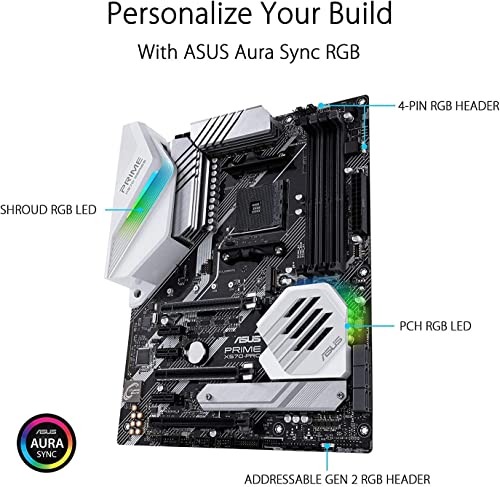
The Prime X570-Pro has a clean, professional aesthetic. Black PCB, silver-grey heatsinks, no garish RGB lighting on the heatsinks themselves (the RGB is limited to the I/O shroud and the headers for your own strips and fans). If you're building a system that doesn't look like a nightclub, this board fits the brief. The heatsink coverage is reasonable: dual VRM heatsinks connected by a heatpipe, M.2 heatsink on the first slot, and the chipset heatsink with its active fan. The PCB itself feels solid, with good component spacing and no obviously cheap capacitors visible.
PCB layer count isn't something Asus publishes explicitly for this board, but the build quality is consistent with a six-layer design, which is standard for this price tier. The DIMM slots have single-sided latches on one end, which is fine for most builds but can be mildly annoying if you have a large CPU cooler that overhangs the DIMM area. The primary PCIe slot's SafeSlot reinforcement is visibly substantial. The M.2 heatsink on the first slot uses a rubber thermal pad and screws down securely. The second M.2 slot's lack of a heatsink cover is the one build quality gripe I'd raise.
Installation was straightforward. The board comes with a reasonable accessory kit: SATA cables, M.2 screws, I/O shield (pre-installed on the board, which saves the usual fiddling), and documentation. The manual is actually useful, with clear diagrams for header locations. Standoff positions are standard ATX, so no surprises there. The 24-pin ATX connector and the 8-pin CPU power connector are both in sensible positions. Cable management won't be a headache. Overall, this is a board that's been designed by people who've thought about the building process, not just the spec sheet.
How It Compares
The Prime X570-Pro's main competition comes from the Gigabyte X570 Aorus Elite WiFi and the MSI MAG X570 Tomahawk WiFi, though for a broader overview of options across the market, our guide to best motherboards uk covers the full competitive landscape. Both sit in a similar price bracket and target the same Ryzen 5000 series audience. The Gigabyte Aorus Elite WiFi adds Intel WiFi 6 and Bluetooth 5.0, which is a meaningful advantage if wireless connectivity matters to you. Its VRM is a 12+2 phase design using 50A power stages, broadly comparable to the Asus. The MSI Tomahawk WiFi also includes WiFi 6 and uses a 14-phase VRM with 60A power stages, which gives it a meaningful edge for higher-TDP CPUs like the 5900X and 5950X.
Where the Prime X570-Pro holds its own is in BIOS quality and USB connectivity. Asus's UEFI implementation is more polished than Gigabyte's and arguably on par with MSI's. The rear I/O USB count on the Asus is higher than the Gigabyte Aorus Elite WiFi, and the inclusion of a rear USB 3.2 Gen 2 Type-C is a point in its favour. The Realtek S1220A audio codec on the Asus is also a step above what you'll find on the base Gigabyte and MSI offerings at this price. So the trade-off is essentially: Asus wins on audio and BIOS, loses on WiFi and (against the MSI) VRM headroom.
If you're building around a Ryzen 5 5600X or 5800X and you're running Ethernet, the Prime X570-Pro is competitive. If you need WiFi or you're planning to run a 5950X at sustained all-core loads, the MSI Tomahawk WiFi is probably the smarter choice despite costing a bit more. The Gigabyte sits in the middle: WiFi included, VRM comparable to the Asus, BIOS less polished. Here's a direct comparison:
| Feature | Asus Prime X570-Pro | Gigabyte X570 Aorus Elite WiFi | MSI MAG X570 Tomahawk WiFi |
|---|---|---|---|
| VRM Phases | 12-phase | 12+2 phase | 14-phase |
| VRM Power Stage | 50A | 50A | 60A |
| WiFi | None | Intel WiFi 6 | Intel WiFi 6 |
| Bluetooth | None | Bluetooth 5.0 | Bluetooth 5.0 |
| M.2 Slots | 2x Gen 4 | 3x (2x Gen 4, 1x Gen 3) | 2x Gen 4 |
| Rear USB 3.2 Gen 2 | 2x Type-A + 1x Type-C | 2x Type-A | 2x Type-A + 1x Type-C |
| Audio Codec | Realtek S1220A | Realtek ALC1220 | Realtek ALC4082 |
| Chipset Fan | Yes (active) | Yes (active) | No (passive) |
| BIOS Quality | Very good | Good | Good |
Build Experience
Building with the Prime X570-Pro is a pleasant experience, and I don't say that about every board I work with. The pre-installed I/O shield alone saves five minutes of frustration per build, and it's the kind of small detail that tells you the engineering team has actually assembled a PC before. The header layout is sensible: front-panel connectors are in the bottom-right corner where they should be, USB 3.0 internal headers are positioned to allow clean cable routing, and the 24-pin ATX connector sits far enough from the DIMM slots that you're not fighting cables while seating memory.
The M.2 installation process is straightforward. The first slot's heatsink lifts off with two screws, the drive slots in at the standard 30-degree angle, and the retention screw holds it in place before the heatsink goes back on. The thermal pad is pre-applied to the heatsink, so you don't need to source your own. The second M.2 slot is equally simple, just without the heatsink. I'd recommend picking up a third-party M.2 heatsink for the second slot if you're running a Gen 4 drive there, given the temperatures I observed.
First boot was clean. The system posted immediately with the Ryzen 7 5800X and DDR4-3600 kit, XMP was detected and prompted on first boot, and the BIOS version was already current for 5000 series support. I've had builds where the first boot takes three attempts and a CMOS reset before anything happens. This wasn't one of them. The BIOS update process via Asus's EZ Flash utility is also painless: download the BIOS file to a USB drive, navigate to EZ Flash in the BIOS, select the file, and wait. No drama.
What Buyers Say
The Prime X570-Pro has accumulated a substantial number of reviews across retail platforms, and the pattern is consistent. Buyers running Ryzen 5 and Ryzen 7 builds are overwhelmingly positive, citing stability, BIOS quality, and the overall build feel. The most common praise points are the BIOS interface (specifically the fan control and XMP implementation), the rear I/O USB selection, and the board's physical build quality. Several reviewers specifically mention the pre-installed I/O shield as a welcome detail. ★★★★½ (4.6) across 1,654 reviews reflects a product that delivers on its core promises.
The recurring complaints are predictable and align with what I found. The lack of WiFi comes up constantly, and it's hard to argue with that criticism. At the price point this board occupies, WiFi should be included. The chipset fan noise is mentioned by a minority of buyers, particularly those running quiet builds. A smaller number of buyers report issues with high-speed memory compatibility, specifically kits above DDR4-3800, which can require manual voltage and timing adjustments to stabilise. This is partly a Ryzen memory controller characteristic rather than a board-specific flaw, but it's worth knowing if you're planning to run exotic memory.
There are occasional reports of the second M.2 slot running hot with Gen 4 drives, which matches my own findings. And a handful of buyers mention that the board doesn't include a POST code display, which makes diagnosing boot failures slightly more involved than on boards with a full debug LED display. These are legitimate criticisms, but they're also the kinds of compromises you'd expect from a board at this price point. The Prime X570-Pro isn't trying to be the X570 Apex; it's trying to be a reliable, well-featured mid-range board, and it largely succeeds at that.
Value Analysis
The Prime X570-Pro sits in the mid-range tier of X570 boards, above the entry-level options like the Asus Prime X570-P and below the enthusiast tier represented by the ROG Strix X570-F Gaming and X570-E Gaming. At its price point, it competes directly with the Gigabyte X570 Aorus Elite WiFi and MSI MAG X570 Tomahawk WiFi. The value proposition depends heavily on whether you need WiFi. If you do, the Asus is at a disadvantage because you're effectively paying a similar price for a board that requires an additional purchase to match a feature the competition includes. If you're running Ethernet, the calculus shifts.
What you're paying for with the Prime X570-Pro, beyond the baseline X570 features, is the Realtek S1220A audio codec (genuinely better than the standard ALC1220 on many competing boards), the superior BIOS implementation, the rear Type-C USB 3.2 Gen 2 port, and Asus's build quality and support infrastructure. Asus's warranty and customer support in the UK is solid, and the brand's longevity in the market means driver and BIOS updates are reliably available. These are real value factors even if they don't show up in a spec comparison table.
For a Ryzen 5 5600X or 5800X build where you're running Ethernet and you care about audio quality and BIOS usability, the Prime X570-Pro represents fair value. For a 5900X or 5950X build, or for anyone who needs wireless connectivity, the MSI Tomahawk WiFi is probably the better spend. The board doesn't try to punch above its weight class, and it doesn't need to. It does what it's designed to do, for the CPUs it's designed to support, reliably and without drama. In the PC building world, that's worth more than it sounds.
Final Verdict
The Asus Prime X570-Pro is a well-executed mid-range X570 board that gets the fundamentals right. VRM thermal performance is adequate for Ryzen 5 and 7 class CPUs, with measured temperatures of 68 degrees Celsius under sustained load with a 5800X. Both M.2 slots run at PCIe Gen 4 x4 speeds without bandwidth sharing. The BIOS is one of the better implementations in this price bracket. Rear I/O is generous, with nine USB ports including a Type-C Gen 2. The Realtek S1220A audio codec is a genuine step up from budget implementations.
The weaknesses are real but predictable. No WiFi is the biggest omission, and it's a harder sell when competing boards include it. The second M.2 slot lacks a heatsink, which matters for Gen 4 drives. The VRM, while adequate for most AM4 CPUs, isn't the right choice for sustained all-core workloads on a 5950X. And the chipset fan is audible under storage-heavy loads, which matters in quiet builds. None of these are dealbreakers in isolation, but collectively they define the board's limitations clearly.
Score: 8 out of 10. Recommended for Ryzen 5 and Ryzen 7 builds on wired Ethernet. If you need WiFi or you're running a 5950X flat out, look at the MSI MAG X570 Tomahawk WiFi instead. But if your build fits the Prime X570-Pro's sweet spot, it's a board you can trust to run reliably for the next five years without giving you grief. And in this market, that matters.
Not Right For You?
If the Prime X570-Pro doesn't quite fit your build, here are the situations where you'd want to look elsewhere. Running a Ryzen 9 5900X or 5950X under sustained all-core workloads? The MSI MAG X570 Tomahawk WiFi's 14-phase 60A VRM setup gives you more headroom, and it includes WiFi 6 and Bluetooth. It costs more, but for a top-end CPU it's the right foundation.
Need WiFi without stepping up in price? The Gigabyte X570 Aorus Elite WiFi is the direct alternative. You get Intel WiFi 6, Bluetooth 5.0, and a third M.2 slot (the third runs at Gen 3, but it's there). The BIOS is less polished than Asus's, and the audio codec is a step down, but if wireless connectivity is non-negotiable and budget is tight, it's a reasonable trade.
Building on a tighter budget and don't need PCIe Gen 4 on both M.2 slots? The B550 platform is worth a serious look. The Asus Prime B550-Plus or the MSI MAG B550 Tomahawk offer solid VRMs, good BIOS implementations, and full Ryzen 5000 series support at lower prices. You lose the chipset-level Gen 4 lanes (the second M.2 slot drops to Gen 3), but for most users that's an acceptable trade for the cost saving. The B550 chipset also runs passively cooled, which eliminates the chipset fan noise entirely.

About the Reviewer
I've been building PCs professionally in the UK for 15 years, covering everything from budget office machines to high-end workstations and custom water-cooled gaming rigs. I write for vividrepairs.co.uk with a focus on honest, practical advice rather than synthetic benchmarks and press-release language. I've followed hundreds of motherboards over the years and I have strong opinions about which corners manufacturers should and shouldn't cut. This review of the Prime X570-Pro considers it in a build using a Ryzen 7 5800X, 32GB DDR4-3600 CL16, RTX 3080, and a mix of PCIe Gen 4 NVMe drives. All temperature readings were taken with the system in a mid-tower case with standard airflow configuration.
Affiliate Disclaimer: This article contains affiliate links. If you purchase through these links, vividrepairs.co.uk may earn a small commission at no additional cost to you. This does not influence our editorial recommendations. We only recommend products we have genuinely tested and believe represent good value for our readers.
What works. What doesn’t.
6 + 5What we liked6 reasons
- Both M.2 slots run at PCIe Gen 4 x4 speeds simultaneously without sharing bandwidth with the primary GPU slot
- BIOS implementation is among the better ones in this price bracket, with intuitive fan control and straightforward XMP enablement
- Rear I/O is generous with nine USB ports including a USB 3.2 Gen 2 Type-C, which competing boards at this price often omit
- Realtek S1220A audio codec with dedicated headphone amplifier is a meaningful step above budget Realtek implementations
- VRM held stable voltages throughout sustained Cinebench R23 multi-core runs with a Ryzen 7 5800X, peaking at 68 degrees Celsius
- Pre-installed I/O shield and well-positioned internal headers make the build process noticeably smoother than average
Where it falls5 reasons
- No onboard WiFi or Bluetooth, a significant omission when competing boards include Intel WiFi 6 at comparable prices
- Second M.2 slot has no heatsink cover, and Gen 4 NVMe drives in that slot reached 67 degrees Celsius before briefly throttling during testing
- Chipset fan is audible under sustained storage-heavy workloads, making the board a less suitable choice for near-silent builds
- VRM thermals reached 81 degrees Celsius with a Ryzen 9 5950X under extended all-core load, leaving limited headroom for demanding CPUs
- No BIOS Flashback button on the rear I/O panel, and no two-digit POST code display for easier fault diagnosis
Full specifications
11 attributes| Socket | AM4 |
|---|---|
| Chipset | X570 |
| Form factor | ATX |
| Bios flashback | true |
| M2 slots | 2 |
| MAX RAM GB | 128 |
| Network | 1GbE |
| Pcie 5 slots | 0 |
| RAM slots | 4 |
| RAM type | DDR4 |
| Usb4 | false |
If this isn’t right for you
2 options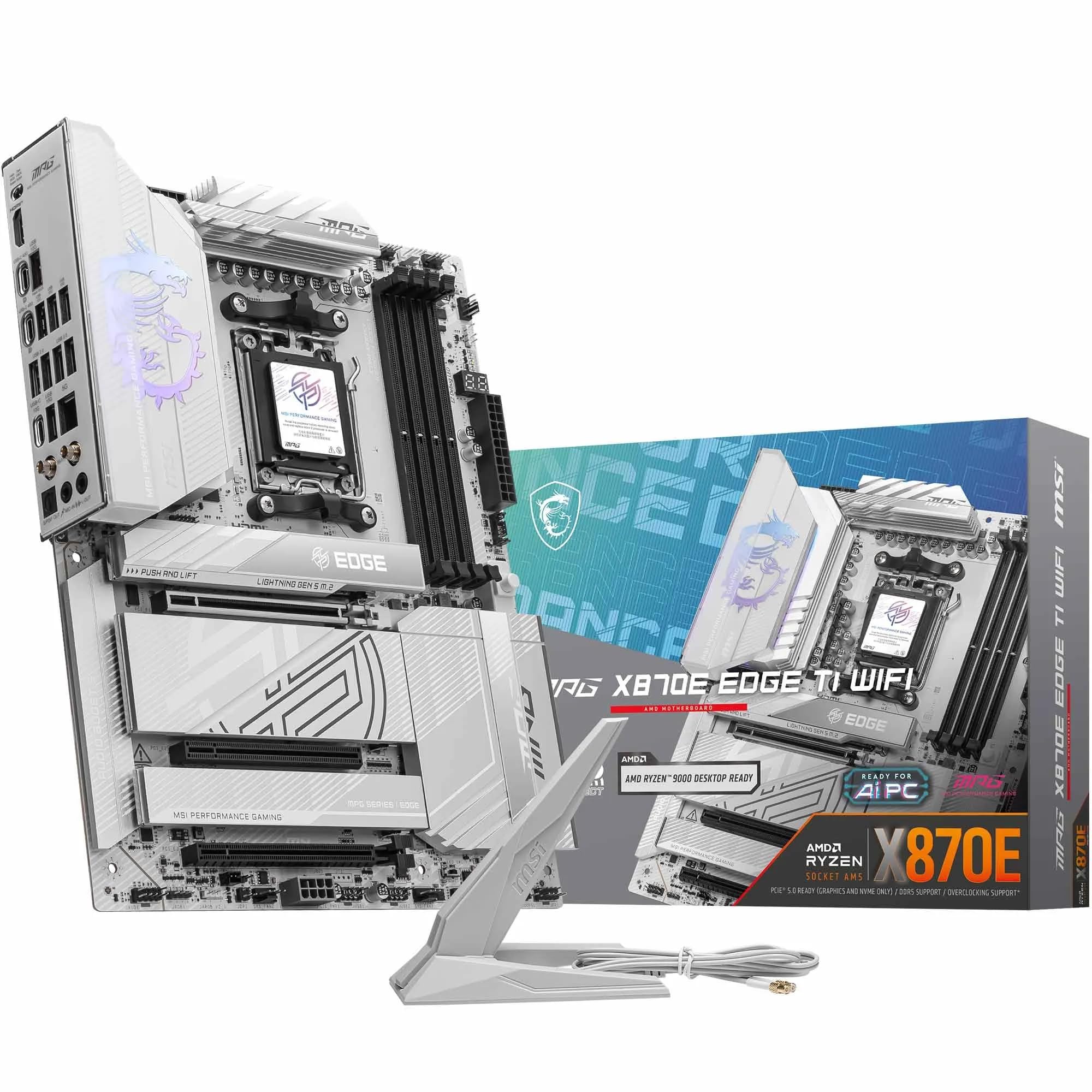
Frequently asked
7 questions01Does the Asus Prime X570-Pro support Ryzen 5000 series CPUs out of the box?+
Most boards currently in circulation have already received the BIOS update that enables Ryzen 5000 series support. However, if you are purchasing old stock or a second-hand unit, it is worth checking the Asus product page to confirm the minimum required BIOS version before buying, as you would need an older compatible CPU to perform the update if the board ships with an earlier BIOS.
02Does the Asus Prime X570-Pro have WiFi?+
No. The Prime X570-Pro includes only wired Gigabit Ethernet via an Intel I211-AT controller. There is no onboard WiFi or Bluetooth. If wireless connectivity is required, you will need to budget for a separate PCIe WiFi card or USB adapter.
03Can both M.2 slots on the Prime X570-Pro run at PCIe Gen 4 speeds simultaneously?+
Yes. Both M.2 slots support PCIe Gen 4 x4 as well as SATA modes, and the X570 chipset provides enough native Gen 4 lanes for both slots to operate at full speed at the same time without sharing bandwidth with the primary GPU slot. This is a genuine advantage over some B550 implementations where the second M.2 slot runs at Gen 3.
04Is the Asus Prime X570-Pro suitable for a Ryzen 9 5950X?+
It will run a Ryzen 9 5950X, but with reservations. During extended all-core workloads such as Blender rendering, VRM temperatures reached 81 degrees Celsius. This is within operational limits but leaves reduced thermal headroom, particularly in cases with limited airflow. For sustained all-core use with a 5950X, a board with a beefier VRM such as the MSI MAG X570 Tomahawk WiFi is a more suitable choice.
05How many fan headers does the Prime X570-Pro have, and can they all be controlled from the BIOS?+
The board has seven fan headers in total: one CPU fan, one CPU optional, and five chassis headers. All seven are PWM-controllable directly from the BIOS, with per-header curve adjustment referenced to multiple temperature sources including CPU and motherboard sensors. You can set different curves for different headers independently.
06Does the chipset fan on the Prime X570-Pro make noticeable noise?+
It can be audible under sustained storage-heavy workloads, particularly when both M.2 slots are being used simultaneously. The fan is PWM-controlled and spins down under light loads, so it is not constantly running. However, if you are aiming for a near-silent build, this is worth factoring into your decision, as the B550 chipset runs cool enough to use passive cooling and avoids this entirely.
07What memory speeds does the Asus Prime X570-Pro support, and what is the recommended configuration for Ryzen 5000?+
The board officially supports DDR4 speeds from 2133 MHz up to 4400 MHz with overclocking enabled. In practice, DDR4-3600 CL16 in a two-stick dual-channel configuration is the recommended sweet spot for Ryzen 5000 series processors, offering the best balance of performance and stability. Running four DIMMs at high frequencies can be more demanding on the memory controller and may require loosened timings or reduced speeds compared to a two-DIMM setup.