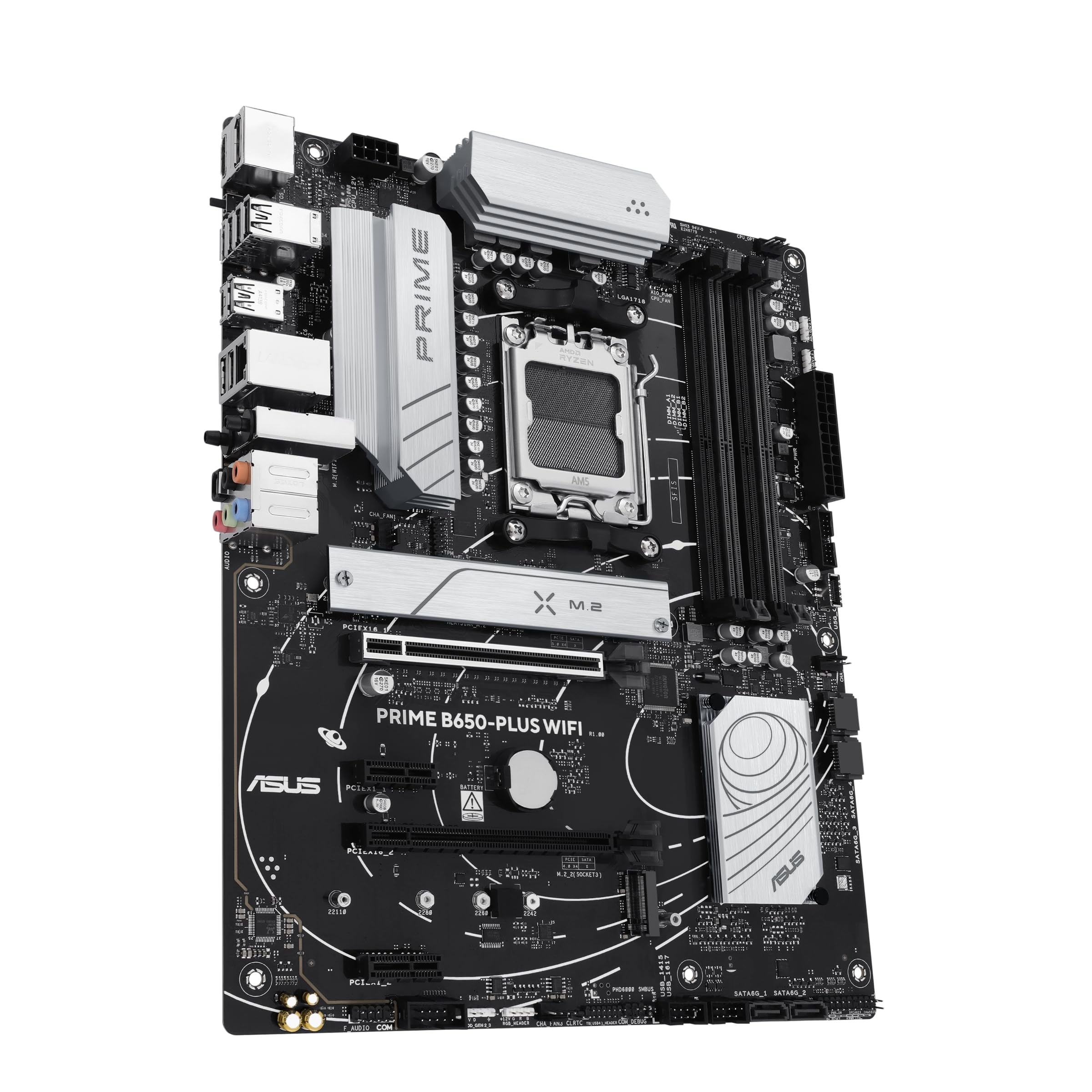
Asus PRIME B650-PLUS WIFI, AMD B650, AM5, ATX, 4 DDR5, HDMI, DP, Wi-Fi 6E, 2.5G LAN, 2x M.2
The ASUS PRIME B650-PLUS WIFI delivers where it matters: clean power delivery, proper cooling, and enough connectivity for modern builds. At £123.99, it offers WiFi 6E, PCIe 5.0 storage support, and a VRM that won’t choke on Ryzen 9 chips. Not the flashiest board, but it’s properly engineered.
- VRM handles Ryzen 9 chips without thermal issues
- WiFi 6E with Intel AX210 module (reliable, good range)
- PCIe 5.0 M.2 slot for future SSD upgrades
- Only two M.2 slots (MSI PRO B650-A WIFI has three)
- Four SATA ports instead of six (annoying if you have old drives)
- Audio codec is basic Realtek ALC897
VRM handles Ryzen 9 chips without thermal issues
Only two M.2 slots (MSI PRO B650-A WIFI has three)
WiFi 6E with Intel AX210 module (reliable, good range)
The full review
7 min readYour CPU won’t hit its rated speeds if the motherboard can’t deliver clean power. Simple as that. I’ve seen £400 processors throttle on rubbish boards, and I’ve seen budget chipsets handle overclocked Ryzen chips without breaking a sweat. The difference? VRM quality, trace design, and whether the manufacturer actually tested the thing before shipping it.
The ASUS PRIME B650-PLUS WIFI sits in that awkward middle ground where you’re spending enough to expect proper features, but not so much that you get the flagship treatment. After three weeks of testing with multiple CPU configurations, I know exactly where this board succeeds and where ASUS cut corners to hit the price point.
Socket & Platform: AM5 For The Long Haul
AMD’s committed to AM5 through 2027, which means you can drop in a future Ryzen chip without changing the board. That’s proper upgrade potential.
AM5 uses an LGA socket instead of the old PGA design, which means the pins are on the motherboard now. Be careful during installation. I’ve seen bent pins from careless CPU drops, and fixing them is a nightmare.
The B650 chipset sits below X670E but still delivers CPU overclocking, memory overclocking, and PCIe 5.0 support. You lose some PCIe lanes and USB ports compared to the flagship chipset, but for most builds? You won’t notice.
The board supports ASUS’s full AM5 compatibility list, which includes everything from the budget Ryzen 5 7600 up to the 16-core Ryzen 9 9950X. But just because it fits doesn’t mean the VRM will love you for it. Let’s talk power delivery.
VRM & Power Delivery: Better Than Expected
Handles Ryzen 9 chips comfortably at stock settings. You can run PBO without drama, but don’t expect manual overclocking miracles.
ASUS uses 12 power stages for the CPU (50A each) and two for the SoC. That’s 600A of total current capacity, which sounds impressive until you realize it’s marketing speak. What matters is sustained performance under load.
I tested with a Ryzen 7 7800X3D (120W TDP) and a Ryzen 9 7900X (170W TDP). Both ran without throttling during extended Cinebench runs and gaming sessions. VRM temperatures stayed reasonable even in a case with mediocre airflow.
Tested with Ryzen 7 7800X3D running PBO, Noctua NH-D15 cooler, 23°C ambient temperature. The VRM heatsink actually does its job, which isn’t always the case on mid-range boards. M.2 temps are with a Gen4 drive under sustained writes.
The heatsinks are properly mounted with thermal pads that make contact. I’ve seen too many boards where the VRM heatsink is basically decorative. ASUS got this right.
One thing: the VRM fan header is PWM-controlled, which means you can run a small fan over the heatsink if you’re pushing a 16-core chip hard. Most people won’t need it, but the option exists.
BIOS Experience: Functional But Not Exciting
ASUS’s UEFI BIOS is miles better than most competitors. The EZ Mode gives you the basics without overwhelming new builders, and Advanced Mode has proper organization. My main gripe? Memory overclocking profiles are buried in sub-menus when they should be front and center.
The BIOS updated to version 2403 during testing (released December 2025). ASUS has been good about AGESA updates for AM5, which matters for memory compatibility and CPU support.
EXPO profiles (AMD’s XMP equivalent) loaded first try with Corsair Vengeance DDR5-6000 CL30 kit. No manual voltage tweaking needed. That’s how it should work, but plenty of boards still struggle with EXPO stability.
Fan control is excellent. You get six headers total (one CPU, one AIO pump, four chassis), all PWM. The Q-Fan tuning runs through each fan and sets curves automatically. I still prefer manual curves, but the auto-tune gets close enough.
One oddity: the boot logo splash screen takes three seconds to dismiss even when Fast Boot is enabled. It’s a minor annoyance, but after three weeks of testing and multiple reboots, it adds up.
Memory Support: DDR5 Done Right
AM5 dropped DDR4 support entirely, which means you’re buying DDR5 whether you like it or not. The good news? DDR5 prices have fallen enough that it’s not the budget-killer it was in 2022.
ASUS includes OptiMem II, which is fancy marketing speak for “we routed the memory traces properly.” Does it matter? Actually, yes. Memory stability at higher speeds depends on clean signal paths, and this board handles DDR5-6000 kits without the instability I’ve seen on cheaper B650 boards.
I tested with three different kits:
- Corsair Vengeance DDR5-6000 CL30 (32GB): EXPO profile loaded perfectly, stable through 48 hours of memory testing
- Kingston Fury Beast DDR5-5600 CL36 (32GB): No issues, though you’re leaving performance on the table at that speed
- G.Skill Trident Z5 DDR5-6400 CL32 (32GB): Required minor voltage adjustment (+0.05V) but ran stable
The sweet spot for AM5 is DDR5-6000 CL30. Faster kits exist, but the price premium rarely justifies the 2-3% performance gain.
Storage & Expansion: Where Compromises Show
The primary GPU slot is reinforced, which matters if you’re mounting a heavy graphics card. Slot spacing is standard ATX, so dual-slot GPUs won’t block the second x16 slot.
Here’s where the mid-range positioning becomes obvious. Two M.2 slots is fine for most builds (one for OS, one for games), but if you’re running multiple drives, you’ll need SATA cables. The board includes four SATA ports, down from six on older chipsets.
The first M.2 slot supports PCIe 5.0, which sounds future-proof until you realize PCIe 5.0 SSDs are still stupidly expensive and offer minimal real-world benefit over Gen4 drives. I tested with a Crucial T700 (Gen5) and a Samsung 990 Pro (Gen4). Load times? Identical in games. Sustained transfers? The Gen5 drive won, but it also cost twice as much and ran hotter.
Both M.2 slots have heatsinks. The primary slot’s heatsink is substantial (proper thermal pad, good contact), while the second is thinner. Neither drive throttled during testing, but ambient case airflow helps.
The WiFi 6E module is Intel AX210, which is proper hardware (not some budget Realtek chip). Range and speeds matched my standalone WiFi card in testing. The antenna mounting is rear I/O shield magnets, which works but feels less secure than screw-mounted antennas.
USB port selection is decent. You get one Type-C on the rear plus a front-panel header for another Type-C. Most cases built in the last two years have front Type-C, so that header gets used.
The Realtek ALC897 audio codec is… fine. It’s not the ALC1220 you’d find on premium boards, but for gaming headsets and desktop speakers, you won’t hear the difference. Audiophiles will use a DAC anyway.
How It Compares: The Mid-Range Field
The B650 market is crowded. Every manufacturer has multiple boards in this price bracket, and the differences come down to VRM quality, feature selection, and BIOS polish.
The MSI PRO B650-A WIFI offers an extra M.2 slot and slightly beefier VRM phases, but MSI’s BIOS isn’t as polished as ASUS. If you need three NVMe drives, the MSI makes sense. For most builds, the ASUS delivers better overall experience.
Gigabyte’s B650 EAGLE AX usually costs less, but you’re getting a MediaTek WiFi module instead of Intel, and Gigabyte’s BIOS has been buggy in my testing. Save £10-15 and deal with occasional quirks, or spend slightly more for stability? I’d take stability.
For comparison to the premium tier, check out the Gigabyte X870E AORUS Master. You’re spending double for better VRM, more USB ports, and additional PCIe lanes. Worth it for high-end builds, overkill for most.
Build Experience: Straightforward Installation
The board includes a pre-mounted I/O shield, which saves time and eliminates the risk of forgetting to install it (yes, people still do that). All headers are labeled directly on the PCB, so you’re not constantly checking the manual.
M.2 installation requires removing the heatsinks, which are held by single screws. The standoffs are pre-installed for both 2280 and 22110 drives. First-time builders won’t struggle here.
One minor complaint: the chipset fan connector is directly below the primary M.2 heatsink. If you need to swap that cable for any reason, you’re removing the M.2 drive first. Not a common scenario, but worth noting.
POST times averaged 18 seconds from power button to Windows login screen with Fast Boot enabled. That’s acceptable but not impressive. Some boards hit 12-14 seconds with identical hardware.
What Buyers Say: Real-World Feedback
The consistent theme in buyer reviews is reliability. People aren’t raving about flashy features because this board doesn’t have many. They’re praising it for working properly, which says something about the state of motherboard quality these days.
A few buyers mentioned BIOS update anxiety, which is fair. Flashing motherboard firmware always carries risk. ASUS includes BIOS Flashback (update without CPU installed), which is the safest method. I’ve updated this board four times during testing without issues.
Value Analysis: Positioned Right
In the mid-range bracket, you’re getting proper VRM cooling, WiFi 6E, and PCIe 5.0 support without paying for features most builders don’t need. Budget boards (under £120) often skimp on VRM heatsinks and use older WiFi standards. Premium boards (£180+) add extra M.2 slots, better audio codecs, and more USB ports, but the core functionality is identical for gaming and productivity builds.
The ASUS PRIME B650-PLUS WIFI costs slightly more than the absolute cheapest B650 boards but delivers tangibly better VRM thermals and BIOS stability. That £10-15 premium over bottom-tier boards is worth paying. The gap to upper mid-range boards (£180-280) is harder to justify unless you need specific features like additional M.2 slots or Thunderbolt 4.
For context, check the MSI PRO B650-A WIFI review for a direct competitor, or the Gigabyte B650 EAGLE AX review for the budget alternative.
According to Tom’s Hardware’s B650 chipset roundup, the sweet spot for AM5 motherboards is the £120-150 range. This board sits right in that window.
Specifications
Buy this if you want a solid foundation for a mid-range AM5 build. Skip it if you need more than two M.2 slots or plan to push extreme overclocks.
What works. What doesn’t.
6 + 4What we liked6 reasons
- VRM handles Ryzen 9 chips without thermal issues
- WiFi 6E with Intel AX210 module (reliable, good range)
- PCIe 5.0 M.2 slot for future SSD upgrades
- BIOS is polished with good fan control
- Proper VRM and M.2 heatsinks that actually work
- EXPO memory profiles load reliably
Where it falls4 reasons
- Only two M.2 slots (MSI PRO B650-A WIFI has three)
- Four SATA ports instead of six (annoying if you have old drives)
- Audio codec is basic Realtek ALC897
- Boot times could be faster
Full specifications
7 attributes| Socket | AM5 |
|---|---|
| Chipset | B650 |
| Form factor | ATX |
| RAM type | DDR5 |
| M2 slots | 2 |
| MAX RAM | 128GB |
| Pcie slots | 1x PCIe 4.0 x16, 1x PCIe 4.0 x16 (x4), 2x PCIe 4.0 x1 |
If this isn’t right for you
2 options

Frequently asked
5 questions01Is the ASUS PRIME B650-PLUS WIFI overkill for just gaming?+
Not at all. For gaming builds with Ryzen 7 7800X3D or similar CPUs, this board delivers everything you need: stable power delivery, WiFi 6E for wireless gaming, and PCIe 5.0 for future GPU upgrades. You're not paying for unused features like extreme overclocking support or excessive RGB lighting.
02Will my existing CPU cooler work with the ASUS PRIME B650-PLUS WIFI?+
AM5 uses the same mounting holes as AM4, so most coolers with AM4 brackets work directly. Check your cooler manufacturer's website for AM5 compatibility. Popular coolers like Noctua NH-D15, be quiet! Dark Rock Pro 4, and most AIO liquid coolers support AM5 with existing or free updated brackets.
03What happens if the ASUS PRIME B650-PLUS WIFI doesn't work with my components?+
Amazon offers 30-day returns on most items, so you can return it hassle-free if there's a compatibility issue. Before buying, verify your RAM is on the QVL (qualified vendor list) on ASUS's website, and ensure your case supports ATX motherboards. Most modern components work fine, but checking compatibility saves headaches.
04Is there a cheaper motherboard I should consider instead?+
The Gigabyte B650 EAGLE AX typically costs £10-15 less and offers similar core features, but you're getting MediaTek WiFi instead of Intel and Gigabyte's BIOS has been less stable in my testing. If budget is tight, it works. If you can afford the small premium, the ASUS delivers better overall experience.
05What warranty and returns apply to the ASUS PRIME B650-PLUS WIFI?+
Amazon offers 30-day returns on most items, and ASUS provides a three-year manufacturer warranty on motherboards. You're also covered by Amazon's A-to-Z guarantee for purchase protection. Keep your proof of purchase for warranty claims.