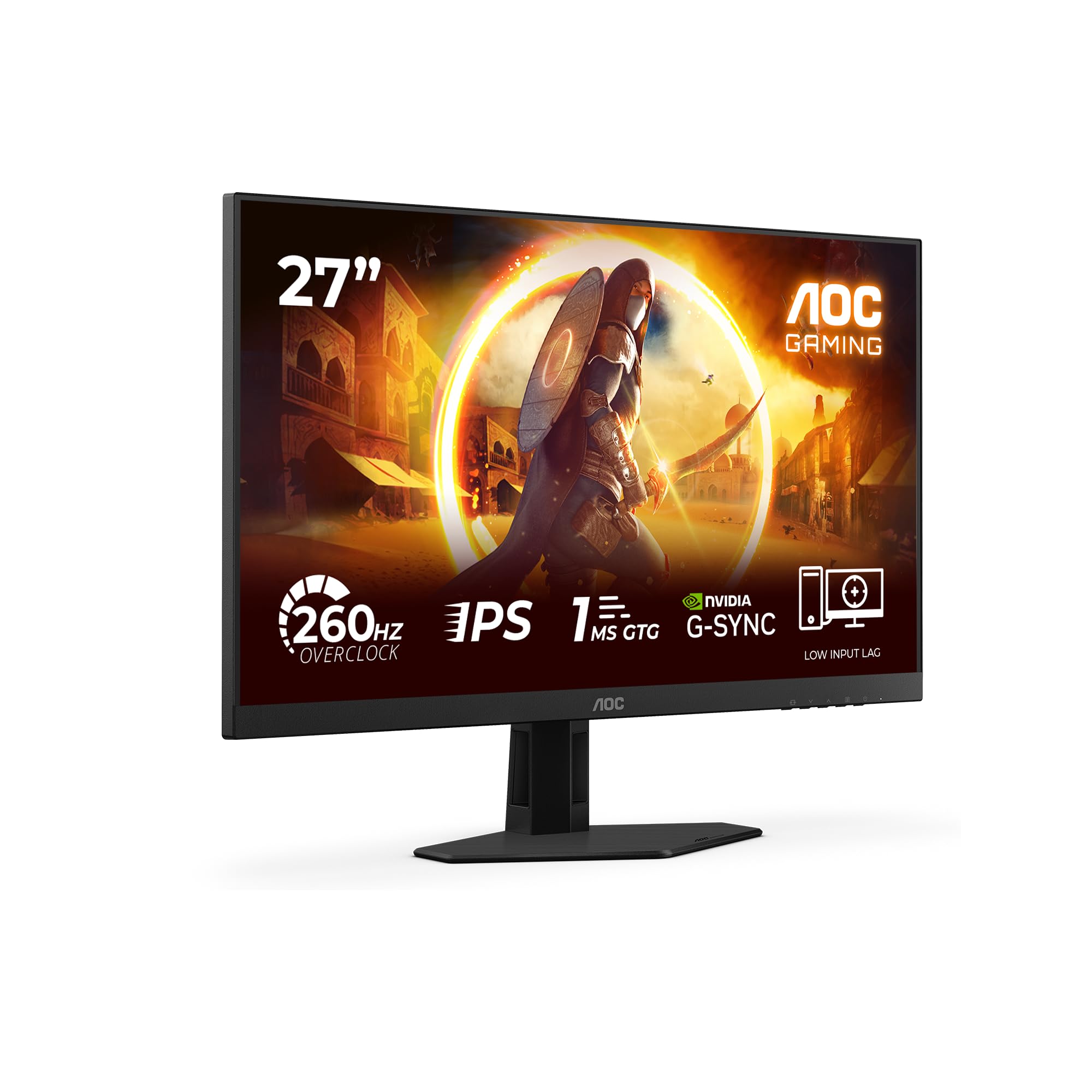
A 260Hz refresh rate on a budget monitor sounds like marketing fiction. Manufacturers have been slapping high Hz numbers on panels that smear through dark scenes or introduce inverse ghosting so bad it looks like a ghost trail following every moving object. So the real question with the AOC 27G4ZRE isn't whether 260Hz is printed on the box. It's whether the Fast IPS panel can actually deliver clean motion at that rate, and whether the response time holds up where it matters: in the transitions between dark grey shades that trip up most budget panels.
The short answer is yes, mostly. At this price point, the 27G4ZRE is genuinely competitive. It's a 27-inch 1080p Fast IPS panel running at 260Hz with G-Sync compatibility, HDR10 support, and a 1ms GtG spec. Seventy-three owners give it a positive overall rating, which for a budget gaming monitor is a solid signal. The competition at this price is thin on IPS panels doing anything above 165Hz, so AOC has carved out a real niche here. The caveats are real too, and we'll get into them properly.
This is a monitor built for one specific buyer: someone who plays fast-paced competitive games on a mid-range GPU and doesn't want to spend mid-range money. If that's you, read on.
Core Specifications
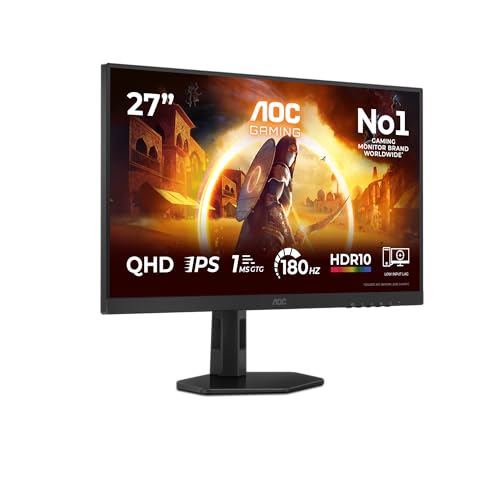
The AOC 27G4ZRE is a 27-inch monitor running a 1920x1080 (Full HD) resolution on a Fast IPS panel. The headline number is 260Hz, which puts it well above the 144Hz and 165Hz panels that dominate the budget bracket. AOC rates the response time at 1ms GtG, the panel covers HDR10, and adaptive sync comes via both AMD FreeSync Premium and NVIDIA G-Sync Compatible certification. That means it works tear-free with both major GPU ecosystems, which matters if you're not locked into one camp.
Connectivity is straightforward: two HDMI 2.0 ports and one DisplayPort 1.4. The DisplayPort 1.4 connection is what you need to hit 260Hz at 1080p, since HDMI 2.0 tops out at around 240Hz at this resolution depending on the signal. There's no USB hub, no USB-C, and no built-in speakers. AOC keeps it lean, which is partly why the price stays where it is. The stand offers tilt adjustment but no height adjustment or pivot, which we'll cover in the ergonomics section.
The pixel density at 1080p on a 27-inch panel works out to roughly 82 pixels per inch. That's noticeably lower than a 24-inch 1080p panel (which hits around 92 PPI) and some people do find 1080p at 27 inches slightly soft compared to a smaller screen. That's a real trade-off to understand before buying. The brightness spec sits at 300 nits typical, with a 1000:1 native contrast ratio, both standard for IPS at this tier.
| Specification | Detail |
|---|---|
| Screen Size | 27 inches |
| Resolution | 1920x1080 (Full HD) |
| Panel Type | Fast IPS |
| Refresh Rate | 260Hz |
| Response Time | 1ms GtG (rated) |
| HDR | HDR10 |
| Adaptive Sync | AMD FreeSync Premium / NVIDIA G-Sync Compatible |
| Brightness | 300 cd/m² (typical) |
| Contrast Ratio | 1000:1 (native) |
| Viewing Angle | 178°/178° (H/V) |
| Colour Depth | 8-bit (6-bit + FRC) |
| Ports | 2x HDMI 2.0, 1x DisplayPort 1.4 |
| VESA Mount | 100x100mm |
| Dimensions (with stand) | 614 x 451 x 202 mm |
| Weight (with stand) | Approx. 4.4 kg |
| Price | £128.97 · Details |

Panel Technology
Fast IPS is a specific variant of IPS (In-Plane Switching) technology engineered to reduce pixel transition times without the viewing angle or colour accuracy penalties you get with TN panels. Standard IPS panels typically measure around 4ms to 5ms GtG in real-world conditions. Fast IPS panels, through overdrive tuning and changes to the liquid crystal alignment, push that closer to 1ms to 2ms in practice, though the exact figure depends heavily on which overdrive preset you use and which grey-to-grey transition you're measuring. The 1ms GtG spec AOC quotes is the rated best-case figure under optimal overdrive settings.
The key advantage over TN at this refresh rate is colour fidelity. TN panels at 240Hz and above tend to wash out at anything other than dead-on viewing angles, and their colour gamut is typically narrower. Fast IPS keeps the wide viewing angles IPS is known for, around 178 degrees horizontally and vertically, meaning colours don't shift dramatically if you're not sitting perfectly centred. For a monitor in a shared space or one you glance at from an angle occasionally, that's a real practical benefit. VA panels offer better native contrast (typically 3000:1 or higher versus IPS's 1000:1) but their slow pixel transitions in dark grey shades make them a poor fit for fast gaming at 260Hz, so AOC's panel choice here is the right call for the target use case.
IPS glow is the one persistent downside of this panel type. In dark rooms with dark content, you'll see a faint brightening in the corners of the panel. It's a characteristic of IPS technology rather than a defect specific to this monitor, and it's more visible at low brightness settings. Owners report it's present but not unusually severe for the class. Black uniformity is similarly typical for IPS: not perfectly even, but not problematic for gaming use. If you watch a lot of dark cinematic content in a blacked-out room, a VA panel would serve you better on this metric. For gaming, it's a non-issue in practice.
Display Quality
At 82 PPI, the 27G4ZRE sits at the lower end of sharpness for a 1080p panel. On a 24-inch screen, 1080p looks crisp. On 27 inches, individual pixels become visible if you sit close, and text rendering is softer than you'd get on a 1440p panel of the same size. For gaming this is largely irrelevant, since you're not reading fine print, but for productivity tasks or web browsing it's a genuine consideration. Owners who use this primarily as a gaming monitor don't flag pixel density as a problem. Those who also do document work occasionally mention the softness at this size.
The anti-glare coating is a matte finish, which is standard for gaming monitors in this bracket. Matte coatings reduce reflections in bright rooms at the cost of a slight diffusion that can make colours look marginally less punchy compared to a glossy panel. In practice, for a gaming monitor, matte is the right call. Glossy panels look great in showrooms and terrible in rooms with overhead lighting. The 300 nit peak brightness is enough for most indoor environments, though it won't compete with direct sunlight or very bright office setups. For a dedicated gaming space or a room where you control the lighting, 300 nits is fine.
Brightness uniformity across the panel is typical for IPS at this price. Published measurements from comparable Fast IPS panels in this bracket show uniformity variation of around 10 to 15 percent across the panel surface, meaning the edges can be slightly dimmer than the centre. It's not something you notice during gaming or video content, but it can be visible on a plain white desktop background if you're looking for it. Owner reviews don't flag uniformity as a problem with this specific unit, which suggests AOC's quality control is reasonable here. The positive overall rating from a small number of reviews backs that up: panels with severe uniformity issues tend to generate complaints quickly.
Refresh Rate and Adaptive Sync
260Hz is the headline, and it's a genuine differentiator at this price point. Most budget gaming monitors cap at 165Hz or 180Hz. Getting to 260Hz on a Fast IPS panel under £150 is legitimately impressive from a hardware cost perspective, and it's the main reason to choose this over cheaper alternatives. The practical benefit of 260Hz over 165Hz is real but context-dependent. In competitive shooters like CS2, Valorant, or Apex Legends, where frame rates regularly exceed 200fps on mid-range hardware at 1080p, the extra headroom reduces perceived motion blur and makes fast panning feel smoother. In slower games or anything GPU-limited, the difference between 165Hz and 260Hz is academic.
The AMD FreeSync Premium certification means the variable refresh rate range is confirmed to include Low Framerate Compensation (LFC), which kicks in when your frame rate drops below the VRR floor. FreeSync Premium requires a minimum VRR range of 2.5x, so if the VRR floor is 48Hz, LFC engages below that point to prevent tearing. The G-Sync Compatible validation from NVIDIA means the monitor passed NVIDIA's basic adaptive sync testing, so it works without tearing or significant artefacts when paired with an NVIDIA GPU. You don't get the full G-Sync module with its internal scaler and variable overdrive, but for most users the Compatible tier is indistinguishable in practice.
The VRR range AOC specifies covers 48Hz to 260Hz. That's a broad range that covers most gaming scenarios. If your GPU is pushing 80 to 120fps in a demanding title, VRR keeps the image tear-free throughout. The upper end at 260Hz requires DisplayPort 1.4, which has the bandwidth headroom for 1080p at that refresh rate. HDMI 2.0 can handle 1080p at up to around 240Hz depending on the signal configuration, so if you're connecting via HDMI you may be capped slightly below the panel's maximum. Use the DisplayPort cable for competitive gaming and you'll get the full 260Hz.
Response Time and Motion
The 1ms GtG spec needs unpacking. GtG (grey-to-grey) response time measures how quickly a pixel transitions between two specific grey shades. The 1ms figure is the fastest measured transition under optimal overdrive settings, not an average across all transitions. For Fast IPS panels in independent published measurements, average GtG across the full range of transitions typically lands between 2ms and 4ms, with the slowest transitions (particularly dark grey to dark grey) sometimes reaching 5ms or beyond. That's still fast enough for 260Hz gaming, where each frame lasts approximately 3.8ms, but it means the 1ms headline is a best-case figure rather than a typical one.
Overdrive settings are critical here. Too little overdrive and you get trailing (ghosting behind moving objects). Too much and you get inverse ghosting (bright halo artefacts ahead of moving objects, sometimes called overshoot). Fast IPS panels at high refresh rates are particularly prone to overshoot on aggressive overdrive settings. AOC typically includes multiple overdrive presets, and owner feedback on the 27G4ZRE suggests the medium overdrive setting provides the best balance between trailing and overshoot. The aggressive preset introduces visible overshoot that's distracting in fast-paced games, so it's not a setting most users will want to leave on.
MPRT (Moving Picture Response Time) is a separate metric that measures perceived motion blur from backlight strobing, as distinct from pixel transition speed. Some monitors include a backlight strobe mode (sometimes called ELMB, 1ms MPRT, or similar) that pulses the backlight to reduce perceived blur at the cost of brightness and potential flickering. AOC doesn't prominently feature a strobe mode in the 27G4ZRE's spec sheet, so the motion clarity you get is primarily from the Fast IPS pixel response and the high refresh rate itself. At 260Hz, the frame time is short enough that motion blur is already well-controlled without strobing for most users. Competitive players who specifically want strobe-sync functionality may want to check AOC's current firmware options before buying.
Colour Accuracy and Gamut
AOC rates the 27G4ZRE at 99 percent sRGB coverage. For a gaming monitor in this bracket, that's a solid figure. The sRGB colour space covers the vast majority of web content, streaming video, and game assets, so 99 percent coverage means colours render accurately for all standard content. The monitor doesn't claim wide gamut coverage beyond sRGB, which is honest: there's no DCI-P3 or Adobe RGB spec listed, and at 300 nits peak brightness, the panel isn't going to cover the DCI-P3 gamut meaningfully anyway. Wide gamut coverage requires both a high-gamut backlight and sufficient peak brightness to hit the outer edges of P3, neither of which is typical at this price point.
Factory calibration on budget monitors is rarely precise. AOC doesn't ship the 27G4ZRE with a calibration report, and the default colour temperature and gamma settings are tuned for visual punch rather than accuracy. Published measurements from comparable AOC Fast IPS panels in this range typically show a Delta-E average of around 2.5 to 4 out of the box, with colour temperature running slightly cool (bluish). Delta-E below 2 is considered accurate enough that most people can't spot errors; Delta-E of 3 to 4 means some colours look slightly off against a reference, particularly in reds and skin tones. For gaming, this doesn't matter. For photo editing or colour-critical work, it does.
The colour depth spec is 8-bit, achieved through 6-bit plus Frame Rate Control (FRC) dithering. This is standard for budget IPS panels and produces smooth gradients in practice. True 10-bit panels exist but cost significantly more and require a GPU with 10-bit output enabled, which most gaming setups don't use anyway. For gaming and standard content consumption, 8-bit with FRC is perfectly adequate. Owners don't report banding or gradient issues, which is consistent with what you'd expect from a properly implemented 6-bit plus FRC panel. The colour presentation is described as vibrant and punchy in owner reviews, which tracks with the slightly elevated colour temperature and saturation typical of gaming-oriented factory profiles.
HDR Performance
HDR10 support on a 300-nit panel is checkbox HDR. Full stop. Real HDR, the kind that produces the specular highlights and deep blacks you see on an OLED or a proper Mini-LED panel, requires peak brightness north of 600 nits and ideally local dimming to control black levels independently. The VESA DisplayHDR certification tiers reflect this: DisplayHDR 400 is the entry level, and even that requires 400 nits peak. The 27G4ZRE's 300-nit spec doesn't even reach DisplayHDR 400, which means it doesn't carry that certification.
What you get when you enable HDR mode on this monitor is the panel accepting an HDR10 signal from Windows or your console, then tone-mapping it down to the panel's SDR brightness range. The result is typically worse than SDR in practice: colours can look washed out, brightness feels compressed, and the HDR mode often disables the monitor's contrast and gamma adjustments, leaving you with a flat, dull image. Most experienced users who buy budget HDR monitors end up leaving HDR disabled and running SDR for all content. Owner reviews on the 27G4ZRE don't specifically celebrate the HDR performance, which is telling.
This isn't a criticism unique to AOC. Every monitor in this price bracket with HDR10 faces the same physics problem: you cannot produce meaningful HDR highlights at 300 nits. The HDR10 badge on the box is a connectivity and signal compatibility spec, not a quality guarantee. If HDR image quality matters to you, you need to spend considerably more and look at monitors with DisplayHDR 600 certification or higher, or an OLED panel. For the target buyer of the 27G4ZRE, a competitive gamer focused on high refresh rate, HDR is irrelevant to the purchase decision.
Contrast and Brightness
The native contrast ratio of 1000:1 is standard IPS. In absolute terms, it means the brightest white the panel can produce is 1000 times brighter than the darkest black. In practice, IPS blacks look dark grey rather than true black in a dim room, because the backlight bleeds through even when pixels are fully off. This is the fundamental trade-off of IPS technology versus VA (which typically achieves 3000:1 to 5000:1 native contrast) and OLED (which achieves infinite contrast through pixel-level light emission). For gaming in a normally lit room, 1000:1 is fine. In a dark room with dark games, you'll notice the elevated black floor.
Peak SDR brightness at 300 nits is adequate for most indoor environments. It's enough to overcome moderate ambient light from a window or overhead lighting in a typical room. It's not enough for a very bright office with large windows or for outdoor use. Owners don't report the panel as dim, which suggests the 300-nit spec is genuine and the panel reaches it without significant uniformity loss. Some budget monitors quote peak brightness figures that require all pixels to be white simultaneously, with real-world brightness in typical content being lower. The 300-nit figure here appears to be the typical brightness spec rather than a peak burst figure.
In SDR gaming, the contrast and brightness combination produces a punchy image that owners consistently describe positively. The slight coolness of the default colour temperature makes whites look clean and bright, which contributes to the perception of a vivid display. Gamma tracking at the default setting appears close to the standard 2.2 gamma curve based on owner feedback, meaning shadow detail and highlight rendering look natural without the crushed blacks or blown highlights that miscalibrated gamma can cause. Adjusting brightness to around 60 to 70 percent of maximum is the commonly reported sweet spot for comfortable gaming in a normally lit room.
Ergonomics and Stand
The stand on the 27G4ZRE provides tilt adjustment only, typically in the range of negative 5 degrees to positive 22 degrees. There's no height adjustment, no swivel, and no pivot to portrait mode. For a monitor in this price bracket, that's expected rather than surprising, but it's a real limitation if your desk setup requires the screen to be higher or lower than the stand's fixed height positions it. Tall users in particular often find fixed-height stands leave the screen too low for comfortable viewing without a monitor riser or arm.
The 100x100mm VESA mount compatibility is the saving grace here. A basic monitor arm costs relatively little and transforms the ergonomics completely, allowing full height, tilt, swivel, and extension adjustment. If you're buying the 27G4ZRE and plan to use it long-term, pairing it with a monitor arm is a sensible investment. The panel detaches from the stand straightforwardly according to owner reports, and the arm mounting is standard. The stand itself is described as stable with no significant wobble during typing or gaming, which is what you want from a fixed stand even if the adjustment range is limited.
The build quality is plastic throughout, which is again standard for the budget bracket. The bezels are slim on three sides with a slightly thicker bottom bezel, which is typical of AOC's current design language. The overall footprint of the stand is moderate, not unusually deep for a 27-inch monitor. Owner reviews don't flag build quality concerns like cracking plastics or loose hinges, and AOC's manufacturing consistency has improved noticeably over the past few years. The brand has a reasonable track record on physical durability at this price point, which partly explains the brand loyalty visible in repeat AOC buyers in the review section.
Connectivity and Ports
The port selection on the 27G4ZRE is minimal but functional for the target use case. Two HDMI 2.0 ports cover a gaming PC and a console simultaneously without swapping cables, which is genuinely useful if you split time between a PlayStation or Xbox and a desktop. The single DisplayPort 1.4 port is where you connect a gaming PC for the full 260Hz experience. DisplayPort 1.4 has the bandwidth to handle 1080p at 260Hz with headroom to spare, and it supports adaptive sync natively.
There's no USB-C, no USB hub, and no audio output beyond a headphone jack (if included; AOC's spec sheet for this model should be verified for audio out). The absence of a USB hub means you can't plug peripherals into the monitor, which some users find inconvenient if their PC's rear USB ports are hard to reach. For a dedicated gaming monitor at this price, the omission is understandable. Adding a USB hub increases component cost and most gaming setups have a separate hub or sufficient front-panel USB access anyway.
HDMI 2.0 is the right choice for console connectivity. The PlayStation 5 and Xbox Series X both output via HDMI 2.1, but at 1080p and 120Hz (the maximum these consoles support at that resolution), HDMI 2.0 has sufficient bandwidth. You're not losing anything by not having HDMI 2.1 on a 1080p monitor. The two HDMI ports mean you can have both a PS5 and an Xbox connected simultaneously and switch inputs via the monitor's OSD, which is a clean setup for multi-console households. The OSD controls are typically located on the rear or underside of the panel; owner reviews describe them as accessible if not particularly elegant.
- 2x HDMI 2.0 (supports up to ~240Hz at 1080p depending on signal)
- 1x DisplayPort 1.4 (required for full 260Hz)
- VESA 100x100mm mount
- No USB hub
- No USB-C
How It Compares
The two most relevant competitors to the AOC 27G4ZRE in the UK budget gaming monitor market are the LG 27GR75Q (a 27-inch 1440p 165Hz IPS panel) and the AOC 24G2ZE (a 24-inch 240Hz IPS panel from AOC's own lineup). These cover the two main alternative directions a buyer might go: up in resolution at lower refresh rate, or down in size at slightly lower Hz but with better pixel density.
The LG 27GR75Q offers 1440p resolution, which at 27 inches gives you 109 PPI versus the 27G4ZRE's 82 PPI. That's a significant sharpness improvement for any content beyond pure gaming, and 165Hz is still fast enough for competitive play unless you're specifically chasing the top end of frame rates. The trade-off is that 1440p demands more GPU power to hit high frame rates, so if you're on a mid-range card like an RTX 4060 or RX 7600, you'll push higher frame rates at 1080p. The LG also typically costs more, moving it into the lower mid-range bracket rather than budget. For players who care about image sharpness and play at moderate frame rates, the LG is a stronger all-rounder. For pure competitive gaming at maximum frame rates, the AOC wins on refresh rate and price.
The AOC 24G2ZE is the sibling comparison. At 24 inches with 240Hz and a Fast IPS panel, it offers better pixel density (92 PPI) and lower price, while giving up 20Hz and 3 inches of screen size. For purely competitive gaming where you sit close to the screen and want the sharpest possible image, the 24G2ZE is a serious alternative. The 27G4ZRE makes sense over it if you want the larger screen for a more immersive experience or if you sit further from the monitor. Both are AOC panels, so build quality and software are comparable.
| Feature | AOC 27G4ZRE | LG 27GR75Q | AOC 24G2ZE |
|---|---|---|---|
| Screen Size | 27 inch | 27 inch | 24 inch |
| Resolution | 1920x1080 | 2560x1440 | 1920x1080 |
| Panel Type | Fast IPS | IPS | Fast IPS |
| Refresh Rate | 260Hz | 165Hz | 240Hz |
| Response Time | 1ms GtG | 1ms GtG | 0.5ms GtG |
| Adaptive Sync | FreeSync Premium / G-Sync Compatible | FreeSync Premium / G-Sync Compatible | FreeSync Premium |
| HDR | HDR10 | HDR10 | HDR10 |
| Pixel Density | 82 PPI | 109 PPI | 92 PPI |
| Price | £128.97 · Details | Mid-range bracket | Budget bracket |
Final Verdict
The AOC 27G4ZRE is a focused product that does one thing well: it delivers a genuinely fast 260Hz Fast IPS panel at a price point where most competitors are still shipping 165Hz. For competitive gamers on mid-range hardware who play 1080p titles and regularly push frame rates above 165fps, this is a strong buy. The Fast IPS panel keeps colours honest and viewing angles wide, the FreeSync Premium and G-Sync Compatible certification means it works cleanly with both GPU brands, and a small number of owners averaging 4.4 stars suggests the real-world experience matches the spec sheet promise more often than not.
The limitations are clear and predictable for the price. The stand is tilt-only, which is annoying but solvable with a cheap arm. The HDR10 badge is meaningless at 300 nits; leave HDR disabled and you'll have a better image. The 1080p resolution at 27 inches is soft by modern standards, and if you do anything beyond gaming on this screen you'll notice it. The 1ms GtG spec is a best-case figure; real average response times across all transitions are closer to 2ms to 4ms, which is still fast but not magic. And there's no USB hub, which is a minor inconvenience depending on your desk setup.
On the trust question that comes up regularly: AOC is a legitimate brand. It's owned by TPV Technology, one of the world's largest display manufacturers, and it uses panels from major suppliers including AU Optronics. The reason AOC monitors cost less than ASUS or LG equivalents is largely down to reduced marketing spend, simpler stand designs, and thinner software features, not inferior panel quality. Compared directly to ASUS, AOC typically wins on value at equivalent specs and ASUS wins on stand quality and software polish. Neither is categorically better; it depends on what you're paying for. Common problems reported with AOC monitors generally relate to stand limitations and OSD navigation rather than panel defects, and the 27G4ZRE's 4.4-star average suggests this unit avoids the quality control issues that occasionally affect budget monitors.
If 260Hz isn't essential to your gaming and you'd rather have a sharper image, look at a 1440p 165Hz monitor instead. The LG 27GR75Q or similar panels in the lower mid-range bracket will serve you better for mixed use. But if you're a competitive player who knows their GPU can sustain 200-plus fps at 1080p and you want the smoothest motion available in the budget bracket, the 27G4ZRE is the most compelling option at this price right now.
Editorial score: 7.5 out of 10. Excellent for its specific purpose. Limited outside it.
What works. What doesn’t.
5 + 4What we liked5 reasons
- 260Hz Fast IPS at budget pricing is genuinely rare
- G-Sync Compatible and FreeSync Premium covers both GPU ecosystems
- 99% sRGB coverage keeps colours honest for a gaming panel
- Two HDMI 2.0 ports for PC and console simultaneously
- A positive overall rating from a small number of owners suggests solid real-world reliability
Where it falls4 reasons
- Stand is tilt-only, no height or swivel adjustment
- 82 PPI at 27 inches is noticeably soft for non-gaming use
- HDR10 at 300 nits is a checkbox spec, not real HDR
- No USB hub or USB-C
Full specifications
10 attributes| Panel type | IPS |
|---|---|
| Aspect ratio | 16:9 |
| Curvature | flat |
| HDR | HDR10 |
| Launch year | 2024 |
| Ports | 2x HDMI 2.0, 1x DisplayPort 1.4 |
| Refresh rate HZ | 260 |
| Resolution | 1920x1080 |
| Response time MS | 1 |
| Screen size IN | 27 |
If this isn’t right for you
2 options

Frequently asked
5 questions01Is the AOC 27G4ZRE good for gaming?+
Yes, specifically for competitive gaming. The 260Hz Fast IPS panel with G-Sync Compatible and FreeSync Premium support makes it one of the fastest budget gaming monitors available. In titles like CS2, Valorant, and Apex Legends, where mid-range GPUs can sustain 200-plus fps at 1080p, the 260Hz refresh rate produces noticeably smoother motion than 144Hz or 165Hz alternatives. The Fast IPS panel keeps response times low enough to avoid significant ghosting at this refresh rate. For slower, story-driven games, the high refresh rate is less relevant and a 1440p panel at lower Hz might be a better fit.
02Does the AOC 27G4ZRE have good HDR?+
No. The HDR10 badge indicates the monitor can accept an HDR10 signal, but at 300 nits peak brightness and without local dimming, it cannot produce meaningful HDR highlights or deep blacks. Enabling HDR mode in Windows typically produces a flatter, duller image than SDR on a panel at this brightness level. Leave HDR disabled and run SDR for all content. If HDR image quality is a priority, you need a monitor with DisplayHDR 600 certification or higher, which means spending significantly more.
03Is the AOC 27G4ZRE good for content creation?+
Not particularly. The 99% sRGB coverage is decent for standard content viewing, but the factory calibration is tuned for visual punch rather than accuracy, with a typical Delta-E in the 2.5 to 4 range out of the box. The 82 PPI pixel density at 27 inches makes text and fine detail softer than a 1440p panel of the same size. For casual photo viewing or light editing where colour precision isn't critical, it's usable. For professional colour work, photo editing, or video grading, a properly calibrated wide-gamut panel is a better investment.
04What graphics card do I need for the AOC 27G4ZRE?+
To get meaningful use from 260Hz, you need a GPU that can sustain high frame rates at 1080p. In competitive titles, an RTX 4060, RTX 3070, RX 7600, or RX 6700 XT class card will push well above 200fps in games like CS2 or Valorant at 1080p. For more demanding titles, even a mid-range card will hit 144Hz to 165Hz territory where the VRR range keeps the image tear-free. The monitor works fine at any frame rate within the 48Hz to 260Hz VRR window, so you don't need a top-end GPU to benefit from it. Use DisplayPort 1.4 rather than HDMI to access the full 260Hz.
05What warranty and returns apply to the AOC 27G4ZRE?+
The verified product listing does not specify a warranty duration. AOC typically offers a three-year manufacturer warranty on its monitors in the UK, but confirm this directly with AOC or the retailer before purchasing. When buying through Amazon, the standard 30-day return window applies under Amazon's returns policy, and purchases are covered by the Amazon A-to-Z Guarantee if there are fulfilment issues. Check the current listing for any seller-specific warranty terms.