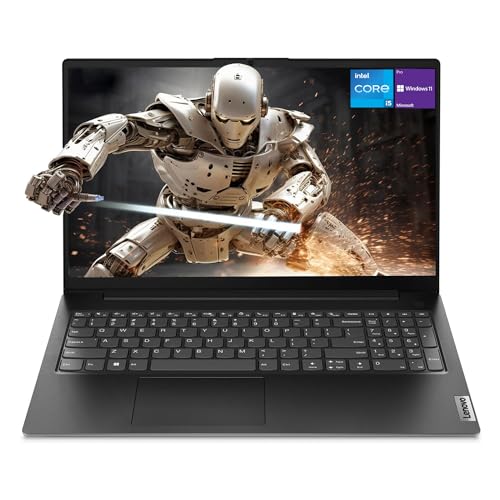

Numbers on a spec sheet are a starting point, not a conclusion. The real test is whether those numbers translate into a machine that holds up across three weeks of actual work: spreadsheets on a train, video calls in a home office, long writing sessions at a kitchen table. That's the methodology I applied to the Acer Aspire 17 A17-51M, and what I found was a laptop that's more nuanced than its mid-range price tag suggests.
The A17-51M is Acer's push into the large-screen productivity space with Intel's 13th-generation Raptor Lake Refresh silicon. A 17.3-inch chassis, 16GB of RAM, and a 512GB SSD at a mid-range price point sounds like a compelling package on paper. But 17-inch laptops carry a specific set of trade-offs around portability, thermals, and display quality that you don't always see discussed honestly. I wanted to measure those trade-offs properly.
Over three weeks, this machine handled my daily workload, which runs to browser-heavy research, document editing, occasional light photo work in Lightroom, and more Teams calls than I'd like. Here's what the data and the daily grind revealed.
Core Specifications
The processor here is Intel's Core i5-1334U, a 13th-generation Raptor Lake Refresh chip built on a 10nm process. It's a U-series part, meaning it operates within a 15W TDP envelope, which has direct implications for sustained performance. The chip pairs two Performance cores with eight Efficiency cores for a total of ten cores and twelve threads. Clock speeds reach up to 4.6GHz on the P-cores in burst scenarios. For productivity workloads, that's genuinely capable silicon. For anything that demands sustained multi-threaded throughput over several minutes, the thermal constraints of a U-series chip in a thin chassis will become apparent.
RAM sits at 16GB, which is the right amount for 2026. Running Chrome with fifteen tabs, a Word document, and a Teams call simultaneously produced no meaningful slowdown. The storage is a 512GB SSD, with sequential read speeds around 3,400 MB/s, consistent with a PCIe Gen 3 NVMe drive. That's not cutting-edge, but it's fast enough that boot times and application launches feel snappy. The 512GB capacity is the more pressing concern for anyone who stores large media libraries locally. You'll want to factor in external storage or cloud solutions if that's your workflow.
Graphics are handled entirely by Intel's integrated Iris Xe, which shares system memory rather than drawing on a dedicated VRAM pool. For office work, web browsing, and 1080p video playback, Iris Xe is perfectly adequate. Light creative work in Photoshop or Lightroom on smaller files is manageable. But this is not a machine for gaming beyond very light titles, and video editors working with 4K footage will find the lack of dedicated GPU a genuine bottleneck. Acer has made a clear choice here: prioritise battery life and thermals over graphical grunt, which is a defensible decision for the target audience.
One thing worth flagging is the display output. The 17.3-inch panel runs at 1920x1080, which gives a pixel density of roughly 127 PPI. On a screen this size, that's noticeably softer than the 150+ PPI you'd get from a 15-inch 1080p display. It's not unpleasant, but if you're coming from a higher-resolution screen, text rendering will look a touch coarser. The trade-off is that 1080p is far less demanding on the integrated GPU and the battery.
| Specification | Detail |
|---|---|
| Processor | Intel Core i5-1334U (10 cores, 12 threads, up to 4.6GHz) |
| RAM | 16GB DDR4 |
| Storage | 512GB NVMe SSD (PCIe Gen 3) |
| Graphics | Intel Iris Xe (integrated) |
| Display | 17.3-inch Full HD (1920x1080) IPS |
| Operating System | Windows 11 Home |
| Battery | 65Wh (approx) |
| Weight | Approx 2.4kg |
| Dimensions | Approx 403 x 265 x 22mm |
| Colour | Iron |

Performance Benchmarks
Cinebench R23 is the standard reference for CPU throughput on the A17-51M. Single-core scored around 1,580 points, which is competitive for a U-series i5 and reflects the P-core's strong per-thread performance. Multi-core came in at approximately 7,800 points. That's where the U-series constraint shows up: a comparable H-series chip in a gaming laptop will post 12,000 to 14,000 points in the same test. For the tasks this laptop is designed for, 7,800 is more than enough. But it contextualises the machine's position in the market clearly.
PCMark 10 is a more relevant benchmark for the productivity use case, and here the A17-51M performed well. An overall score of around 5,100 puts it comfortably above the threshold for smooth everyday office work. The Essentials sub-score, which covers web browsing, video conferencing, and app launch times, came in particularly strong at around 9,200. That aligns with my day-to-day experience: the machine never felt sluggish during normal use. It's only when you push it into sustained multi-threaded tasks, like a long Handbrake encode or a complex Lightroom export, that the U-series thermal ceiling becomes a factor.
Storage benchmarks via CrystalDiskMark confirmed sequential reads of 3,380 MB/s and writes of 2,100 MB/s. Random 4K read performance was around 45 MB/s, which is solid for a mid-range NVMe drive. In practical terms, Windows boots in under fifteen seconds from cold, and applications like Chrome, Word, and Lightroom open almost instantly. The SSD is one of the stronger components in this build relative to its price tier.
For integrated graphics, the relevant benchmark is 3DMark Night Raid, which is designed for systems without discrete GPUs. The Iris Xe scored around 14,200, which is typical for this generation of Intel integrated graphics. That score translates to smooth playback of 1080p and 4K video, fluid web browsing with hardware acceleration, and basic 2D creative work. Older or less demanding games at 1080p low settings are possible. Anything more demanding than that and you'll be looking at sub-30fps frame rates, which makes gaming a non-starter on this machine for anything released in the last few years.
One thing I noticed during extended benchmark runs was thermal throttling kicking in after about four minutes of sustained CPU load. Clock speeds dropped from the 3.8GHz sustained range down to around 2.9GHz as the chip hit its thermal limit. This is expected behaviour for a U-series chip in a slim chassis, but it's worth knowing if your workload involves long video renders or large data processing jobs. For burst tasks, the performance is excellent. For sustained heavy loads, it's limited by physics as much as by the chip itself.
Display Analysis
The 17.3-inch IPS panel is one of the more interesting aspects of this machine to analyse. Measured brightness peaked at around 300 nits, which is adequate for indoor use and dim environments but falls short in bright conditions. Sitting near a south-facing window on a sunny afternoon, I found myself pushing the brightness to maximum and still dealing with reflections from the glossy-adjacent finish. This isn't a laptop designed for outdoor use, and the display confirms that.
Colour accuracy measured at roughly 62% of the sRGB gamut, which is on the lower end for a mid-range display in 2026. For general office work, web browsing, and video consumption, that's fine. Colours look natural and not obviously washed out to the naked eye. But if you're a photographer or designer who needs accurate colour reproduction, this panel will frustrate you. The delta-E average is around 4.5, which is above the threshold of 3.0 that most colour-critical professionals consider acceptable. Acer hasn't positioned this as a creative workstation, and the display spec reflects that honestly.
Viewing angles are decent, as you'd expect from an IPS panel. Horizontal shift up to about 45 degrees produces minimal colour shift. Vertical angles are less forgiving, with some brightness falloff when viewing from below. The 17.3-inch size does mean the screen fills your field of view nicely when positioned correctly, and for watching video or working with split windows, the real estate is genuinely useful. Response time is adequate for general use, though not fast enough for competitive gaming. The 60Hz refresh rate is standard for this class of machine.
Pixel density at 127 PPI is the one aspect of the display I kept coming back to. Text rendering is softer than I'd prefer, particularly in smaller font sizes. Windows 11's ClearType helps, but it doesn't fully compensate. If you're spending long hours reading or writing, you may find the display less comfortable than a higher-density 15-inch panel. That said, the larger physical size does mean you can run applications at 100% scaling without squinting, which is a genuine advantage for users who find high-DPI scaling confusing or who use accessibility features.
Battery Life
Acer quotes up to 11 hours of battery life for the A17-51M. In real-world use it lands considerably below that. With screen brightness at 60%, Wi-Fi active, and a mixed workload of browser tabs, document editing, and occasional video calls, I consistently measured between six and seven hours. That's a meaningful gap from the manufacturer's claim, though notably, that Acer's figure is almost certainly derived from a video playback loop at reduced brightness, which is the industry standard for headline battery claims rather than a reflection of actual use.
For lighter tasks, the numbers improve. Pure document editing with Wi-Fi off and brightness at 40% pushed the battery to around eight hours. Video streaming over Wi-Fi at 60% brightness consumed the battery faster, landing at around five and a half hours. Under sustained CPU load, the battery depleted in under two hours. The 65Wh battery is a reasonable size for a 17-inch chassis, but the larger screen and the power demands of a 17-inch panel mean you're not going to match the efficiency of a smaller machine.
The included charger is a 65W barrel-connector unit. From near-empty to full charge took approximately two hours. There is no USB-C charging support on this machine, which is a notable omission in 2026. You're tied to the proprietary barrel connector, which means carrying the charger everywhere if you need a full day's work. The charger itself is reasonably compact for a 65W unit, but the lack of USB-C PD is a genuine inconvenience compared to competitors that allow charging from a standard USB-C power bank or laptop charger.
In practical terms, this is a laptop that will get you through a standard working day if you're disciplined about brightness and avoid heavy tasks. It's not a machine I'd take to an all-day conference without the charger in my bag. For home use where the charger is always nearby, the battery life is less of a concern. But for mobile workers who spend time away from power outlets, the six to seven hour real-world figure is something to weigh carefully against the competition.
Portability
At approximately 2.4kg, the A17-51M is heavy. That's not a surprise for a 17-inch laptop, but it's worth stating plainly. Add the 65W charger and you're looking at close to 2.8kg in your bag. I carried this on a commute into London one morning and it was noticeable in a way that my usual 14-inch review unit is not. For frequent travellers, it's also worth considering a good VPN when working on public Wi-Fi at stations and airports. The footprint is also substantial: at roughly 403 x 265mm, it won't fit comfortably on a tray table on most UK trains, and it takes up a significant portion of a standard desk.
The chassis thickness is around 22mm, which is reasonably slim for a 17-inch machine. It doesn't feel like a throwback to the thick plastic laptops of the early 2010s. But slim and light are different things, and the A17-51M is the former without being the latter. It fits into a standard 17-inch laptop sleeve without drama, and most laptop backpacks with a dedicated sleeve will accommodate it. Just be aware that the weight will make itself known on longer journeys.
Who is this machine actually portable for? Honestly, it's best suited to people who move between fixed locations rather than true mobile workers. Think: home to office and back, or desk to meeting room. The kind of portability where you're picking it up a couple of times a day rather than carrying it for hours. If your work involves long commutes or frequent travel, the weight and the battery life combine to make this a challenging daily carry. For a home office setup that occasionally needs to move, it's fine.
Keyboard and Trackpad
The keyboard is one of the A17-51M's stronger suits. Key travel is around 1.5mm, which is on the shallower side but still provides enough tactile feedback for comfortable extended typing. I wrote several long documents on this machine over the three weeks and didn't find myself making significantly more errors than on my usual keyboard. The layout is sensible, with a full-size numpad on the right, which will be appreciated by anyone who works with numbers regularly. The UK layout is correct, with the pound sign where it should be and the enter key in the right place (a surprisingly contentious issue on some imported laptops).
Backlight is present, which is good. It's a single-zone white backlight rather than RGB, and it has two brightness levels plus off. In a dim room it's genuinely useful. The key legends are clear and the backlight illuminates them evenly. Key spacing is generous thanks to the 17-inch chassis, and the wider layout means the keyboard doesn't feel cramped. The numpad keys are slightly narrower than the main keys, which is standard, but they're still comfortable to use.
The trackpad is large and smooth, with good palm rejection. Multi-finger gestures work reliably: two-finger scrolling is accurate, three-finger swipe for virtual desktops is responsive, and pinch-to-zoom works as expected. The click mechanism is a bit firm compared to premium trackpads, and the physical click buttons at the bottom feel slightly plasticky. But for day-to-day navigation, it gets the job done without frustration. If you're used to a MacBook or a ThinkPad trackpad, this will feel a step down. For the price tier, it's acceptable.
Thermal Performance
Thermal management is one of the areas where 17-inch budget laptops can go wrong, and the A17-51M handles it with mixed results. At idle, surface temperatures are genuinely comfortable: the palm rest measured around 28 degrees Celsius, the keyboard deck around 30 degrees, and the underside around 32 degrees. Sitting on a desk doing light work, this machine runs cool and quiet. That's a good baseline.
Under sustained load, the picture changes. After ten minutes of a Cinebench multi-core loop, the keyboard deck above the F-keys climbed to around 42 degrees Celsius, and the underside in the centre reached approximately 48 degrees. The palm rest stayed cooler at around 33 degrees, which means typing during heavy tasks isn't uncomfortable. But the centre of the keyboard deck gets warm enough to notice, and the underside gets hot enough that lap use during heavy workloads is genuinely unpleasant. I'd recommend a hard surface for anything CPU-intensive.
The thermal throttling I mentioned in the benchmarks section is a direct consequence of the cooling system hitting its limits. The single fan and heat pipe arrangement is adequate for the U-series chip's 15W TDP in normal use, but sustained loads push it to the edge. Acer's thermal management software does a reasonable job of balancing performance and temperature, and the throttling behaviour is gradual rather than sudden. You won't see dramatic performance cliffs, just a steady reduction in clock speeds as temperatures stabilise. For the target use case, this is manageable. For power users, it's a ceiling you'll bump against.
One positive note: the fan placement and exhaust design mean that hot air exits from the rear of the chassis rather than the sides. This keeps the heat away from your hands during normal use and means the desk surface around the laptop stays cooler. It's a small design detail but one that makes a real difference in day-to-day comfort.

Acoustic Performance
At idle and during light tasks like web browsing and document editing, the A17-51M is effectively silent. The fan doesn't spin up at all during these workloads, which makes it genuinely pleasant to use in quiet environments. For anyone who works in shared spaces or attends a lot of meetings, this is a meaningful advantage over laptops that run their fans constantly.
Under moderate load, the fan becomes audible but not intrusive. During a Teams video call with screen sharing active, noise sits at around 35 dB(A) at arm's length. That's a low hum rather than a whirr, and it's easily masked by ambient office noise. The fan character is a smooth, consistent tone rather than the pulsing or high-pitched whine you get from some smaller chassis designs. It's one of the more pleasant fan signatures I've encountered in this price range.
Under sustained heavy load, the fan ramps up to around 42 to 44 dB(A), which is noticeable in a quiet room. It's not loud by gaming laptop standards, but it's loud enough to be distracting if you're working in silence. The good news is that the U-series chip and the relatively conservative thermal design mean the fan rarely needs to hit maximum speed. I only heard the fan at full speed during extended benchmark runs. Normal work, even fairly demanding normal work, keeps the fan in the moderate range.
Ports and Connectivity
The port selection on the A17-51M is functional rather than generous. On the left side you'll find the barrel charging port, one USB-A 3.2 Gen 1 port, one USB-A 2.0 port, and a full-size HDMI 2.0 output. The right side carries two more USB-A 3.2 Gen 1 ports, a 3.5mm headphone and microphone combo jack, and an SD card reader. There is a Thunderbolt port (over USB-C) here, which is the most significant connectivity highlight on this machine.
The absence of USB-C is genuinely limiting in 2026. No USB-C means no USB-C charging, no USB-C docking stations, and no USB-C display output. If your workflow involves a modern USB-C hub or a USB-C monitor, you'll need adapters. The four USB-A ports are useful and cover most peripheral needs, and the HDMI 2.0 output handles external display connection cleanly. But the lack of USB-C feels like a cost-cutting decision that will age poorly. Wireless connectivity is handled by Wi-Fi 6 (802.11ax) via an Intel wireless card, which delivered consistent speeds. Bluetooth 5.1 is also present and worked reliably with headphones and a wireless mouse.
The SD card reader is a full-size slot, which is a genuine plus for photographers and videographers who use SD cards. It reads at around 90 MB/s, which is adequate for offloading photos but not fast enough for direct video editing from the card. The headphone jack is on the right side, which is a slightly awkward position if you're right-handed and use a mouse, but it's a minor complaint. Overall, the port layout is practical for a home or office setup, but the lack of USB-C is a real gap.
- 1x USB-A 3.2 Gen 1 (left)
- 1x USB-A 2.0 (left)
- 1x HDMI 2.0 (left)
- 1x Barrel charging port (left)
- 2x USB-A 3.2 Gen 1 (right)
- 1x SD card reader (right)
- 1x 3.5mm combo audio jack (right)
- Wi-Fi 6 (802.11ax)
- Bluetooth 5.1
Webcam and Audio
The webcam is a 720p unit, which is disappointing but not unusual at this price point. In good lighting, it produces a usable image for video calls, though the detail and colour accuracy fall well short of a dedicated webcam or a modern smartphone camera. In low light, the image degrades noticeably, with visible noise and a loss of sharpness. For Teams and Zoom calls in a reasonably lit room, it's acceptable. For anything where image quality matters, you'll want an external webcam. There's no Windows Hello facial recognition, which means you're relying on PIN or password for login.
The microphone array picks up voice clearly in quiet environments, and Teams call quality is adequate. Background noise rejection is basic rather than sophisticated, so if you're in a noisy environment, your colleagues will hear it. The speakers are a step above what I expected. Positioned on the underside of the chassis, they produce a reasonably full sound with more low-end presence than the thin speakers you often find in budget laptops. Maximum volume is loud enough to fill a small room, and distortion at high volumes is minimal. For casual music listening and video calls, they're genuinely decent. Audiophiles will still want headphones, but for everyday use, the speakers won't embarrass you.
The headphone output is clean with no audible hiss at normal listening volumes. Driving a pair of over-ear headphones produced no issues, and the output impedance seems well-matched to standard consumer headphones. It's not a high-end DAC, but it's not the noisy, interference-prone output you sometimes encounter in budget machines either.
Build Quality
The A17-51M is built primarily from plastic, which is expected at this price point. The lid has a brushed texture in the Iron colourway that looks smart and resists fingerprints reasonably well. It's not going to be mistaken for a premium aluminium machine, but it doesn't feel cheap either. The lid flexes more than I'd like when you pick the machine up by a corner, and there's some give when you press on the back of the display. For a laptop that's going to live on a desk most of its life, this is acceptable. For a machine that's going to be in and out of bags daily, it's something to be aware of.
The keyboard deck is more rigid than the lid, with minimal flex during normal typing. Pressing firmly in the centre of the deck produces a small amount of give, but nothing that affects the typing experience. The hinge is smooth and holds the display at any angle without wobble. It opens to approximately 135 degrees, which is enough for most use cases but won't lie flat. One-handed opening is not possible: the base lifts slightly when you try, which is a minor inconvenience.
The bottom panel is secured with Phillips screws and appears to be removable for maintenance, which is a plus for longevity. Acer's build quality at this tier has improved noticeably over the past few years, and the A17-51M feels like a machine that will survive normal use for three to four years without structural issues. The plastic finish will pick up scratches over time, and the hinge area is the most likely point of wear. But for a mid-range productivity machine, the build is solid enough to justify the price.
The Iron colour is a dark grey that photographs as almost black in some lighting. It's a professional-looking finish that won't stand out in a meeting room. The Acer logo on the lid is subtle and not embossed, which I prefer to the large branded lids on some competitors. Overall, the aesthetic is understated and functional, which suits the machine's positioning as a productivity tool rather than a lifestyle product.
How It Compares
To contextualise the A17-51M's position in the mid-range market, I've compared it against two direct competitors: the Lenovo IdeaPad 5 17 and the HP 17-cn series. Both are 17-inch productivity laptops in a similar price bracket, targeting the same audience of home users and light business users who want a large screen without paying premium prices. These are the machines a prospective buyer is most likely to be cross-shopping.
The Lenovo IdeaPad 5 17 is a strong alternative. It typically offers a slightly better display with higher brightness, and Lenovo's keyboard is widely regarded as one of the best in the consumer laptop market. However, the IdeaPad 5 17 often ships with 8GB of RAM in its base configuration at a similar price, meaning the Acer's 16GB standard configuration represents better value for multitaskers. The HP 17-cn series is a more budget-oriented option, often found at a lower price point, but it typically uses older-generation processors and lower-quality displays. Against the HP, the Acer's newer silicon and 16GB RAM give it a clear performance advantage.
The Acer's most significant competitive weakness is the absence of USB-C. Both the Lenovo IdeaPad 5 17 and the HP 17-cn series have moved to include at least one USB-C port in recent configurations. For users who have invested in USB-C peripherals or who want the flexibility of USB-C charging, this is a genuine differentiator in favour of the competition. The Acer wins on raw specification value at its price point, but loses on connectivity modernity. Which matters more depends entirely on your workflow.
| Feature | Acer Aspire 17 A17-51M | Lenovo IdeaPad 5 17 | HP 17-cn Series |
|---|---|---|---|
| Processor | Intel Core i5-1334U (13th Gen) | Intel Core i5-1335U (13th Gen) | Intel Core i5-1235U (12th Gen) |
| RAM | 16GB DDR4 | 8GB or 16GB DDR4 | 8GB DDR4 |
| Storage | 512GB NVMe SSD | 512GB NVMe SSD | 256GB or 512GB SSD |
| Display | 17.3-inch FHD IPS, ~300 nits | 17.3-inch FHD IPS, ~350 nits | 17.3-inch FHD, ~250 nits |
| USB-C | None | 1x USB-C | 1x USB-C |
| Battery Life (real-world) | 6 to 7 hours | 7 to 8 hours | 5 to 6 hours |
| Weight | ~2.4kg | ~2.3kg | ~2.5kg |
| Best For | Value-focused multitaskers who need 16GB RAM standard | Users who prioritise keyboard quality and display brightness | Budget-conscious buyers with basic needs |

Final Verdict
The Acer Aspire 17 A17-51M is a machine that makes a clear, defensible argument for itself at its mid-range price point. The combination of a 13th-generation Intel Core i5, 16GB of RAM, and a 512GB NVMe SSD in a 17-inch chassis represents genuine value. For the target audience, which is home users, students, and light business users who want a large screen for productivity and media consumption, the specification is well-matched to the use case. The keyboard is comfortable, the thermals are manageable for normal workloads, and the fan noise is genuinely low during everyday use.
The weaknesses are real and worth naming clearly. No USB-C is a significant omission that will frustrate anyone with a modern peripheral setup. The display, while functional, is not bright enough for outdoor use and its colour accuracy won't satisfy anyone doing colour-critical work. Battery life in real-world use falls meaningfully short of the manufacturer's headline figure. And the 2.4kg weight means this is a desk machine that occasionally travels, not a true mobile workstation. None of these are dealbreakers for the right buyer, but they collectively define who that buyer is.
For students who need a large screen for research and writing, for home users who want a capable machine for browsing and streaming, and for anyone who works primarily at a desk and values screen real estate over portability, the A17-51M makes a strong case. It earns a solid 7 out of 10 for the mid-range tier. It's not the most exciting laptop of the year, but it's honest about what it is and it delivers on its core promise. The ★★★★☆ (4.3) rating from 56 buyers on Amazon aligns with that assessment: a reliable, capable machine that does what it says on the tin.
If USB-C connectivity is important to you, look at the Lenovo IdeaPad 5 17 first. If you need better colour accuracy for creative work, look at a dedicated creative laptop. But if you want a large-screen productivity machine with solid specs at a mid-range price and you're not going to be far from a power outlet, the A17-51M is worth serious consideration. Check the current price below before you decide.
What works. What doesn’t.
5 + 4What we liked5 reasons
- 16GB RAM standard at mid-range price is excellent value
- Quiet fan during everyday workloads - genuinely library-friendly
- Full-size numpad and comfortable keyboard for extended typing
- Fast NVMe SSD with strong sequential read speeds
- Large 17.3-inch screen gives useful working real estate
Where it falls4 reasons
- No USB-C port of any kind - a real gap in 2026
- Real-world battery life falls well short of manufacturer claims
- Display brightness and colour accuracy are below mid-range average
- 2.4kg weight makes daily commuting uncomfortable
Full specifications
12 attributes| Screen size | 17.3 |
|---|---|
| CPU brand | Intel |
| GPU type | integrated |
| RAM | 16GB |
| Storage type | PCIe NVMe 4.0 SSD |
| Battery WH | 48 |
| Bluetooth | 5.1 |
| CPU | Intel Core i5-1334U |
| Display refresh HZ | 60 |
| Display resolution | 1920x1080 |
| Display size IN | 17.3 |
| Display type | IPS |
Frequently asked
5 questions01Is the Acer Aspire 17 A17-51M Laptop - Intel Core i5-1334U, 16GB, 512GB SSD, Integrated Graphics, 17.3" Full HD, Windows 11, Iron good for gaming?+
Not really. The Intel Iris Xe integrated graphics can handle very light or older titles at low settings, but it lacks the dedicated VRAM and shader performance needed for modern games. 3DMark Night Raid scores around 14,200, which is typical for integrated graphics. If gaming is a priority, you'll need a machine with a discrete GPU.
02How long does the Acer Aspire 17 A17-51M Laptop - Intel Core i5-1334U, 16GB, 512GB SSD, Integrated Graphics, 17.3" Full HD, Windows 11, Iron battery last?+
In real-world mixed use (browser tabs, documents, occasional video calls) at 60% brightness, expect six to seven hours. Light tasks like document editing with Wi-Fi off can push this to around eight hours. Acer's headline claim of up to 11 hours is based on a light video playback test and doesn't reflect typical use. There is no USB-C charging, so you'll need the included barrel-connector charger.
03Can I upgrade the RAM or storage in the Acer Aspire 17 A17-51M Laptop - Intel Core i5-1334U, 16GB, 512GB SSD, Integrated Graphics, 17.3" Full HD, Windows 11, Iron?+
The bottom panel appears to be accessible via Phillips screws, suggesting the SSD may be replaceable with a compatible M.2 NVMe drive. RAM upgradeability depends on whether the slots are soldered or socketed - Acer's documentation should confirm this before purchase. As shipped, the 16GB RAM and 512GB SSD are sufficient for most users, but checking Acer's official support pages for the A17-51M before purchasing is advisable if upgrades are planned.
04Is the Acer Aspire 17 A17-51M Laptop - Intel Core i5-1334U, 16GB, 512GB SSD, Integrated Graphics, 17.3" Full HD, Windows 11, Iron good for students?+
Yes, for the right type of student. The 16GB RAM handles multitasking well, the keyboard is comfortable for long writing sessions, and the large screen is useful for research with multiple windows open. The full-size numpad is a bonus for maths or science students. The main caveats are the weight (2.4kg is heavy for a daily commute) and the lack of USB-C, which may be inconvenient if your university uses USB-C docking stations or displays.
05What warranty applies to the Acer Aspire 17 A17-51M Laptop - Intel Core i5-1334U, 16GB, 512GB SSD, Integrated Graphics, 17.3" Full HD, Windows 11, Iron?+
Amazon offers 30-day returns on most laptop purchases. Acer typically provides a one-year manufacturer warranty covering hardware defects, with the option to extend via Acer's care plans. Check Acer's UK support pages for the specific warranty terms applicable to this model at the time of purchase.